2019 MASERATI QUATTROPORTE change time
[x] Cancel search: change timePage 277 of 396
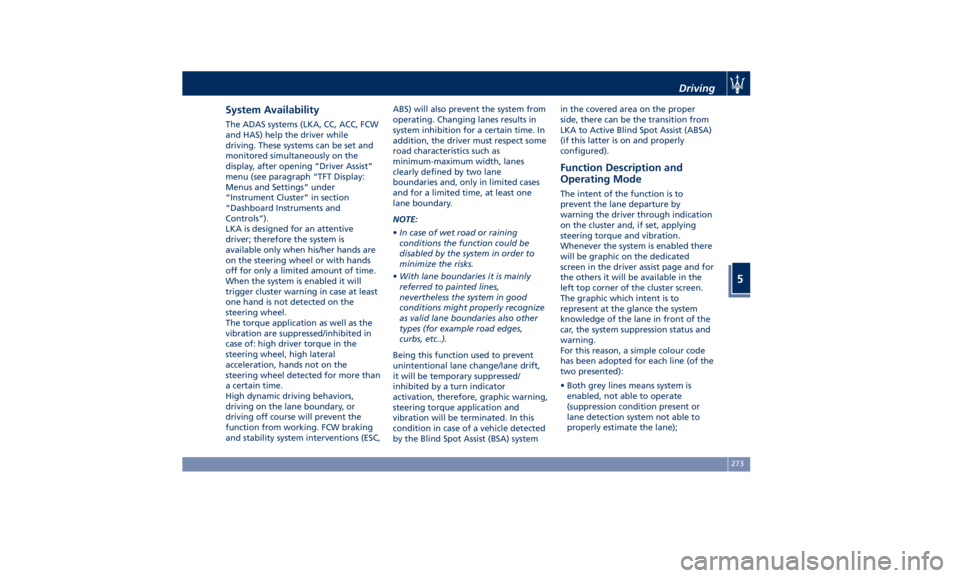
System Availability The ADAS systems (LKA, CC, ACC, FCW
and HAS) help the driver while
driving. These systems can be set and
monitored simultaneously on the
display, after opening “Driver Assist”
menu (see paragraph “TFT Display:
Menus and Settings” under
“Instrument Cluster” in section
“Dashboard Instruments and
Controls”).
LKA is designed for an attentive
driver; therefore the system is
available only when his/her hands are
on the steering wheel or with hands
off for only a limited amount of time.
When the system is enabled it will
trigger cluster warning in case at least
one hand is not detected on the
steering wheel.
The torque application as well as the
vibration are suppressed/inhibited in
case of: high driver torque in the
steering wheel, high lateral
acceleration, hands not on the
steering wheel detected for more than
a certain time.
High dynamic driving behaviors,
driving on the lane boundary, or
driving off course will prevent the
function from working. FCW braking
and stability system interventions (ESC, ABS) will also prevent the system from
operating. Changing lanes results in
system inhibition for a certain time. In
addition, the driver must respect some
road characteristics such as
minimum-maximum width, lanes
clearly defined by two lane
boundaries and, only in limited cases
and for a limited time, at least one
lane boundary.
NOTE:
• In case of wet road or raining
conditions the function could be
disabled by the system in order to
minimize the risks.
• With lane boundaries it is mainly
referred to painted lines,
nevertheless the system in good
conditions might properly recognize
as valid lane boundaries also other
types (for example road edges,
curbs, etc..).
Being this function used to prevent
unintentional lane change/lane drift,
it will be temporary suppressed/
inhibited by a turn indicator
activation, therefore, graphic warning,
steering torque application and
vibration will be terminated. In this
condition in case of a vehicle detected
by the Blind Spot Assist (BSA) system in the covered area on the proper
side, there can be the transition from
LKA to Active Blind Spot Assist (ABSA)
(if this latter is on and properly
configured).
Function Description and
Operating Mode The intent of the function is to
prevent the lane departure by
warning the driver through indication
on the cluster and, if set, applying
steering torque and vibration.
Whenever the system is enabled there
will be graphic on the dedicated
screen in the driver assist page and for
the others it will be available in the
left top corner of the cluster screen.
The graphic which intent is to
represent at the glance the system
knowledge of the lane in front of the
car, the system suppression status and
warning.
For this reason, a simple colour code
has been adopted for each line (of the
two presented):
• Both grey lines means system is
enabled, not able to operate
(suppression condition present or
lane detection system not able to
properly estimate the lane);Driving
5
273
Page 279 of 396

The icons that represent the status of
the ADAS systems remain displayed
even when you exit the "Driver Assist"
screen.
System Limitations Because of physical limits, in order to
properly operate, the system needs
good visibility (it might not work or
not properly operate in case of heavy rain, snow, wet roads, fog, direct sun
on the camera, etc.).
NOTE:
• The presence of the hands on the
steering wheel is detected by a logic
combination of a capacitive sensor
installed in the steering wheel and
the measured applied torque at the
steering column. This leads to a
more robust hands detection when
hands are actually on the steering
wheel (at least one).
• The sensors are not able to detect
the presence of the hands on the
steering wheel areas covered in
wood, plastic bezels or carbon
inserts (where present).
Sharp turns, slopes and change in
slopes, poor lane boundaries, as well
as construction areas and all the
scenario described in this paragraph
may challenge the system, therefore
be always ready to prevent any
unexpected behaviour of the car.
Damaged front bumper, windshield
replaced without proper technical
intervention may also lead to system
malfunction or system unavailability.
Other conditions such as fault, but not
explicitly indicated here may also prevent/interrupt the system
intervention.
WARNING!
If the driver fails to adapt his/her
driving style, Lane Keeping Assist
(LKA) can neither reduce the risk of an
accident nor override the laws of
physics. It cannot take into account
road, weather or traffic conditions.
Active LKA is only an aid. Driver is
always responsible for the distance to
the vehicle in front, for vehicle speed,
for braking in good time and for
staying in lane.
System in Fault When the LKA cannot properly
operate due to a fault of its
components or because the
windshield in front of the forward
facing camera is dirty, the amber light
and/or the corresponding message will
be displayed.Non-Driver Assist Page Driving
5
275
Page 285 of 396

System is Faulty
The BSA system cannot properly
operate due to a fault of its
components, or because the area on
the rear bumper fascia where the
radar sensors are located is dirty. In
these cases the amber warning light
and the related message will be
displayed on the instrument cluster.
In these cases do not use the system
and have the vehicle inspected at an
Authorized Maserati Dealer .
Radar Device - Regulatory
Information The “Regulatory Information” for all
the radio frequency and radar devices
can be consulted by accessing the
“Services” section on the website
www.maserati.com. Active Blind Spot Assist -
ABSA (optional, with ACC
only) ABSA system is only available on
vehicles equipped with ACC system
and represents an addition to the BSA
previously described (see chapter
"Blind Spot Assist - BSA" of this
section).
ABSA adds to the BSA the possibility in
certain circumstances to avoid and or
mitigate side collisions with vehicles
proceeding in the adjacent lanes by
changing the car's direction in order
to try to keep it inside the
detected/estimated lane. A steering
wheel vibration is used as further
feedback to warn the driver that the
lane change is not safe.
The main logic core is the front radar,
whereas the sense inputs are the
radars on the rear bumper fascia used
for sensing the presence of vehicle in
the blind spot areas and the forward
facing camera placed behind the
internal rear-view mirror that instead
is used for lane detection and
estimation.
ABSA is designed to help the driver to
avoid mitigate a collision. Torque and
vibration application is however available in the 37 - 112 mph (60 -
180 km/h) speed interval. All the speed
thresholds related to the BSA remain
still valid, since ABSA as mentioned is
BSA extension.
ABSA is intended as a “hands-on”
function meaning that the driver is
required to stay engaged in the
driving all the time with his/her hands
on the steering wheel, in case hands
are not on the steering wheel for a
certain time there cannot be any
steering torque application vibration
included.
System Availability ABSA is designed for an attentive
driver therefore the system is available
only when his/her hands are on the
steering wheel or with hands off for a
very limited amount of time. When
the system is enabled, it will trigger
cluster warning in case at least one
hand is not detected on the steering
wheel.
The torque application as well as the
vibration are suppressed/inhibited in
case of: high driver torque in the
steering wheel, high lateral
acceleration, hands not on the
steering wheel detected for more than
a certain time.Driving
5
281
Page 286 of 396
Highly dynamic behaviours, driving on
the lane boundary, off course will
prevent the function from working.
FCW braking and stability system
interventions (ESC, ABS) will also
prevent the system from operating.
Changing lane results in system
inhibition for a certain time.
In addition the road must respect some
characteristics such as minimum-
maximum width, lane clearly defined
by two lane boundaries and only in
limited case for a limited time at least
one.
NOTE:
• In case of wet road or raining
conditions the function could be
disabled by the system in order to
minimize the risks.
• With lane boundaries it is mainly
referred to painted lines,
nevertheless the system in good
conditions might properly recognise
as valid lane boundaries also other
types (for example road edges, curbs,
etc..). Speed Range of Use Speed mph (km/h)
Minimum 37 (60)
Engaged/activated 37 (60)
Maximum 112 (180)
System Limitation Because of physical limits the system to
properly operate needs good visibility
(it might not work or not properly
operate in case of heavy rain, snow,
wet roads, fog, direct sun on the
camera, dirty windshield, low
illumination etc.)
Sharp turns, slopes and change in
slopes, poor lane boundaries, as well
as construction areas and all the
scenarios described in this paragraph
may challenge the system, therefore
be always ready to prevent any
unexpected behaviour of the car.
Damaged front bumper, windshield
replaced without proper technical
intervention may also lead to system
malfunction or system unavailability.
Other conditions such as faults, but
not explicitly indicated here may also
prevent/interrupt the system
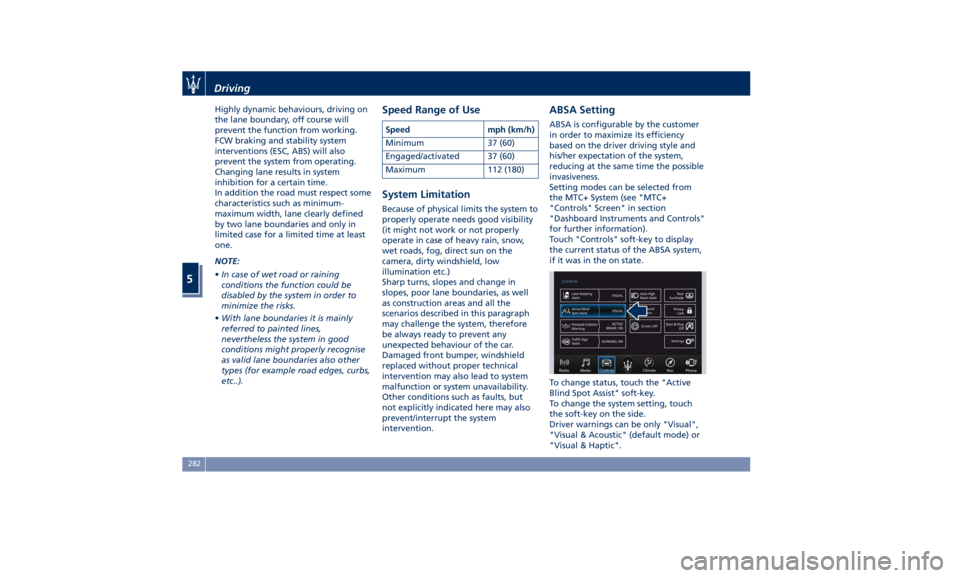
intervention. ABSA Setting ABSA is configurable by the customer
in order to maximize its efficiency
based on the driver driving style and
his/her expectation of the system,
reducing at the same time the possible
invasiveness.
Setting modes can be selected from
the MTC+ System (see "MTC+
"Controls" Screen" in section
"Dashboard Instruments and Controls"
for further information).
Touch "Controls" soft-key to display
the current status of the ABSA system,
if it was in the on state.
To change status, touch the "Active
Blind Spot Assist" soft-key.
To change the system setting, touch
the soft-key on the side.
Driver warnings can be only "Visual",
"Visual & Acoustic" (default mode) or
"Visual & Haptic".Driving
5
282
Page 287 of 396

System sensitivity can be set to
“Early”, “Medium” (default mode) or
“Late”.
System strength can be set to "Low",
"Medium" (default mode) or "High".
NOTE:
The ABSA system will store the current
operating mode when the vehicle is
shut off. Each time the vehicle is
started, the previously-stored mode
will be recalled and used.
Meanings of Settings
When "Visual & Haptic" is selected
and of course ABSA is enabled, then
two following menus will be used by
the system.
• ABSA “Sensitivity": it tunes the
distance to the lane boundary where
the system will start to apply
steering torque. • ABSA “Strength": it tunes the
steering torque value to have a
stronger or weaker directional
correction/deviation.
Blind Spot Assist in "Visual & Haptic"
Mode
When the system is on and configured
“Visual & Haptic” then the ABSA is
enabled and to the conventional
visual warnings is added the steering
torque and vibration.
When operating in this mode, the
system will provide a visual alert in the
appropriate outside rear-view mirror
when it detects a vehicle or an object
in the detection areas monitored by its
sensors. In case of turn indicator
activation on the appropriate side, the
system will react with a torque on the
steering wheel to try to prevent the
lane change and therefore to
avoid/mitigate the collision. The
torque on the steering is applied
when the car is very close to the lane
boundary as a further feedback to
warn the driver of the unsafe
maneuver.
NOTE:
• The steering torque is not supplied if
the system is not able to estimate a
lane and if the turn indicator from
the appropriate side is not inserted. • The presence of the hands on the
steering wheel is detected by a logic
combination of a capacitive sensor
installed in the steering wheel and
the measured applied torque at the
steering column. This leads to a
more robust hands detection.
WARNING!
• Risk of accident despite steering
torque application of Active Blind
Spot Assist (ABSA).
• A course-correcting steering torque
application cannot always prevent a
collision.
• The driver is always required to
steer, brake or accelerate themself,
especially if ABSA warns or makes a
course correcting steer intervention.
• Always maintain a safe distance at
the sides.
• Steering torque application may be
interrupted at any time by counter
steering by the driver.
RCP - Rear Cross Path
Operation RCP operation is the same as described
in chapter "Blind Spot Assist - BSA".Driving
5
283
Page 291 of 396

When exiting the “Driver Assist” page,
the attention level colour will always
be displayed until the system is
disabled by pressing the
button on
the steering wheel.
The HAS system uses sensors in the
steering wheel outer crown to detect
if the driver’s hands are on the
steering wheel. If the driver’s hands
are not detected on the steering wheel, the instrument cluster will
display a series of warnings to alert
the driver to return their hands to the
steering wheel. There will also be
audible chimes. After a set amount of
time, HAS will cancel if the driver’s
hands are not returned to the steering
wheel.
When the system does not sense the
hands on the steering wheel for a few
seconds (3 – 5 seconds) or more (up to
10 seconds), it tries to draw the
attention of the driver by showing,
even when the display is not in the
"Driver Assist" page, the
symbol
with the figure of the hands in the
centre of the display. According to
such time frames, the system will
change the attention level colour,
silence the audio in the vehicle (if it is
active) and emit audible chimes to
invite the driver to take the control of
the vehicle again. This is the only way
to reengage the system.
Hands Detection on Steering
Wheel The sensors in the steering wheel
outer crown are able to detect the
presence of the hands on the steering
wheel. In order to be able to use the HAS
system, place your hands around the
steering wheel outer crown.
NOTE:
• The sensors are not able to detect
the presence of the hands on the
steering wheel areas covered in
wood, plastic bezels or carbon
inserts (where present).
HAS is deactivated if the steering
wheel is no longer being touched.
System Statuses The active status of the HAS system is
indicated by the green attention level
colour which is maintained even if the
driver releases his/her grip from the
steering wheel up to 3 seconds.
The yellow attention level colour
appears when the driver removes
his/her hands from the steering wheelDriver Assist Page
Non-Driver Assist Page Driving
5
287
Page 314 of 396
Some advices for driving in the rain are
listed below.
• Reduce your speed and keep a
greater safety distance from the
vehicles in front of you. High speed
may result in a loss of vehicle control.
• When driving on wet or slushy roads,
it is possible for a wedge of water to
build up between the tire and road
surface. This is known as
aquaplaning and may cause partial
or complete loss of vehicle control
and stopping ability. To reduce this
possibility: slow down if the road has
standing water or puddles.
• Heavy rain substantially reduces
visibility. In these circumstances, even
during the day, turn on the low
beams, to be more visible to other
drivers.
• Set the air conditioning and heating
system controls on the defogging
function, in order to avoid any
visibility problem.
• Periodically check the conditions of
the windshield wiper blades.
• In low grip conditions use “I.C.E.”
driving mode (see chapters “Drive
Mode” in this section). • Avoid driving with ESC OFF as this
will likely cause a loss of control of
the vehicle.
Driving in Fog
If the fog is dense, avoid traveling if
possible.
When driving in mist, blanket fog or
when there is the possibility of banks
of fog, please consider some advices
listed below.
• Keep a moderate speed.
• Even in daytime, turn on the low
beams and rear fog lights. Do not
use the high beams.
• Remember that fog creates
dampness on the asphalt and thus
any type of maneuver is more
difficult and braking distances are
extended.
• Keep a safe distance from the vehicle
in front of you.
• Avoid sudden changes in speed as
much as possible.
• Whenever possible, avoid overtaking.
• If you are forced to stop the vehicle
(breakdowns, impossibility of
proceeding due to poor visibility,
etc.), first of all, try to stop off of the
travel lane. Then turn on the hazard
warning flashers and, if possible, the
low beams. CAUTION!
Be aware that rear fog lights can
bother the drivers following your
vehicle: when visibility is back to
normal, turn off these lights.
Driving in the Mountains
Mountain
roads usually
have many
narrow turns and curves, tunnels and
steep uphill or downhill slopes: please
consider some advices listed below.
• Drive at a moderate speed, avoid
“cutting” corners.
• When driving inside a tunnel in
daylight turn on the low beams in
advance; avoid high beams and be
aware of the rapid brightness
change. Avoid abrupt maneuvers
that could be dangerous for the
following vehicle.
• Never coast downhill with the engine
off or in neutral.
• Remember that passing other
vehicles when driving uphill is slower
and thus requires more free distance
on the road. If you are being
overtaken on a hill, slow down and
allow the other vehicle to pass.Driving
5
310
Page 322 of 396
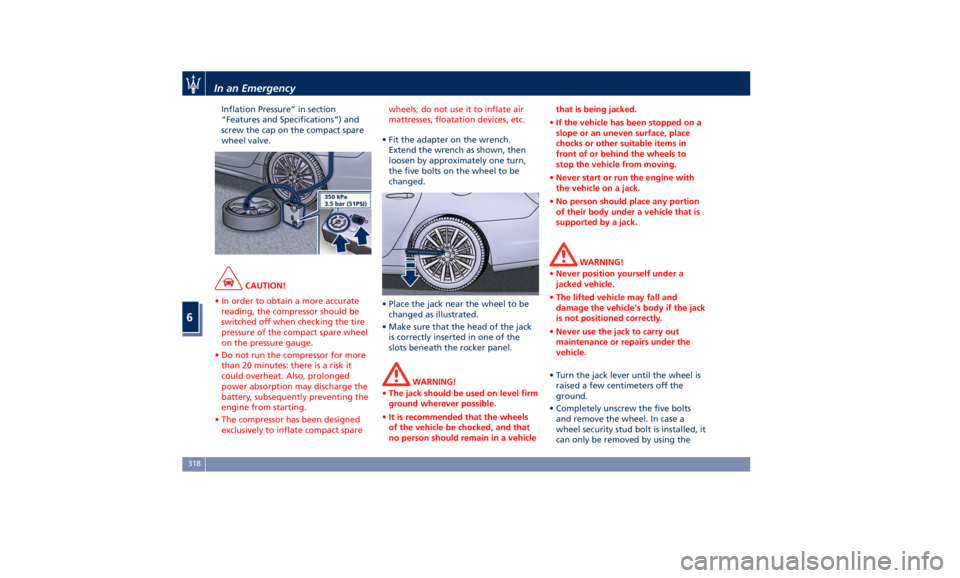
Inflation Pressure” in section
“Features and Specifications”) and
screw the cap on the compact spare
wheel valve.
CAUTION!
• In order to obtain a more accurate
reading, the compressor should be
switched off when checking the tire
pressure of the compact spare wheel
on the pressure gauge.
• Do not run the compressor for more
than 20 minutes: there is a risk it
could overheat. Also, prolonged
power absorption may discharge the
battery, subsequently preventing the
engine from starting.
• The compressor has been designed
exclusively to inflate compact spare wheels; do not use it to inflate air
mattresses, floatation devices, etc.
• Fit the adapter on the wrench.
Extend
the wrench as shown, then
loosen by approximately one turn,
the five bolts on the wheel to be
changed.
• Place the jack near the wheel to be
changed as illustrated.
• Make sure that the head of the jack
is correctly inserted in one of the
slots beneath the rocker panel.
WARNING!
• The jack should be used on level firm
ground wherever possible.
• It is recommended that the wheels
of the vehicle be chocked, and that
no person should remain in a vehicle that is being jacked.
• If the vehicle has been stopped on a
slope or an uneven surface, place
chocks or other suitable items in
front of or behind the wheels to
stop the vehicle from moving.
• Never start or run the engine with
the vehicle on a jack.
• No person should place any portion
of their body under a vehicle that is
supported by a jack.
WARNING!
• Never position yourself under a
jacked vehicle.
• The lifted vehicle may fall and
damage the vehicle's body if the jack
is not positioned correctly.
• Never use the jack to carry out
maintenance or repairs under the
vehicle.
• Turn the jack lever until the wheel is
raised a few
centimeters off the
ground.
• Completely unscrew the five bolts
and remove the wheel. In case a
wheel security stud bolt is installed, it
can only be removed by using theIn an Emergency
6
318