2019 MASERATI LEVANTE mirror
[x] Cancel search: mirrorPage 232 of 436
Normal Starting of the
Engine WARNING!
It is dangerous to run the engine in an
enclosed area. The engine consumes
oxygen and discharges carbon
dioxide, carbon monoxide and other
toxic gases in the atmosphere.
WARNING!
California Proposition 65
Operating, servicing and maintaining
a passenger vehicle or off-road vehicle
can expose you to chemicals including
such as, engine exhaust, carbon
monoxide, phthalates and lead, that
which are known to the State of
California to cause cancer and birth
defects or other reproductive harm. To
minimize exposure, avoid breathing
exhaust, do not idle the engine except
as necessary, service your vehicle in a
well-ventilated area and wear gloves
or wash your hands frequently when
servicing your vehicle. For more
information go to: www.P65Warnings.ca.gov/passenger-
vehicle
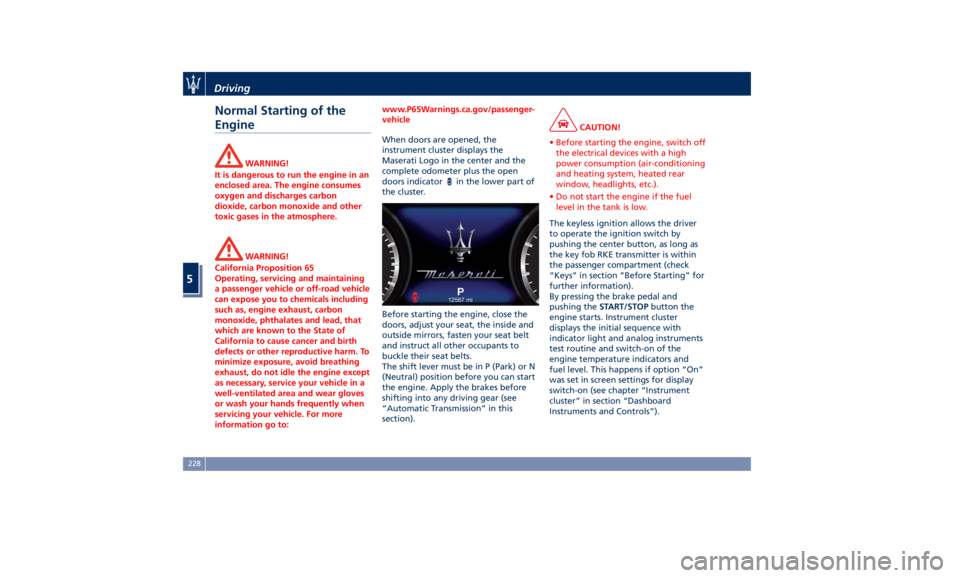
When doors are opened, the
instrument
cluster displays the
Maserati
Logo in the center and the
complete odometer plus the open
doors indicator
in the lower part of
the cluster.
Before starting the engine, close the
doors, adjust your seat, the inside and
outside mirrors, fasten your seat belt
and instruct all other occupants to
buckle their seat belts.
The shift lever must be in P (Park) or N
(Neutral) position before you can start
the engine. Apply the brakes before
shifting into any driving gear (see
“Automatic Transmission” in this
section). CAUTION!
• Before starting the engine, switch off
the electrical devices with a high
power consumption (air-conditioning
and heating system, heated rear
window, headlights, etc.).
• Do not start the engine if the fuel
level in the tank is low.
The keyless ignition allows the driver
to
operate the ignition
switch by
pushing the center button, as long as
the key fob RKE transmitter is within
the passenger compartment (check
“Keys” in section “Before Starting” for
further information).
By pressing the brake pedal and
pushing the START/STOP button the
engine starts. Instrument cluster
displays the initial sequence with
indicator light and analog instruments
test routine and switch-on of the
engine temperature indicators and
fuel level. This happens if option “On”
was set in screen settings for display
switch-on (see chapter “Instrument
cluster” in section “Dashboard
Instruments and Controls”).Driving
5
228
Page 290 of 436

below the set speed with steady light
will be displayed.
Resume Speed To resume a previously set speed, push
upward the multifunction switch (RES
+) and release. The
green light with
below the set speed will illuminate on
the instrument cluster. Resume can be
used at any speed above 18 mph
(30 km/h).
Using Electronic Cruise Control
on Hills The transmission may be downshifted
on hills to maintain the vehicle set
speed. The CC system maintains set
speed up and down hills. A slight
speed change on moderate hills is
normal. On steep slopes it is
recommended to drive without CC.
WARNING!
Electronic Cruise Control can be
dangerous where the system cannot
maintain a constant speed. Do not use
electronic Cruise Control in heavy
traffic or on winding, icy,
snow-covered or slippery roads. Adaptive Cruise Control -
ACC (optional) ADAS Equipments The Adaptive Cruise Control (ACC) is
part of ADAS equipments together
with:
• Lane Keeping Assist (LKA)
• Active Blind Spot Assist (ABSA)
• Forward Collision Warning (FCW)
• Highway Assist (HAS)
• Traffic Sign Assist (TSA).
FCW, HAS and TSA are separate
functions that may not be present in
the ADAS equipment. For more details
see “Forward Collision Warning -
FCW”, “Highway Assist - HAS" and
"Traffic Sign Assist - TSA" in this
section.
NOTE:
LKA and ABSA are described in the
relevant chapters of this section.
ACC Preview The Adaptive Cruise Control (ACC)
further increases the drive comfort
ensured by the Cruise Control when
driving on highways and freeways.
Always consider that ACC is not a safety system and is not designed to
prevent accidents.
The ACC allows driver to keep Cruise
Control active in limited or moderate
traffic conditions with no need to
constantly restore the Cruise Control.
The ACC uses a radar sensor, located
on the front grille behind the trident,
and the forward-facing camera behind
the internal rear-view mirror to detect
the presence of a vehicle ahead at a
close distance and moving in the same
direction.
This vehicle, in this chapter, will be
indicated as "target vehicle" or
"vehicle ahead".
NOTE:
• If the sensor detects no vehicle
ahead, the ACC system will maintain
set steady speed.
• If the ACC sensor detects a vehicleDriving
5
286
Page 305 of 436
Lane Keeping Assist - LKA
(optional, with ACC only) This system was designed especially
for highway or freeway driving, to
reduce the risk that the vehicle, under
particular circumstances, accidentally
departs from the lane in use. When
this happens, graphic instructions on
instrument cluster display together
with steering torque application and
steering wheel vibration (depending
on the distance to the line) warn the
driver that the vehicle is going out of
the lane and initiate a steering
maneuver to try to prevent the lane
exit.
To detect lane lines, the system uses
the forward-facing camera behind of
the rear-view mirror, which is the same
one used also by the lighting system
to manage the automatic high beams.
The logic core is in the front radar.
LKA system remembers the condition
it was in before turning off the
vehicle.
Refer to “MTC+ "Controls" Screen” in
section “Dashboard Instruments and
Controls” for further information. NOTE:
In case of wet road or raining
conditions the function could be
disabled by the system in order to
minimize the risks.
Speed Range of Use Speed mph (km/h)
Minimum 37 (60)
Engaged/activated 37 (60)
Maximum 112 (180)
Customized Settings LKA is configurable by the driver in
order to maximize its efficiency based
on the driver driving style and the
expectation of the system, reducing at
the same time the possible
invasiveness.
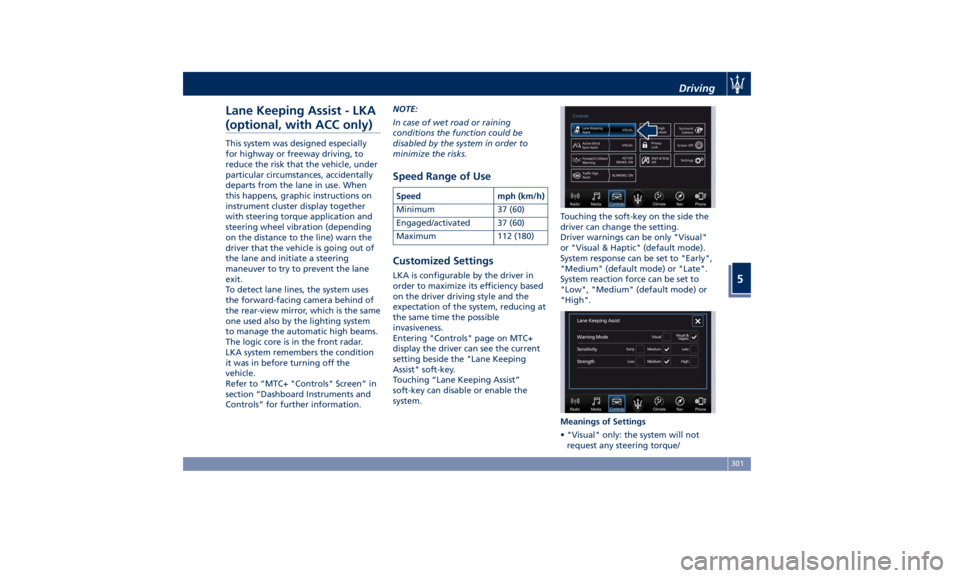
Entering "Controls" page on MTC+
display the driver can see the current
setting beside the "Lane Keeping
Assist" soft-key.
Touching “Lane Keeping Assist”
soft-key can disable or enable the
system. Touching the soft-key on the side the
driver can change the setting.
Driver warnings can be only "Visual"
or "Visual & Haptic" (default mode).
System response can be set to "Early",
"Medium" (default mode) or "Late".
System reaction force can be set to
"Low", "Medium" (default mode) or
"High".
Meanings of Settings
• "Visual" only: the system will not
request any steering torque/Driving
5
301
Page 309 of 436

If message suggestion does not allow
fixing the fault, do not use the system
and have the vehicle inspected at the
Authorized Maserati Dealer .
Radar Device - Regulatory
Information The “Regulatory Information” for all
the radio frequency and radar devices
can be consulted by accessing the
"Services" section on the website
www.maserati.com. Blind Spot Assist – BSA
(without ACC) BSA System Operation The Blind Spot Assist (BSA) system uses
two radar-based sensors, located
inside the rear bumper fascia, to
detect highway licensable vehicles
(cars, buses, motorbikes, etc.) that
enter the blind spot zones from the
rear/front/side of the vehicle.
The example shown in the figure
highlights the blind spots on either
side of the vehicle when oncoming
traffic is approaching from behind.
When the vehicle is started, the BSA
warning light will momentarily
illuminate in both outside rear view
mirrors to let the driver know that the
system is operational and on. The BSA
system sensors operate when the vehicle is in any forward gear and
enters standby mode when the
transmission is in (P) Park.
The BSA detection zone shown in
figure covers approximately one lane
on both sides of the vehicle
(approximately 11 ft or 3.3 m). The
blind spot area extends from
immediately behind the exterior
rear-view mirrors up to about 23 ft (7
m) behind the rear bumper.Driving
5
305
Page 310 of 436

The BSA system monitors the detection
zones on both sides of the vehicle
when the vehicle speed reaches
approximately 6 mph (10 km/h) or
higher and will alert the driver of
vehicles in these areas.
WARNING!
• The BSA system does NOT alert the
driver about rapidly approaching
vehicles that are outside the
detection zones.
• The BSA might alert the driver too
late especially in case of rapidly
approaching vehicles.
WARNING!
Risk of accident despite Blind Spot
Assist (BSA).
BSA does not detect/react to the
following:
• Overtaking vehicles close on the
side, placing them in the blind spot
area. As a result, BSA may neither
give warnings nor intervene in such
situations. • Always pay attention to the traffic
situation and maintain a safe
distance at the side of the vehicle.
NOTE:
If
your vehicle has
experienced any
damage in the area where the sensor
is located, even if the fascia is not
damaged, the sensor may have
become misaligned. Take your vehicle
at an Authorized Maserati Dealer to
verify sensor alignment. Having a
sensor that is misaligned will result in
the BSA not operating to specification.
The area on the rear bumper fascia
where the radar sensors are located
must remain free of snow, ice, and
dirt/road contamination so that the
BSA system can function properly. Do
not cover or block the area of the rear
bumper fascia where the radar sensors
are located with foreign objects
(bumper stickers, spoilers, bicycle racks,
etc.).
The BSA system notifies the driver of
vehicles or objects in the detection
zones by illuminating the BSA warning
light located in the outside mirrors in
addition to sounding an audible
(chime) alert and reducing the radio
volume (if the radio is on). Refer to “BSA and RCP Setting” in this chapter
for further information.
The BSA system monitors the detection
zone from three different entry points
(side, rear, overtaking traffic) while
driving to see if an alert is necessary.
The BSA system will issue an alert
whenever a vehicle enters any one
detection zone as outlined below.
Speed Range of Use
Speed mph (km/h)
Minimum 6 (10)
Engaged/activated 6 (10)
Maximum – (–)
Entering from the Side
Vehicles that move into your adjacent
lanes from either side of the vehicle.Driving
5
306
Page 311 of 436
Entering from the Rear
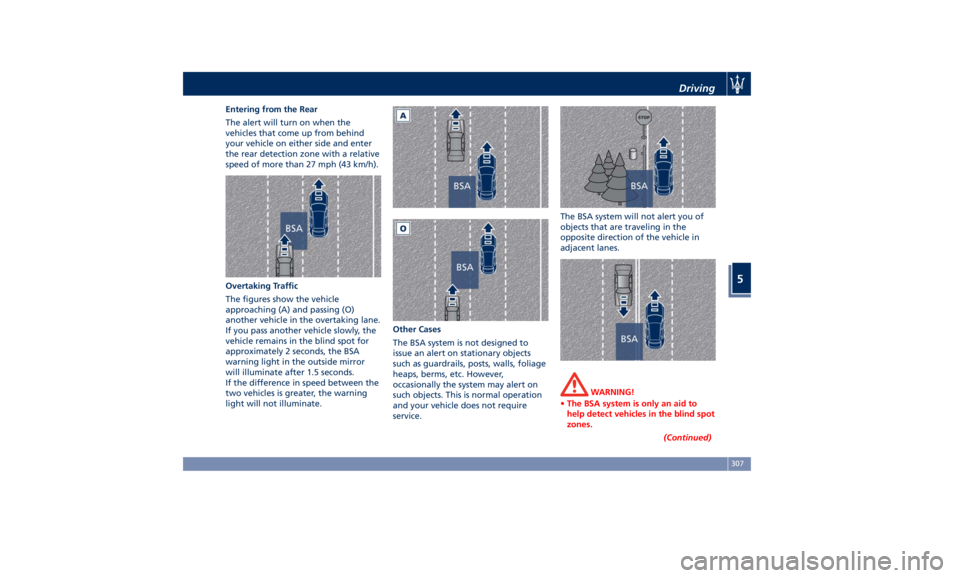
The alert will turn on when the
vehicles that come up from behind
your vehicle on either side and enter
the rear detection zone with a relative
speed of more than 27 mph (43 km/h).
Overtaking Traffic
The figures show the vehicle
approaching (A) and passing (O)
another vehicle in the overtaking lane.
If you pass another vehicle slowly, the
vehicle remains in the blind spot for
approximately 2 seconds, the BSA
warning light in the outside mirror
will illuminate after 1.5 seconds.
If the difference in speed between the
two vehicles is greater, the warning
light will not illuminate. Other Cases
The BSA system is not designed to
issue an alert on stationary objects
such as guardrails, posts, walls, foliage
heaps, berms, etc. However,
occasionally the system may alert on
such objects. This is normal operation
and your vehicle does not require
service. The BSA system will not alert you of
objects that are traveling in the
opposite direction of the vehicle in
adjacent lanes.
WARNING!
• The BSA system is only an aid to
help detect vehicles in the blind spot
zones.
(Continued)Driving
5
307
Page 312 of 436

(Continued)
• The BSA system is not designed to
detect pedestrians, cyclists, or
animals.
• Even if your vehicle is equipped with
the BSA system, always check your
vehicle’s outside and rearview
mirrors for any vehicles approaching
from behind or overtaking.
• Use your turn signal before changing
lanes.
RCP - Rear Cross Path The Rear Cross Path (RCP) feature is
intended to aid the drivers when gear
in reverse of parking spaces where
their vision of oncoming vehicles may
be blocked.
The RCP system monitors the rear
detection zones on both sides of the
vehicle. Using sensors located on either
side of the rear bumper, it detects any
vehicles or objects that are moving
toward the side of the vehicle with a
minimum speed of approximately 1 to
2 mph (1 km/h to 3 km/h) to a
maximum of approximately 10 mph
(16 km/h), such as in parking lot
situations. NOTE:
In a parking lot situation, oncoming
vehicles can be obscured by vehicles
parked on either side. If the sensors
are blocked by other structures or
vehicles, the system will not be able to
alert the driver.
Proceed slowly and cautiously out of
the parking space until the rear end of
the vehicle is moderately exposed.
The RCP system will then have a clear
view of the cross traffic. If an
oncoming vehicle is detected, the RCP
system will alert the driver using both
the visual and audible alarms. If the
radio is on, it will also reduce the radio
volume.
WARNING!
RCP is not a Back Up Aid system. More specifically, it is intended to be used to
help a driver detect an oncoming
vehicle in a parking lot situation.
Drivers must be careful when backing
up, even when using RCP. Always
check carefully behind your vehicle,
look behind you, and be sure to check
for pedestrians, animals, other
vehicles, obstructions, and blind spots
before backing up. Failure to do so can
result in serious injury or death.
BSA and RCP Setting Setting modes can be selected from
the MTC+ System.
Touch “Controls” soft-key and then
“Blind Spot Assist” soft-key to enter
the setting page.
Refer to chapter “MTC+ “Controls”
Screen” in section “Dashboard
Instruments and Controls” for further
information.Driving
5
308
Page 313 of 436

BSA in Visual Mode
When operating in “Visual” mode, the
BSA system will provide a visual alert
in the appropriate side view mirror
when it detects a vehicle or an object
in the detection areas monitored by its
sensors: depending on the status of
the relative turn indicator, the
warning light can be fixed or flashing.
However, when the system is
operating in RCP mode, it will respond
with both visual and audible alerts
when an oncoming vehicle or an
object approaching the rear end side
of the vehicle is detected.
Whenever an audible alert is
requested, the radio is muted (if the
radio is on).
BSA in Visual and Acoustic Mode
When operating in “Visual & Acoustic”
mode, the BSA system will provide a
visual alert in the appropriate side
view mirror based on a detected
vehicle or object. If the turn signal is then activated, and
it corresponds to an alert present on
that side of the vehicle, an audible
chime will also be sounded: in the
same moment the warning light will
start flashing.
Whenever a turn signal and detected
vehicle or object are present on the
same side at the same time, both the
visual and audio alerts will be issued.
In addition to the audible alert, the
radio volume will be reduced (if the
radio is on).
NOTE:
If the hazard flashers are on, the BSA
system will issue the appropriate visual
alert only.
When the system is in RCP mode, the
system shall respond with both visual
and audible alerts when a detected
vehicle or object is present. Whenever an audible alert is requested, the radio
(if on) is also muted.
Right/left turn/hazard signal status is
ignored; the RCP status always
requests the chime.
Blind Spot Assist Off
When this function is turned off from
the MTC+, there will be no visual or
audible alerts from either the BSA or
RCP subsystems.
NOTE:
The BSA system will store the current
operating mode when the vehicle is
shut off. Each time the vehicle is
started, the previously-stored mode
will be recalled and used.
System Temporarily Unavailable
The blind spot system will become
temporarily unavailable and the
instrument cluster display will show
the message “Blind Spot Alert
Temporarily Unavailable” when the
vehicle enters a radio quite zone
(example the areas around radio
telescopes).
The warning light on the outside
rear-view mirrors will be lit up and
stay lit until the vehicle exits the zone.Driving
5
309