2019 MASERATI LEVANTE steering
[x] Cancel search: steeringPage 114 of 436
Adjustable Pedals (if
equipped) The adjustable pedals system is
designed to allow greater range of
pedals positions enabling driver
comfort with regard to the steering
wheel tilt and the seat position.
This feature allows the brake and
accelerator pedals to move toward or
away from the driver’s feet.
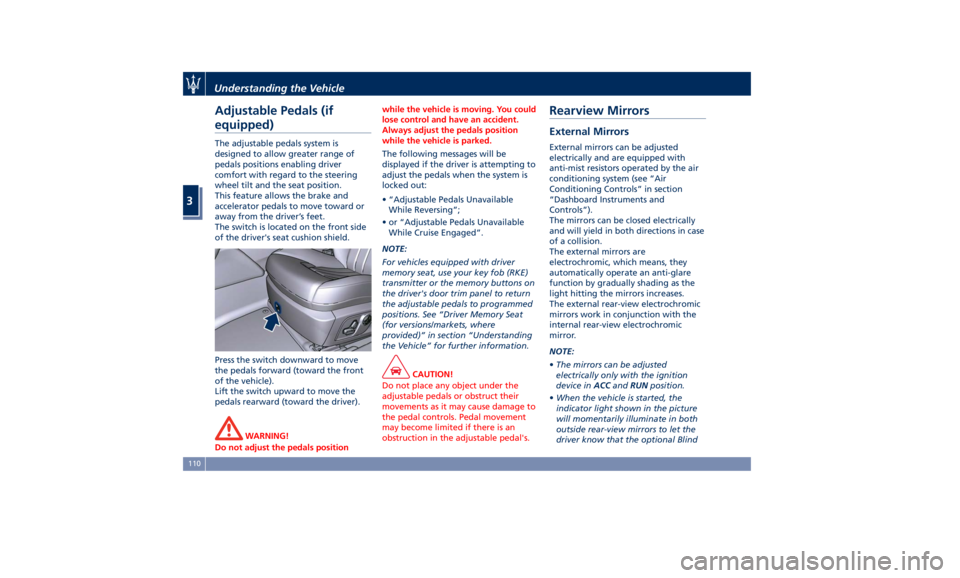
The switch is located on the front side
of the driver's seat cushion shield.
Press the switch downward to move
the pedals forward (toward the front
of the vehicle).
Lift the switch upward to move the
pedals rearward (toward the driver).
WARNING!
Do not adjust the pedals position while the vehicle is moving. You could
lose control and have an accident.
Always adjust the pedals position
while the vehicle is parked.
The following messages will be
displayed
if the driver is attempting to
adjust the pedals when the system is
locked out:
• “Adjustable Pedals Unavailable
While Reversing”;
• or “Adjustable Pedals Unavailable
While Cruise Engaged”.
NOTE:
For vehicles equipped with driver
memory seat, use your key fob (RKE)
transmitter or the memory buttons on
the driver's door trim panel to return
the adjustable pedals to programmed
positions. See “Driver Memory Seat
(for versions/markets, where
provided)” in section “Understanding
the Vehicle” for further information.
CAUTION!
Do not place any object under the
adjustable pedals or obstruct their
movements as it may cause damage to
the pedal controls. Pedal movement
may become limited if there is an
obstruction in the adjustable pedal's.Rearview Mirrors External Mirrors External mirrors can be adjusted
electrically and are equipped with
anti-mist resistors operated by the air
conditioning system (see “Air
Conditioning Controls” in section
“Dashboard Instruments and
Controls”).
The mirrors can be closed electrically
and will yield in both directions in case
of a collision.
The external mirrors are
electrochromic, which means, they
automatically operate an anti-glare
function by gradually shading as the
light hitting the mirrors increases.
The external rear-view electrochromic
mirrors work in conjunction with the
internal rear-view electrochromic
mirror.
NOTE:
• The mirrors can be adjusted
electrically only with the ignition
device in ACC and RUN position.
• When the vehicle is started, the
indicator light shown in the picture
will momentarily illuminate in both
outside rear-view mirrors to let the
driver know that the optional BlindUnderstanding the Vehicle
3
110
Page 120 of 436

SmartBeam™ System (for
versions/markets, where
provided) The SmartBeam™ system provides
increased forward lighting for a more
comfortable and secure driving
experience without resulting in glare
to other vehicles in certain traffic
situations. The SmartBeam™ system
uses a forward facing digital camera,
located on the windshield behind the
internal rear-view mirror, and an
electronical headlights controller in
order to dynamically adapt the front
light distribution according to the
traffic scenario.
The digital camera works like a human
eye, it is able to see which is the traffic
context while the headlight electronic
controller works like a human brain,
using information from the camera to
command an headlight reaction that
gives to the driver the “best” light
distribution (best is always in reference
to the specific traffic environment).
The camera gives information to the
electronical headlight controller about
environmental brightness, traffic
participants vehicle and obstacles
lights, distances and velocities. Using a
proper combination of all these data
the smart beam system is able to dynamically modify the light shape
produced by the dipped beam and by
the full beam as well, to make the
driver visibility as much comfortable as
possible in every condition without
glaring other traffic participants.
System Limitations
There are some cases in which the
SmartBeam TM
system may not function
properly temporarily, and cause
glaring for other vehicles especially
with “Auto High Beam Assist” feature
activated on MTC+ “Controls” page
(see “MTC+ “Controls” Screen” in
section "Dashboard Instruments and
Controls").
These cases could be related to:
• Vehicles headlight and/or rear light
(one or both of them) not visible in
the field of view of the camera.
• Heavy rainy weather.
• Heavy foggy weather.
• Snowing weather.
• Windshield dirt or impurities in
camera lens zone.
• Camera lens obstruction or logging.
In all these cases, it will be the driver’s
responsibility to avoid this glaring by
acting manually on the system,
switching off the high beam by means
of steering wheel multifunction lever. Daytime Running Lights (DRL) The lighting system uses the same high
or low intensity headlamps LED,
respectively, for the DRL lights and
front position lights.
DRL lights will turn on when the
twilight sensor is in “DAY” mode, the
engine is running and the light switch
is in
or “AUTO” position.
If a turn signal is activated, the DRL
LED on the same side of the vehicle
will turn off for the duration of the
turn signal activation. Once the turn
signal is deactivated, the DRL LED will
light up again.
NOTE:
On Canadian vehicles DRL are always
on. On USA vehicles the DRL lights can
be turned on and off using the MTC+
System, see “MTC+ Settings” in section
“Dashboard Instruments and Controls”
for further information.Understanding the Vehicle
3
116
Page 121 of 436

Bi-Xenon Headlight (for
headlights without AFS) The gas-discharge (xenon) headlights
operate with an electric arc saturated
with Xenon gas under pressure,
instead of the incandescent filament.
The light produced is assuredly higher
compared to traditional light bulbs, in
terms of quality (brighter light) as well
as of the span and positioning of the
illuminated area.
WARNING!
If xenon headlamp replacement is
necessary, contact the Authorized
Maserati Dealer only: DANGER - RISK
OF ELECTRICAL SHOCK.
Headlight with AFS (for
versions/markets, where
provided) These headlights combines the “xeno”
technology to the AFS (Advanced
Frontlighting System) adaptive
features.
The system is able to process signals of
onboard systems and subsequently
start up five strategic steps in the
following situations:
• “motorway beam”; • “country beam”;
• “town beam”;
• “adverse weather beam”;
• “tourist beam” (for example in
countries with circulation on the
opposite side). In this case this
function must be activated via the
menu of MTC+ (refer to “MTC+
Settings” in section “Dashboard
Instruments and Controls”).
The advantages offered by the AFS
system are perceived especially in case
of bad weather, fog and/or insufficient
road indications providing broader
illumination of the side zones, which
are normally left in the dark, and for
motorway driving (see comparison
rendered below).
This surely increases driving safety as it
offers less eye stress and increased
orientation for the driver and better
detection of other persons on the
road sides (pedestrians, bicycle riders
and motorcycle drivers).
The table shows the light values (lux)
and the light flux (lumen) of AFS
headlights. Combining a bending mode and a
vertical adjustment, the system assures
better visibility of the road surface
when driving on a curve, steering, or
in the event of road deviations,
optimizing vertical and horizontal
light distribution according to the
current drive path.
The increased lateral illumination is
gained through a fixed bending light
or a cornering light (depending on the
market) elaborating information
about the steering angle, the vehicle
speed and the turn indicator.
The improved vertical illumination, in
case of fast acceleration and/or fast
deceleration, will assure the deeper
illuminated distance from the vehicle,
through a dynamical adaptation of
headlight vertical attitude.Understanding the Vehicle
3
117
Page 123 of 436

detection of other persons on the
road sides (pedestrians, bicycle riders
and motorcycle drivers). Furthermore,
the headlamps are suitable to prevent
glare, providing optimal lighting
when driving the car in a country with
circulation on the opposite side.
The table shows the light values (lux)
and the light flux (lumen) of AFS
headlights.
NOTE:
The values reported in the table may
change depending on the destination
market of the car. The system assures better visibility of
the road surface when driving in a
curve, steering, or in the event of road
deviations, optimizing vertical light
distribution according to the current
drive path.
The increased lateral illumination is
gained through a fixed bending light
or a cornering light (depending on the
market) elaborating information
about the steering angle, the vehicle
speed and the turn indicator.
The improved vertical illumination, in
case of fast acceleration and/or fast
deceleration, will assure the deeper
illuminated distance from the vehicle,
through a dynamical adaptation of
headlight vertical attitude. NOTE:
• Each time the adaptive headlight
system is turned on, the headlights
adjustment will perform a
self-regulation cycle.
• All AFS features are available only if
the vehicle is moving forward.
• “Adaptive Front Light” function can
be turned on or off using the MTC+
System, refer to “MTC+ Settings” in
section “Dashboard Instrument and
Controls” for further information.
AFS System Failure
In the event of AFS system unvailable,
the related warning light and message
will light up on the TFT display. Take
your vehicle to the nearest Center of
the Authorized Maserati Delaer as
soon as possible to check the system.Lighting (at 27 yd/25 m) Light flux
Low beam 55 lux 765 lm
Low beam (low speed) 43 lux 600 lm
Low beam (high speed) 58 lux 800 lm
Low beam (wet road) 42 lux 790 lm
High beam 150 lux 1440 lm Understanding the Vehicle
3
119
Page 128 of 436

Multifunction Lever The multifunction lever controls the
operation of the turn signals,
headlight beam selection and
overtaking lights, wipers and washers
acting on the windshield and on the
liftgate (for this content see the
chapter “Wipers and Washers” of this
section).
The multifunction lever is fitted on the
left side of the steering column.
Turn Signals
Move the multifunction lever all the
way up or down until the stop
triggers.
The left or right arrow on the
speedometer and tachometer
instrument cluster respectively, flashes
to show proper operation of the front
and rear turn signal lights. To activate lane change function, tap
the lever up or down once, without
moving beyond the detent. The turn
signals (right or left) will flash three
times then automatically turn off.
This function is useful when
overtaking or changing lanes. NOTE:
• If either light remains on and does
not flash, or flashes at a fast rate,
check for a defective outside light. If
an indicator on the instrument
cluster fails while moving the lever,
then the turn indicator is probably
defective.
• The message that a turn signal is on
will appear in the instrument cluster
and a continuous chime will sound if
the vehicle is driven more than 1 mile
(1.6 km) with either turn signal on.
High Beams and Flashing
To switch on the high beams with the
light switch in headlamp
or
“AUTO” position, shift the
multifunction lever onward.
The blue telltale
will illuminate on
the tachometer.Understanding the Vehicle
3
124
Page 129 of 436
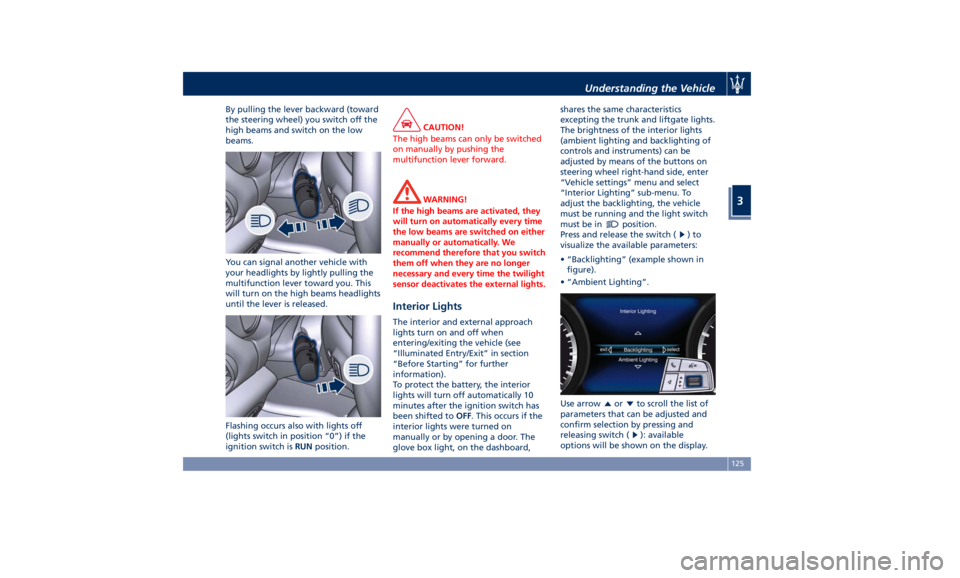
By pulling the lever backward (toward
the steering wheel) you switch off the
high beams and switch on the low
beams.
You can signal another vehicle with
your headlights by lightly pulling the
multifunction lever toward you. This
will turn on the high beams headlights
until the lever is released.
Flashing occurs also with lights off
(lights switch in position “0”) if the
ignition switch is RUN position. CAUTION!
The high beams can only be switched
on manually by pushing the
multifunction lever forward.
WARNING!
If the high beams are activated, they
will turn on automatically every time
the low beams are switched on either
manually or automatically. We
recommend therefore that you switch
them off when they are no longer
necessary and every time the twilight
sensor deactivates the external lights.
Interior Lights The interior and external approach
lights turn on and off when
entering/exiting the vehicle (see
“Illuminated Entry/Exit” in section
“Before Starting” for further
information).
To protect the battery, the interior
lights will turn off automatically 10
minutes after the ignition switch has
been shifted to OFF . This occurs if the
interior lights were turned on
manually or by opening a door. The
glove box light, on the dashboard, shares the same characteristics
excepting the trunk and liftgate lights.
The brightness of the interior lights
(ambient lighting and backlighting of
controls and instruments) can be
adjusted by means of the buttons on
steering wheel right-hand side, enter
“Vehicle settings” menu and select
“Interior Lighting” sub-menu. To
adjust the backlighting, the vehicle
must be running and the light switch
must be in
position.
Press and release the switch (
)to
visualize the available parameters:
• “Backlighting” (example shown in
figure).
• “Ambient Lighting”.
Use arrow
or to scroll the list of
parameters that can be adjusted and
confirm selection by pressing and
releasing switch (
): available
options will be shown on the display.Understanding the Vehicle
3
125
Page 130 of 436

A check mark will remain next to the
previously-selected item until a new
selection is made.
Press and release the switch (
)to
select the option. A selection notice
pops up for 2 seconds and then the
display reverts to the last modified
parameter.
The dimmable lights are the following:
• instrument cluster dials and display;
• dome light (front/rear); • LED in correspondence of the
internal door handle;
• doors and steering wheel backlight
controls LED;
• front footrest light;
• front seats night lighting.
Automatic Headlights Leveling A correct headlights leveling is crucial
for the safety of the vehicle’s
occupants and of people in the street.
Moreover it is included in the road
regulation law.
In order to obtain the best visibility
conditions while driving with
headlights on, the headlight beam
must be properly leveled, under any
vehicle load condition.
The vehicle is equipped with a system
that automatically adjusts headlight
leveling according to ground clearance
and vehicle load conditions. Dome Lights The dome lights integrated into the
front dome console, include a central
and two reading lights.
The central light automatically turns
on when one of the doors is opened
and turns off when the door is closed
(timed switching off). The light may be
switched on manually by pressing the
central button.
The reading lights are controlled by
the respective side buttons.
If they are turned on by pressing the
button, both central and reading lights
will stay on for about 10 minutes after
turning the engine off, and will then
turn off gradually.
When the exterior lights are switched
on, the two night LEDs fitted on the
side of the power buttons on the
overhead console will light up toUnderstanding the Vehicle
3
126
Page 133 of 436
Wipers and Washers The multifunction lever operates the
wipers and washers acting on the
windshield and on the window of the
liftgate when the ignition switch is
placed in RUN or ACC position. The
multifunction lever is located on the
left side of the steering column.
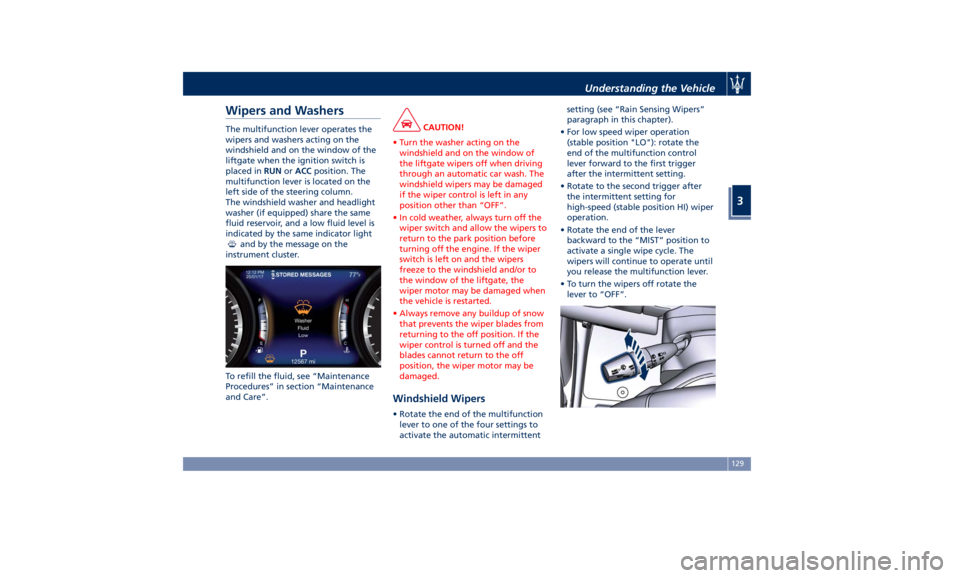
The windshield washer and headlight
washer (if equipped) share the same
fluid reservoir, and a low fluid level is
indicated by the same indicator light
and by the message on the
instrument cluster.
To refill the fluid, see “Maintenance
Procedures” in section “Maintenance
and Care”. CAUTION!
• Turn the washer acting on the
windshield and on the window of
the liftgate wipers off when driving
through an automatic car wash. The
windshield wipers may be damaged
if the wiper control is left in any
position other than “OFF”.
• In cold weather, always turn off the
wiper switch and allow the wipers to
return to the park position before
turning off the engine. If the wiper
switch is left on and the wipers
freeze to the windshield and/or to
the window of the liftgate, the
wiper motor may be damaged when
the vehicle is restarted.
• Always remove any buildup of snow
that prevents the wiper blades from
returning to the off position. If the
wiper control is turned off and the
blades cannot return to the off
position, the wiper motor may be
damaged.
Windshield Wipers • Rotate the end of the multifunction
lever to one of the four settings to
activate the automatic intermittent setting (see “Rain Sensing Wipers”
paragraph in this chapter).
• For low speed wiper operation
(stable position "LO"): rotate the
end of the multifunction control
lever forward to the first trigger
after the intermittent setting.
• Rotate to the second trigger after
the intermittent setting for
high-speed (stable position HI) wiper
operation.
• Rotate the end of the lever
backward to the “MIST” position to
activate a single wipe cycle. The
wipers will continue to operate until
you release the multifunction lever.
• To turn the wipers off rotate the
lever to “OFF”.Understanding the Vehicle
3
129