2019 MASERATI LEVANTE display
[x] Cancel search: displayPage 55 of 436

plate lights, when the vehicle has
been unlocked using the key fob or
the “Passive Entry” system.
When the button
on the key fob is
pressed twice within five seconds, the
direction indicators flash twice to
indicate the opening or closing of the
power liftgate, if the light flashing
function at closing is activated on
MTC+ (for more information, see the
chapter "MTC+ Settings" in section “Dashboard Instruments and
Controls”).
With the ignition switch in RUN
position, the red symbol
will be
displayed on the instrument cluster. If
the vehicle is in motion, in addition to
the symbol
will also appear a
message indicating that the power
liftgate is open. Once the power
liftgate is closed the symbol or the
symbol and message will disappear
from the display.
With the ignition device in the OFF
position, only the power liftgate open
symbol will display until closure.
See “Passive Entry System” in this
section for more information on
power liftgate operation with the
“Passive Entry” feature. Automatic Opening and
Closing Movement of the
Power Liftgate Automatic opening and closing
movement of the liftgate is driven by
electric actuators and a motorized
latch ensuring lid locking upon
closing.
The
button on key fob and button
on front dome console not only allow
user to completely open the power
liftgate, but also to stop it at any
intermediate position by pressing the
button again whenever you wish to
stop and resume the opening process.
In addition to these commands, it is
possible to open and close the power
liftgate, or stop its movement, by
simply moving your foot under the
rear bumper, if the vehicle is so
equipped with the kick sensor option.
In this latter case, the power liftgate
will be opened and closed only if the
“Passive Entry” system acknowledges
the presence of the key fob RKE
transmitter within 3.3 ft (1 m) of the
power liftgate.
Power liftgate uses the button
in-between the license plate lights,
indicated in figure, to activate the
opening once the car has beenBefore Starting
2
51
Page 60 of 436
Hood Operation Opening Two latches must be released to open
the hood.
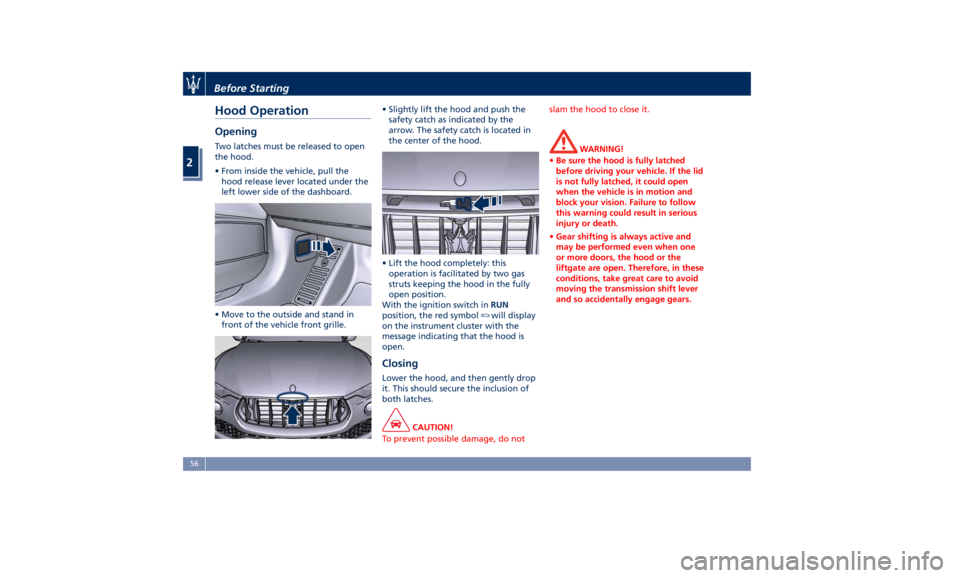
• From inside the vehicle, pull the
hood release lever located under the
left lower side of the dashboard.
• Move to the outside and stand in
front of the vehicle front grille. • Slightly lift the hood and push the
safety catch as indicated by the
arrow. The safety catch is located in
the center of the hood.
• Lift the hood completely: this
operation is facilitated by two gas
struts keeping the hood in the fully
open position.
With the ignition switch in RUN
position, the red symbol
will display
on the instrument cluster with the
message indicating that the hood is
open.
Closing Lower the hood, and then gently drop
it. This should secure the inclusion of
both latches.
CAUTION!
To prevent possible damage, do not slam the hood to close it.
WARNING!
• Be sure the hood is fully latched
before driving your vehicle. If the lid
is not fully latched, it could open
when the vehicle is in motion and
block your vision. Failure to follow
this warning could result in serious
injury or death.
• Gear shifting is always active and
may be performed even when one
or more doors, the hood or the
liftgate are open. Therefore, in these
conditions, take great care to avoid
moving the transmission shift lever
and so accidentally engage gears.Before Starting
2
56
Page 84 of 436

speed is increased to approximately
7.5 mph (12 km/h) or above. The
system will become active again if the
vehicle speed is decreased to speeds
less than approximately 6.2 mph
(10 km/h).
Park Assist Sensors The four Park Assist sensors, located in
the rear bumper, monitor the area
behind the vehicle that is within the
sensors' field of view. The sensors can
detect obstacles up to approximately
78 in (200 cm) from the rear bumper in
the horizontal direction, depending on
the location, type and orientation of
the obstacle. The six Park Assist sensors, located in
the front bumper, monitor the area in
front of the vehicle that is within the
sensors' field of view.
The sensors can detect obstacles up to
a distance of approximately 50 in (120
cm) from the front bumper in the
horizontal direction, depending on the
location, type and orientation of the
obstacle. Park Assist Warning Messages
Display The Park Assist Warning screen will
only be displayed if “Sound + Display”
is selected from the MTC+ System.
Refer to “MTC+ Settings” in section
“Dashboard Instruments and Controls”
for further information.
The Park Assist Warning screen is
located on the instrument cluster
display.
It provides visual warnings to indicate
the distance between the rear bumper
and/or front bumper and the detected
obstacle.
The warning display will turn on
indicating the system status (ready or
off) when the vehicle is in R (Reverse)
or in D (Drive) and an obstacle has
been detected.GTS and TROFEO Versions GTS and TROFEO VersionsBefore Starting
2
80
Page 85 of 436
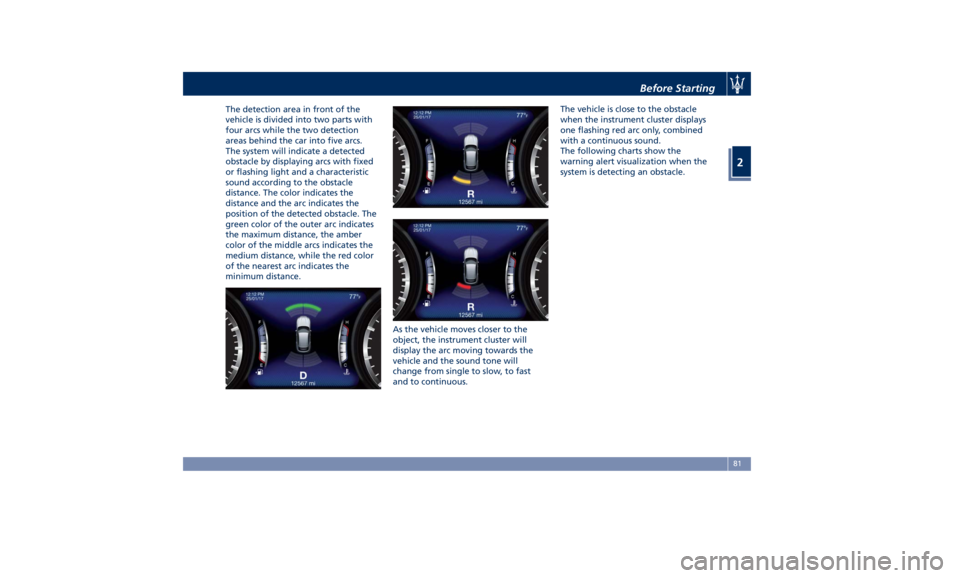
The detection area in front of the
vehicle is divided into two parts with
four arcs while the two detection
areas behind the car into five arcs.
The system will indicate a detected
obstacle by displaying arcs with fixed
or flashing light and a characteristic
sound according to the obstacle
distance. The color indicates the
distance and the arc indicates the
position of the detected obstacle. The
green color of the outer arc indicates
the maximum distance, the amber
color of the middle arcs indicates the
medium distance, while the red color
of the nearest arc indicates the
minimum distance.
As the vehicle moves closer to the
object, the instrument cluster will
display the arc moving towards the
vehicle and the sound tone will
change from single to slow, to fast
and to continuous. The vehicle is close to the obstacle
when the instrument cluster displays
one flashing red arc only, combined
with a continuous sound.
The following charts show the
warning alert visualization when the
system is detecting an obstacle.
Before Starting
2
81
Page 87 of 436

Enabling and Disabling Park
Assist By accessing the submenu “Safety &
Driving Assistant” from MTC+ System,
the “Park Assist” can be disabled
(option “Off”). The available options
regarding the warning alerts are:
“Sound” or “Sound + Display”. Refer
to “MTC+ Settings” in section
“Dashboard Instruments and
Controls” for further information.
The front sensors can be enabled or
disabled at any time by pressing the
button on the front dome console.
After pressing the button the
instrument cluster will display the
state of front parking sensors for
approximately five seconds. The
button LED will be on when the front
sensors are disabled. The button LED
will be off when the front sensors are
enabled. If the button is pressed and the system requires service, the LED
will blink momentarily, and then the
LED will be on.
When the shift lever is moved to R
(Reverse) or to D (Drive) at a speed of
7 mph (11 km/h) or below and the
system is disabled, the instrument
cluster will display the “PARK ASSIST
Off” message for 5 seconds until the
shift lever remains in R (Reverse) or
when the shift lever is moved in D
(Drive).
Service the Park Assist System In case of malfunction of the Park
Assist system, the instrument cluster
will actuate a single sound, once per
ignition cycle. The instrument cluster
will display a message when any of
the rear or front sensor(s) are blocked
by snow, mud, or ice and the vehicle is
shifted into R (Reverse) or D (Drive).
The instrument cluster will display a
message when any of the rear or front
sensors are damaged and require
service.
When the shift lever is moved to R
(Reverse) or D (Drive) and the system
has detected a faulted condition, the
instrument cluster will display the
corresponding message for the time
lapse the vehicle is in R (Reverse) or D
(Drive) at speeds less than 7 mph (11 km/h). Under this condition Park
Assist will not operate. See
“Instrument Cluster” in section
“Dashboard Instruments and
Controls” for further information.
If the instrument cluster displays a
message prompting you to clean the
sensors, make sure the outer surface
and the underside of the rear bumper
and/or front bumper is clean and clear
of snow, ice, mud, dirt or other
obstruction and then cycle the ignition
switch. If the message continues to
appear contact the Authorized
Maserati Dealer .
If a failure message is displayed on the
instrument cluster, contact the
Authorized Maserati Dealer .Before Starting
2
83
Page 88 of 436

Cleaning the Park Assist
Sensors When cleaning the sensors, take
special care not to scratch or damage
them; therefore, do not use dry, rough
or hard cloths.
The sensors must be washed with clean
water, possibly adding car shampoo.
Should you need to repaint the
bumper or in case of paint touch-ups
in the sensor area, please contact
exclusively the Authorized Maserati
Dealer . Incorrect paint application
could affect the parking sensors
operation.
Park Assist System Usage
Precautions NOTE:
• Jackhammers, large trucks, and other
vibrations could affect the
performance of Park Assist.
• Objects such as bicycle carriers, trailer
hitches, etc., must not be placed
within 12 in (30 cm) from the rear
bumper while driving the vehicle.
Failure to do so can result in the
system misinterpreting a close object
as a sensor problem, causing the
service Park Assist message to be
displayed in the instrument cluster. CAUTION!
• Park Assist is only a parking aid and
it is unable to recognize every
obstacle, including small obstacles.
Parking curbs might only be
temporarily detected or not detected
at all. Obstacles located above or
below the sensors will not be
detected when they are in close
proximity.
• The vehicle must be driven slowly
when using Park Assist in order to be
able to stop in time when an
obstacle is detected. When backing
up, it is recommended that the driver
looks over his/her shoulder when
using Park Assist.
WARNING!
Drivers must be careful when backing
up even when using the Park Assist
system. Always check carefully behind
your vehicle, look behind you, and be
sure to check for pedestrians, animals,
other vehicles, obstructions, and blind
spots before backing up. You are
responsible for safety and must
continue to pay attention to your surroundings. Failure to do so can
result in serious injury or death.
Park Assist Volume The volume of the acoustic signal
emitted by the front and rear parking
sensors is set to the medium level.
Three different levels of volume can be
selected via the submenu “Safety &
Driving Assistant” from the MTC+
System.
Low level is useful in certain conditions
when the parking sensor acoustic
signal keeps coming on although there
is no actual collision hazard. This may
typically occur when driving in a queue
or when the vehicle is overtaken by
motorcycles or other vehicles on one
or both sides in a queue of traffic.
When you set the volume, only the
parking sensor acoustic signal will be
affected. The radio or any other
devices connected to the vehicle sound
system will not be affected.
Refer to chapter “MTC+ Settings” in
section “Dashboard Instruments and
Controls” for further information.
Operation with a Trailer The operation of the rear sensors is
automatically deactivated when the
trailer's electric plug is inserted in theBefore Starting
2
84
Page 89 of 436

vehicle's tow hook socket, while the
front sensors stay active and can
provide acoustic and visual warnings.
The rear sensors are automatically
reactivated when the trailer's cable
plug is removed.
Rear Parking Camera Your vehicle is equipped with a rear
parking camera that allows you to see
an image on the MTC+ screen of the
rear surroundings of your vehicle
whenever the shift lever is put into R
(Reverse).
When “Parkview Camera Off Delay”
mode is enabled, the rear view image
shall be displayed for up to 10 seconds
after shifting out of R (Reverse).
When “Rearwiew Camera Delay”
mode is enabled, the rear view image
shall be displayed for up to 10 seconds
after shifting out of R (Reverse).
To assist the driver during maneuvers
on dead-ends/roads and on
intersections, the vehicle may be
equipped with an optional surround
view camera system. In this case, the
rear parking camera is integrated into
the surround view camera system. In
both configurations (rear parking
camera only or surround view camera
system), you can monitor the rear
view. For more details on this option,
see chapter "Surround View Camera
System (optional)" in this section.
The image will be displayed along
with a caution note to “Check Entire
Surroundings” across the top of the screen. After five seconds this note
will disappear.
The rear parking camera is located on
the rear of the vehicle above the rear
license plate.
When the shift lever is shifted out of R
(Reverse), the rear camera mode is
exited and the navigation or audio
screen appears again.
When displayed, dynamic grid lines (if
the function is set to “MTC+ Settings”)
will illustrate the width of the vehicle
to assist with parking or aligning to a
hitch/receiver. The dynamic grid lines
will show separate zones in different
color that will help indicate the
distance to the rear of the vehicle.Before Starting
2
85
Page 91 of 436
Surround View Camera
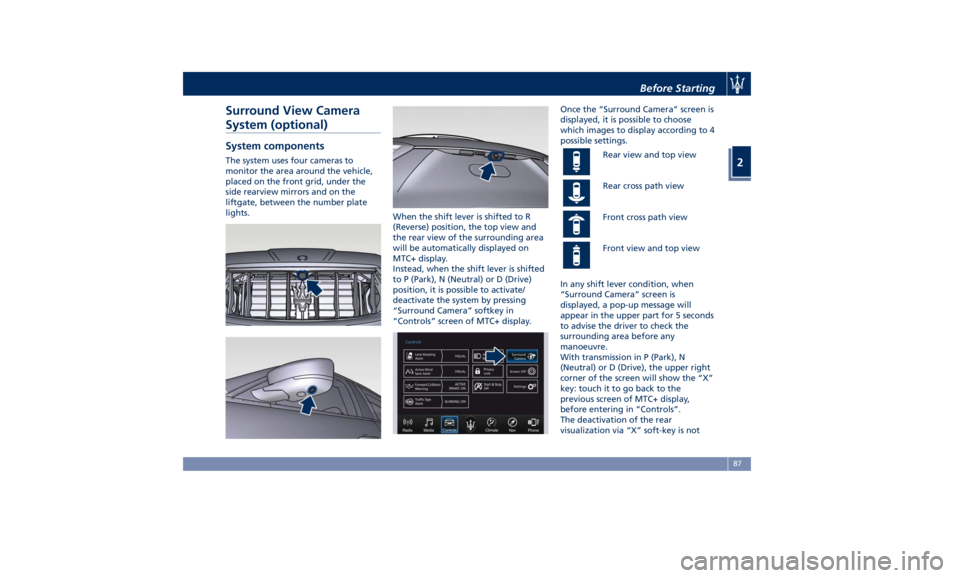
System (optional) System components The system uses four cameras to
monitor the area around the vehicle,
placed on the front grid, under the
side rearview mirrors and on the
liftgate, between the number plate
lights.
When the shift lever is shifted to R
(Reverse) position, the top view and
the rear view of the surrounding area
will be automatically displayed on
MTC+ display.
Instead, when the shift lever is shifted
to P (Park), N (Neutral) or D (Drive)
position, it is possible to activate/
deactivate the system by pressing
“Surround Camera” softkey in
“Controls” screen of MTC+ display. Once the “Surround Camera” screen is
displayed, it is possible to choose
which images to display according to 4
possible settings.
Rear view and top view
Rear cross path view
Front cross path view
Front view and top view
In any shift lever condition, when
“Surround Camera” screen is
displayed, a pop-up message will
appear in the upper part for 5 seconds
to advise the driver to check the
surrounding area before any
manoeuvre.
With transmission in P (Park), N
(Neutral) or D (Drive), the upper right
corner of the screen will show the “X”
key: touch it to go back to the
previous screen of MTC+ display,
before entering in “Controls”.
The deactivation of the rear
visualization via “X” soft-key is notBefore Starting
2
87