2019 MASERATI GHIBLI key
[x] Cancel search: keyPage 53 of 384

Trunk Lid Operation The manual trunk lid can be unlocked
from inside the vehicle by pressing the
button on the front dome console.
This command will fully open the
Power Trunk Lid/Hands Free (if
equipped). Pressing this button in
sequence, if the power trunk lid stops
in intermediate position, it resumes his
opening movement.
NOTE:
The shift lever must be in P (Park)
before the button can operate.
The manual trunk lid can be released
from outside the vehicle by pressing
the
button on the key fob with
RKE transmitter twice within five
seconds or by using the external
release button located on the lower
side of the trunk lid ledge, between the license plate lights, when the
vehicle has been unlocked using the
key fob or the “Passive Entry” system.
When the button
on the key fob is
pressed twice within five seconds, the
direction indicators flash twice to
indicate the opening or closing of the
trunk lid, if the light flashing function
at closing is activated on MTC+ (for
more information, see the chapter
"MTC+ Settings" in section “Dashboard Instruments and
Controls”).
To manually close the trunk lid use the
handle as indicated beside the closing
device.
With the ignition switch in RUN
position, the red symbol
will
display on the instrument cluster with
the message indicating that the trunk
lid is open. Once the trunk is closed
both symbol and message will
disappear from the display.Before Starting
2
49
Page 54 of 384

With the ignition device in the OFF
position, the trunk open symbol and
message will display until closure.
See “Passive Entry System” in this
section for more information on trunk
lid operation with the “Passive Entry”
feature.
Power Trunk Lid/Hands Free
(optional) Automatic opening and closing
movement of the trunk lid is driven by
electric actuators and a motorized
latch ensuring lid locking upon closing.
Power Trunk lid can be opened using
button
on the key fob RKE
transmitter and the button on the
front dome console used also for
non-power version.
The
button on key fob and button
on dome console not only allows user
to completely open the Power Trunk
Lid/Hands Free, but also to stop it at
any intermediate position by pressing
the button again at anytime you wish
to stop and resume the opening
process.
In addition to these commands, it is
possible open and close the Power
Trunk Lid/Hands Free by simply moving
your foot under the rear bumper, if
the vehicle is so equipped with the
kick sensor option, as specified in the paragraph “Hands Free Power Trunk
Release and Closing”. In this latter
case, the lid will be opened and closed
only if the “Passive Entry” system
acknowledges the presence of the key
fob RKE transmitter within 3.3 ft (1 m)
of the trunk lid.
Power Trunk Lid/Hands Free uses the
button in between the license plate
lights, indicated in figure, to activate
the opening once the car has been
unlocked by the key fob or by the
“Passive Entry” function.
By pressing this button when the
Power Trunk Lid/Hands Free is closed
you can open it completely or by
pressing the button again stop the
opening process, or by pressing the
button again invert the movement and
close it completely.
When the Power Trunk Lid/Hands Free
is open, to move it there are two buttons positioned on its right lower
part as indicated in figure.
When the power trunk lid is
completely open if you press and
release the LH button
, the power
trunk lid will be completely closed
unless it is stopped;
• if instead the power trunk lid is in an
intermediate position and you press
and release the LH button
during
the closing or opening stroke, it will
be stopped;
• if instead the power trunk lid is
stopped in an intermediate position
and you press and release the LH
button
, it will reverse its previous
movement and it will be completely
opened or closed unless it is stopped
again.
In any case, when you press the LH
button
, the doors will not beBefore Starting
2
50
Page 56 of 384

protection system able to stop its
movement when an obstacle is
detected along the path: when
opening or closing, it stops
automatically and then slightly moves
back.
After the closing command, when
Power Trunk Lid/Hands Free starts
closing, all the indicators will blink to
warn anyone within range. Apart from
activating indicators blinking when
power trunk lid is operated, it is also
possible to activate a sound warning
by selecting the relevant function
within MTC+ user settings (see “MTC+
Settings” in section “Dashboard
Instruments and Controls”). When
Power Trunk Lid/Hands Free edge
reaches the car body, the motor
locking the latch is activated
automatically.
If necessary, the Power Trunk
Lid/Hands Free can also be opened or
closed manually. This operation could
be required when the trunk lid
remains open for a long period of
time.
WARNING!
• Activate Power Trunk Lid/Hand Free
only when vehicle is at a standstill. • Always pay utmost attention when
opening and closing Power Trunk
Lid/Hand Free.
• After the closing command, always
make sure that Power Trunk
Lid/Hand Free is completely closed.
CAUTION!
• Under extreme weather conditions,
trunk lid seal could freeze and
compromise Power Trunk Lid/Hand
Free automatic opening and closing.
• Before opening Power Trunk
Lid/Hand Free, make sure that no
objects or snow are set on trunk lid
or might jam or prevent its opening.
Hands Free Power Trunk Release and
Closing
This
mode is controlled by the “Passive
Entry” system (see paragraph “Passive
Entry System” in this section), which
automatically releases and closes the
Power Trunk Lid/Hands Free when you
place your foot in the area under the
rear bumper.
The system will only operate if the
system acknowledges the presence of
the key fob RKE transmitter within 3.3
ft (1 m) of the Power Trunk Lid/Hands
Free. The range of the sensors that detect
your foot movement extends along
and underneath the central portion of
the rear bumper.
To activate the Power Trunk Lid/Hands
Free, stand behind the vehicle, near
the trunk lid, and move your foot
under the bumper as if to kick
something. Do not place your foot too
close to the bumper or touch the
underbody.
WARNING!
• Pay careful attention to the exhaust
tailpipes as they can reach high
temperatures and, in case of contact,
they can cause severe burns.
• When it is not necessary to open the
Power Trunk Lid/Hand Free with the
Hands Free mode, make sure the key
fob results outside the range of use
(3.3 ft/1 m). Otherwise, the Power
Trunk Lid/Hand Free can be opened
accidentally by an unintentional
movement of the foot.Before Starting
2
52
Page 57 of 384

In order for the sensors to detect your
foot movement, move your foot
towards the vehicle rather than
sideways and immediately pull it back:
from this moment, the Power Trunk
Lid/Hands Free will activate within two
seconds.
If closed, with the foot movement the
Power Trunk Lid/Hands Free will:
• unlock and completely open;
• after another kick, will stop;
• after another kick, will reverse its
movement and completely close
unless stopped again.
If open, with the foot movement the
Power Trunk Lid/Hands Free will:
• completely close but not lock;
• another kick before the completed
closing can stop the movement; • if the movement was stopped
another kick operation will invert a
complete opening.
NOTE:
• If your foot movement fails to
activate the Power Trunk Lid/Hands
Free movement, wiggling your foot
under the bumper will not help.
Repeat the whole kick movement.
• In particular situations, external
factors affecting the sensor area may
trigger the Hands free power trunk
lid release feature. For example,
when washing the vehicle, a water
jet aimed at the sensor area may
trigger the “Hands free” power
trunk release feature. Keep the key
fob RKE transmitter away from the
sensing range of the sensors (10 ft/3
m) or disable the Hands free feature
from the MTC+ menu (see “MTC+
Settings” in section “Dashboard
Instruments and Controls”). A key
fob RKE transmitter located in the
front seat passenger area is
considered out of range of the
“Hand free” trunk release sensor.
• If somebody or something knocks
against the Power Trunk Lid/Hands
Free while it is moving, the safety system might stop lid opening or
closing movement.
Trunk Lid Emergency Release If accessing the trunk compartment
from the rear seats, operate the
emergency release lever (see the
chapter “Trunk Safety” in this section)
in order to lower the rear seat
backrest (see “Cargo Area” in section
“Understanding the Vehicle”). If the
power release control operated by
pressing the button on the dome
console fails, it may be that the
battery is critical. In this case, it is
possible to temporarily power the
system by using the battery remote
poles located inside the engine
compartment (see “Auxiliary
Jump-Start Procedure” in section “In
an Emergency”). Then it is possible to
normally open the trunk lid by using
the key fob RKE transmitter. Have the
vehicle subsequently serviced by an
Authorized Maserati Dealer center in
order to solve the failure.Before Starting
2
53
Page 67 of 384

The BeltAlert ®
warning sequence
begins after the vehicle speed is over 5
mph (8 km/h) for more than 19
seconds, by blinking the seat belt
reminder light
and message and by
sounding an intermittent chime.
Once the sequence starts, it will
continue for the entire duration. After
the sequence completes, the seat belt
reminder light
remains illuminated
until the respective seat belts are
fastened and the message remains on
for 5 seconds.
If the opened front door on the driver
or passenger side is closed and the
occupant presence sensor detects a
status change from occupant not
present to occupant present the
system will repeat the warning
sequence.
The driver should instruct all other
occupants to fasten their seat belts. If a front seat belt is unbuckled while
traveling at speeds greater than
5 mph (8 km/h), BeltAlert ®
will
provide both audio and visual
notification on the instrument cluster.
The front passenger seat BeltAlert ®
is
not active when the front passenger
seat is not occupied. BeltAlert ®
may
be triggered when an animal or heavy
object is on the front passenger seat.
It is recommended to restrain pets in
the rear seat, in pet harnesses or pet
carriers that are secured by seat belts,
and properly stow cargo.
Seat Belts and Pregnant
Women Seat belts should be worn by pregnant
women: the risk of injury in the event
of an accident is greatly reduced for
them and the unborn child if they are
wearing a seat belt. The best way to
protect the fetus is to protect the
mother.
Pregnant women must position the
lower part of the belt below the belly
so that it passes over the pelvis and
under the abdomen (see figure). When a safety belt is worn properly, it is
more likely that the baby will not be
hurt in a crash. For pregnant women, as
for anyone, the key to making safety
belts effective is wearing them properly.
WARNING!
Pregnant women should observe the
above indications, as well as local
regulation concerning the use of seat
belts.Before Starting
2
63
Page 84 of 384
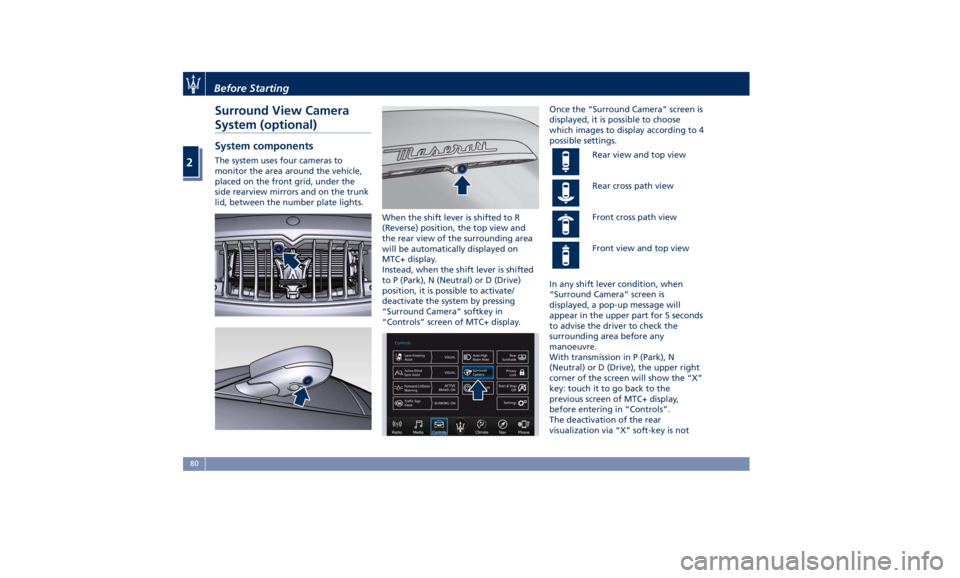
Surround View Camera
System (optional) System components The system uses four cameras to
monitor the area around the vehicle,
placed on the front grid, under the
side rearview mirrors and on the trunk
lid, between the number plate lights.
When the shift lever is shifted to R
(Reverse) position, the top view and
the rear view of the surrounding area
will be automatically displayed on
MTC+ display.
Instead, when the shift lever is shifted
to P (Park), N (Neutral) or D (Drive)
position, it is possible to activate/
deactivate the system by pressing
“Surround Camera” softkey in
“Controls” screen of MTC+ display. Once the “Surround Camera” screen is
displayed, it is possible to choose
which images to display according to 4
possible settings.
Rear view and top view
Rear cross path view
Front cross path view
Front view and top view
In any shift lever condition, when
“Surround Camera” screen is
displayed, a pop-up message will
appear in the upper part for 5 seconds
to advise the driver to check the
surrounding area before any
manoeuvre.
With transmission in P (Park), N
(Neutral) or D (Drive), the upper right
corner of the screen will show the “X”
key: touch it to go back to the
previous screen of MTC+ display,
before entering in “Controls”.
The deactivation of the rear
visualization via “X” soft-key is notBefore Starting
2
80
Page 89 of 384

• Check the tires (see “Tire Inflation
Pressure” chapter in section
“Features and Specifications”) for
proper cold inflation pressure.
Lights and Indicator Lights
• Have someone observe the
operation of exterior lights while
you operate the controls (see
“Lights” chapter in section
“Understanding the Vehicle”).
• Check turn signal and high beam
indicator lights on the instrument
cluster (see “Instrument Cluster”
chapter in section “Dashboard
Instruments and Controls”).
Door Latches
• Check for positive closing, latching,
and locking of doors and trunk lid
(see “Unlock the Vehicle with Key
fob” chapter in this section).
Fluid Leaks
• Check area under vehicle after
overnight parking for recent fluid
leaks (oil, fuel, etc.).
• If gasoline fumes are detected or
fluid leaks are suspected, contact the
Authorized Maserati Dealer . WARNING!
California Proposition 65
Operating, servicing and maintaining
a passenger vehicle or off-road vehicle
can expose you to chemicals including
such as, engine exhaust, carbon
monoxide, phthalates and lead, that
which are known to the State of
California to cause cancer and birth
defects or other reproductive harm. To
minimize exposure, avoid breathing
exhaust, do not idle the engine except
as necessary, service your vehicle in a
well-ventilated area and wear gloves
or wash your hands frequently when
servicing your vehicle. For more
information go to:
www.P65Warnings.ca.gov/passenger-
vehiclePark Assist (if equipped) The Park Assist (also called
“ParkSense”) system provides visual
and audible indications of the distance
between the rear and/or front bumper
and a detected obstacle when backing
up or moving forward, e.g. during a
parking maneuver.
Besides the use of the sensors
available on the bumpers and of the
rear parking camera, the vehicle may
be equipped with surround view
cameras (optional) to assist the driver
during maneuvers on dead-ends/roads
and on intersections. For more details
on this option, see chapter "Surround
View Camera System (optional)" in
this section.
Refer to “Park Assist System Usage
Precautions” for limitations of this
system and recommendations.
Park Assist system will retain the last
system state (enabled or disabled)
from the last ignition cycle when the
ignition is changed to the RUN
position.
Park Assist system can be active only
when the shift lever is in R (Reverse) or
D (Drive).
If Park Assist is enabled at one of
these shift lever positions, the system
will remain active until the vehicleBefore Starting
2
85
Page 101 of 384

Power Lumbar
Push the switch 3 forward or rearward
to increase or decrease the lumbar
support.
Push the switch 3 upward or
downward to raise or lower the
lumbar support.
WARNING!
• Never adjust the seat while driving.
You could lose control of the vehicle.
Moving the seat could distract you
or make you press a pedal
unintentionally.
• Seats should be adjusted before
fastening the seat belts and while
the vehicle is parked.
• Do not ride with the seatback
reclined so that the shoulder belt is
no longer resting against your chest.
In a collision you could slide under
the seat belt, which could result in
serious injury or death.
CAUTION!
Do not place any object under a
power seat or obstruct its movement
as it may cause damage to the seat
controls. Seat movement may become limited if there is an obstruction in the
way.
Front Heated Seats The front seats are equipped with
heaters in both seat cushions and
seatbacks.
The seats comfort commands are in
the “Climate” screen of the MTC+.
They are present in the "Climate"
screen even when the A/C is off. See
“Air Conditioning Controls” in section
“Dashboard Instruments and
Controls” for further details.
WARNING!
• Persons with low skin sensitivity
because of advanced age, chronic
illness, diabetes, spinal cord injury,
medication, alcohol use, exhaustion
or other physical conditions must be
careful when using the seat heater.
It may cause irritation even at low
temperatures, especially if used for
long periods of time.
• Do not place anything on the seat
that insulates against heat, such as a
blanket or cushion. This may cause
the seat heater to overheat. Front Seats Heat Function
NOTE:
The
engine must
be running for the
heated seats to operate.
• Touch the “Climate” softkey on the
lower part of the MTC+ display.
• Starting from the state “OFF”,
indicated below the respective icon,
within 15 seconds touch the driver or
passenger seat soft-key once to
select HI-level heating.
• Within 15 seconds, touch the driver
or passenger seat soft-key a second
time to select LO-level heating.Understanding the Vehicle
3
97