2019 LINCOLN NAVIGATOR steering
[x] Cancel search: steeringPage 301 of 645

RV & Trailer Towing Guide Online
http://www.fleet.ford.com/towing-guides/Website
TRAILER REVERSING AIDS (IF
EQUIPPED)
Pro Trailer Backup Assist™
WARNING: Driving while distractedcan result in loss of vehicle control, crashand injury. We strongly recommend thatyou use extreme caution when using anydevice that may take your focus off theroad. Your primary responsibility is the safeoperation of your vehicle. We recommendagainst the use of any hand-held devicewhile driving and encourage the use ofvoice-operated systems when possible.Make sure you are aware of all applicablelocal laws that may affect the use ofelectronic devices while driving.
WARNING: This system is an extradriving aid. It does not replace yourattention and judgment, or the need toapply the brakes. This system does NOTautomatically brake your vehicle. If you failto press the brake pedal when necessary,you may collide with another vehicle.
Note:The system is not a substitute for safedriving practices.
Note:You must always be aware of thevehicle and trailer combination and thesurrounding environment.
Note:The system does not detect or preventthe vehicle or trailer from making contactwith obstacles in the surroundingenvironment.
Note:Keep in mind that the front end of thevehicle swings out when changing thedirection of the trailer.
Note:The system relies on usermeasurements to determine stickerplacement and system limits. It is critical totake the key measurements correctly.Incorrect measurements can result in theimproper function of the system up to andincluding contact between the vehicle andtrailer.
Note:The system limits vehicle speed whenbacking up. The system is not a replacementfor proper use of the throttle and brakepedals.
Principle of Operation
This feature helps you to steer your vehiclewhen reversing with a trailer attached. Turnand hold the control knob in the directionyou want the trailer to go and the systemtakes over the steering. This allows you tofocus on checking the mirrors and operatingthe brake and accelerator.
298
Navigator (TB9) Canada/United States of America, enUSA, Edition date: 201808, First-Printing
Towing
Page 302 of 645

You have to set up each trailer you use withyour vehicle. You must accurately follow thesetup process to make sure you correctlyplace the sticker.
Contact your dealership if you needassistance in setting up your trailer.
Setting Up Pro Trailer Backup Assist
Note:Once you enter a trailer's information,the system stores it for easy recall. You canadd a maximum of 10 trailers to the system.
Step 1: Position your Vehicle and Trailer
Hitch the conventional trailer to your vehicle.See Essential Towing Checks (page 311).
Park your vehicle and trailer on a levelsurface.
For best results, make sure that your trailerrides level with the ground when you hitchyour vehicle. More information on selectingyour tow bar is available in the Towingsection. See Towing (page 297).
Make sure your vehicle and the trailer are inline with each other. You can do this bydriving straight forward.
Step 2: Follow the Information DisplayPrompts
Press the button to turn the system on.
1. Select the option to add a trailer in theinformation display using the steeringwheel control. See General Information(page 120).
299
Navigator (TB9) Canada/United States of America, enUSA, Edition date: 201808, First-Printing
TowingE247482 E247481 E246984
Page 305 of 645
Distance D
The horizontal distance from the bumper tothe center of the trailer axle (single axletrailers), or the center of the axles (trailerswith dual axles or more).
Step 5: Enter Measurements Using theInformation Display
Using the recorded measurements, enter therequired data into the system. Follow the onscreen prompts to enter each of themeasurements taken in step 4. When all fourdistances have been entered, a confirmationdisplay will appear. Check the values arecorrect before proceeding, or go back tochange any if required.
Step 6: Confirming the Sticker Location
Check the rear view camera display to seeif the sticker is identified by the system andmarked with a red circle.
Confirm that the red circle is correctly locatedover the sticker image in the display. The onscreen prompt will ask you to confirm this.
Note:If the system cannot locate the stickertry cleaning the camera lens, and also makesure the sticker is within the green zone asindicated in step 3.
Calibrating the System
To complete setup, drive your vehiclestraight forward between 4 mph (6 km/h) and24 mph (39 km/h) following the on screenprompt.
Note:Check your measurements to makesure you measured from the correct points.
Note:If you move the steering wheel duringthis procedure, the calibration pauses.
Note:We recommend that you do not dothis at night.
A message will be displayed duringcalibration and after calibration is complete.
Using Pro Trailer Backup Assist
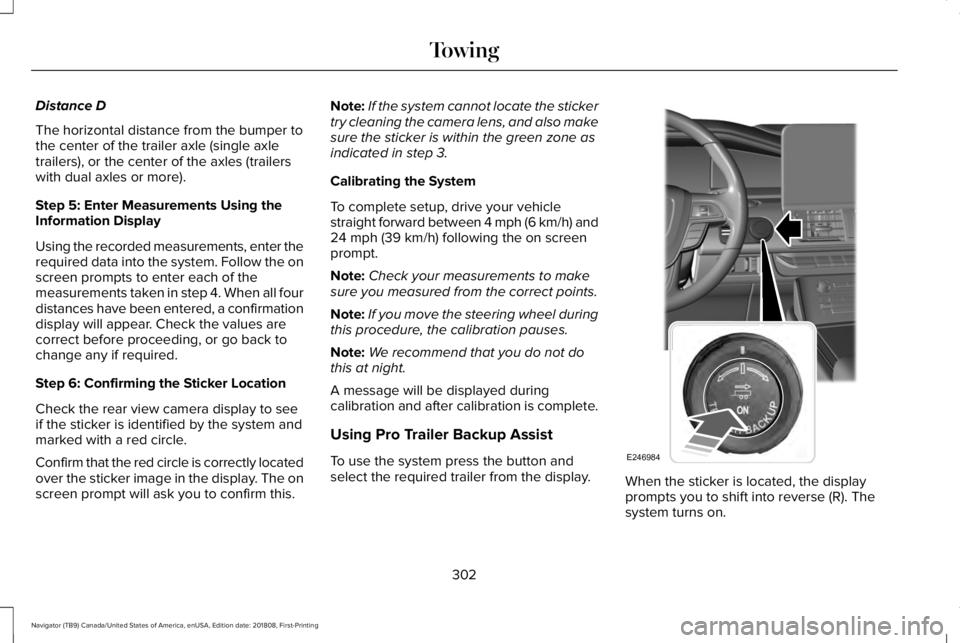
To use the system press the button andselect the required trailer from the display.When the sticker is located, the displayprompts you to shift into reverse (R). Thesystem turns on.
302
Navigator (TB9) Canada/United States of America, enUSA, Edition date: 201808, First-Printing
TowingE246984
Page 306 of 645

Note:The system does not function if yourhands are on the steering wheel. Removeyour hands to resume operation.
Follow the screen prompts to steer yourvehicle and trailer.
Note:You may have to drive forward tostraighten the trailer.
Take your hands off the steering wheel andturn the Pro Trailer Backup Assist controlknob instead. The knob acts as the steeringcontrol for the trailer.
Note:The more you turn the knob, thesharper the trailer turns.
Turn and hold counterclockwise to make thetrailer go left.
Turn and hold clockwise to make the trailergo right.
Note:Practice maneuvering with the systemin a safe open area first.
Note:Try backing up in a straight line andthen turning the knob slowly in the directionyou want to go.
Note:Quickly turning and releasing the knobresults in a jerky movement of the vehicle.
Release the knob when the trailer is movingin the direction you want. Control theaccelerator and brakes while the systemsteers your vehicle automatically to keep thetrailer moving straight back.
Note:You may have to use the knob tocorrect the trailer direction when attemptingto move the trailer straight back under someconditions.
Note:Your vehicle speed is automaticallylimited.
Note:When you release the knob or turn itto the center position, your vehicle followsthe trailer's path.
Troubleshooting
Note:The system requires a clear view ofthe sticker placed on the trailer. You mustkeep the camera lens and sticker clean forthe system to operate correctly.
303
Navigator (TB9) Canada/United States of America, enUSA, Edition date: 201808, First-Printing
TowingE246992 E246991 E246993
Page 308 of 645

either too far below or too close to thecamera to properly recognize the sticker.In order for the system to operatecorrectly the sticker height must belowered if you receive the minimumwarning or the sticker height must beraised if you receive the maximumwarning.
•Only one sticker can be placed on thetrailer for correct system function. Theprevious sticker must be removed orcovered so only one sticker is visible tothe camera.
•Measurement B and C must be measuredagain if a new sticker is placed on thetrailer.
Measurement D has reached maximum orminimum value:
•Make sure that the measurement beingmade is the horizontal distance only fromthe bumper to the center of the singleaxle or the center of all the axles on thetrailer. See step 4 of the setup foradditional measurement instructions. TheTBA system does not support trailerlengths outside the range allowed by theinformation display.
System is circling something beside thesticker or system cannot find the sticker:
•Make sure the rear camera is clean andthe sticker is clearly visible in the cameraimage. Clean the camera and sticker ifnecessary.
•The camera system uses the enteredmeasurements to help locate the sticker.Inaccurate sticker measurements willdegrade the system’s ability to locate thesticker. Verify the measurements enteredinto the system are accurate.
•Remove the incorrectly circled label ordecal if possible.
•If you cannot resolve the issue a newsticker location should be tried. Thesticker location must still meet therequirements noted in step 3 of the setupinstructions. Only one sticker can beplaced on the trailer for correct systemfunction. The previous sticker must beremoved or covered so only one stickeris visible to the camera.
Calibration
The system monitors various vehicleparameters to ensure your vehicle is beingdriven straight and the trailer straight behindyour vehicle. Any steering input or trailermovement will pause the calibration.
For best results:
•Use a long, straight, smooth and levelroad when attempting to calibrate.
•Drive straight forward.
•Drive between 4 mph (6 km/h) and24 mph (39 km/h).
System Operation
The following warnings or difficulties mayoccur during feature operation. Tips toresolve them are listed below.
305
Navigator (TB9) Canada/United States of America, enUSA, Edition date: 201808, First-Printing
Towing
Page 311 of 645

•If the sticker location needs to bechanged, the previous sticker must beremoved and a new sticker needs to beplaced on the trailer. ONLY ONESTICKER SHOULD BE PLACED ON THETRAILER FOR PROPER SYSTEMFUNCTION.
•Disregard the prompt to remove thissticker and continue to the next step ifyou only plan to update themeasurements for the current stickerlocation.
System consistently shows Stop now takecontrol of steering warning:
•The system displays this warning whenit can no longer steer the vehicle and youmust take over steering. There are fourreasons why this warning displays andadditional information regarding thereason for the warning is available on thecenter display.
•The steering wheel is touched while thesystem is controlling it. Avoid touchingthe wheel during system operation.
•The maximum speed for featureoperation is exceeded. Systemperformance is optimized at slowerspeeds. Backup slowly.
•The sticker was lost by the camerasystem. Once your vehicle is stoppedadditional warnings will indicate thesticker was lost. Refer to sticker losttrouble shooting tips.
•An internal condition for systemoperation was not met which requiresyour vehicle return to manual control ofthe steering.
Note:The system is designed to be usedwith the same trailer connection every timethe trailer is chosen from the selection menu.Using a different drawbar or a different pinhole (on drawbars with more than one) whenconnecting the drawbar to your vehicleaffects the trailer measurements. Take themeasurements again and update if required.
TRAILER SWAY CONTROL
WARNING: Turning off trailer swaycontrol increases the risk of loss of vehiclecontrol, serious injury or death. Ford doesnot recommend disabling this featureexcept in situations where speed reductionmay be detrimental (such as hill climbing),the driver has significant trailer towingexperience, and can control trailer swayand maintain safe operation.
Note:This feature does not prevent trailersway, but reduces it once it begins.
Note:This feature cannot stop all trailersfrom swaying.
Note:In some cases, if vehicle speed is toohigh, the system may activate multiple times,gradually reducing vehicle speed.
308
Navigator (TB9) Canada/United States of America, enUSA, Edition date: 201808, First-Printing
Towing
Page 321 of 645

Before Towing a Trailer
Practice turning, stopping and backing up toget the feel of your vehicle-trailercombination before starting on a trip. Whenturning, make wider turns so the trailerwheels clear curbs and other obstacles.
When Towing a Trailer
•Do not drive faster than 70 mph(113 km/h) during the first 500 mi(800 km).
•Do not make full-throttle starts.
•Check your hitch, electrical connectionsand trailer wheel lug nuts thoroughly afteryou have traveled 50 mi (80 km).
•When stopped in congested or heavytraffic during hot weather, place thetransmission in park (P) to aid engine andtransmission cooling and to help A/Cperformance.
•Turn off the speed control when carryingheavy loads or in hilly terrain. The speedcontrol may turn off automatically whenyou are towing on long, steep grades.
•Shift to a lower gear when driving downa long or steep hill. Do not apply thebrakes continuously, as they mayoverheat and become less effective.
•If your transmission has a Grade Assistor Tow/Haul feature, use this featurewhen towing. This provides enginebraking and helps eliminate excessivetransmission shifting for optimum fueleconomy and transmission cooling.
•If your vehicle has AdvanceTrac withRSC, this system may turn on duringtypical cornering maneuvers with aheavily loaded trailer. This is normal.Turning the corner at a slower speedwhile towing may reduce this tendency.
•If your vehicle has Adaptive suspension,you can select NORMAL or SPORT drivecontrol modes for better experiencewhen towing a trailer. See InformationDisplays (page 120).
•If you are towing a trailer frequently inhot weather, hilly conditions, at the grosscombined weight rating (or anycombination of these factors), considerrefilling your rear axle with synthetic gearlubricant (if the axle is not already filledwith it). See Capacities andSpecifications (page 418).
•Allow more distance for stopping with atrailer attached. Anticipate stops andbrake gradually.
•Avoid parking on a grade. However, ifyou must park on a grade:
1. Turn the steering wheel to point yourvehicle tires away from traffic flow.
2. Set your vehicle parking brake.
3. Place the transmission in park (P).
4.Place wheel chocks in the front and backof the trailer wheels.
Note:Chocks are not included with yourvehicle.
318
Navigator (TB9) Canada/United States of America, enUSA, Edition date: 201808, First-Printing
Towing
Page 322 of 645

Your vehicle may be equipped with atemporary or conventional spare tire. Atemporary spare tire is different in size(diameter or width), tread-type (All-Seasonor All-Terrain) or is from a differentmanufacturer than the road tires on yourvehicle. Consult information on the tire labelor Safety Compliance label for limitationswhen using.
Launching or Retrieving a Boat orPersonal Watercraft (PWC)
Note:Disconnect the wiring to the trailerbefore backing the trailer into the water.
Note:Reconnect the wiring to the trailerafter removing the trailer from the water.
When backing down a ramp during boatlaunching or retrieval:
•Do not allow the static water level to riseabove the bottom edge of the rearbumper.
•Do not allow waves to break higher than6 in (15 cm) above the bottom edge ofthe rear bumper.
Exceeding these limits may allow water toenter vehicle components:
•Causing internal damage to thecomponents.
•Affecting driveability, emissions, andreliability.
Replace the rear axle lubricant anytime therear axle has been submerged in water.Water may have contaminated the rear axlelubricant, which is not normally checked orchanged unless a leak is suspected or otheraxle repair is required.
TOWING THE VEHICLE ON FOUR
WHEELS
WARNING: If your vehicle has asteering wheel lock make sure the ignitionis in the accessory or on position whenbeing towed.
Recreational Towing
Note:Put your climate control system inrecirculated air mode to prevent exhaustfumes from entering your vehicle. SeeClimate Control (page 152).
Follow these guidelines if you have a needfor recreational towing, such as towing yourvehicle behind a motorhome. Theseguidelines are designed to prevent damageto your transmission.
Two-wheel Drive Vehicles
You cannot tow a two-wheel drive vehiclewith any wheels on the ground as vehicle ortransmission damage may occur. You musttow your vehicle with all four wheels off theground, for example when using acar-hauling trailer.
319
Navigator (TB9) Canada/United States of America, enUSA, Edition date: 201808, First-Printing
Towing