Page 110 of 645

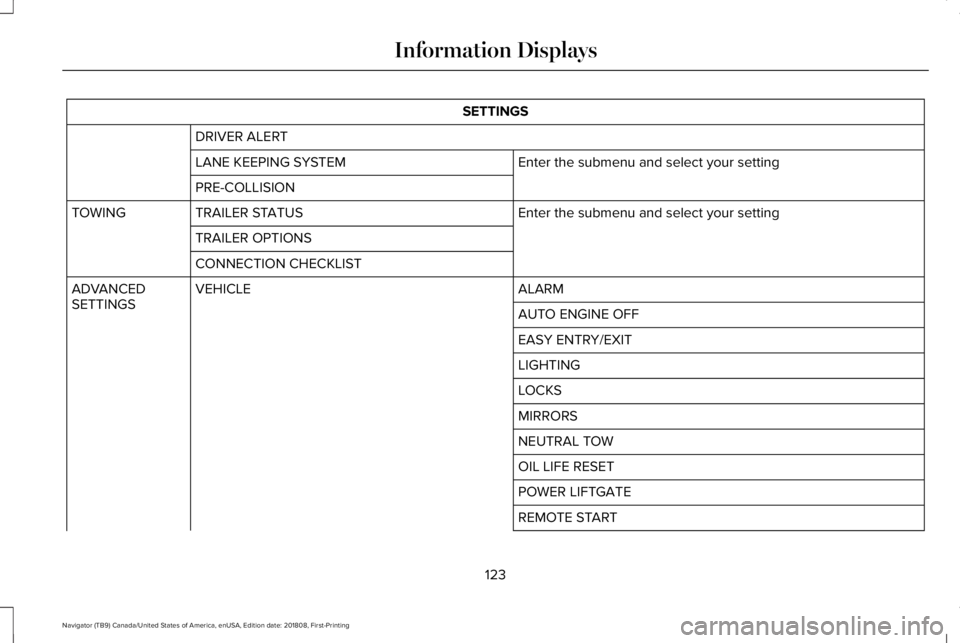
Left-hand mirror.A
Right-hand mirror.B
Adjustment control.C
Window lockout.D
Power-folding mirror control.E
To adjust a mirror:
1.Select the mirror you want to adjust. Thecontrol will light.
2. Adjust the position of the mirror.
3. Press the mirror control again.
Fold-Away Exterior Mirrors
Push the mirror toward the door windowglass. Make sure that you fully engage themirror in its support when returning it to itsoriginal position.
Auto-Folding Mirrors (If Equipped)
The exterior mirrors automatically fold intoward the glass after you place thetransmission into park (P), turn off the vehicle,open and close the driver's side door andlock the vehicle. The exterior mirrorsautomatically unfold and return to theirdriving position after you unlock the vehicleand open and close the driver's side door.
You can switch this feature on and offthrough the information display. See GeneralInformation (page 120).
You can fold the mirrors on demand bypressing the power-folding mirror controllocated on the door. The control lights andthe mirrors fold in toward the glass. Pressthe control again to unfold the mirrors. Thecontrol light turns off.
Note:If you use the power-folding control tofold the mirrors on demand and the auto foldfeature is switched on, you must use thecontrol again to unfold them.
107
Navigator (TB9) Canada/United States of America, enUSA, Edition date: 201808, First-Printing
Windows and MirrorsE176219 E170431
Page 111 of 645

Loose Mirror
If your power-folding mirrors are manuallyfolded, they may not work properly evenafter you re-position them. You need to resetthem if:
•The mirrors vibrate when you drive.
•The mirrors feel loose.
•The mirrors do not stay in the folded orunfolded position.
•One of the mirrors is not in its normaldriving position.
To reset the power-fold feature, use thepower-folding mirror control to fold andunfold the mirrors. You may hear a loud noiseas you reset the power-folding mirrors. Thissound is normal. Repeat this process asneeded each time the mirrors are manuallyfolded.
Heated Exterior Mirrors
See Heated Exterior Mirrors (page 156).
Memory Mirrors
You can save and recall the mirror positionsthrough the memory function. See MemoryFunction (page 167).
Auto-Dimming Feature
The driver’s exterior mirror automaticallydims when the interior auto-dimming mirrorturns on.
Signal Indicator Mirrors (If Equipped)
The outer portion of the appropriate mirrorhousing blinks when you switch on thedirection indicator.
Lincoln Welcome Mat
Projection lights, on the bottom of the mirrorhousings, project an image onto the grounda short distance from the vehicle.
360-Degree Camera (If Equipped)
See 360 Degree Camera (page 252).
Blind Spot Monitor
See Blind Spot Information System (page271).
INTERIOR MIRROR
WARNING: Do not adjust the mirrorswhen your vehicle is moving. This couldresult in the loss of control of your vehicle,serious personal injury or death.
Note:Do not clean the housing or glass ofany mirror with harsh abrasives, fuel or otherpetroleum or ammonia-based cleaningproducts.
You can adjust the interior mirror to yourpreference. Some mirrors also have a secondpivot point. This lets you move the mirrorhead up or down and from side to side.
108
Navigator (TB9) Canada/United States of America, enUSA, Edition date: 201808, First-Printing
Windows and Mirrors
Page 112 of 645

Auto-Dimming Mirror
Note: Do not block the sensors on the frontand back of the mirror. A rear centerpassenger or raised rear center headrestraint may also block light from reachingthe sensor.
The mirror dims to reduce the effect of brightlight from behind. It returns to normal whenthe bright light from behind is no longerpresent or if you shift into reverse (R).
CHILDMINDER MIRROR
On overhead consoles, the childmindermirror allows the driver to view the rearseating area.
WARNING: Do not use thechildminder mirror to view rearward traffic,do not allow rear passengers to distractyou from the driving task, and make surethe rear view mirror has a clear view ofrearward traffic. Failure to do so couldincrease the risk of a crash from an unseenvehicle, which may result in serious injury.
Pull down the rear edge of the childmindermirror to open. You can adjust thechildminder mirror to any position up to fullopen to aid in visibility.
TOLL READER
Installing the Toll Reader
Install the toll reader or radio-controlledequipment on the driver side of thewindshield behind the interior mirror.
Note:Follow the manufacturer's installationinstructions.
109
Navigator (TB9) Canada/United States of America, enUSA, Edition date: 201808, First-Printing
Windows and MirrorsE190497 E274072
Page 117 of 645

Status Bar.A
Speedometer.B
Right Information Group.C
Fuel Gauge.D
Coolant Gauge.E
Left Information Group.F
Status Bar
Displays information related to the currentaudio source, compass direction and outsideair temperature.
Left and Right Information Group
Information that appears depends on currentgauge view and on-demand settings. SeeGeneral Information (page 120).
Fuel Gauge
The fuel gauge indicates about how muchfuel is in the fuel tank.
The arrow adjacent to the fuel pump symbolindicates on which side of your vehicle thefuel filler door is located.
Note:The fuel gauge may vary slightly whenyour vehicle is moving or on a slope.
Low Fuel Reminder
A low fuel level reminder displays andsounds when the distance to empty reaches75 mi (120 km) to empty for MyKey, and at50 mi (80 km), 25 mi (40 km), 10 mi (20 km)and 0 mi (0 km) for all vehicle keys.
Note:The low fuel reminder can appear atdifferent fuel gauge positions depending onfuel economy conditions. This variation isnormal.
Engine Coolant Temperature Gauge
Indicates engine coolant temperature. Atnormal operating temperature, the levelindicator will be in the normal range. If theengine coolant temperature exceeds thenormal range, stop your vehicle as soon assafely possible, switch off the engine and letthe engine cool.
WARNING: Do not remove thecoolant reservoir cap when the coolingsystem is hot. Wait 10 minutes for thecooling system to cool down. Cover thecoolant reservoir cap with a thick cloth toprevent the possibility of scalding andslowly remove the cap. Failure to followthis instruction could result in personalinjury.
WARNING LAMPS AND
INDICATORS
The following warning lamps and indicatorsalert you to a vehicle condition that maybecome serious. Some lamps illuminatewhen you start your vehicle to make surethey work. If any lamps remain on afterstarting your vehicle, refer to the respectivesystem warning lamp for further information.
Note:Some warning indicators appear inthe information display and operate thesame as a warning lamp but do notilluminate when you start your vehicle.
114
Navigator (TB9) Canada/United States of America, enUSA, Edition date: 201808, First-Printing
Instrument Cluster
Page 123 of 645
GENERAL INFORMATION
WARNING: Driving while distractedcan result in loss of vehicle control, crashand injury. We strongly recommend thatyou use extreme caution when using anydevice that may take your focus off theroad. Your primary responsibility is the safeoperation of your vehicle. We recommendagainst the use of any hand-held devicewhile driving and encourage the use ofvoice-operated systems when possible.Make sure you are aware of all applicablelocal laws that may affect the use ofelectronic devices while driving.
You can control various systems on yourvehicle using the quick action menu (QAM)buttons on the right-hand side of the steeringwheel. The information display provides thecorresponding information.
Note:Some options may appear slightlydifferent or not at all if the items are optional.
Note:Trailer options are not available if yourvehicle speed is greater than 3 mph (5 km/h).
Note:Some MyKey menu options onlyappear if MyKey is enabled and at least oneMyKey is programmed.
This icon gives you the ability toswitch a feature on or off. A checkin the box indicates the feature ison, and unchecked indicates the feature isoff.
120
Navigator (TB9) Canada/United States of America, enUSA, Edition date: 201808, First-Printing
Information DisplaysE204495
Page 124 of 645
Information Display ControlsBack Button.A
Toggle Up.B
OK Button.C
Toggle Down.D
Phone QAM Buttons.E
Audio QAM Button.F
Navigation QAM Button.G
Settings QAM Button.H
Display QAM Button.I
Note:The DISP button is replaced with aHUD button on vehicles equipped with ahead up display (HUD). See Head UpDisplay (page 148).
Note:The NAV button is replaced with acompass button on vehicles withoutnavigation.
•Press one of the QAM buttons to enter amenu.
•Toggle (B) and (D) to scroll through andhighlight the options within a menu.
•Press (C) to enter a sub-menu.
•Press (A) to exit a menu.
•Press the open menu's QAM button atany time to close the menu (escapebutton).
•Press (C) to choose and confirm settingsor messages.
121
Navigator (TB9) Canada/United States of America, enUSA, Edition date: 201808, First-Printing
Information DisplaysE247519
Page 126 of 645
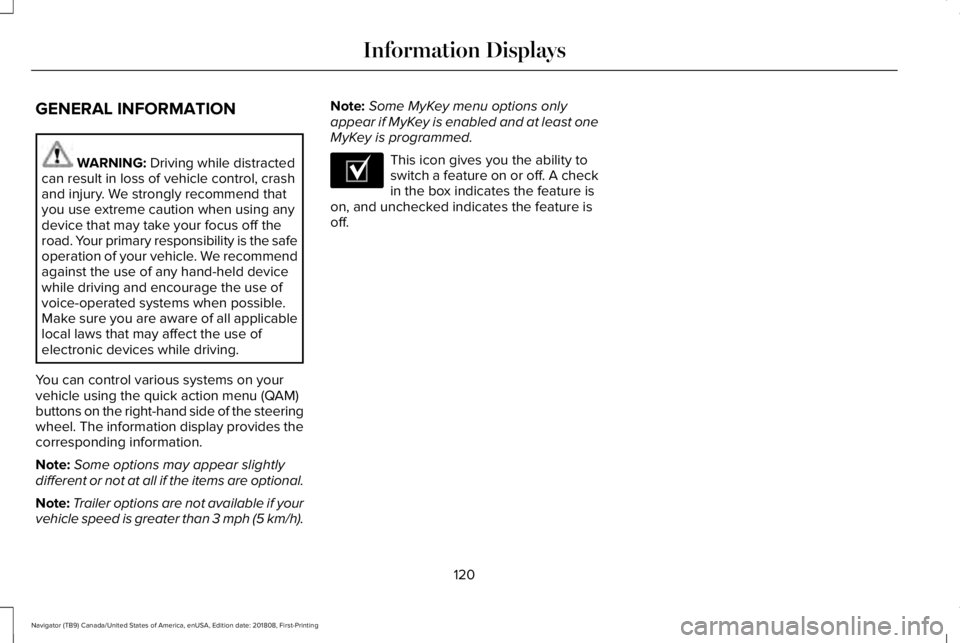
SETTINGS
DRIVER ALERT
Enter the submenu and select your settingLANE KEEPING SYSTEM
PRE-COLLISION
Enter the submenu and select your settingTRAILER STATUSTOWING
TRAILER OPTIONS
CONNECTION CHECKLIST
ALARMVEHICLEADVANCEDSETTINGSAUTO ENGINE OFF
EASY ENTRY/EXIT
LIGHTING
LOCKS
MIRRORS
NEUTRAL TOW
OIL LIFE RESET
POWER LIFTGATE
REMOTE START
123
Navigator (TB9) Canada/United States of America, enUSA, Edition date: 201808, First-Printing
Information Displays
Page 148 of 645

Trailer
ActionMessage
The current gain setting for the trailer brake.Trailer Brake Gain: {trailer gain value:#0.0}
The current gain setting for the trailer brake when a trailer is not connected.Trailer Brake Gain: {trailer gain value:#0.0} No Trailer
Faults sensed in the Integrated Trailer Brake Control Module followed by a singlechime. See Towing a Trailer (page 297).Trailer Brake Module Fault
A correct trailer connection is sensed during a given ignition cycle.Trailer Connected
A trailer connection becomes disconnected, either intentionally or unintentionally,and has been sensed during a given ignition cycle.Trailer Disconnected
The trailer sway control has detected trailer sway.Trailer Sway Reduce Speed
There are certain faults in your vehicle wiring and trailer wiring/brake system.See Towing a Trailer (page 297).Trailer Wiring Fault
There is a fault with your trailer turn lamp. Check your lamp.Trailer Left Turn Lamps Fault Check Lamps
There is a fault with your trailer turn lamp. Check your lamp.Trailer Right Turn Lamps Fault Check Lamps
There is a fault with your trailer battery. See Towing a Trailer (page 297).Trailer Battery Not Charging See Manual
There is a fault with your vehicle trailer lighting module. See Towing a Trailer(page 297).Trailer Lighting Module Fault See Manual
One or more tires on your trailer is below the specified tire pressure.Trailer Tire Low Specified:
145
Navigator (TB9) Canada/United States of America, enUSA, Edition date: 201808, First-Printing
Information Displays