Page 262 of 645

The selected gap appears in the informationdisplay as shown by the bars in the image.
Note:The gap setting is time dependent andtherefore the distance adjusts with yourvehicle speed.
Note:It is your responsibility to select a gapappropriate to the driving conditions.
Adaptive Cruise Control Gap Settings
DynamicbehaviorDistance GapGraphicdisplay,bars indic-atedbetweenvehicles
Sport.Closest.1
Normal.Close.2
Normal.Medium.3
Comfort.Far.4
Each time you switch the system on, itselects the last chosen gap setting.
Overriding the Set Speed
WARNING: If you override thesystem by pressing the accelerator pedal,it does not automatically apply the brakesto maintain a gap from any vehicle ahead.
When you press the accelerator pedal, youoverride the set speed and gap distance.
Use the accelerator pedal normallyto intentionally exceed the setspeed limit.
When you override the system, the greenindicator light illuminates and the vehicleimage does not appear in the informationdisplay.
The system resumes operation when yourelease the accelerator pedal. The vehiclespeed decreases to the set speed, or a lowerspeed if following a slower vehicle.
Changing the Set Speed
Press and release to increase theset speed in small increments.
Press and release to decrease theset speed in small increments.
Press and hold either button to change theset speed in large increments. Release thebutton when you reach your preferred speed.
259
Navigator (TB9) Canada/United States of America, enUSA, Edition date: 201808, First-Printing
Cruise ControlE255686 E144529 E265299
Page 263 of 645

The system may apply the brakes to slowthe vehicle to the new set speed. The setspeed displays continuously in theinformation display when the system isactive.
Canceling the Set Speed
Press and release the button or tapthe brake pedal.
The set speed does not erase.
Resuming the Set Speed
Press and release the button.
Your vehicle speed returns to the previouslyset speed and gap setting. The set speeddisplays continuously in the informationdisplay when the system is active.
Note:Only use resume if you are aware ofthe set speed and intend to return to it.
Automatic Cancellation
Automatic cancellation can also occur when:
•The tires lose traction.
•You apply the parking brake.
Park Brake Application
Automatic parking brake application andcancellation occurs if:
•You unbuckle the seatbelt and open thedoor after you stop the vehicle.
•You hold the vehicle at a stopcontinuously for more than three minutes.
Hilly Condition Usage
You should select a lower gear when thesystem is active in situations such asprolonged downhill driving on steep grades,for example in mountainous areas. Thesystem needs additional engine braking inthese situations to reduce the load on thevehicle’s regular brake system to prevent itfrom overheating.
Note:An audible alarm sounds and thesystem shuts down if it applies brakes for anextended period of time. This allows thebrakes to cool. The system functionsnormally again after the brakes cool.
Switching Adaptive Cruise Control Off
Press and release the button whenthe system is in standby mode, orswitch the ignition off.
Note:You erase the set speed and gapsetting when you switch the system off.
Detection Issues
WARNING: On rare occasions,detection issues can occur due to the roadinfrastructures, for example bridges,tunnels and safety barriers. In these cases,the system may brake late orunexpectedly. At all times, you areresponsible for controlling your vehicle,supervising the system and intervening, ifrequired.
WARNING: If the systemmalfunctions, have your vehicle checkedas soon as possible.
260
Navigator (TB9) Canada/United States of America, enUSA, Edition date: 201808, First-Printing
Cruise Control E265299 E265297
Page 264 of 645

The radar sensor has a limited field of view.It may not detect vehicles at all or detect avehicle later than expected in somesituations. The lead vehicle graphic does notilluminate if the system does not detect avehicle in front of you.
Detection issues can occur:
When driving on a different linethan the vehicle in front.A
With vehicles that edge into yourlane. The system can only detectthese vehicles once they movefully into your lane.
B
There may be issues with thedetection of vehicles in front whendriving into and coming out of abend or curve in the road.
C
In these cases, the system may brake late orunexpectedly. You should stay alert and takeaction when necessary.
If something hits the front end of your vehicleor damage occurs, the radar-sensing zonemay change. This could cause missed orfalse vehicle detection.
Optimal system performance requires a clearview of the road by the windshield-mountedcamera.
Optimal performance may not occur if:
261
Navigator (TB9) Canada/United States of America, enUSA, Edition date: 201808, First-Printing
Cruise ControlE71621
Page 265 of 645
•The camera is blocked.
•There is poor visibility or lightingconditions.
•There are bad weather conditions.
System Not Available
Conditions that can cause the system todeactivate or prevent the system fromactivating when requested include:
•A blocked sensor.
•High brake temperature.
•A failure in the system or a relatedsystem.
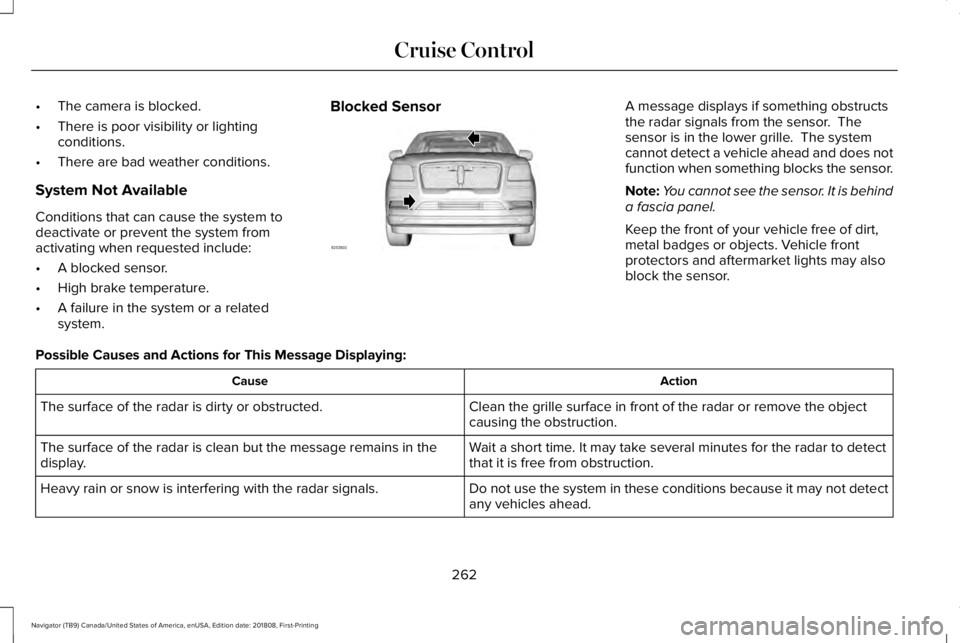
Blocked SensorA message displays if something obstructsthe radar signals from the sensor. Thesensor is in the lower grille. The systemcannot detect a vehicle ahead and does notfunction when something blocks the sensor.
Note:You cannot see the sensor. It is behinda fascia panel.
Keep the front of your vehicle free of dirt,metal badges or objects. Vehicle frontprotectors and aftermarket lights may alsoblock the sensor.
Possible Causes and Actions for This Message Displaying:
ActionCause
Clean the grille surface in front of the radar or remove the objectcausing the obstruction.The surface of the radar is dirty or obstructed.
Wait a short time. It may take several minutes for the radar to detectthat it is free from obstruction.The surface of the radar is clean but the message remains in thedisplay.
Do not use the system in these conditions because it may not detectany vehicles ahead.Heavy rain or snow is interfering with the radar signals.
262
Navigator (TB9) Canada/United States of America, enUSA, Edition date: 201808, First-Printing
Cruise ControlE253503
Page 266 of 645

ActionCause
Do not use the system in these conditions because it may not detectany vehicles ahead.Water, snow or ice on the surface of the road may interfere with theradar signals.
Wait a short time or switch to normal cruise control.You are in a desert or remote area with no other vehicles and noroadside objects.
Due to the nature of radar technology, it is possible to get a blockage warning with no actual block. A false blocked condition either selfclears, or clears after you restart your vehicle.
Switching to Normal Cruise Control
WARNING: Normal cruise control willnot brake when your vehicle isapproaching slower vehicles. Always beaware of which mode you have selectedand apply the brakes when necessary.
The cruise control indicator lightreplaces the adaptive cruisecontrol indicator light if you selectnormal cruise control. The gap setting doesnot display, and the system does not respondto lead vehicles. Automatic braking remainsactive to maintain set speed.
You can change from adaptive cruise controlto normal cruise control through theinformation display. See GeneralInformation (page 120).
263
Navigator (TB9) Canada/United States of America, enUSA, Edition date: 201808, First-Printing
Cruise ControlE71340
Page 271 of 645
Intensity: This setting affects the intensity ofthe steering wheel vibration used for the alertand alert and aid modes. This setting doesnot affect the aid mode.
•Low.
•Medium.
•High.
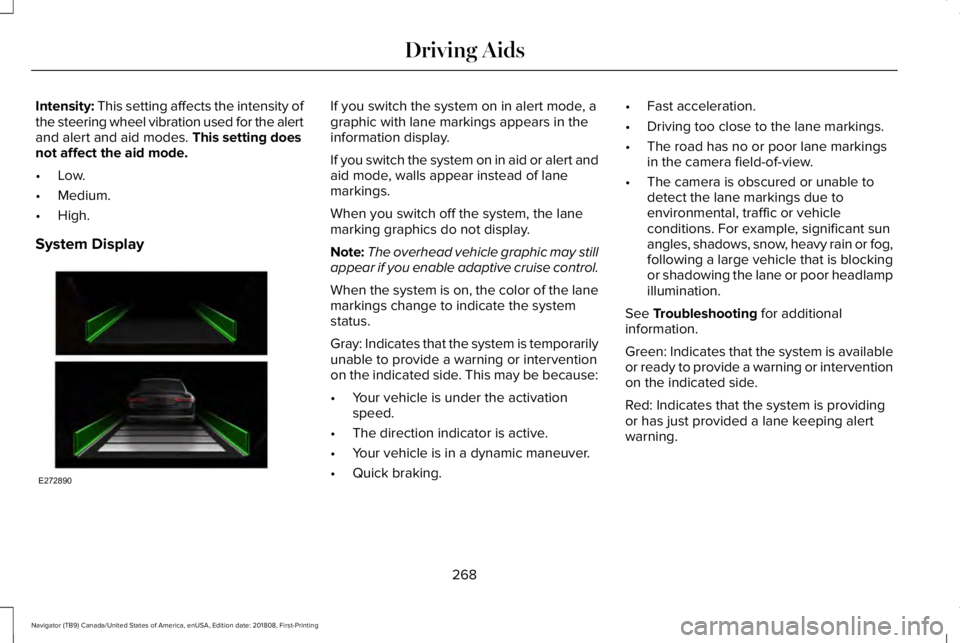
System Display
If you switch the system on in alert mode, agraphic with lane markings appears in theinformation display.
If you switch the system on in aid or alert andaid mode, walls appear instead of lanemarkings.
When you switch off the system, the lanemarking graphics do not display.
Note:The overhead vehicle graphic may stillappear if you enable adaptive cruise control.
When the system is on, the color of the lanemarkings change to indicate the systemstatus.
Gray: Indicates that the system is temporarilyunable to provide a warning or interventionon the indicated side. This may be because:
•Your vehicle is under the activationspeed.
•The direction indicator is active.
•Your vehicle is in a dynamic maneuver.
•Quick braking.
•Fast acceleration.
•Driving too close to the lane markings.
•The road has no or poor lane markingsin the camera field-of-view.
•The camera is obscured or unable todetect the lane markings due toenvironmental, traffic or vehicleconditions. For example, significant sunangles, shadows, snow, heavy rain or fog,following a large vehicle that is blockingor shadowing the lane or poor headlampillumination.
See Troubleshooting for additionalinformation.
Green: Indicates that the system is availableor ready to provide a warning or interventionon the indicated side.
Red: Indicates that the system is providingor has just provided a lane keeping alertwarning.
268
Navigator (TB9) Canada/United States of America, enUSA, Edition date: 201808, First-Printing
Driving AidsE272890
Page 285 of 645
If the time gap to a preceding vehicle issmall, a red visual indication appears.
Note:Distance Indication and Alertdeactivates and the graphics do not displaywhen adaptive cruise control is active.
Time GapDistance GapGraphicsSensitivitySpeed
>0.9sec>82 ft (25 m)GreyNormal62 mph (100 km/h)
0.6sec — 0.9sec56–82 ft (17–25 m)YellowNormal62 mph (100 km/h)
<0.6sec<56 ft (17 m)RedNormal62 mph (100 km/h)
282
Navigator (TB9) Canada/United States of America, enUSA, Edition date: 201808, First-Printing
Driving AidsE254797
Page 347 of 645
Protected ComponentFuse RatingFuse Number
RH-LDM, LH-LDM.15A115Voltage quality module.Blindspot information system.Cruise control module.Tailgate applique.Image processing module B.
Powertrain control module (PCM) run/start feed.10A116
Anti-lock brake system (ABS) run/start feed.10A117
Electronic power assist steering, run/start feed.10A118
Not used.—19
Front blower.40A220
Passenger seat motors.40A221
Not used.—22
Alternator A-line.10A123
Trailer brake control module.30A224
Body control module power 1.50A225
344
Navigator (TB9) Canada/United States of America, enUSA, Edition date: 201808, First-Printing
Fuses

