Page 435 of 595

Website
http://hdradio.com/stations/feedback
HD Radio Technology manufactured underlicense from iBiquity Digital Corporation andforeign patents. HD Radio and the HD andHD Radio logos are proprietary trademarksof DTS. Ford Motor Company and DTS arenot responsible for the content sent usingHD Radio technology. Content may bechanged, added or deleted at any time atthe station owner's discretion.
CD (If equipped)
Once you select this option, the systemreturns you to the main audio screen.
The current audio information appears onthe screen.
The following buttons are also available:
FunctionButton
You can use the browse button to select a track.Browse
Select this button and a small number one displays to indicate the track is set to repeat.RepeatFor MP3 CDs, this button allows you to toggle through repeat off, repeat one track (a small numberone displays), and repeat current folder (a small folder displays).
Select the shuffle symbol to have the audio on the disk play in random order.Shuffle
432
MKZ (CC9) Canada/United States of America, enUSA, Edition date: 201805, First-Printing
SYNC™ 3
Page 441 of 595

Note: the passenger sidetemperature and the DUALindication automatically turn onwhen you or your passenger adjustthe passenger temperature.
Passenger temperature: Touch upor down to adjust the temperature.G
Fan speed: Touch up or down toincrease or decrease the volumeof air that circulates in your vehicle.
H
Note: You cannot adjust the fanspeed when the system is set toAUTO, MAX A/C or MAX Defrost.
A/C: A pop-up appears on thescreen to display the airconditioning options.
I
MAX A/C: Touch the button toactivate and maximize cooling. Thedriver and passenger temperaturesare set to LO, recirculated air flowsthrough the instrument panelvents, air conditioningautomatically turns on and the fanautomatically adjusts to the highestspeed.
A/C: Touch to switch the airconditioning on or off. Use A/Cwith recirculated air to improvecooling performance andefficiency.
Note: In certain conditions (forexample, Max Defrost), the airconditioning compressor maycontinue to operate even whenyou switch the air conditioning A/Cbutton off.
Recirculated air: Touch to switchthe recirculated air on or off. Whenrecirculated air is on, it may reducethe amount of time needed to cooldown the interior (when used withA/C) and help reduce odors fromreaching the interior.
Note: Recirculated air may turn offautomatically (or the system mayprevent it from turning on) in allairflow modes except MAX A/C toreduce risk of fogging. It may alsoturn on and off automatically inPanel or Panel/Floor airflow modesduring hot weather in order toimprove cooling efficiency.
Manual airflow distributioncontrols: Select these controlsindividually, together, or withDefrost to direct the air flow to thearea you desire.
J
Panel: Distributes air through theinstrument panel vents.
Floor: Distributes air through thedemister vents, floor vents and rearseat floor vents.
438
MKZ (CC9) Canada/United States of America, enUSA, Edition date: 201805, First-Printing
SYNC™ 3
Page 453 of 595

DescriptionMenu Item
This is in a decimal degrees format, one to six decimal places are accepted.
You are given autocomplete options below the address bar to select as you type.If you do not give an exact destination, a menu displays with your possible selections.
Collections of your last 40 navigation destinations display here.Previous DestinationsYou can select any option from the list to select it as your destination.
Select this option to remove all previous destinations.Delete All
Select to navigate to your set Home destination.HomeThe time it takes to travel from your current location to Home displays.To set your Home, press:
A prompt appears asking if you would like to create a favorite for home. Select:Home
Enter a location into the search bar and press:Yes
Save
Select to navigate to your set Work destination.WorkThe time it takes to travel from your current location to Work displays.To set your Work:
A prompt appears asking if you would like to create a favorite for work. Select:Work
Enter a location into the search bar and press:Yes
Save
450
MKZ (CC9) Canada/United States of America, enUSA, Edition date: 201805, First-Printing
SYNC™ 3
Page 462 of 595

Action and Descrip-tionMenu Item
SYNC 3 will searchand connect tocompatible app(s)running on yourmobile device.
Find Mobile Apps
Enabling SYNC 3 Mobile Apps
In order to enable mobile apps, SYNC 3requires user consent to send and receiveapp authorization information and updatesusing the data plan associated with theconnected device.
The connected device sends data to Lincolnin the United States. The information isencrypted and includes your VIN, SYNC 3module number, odometer, usage statisticsand debugging information. We retain thisdata for only as long as necessary to providethis service, troubleshoot, and improveproducts and services and to offer youproducts and services that may interest youwhere allowed by law.
Note:You must enable mobile apps for eachconnected device the first time you select amobile app using the system.
Note:Lincoln reserves the right to limitfunctionality or deactivate mobile apps atany time.
Note: Standard data rates apply. Lincoln isnot responsible for any additional chargesyou may receive from your service provider,when your vehicle sends or receives datathrough the connected device. This includesany additional charges incurred due todriving in areas when roaming out of a homenetwork.
You can enable and disable apps throughsettings. See Settings (page 461).
App Permissions
The system organizes the app permissionsinto groups. You can individually grant thesegroup permissions.You can change apermission group status any time when notdriving, by using the settings menu. Whilein the settings menu, you can also see thedata included in each group.
When you launch an app using SYNC 3, thesystem may ask you to grant certainpermissions, for example Vehicle information,Driving characteristics, GPS and Speed,and/or Push notifications. You can enable allgroups or none of them during the initial apppermissions prompts. The settings menuoffers individual group permission control.
Note:You are only prompted to grantpermissions the first time you use an appwith SYNC 3.
Note:If you disable group permissions, appswill still be enabled to work with SYNC 3unless you deactivate All Apps in the settingsmenu.
SiriusXM Traffic and Travel Link (If
Equipped)
WARNING: Driving while distractedcan result in loss of vehicle control, crashand injury. We strongly recommend that youuse extreme caution when using any devicethat may take your focus off the road. Yourprimary responsibility is the safe operation
459
MKZ (CC9) Canada/United States of America, enUSA, Edition date: 201805, First-Printing
SYNC™ 3
Page 467 of 595
Action and DescriptionMenu Item
Select how time displays.Clock Format
When active, the clock adjusts to time zone changes.Auto Time Zone UpdateThis feature is only available in vehicles with navigation.
When selected, the vehicle clock resets to GPS satellite time.Reset Clock to GPS Time
The system automatically saves any updatesyou make to the settings.
Bluetooth
Pressing this button allows you to access thefollowing:
ActionMenu Item
OnBluetooth
Off
You must activate Bluetooth to pair aBluetooth enabled device.
The processes of pairing a Bluetooth deviceis the same as pairing a phone. See Pairinga Device in Phone settings for how to pair adevice and the available options.
Phone
Pair your Bluetooth enabled phone with thesystem before using the functions inhands-free mode.
Switch on Bluetooth on your device to beginpairing. See your phone’s manual ifnecessary.
464
MKZ (CC9) Canada/United States of America, enUSA, Edition date: 201805, First-Printing
SYNC™ 3
Page 476 of 595
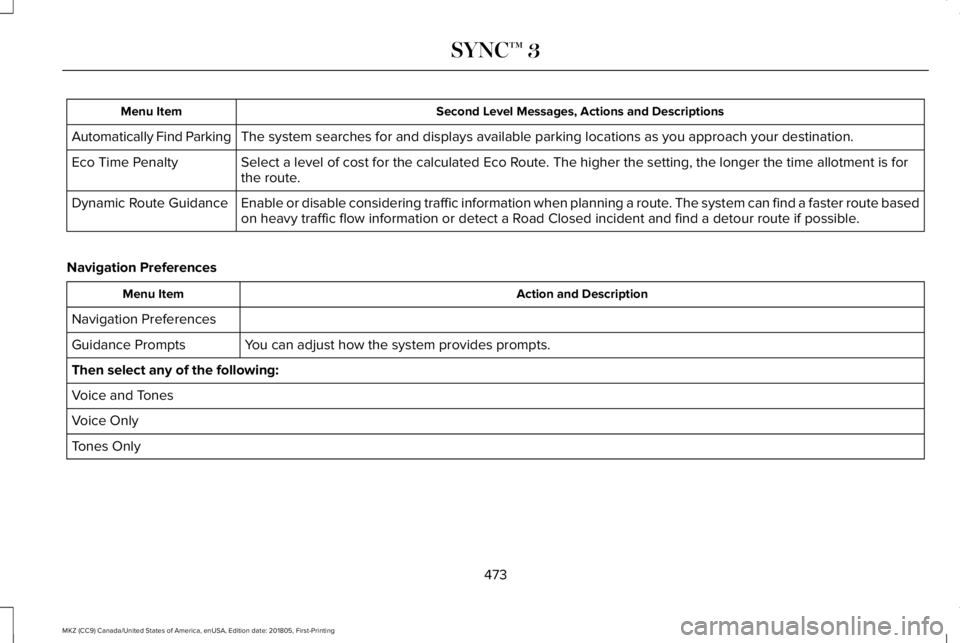
Second Level Messages, Actions and DescriptionsMenu Item
The system searches for and displays available parking locations as you approach your destination.Automatically Find Parking
Select a level of cost for the calculated Eco Route. The higher the setting, the longer the time allotment is forthe route.Eco Time Penalty
Enable or disable considering traffic information when planning a route. The system can find a faster route basedon heavy traffic flow information or detect a Road Closed incident and find a detour route if possible.Dynamic Route Guidance
Navigation Preferences
Action and DescriptionMenu Item
Navigation Preferences
You can adjust how the system provides prompts.Guidance Prompts
Then select any of the following:
Voice and Tones
Voice Only
Tones Only
473
MKZ (CC9) Canada/United States of America, enUSA, Edition date: 201805, First-Printing
SYNC™ 3
Page 483 of 595
Display
To make adjustments using the touchscreen, select:
Action and DescriptionMenu Item
The screen goes black and does not display anything. Tap the screen to switch it back on.Display Off
Make the screen display brighter or dimmer.Brightness
You can select:Mode
The screen automatically switches between day and night modes based on the outsidelight level.Auto
The screen displays with a light background to enhance daytime viewing.Day
The screen displays with a darker background to make nighttime viewing easier.Night
Enable this option to automatically dim the display brightness based on ambient lighting conditions.Auto Dim
Voice Control
You can adjust the voice control settings byselecting the following options.
480
MKZ (CC9) Canada/United States of America, enUSA, Edition date: 201805, First-Printing
SYNC™ 3
Page 490 of 595

USB and Bluetooth Stereo issues
Possible solutionPossible causeIssue
Disconnect the device from SYNC 3. Try switching your device off,resetting it or removing the battery, then connect it back to SYNC 3.
This is a device limitation.When I connect my device,I sometimes do not hearany sound.
To listen to Apple devices through USB, select AirPlay from the devicesControl Center, then select Dock Connector.
To listen to Apple devices through Bluetooth Stereo, select AirPlayfrom the devices Control Center, then select SYNC.
Connect a compatible device or media player.The device or media player is incompat-ible.
SYNC 3 does not displaythe song information,repeat, or shuffle buttons.
Wi-Fi Access Point issues
Possible solutionPossible causeIssue
Verify password.Password error.Failed connection.
Check for a poor Wi-Fi signal.Weak signal.
Use a unique name for your SSID, don’t use the default name unlessit contains a unique identifier, such as part of the MAC address.Multiple Access points within range withthe same SSID.
487
MKZ (CC9) Canada/United States of America, enUSA, Edition date: 201805, First-Printing
SYNC™ 3