2019 LINCOLN MKC phone
[x] Cancel search: phonePage 479 of 581
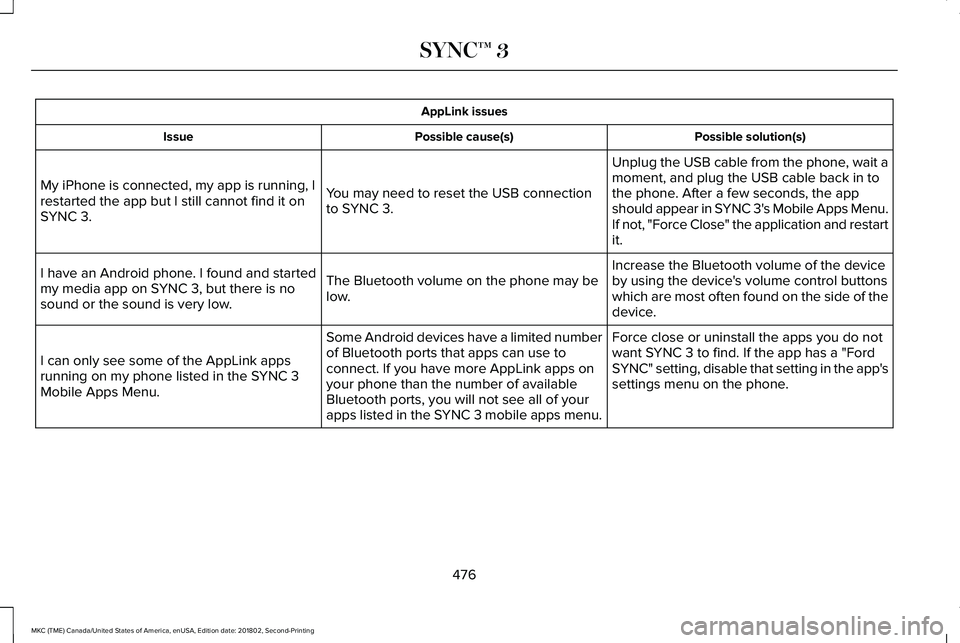
AppLink issues
Possible solution(s)Possible cause(s)Issue
Unplug the USB cable from the phone, wait amoment, and plug the USB cable back in tothe phone. After a few seconds, the appshould appear in SYNC 3's Mobile Apps Menu.If not, "Force Close" the application and restartit.
You may need to reset the USB connectionto SYNC 3.
My iPhone is connected, my app is running, Irestarted the app but I still cannot find it onSYNC 3.
Increase the Bluetooth volume of the deviceby using the device's volume control buttonswhich are most often found on the side of thedevice.
The Bluetooth volume on the phone may below.
I have an Android phone. I found and startedmy media app on SYNC 3, but there is nosound or the sound is very low.
Force close or uninstall the apps you do notwant SYNC 3 to find. If the app has a "FordSYNC" setting, disable that setting in the app'ssettings menu on the phone.
Some Android devices have a limited numberof Bluetooth ports that apps can use toconnect. If you have more AppLink apps onyour phone than the number of availableBluetooth ports, you will not see all of yourapps listed in the SYNC 3 mobile apps menu.
I can only see some of the AppLink appsrunning on my phone listed in the SYNC 3Mobile Apps Menu.
476
MKC (TME) Canada/United States of America, enUSA, Edition date: 201802, Second-Printing
SYNC™ 3
Page 480 of 581

Voice command issues
Possible solutionPossible causeIssue
Review the cell phone voice commands and the media voicecommands at the beginning of their respective sections.You may be using the wrong voicecommands.SYNC 3 does not under-stand what I am saying.Refer to the audio display during an active voice session to find a listof voice commands there.
Wait for the system to prompt you before you state your command.You may be speaking too soon or at thewrong time.
Review the media voice commands at the beginning of the mediasection.You may be using the wrong voicecommands.
SYNC 3 does not under-stand the name of a songor artist.
Say the song or artist name exactly as it is displayed on your device.For example, say "Play Artist Prince" or "Play song Purple Rain".
You may not be saying the name exactlyas it appears on your device.Make sure you are saying the complete title such as "California remixfeaturing Jennifer Nettles".
If there are any abbreviations in the name, like ESPN or CNN, youhave to spell those: "E-S-P-N" or "C-N-N".
Make sure that song titles, artists, album, and playlists names do nothave any special characters like *, - or +.
The song or artist name may have somespecial characters that are not beingrecognized by SYNC 3.
477
MKC (TME) Canada/United States of America, enUSA, Edition date: 201802, Second-Printing
SYNC™ 3
Page 481 of 581

Voice command issues
Possible solutionPossible causeIssue
Make sure that you are saying the name exactly as it appears on yourphone. For example, if your contact is "Joe Wilson", say "Call JoeWilson". If your contact name is "Mom", say "Call Mom".
You may not be saying the name exactlyas it appears on your phonebook.SYNC 3 does not under-stand or is calling thewrong contact when I wantto make a call.Make sure that your contact names do not have any special characterslike *, - or +.The contact name may contain specialcharacters.
SYNC 3 applies the phonetic pronunciation rules of the selectedlanguage to the contact names stored on your cell phone.
You may not be saying the name exactlyas it appears on your phonebook.
The SYNC 3 voice controlsystem is having troublerecognizing foreign namesstored on my cell phone.
Helpful Hint: You can select your contact manually. Press PHONE.Select the option for phonebook and then contact name. Press thesoft-key option to hear it. SYNC 3 will read the contact name to you,giving you some idea of the pronunciation it is expecting.
478
MKC (TME) Canada/United States of America, enUSA, Edition date: 201802, Second-Printing
SYNC™ 3
Page 482 of 581

Voice command issues
Possible solutionPossible causeIssue
SYNC 3 applies the phonetic pronunciation rules of the selectedlanguage to the names stored on your media player or USB flashdrive. It is able to make some exceptions for very popular artist names(for example, U2) such that you can always use the English pronunci-ation for these artists.
You may be saying the foreign namesusing the currently selected language forSYNC 3.
The SYNC 3 voice controlsystem is having troublerecognizing foreign tracks,artists, albums, genres andplaylist names from mymedia player or USB flashdrive.
SYNC 3 uses a synthetically generated voice rather than pre-recordedhuman voice.
SYNC 3 uses text-to-speech voice prompttechnology.
The system generatesvoice prompts and thepronunciation of somewords may not be accuratefor my language.
SYNC 3 offers several new voice control features for a wide range oflanguages. Dialing a contact name directly from the phonebookwithout pre-recording (for example, “call John Smith”) or selecting atrack, artist, album, genre or playlist directly from your media player(for example, "play artist Madonna").
479
MKC (TME) Canada/United States of America, enUSA, Edition date: 201802, Second-Printing
SYNC™ 3
Page 483 of 581

General
Possible solutionPossible causeIssue
SYNC 3 only supports four languages in a single module for textdisplay, voice control and voice prompts. The country where youbought your vehicle dictates the four languages based on the mostpopular languages spoken. If the selected language is not available,SYNC 3 remains in the current active language.SYNC 3 does not support the currentlyselected language for the instrumentcluster and information and entertainmentdisplay.
The language selected forthe instrument cluster andinformation and entertain-ment display does notmatch the SYNC 3language (phone, USB,Bluetooth audio, voicecontrol and voice prompts).
SYNC 3 offers several new voice control features for a wide range oflanguages. Dialing a contact name directly from the phonebookwithout pre-recording (for example, “call John Smith”) or selecting atrack, artist, album, genre or playlist directly from your media player(for example, "play artist Madonna").
SYNC 3 System Reset
The system has a System Reset feature that can be performed if the function of a SYNC 3 feature is lost. This reset is intended to restorefunctionality and will not erase any information previously stored in the system (such as paired devices, phonebook, call history, textmessages, or user settings). To perform a System Reset, press and hold the Seek Up (>>|) button while pressing and holding the RadioPower button. After approximately 5 seconds the screen will go black. Allow 1-2 minutes for the system reset to complete. You may thenresume using the SYNC 3 system.
480
MKC (TME) Canada/United States of America, enUSA, Edition date: 201802, Second-Printing
SYNC™ 3
Page 486 of 581

*Lincoln Licensed Accessory. The accessorymanufacturer designs, develops andtherefore warrants Lincoln LicensedAccessories, and does not design or testthese accessories to Lincoln Motor Companyengineering requirements. Contact anauthorized Lincoln dealer for themanufacturer's limited warranty details andrequest a copy of the Lincoln LicensedAccessories product limited warranty fromthe accessory manufacturer.
For maximum vehicle performance, keep thefollowing information in mind when addingaccessories, equipment, passengers andluggage to your vehicle:
•Do not exceed the total weight capacityof the vehicle or of the front or rear axle(GVWR or GAWR as indicated on theSafety Compliance Certification label).Consult an authorized dealer for specificweight information.
•The Federal CommunicationsCommission (FCC) and Canadian RadioTelecommunications Commission (CRTC)regulate the use of radiotransmitter-equipped mobilecommunications systems, for exampletwo-way radios, telephones and theftalarms. Any such equipment shouldcomply with the Federal CommunicationsCommission (FCC) and Canadian RadioTelecommunications Commission (CRTC)regulations, and an authorized dealershould install this equipment.
•An authorized dealer should installmobile communications systems.Improper installation may harm theoperation of your vehicle, particular iftheir manufacturer did not design themobile communication systemspecifically for automotive use.
•If you or an authorized dealer add anynon-Lincoln electrical or electronicaccessories or components to yourvehicle, you may adversely affect batteryperformance and durability. In addition,you may also adversely affect theperformance of other electrical systemsin the vehicle.
483
MKC (TME) Canada/United States of America, enUSA, Edition date: 201802, Second-Printing
Accessories
Page 522 of 581

ELECTROMAGNETIC
COMPATIBILITY
WARNING: Do not place objects ormount equipment on or near the airbagcover, on the side of the seatbacks (of thefront seats), or in front seat areas that maycome into contact with a deploying airbag.Failure to follow these instructions mayincrease the risk of personal injury in theevent of a crash.
WARNING: Do not fasten antennacables to original vehicle wiring, fuel pipesand brake pipes.
WARNING: Keep antenna and powercables at least 4 in (10 cm) from anyelectronic modules and airbags.
Note:We test and certify your vehicle tomeet electromagnetic compatibilitylegislation (UNECE Regulation 10 or otherapplicable local requirements). It is yourresponsibility to make sure that anyequipment an authorized dealer installs onyour vehicle complies with applicable locallegislation and other requirements.
Note:Any radio frequency transmitterequipment in your vehicle (such as cellulartelephones and amateur radio transmitters)must keep to the parameters in the followingtable. We do not provide special provisionsor conditions for installations or use.
519
MKC (TME) Canada/United States of America, enUSA, Edition date: 201802, Second-Printing
Appendices
Page 543 of 581

communication with any positioning devicesor any mobile or wireless-connectedelectronic or computer devices, includingwithout limitation cellular phones, palmtopand handheld computers, pagers, andpersonal digital assistants or PDAs.
Warning. The Data may contain inaccurateor incomplete information due to thepassage of time, changing circumstances,sources used and the nature of collectingcomprehensive geographic data, any ofwhich may lead to incorrect results.
No Warranty. This Data is provided to you“as is,” and you agree to use it at your ownrisk. Telenav and its licensors (and theirlicensors and suppliers) make no guarantees,representations or warranties of any kind,express or implied, arising by law orotherwise, including but not limited to,content, quality, accuracy, completeness,effectiveness, reliability, fitness for aparticular purpose, usefulness, use or resultsto be obtained from this Data, or that theData or server will be uninterrupted orerror-free.
Disclaimer of Warranty: TELENAV AND ITSLICENSORS (INCLUDING THEIR LICENSORSAND SUPPLIERS) DISCLAIM ANYWARRANTIES, EXPRESS OR IMPLIED, OFQUALITY, PERFORMANCE,MERCHANTABILITY, FITNESS FOR APARTICULAR PURPOSE ORNON-INFRINGEMENT. Some States,Territories and Countries do not allow certainwarranty exclusions, so to that extent theabove exclusion may not apply to you.
Disclaimer of Liability: TELENAV AND ITSLICENSORS (INCLUDING THEIR LICENSORSAND SUPPLIERS) SHALL NOT BE LIABLE TOYOU: IN RESPECT OF ANY CLAIM, DEMANDOR ACTION, IRRESPECTIVE OF THENATURE OF THE CAUSE OF THE CLAIM,DEMAND OR ACTION ALLEGING ANY LOSS,INJURY OR DAMAGES, DIRECT ORINDIRECT, WHICH MAY RESULT FROM THEUSE OR POSSESSION OF THEINFORMATION; OR FOR ANY LOSS OFPROFIT, REVENUE, CONTRACTS ORSAVINGS, OR ANY OTHER DIRECT,INDIRECT, INCIDENTAL, SPECIAL ORCONSEQUENTIAL DAMAGES ARISING OUTOF YOUR USE OF OR INABILITY TO USE
THIS INFORMATION, ANY DEFECT IN THEINFORMATION, OR THE BREACH OF THESETERMS OR CONDITIONS, WHETHER IN ANACTION IN CONTRACT OR TORT OR BASEDON A WARRANTY, EVEN IF TELENAV ORITS LICENSORS HAVE BEEN ADVISED OFTHE POSSIBILITY OF SUCH DAMAGES.Some States, Territories and Countries donot allow certain liability exclusions ordamages limitations, so to that extent theabove may not apply to you.
Export Control. You shall not export fromanywhere any part of the Data or any directproduct thereof except in compliance with,and with all licenses and approvals requiredunder, applicable export laws, rules andregulations, including but not limited to thelaws, rules and regulations administered bythe Office of Foreign Assets Control of theU.S. Department of Commerce and theBureau of Industry and Security of the U.S.Department of Commerce. To the extent thatany such export laws, rules or regulationsprohibit HERE from complying with any of itsobligations hereunder to deliver or distributeData, such failure shall be excused and shallnot constitute a breach of this Agreement.
540
MKC (TME) Canada/United States of America, enUSA, Edition date: 201802, Second-Printing
Appendices