2019 LINCOLN CONTINENTAL light
[x] Cancel search: lightPage 101 of 627
Rear Interior Lamps
The rear interior lamps may be above the
rear seat or above the rear windows.
Press to switch the lamps on or off.
AMBIENT LIGHTING
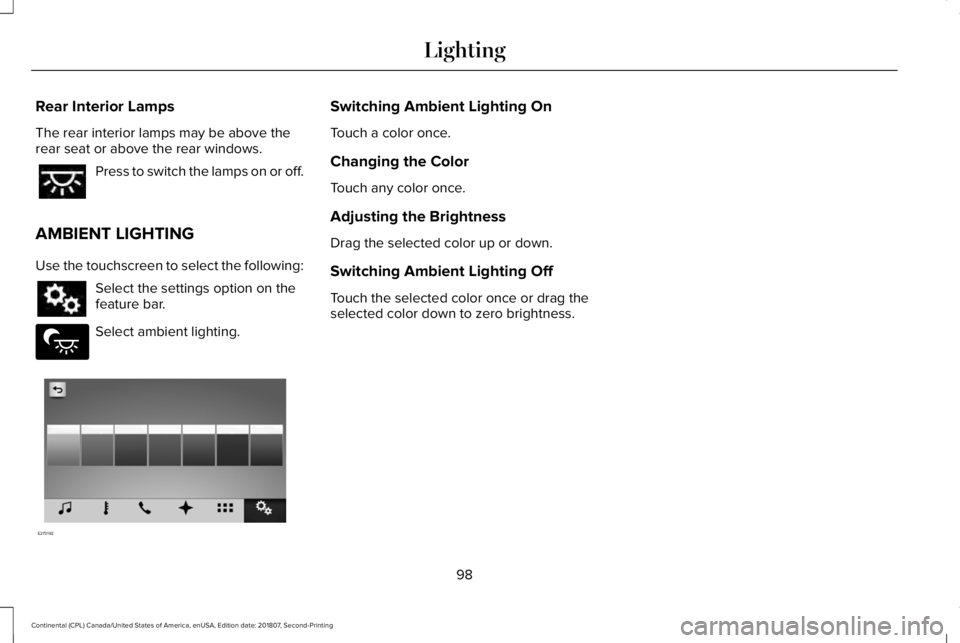
Use the touchscreen to select the following: Select the settings option on the
feature bar.
Select ambient lighting. Switching Ambient Lighting On
Touch a color once.
Changing the Color
Touch any color once.
Adjusting the Brightness
Drag the selected color up or down.
Switching Ambient Lighting Off
Touch the selected color once or drag the
selected color down to zero brightness.
98
Continental (CPL) Canada/United States of America, enUSA, Edition date: 201807, Second-Printing Lighting E279027 E273192
Page 102 of 627
POWER WINDOWS
WARNING: Do not leave children
unattended in your vehicle and do not let
them play with the power windows. Failure
to follow this instruction could result in
personal injury. WARNING: When closing the power
windows, verify they are free of obstruction
and make sure that children and pets are
not in the proximity of the window
openings. Note:
You may hear a pulsing noise when
just one of the windows is open. Lower the
opposite window slightly to reduce this
noise.
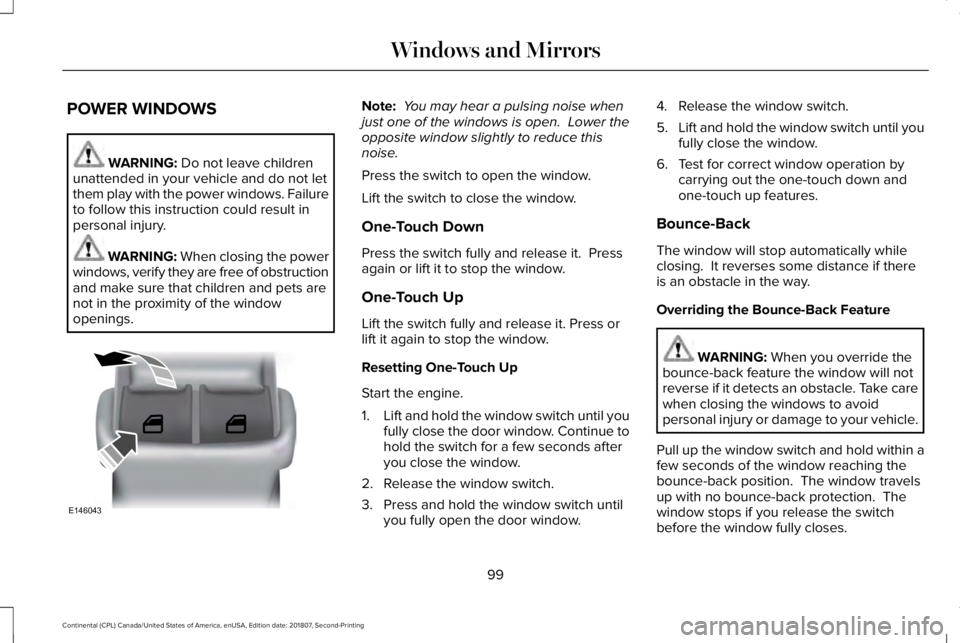
Press the switch to open the window.
Lift the switch to close the window.
One-Touch Down
Press the switch fully and release it. Press
again or lift it to stop the window.
One-Touch Up
Lift the switch fully and release it. Press or
lift it again to stop the window.
Resetting One-Touch Up
Start the engine.
1. Lift and hold the window switch until you
fully close the door window. Continue to
hold the switch for a few seconds after
you close the window.
2. Release the window switch.
3. Press and hold the window switch until you fully open the door window. 4. Release the window switch.
5.
Lift and hold the window switch until you
fully close the window.
6. Test for correct window operation by carrying out the one-touch down and
one-touch up features.
Bounce-Back
The window will stop automatically while
closing. It reverses some distance if there
is an obstacle in the way.
Overriding the Bounce-Back Feature WARNING:
When you override the
bounce-back feature the window will not
reverse if it detects an obstacle. Take care
when closing the windows to avoid
personal injury or damage to your vehicle.
Pull up the window switch and hold within a
few seconds of the window reaching the
bounce-back position. The window travels
up with no bounce-back protection. The
window stops if you release the switch
before the window fully closes.
99
Continental (CPL) Canada/United States of America, enUSA, Edition date: 201807, Second-Printing Windows and MirrorsE146043
Page 104 of 627
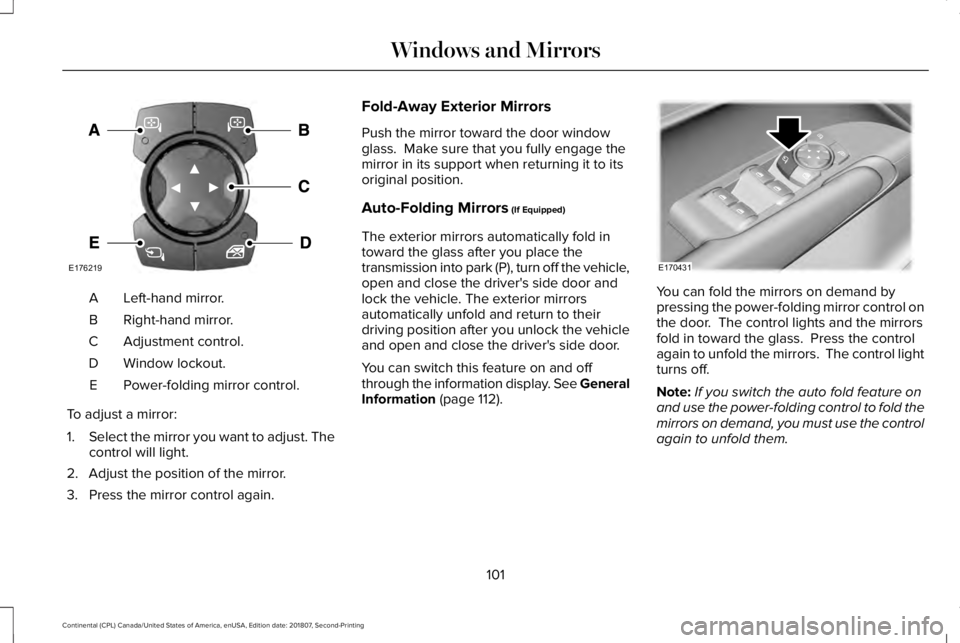
Left-hand mirror.
A
Right-hand mirror.
B
Adjustment control.
C
Window lockout.
D
Power-folding mirror control.
E
To adjust a mirror:
1. Select the mirror you want to adjust. The
control will light.
2. Adjust the position of the mirror.
3. Press the mirror control again. Fold-Away Exterior Mirrors
Push the mirror toward the door window
glass. Make sure that you fully engage the
mirror in its support when returning it to its
original position.
Auto-Folding Mirrors (If Equipped)
The exterior mirrors automatically fold in
toward the glass after you place the
transmission into park (P), turn off the vehicle,
open and close the driver's side door and
lock the vehicle. The exterior mirrors
automatically unfold and return to their
driving position after you unlock the vehicle
and open and close the driver's side door.
You can switch this feature on and off
through the information display. See General
Information
(page 112). You can fold the mirrors on demand by
pressing the power-folding mirror control on
the door. The control lights and the mirrors
fold in toward the glass. Press the control
again to unfold the mirrors. The control light
turns off.
Note:
If you switch the auto fold feature on
and use the power-folding control to fold the
mirrors on demand, you must use the control
again to unfold them.
101
Continental (CPL) Canada/United States of America, enUSA, Edition date: 201807, Second-Printing Windows and MirrorsE176219 E170431
Page 105 of 627

Loose Mirror
If you manually fold the power-folding
mirrors, they may not work properly even
after you re-position them. You need to reset
them if:
•
The mirrors vibrate when you drive.
• The mirrors feel loose.
• The mirrors do not stay in the folded or
unfolded position.
• One of the mirrors is not in its normal
driving position.
To reset the power-fold feature, use the
power-folding mirror control to fold and
unfold the mirrors. You may hear a loud noise
as you reset the power-folding mirrors. This
sound is normal. Repeat this process as
needed each time you manually fold the
mirrors.
Heated Exterior Mirrors
See Heated Exterior Mirrors (page 148). Memory Mirrors
You can save and recall the mirror positions
through the memory function. See Memory
Function
(page 160).
Auto-Dimming Feature
The driver’ s exterior mirror automatically
dims when the interior auto-dimming mirror
turns on.
Signal Indicator Mirrors
The outer portion of the appropriate mirror
housing blinks when you activate the
direction indicator.
Lincoln Welcome Mat
Projection lights, on the bottom of the mirror
housings, project an image onto the ground
a short distance from the vehicle.
360-Degree Camera
(If Equipped)
See
360 Degree Camera (page 231). Integrated Blind Spot Mirrors
(If Equipped) WARNING: Objects in the mirror are
closer than they appear.
The blind spot mirror has a wide-angle mirror
inside the exterior mirror that can increase
visibility along the side of your vehicle.
Check the main mirror first before a lane
change, then check the blind spot mirror. If
no vehicles are present in the blind spot
mirror and the traffic in the adjacent lane is
at a safe distance, signal that you intend to
change lanes. Glance over your shoulder to
verify traffic is clear and carefully change
lanes.
102
Continental (CPL) Canada/United States of America, enUSA, Edition date: 201807, Second-Printing Windows and Mirrors
Page 106 of 627
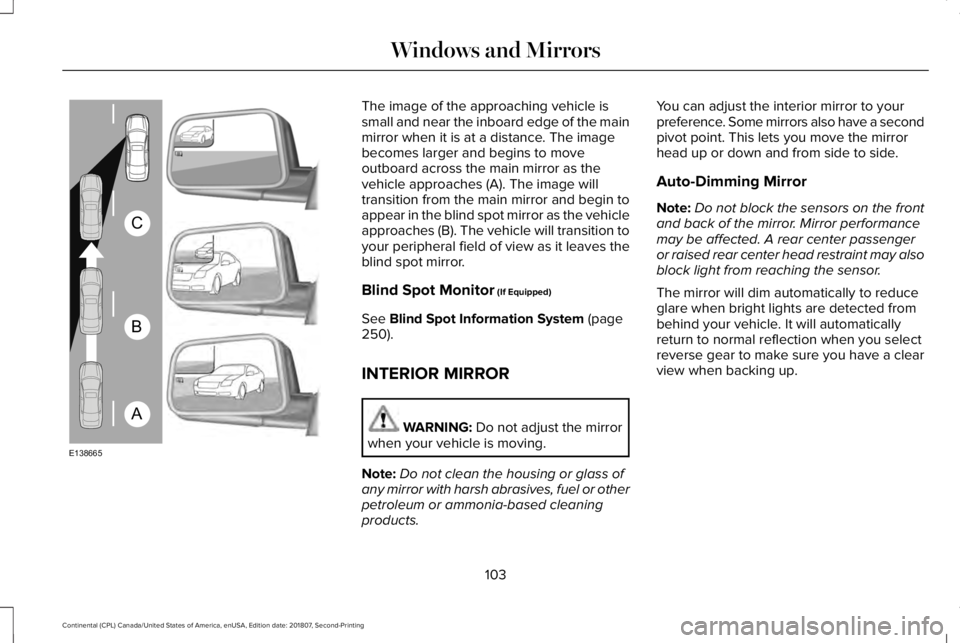
The image of the approaching vehicle is
small and near the inboard edge of the main
mirror when it is at a distance. The image
becomes larger and begins to move
outboard across the main mirror as the
vehicle approaches (A). The image will
transition from the main mirror and begin to
appear in the blind spot mirror as the vehicle
approaches (B). The vehicle will transition to
your peripheral field of view as it leaves the
blind spot mirror.
Blind Spot Monitor (If Equipped)
See
Blind Spot Information System (page
250).
INTERIOR MIRROR WARNING:
Do not adjust the mirror
when your vehicle is moving.
Note: Do not clean the housing or glass of
any mirror with harsh abrasives, fuel or other
petroleum or ammonia-based cleaning
products. You can adjust the interior mirror to your
preference. Some mirrors also have a second
pivot point. This lets you move the mirror
head up or down and from side to side.
Auto-Dimming Mirror
Note:
Do not block the sensors on the front
and back of the mirror. Mirror performance
may be affected. A rear center passenger
or raised rear center head restraint may also
block light from reaching the sensor.
The mirror will dim automatically to reduce
glare when bright lights are detected from
behind your vehicle. It will automatically
return to normal reflection when you select
reverse gear to make sure you have a clear
view when backing up.
103
Continental (CPL) Canada/United States of America, enUSA, Edition date: 201807, Second-Printing Windows and MirrorsA
B
C
E138665
Page 110 of 627

Fuel Gauge.
E
Left Information Group.
F
Audio Status Bar
Displays information related to the current
audio source.
Time and Temperature Status Bar
Displays time, temperature and navigation
related information.
Left/Right Information Group
Information that appears in the left and right
information group varies depending on
current gauge, on-demand and HUD (if
equipped) settings. See General
Information (page 112).
Fuel Gauge
The fuel gauge indicates about how much
fuel is in the fuel tank. The arrow adjacent to the fuel pump symbol
indicates on which side of your vehicle the
fuel filler door is located.
Note:
The fuel gauge may vary slightly when
your vehicle is moving or on a slope.
Low Fuel Reminder
A low fuel level reminder displays and
sounds when the distance to empty reaches
75 mi (120 km)
for MyKey, and at 50 mi
(80 km), 25 mi (40 km), 10 mi (20 km) and
0 mi (0 km) for all vehicle keys.
Note: The low fuel reminder can appear at
different fuel gauge positions depending on
fuel economy conditions. This variation is
normal. WARNING LAMPS AND
INDICATORS
The following warning lamps and indicators
alert you to a vehicle condition that may
become serious. Some lamps illuminate
when you start your vehicle to make sure
they work. If any lamps remain on after
starting your vehicle, refer to the respective
system warning lamp for further information.
Note:
Some warning indicators appear in
the information display and function the
same as a warning lamp, but do not display
when you start your vehicle.
Adaptive Cruise Control
(If Equipped) The speed control system indicator
light changes color to indicate
what mode the system is in:
See
Using Adaptive Cruise Control (page 234).
107
Continental (CPL) Canada/United States of America, enUSA, Edition date: 201807, Second-Printing Instrument ClusterE144524
Page 111 of 627

On (white light): Illuminates when the
adaptive cruise control system is turned on.
Turns off when the speed control system is
turned off.
Engaged (green light): Illuminates when the
adaptive cruise control system is engaged.
Turns off when the speed control system is
disengaged.
Adaptive Steering (If Equipped)
The adaptive steering system
indicator illuminates if the system
detects a fault during the
continuous diagnostic checks.
Adaptive Steering Initialization (yellow,
flashing): The adaptive steering system
detects a difference between steering wheel
angle and the desired road wheel angle. The
steering wheel adjusts itself to correct this
difference. This adjustment is part of normal
system operation. Adaptive Steering Off (yellow, solid): The
adaptive steering system is off. It is possible
that the steering wheel may not be straight
when you drive straight ahead. If this
message persists, see an authorized dealer.
Adaptive Steering Loss (red, solid): The
adaptive steering system integrity cannot be
verified. Do not drive the vehicle and contact
an authorized dealer immediately.
See
Steering (page 256).
Anti-Lock Braking System If it illuminates when you are
driving, this indicates a
malfunction. You continue to have
the normal braking system (without ABS)
unless the brake system warning lamp is also
illuminated. Have the system checked by
your authorized dealer.
Autohold Active Illuminates when the system holds
your vehicle stationary.Autohold Unavailable Illuminates when the system is on,
but unavailable to hold your
vehicle stationary.
Automatic Headlamp High Beam Illuminates when this feature is on.
See Automatic High Beam
Control (page 94).
Battery It illuminates when you switch the
ignition on.
If it illuminates when the engine is
running this indicates a malfunction. Have
your vehicle checked as soon as possible.
Blind Spot Monitor
(If Equipped) It illuminates when you switch this
feature off or in conjunction with a
message.
See Blind Spot
Information System (page 250).
108
Continental (CPL) Canada/United States of America, enUSA, Edition date: 201807, Second-Printing Instrument ClusterE223375 E197933 E197934 E151262
Page 115 of 627
GENERAL INFORMATION
WARNING: Driving while distracted
can result in loss of vehicle control, crash
and injury. We strongly recommend that
you use extreme caution when using any
device that may take your focus off the
road. Your primary responsibility is the safe
operation of your vehicle. We recommend
against the use of any hand-held device
while driving and encourage the use of
voice-operated systems when possible.
Make sure you are aware of all applicable
local laws that may affect the use of
electronic devices while driving.
You can control various systems on your
vehicle using the quick action menu (QAM)
buttons on the right-hand side of the steering
wheel. The information display provides the
corresponding information.
Note: Some options may appear slightly
different or not at all if the items are optional. Note:
Some MyKey menu options only
appear if MyKey is enabled and at least one
MyKey is programmed.
Note: Speedometer, driving aid information,
and distance to empty information (if
enabled) moves to the left information group
when a menu is opened. This icon gives you the ability to
switch a feature on or off. A check
in the box indicates the feature is
enabled, and unchecked indicates the
feature is disabled.
112
Continental (CPL) Canada/United States of America, enUSA, Edition date: 201807, Second-Printing Information DisplaysE204495