Page 289 of 476
2895-3. Using the air conditioning system and defogger
5
Interior features
as follows:
AUTO Hi Lo Off
Page 293 of 476
2935-5. Using the storage features
5
Interior features
5-5.Using the storage features
Auxiliary tray/Wireless charger (if equipped) (P.303)
Glove box ( P.294)
Bottle holders ( P.295)
Cup holders ( P.294)
Console box ( P.294)
Coin holder ( P.295)
List of storage features
Location of the storage features
A
B
C
D
E
F
WARNING
■Items that should not be left in the
vehicle
Do not leave glasses, lighters or spray
cans in the storage spaces, as this may
cause the following when cabin tempera-
ture becomes high:
●Glasses may be deformed by heat or
cracked if they come into contact with
other stored items.
●Lighters or spray ca ns may explode. If
they come into contact with other
stored items, the lighter may catch fire
or the spray can may release gas,
causing a fire hazard.
Page 296 of 476
2965-5. Using the storage features
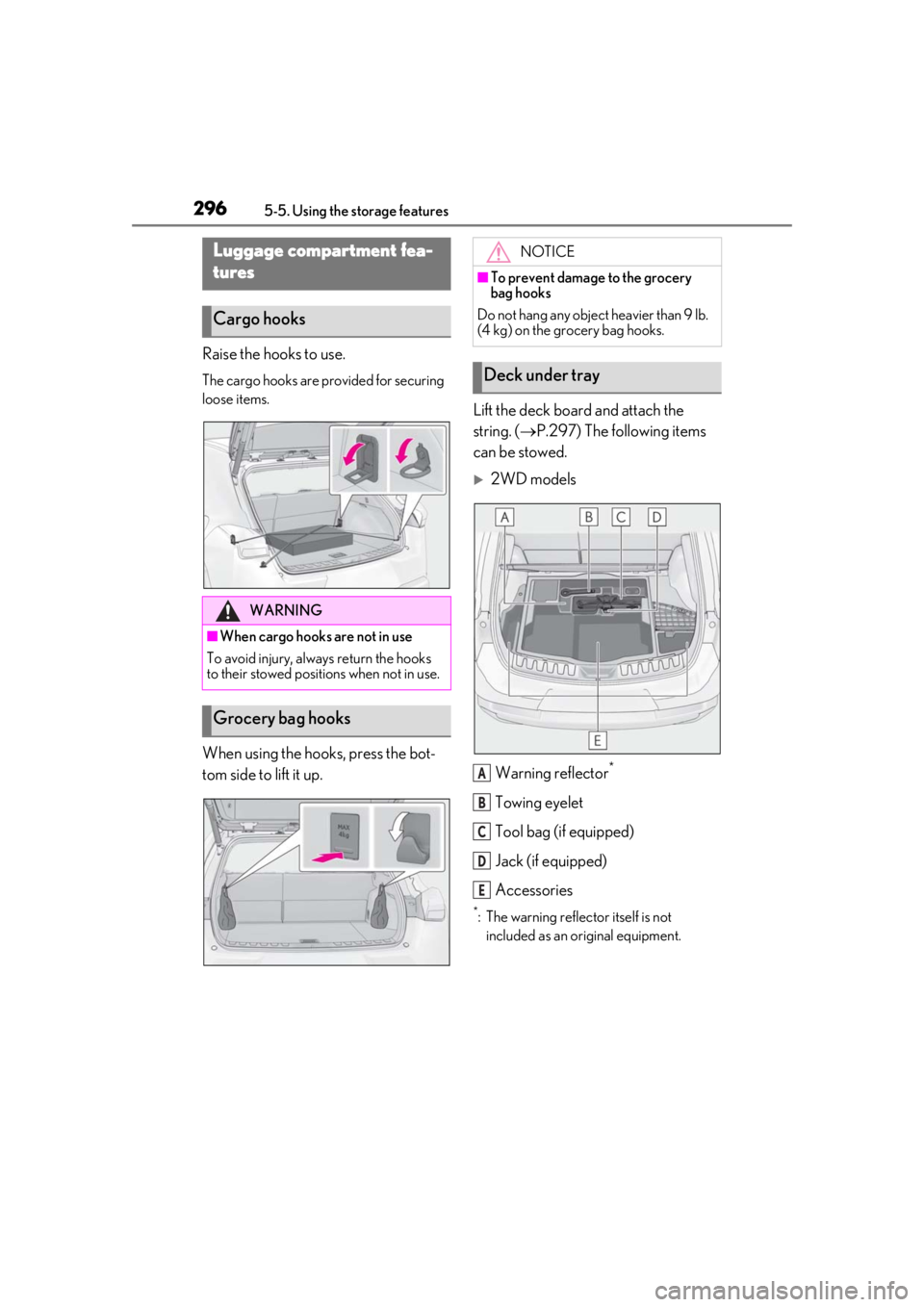
Raise the hooks to use.
The cargo hooks are provided for securing
loose items.
When using the hooks, press the bot-
tom side to lift it up.Lift the deck board and attach the
string. (
P.297) The following items
can be stowed.
2WD models
Warning reflector
*
Towing eyelet
Tool bag (if equipped)
Jack (if equipped)
Accessories
*: The warning reflec tor itself is not
included as an original equipment.
Luggage compartment fea-
tures
Cargo hooks
WARNING
■When cargo hooks are not in use
To avoid injury, always return the hooks
to their stowed positions when not in use.
Grocery bag hooks
NOTICE
■To prevent damage to the grocery
bag hooks
Do not hang any object heavier than 9 lb.
(4 kg) on the grocery bag hooks.
Deck under tray
A
B
C
D
E
Page 298 of 476
2985-5. Using the storage features
4Attach the string to the luggage
cover hook on the back door.
Left side
Pull the strap upwards to lift the side
deck board and remove it.
Right side
Pull the strap and fold the side deck
board.
■When installing the side deck board (left
side)
Insert the claw of the side deck board and
install it.
■Installing the luggage cover
1
Take out the luggage cover from
the bag.
2
Slowly unfold the luggage cover.
3
Attach the strings to the luggage
cover hooks.
Make sure that the side the strings are
WARNING
■If the deck boards are opened or
removed
Return them to their original positions
before driving. In the event of sudden
braking, an accident may occur due to an
occupant being struck by the deck
boards or the items stored in the deck
under tray.
NOTICE
■To prevent damage to the deck board
When closing the back door, do not
leave the deck board string attached to
the hook.
Luggage cover
Page 299 of 476
2995-5. Using the storage features
5
Interior features
sewn faces down.
■Stowing the luggage cover
1
Hold the luggage cover corners of
the side with the long strings.
2
Fold it in half. 3
Turn your wrists
to fold it.
4
Put it in the bag.
■When removing the luggage cover
Pull the short strings toward you and
unhook them.
WARNING
■When removing and unfolding the
luggage cover
Observe the following precautions. Fail-
ure to do so may cause the luggage
cover to suddenly unfold, resulting in
injury.
●When taking out the luggage cover
from the bag, securely hold the edges
of the luggage cover and slowly take it
out.
Page 300 of 476
3005-5. Using the storage features
WARNING
●When unfolding the luggage cover,
hold it securely in both hands and
slowly unfold it.
●Do not unfold the luggage cover near
your face.
●When unfolding the luggage cover, do
not release your hand from the cover.
●Do not unfold the luggage cover near
other people.
■When installing the luggage cover
Observe the following precautions. Fail-
ure to do so may cause an accident.
●Make sure that the rear edge of the
luggage cover is laying flat to prevent
the driver’s view from being
obstructed.
●Make sure to attach the strings cor-
rectly.
NOTICE
■When using the luggage cover
●Do not place anything on the luggage
cover. Doing so may deform the lug-
gage cover.
●Do not open or close the back door
with the strings un hooked. Doing so
may cause damage to the luggage
cover.
●Do not hook anythi ng other than the
luggage cover and deck board strings
on the luggage cover hooks. The
hooks and back door may be dam-
aged.
Page 302 of 476

3025-6. Using the other interior features
Please use a power supply for elec-
tronic goods that use less than 12
VDC/10 A (power consumption of
120 W).
When using electronic goods, make
sure that the power consumption of all
the connected power outlets is less
than 120 W.
Front
Press down the lid to open it.
Rear
Open the lid.
■The power outlet can be used when
The power switch is in ACC or ON.
The USB charging ports are used to
supply 2.1 A of electricity at 5 V to
external devices.
The USB charging ports are for
Power outlet
NOTICE
■When power outlet is not in use
To avoid damaging the power outlet,
close the power outlet lid when the
power outlet is not in use.
Foreign objects or li quids that enter the
power outlet may cause a short circuit.
■To prevent 12-volt battery discharge
Do not use the power outlet longer than
necessary when the hy brid system is off.
■To prevent incorrect operation of the
vehicle
When turning the powe r switch off, make
sure to disconnect accessories designed
for charging, such as portable chargers,
power banks, etc. from the power outlets.
If such an accessory is left connected, the
following may occur:
●The doors will not be able to be locked.
●The opening screen will be displayed
on the multi-information display.
●The interior lights, instrument panel
lights, etc. will illuminate.
USB charging ports
Page 305 of 476
3055-6. Using the other interior features
5
Interior features
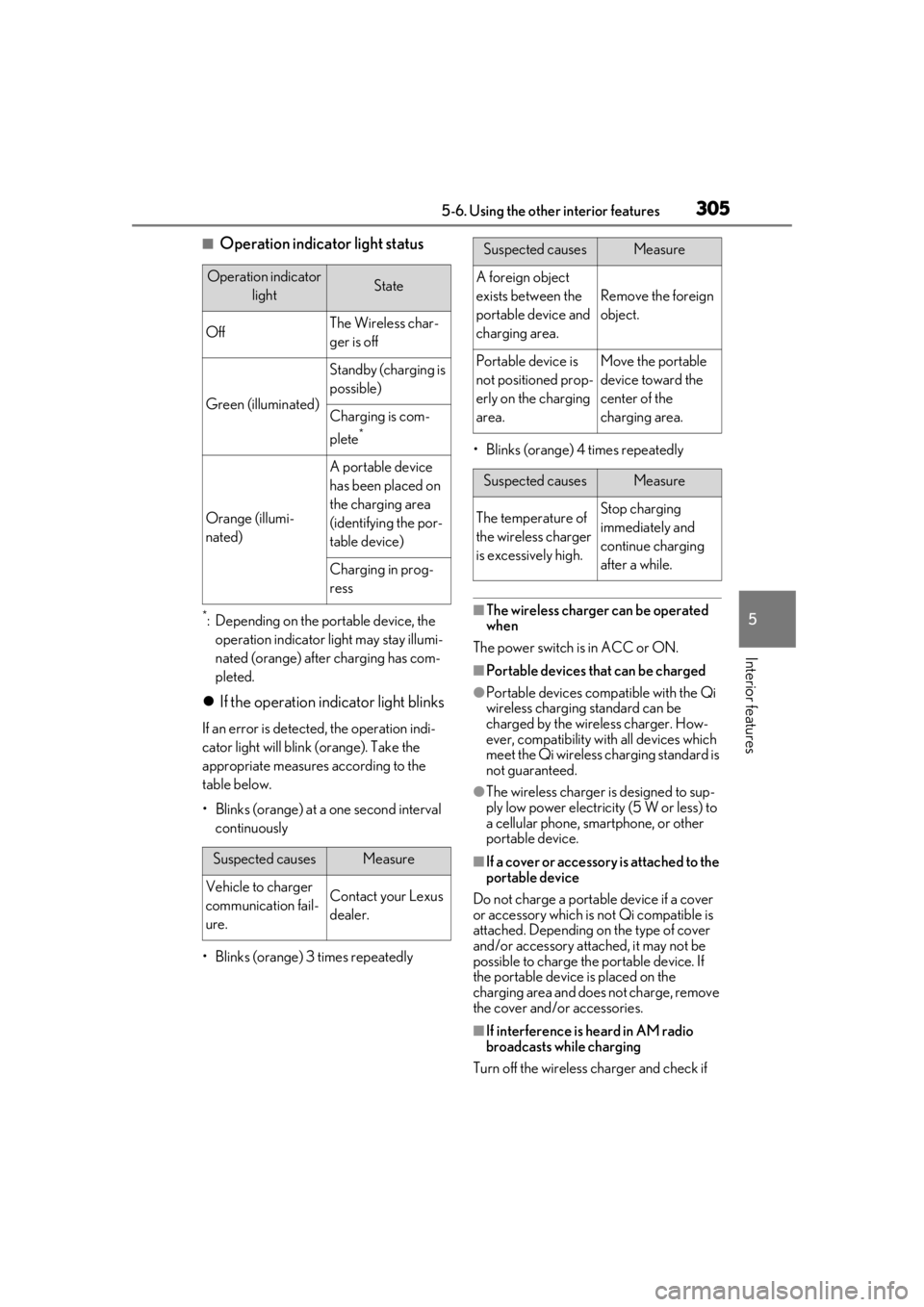
■Operation indicator light status
*: Depending on the portable device, the operation indicator light may stay illumi-
nated (orange) after charging has com-
pleted.
If the operation indicator light blinks
If an error is detected, the operation indi-
cator light will blink (orange). Take the
appropriate measures according to the
table below.
• Blinks (orange) at a one second interval continuously
• Blinks (orange) 3 times repeatedly • Blinks (orange) 4 times repeatedly
■The wireless charger can be operated
when
The power switch is in ACC or ON.
■Portable devices that can be charged
●Portable devices compatible with the Qi
wireless charging standard can be
charged by the wireless charger. How-
ever, compatibility with all devices which
meet the Qi wireless charging standard is
not guaranteed.
●The wireless charger is designed to sup-
ply low power electricity (5 W or less) to
a cellular phone, smartphone, or other
portable device.
■If a cover or accessory is attached to the
portable device
Do not charge a portable device if a cover
or accessory which is not Qi compatible is
attached. Depending on the type of cover
and/or accessory attached, it may not be
possible to charge the portable device. If
the portable device is placed on the
charging area and does not charge, remove
the cover and/or accessories.
■If interference is heard in AM radio
broadcasts while charging
Turn off the wireless charger and check if
Operation indicator lightState
OffThe Wireless char-
ger is off
Green (illuminated)
Standby (charging is
possible)
Charging is com-
plete
*
Orange (illumi-
nated)
A portable device
has been placed on
the charging area
(identifying the por-
table device)
Charging in prog-
ress
Suspected causesMeasure
Vehicle to charger
communication fail-
ure.Contact your Lexus
dealer.
Suspected causesMeasure
A foreign object
exists between the
portable device and
charging area.
Remove the foreign
object.
Portable device is
not positioned prop-
erly on the charging
area.Move the portable
device toward the
center of the
charging area.
Suspected causesMeasure
The temperature of
the wireless charger
is excessively high.Stop charging
immediately and
continue charging
after a while.