2019 LEXUS UX250H fog
[x] Cancel search: fogPage 152 of 476

1524-1. Before driving
4-1.Before driving
■Starting the hybrid system
P.162
■Driving
1 With the brake pedal depressed,
shift the shift lever to D. ( P.167)
2 If the parking brake is in manual
mode, release the parking brake.
(P.172)
3 Gradually release the brake pedal
and gently depress the accelerator
pedal to accelerate the vehicle.
■Stopping
1 With the shift lever in D, depress the
brake pedal.
2 If necessary, set the parking brake.
(P.172)
If the vehicle is to be stopped for an
extended period of time, shift the shift lever
to P. ( P.167)
■Parking the vehicle
1 With the shift lever in D, depress the
brake pedal.
2 If the parking brake is in manual
mode, set the parking brake
(P.172), and shift the shift lever to
P ( P.167).
3 Press the power switch to stop the
hybrid system. 4
Lock the door, making sure that you
have the electronic key on your
person.
If parking on a hill, block the wheels as
needed.
■Starting off on a steep uphill
1 Make sure that the parking brake is
set with the brake pedal depressed,
and then shift the shift lever to D.
2 Release the brake pedal and gently
depress the accelerator pedal.
3 Release the parking brake.
■When starting off on a uphill
The hill-start assist control will be activated.
( P.257)
■For fuel-efficient driving
Keep in mind that hybr id vehicles are similar
to conventional vehicles, and it is necessary
to refrain from activi ties such as sudden
acceleration. ( P.261)
■Driving in the rain
●Drive carefully when it is raining, because
visibility will be reduced, the windows
may become fogged-up, and the road
will be slippery.
●Drive carefully when it starts to rain,
because the road surface will be espe-
cially slippery.
●Refrain from high speeds when driving on
an expressway in the rain, because there
may be a layer of wa ter between the tires
and the road surface, preventing the
steering and brakes from operating prop-
erly.
■Restraining the hybrid system output
(Brake Override System)
●When the accelerato r and brake pedals
are depressed at the same time, the
hybrid system output may be restrained.
●A warning message is displayed on the
multi-information display and head-up
display (if equipped) while the system is
operating. ( P.391)
Driving the vehicle
The specified procedures should be
observed to ensure safe driving:
Driving procedure
Page 166 of 476

1664-2. Driving procedures
mation display.
●The temperature of the hybrid system is
high.
The vehicle has been left in the sun,
driven on a hill, driven at high speeds, etc.
●The temperature of the hybrid system is
low.
The vehicle has been left in temperatures
lower than about 32 °F (0 °C) for a long
period of time, etc.
●The gasoline engine is warming up.
●The hybrid battery (traction battery) is
low.
The remaining battery level indicated in
the “Energy Monitor” display is low.
( P.97)
●Vehicle speed is high.
●The accelerator pedal is depressed firmly
or the vehicle is on a hill, etc.
●The windshield defogger is in use.
■Switching to EV drive mode when the
gasoline engine is cold
If the hybrid system is started while the gas-
oline engine is cold, the gasoline engine will
start automatically after a short period of
time in order to warm up. In this case, you
will become unable to switch to EV drive
mode.
After the hybrid system has started and the
“READY” indicator has illuminated, press
the EV drive mode switch before the gaso-
line engine starts to switch to EV drive
mode.
■Automatic cancelation of EV drive
mode
When driving in EV drive mode, the gaso-
line engine may automatically restart in the
following situations. When EV drive mode
is canceled, a buzzer will sound, the EV
drive mode indicator w ill go off after flash-
ing, and a message is displayed on the
multi-information display.
●The hybrid battery (traction battery)
becomes low.
The remaining battery level indicated in
the “Energy Monitor” display is low.
( P.97)
●Vehicle speed is high.
●The accelerator pedal is depressed firmly
or the vehicle is on a hill, etc.
■Possible driving distan ce when driving in
EV drive mode
EV drive mode’s possible driving distance
ranges from a few hundred meters to
approximately 0.6 mile (1 km). However,
depending on vehicle conditions, there are
situations when EV drive mode cannot be
used. (The distance that is possible depends
on the hybrid battery [traction battery] level
and driving conditions.)
■Fuel economy
The hybrid system is designed to achieve
the best possible fuel economy during nor-
mal driving (using the gasoline engine and
electric motor [tractio n motor]). Driving in
EV drive mode more than necessary may
lower fuel economy.
■If “EV Mode Unavailable” is shown on
the multi-information display
The EV drive mode is not available. The rea-
son the EV drive mode is not available (the
vehicle is idling, batter y charge is low, vehi-
cle speed is higher than the EV drive mode
operating speed range or accelerator pedal
is depressed too much) may be displayed.
Use the EV drive mode when it becomes
available.
■If “EV Mode Deactivated” is shown on
the multi-information display
The EV drive mode has been automatically
canceled. The reason the EV drive mode is
not available (the batt ery charge is low,
vehicle speed is higher than the EV drive
mode operating speed range or accelera-
tor pedal is depressed too much) may be
displayed. Drive the vehicle for a while
before attempting to turn on the EV drive
mode again.
Page 180 of 476

1804-3. Operating the lights and wipers
1Press the Automatic High Beam
switch.
2
Turn the headlight switch to the
or position.
The Automatic High Beam indicator will come on when the system is operating.
■Conditions to turn the high beams on/off
automatically
●When all of the follo
wing conditions are
met, the high beams will be turned on
automatically (after approximately 1 sec-
ond):
• The vehicle speed is approximately 21 mph (34 km/h) or more.
• The area ahead of the vehicle is dark.
• There are no vehicles ahead with head- lights or tail lights turned on.
• There are few streetlights on the road ahead.
●If any of the following conditions are met,
the high beams will turn off automatically:
• The vehicle speed is below approxi-
mately 17 mph (27 km/h).
• The area ahead of the vehicle is not dark.
• Vehicles ahead have their headlights or
tail lights turned on.
• There are many streetlights on the road ahead.
■Front camera detection information
●The high beams may not be automatically
turned off in the following situations:
• When a vehicle suddenly appears from around a curve
• When the vehicle is cut in front of by
another vehicle
• When vehicles ahead cannot be detected due to repeated curves, road
dividers or roadside trees
• When vehicles ahead appear in a far- away lane on a wide road
• When the lights of vehicles ahead are not
on
●The high beams may be turned off if a
vehicle ahead that is using fog lights with-
Automatic High Beam
The Automatic High Beam uses a
front camera located behind the
upper portion of the windshield to
assess the brightness of the lights of
vehicles ahead, streetlights, etc.,
and automatically turns the high
beams on or off as necessary.
WARNING
■Limitations of the Automatic High
Beam
Do not overly rely on the Automatic High
Beam. Always drive sa fely, taking care to
observe your surroundings and turning
the high beams on or off manually if nec-
essary.
■To prevent incorrect operation of the
Automatic High Beam system
Do not overload the vehicle.
Activating the Automatic High
Beam
Page 181 of 476

1814-3. Operating the lights and wipers
4
Driving
out its headlights turned on is detected.
●House lights, street lights, traffic signals,
and illuminated billboards or signs and
other reflective objects may cause the
high beams to change to the low beams,
or the low beams to remain on.
●The following factors may affect the
amount of time taken for the high beams
to turn on or off:
• The brightness of the headlights, fog
lights, and tail lights of vehicles ahead
• The movement and direction of vehicles ahead
• When a vehicle ahead only has opera- tional lights on one side
• When a vehicle ahead is a two-wheeled
vehicle
• The condition of the road (gradient, curve, condition of th e road surface, etc.)
• The number of passengers and amount of luggage in the vehicle
●The high beams may turn on or off unex-
pectedly.
●Bicycles or similar vehicles may not be
detected.
●In the following situations the system may
not be able to correctly detect the sur-
rounding brightness le vel. This may cause
the low beams to remain on or the high
beams to flash or dazzle pedestrians or
vehicles ahead. In such a case, it is neces-
sary to manually switch between the high
and low beams.
• When driving in inclement weather
(heavy rain, snow, fog, sandstorms, etc.)
• When the windshield is obscured by fog, mist, ice, dirt, etc.
• When the windshield is cracked or dam- aged
• When the front camera is deformed or
dirty
• When the temperature of the front cam- era is extremely high
• When the surrounding brightness level is equal to that of head lights, tail lights or
fog lights
• When headlights or tail lights of vehicles
ahead are turned off, dirty, changing
color, or not aimed properly
• When the vehicle is hit by water, snow,
dust, etc. from a preceding vehicle
• When driving through an area of inter-mittently changing brightness and dark-
ness
• When frequently and repeatedly driving
ascending/descending roads, or roads
with rough, bumpy or uneven surfaces
(such as stone-paved roads, gravel roads,
etc.)
• When frequently and repeatedly taking curves or driving on a winding road
• When there is a highly reflective object ahead of the vehicle, such as a sign or
mirror
• When the back of a preceding vehicle is highly reflective, such as a container on a
truck
• When the vehicle’s headlights are dam- aged or dirty, or are not aimed properly
• When the vehicle is listing or titling due to
a flat tire, a trailer being towed, etc.
• When the headlights are changed between the high beams and low beams
repeatedly in an abnormal manner
• When the driver believes that the high beams may be flashing or dazzling
pedestrians or other drivers
■Temporarily lowering sensor sensitivity
The sensitivity of the sensor can be tempo-
rarily lowered.
1 Turn the power switch on while the fol-
lowing conditions are met.
●The headlight switch is in or
position.
●The headlight switch lever is in high beam
position.
●Automatic High Beam switch is on.
2 Turn the power switch to ON.
3 Within 30 seconds after step 2, repeat
pulling the headlight switch lever to the
original position then pushing it to the
high beam position quickly 10 times,
then leave the lever in high beam posi-
tion.
4 If the sensitivity is changed, the Auto-
matic High Beam indicator is turn on
and off 3 times.
Automatic High Beam (headlights) may
turn on even when the vehicle is stopped.
Page 183 of 476
1834-3. Operating the lights and wipers
4
Driving
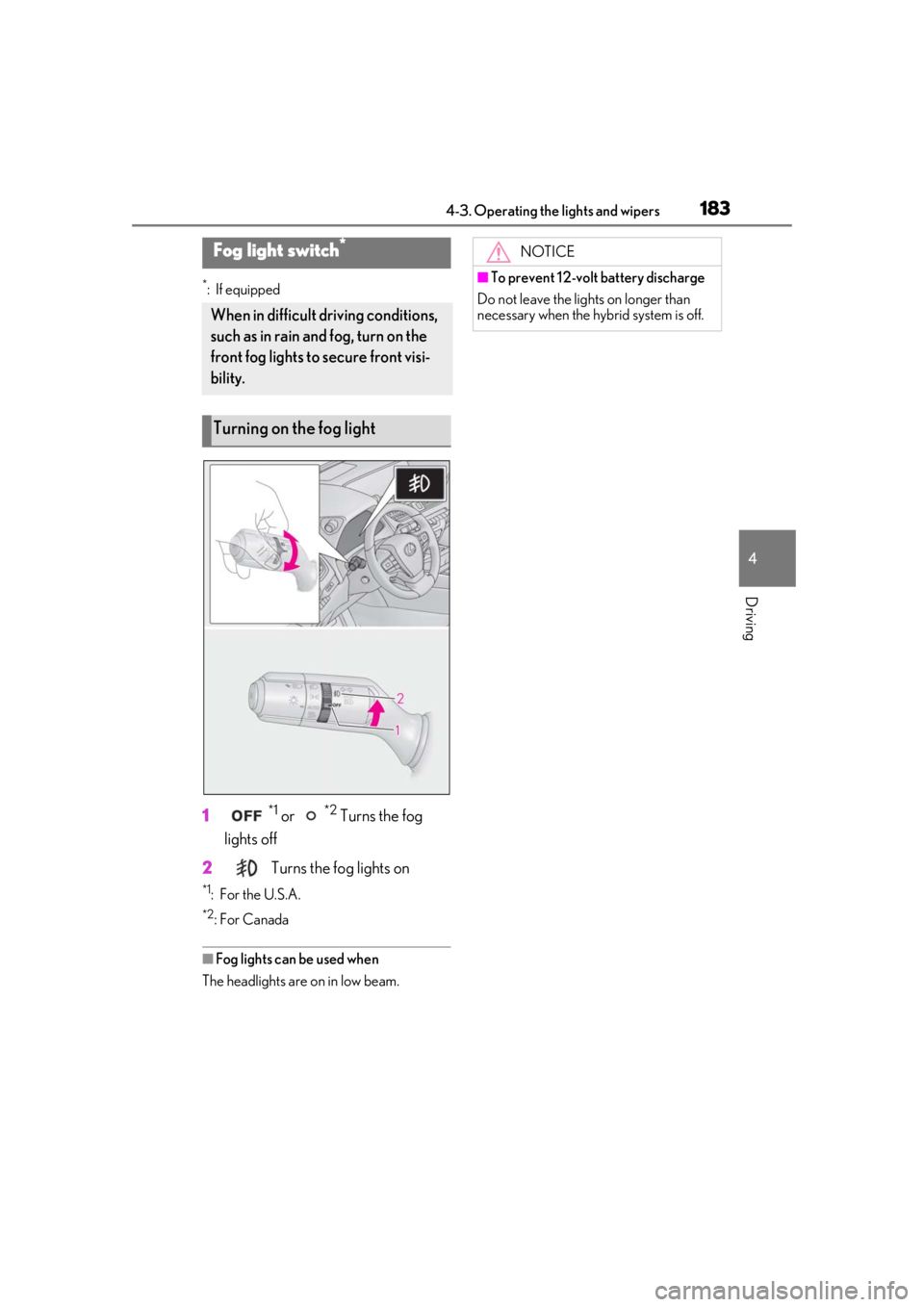
*: If equipped
1*1 or *2 Turns the fog
lights off
2
Turns the fog lights on
*1: For the U.S.A.
*2: For Canada
■Fog lights can be used when
The headlights are on in low beam.
Fog light switch*
When in difficult driving conditions,
such as in rain and fog, turn on the
front fog lights to secure front visi-
bility.
Turning on the fog light
NOTICE
■To prevent 12-volt battery discharge
Do not leave the lights on longer than
necessary when the hy brid system is off.
Page 194 of 476
1944-5. Using the driving support systems
WARNING
●If the part of the windshield in front of
the front camera is fogged up or cov-
ered with condensation, or ice, use the
windshield defogger to remove the
fog, condensation, or ice. (P.277)
●If water droplets cannot be properly
removed from the area of the wind-
shield in front of the front camera by
the windshield wipers, replace the
wiper insert or wiper blade.
If the wiper inserts or wiper blades
need to be replaced, contact your
Lexus dealer.
●Do not attach window tint to the wind-
shield.
●Replace the windshield if it is damaged
or cracked.
If the windshield needs to be replaced,
contact your Lexus dealer.
●Do not allow liquids to contact the
front camera.
●Do not allow bright lights to shine into
the front camera.
●Do not dirty or damage the front cam-
era.
When cleaning the inside of the wind-
shield, do not allow glass cleaner to
contact the lens of the front camera.
Also, do not touch the lens.
If the lens is dirty or damaged, contact
your Lexus dealer.
●Do not subject the front camera to a
strong impact.
●Do not change the installation position
or direction of the front camera or
remove it.
●Do not disassemble the front camera.
●Do not modify any components of the
vehicle around the front camera
(inside rear view mirror, etc.) or ceiling.
●Do not attach any accessories to the
hood, front grille or front bumper that
may obstruct the front camera. Con-
tact your Lexus dealer for details.
●If a surfboard or other long object is to
be mounted on the roof, make sure
that it will not obstruct the front cam-
era.
●Do not modify the headlights or other
lights.
Page 196 of 476

1964-5. Using the driving support systems
■If a warning message is displayed on the multi-information display
A system may be temporarily unavailable or there may be a malfunction in the system.
●In the following situations, perform the actions specified in the table. When the normal
operating conditions are detected, the message will disappear and the system will
become operational.
If the message does not disappear, contact your Lexus dealer.
SituationActions
When the area around a sensor is covered
with dirt, moisture (f ogged up, covered with
condensation, ice, etc. ), or other foreign
matterTo clean the part of the windshield in front of
the front camera, use the windshield wipers
or the windshield defogger of the air condi-
tioning system ( P.277).
Page 197 of 476

1974-5. Using the driving support systems
4
Driving
●In the following situations, if the situation has changed (or the vehicle has been driven for
some time) and the normal operating conditions are detected, the message will disappear
and the system will become operational.
If the message does not disappea r, contact your Lexus dealer.
When the temperature around the radar sensor is outside of the operational range, such as
when the vehicle is in the sun or in an extremely cold environment
When the front camera cannot detect objects in fr ont of the vehicle, such as when driving in
the dark, snow, or fog, or when bright lights are shining into the front camera
When the temperature around the front
camera is outside of the operational range,
such as when the vehicle is in the sun or in an
extremely cold environment
If the front camera is hot, such as after the
vehicle had been parked in the sun, use the
air conditioning system to decrease the tem-
perature around the front camera.
If a sunshade was used when the vehicle was
parked, depending on its type, the sunlight
reflected from the surface of the sunshade
may cause the temperature of the front cam-
era to become excessively high.
If the front camera is cold, such after the
vehicle is parked in an extremely cold envi-
ronment, use the air conditioning system to
increase the temperature around the front
camera.
The area in front of the front camera is
obstructed, such as when the hood is open
or a sticker is attached to the part of the
windshield in front of the front camera.
Close the hood, remove the sticker, etc. to
clear the obstruction.
SituationActions