2019 LEXUS UX250H warning
[x] Cancel search: warningPage 265 of 476

2654-6. Driving tips
4
Driving
0.98 in. (25 mm) in length
Cross chain:
0.16 in. (4 mm) in diameter
0.55 in. (14 mm) in width
0.98 in. (25 mm) in length
Regulations regarding the use of tire
chains vary depending on location and
type of road. Always check local regu-
lations before installing chains.
■Tire chain installation
Observe the following precautions when
installing and removing chains:
●Install and remove tire chains in a safe
location.
●Install tire chains on the front tires only.
Do not install tire chains on the rear tires.
●Install tire chains on fr ont tires as tightly as
possible. Retighten chains after driving
1/4 - 1/2 mile (0.5 - 1.0 km).
●Install tire chains following the instruc-
tions provided with the tire chains.
To enable the windshield wipers to be
lifted when heavy snow or icy condi-
tions are expected, change the rest
position of the windshield wipers from
the retracted position below the hood to the service position using the wiper
lever.(
P.186)
Regulations on the use of tire
chains
NOTICE
■Fitting tire chains
The tire pressure warning valves and
transmitters may not function correctly
when tire chains are fitted.
Windshield wipers
C
D
E
F
Page 266 of 476
2664-6. Driving tips
Specific design characteristics give
it a higher center of gravity than
ordinary passenger cars. This vehi-
cle design feature causes this type
of vehicle to be more likely to roll-
over. Utility vehicles have a signifi-
cantly higher rollover rate than
other types of vehicles.
An advantage of the higher ground
clearance is a better view of the
road allowing you to anticipate
problems.
It is not designed for cornering at
the same speeds as ordinary pas-
senger cars any more than low-
slung sports cars designed to per-
form satisfactorily under off-road
conditions. Therefore, sharp turns at
excessive speeds may cause roll-
over.
Your vehicle is not designed to be
driven off-road. However, in the event
that off-road driving cannot be
avoided, please observe the following
precautions to help avoid the areas
prohibited to vehicles.
Utility vehicle precautions
This vehicle belongs to the utility
vehicle class, which has higher
ground clearance and narrower
tread in relation to the height of its
center of gravity.
Utility vehicle feature
WARNING
■Utility vehicle precautions
Always observe the following precau-
tions to minimize the risk of death or seri-
ous injury or damage to your vehicle:
●In a rollover crash, an unbelted person
is significantly more likely to die than a
person wearing a seat belt. Therefore,
the driver and all passengers should
always fasten their seat belts.
●Avoid sharp turns or abrupt maneu-
vers, if at all possible.
Failure to operate this vehicle correctly
may result in loss of control or vehicle
rollover causing death or serious
injury.
●Loading cargo on the roof luggage
carrier will make the center of the
vehicle gravity higher. Avoid high
speeds, sudden starts, sharp turns,
sudden braking or abrupt maneuvers,
otherwise it may result in loss of con-
trol or vehicle rollover due to failure to
operate this vehicle correctly.
●Always slow down in gusty crosswinds.
Because of its profile and higher cen-
ter of gravity, your vehicle is more sen-
sitive to side winds than an ordinary
passenger car. Slowing down will allow
you to have better control.
●Do not drive horizontally across steep
slopes. Driving straight up or straight
down is preferred. Your vehicle (or any
similar off-road vehicle) can tip over
sideways much more easily than for-
ward or backward.
Off-road driving
Page 267 of 476

2674-6. Driving tips
4
Driving
Drive your vehicle only in areas
where off-road vehicles are permit-
ted to travel.
Respect private property. Get
owner’s permission before entering
private property.
Do not enter areas that are closed.
Honor gates, barriers and signs that
restrict travel.
Stay on established roads. When
conditions are we t, driving tech-
niques should be changed or travel
delayed to prevent damage to
roads.
AWD models: Avoid driving on very
steep, slippery roads and other sur-
faces, such as sand, where the tires
are liable to lose traction. Your vehi-
cle may not perform as well as con-
ventional AWD on-road vehicles on
these surfaces.
■Additional informatio n for off-road driv-
ing
For owners in U.S. mainland, Hawaii and
Puerto Rico:
To obtain additional information pertaining
to driving your vehicle off-road, consult the
following organizations.
●State and Local Parks and Recreation
Departments
●State Motor Vehicle Bureau
●Recreational Vehicle Clubs
●U.S. Forest Service and Bureau of Land
Management
WARNING
■Off-road driving precautions
Always observe the following precau-
tions to minimize the risk of death or seri-
ous injury or damage to your vehicle:
●Drive carefully when off the road. Do
not take unnecessary risks by driving in
dangerous places.
●Do not grip the steering wheel spokes
when driving off-road. A bad bump
could jerk the wheel and injure your
hands. Keep both hands and especially
your thumbs on the outside of the rim.
●Always check your brakes for effec-
tiveness immediately after driving in
sand, mud, water or snow.
●After driving through tall grass, mud,
rock, sand, water, et c., check that there
is no grass, bush, paper, rags, stone,
sand, etc. adhering or trapped to the
underbody. Clear of f any such matter
from the underbody. If the vehicle is
used with these materials trapped or
adhering to the underbody, a break-
down or fire could occur.
●When driving off-road or in rugged
terrain, do not drive at excessive
speeds, jump, make sharp turns, strike
objects, etc. This may cause loss of
control or vehicle rollover causing
death or serious injury. You are also
risking expensive damage to your
vehicle’s suspension and chassis.
NOTICE
■To prevent water damage
Take all necessary safety measures to
ensure that water damage to the hybrid
battery (traction battery), hybrid system
or other components does not occur.
●Water entering the engine compart-
ment may cause seve re damage to the
hybrid system. Water entering the inte-
rior may cause the hybrid battery
stowed under the re ar seats to short
circuit.
Page 279 of 476

2795-3. Using the air conditioning system and defogger
5
Interior features
diately after the air conditioning system is
started in automatic mode.
■Air conditioning filter
P.364
■Customization
Settings (e.g. A/C automatic mode switch
operation) can be changed.
(Customizable features: P.443)
■Main control screen
Using the touchpad of the Remote
Touch, select the button on the screen.
to can be adjusted by perform-
ing the following operations.
Flick operation: Move the pointer to
the desired item and flick the touchpad
up or down.
The item can be adjusted by one level.
Trace operation: After selecting the
desired item, slide your finger up or
down.
The item can be adjusted by the amount
that you trace.
Trace operation cannot be used while driv-
ing.
Sub menu
Selecting the sub menu item to switch the
main screen.
: Display the air conditioning control
screen
: Display the heated steering
wheel/seat heater/sea t ventilator control
screen (if equipped)
: Display the Lexus Climate Con-
cierge control screen
: Display the option control screen
Adjust the left-hand side tempera-
ture setting
Adjust the fan speed setting
Select the air flow mode
: Air flows to the upper body
: Air flows to the upper body and feet
WARNING
■To prevent the windshield from fog-
ging up
Do not use the windshield defogger
switch during cool air operation in
extremely humid weather. The difference
between the temperature of the outside
air and that of the windshield can cause
the outer surface of the windshield to fog
up, blocking your vision.
■When the outside rear view mirror
defoggers are operating
Do not touch the outside rear view mir-
ror surfaces, as they can become very
hot and burn you.
NOTICE
■To prevent 12-volt battery discharge
Do not leave the air conditioning system
on longer than necessary when the
hybrid system is off.
Air conditioning control screen
BE
A
B
C
D
Page 281 of 476

2815-3. Using the air conditioning system and defogger
5
Interior features
control screen (if equipped)
(P.288)
Adjust the left-hand side tempera-
ture setting
Adjust the fan speed setting
Adjust the right-hand side tem-
perature setting
Set cooling and dehumidification
function on/off
Adjust the temperature for the
driver’s and front passenger’s seats
separately (“DUAL” mode)
( P.283)
Select the air flow mode
■Windshield wiper de-icer (if equipped)
This feature is used to prevent ice from
building up on the wi ndshield and wiper
blades.
The windshield wiper de-icer will automati-
cally turn off after a period of time.
■Eco air conditioning mode
When Eco drive mode is selected using the
driving mode select switch, eco air condi-
tioning mode turns on.
When a driving mode other than Eco drive
mode is selected, eco air conditioning
mode may turn off.
1Press the automatic mode switch or
select “AUTO” on the sub function
menu. ( P.279)
2
Adjust the temperature setting.
3
To stop the operation, press the off
switch or select “Off” on the sub
function menu.
If the fan speed setting or air flow
modes are operated, the automatic
mode indicator goes off. However,
automatic mode for functions other
than that operated is maintained.
■Using automatic mode
Fan speed is adjusted automatically accord-
ing to the temperature setting and the
ambient conditions.
Therefore, the fan may stop for a while until
warm or cool air is ready to flow immedi-
ately after the automatic mode switch is
pressed or “AUTO” is selected.
Cool air may blow around the upper body
even when the heater is on due to sunlight.
■Windshield fog detection function
When automatic mode is set, the humidity
sensor detects fog on the windshield and
controls the air condit ioning system to pre-
vent fog.
WARNING
■To prevent burns (vehicles with wind-
shield wiper de-icer)
Do not touch the glass at lower part of
the windshield or to the side of the front
pillars when the wind shield wiper de-icer
is on.
B
C
D
E
F
G
Using automatic mode
NOTICE
■Humidity sensor
In order to detect fog on the windshield,
a sensor which monitors the temperature
of the windshield, the surround humidity,
etc., is installed.
Follow these points to avoid damaging
the sensor:
●Do not disassemble the sensor
●Do not spray the glass cleaner on the
sensor or subject it to strong impacts
Page 285 of 476
2855-3. Using the air conditioning system and defogger
5
Interior features
WARNING
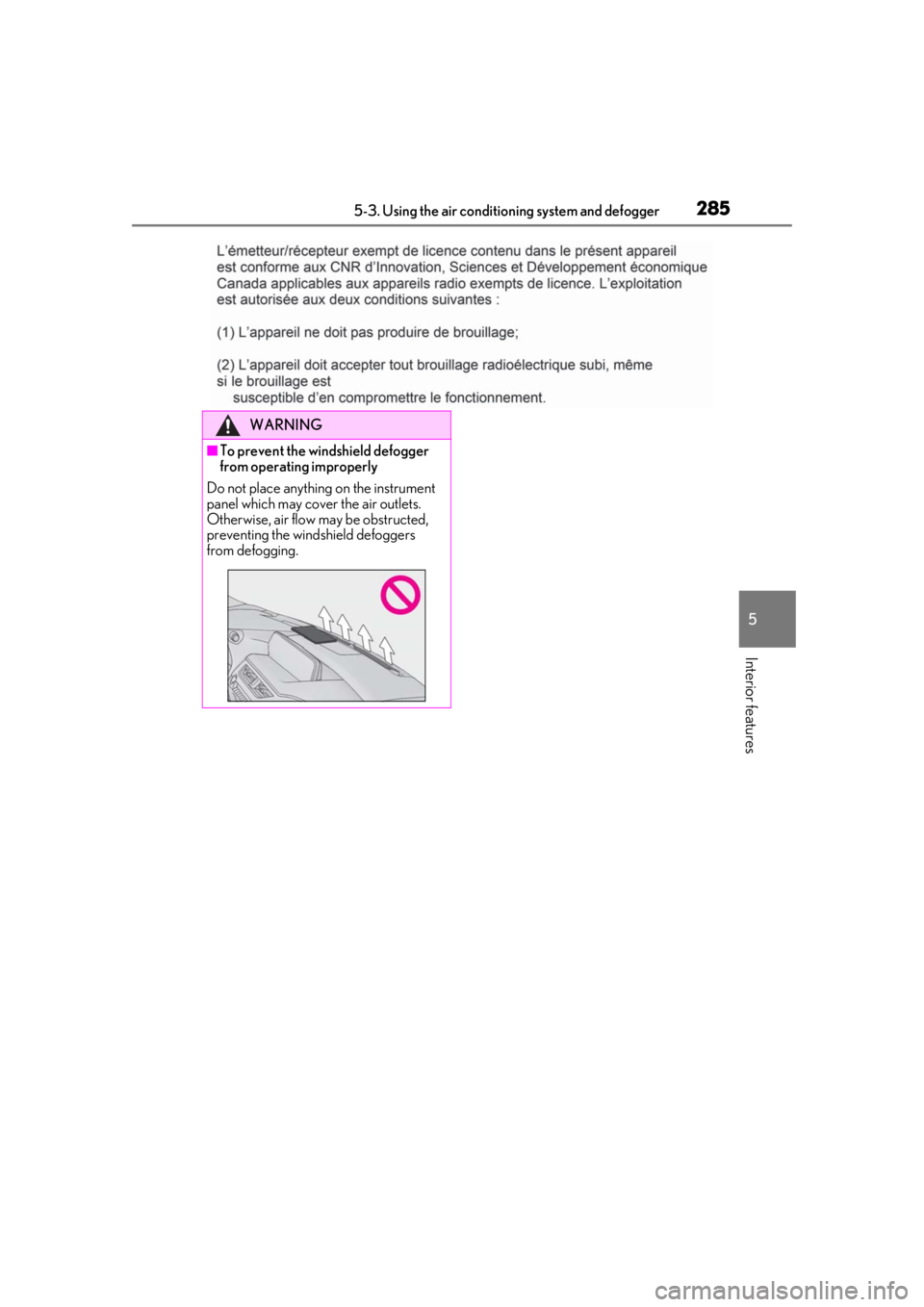
■To prevent the windshield defogger
from operating improperly
Do not place anything on the instrument
panel which may cover the air outlets.
Otherwise, air flow may be obstructed,
preventing the windshield defoggers
from defogging.
Page 286 of 476

2865-3. Using the air conditioning system and defogger
*: If equipped
Turns the heated steering wheel on/off
Each time the switch is pressed, the opera-
tion condition changes as follows.
AUTO (lit) Hi (2 segments lit) Lo (1
segment lit) Off
The AUTO indicator and/or level indi-
cator illuminates during operation.
■The heated steering wheel can be used
when
The power switch is in ON.
■Customization
Steering wheel heating preference in auto-
matic mode can be changed. (Customiz-
able features: P.444)
Heated steering wheel*/seat
h
eaters*/seat ventilators*
Heated steering wheel
Warms up the grip of the steering
wheel
Seat heaters
Warm up the seat upholstery
Seat ventilators
Maintain good airflow on the seat
upholstery by sucking air into the
seats
Press the “MENU” button on the
Remote Touch and select “Climate”
to display the air conditioning con-
trol screen. Then, select on the
sub menu ( P.279) to display the
heated steering wheel/seat heat-
ers/seat ventilators control screen.
WARNING
■To prevent minor burn injuries
Care should be taken if anyone in the fol-
lowing categories comes in contact with
the steering wheel or seats when the
heater is on:
●Babies, small children, the elderly, the
sick and the phys ically challenged
●Persons with sensitive skin
●Persons who are fatigued
●Persons who have taken alcohol or
drugs that induce sleep (sleeping
drugs, cold remedies, etc.)
NOTICE
■To prevent damage to the seat heat-
ers and seat ventilators
Do not put heavy objects that have an
uneven surface on the seat and do not
stick sharp objects (n eedles, nails, etc.)
into the seat.
■To prevent battery discharge
Do not use the functions when the hybrid
system is off.
Heated steering wheel
A
B
Page 287 of 476
2875-3. Using the air conditioning system and defogger
5
Interior features
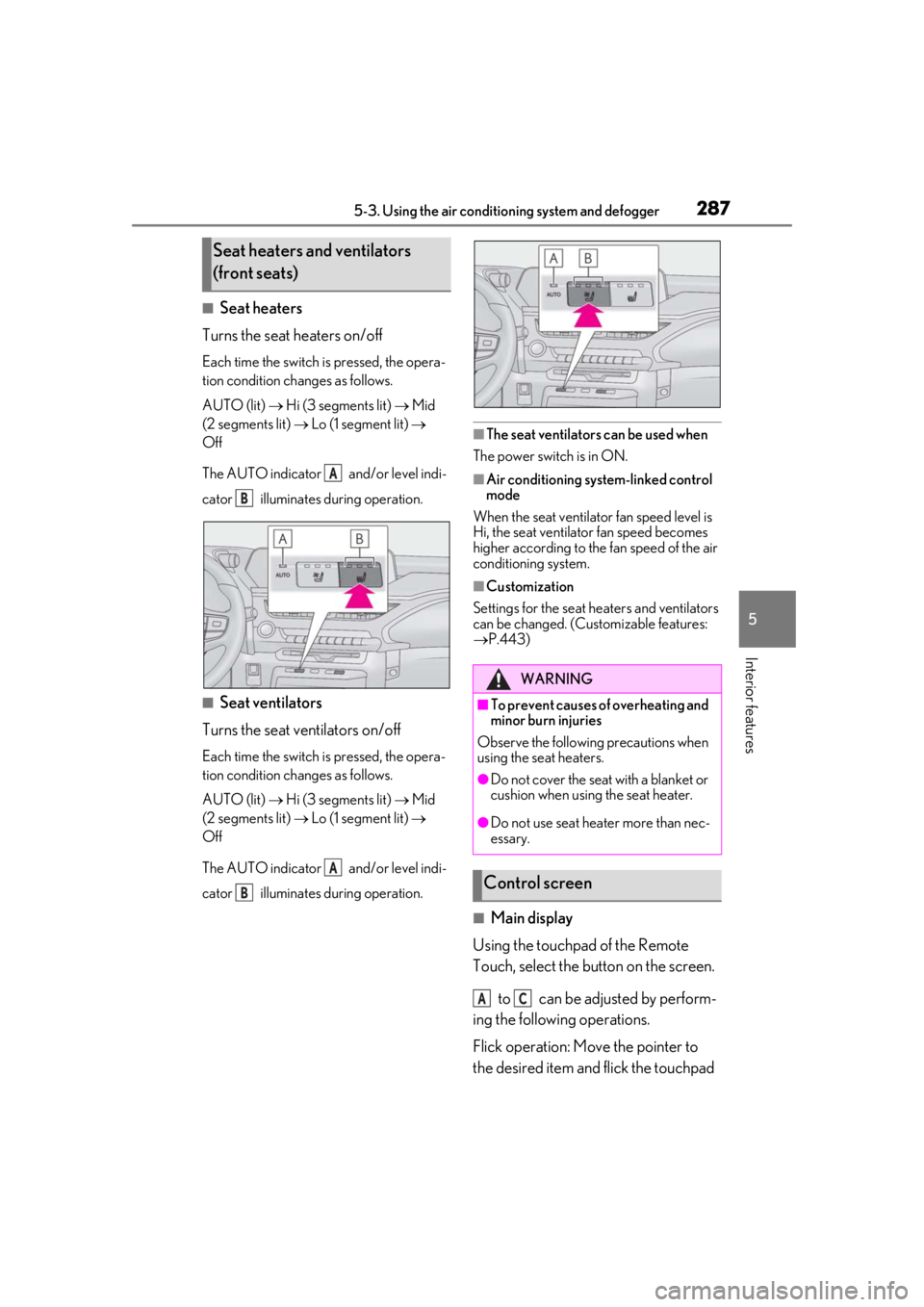
■Seat heaters
Turns the seat heaters on/off
Each time the switch is pressed, the opera-
tion condition changes as follows.
AUTO (lit) Hi (3 segments lit) Mid
(2 segments lit) Lo (1 segment lit)
Off
The AUTO indicator and/or level indi-
cator illuminates during operation.
■Seat ventilators
Turns the seat ventilators on/off
Each time the switch is pressed, the opera-
tion condition changes as follows.
AUTO (lit) Hi (3 segments lit) Mid
(2 segments lit) Lo (1 segment lit)
Off
The AUTO indicator and/or level indi-
cator illuminates during operation.
■The seat ventilators can be used when
The power switch is in ON.
■Air conditioning system-linked control
mode
When the seat ventilator fan speed level is
Hi, the seat ventilator fan speed becomes
higher according to the fan speed of the air
conditioning system.
■Customization
Settings for the seat heaters and ventilators
can be changed. (Customizable features:
P.443)
■Main display
Using the touchpad of the Remote
Touch, select the button on the screen.
to can be adjusted by perform-
ing the following operations.
Flick operation: Move the pointer to
the desired item and flick the touchpad
Seat heaters and ventilators
(front seats)
A
B
A
B
WARNING
■To prevent causes of overheating and
minor burn injuries
Observe the following precautions when
using the seat heaters.
●Do not cover the seat with a blanket or
cushion when using the seat heater.
●Do not use seat heater more than nec-
essary.
Control screen
AC