Page 287 of 476
2875-3. Using the air conditioning system and defogger
5
Interior features
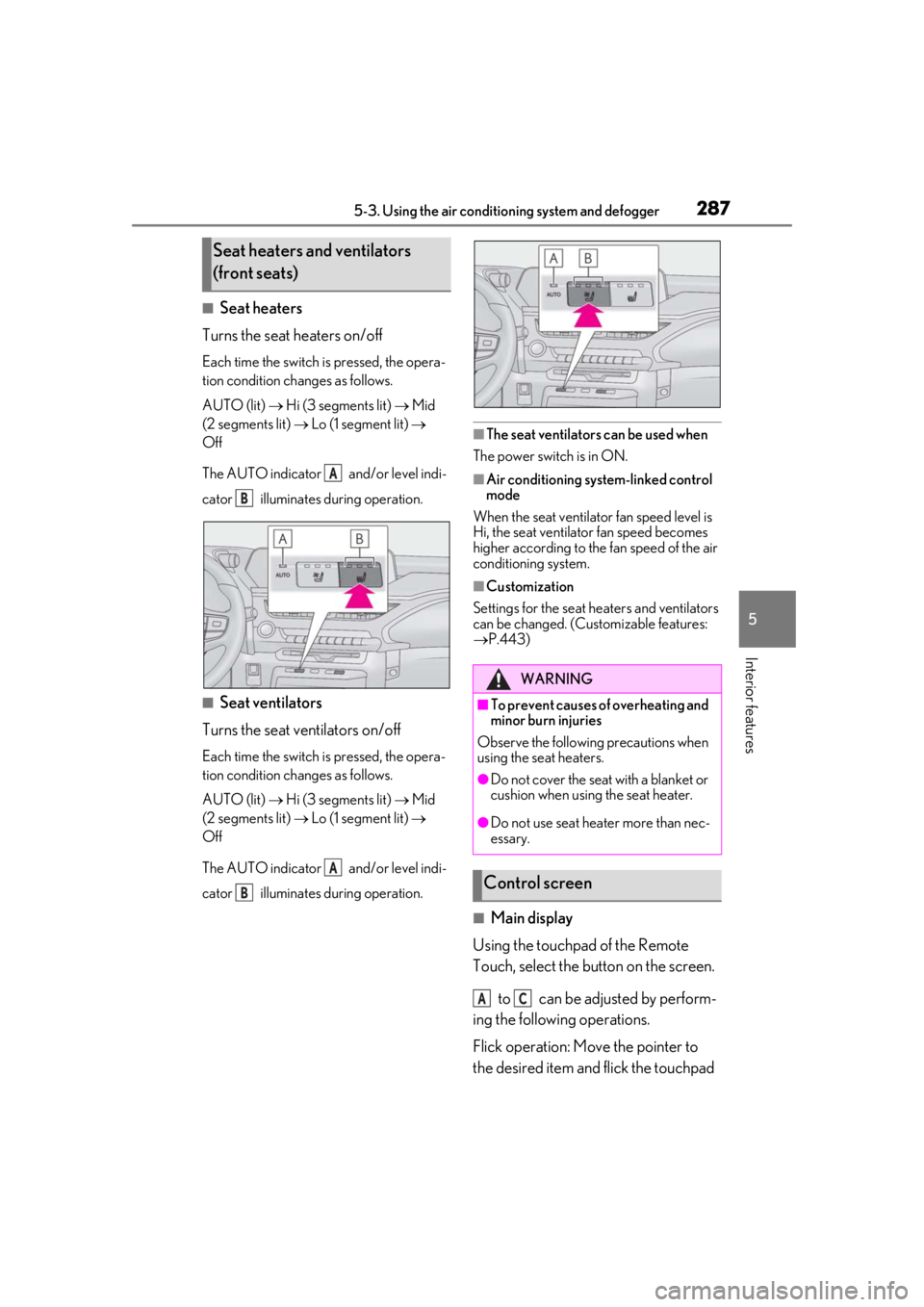
■Seat heaters
Turns the seat heaters on/off
Each time the switch is pressed, the opera-
tion condition changes as follows.
AUTO (lit) Hi (3 segments lit) Mid
(2 segments lit) Lo (1 segment lit)
Off
The AUTO indicator and/or level indi-
cator illuminates during operation.
■Seat ventilators
Turns the seat ventilators on/off
Each time the switch is pressed, the opera-
tion condition changes as follows.
AUTO (lit) Hi (3 segments lit) Mid
(2 segments lit) Lo (1 segment lit)
Off
The AUTO indicator and/or level indi-
cator illuminates during operation.
■The seat ventilators can be used when
The power switch is in ON.
■Air conditioning system-linked control
mode
When the seat ventilator fan speed level is
Hi, the seat ventilator fan speed becomes
higher according to the fan speed of the air
conditioning system.
■Customization
Settings for the seat heaters and ventilators
can be changed. (Customizable features:
P.443)
■Main display
Using the touchpad of the Remote
Touch, select the button on the screen.
to can be adjusted by perform-
ing the following operations.
Flick operation: Move the pointer to
the desired item and flick the touchpad
Seat heaters and ventilators
(front seats)
A
B
A
B
WARNING
■To prevent causes of overheating and
minor burn injuries
Observe the following precautions when
using the seat heaters.
●Do not cover the seat with a blanket or
cushion when using the seat heater.
●Do not use seat heater more than nec-
essary.
Control screen
AC
Page 290 of 476
2905-4. Using the interior lights
5-4.Using the interior lights
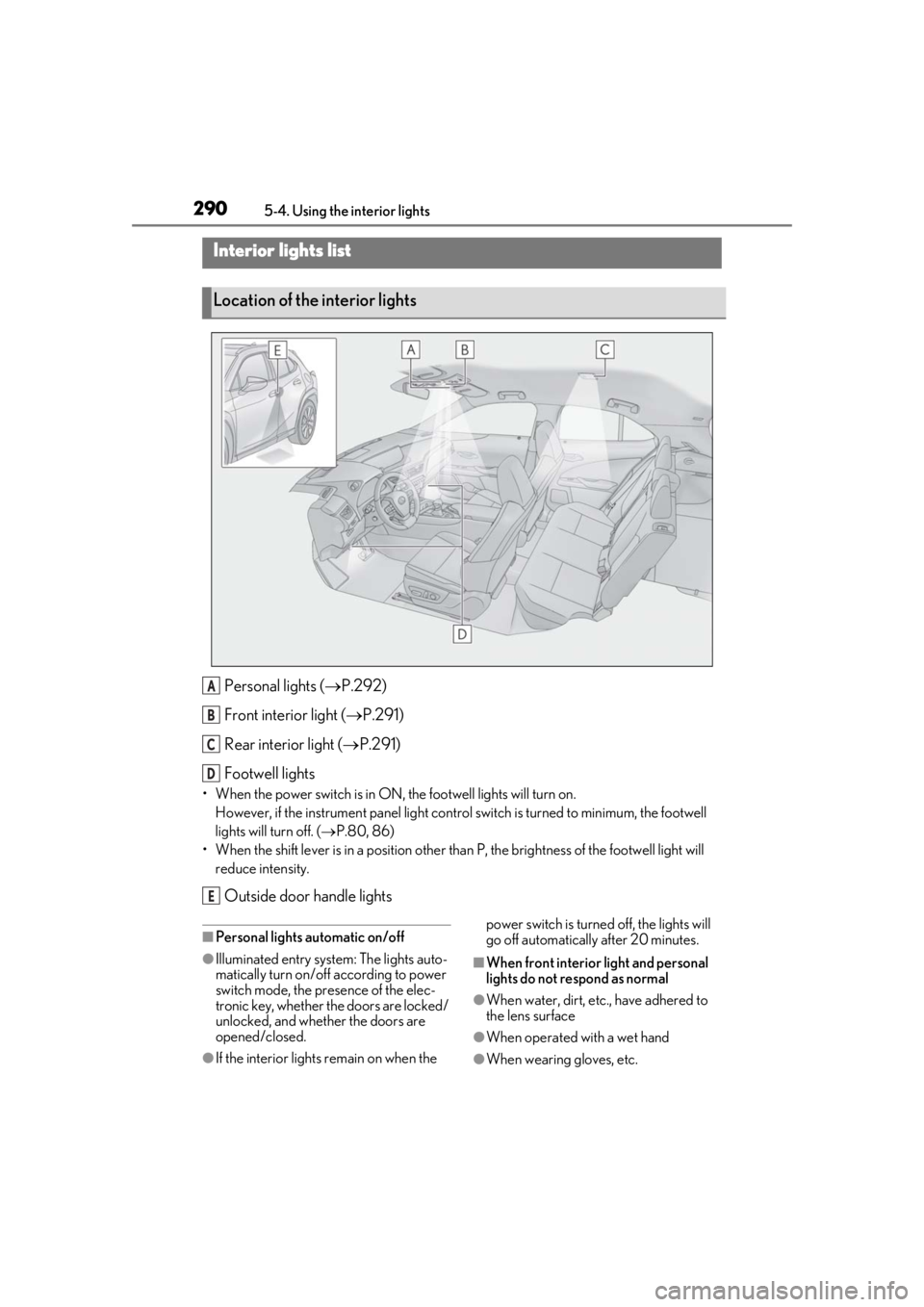
Personal lights ( P.292)
Front interi or light (P.291)
Rear interior light ( P.291)
Footwell lights
• When the power switch is in ON, the footwell lights will turn on.
However, if the instrume nt panel light control switch is turned to minimum, the footwell
lights will turn off. ( P.80, 86)
• When the shift lever is in a position other th an P, the brightness of the footwell light will
reduce intensity.
Outside door handle lights
■Personal lights automatic on/off
●Illuminated entry system: The lights auto-
matically turn on/off according to power
switch mode, the presence of the elec-
tronic key, whether the doors are locked/
unlocked, and whether the doors are
opened/closed.
●If the interior lights remain on when the power switch is turned off, the lights will
go off automatically after 20 minutes.
■When front interior light and personal
lights do not respond as normal
●When water, dirt, etc., have adhered to
the lens surface
●When operated with a wet hand
●When wearing gloves, etc.
Interior lights list
Location of the interior lights
A
B
C
D
E
Page 291 of 476
2915-4. Using the interior lights
5
Interior features
■Automatic turning on of the interior
lights
If any of the SRS airbags deploy (inflate) or
in the event of a strong rear impact, the inte-
rior lights will turn on automatically. The
interior lights will turn off automatically after
approximately 20 minutes. The interior
lights can be turned off manually. However,
in order to help prevent further collisions, it
is recommended that th ey be left on until
safety can be ensured. (The interior lights
may not turn on automatically depending
on the force of the impact and conditions of
the collision.)
■Customization
Setting (e.g. the time elapsed before lights
turn off) can be changed. (Customizable
features: P.444)
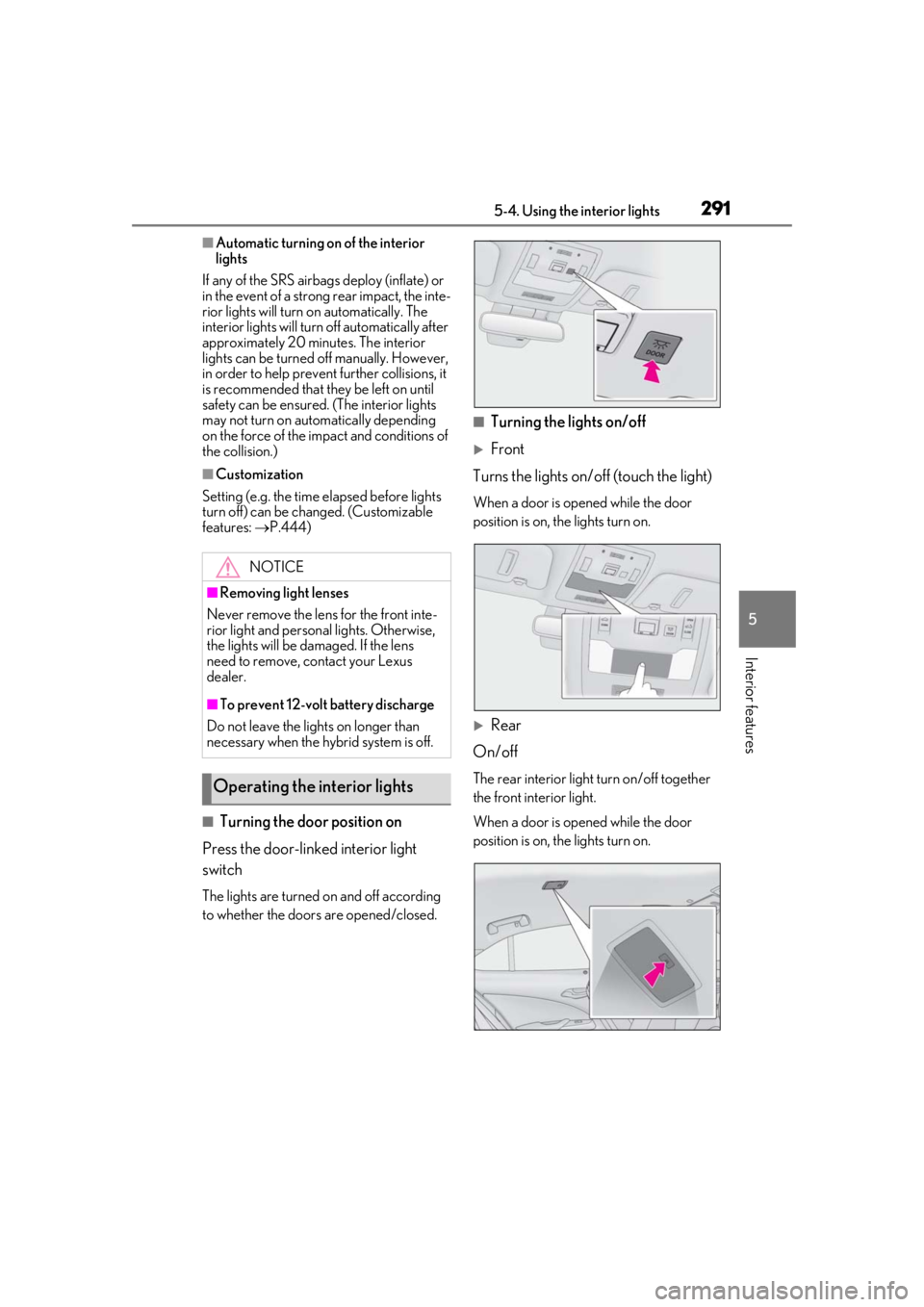
■Turning the door position on
Press the door-linked interior light
switch
The lights are turned on and off according
to whether the doors are opened/closed.
■Turning the lights on/off
Front
Turns the lights on/off (touch the light)
When a door is opened while the door
position is on, the lights turn on.
Rear
On/off
The rear interior light turn on/off together
the front interior light.
When a door is opened while the door
position is on, the lights turn on.
NOTICE
■Removing light lenses
Never remove the lens for the front inte-
rior light and personal lights. Otherwise,
the lights will be damaged. If the lens
need to remove, contact your Lexus
dealer.
■To prevent 12-volt battery discharge
Do not leave the lights on longer than
necessary when the hy brid system is off.
Operating the interior lights
Page 292 of 476
2925-4. Using the interior lights
■Turning the lights on/off
Turns the lights on/off (touch the light)
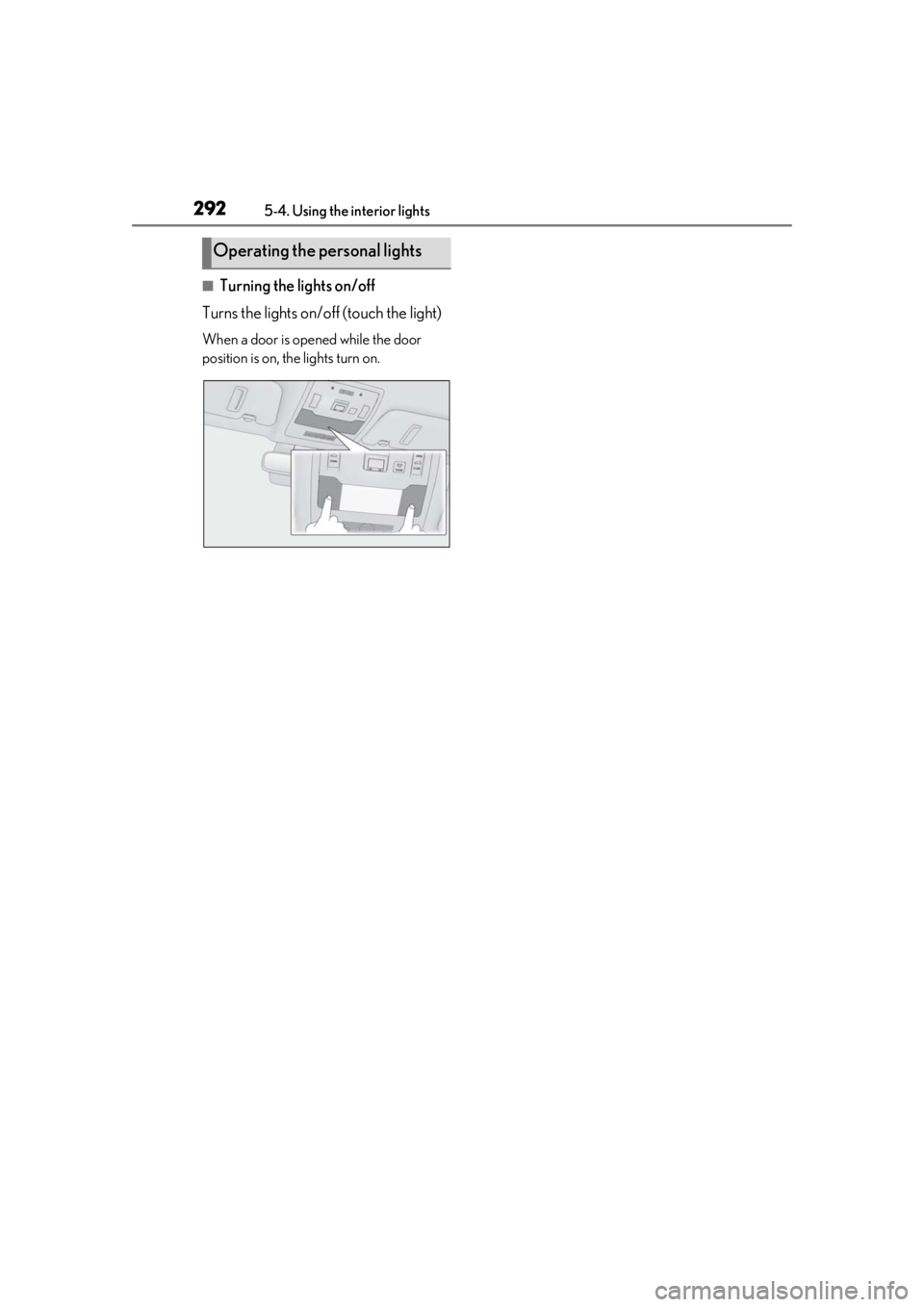
When a door is opened while the door
position is on, the lights turn on.
Operating the personal lights
Page 294 of 476
2945-5. Using the storage features
1Open (press the button)
2
Unlock with the mechanical key
3
Lock with the mechanical key
■Glove box light
The glove box light turns on when the tail
lights are on.
■Removing the partition
The partition inside the glove box can be
removed by pulling it.
Lift the lid while pushing the button to release the lock.
The console box can be opened from
either side.
■Front
■Rear
Pull down the armrest.
WARNING
■When storage compartments are not
in use
When driving or when the glove box and
the console box are not in use, keep it
closed.
In the event of sudden braking or sudden
swerving, an accident may occur due to
an occupant being struck by an open lid
or the items stored inside.
Glove box
Console box
Cup holders
Page 296 of 476
2965-5. Using the storage features
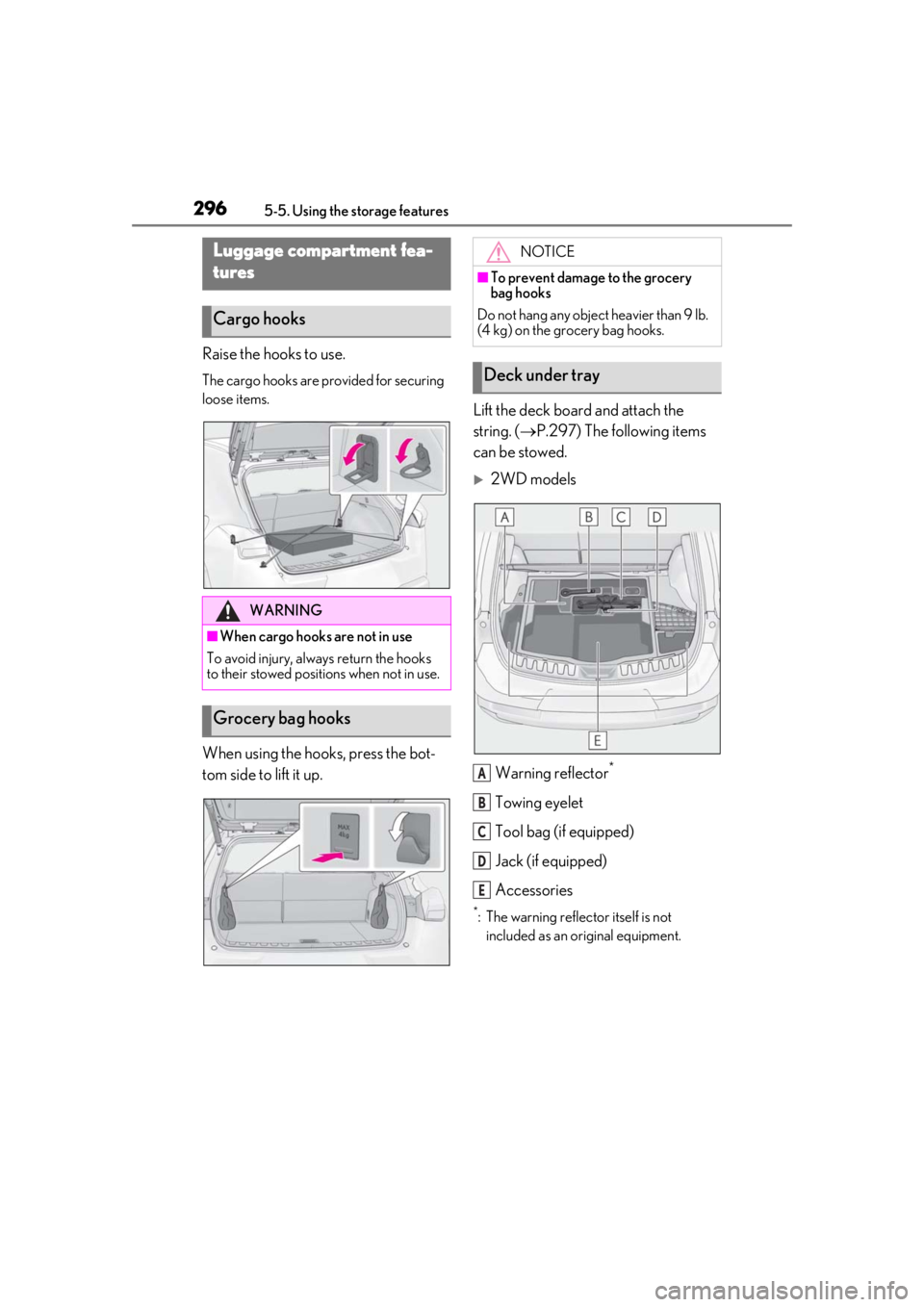
Raise the hooks to use.
The cargo hooks are provided for securing
loose items.
When using the hooks, press the bot-
tom side to lift it up.Lift the deck board and attach the
string. (
P.297) The following items
can be stowed.
2WD models
Warning reflector
*
Towing eyelet
Tool bag (if equipped)
Jack (if equipped)
Accessories
*: The warning reflec tor itself is not
included as an original equipment.
Luggage compartment fea-
tures
Cargo hooks
WARNING
■When cargo hooks are not in use
To avoid injury, always return the hooks
to their stowed positions when not in use.
Grocery bag hooks
NOTICE
■To prevent damage to the grocery
bag hooks
Do not hang any object heavier than 9 lb.
(4 kg) on the grocery bag hooks.
Deck under tray
A
B
C
D
E
Page 298 of 476
2985-5. Using the storage features
4Attach the string to the luggage
cover hook on the back door.
Left side
Pull the strap upwards to lift the side
deck board and remove it.
Right side
Pull the strap and fold the side deck
board.
■When installing the side deck board (left
side)
Insert the claw of the side deck board and
install it.
■Installing the luggage cover
1
Take out the luggage cover from
the bag.
2
Slowly unfold the luggage cover.
3
Attach the strings to the luggage
cover hooks.
Make sure that the side the strings are
WARNING
■If the deck boards are opened or
removed
Return them to their original positions
before driving. In the event of sudden
braking, an accident may occur due to an
occupant being struck by the deck
boards or the items stored in the deck
under tray.
NOTICE
■To prevent damage to the deck board
When closing the back door, do not
leave the deck board string attached to
the hook.
Luggage cover
Page 299 of 476
2995-5. Using the storage features
5
Interior features
sewn faces down.
■Stowing the luggage cover
1
Hold the luggage cover corners of
the side with the long strings.
2
Fold it in half. 3
Turn your wrists
to fold it.
4
Put it in the bag.
■When removing the luggage cover
Pull the short strings toward you and
unhook them.
WARNING
■When removing and unfolding the
luggage cover
Observe the following precautions. Fail-
ure to do so may cause the luggage
cover to suddenly unfold, resulting in
injury.
●When taking out the luggage cover
from the bag, securely hold the edges
of the luggage cover and slowly take it
out.