2019 LEXUS UX200 park
[x] Cancel search: parkPage 241 of 452

2414-5. Using the driving support systems
4
Driving
an approaching vehicle.
●Brake control
• Engine output restriction control is oper- ating
• The Parking Support Brake determines
that an emergency brake operation is
necessary to avoid a collision with an
approaching vehicle.
■The Parking Support Brake function
(rear-crossing vehicles) will stop operat-
ing when
The function will stop operating if any of the
following conditions are met:
●Engine output restriction control
• The Parking Support Brake is disabled.
• The collision becomes avoidable with normal brake operation.
• A vehicle is no longer approaching from the right or left at the rear of the vehicle.
●Brake control
• The Parking Support Brake is disabled.
• Approximately 2 seconds have elapsed
since the vehicle was stopped by brake
control.
• The brake pedal is depressed after the vehicle is stopped by brake control.
• A vehicle is no longer approaching from
the right or left at the rear of the vehicle.
■Detection area of the Parking Support
Brake function (rear-crossing vehicles)
The detection area of the Parking Support
Brake function (rear-crossing vehicles) dif-
fers from the detection area of the RCTA
function ( P.228). Therefore, even if the
RCTA function detects a vehicle and pro-
vides an alert, the Parking Support Brake
function (rear-crossing vehicles) may not
start operating.
■Conditions under which the Parking
Support Brake function (rear-crossing
vehicles) will not detect a vehicle
The Parking Support Brake function (rear-
crossing vehicles) is not designed to detect
the following types of vehicles and/or
objects:
●Vehicles approaching from directly
behind
●Vehicles backing up in a parking space
next to your vehicle
●Vehicles that the sensors cannot detect
due to obstructions
●Vehicles which suddenly accelerate or
decelerate near your vehicle
●Guardrails, walls, signs, parked vehicles
and similar stationary objects*
●Small motorcycles, bicycles, pedestrians,
etc.*
●Vehicles moving away from your vehicle
●Vehicles approaching from the parking
spaces next to your vehicle*
●Objects which are extremely close to a
radar sensor*
●Vehicles which are approaching from the
right or left at the rear of the vehicle at a
traveling speed of less than approxi-
mately 5 mph (8 km/h)
●Vehicles which are approaching from the
right or left at the rear of the vehicle at a
traveling speed of more than approxi-
mately 15 mph (24 km/h)
*: Depending on the conditions, detection
of a vehicle and/or object may occur.
■RCTA buzzer
Regardless of whether th e RCTA function is
enabled or not ( P.227), if the Parking
Support Brake function is enabled
( P.232) and brake control is performed,
a buzzer will sound to notify the driver.
■Situations in which the system may
operate even though there is no possi-
bility of a collision
In some situations such as the following, the
Parking Support Brake function (rear-
crossing vehicles) may operate even
though there is no possibility of a collision.
●When the parking space faces a street
Page 242 of 452

2424-5. Using the driving support systems
and vehicles are being driven on the
street
●When a detected vehicle turns while
approaching the vehicle
●When a vehicle passes by the side of your
vehicle
●When the distance between your vehicle
and metal objects, such as a guardrail,
wall, sign, or parked vehicle, which may
reflect electrical waves toward the rear of
the vehicle, is short
●When there are spinning objects near
your vehicle such as the fan of an air con-
ditioning unit
●When water is splashed or sprayed toward the rear bumper, such as from a
sprinkler
■Situations in which the Parking Support
Brake function (rear-crossing vehicles)
may not operate properly
In some situations, such as the following, the
radar sensors may not detect an object and
this function may not operate properly
●Stationary objects
●When a sensor or the area around a sen-
sor is extremely hot or cold
●If the rear bumper is covered with ice,
snow, dirt, etc.
●When it is raining he avily or water strikes
the vehicle
●When the detection area of a radar sen-
sor is obstructed by an adjacent vehicle
●If the vehicle is significantly tilted
●When equipment that may obstruct a
sensor is installed, such as a towing eye-
let, bumper protector (an additional trim
strip, etc.), bicycle carrier, or snow plow
●If the suspension has been modified or
tires of a size othe r than specified are
installed
●If the front of the vehicle is raised or low-
ered due to the carried load
●If a sticker or an el ectronic component,
such as a backlit license plate (especially
fluorescent type), fog lights, fender pole
or wireless antenna is installed near a
radar sensor
●If the orientation of a radar sensor has
been changed
●When multiple vehicl es are approaching
with only a small gap between each vehi-
cle
●If a vehicle is approaching the rear of
your vehicle rapidly
●Situations in which the radar sensor may
not detect a vehicle
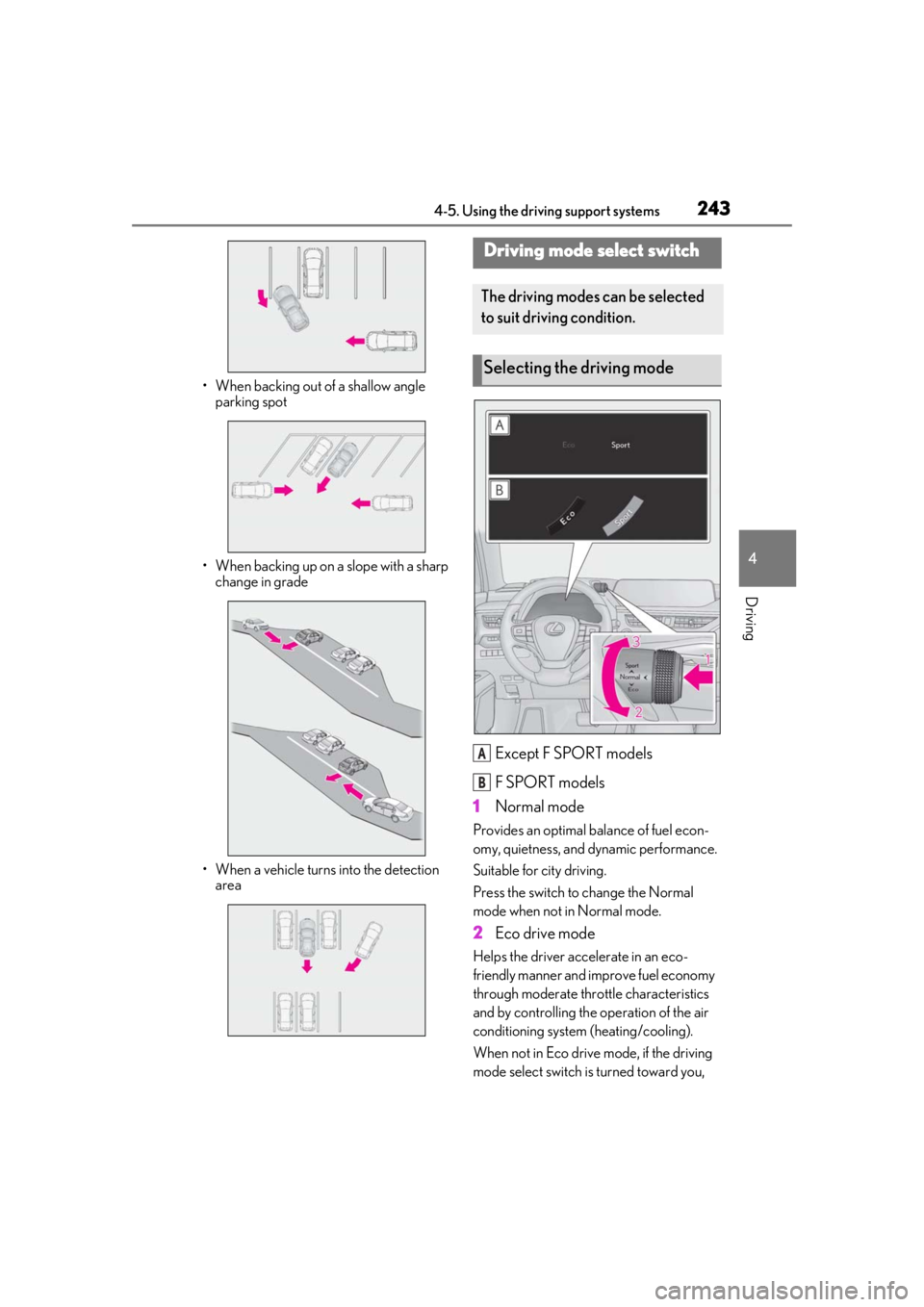
• When a vehicle approaches from the right or left at the rear of the vehicle while
you are turning while backing up
• When turning while backing up
Page 243 of 452
2434-5. Using the driving support systems
4
Driving
• When backing out of a shallow angle parking spot
• When backing up on a slope with a sharp change in grade
• When a vehicle turns into the detection area
Except F SPORT models
F SPORT models
1 Normal mode
Provides an optimal ba lance of fuel econ-
omy, quietness, and dynamic performance.
Suitable for city driving.
Press the switch to change the Normal
mode when not in Normal mode.
2 Eco drive mode
Helps the driver acce lerate in an eco-
friendly manner and improve fuel economy
through moderate thro ttle characteristics
and by controlling the operation of the air
conditioning system (heating/cooling).
When not in Eco drive mode, if the driving
mode select switch is turned toward you,
Driving mode select switch
The driving modes can be selected
to suit driving condition.
Selecting the driving mode
A
B
Page 246 of 452

2464-5. Using the driving support systems
■Operating conditions of hill-start assist
control
When the following four conditions are met,
the hill-start assist control will operate:
●The shift lever is in a position other than P
or N (when starting off forward/back-
ward on an upward incline).
●The vehicle is stopped.
●The accelerator pedal is not depressed.
●The parking brake is not engaged.
■Automatic system cancelation of hill-
start assist control
The hill-start assist control will turn off in any
of the following situations:
●The shift lever is shifted to P or N.
●The accelerator pedal is depressed.
●The parking brake is engaged.
●2 seconds at maximum elapsed after the
brake pedal is released
■Sounds and vibrations caused by the
ABS, brake assist, VSC, TRAC and hill-
start assist control systems
●A sound may be heard from the engine
compartment when the brake pedal is
depressed repeatedly, when the engine is
started or just after the vehicle begins to
move. This sound does not indicate that a
malfunction has occurred in any of these
systems.
●Any of the following conditions may
occur when the above systems are oper-
ating. None of these indicates that a mal-
function has occurred.
• Vibrations may be felt through the vehicle body and steering.
• A motor sound may be heard also after the vehicle comes to a stop.
• The brake pedal may pulsate slightly after
the ABS is activated.
• The brake pedal may move down slightly after the ABS is activated.
■Active Cornering Assist operation
sounds and vibrations
When Active Cornering Assist is operated,
operation sounds and vibrations may be
generated from the brake system, but this is
not a malfunction.
■EPS operation sound
When the steering wheel is operated, a
motor sound (whirring sound) may be
heard. This does not indicate a malfunction.
■Automatic reactivation of TRAC and
VSC systems
After turning the TRAC and VSC systems
off, the systems will be automatically re-
enabled in the following situations:
●When the engine switch is turned off
●If only the TRAC system is turned off, the
TRAC will turn on when vehicle speed
increases. If both the TRAC and VSC
systems are turned off, automatic re-
enabling will not occur when vehicle
speed increases.
■Secondary Collision Brake operating
conditions
The vehicle speed is approximately 6 mph
(10 km/h) or more and the airbag sensor
detects a collision. (The Secondary Colli-
sion Brake will not operate when the vehicle
speed is below approximately 6 mph [10
km/h].)
■Secondary Collision Brake automatic
cancellation
The Secondary Collision Brake is automati-
cally canceled in the following situations.
●The vehicle speed drops below approxi-
mately 6 mph (10 km/h)
●A certain amount of time elapses during
operation
●The accelerator pedal is depressed a
large amount
■Operating conditions of Active Corner-
ing Assist
The system operates in the following situa-
tions.
●TRAC/VSC can operate
●The system determines that the vehicle is
drifting to the outer side when attempting
to accelerate during cornering
●The brake pedal is released
■Reduced effectiveness of the EPS sys-
tem
The effectiveness of the EPS system is
Page 247 of 452

2474-5. Using the driving support systems
4
Driving
reduced to prevent the system from over-
heating when there is frequent steering
input over an extended period of time. The
steering wheel may feel heavy as a result.
Should this occur, refrain from excessive
steering input or stop the vehicle and turn
the engine off. The EPS system should
return to normal within 10 minutes.
WARNING
■The ABS does not operate effectively
when
●The limits of tire gripping performance
have been exceeded (such as exces-
sively worn tires on a snow covered
road).
●The vehicle hydroplanes while driving
at high speed on wet or slick roads.
■Stopping distance when the ABS is
operating may exceed that of normal
conditions
The ABS is not designed to shorten the
vehicle’s stopping di stance. Always main-
tain a safe distance from the vehicle in
front of you, especially in the following
situations:
●When driving on dirt, gravel or snow-
covered roads
●When driving with tire chains
●When driving over bumps in the road
●When driving over roads with potholes
or uneven surfaces
■TRAC/VSC may not operate effec-
tively when
Directional control and power may not
be achievable while driving on slippery
road surfaces, even if the TRAC/VSC
system is operating.
Drive the vehicle carefully in conditions
where stability and power may be lost.
■Active Cornering Assist does not
operate effectively when
●Do not rely solely upon Active Cor-
nering Assist. Active Cornering Assist
may not operate effectively when
accelerating down slopes or driving on
slippery road surfaces.
●When Active Cornering Assist fre-
quently operates, Active Cornering
Assist may temporarily stop operating
to ensure proper operation of the
brakes, TRAC, VSC.
■Hill-start assist control does not oper-
ate effectively when
●Do not overly rely on hill-start assist
control. Hill-start assist control may
not operate effectively on steep
inclines and roads covered with ice.
●Unlike the parking brake, hill-start
assist control is not intended to hold
the vehicle stationary for an extended
period of time. Do not attempt to use
hill-start assist control to hold the vehi-
cle on an incline, as doing so may lead
to an accident.
■When the TRAC/VSC is activated
The slip indicator light flashes. Always
drive carefully. Reckless driving may
cause an accident. Exercise particular
care when the indicator light flashes.
■When the TRAC/VSC systems are
turned off
Be especially careful and drive at a speed
appropriate to the road conditions. As
these are the systems to help ensure
vehicle stability and driving force, do not
turn the TRAC/VSC systems off unless
necessary.
Page 250 of 452
2504-6. Driving tips
Perform the following according to the
driving conditions:
Do not try to forcib ly open a window
or move a wiper that is frozen. Pour
warm water over the frozen area to
melt the ice. Wipe away the water
immediately to prevent it from
freezing.
To ensure proper operation of the
climate control system fan, remove
any snow that has accumulated on
the air inlet vents in front of the
windshield.
Check for and remove any excess
ice or snow that may have accumu-
lated on the exterior lights, vehicle’s
roof, chassis, around the tires or on
the brakes.
Remove any snow or mud from the
bottom of your shoes before getting
in the vehicle.
Accelerate the vehicle slowly, keep a
safe distance between you and the
vehicle ahead, and drive at a reduced
speed suitable to road conditions.
Park the vehicle and move the shift
lever to P without setting the park-
ing brake. The parking brake may
freeze up, preventing it from being
released. If the vehicle is parked
without setting the parking brake,
make sure to block the wheels.
Failure to do so may be dangerous
because it may cause the vehicle to
move unexpectedly, possibly lead-
ing to an accident.
When the parking brake is in automatic
mode, release the parking brake after shift-
ing the shift lever to P. ( P.160)
If the vehicle is left parked with the
brakes damp in cold temperatures,
there is a possibility of the brakes
freezing.
If the vehicle is parked without set-
ting the parking brake, confirm that
the shift lever cannot be moved out
of P
*.
*: The shift lever will be locked if it is
attempted to be shifted from P to any
other position with out depressing the
brake pedal. If the shift lever can be
shifted from P, there may be a problem
with the shift lock system. Have the vehi-
cle inspected by your Lexus dealer
immediately.
NOTICE
■Repairing or replacing snow tires
Request repairs or replacement of snow
tires from Lexus dealers or legitimate tire
retailers.
This is because the removal and attach-
ment of snow tires affects the operation
of the tire pressure warning valves and
transmitters.
Before driving the vehicle
When driving the vehicle
When parking the vehicle
WARNING
■When parking the vehicle
When parking the vehicle without apply-
ing the parking brake, make sure to
chock the wheels. If you do not chock the
wheels, the vehicle may move unexpect-
edly, possibly result ing in an accident.
Page 253 of 452

2534-6. Driving tips
4
Driving
Drive your vehicle only in areas
where off-road vehicles are permit-
ted to travel.
Respect private property. Get
owner’s permission before entering
private property.
Do not enter areas that are closed.
Honor gates, barriers and signs that
restrict travel.
Stay on established roads. When
conditions are we t, driving tech-
niques should be changed or travel
delayed to prevent damage to
roads.
■Additional informatio n for off-road driv-
ing
For owners in U.S. mainland, Hawaii and
Puerto Rico:
To obtain additional information pertaining
to driving your vehicle off-road, consult the
following organizations.
●State and Local Parks and Recreation
Departments
●State Motor Vehicle Bureau
●Recreational Vehicle Clubs
●U.S. Forest Service and Bureau of Land
Management
WARNING
■Off-road driving precautions
Always observe the following precau-
tions to minimize the risk of death or seri-
ous injury or damage to your vehicle:
●Drive carefully when off the road. Do
not take unnecessary risks by driving in
dangerous places.
●Do not grip the steering wheel spokes
when driving off-road. A bad bump
could jerk the wheel and injure your
hands. Keep both hands and especially
your thumbs on the outside of the rim.
●Always check your brakes for effec-
tiveness immediately after driving in
sand, mud, water or snow.
●After driving through tall grass, mud,
rock, sand, water, et c., check that there
is no grass, bush, paper, rags, stone,
sand, etc. adhering or trapped to the
underbody. Clear of f any such matter
from the underbody. If the vehicle is
used with these materials trapped or
adhering to the underbody, a break-
down or fire could occur.
●When driving off-road or in rugged
terrain, do not drive at excessive
speeds, jump, make sharp turns, strike
objects, etc. This may cause loss of
control or vehicle rollover causing
death or serious injury. You are also
risking expensive damage to your
vehicle’s suspension and chassis.
NOTICE
■To prevent water damage
Take all necessary safety measures to
ensure that water damage to the engine
or other components does not occur.
●Water entering the engine air intake
will cause severe engine damage.
●Water entering the automatic trans-
mission will cause deterioration in shift
quality, locking up of your transmission
accompanied by vibration, and ulti-
mately damage.
●Water can wash the grease from wheel
bearings, causing rusting and prema-
ture failure, and may also enter the dif-
ferentials and transmission reducing
the gear oil’s lubricating qualities.
■When you drive through water
If driving through water, such as when
crossing shallow streams, first check the
depth of the water and the bottom of the
riverbed for firmness. Drive slowly and
avoid deep water.
Page 287 of 452

2875-6. Using the other interior features
5
Interior features
external devices.
The USB charging ports are for
charging only. They are not designed
for data transfer or other purposes.
Depending on the external device, it
may not charge properly. Refer to the
manual included with the device
before using a USB charging port.
■Using the USB charging ports
Open the lid.
■The USB charging ports can be used
when
The engine switch is in ACC or ON.
■Situations in which the USB charging
ports may not operate correctly
●If a device which consumes more than 2.1
A at 5 V is connected
●If a device designed to communicate with
a personal computer, such as a USB
memory device, is connected
●If the connected extern al device is turned
off (depending on device)
●If the temperature inside the vehicle is
high, such as after the vehicle has been
parked in the sun
■About connected external devices
Depending on the connected external
device, charging may occasionally be sus-
pended and then start again. This is not a
malfunction.
A portable device, such as a smart-
phone or mobile battery, can be
charged by just placing it on the
charging area, provided the device is
compatible with the Qi wireless
charging standard created by the
Wireless Power Consortium.
The wireless charger cannot be used
with a portable device that is larger
NOTICE
■To prevent damage to the USB
charging ports
●Do not insert foreign objects into the
ports.
●Do not spill water or other liquids into
the ports.
●When the USB charging ports are not
in use, close the lids. If a foreign object
or liquid enters a port may cause a
short circuit.
●Do not apply excessive force to or
impact the USB charging ports.
●Do not disassemble or modify the USB
charging ports.
■To prevent damage to external
devices
●Do not leave external devices in the
vehicle. The temperature inside the
vehicle may become high, resulting in
damage to an external device.
●Do not push down on or apply unnec-
essary force to an external device or
the cable of an external device while it
is connected.
■To prevent battery discharge
Do not use the USB charging ports for a
long period of time with the engine
stopped.
Wireless charger (if equipped)