2019 LEXUS UX200 open
[x] Cancel search: openPage 21 of 452
21Pictorial index
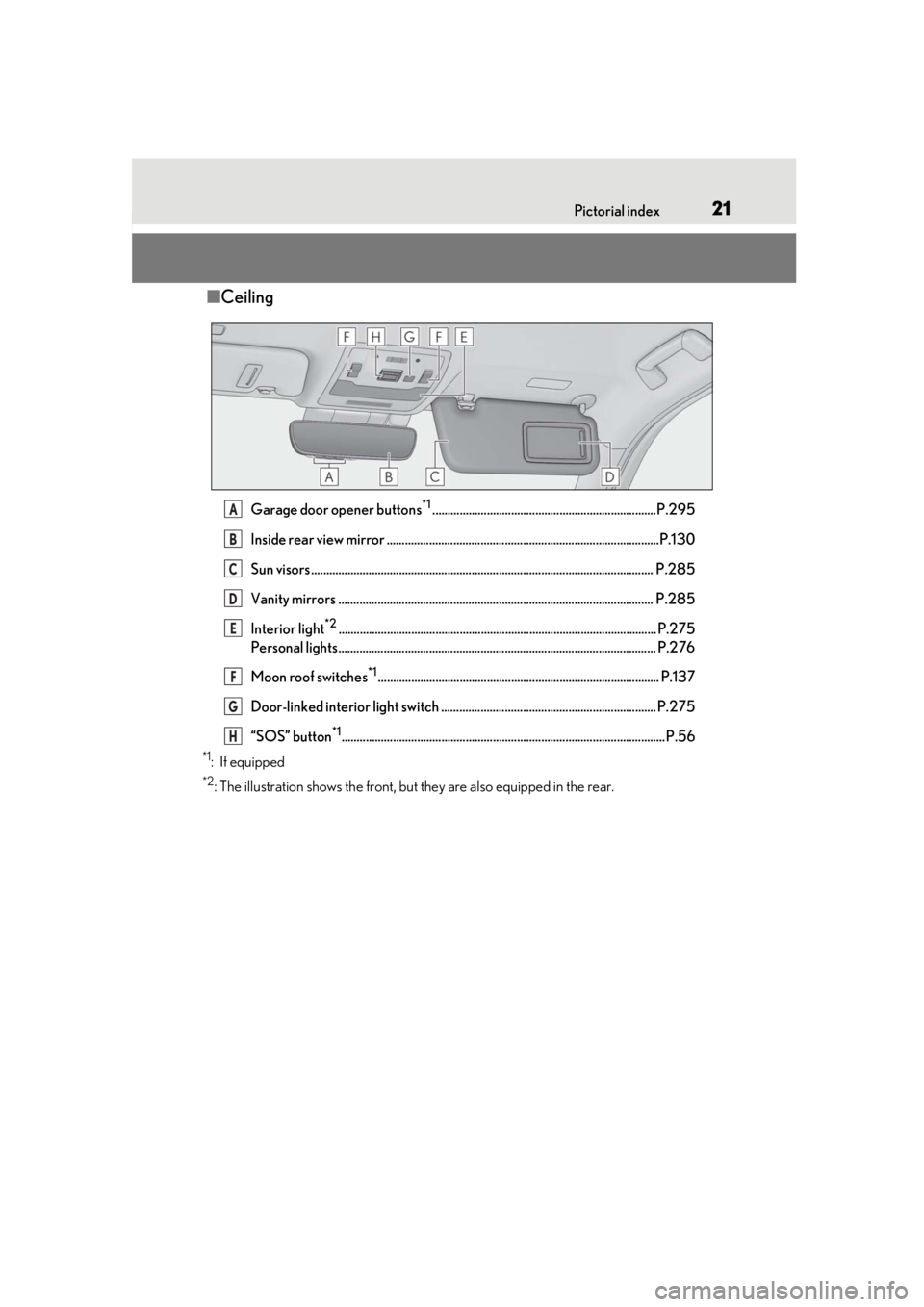
■Ceiling
Garage door opener buttons*1..........................................................................P.295
Inside rear view mirror ..........................................................................................P.130
Sun visors ................................................................................................................. P.28 5
Vanity mirrors ........................................................................................................ P.285
Interior light
*2......................................................................................................... P.275
Personal lights......................................................................................................... P.276
Moon roof switches
*1............................................................................................. P.137
Door-linked interior light switch ....................................................................... P.275
“SOS” button
*1...........................................................................................................P.56
*1: If equipped
*2: The illustration shows the front, but they are also equipped in the rear.
A
B
C
D
E
F
G
H
Page 37 of 452

371-1. For safe use
1
For safety and security
WARNING
●Do not attach anything to or lean any-
thing against areas such as the dash-
board, steering wheel pad and lower
portion of the instrument panel.
These items can become projectiles
when the SRS driver, front passenger
and knee airbags deploy.
●Do not attach anything to areas such
as a door, windshield, side door glass,
front or rear pillar, roof side rail and
assist grip.
●Do not hang coat hangers or other
hard objects on the coat hooks. All of
these items could become projectiles
and may cause death or serious injury,
should the SRS curtain shield airbags
deploy.
●If a vinyl cover is put on the area where
the SRS knee airbag will deploy, be
sure to remove it.
●Do not use seat accessories which
cover the parts where the SRS side air-
bags inflate as they may interfere with
inflation of the SRS airbags. Such
accessories may prevent the side air-
bags from activating correctly, disable
the system or cause the side airbags to
inflate accidentally, resulting in death
or serious injury.
●Do not strike or apply significant levels
of force to the area of the SRS airbag
components or the front doors.
Doing so can cause the SRS airbags to
malfunction.
●Do not touch any of the component
parts immediately after the SRS air-
bags have deployed (inflated) as they
may be hot.
●If breathing becomes difficult after the
SRS airbags have deployed, open a
door or window to allow fresh air in, or
leave the vehicle if it is safe to do so.
Wash off any residue as soon as possi-
ble to prevent skin irritation.
●If the areas where the SRS airbags are
stored, such as the steering wheel pad
and front and rear pillar garnishes, are
damaged or cracked, have them
replaced by your Lexus dealer.
●Do not place anything, such as a cush-
ion, on the front passenger’s seat.
Doing so will disperse the passenger’s
weight, which prevents the sensor
from detecting the passenger’s weight
properly. As a result, the SRS front air-
bags for the front passenger may not
deploy in the event of a collision.
■Modification and disposal of SRS air-
bag system components
Do not dispose of your vehicle or per-
form any of the following modifications
without consulting your Lexus dealer.
The SRS airbags may malfunction or
deploy (inflate) accidentally, causing
death or serious injury.
●Installation, removal, disassembly and
repair of the SRS airbags
●Repairs, modifications, removal or
replacement of the steering wheel,
instrument panel, dashboard, seats or
seat upholstery, front, side and rear pil-
lars, roof side rails, front door panels,
front door trims or front door speakers
●Modifications to the front door panel
(such as making a hole in it)
Page 43 of 452

431-1. For safe use
1
For safety and security
Exhaust gas precautions
Harmful substances to the human
body are contained in exhaust
gases if inhaled.
WARNING
Exhaust gases contain harmful carbon
monoxide (CO), which is colorless and
odorless. Observe the following precau-
tions.
Failure to do so may cause exhaust gases
enter the vehicle and may lead to an
accident caused by light-deadness, or
may lead to death or a serious health
hazard.
■Important points while driving
●Keep the back door closed.
●If you smell exhaust gases in the vehi-
cle even when the back door is closed,
open the windows and have the vehi-
cle inspected at your Lexus dealer as
soon as possible.
■When parking
●If the vehicle is in a poorly ventilated
area or a closed area, such as a
garage, stop the engine.
●Do not leave the vehicle with the
engine running for a long time. If such
a situation cannot be avoided, park the
vehicle in an open space and ensure
that exhaust fumes do not enter the
vehicle interior.
●Do not leave the engine running in an
area with snow build-up, or where it is
snowing. If snowbanks build up around
the vehicle while the engine is running,
exhaust gases may collect and enter
the vehicle.
■Exhaust pipe
The exhaust system needs to be checked
periodically. If there is a hole or crack
caused by corrosion, damage to a joint
or abnormal exhaust noise, be sure to
have the vehicle inspected and repaired
by your Lexus dealer.
Page 44 of 452
441-2. Child safety
1-2.Child safety
Points to remember: P.44
Child restraint system: P.46
When using a child restraint system on
a passenger seat: P.47
When using a child restraint system on
a rear seat: P.48
Child restraint system installation
method
• Fixed with a seat belt: P.48
• Fixed with a child restraint LATCH anchor: P.52
• Using an anchor bracket (for top tether strap): P.54
The laws of all 50 states of the U.S.A.
as well as Canada now require the use
of child restraint systems.
Riding with children
Observe the following precautions
when children are in the vehicle.
Use a child restraint system appro-
priate for the child , until the child
becomes large enough to properly
wear the vehicle’s seat belt.
It is recommended that children
sit in the rear seats to avoid acci-
dental contact with the shift lever,
wiper switch, etc.
Use the rear door child-protector
lock or the window lock switch to
avoid children opening the door
while driving or operating the
power window accidentally.
( P.101, 136)
Do not let small children operate
equipment which may catch or
pinch body parts, such as the
power window, hood, back door,
seats, etc.
WARNING
■When children are in the vehicle
Never leave children unattended in the
vehicle, and never allow children to have
or use the key.
Children may be able to start the vehicle
or shift the vehicle into neutral. There is
also a danger that children may injure
themselves by playing with the windows,
the moon roof (if eq uipped) or other fea-
tures of the vehicle. In addition, heat
build-up or extremely cold temperatures
inside the vehicle can be fatal to children.
Child restraint systems
Before installing a child restraint
system in the vehicle, there are pre-
cautions that need to be observed,
different types of child restraint sys-
tems, as well as installation meth-
ods, etc., written in this manual.
Use a child restraint system when
riding with a small child that cannot
properly use a seat belt. For the
child’s safety, install the child restraint
system to a rear seat. Be sure to fol-
low the installation method that is in
the operation manual enclosed with
the restraint system.
Table of contents
Points to remember
Page 64 of 452

641-4. Theft deterrent system
■Items to check before locking the
vehicle
To prevent unexpected triggering of
the alarm and vehicle theft, make sure
of the following:
Nobody is in the vehicle.
The windows and moon roof (if
equipped) are closed before the
alarm is set.
No valuables or other personal
items are left in the vehicle.
■Setting
Close the doors and hood, and lock all
the doors. The system will be set auto-
matically after 30 seconds.
The security indicator changes from being
on to flashing when the system is set.
■Canceling or stopping
Do one of the following to deactivate
or stop the alarms:
Unlock the doors.
Turn the engine switch to ACC or
ON, or start the engine. (The alarm
will be deactivated or stopped after
a few seconds.)
■System maintenance
The vehicle has a maintenance-free type
alarm system.
■Triggering of the alarm
The alarm may be triggered in the following
situations:
(Stopping the alarm deactivates the alarm
system.)
●A person inside the vehicle opens a door
or hood, or unlocks the vehicle using an
inside lock button.
●The battery is recharged or replaced
when the vehicle is locked. ( P.384)
Alarm
The alarm uses light and sound to
give an alert when an intrusion is
detected.
The alarm is triggered in the follow-
ing situations when the alarm is set:
A locked door is unlocked or
opened in any way other than
using the entry function, wireless
remote control or mechanical
key. (The doors will lock again
automatically.)
The hood is opened.
Setting/canceling/stopping the
alarm system
Page 80 of 452

802-1. Instrument cluster
When the main meter is in the side
position
By selecting menu icons on the multi-
information display, a variety of driving-
related information can be displayed.
The multi-information display can also
be used to change display settings and
other vehicle settings.
Warning or suggestion/advice pop-up
displays are also displayed in certain
situations.
■Menu icons
The menu icons will be displayed by
pressing or of the meter con-
trol switches ( P.81).
F SPORT models: The menu icons can be
displayed when the main meter is in the
side position.
■Opening image display
When the engine switch is in ACC or ON,
the opening image is displayed on the multi-
information display.
While the opening image is being dis-
played, the meter display cannot be
changed even if the drive mode is changed.
When the opening image is finished, the
meter display for the currently selected
mode will be displayed.
■Liquid crystal display
Small spots or light spots may appear on the
display. This phenomen on is characteristic
of liquid crystal disp lays, and there is no
problem continuing to use the display.
Driving information display
( P.81)
Navigation system-linked dis-
play (if equipped) ( P.83)
Audio system-linked display
( P.83)
Driving support system infor-
mation display ( P.83)
Warning message display
( P.367)
Settings display ( P.84)
WARNING
■Caution for use while driving
●When operating the multi-information
display while drivin g, pay extra atten-
tion to the safety of the area around the
vehicle.
●Do not look continuously at the multi-
information display while driving as
you may fail to see pedestrians, objects
on the road, etc. ahead of the vehicle.
■The information display at low tem-
peratures
P.73, 78
Page 85 of 452

852-1. Instrument cluster
2
Vehicle status information and indicators
Displays suggestions to the driver in
the following situations. To select a
response to a displayed suggestion,
use the meter control switches.
■Suggestion to enable the power
back door
If the power back door system is dis-
abled on of the multi-information
display ( P.80) and the power back
door switch on the instrument panel is
operated, a suggestion message will be
displayed asking if you wish to enable
the power back door system. To enable
the power back door system, select
“Yes”.
After enabling the power back door
system, press the power back door
switch again to open or close the
power back door.
■Suggestion to turn on the head-
lights
If the headlight switch is in other than
or position, and the vehicle
speed is 3 mph (5 km/h) or higher for
a certain amount of time when the sur-
roundings are dark, a suggestion mes-
sage will be displayed.
■Suggestion to turn off the head-
lights
If the headlights are left on for a certain
amount of time with the headlight
switch in or position after the
engine switch has been turned off, a
suggestion message will be displayed
asking if you wish to turn the headlights
off.
To turn the headlight s off, select “Yes”.
If a front door is opened after the engine
switch is turned off, this suggestion mes-
sage will not be displayed.
■Customization
Some functions can be customized.
( P.409)
NOTICE
■During setting up the display
To prevent battery discharge, ensure that
the engine is running while setting up the
display features.
Suggestion function
Page 86 of 452

862-1. Instrument cluster
*:If equipped
Illustrations used in this text are intended as
examples, and may differ from the image
that is actually disp layed by the head-up
display.
Driving support system display
area ( P.88)
Navigation system-linked display
area (if equipped)
Displays the following items which are
linked to the navigation system:
• Route guidance to destination
•Street name • Compass (heading-up display)
Driving information display area
Displays the following items:
• Speed limit of the current road (linked to
the navigation system) (U.S.A. only)
• RSA (Road Sign Assist) display (if equipped) ( P.202)
• Speedometer
• Shift position/shift range ( P.155)
Tachometer/Eco Driving Indicator
display area ( P.89)
Head-up display switch
■Head-up display will operate when
The engine switch is in ON.
■When using the head-up display
The head-up display may seem dark or hard
to see when viewed through sunglasses,
especially polarized su nglasses. Adjust the
brightness of the head-up display or
remove your sunglasses.
■Street name display
Only street names which are included in the
map data will be displayed.
■Outside temperature display
●In the following situations, the outside
temperature is displayed.
• When the ambient temperature is
approximately 37°F (3°C) or lower (In
this case, the outside temperature display
will be displayed and the low outside tem-
perature indicator will flash for approxi-
mately 10 seconds.)
• After the opening image ( P.80) is dis-
played (The outside temperature display
will be displayed for approximately 10
seconds.)
●In the following situations, the correct
outside temperature may not be dis-
played, or the display may take longer
than normal to change:
• When stopped, or driving at low speeds (less than 12 mph [20 km/h])
• When the outside temperature has changed suddenly (at the entrance/exit of
Head-up display*
The head-up display projects a vari-
ety of driving-related information
and the operating state of the driv-
ing support systems on the wind-
shield.
System components
A
B
C
D