2019 LEXUS UX200 low
[x] Cancel search: lowPage 148 of 452

1484-1. Before driving
Cargo capacity depends on the total
weight of the occupants.
(Cargo capacity) = (Total load capac-
ity) (Total weight of occupants)
Steps for Determining Correct Load
Limit
(1) Locate the statement “The com-
bined weight of occupants and cargo
should never exceed XXX kg or XXX
lbs.” on your vehicle’s placard.
(2) Determine the combined weight of
the driver and passengers that will be
riding in your vehicle.
(3) Subtract the combined weight of
the driver and passengers from XXX
kg or XXX lbs.
(4) The resulting figure equals the
available amount of cargo and luggage
load capacity.
For example, if the “XXX” amount
equals 1400 lbs. and there will be five
150 lb passengers in your vehicle, the
amount of available cargo and luggage
load capacity is 650 lbs. (1400 - 750
(5 150) = 650 lbs.)
(5) Determine the combined weight of
luggage and cargo being loaded on the
vehicle. That weight may not safely
exceed the available cargo and lug-
gage load capacity calculated in Step 4.
WARNING
●Do not place cargo or luggage in or on
the following locations.
• At the feet of the driver
• On the front passenger or rear seats (when stacking items)
• On the luggage cover
• On the instrument panel
• On the dashboard
• In front of the Center Display
●Secure all items in the occupant com-
partment.
■When using a roof luggage carrier
Observe the following precautions:
●Place the cargo so that its weight is dis-
tributed evenly between the front and
rear axles.
●If loading long or wide cargo, never
exceed the vehicle overall length or
width. ( P.390)
●Before driving, make sure the cargo is
securely fastened on the roof luggage
carrier.
●Loading cargo on the roof luggage
carrier will make the center of gravity
of the vehicle higher. Avoid high
speeds, sudden starts, sharp turns,
sudden braking or abrupt maneuvers,
otherwise it may result in loss of con-
trol or vehicle rollover due to failure to
operate this vehicle correctly and
result in death or serious injury.
●If driving for a long distance, on rough
roads, or at high speeds, stop the vehi-
cle now and then during the trip to
make sure the cargo remains in its
place.
●Do not exceed 176.3 lb. (80 kg) cargo
weight on the roof luggage carrier.
NOTICE
■When loading cargo (vehicles with
moon roof)
Be careful not to scratch the surface of
the moon roof.
Capacity and distribution
Page 149 of 452
1494-1. Before driving
4
Driving
(6) If your vehicle will be towing a
trailer, load from your trailer will be
transferred to your vehicle. Consult
this manual to determine how this
reduces the available cargo and lug-
gage load capacity of your vehicle.
( P.150)
Lexus does not recommend towing a
trailer with your vehicle. Your vehicle is not
designed for trailer towing.
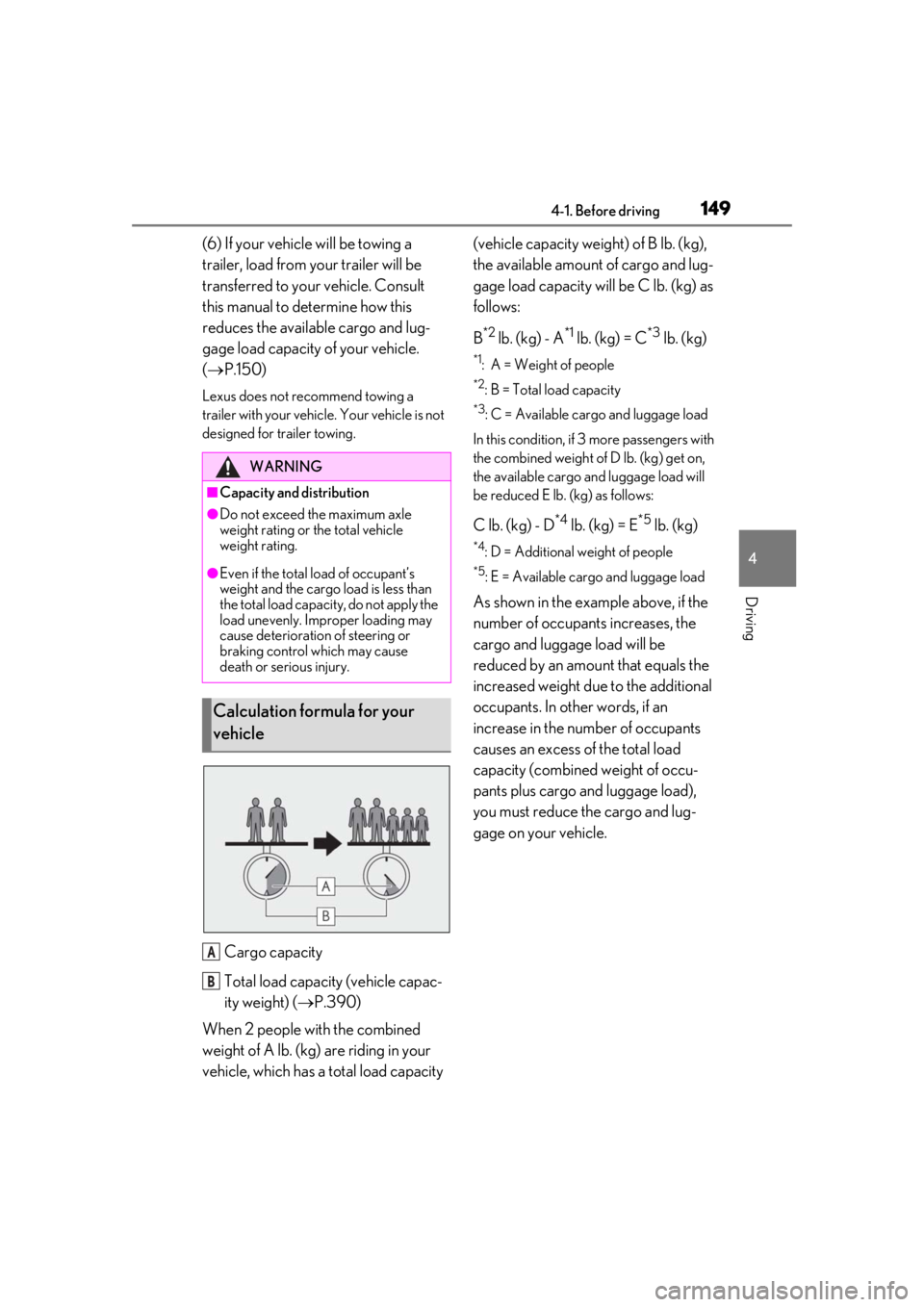
Cargo capacity
Total load capacity (vehicle capac-
ity weight) ( P.390)
When 2 people with the combined
weight of A lb. (kg) are riding in your
vehicle, which has a total load capacity (vehicle capacity weight) of B lb. (kg),
the available amount of cargo and lug-
gage load capacity will be C lb. (kg) as
follows:
B
*2 lb. (kg) - A*1 lb. (kg) = C*3 lb. (kg)
*1: A = Weight of people
*2: B = Total load capacity
*3: C = Available cargo and luggage load
In this condition, if 3 more passengers with
the combined weight of D lb. (kg) get on,
the available cargo and luggage load will
be reduced E lb. (kg) as follows:
C lb. (kg) - D*4 lb. (kg) = E*5 lb. (kg)
*4: D = Additional weight of people
*5: E = Available cargo and luggage load
As shown in the example above, if the
number of occupant s increases, the
cargo and luggage load will be
reduced by an amount that equals the
increased weight due to the additional
occupants. In other words, if an
increase in the number of occupants
causes an excess of the total load
capacity (combined weight of occu-
pants plus cargo and luggage load),
you must reduce the cargo and lug-
gage on your vehicle.
WARNING
■Capacity and distribution
●Do not exceed the maximum axle
weight rating or the total vehicle
weight rating.
●Even if the total load of occupant’s
weight and the cargo load is less than
the total load capacity, do not apply the
load unevenly. Improper loading may
cause deterioration of steering or
braking control which may cause
death or serious injury.
Calculation formula for your
vehicle
A
B
Page 152 of 452

1524-2. Driving procedures
4-2.Driving procedures
1Press the parking brake switch to
check that the parking brake is set.
(P.160)
Parking brake indicator will come on.
2 Check that the shift lever is in P.
3 Firmly depress the brake pedal.
and a message will be displayed on the
multi-information display.
If it is not displayed, the engine cannot be
started.
4 Press the engine switch shortly and
firmly.
When operating the engine switch, one
short, firm press is enough.
It is not necessary to press and hold the
switch.
The engine will crank until it starts or for up
to 30 seconds, whichever is less.
Continue depressing the brake pedal until
the engine is completely started.
The engine can be started from any engine
switch mode.
■Engine switch illumination
According to the situation, the engine
switch illumination operates as follows.
●When a door is opened, or the engine
switch mode is changed from ACC or
ON to OFF, the engine switch illumina-
tion slowly blinks.
●When depressing the brake pedal with
carrying the electronic key on your per-
son, the engine switch illumination rapidly
blinks.
●When the engine swit ch is in ACC or
ON, the engine switch illumination illumi-
nates.
■If the engine does not start
●The engine immobilizer system may not
have been deactivated. ( P.62)
Contact your Lexus dealer.
●If a message related to start-up is shown
on the multi-information display, read the
message and follow the instructions.
●The smart access system with push-but-
ton start may not be operating properly.
( P.381)
■Electronic key battery depletion
P.94
■Conditions affecting operation
P.115
■Note for the entry function
P.116
■Steering lock function
●After turning the engine switch off and
opening and closing the doors, the steer-
ing wheel will be lock ed due to the steer-
ing lock function. Operating the engine
switch again automatically cancels the
steering lock.
●When the steering lock cannot be
released, “Push Engine Switch while
Turning Steering Whee l in Either Direc-
tion” will be displayed on the multi-infor-
mation display.
Check that the shift lever is in P. Press the
engine switch shortly and firmly while
turning the steering wheel left and right.
Engine (ignition) switch
Performing the following opera-
tions when carryin g the electronic
key on your person starts the
engine or changes engine switch
modes.
Starting the engine
Page 155 of 452

1554-2. Driving procedures
4
Driving
If the engine is stopped with the shift
lever in a position other than P, the
engine switch will not be turned off but
instead be turned to ACC. Perform the
following procedure to turn the switch
off:
1
Check that the parking brake is set.
2
Shift the shift lever to P.
3
Check that “Turn Power Off” is dis-
played on the multi-information dis-
play and then press the engine
switch shortly and firmly once.
4
Check that “Turn Power Off” on the
multi-information display is off.
*1: To improve fuel efficiency and reduce noise, shift the shift lever to D for normal
driving.
*2: Selecting gear steps using the M posi-tion achieves suitable engine braking
forces by operating the shift lever or
paddle shift switch es (if equipped).
■Reverse warning buzzer
When shifting into R, a buzzer will sound to
inform the driver that the shift lever is in R.
■To protect the transmission
If the automatic transmission fluid tempera-
ture is high, “Transmission Oil Temp. High
Stop in a safe place and See owner’s man-
ual” will be displayed on the multi-informa-
tion display and the vehicle will go into
transmission protection mode automati-
cally. Have the vehicle inspected by your
NOTICE
■To prevent battery discharge
●Do not leave the engine switch in ACC
or ON for long periods of time without
the engine running.
●If “ACCESSORY” or “IGNITION
ON” is displayed on the multi-informa-
tion display while the engine is not run-
ning, the engine switch is not OFF. Exit
the vehicle after turning the engine
switch off.
●Do not stop the engine when the shift
lever is in a position other than P. If the
engine is stopped in another shift lever
position, the engine switch will not be
turned off but instead be turned to
ACC. If the vehicle is left in ACC, bat-
tery discharge may occur.
When stopping the engine with
the shift lever in a position other
than P
Continuously variable trans-
mission
Select the shift position depending
on your purpose and situation.
Shift position purpose and func-
tions
Shift posi-
tionObjective or function
PParking the vehicle/starting the engine
RReversing
NNeutral (Condition in which
the power is not transmitted)
DNormal driving*1
M
10-speed sport sequential
shiftmatic mode driving
*2
( P.158)
Page 157 of 452

1574-2. Driving procedures
4
Driving
The shift lever can be shifted from P only
when the engine switch is in ON, the brake
pedal is depressed and the shift release but-
ton is pushed.
■If the shift lever cannot be shifted from P
First, check whether the brake pedal is
being depressed.
If the shift lever cannot be shifted even
though the brake pedal is depressed and
the shift release button is pushed, there may
be a problem with the shift lock system.
Have the vehicle inspected by your Lexus
dealer immediately.
The following steps may be used as an
emergency measure to ensure that the shift
lever can be shifted.
Releasing the shift lock:
1
Press the parking brake switch to check
that the parking brake is set. ( P.160)
2
Turn the engine switch off.
3
Depress the brake pedal.
4
Pry the cover up with a flathead screw-
driver or equivalent tool.
To prevent damage to the cover, cover the
tip of the screwd river with a rag.
5
Press the shift lock override button.
The shift lever can be shifted while the but-
ton is pressed.
P.243
To drive using temporary gear step
selection, operate the “-” or “+” paddle
shift switch when driving with the shift
lever in D.
Changing the gear step allows restric-
tion of the highest gear, preventing
unnecessary upshifting and enabling
the level of engine braking force to be
selected.
1
Upshifting
2
Downshifting
WARNING
■To prevent an accident when releas-
ing the shift lock
Before pressing the shift lock override
button, make sure to set the parking
brake and depress the brake pedal.
If the accelerator pe dal is accidentally
depressed instead of the brake pedal
when the shift lock override button is
pressed and the shift lever is shifted out
of P, the vehicle may suddenly start, pos-
sibly leading to an accident which may
result in death or serious injury.
Selecting the driving mode
Selecting gear steps in the D
position (vehicles with paddle
shift switches)
Page 158 of 452

1584-2. Driving procedures
The selected gear step, from D1 to D10, will
be displayed in the meter.
To return to normal D position driving, the
“+” paddle shift switch must be held down
for a period of time.
■Gear step functions
●10 levels of accelerating force and engine
braking can be selected.
●A lower gear step will provide greater
accelerating force and engine braking
force than a higher gear step, and the
engine revolutions will also increase.
■Automatic deactivation of gear step
selection in the D position
Gear step selection in the D position will be
deactivated in the following situations:
●When the vehicle comes to a stop
●If the accelerator pedal is depressed for
more than a certain period of time
●When the shift lever is shifted to a posi-
tion other than D
●When the “+” paddle shift switch is
pressed and held
■Downshifting restriction warning
buzzer
To help ensure safety and driving perfor-
mance, downshifting operation may some-
times be restricted. In some circumstances,
downshifting may not be possible even
when the shift lever or paddle shift switch is
operated. (A buzzer will sound twice.)
To enter 10-speed sport sequential
shiftmatic mode, shift the shift lever to
M. Gear steps can be selected by
operating the shift lever or paddle shift
switches (if equipped). 1
Upshifting
2 Downshifting
The gear step changes once every time the
shift lever or paddle shift switch (if
equipped) is operated.
The selected gear step , from M1 to M10,
will be displayed in the meter.
However, even when in the M position,
the gear steps will be automatically
changed if the engine speed is too
high, or too low.
■Gear step functions
●10 levels of accelerating force and engine
braking can be selected.
●A lower gear step will provide greater
accelerating force and engine braking
force than a higher gear step, and the
engine revolutions will also increase.
■When the vehicle comes to a stop with
the shift lever in the M position
●The transmission will automatically down-
shift to M1 once the vehicle is stopped.
●After a stop, the vehicle will start off in
M1.
Changing gear steps in the M
position
Page 159 of 452

1594-2. Driving procedures
4
Driving
●When the vehicle is stopped, the trans-
mission is set at M1.
■Downshifting restriction warning
buzzer
To help ensure safety and driving perfor-
mance, downshifting operation may some-
times be restricted. In some circumstances,
downshifting may not be possible even
when the shift lever or paddle shift switch (if
equipped) is operated. (A buzzer will sound
twice.)
■If the “M” indicator does not come on or
the “D” indicator is displayed even after
shifting the shift lever to M
This may indicate a malfunction in the auto-
matic transmission system. Have the vehicle
inspected by your Lexus dealer.
(In this situation, the transmission will oper-
ate in the same manner as when the shift
lever is in D.)
The turn signal lever can be used to
show the following intentions of the
driver.
1 Right turn
2 Lane change to the right (move the
lever partway and release it)
The right hand signals will flash 3 times.
3Lane change to the left (move the
lever partway and release it)
The left hand signals will flash 3 times.
4Left turn
■Turn signals can be operated when
The engine switch is in ON.
■If the indicator flashes faster than usual
Check that a light bulb in the front or rear
turn signal lights has not burned out.
Turn signal lever
Operating instructions
Page 161 of 452

1614-2. Driving procedures
4
Driving
ing brake
• Operate the parking brake switch while depressing the brake pedal.
• Using the parking brake automatic release function, the parking brake can
be released by depressing the accelera-
tor pedal. When using this function,
slowly depress the accelerator pedal.
Make sure that the pa rking brake indicator
light turn off.
■Turning the automatic mode on
While the vehicle is stopped, press and
hold the parking brake switch until a
message is shown on the multi-infor-
mation display
When the automatic mode is turned
on, the parking brake operates as fol-
lows.
When the shift lever is shifted from
P, the parking brake will be released,
and the parking brake indicator light
will turn off.
When the shift lever is shifted to P,
the parking brake will be set, and the
parking brake indicator light will
turn on.
Operate the shift lever with the vehicle
stopped and the brake pedal
depressed.
■Turning the automatic mode off
While the vehicle is stopped, pull and
hold the parking brake switch until a
message is shown on the multi-infor-
mation display
■Parking brake operation
●When the engine switch is not in ON, the
parking brake cannot be released using
the parking brake switch.
●When the engine switch is not in ON,
automatic mode (automatic brake setting
and releasing) is not available.
■Parking brake automatic release func-
tion
●When the shift lever is shifted from P, the
parking brake will be released in auto-
matic mode.
●When all of the follo wing conditions are
met in manual mode, the parking brake
can be released by depressing the accel-
erator pedal.
• The driver’s door is closed
• The driver is wearing the seat belt
• The shift lever is in D, M or R
■If “Parking Brake Temporarily Unavail-
able” is displayed on the multi-informa-
tion display
If the parking brake is operated repeatedly
over a short period of time, the system may
restrict operation to prevent overheating. If
this happens, refrain from operating the
parking brake. Normal operation will return
after about 1 minute.