Page 306 of 792
3064-5. Using the driving support systems
RX450h_RX450hL_U
In vehicle-to-vehicle distance control mode, the vehicle automatically a\
cceler-
ates, decelerates and stops to match the speed changes of the preceding vehicle
even if the accelerator pedal is not depr essed. In constant speed control mode,
the vehicle runs at a fixed speed.
Use the dynamic radar cruise control with full-speed range on freeways and
highways.
●Vehicle-to-vehicle distance control mode ( P. 309)
●Constant speed control mode ( P. 315)
Vehicle-to-vehicle distance switch
Display
Set speed
Indicators
Cruise control switch
Dynamic radar cruise control with full-speed range
Summary of functions
1
2
3
4
5
Page 308 of 792

3084-5. Using the driving support systems
RX450h_RX450hL_U
WARNING
■Situations unsuitable for dynamic rada r cruise control with full-speed range
Do not use dynamic radar cruise control with full-speed range in any of the following
situations.
Doing so may result in inappropriate speed control and could cause an accident result-
ing in death or serious injury.
●Roads where there are pedestrians, cyclers, etc.
●In heavy traffic
●On roads with sharp bends
●On winding roads
●On slippery roads, such as thos e covered with rain, ice or snow
●On steep downhills, or where there are sudden changes between sharp up and down
gradients
Vehicle speed may exceed the set speed when driving down a steep hill.
●At entrances to freeways and highways
●When weather conditions are bad enough that they may prevent the sensors from
detecting correctly (fog, snow, sandstorm, heavy rain, etc.)
●When there is rain, snow, etc. on the fron t surface of the radar sensor or camera sen-
sor
●In traffic conditions that require frequent repeated a cceleration and deceleration
●When your vehicle is towing a trailer or during emergency towing
●When an approach warning buzzer is heard often
Page 309 of 792

3094-5. Using the driving support systems
4
Driving
RX450h_RX450hL_U
This mode employs a radar sensor to detect the presence of vehicles up to
approximately 328 ft. (100 m) ahead, determines the current vehicle-to-vehicle
following distance, and operates to main tain a suitable following distance from
the vehicle ahead.
Note that vehicle-to-vehicle distance will cl ose in when traveling on downhill slopes.
Example of constant speed cruising
When there are no vehicles ahead
The vehicle travels at the speed set by the driver. The desired vehicle-to-vehicle dis-
tance can also be set by operating the vehicle-to-vehicle distance switch.
Example of deceleration cruising and follow-up cruising
When a preceding vehicle driving slower than the set speed appears
When a vehicle is detected running ahead of you, the system automatically deceler-
ates your vehicle. When a greater reduction in vehicle speed is necessary, the system
applies the brakes (the stop lights will come on at this time). The system will respond to
changes in the speed of the vehicle ahead in order to maintain the vehicle-to-vehicle
distance set by the driver. Approach warning warns you when the system cannot
decelerate sufficie ntly to prevent your vehicle from closing in on the vehicle ahead.
When the vehicle ahead of you stops, your vehicle will also stop (vehicle is stopped by
system control). After the vehicle ahead starts off, pushing the cruise control lever up
or depressing the accelerator pedal will resume follow-up cruising.
Example of acceleration
When there are no longer any preceding vehicles driving slower than the set
speed
The system accelerates until the set speed is reached. The system then returns to con-
stant speed cruising.
Driving in vehicle-to-vehicle distance control mode
1
2
3
Page 311 of 792
3114-5. Using the driving support systems
4
Driving
RX450h_RX450hL_U
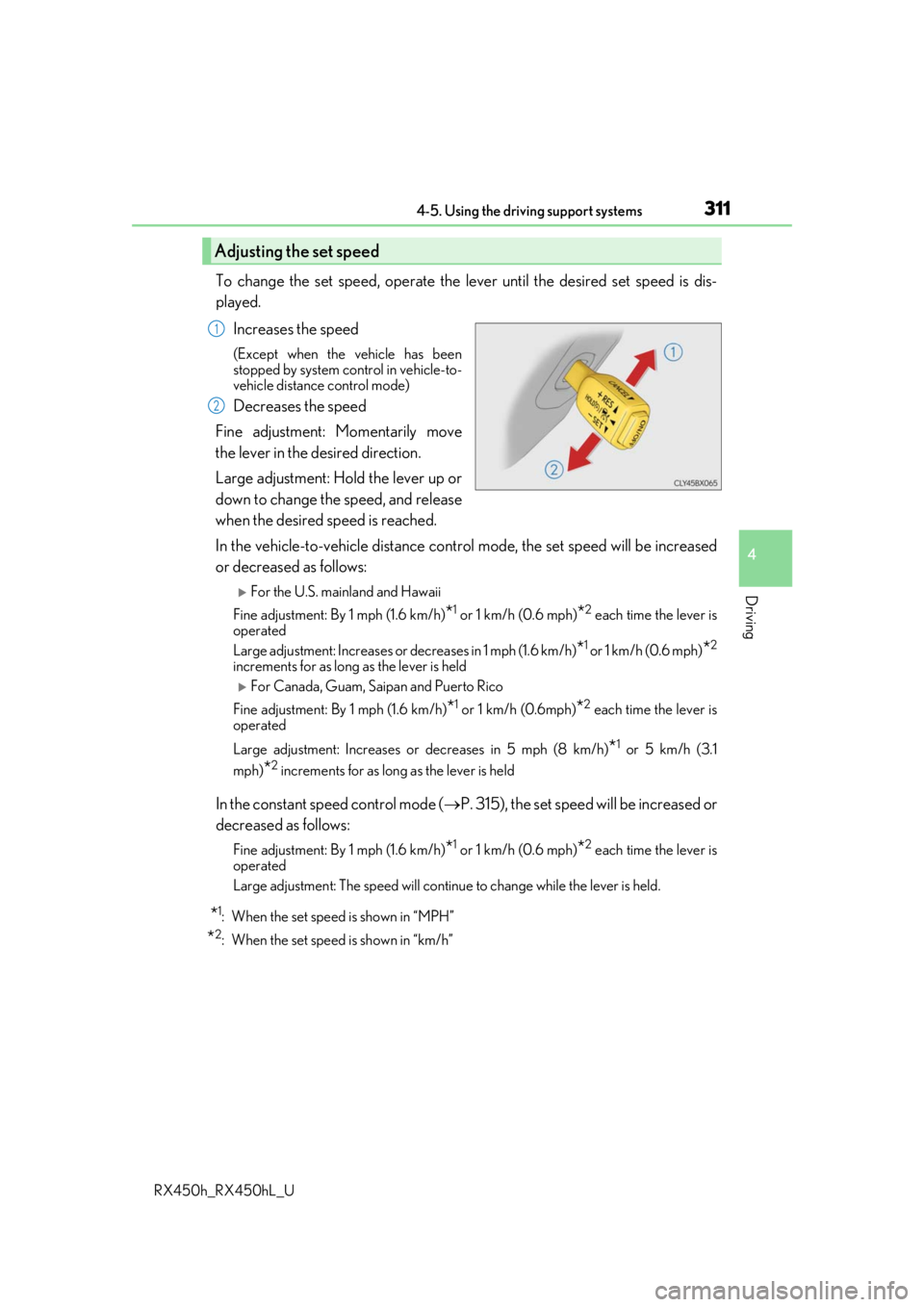
To change the set speed, operate the lever until the desired set speed is dis-
played.Increases the speed
(Except when the vehicle has been
stopped by system control in vehicle-to-
vehicle distance control mode)
Decreases the speed
Fine adjustment: Momentarily move
the lever in the desired direction.
Large adjustment: Hold the lever up or
down to change the speed, and release
when the desired speed is reached.
In the vehicle-to-vehicle distance cont rol mode, the set speed will be increased
or decreased as follows:
For the U.S. mainland and Hawaii
Fine adjustment: By 1 mph (1.6 km/h)
*1 or 1 km/h (0.6 mph)*2 each time the lever is
operated
Large adjustment: Increases or decreases in 1 mph (1.6 km/h)
*1 or 1 km/h (0.6 mph)*2
increments for as long as the lever is held
For Canada, Guam, Saipan and Puerto Rico
Fine adjustment: By 1 mph (1.6 km/h)
*1 or 1 km/h (0.6mph)*2 each time the lever is
operated
Large adjustment: Increases or decreases in 5 mph (8 km/h)
*1 or 5 km/h (3.1
mph)
*2 increments for as long as the lever is held
In the constant speed control mode ( P. 315), the set speed will be increased or
decreased as follows:
Fine adjustment: By 1 mph (1.6 km/h)*1 or 1 km/h (0.6 mph)*2 each time the lever is
operated
Large adjustment: The speed will continue to change while the lever is held.
*1: When the set speed is shown in “MPH”
*2: When the set speed is shown in “km/h”
Adjusting the set speed
1
2
Page 312 of 792
3124-5. Using the driving support systems
RX450h_RX450hL_U
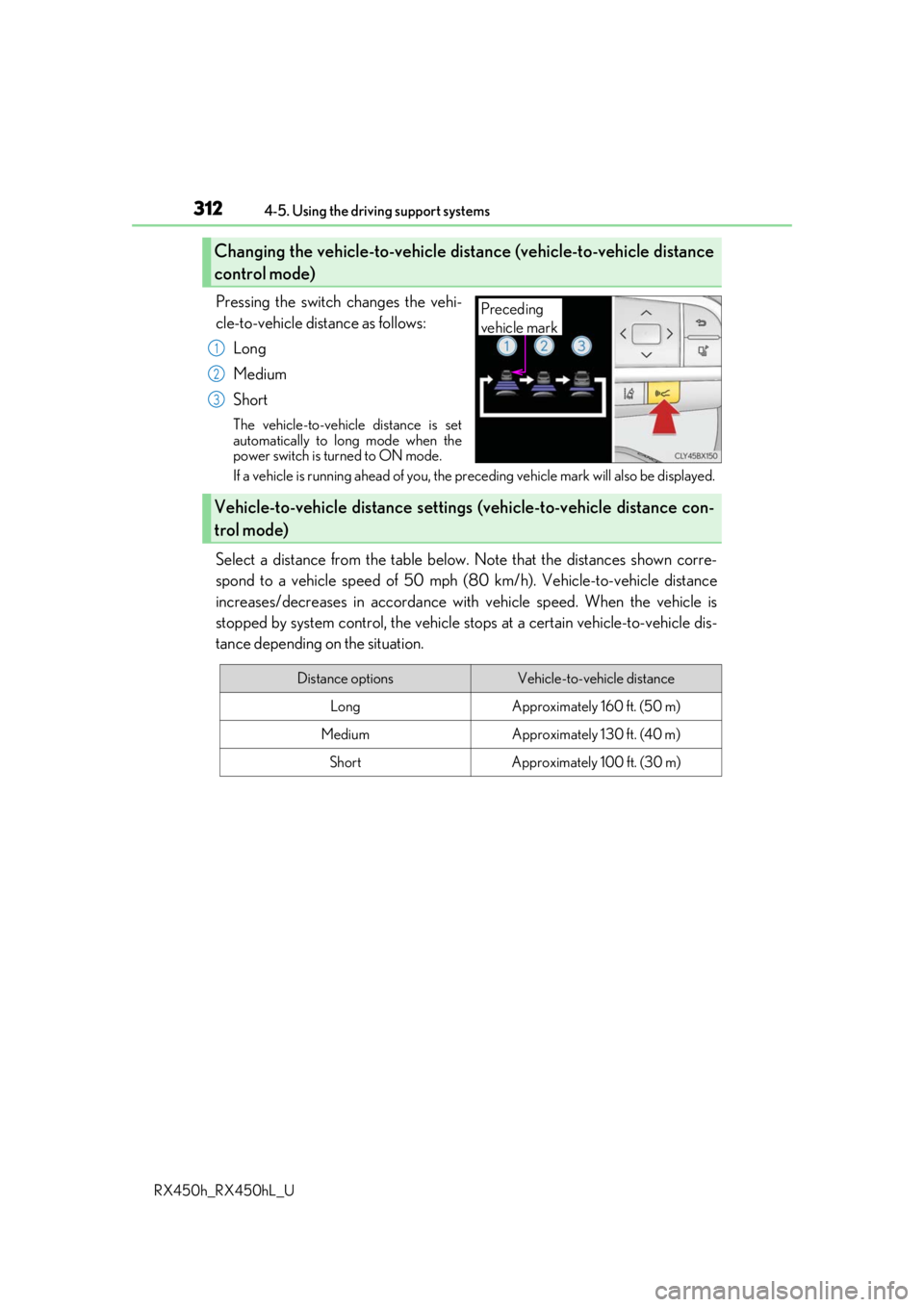
Pressing the switch changes the vehi-
cle-to-vehicle distance as follows: Long
Medium
Short
The vehicle-to-vehicle distance is set
automatically to long mode when the
power switch is turned to ON mode.
If a vehicle is running ahead of you, the pr eceding vehicle mark will also be displayed.
Select a distance from the table below. Note that the distances shown corre-
spond to a vehicle speed of 50 mph (8 0 km/h). Vehicle-to-vehicle distance
increases/decreases in accordance with vehicle speed. When the vehicle is
stopped by system control, the vehicle st ops at a certain vehicle-to-vehicle dis-
tance depending on the situation.
Changing the vehicle-to-vehicle distance (vehicle-to-vehicle distance
control mode)
Preceding
vehicle mark
1
2
3
Vehicle-to-vehicle distance settings (vehicle-to-vehicle distance con-
trol mode)
Distance optionsVehicle-to-vehicle distance
LongApproximately 160 ft. (50 m)
MediumApproximately 130 ft. (40 m)
ShortApproximately 100 ft. (30 m)
Page 324 of 792
3244-5. Using the driving support systems
RX450h_RX450hL_U
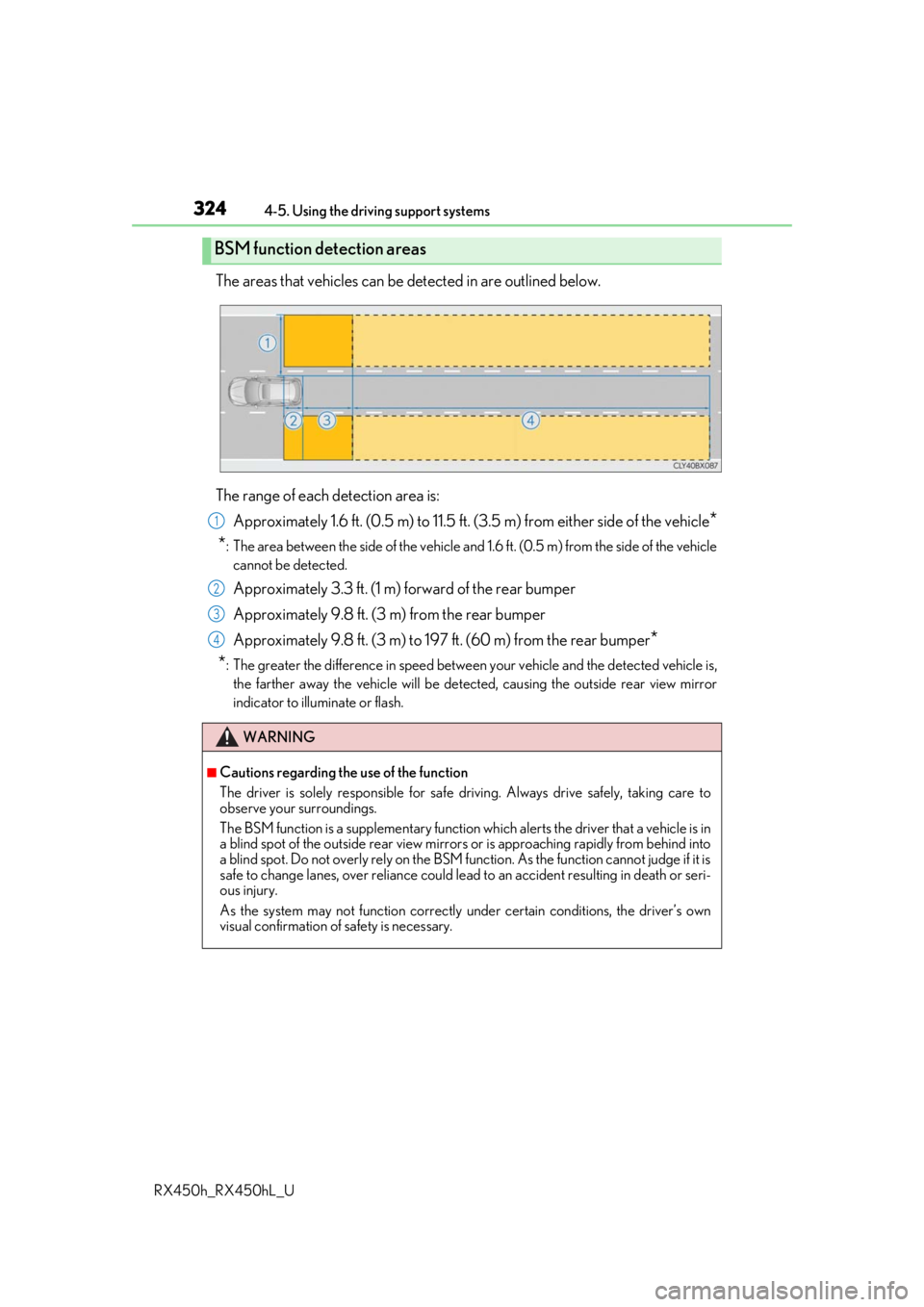
The areas that vehicles can be detected in are outlined below.
The range of each detection area is: Approximately 1.6 ft. (0.5 m) to 11.5 ft. (3 .5 m) from either side of the vehicle
*
*
: The area between the side of the vehicle and 1.6 ft. (0.5 m) from the side of the vehicle
cannot be detected.
Approximately 3.3 ft. (1 m) forward of the rear bumper
Approximately 9.8 ft. (3 m) from the rear bumper
Approximately 9.8 ft. (3 m) to 197 ft. (60 m) from the rear bumper
*
*
: The greater the difference in speed betwee n your vehicle and the detected vehicle is,
the farther away the vehicle will be detect ed, causing the outside rear view mirror
indicator to illuminate or flash.
BSM function detection areas
WARNING
■Cautions regarding the use of the function
The driver is solely responsible for safe driving. Always drive safely, taking care to
observe your surroundings.
The BSM function is a supplementary function which alerts the driver that a vehicle is in
a blind spot of the outside rear view mirrors or is approaching rapidly from behind into
a blind spot. Do not overly rely on the BSM function. As the function cannot judge if it is
safe to change lanes, over reliance could lead to an accident resulting in death or seri-
ous injury.
As the system may not function correctly under certain conditions, the driver’s own
visual confirmation of safety is necessary.
1
2
3
4
Page 325 of 792
3254-5. Using the driving support systems
4
Driving
RX450h_RX450hL_U
■The BSM function is operational when
The BSM function is operational when all of the following conditions are met:
●The BSM function is on.
●The shift lever is in a position other than R.
●The vehicle speed is greater than approximately 10 mph (16 km/h).
■The BSM function will detect a vehicle when
The BSM function will detect a vehicle present in the dete ction area in the following situ-
ations:
●A vehicle in an adjacent la ne overtakes your vehicle.
●Another vehicle enters the detection area when it changes lanes.
■Conditions under which the BSM function will not detect a vehicle
The BSM function is not designed to detect the following types of vehicles and/or
objects:
●Small motorcycles, bicycles, pedestrians, etc.*
●Vehicles traveling in the opposite direction
●Guardrails, walls, signs, parked vehi cles and similar stationary objects*
●Following vehicles that are in the same lane*
●Vehicles traveling 2 lanes away from your vehicle*
*
: Depending on the conditions, detection of a vehicle and/or object may occur.
Page 330 of 792

3304-5. Using the driving support systems
RX450h_RX450hL_U
■Conditions under which the RCTA fu nction will not detect a vehicle
The RCTA function is not designed to detect the following types of vehicles and/or
objects:
●Vehicles approaching from directly behind
●Vehicles backing up in a parkin g space next to your vehicle
●Guardrails, walls, signs, parked vehi cles and similar stationary objects*
●Small motorcycles, bicycles, pedestrians, etc.*
●Vehicles moving away from your vehicle
●Vehicles approaching from the parking spaces next to your vehicle*
*
: Depending on the conditions, detection of a vehicle and/or object may occur.
■Conditions under which the RCTA function may not function correctly
●The RCTA function may not detect vehicles correctly in the following situations:
• When the sensor is misaligned due to a stro ng impact to the sensor or its surround-
ing area
• When mud, snow, ice, a sticke r, etc. is covering the sensor or surrounding area on
the rear bumper
• When driving on a road surf ace that is wet with standing water during bad weather,
such as heavy rain, snow, or fog
• When multiple vehicles are approaching wi th only a small gap between each vehicle
• When a vehicle is approaching at high speed
• When towing a trailer (vehicles with towing package)
●Vehicles that the sensors cannot detect due to
obstructions
• When backing up on a slope with a sharp change in grade
