Page 394 of 792
3944-6. Driving tips
RX450h_RX450hL_U
●Specific design characteristics give it a higher center of gravity than ordinary
passenger cars. This vehicle design feature causes this type of vehicle to be
more likely to rollover. And, utility vehi cles have a significantly higher rollover
rate than other types of vehicles.
●An advantage of the higher ground cl earance is a better view of the road
allowing you to anticipate problems.
●It is not designed for cornering at the same speeds as ordinary passenger cars
any more than low-slung sports cars are designed to perform satisfactorily
under off-road conditions. Therefore, sharp turns at excessive speeds may
cause the vehicle to rollover.
Utility vehicle precautions
This vehicle belongs to the utility vehicl e class, which has higher ground clear-
ance and narrower tread in relation to the height of its center of gravity.
Utility vehicle feature
WARNING
■Utility vehicle precautions
Always observe the following precautions to minimize the risk of death, serious injury
or damage to your vehicle:
●In a rollover crash, an unbelted person is si gnificantly more likely to die than a person
wearing a seat belt. Therefore, the driver and all passengers should always fasten
their seat belts.
●Avoid sharp turns or abrupt maneuvers, if at all possible.
Failure to operate this vehicle correctly may result in loss of control or vehicle rollover
causing death or serious injury.
●Loading cargo on the roof luggage carrier will make the ce nter of the vehicle gravity
higher. Avoid high speeds, sudden starts, sharp turns, sudden braking or abrupt
maneuvers, otherwise it may re sult in loss of control or vehicle rollover due to failure
to operate this vehicle correctly.
●Always slow down in gusty crosswinds. Be cause of its profile and higher center of
gravity, your vehicle is more sensitive to side winds than an ordinary passenger car.
Slowing down will allow you to have better control.
●Do not drive horizontally across steep slopes . Driving straight up or straight down is
preferred. Your vehicle (or any similar off- road vehicle) can tip over sideways much
more easily than forward or backward.
Page 410 of 792
4105-1. Basic Operations
RX450h_RX450hL_U
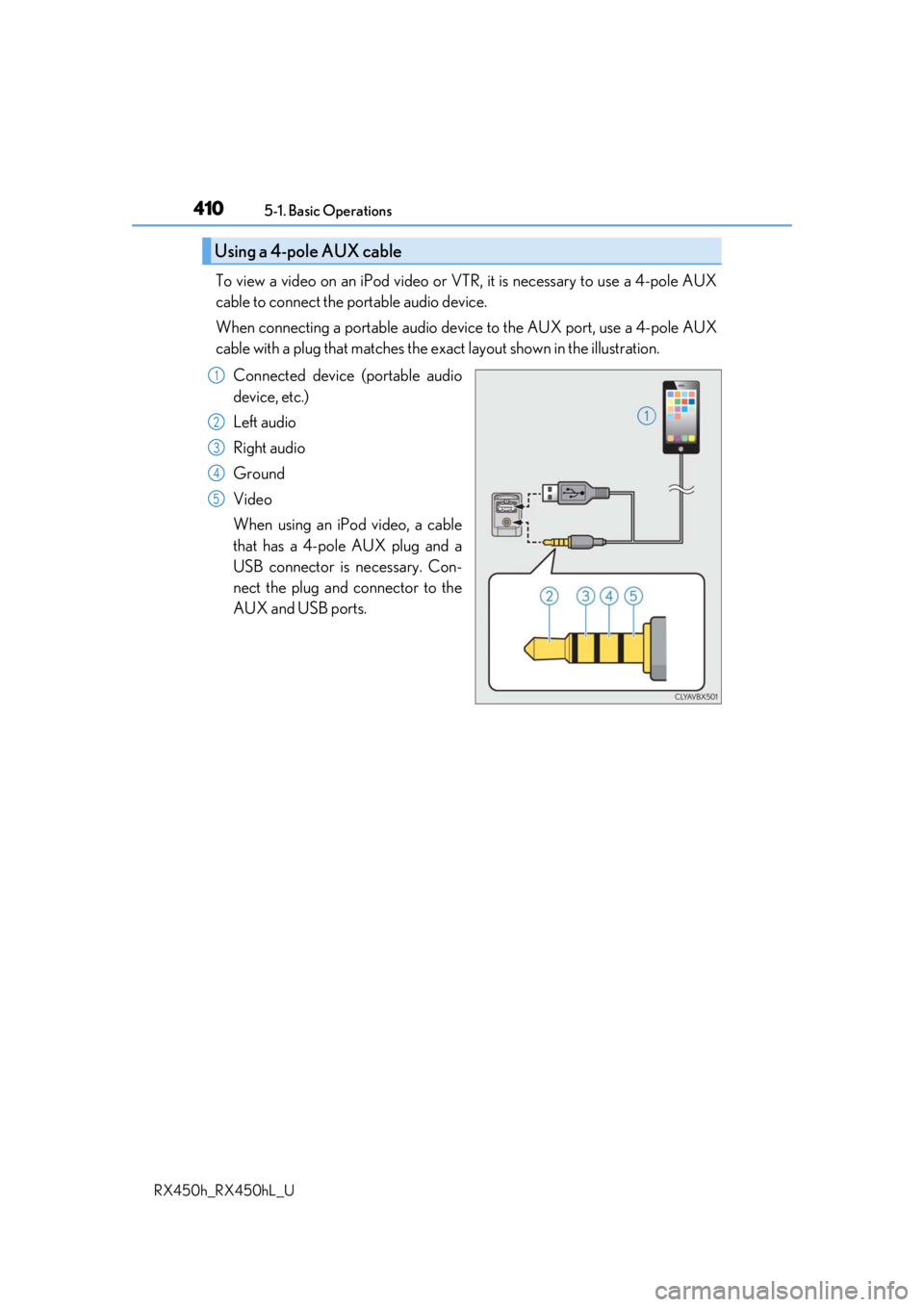
To view a video on an iPod video or VTR, it is necessary to use a 4-pole AUX
cable to connect the portable audio device.
When connecting a portable audio devi ce to the AUX port, use a 4-pole AUX
cable with a plug that matches the ex act layout shown in the illustration.
Connected device (portable audio
device, etc.)
Left audio
Right audio
Ground
Video
When using an iPod video, a cable
that has a 4-pole AUX plug and a
USB connector is necessary. Con-
nect the plug and connector to the
AUX and USB ports.
Using a 4-pole AUX cable
1
2
3
4
5
Page 499 of 792
499
6Interior features
RX450h_RX450hL_U
6-1. Basic operation of the Remote Touch screen
Remote Touch ............................ 500
12.3-inch display........................ 504
6-2. Using the air conditioning system and defogger
Lexus Climate Concierge ................................. 506
Front automatic air conditioning system ...............507
Rear automatic air conditioning system ...............522
Heated steering wheel/ seat heaters/
seat ventilators .........................525
6-3. Using the interior lights Interior lights list......................... 528
• Interior lights ..........................529
• Personal lights ...................... 530
6-4. Using the storage features List of storage features.............532
• Glove box ...............................534
• Console box ...........................534
• Cup holders........................... 535
• Door pockets .........................537 • Bottle holders ........................ 537
• Coin box ..................................538
• Auxiliary boxes .....................539
Luggage compartment features .......................................540
6-5. Using the other interior features
Other interior features ............ 547 • Sun visors ................................ 547
• Vanity mirrors ....................... 547
• Clock ........................................548
• Wireless charger .................548
• Power outlets.........................555
• Front passenger footwell hooks ....................... 557
• Rear door sunshades ......... 557
• Armrest ................................... 558
• Assist grips..............................559
• Coat hooks .............................559
Garage door opener ...............560
Compass ....................................... 567
LEXUS Enform Safety Connect ........................................571
LEXUS Enform Remote ......... 576
LEXUS Enform Service Connect ...................................... 577
Page 540 of 792
5406-4. Using the storage features
RX450h_RX450hL_U
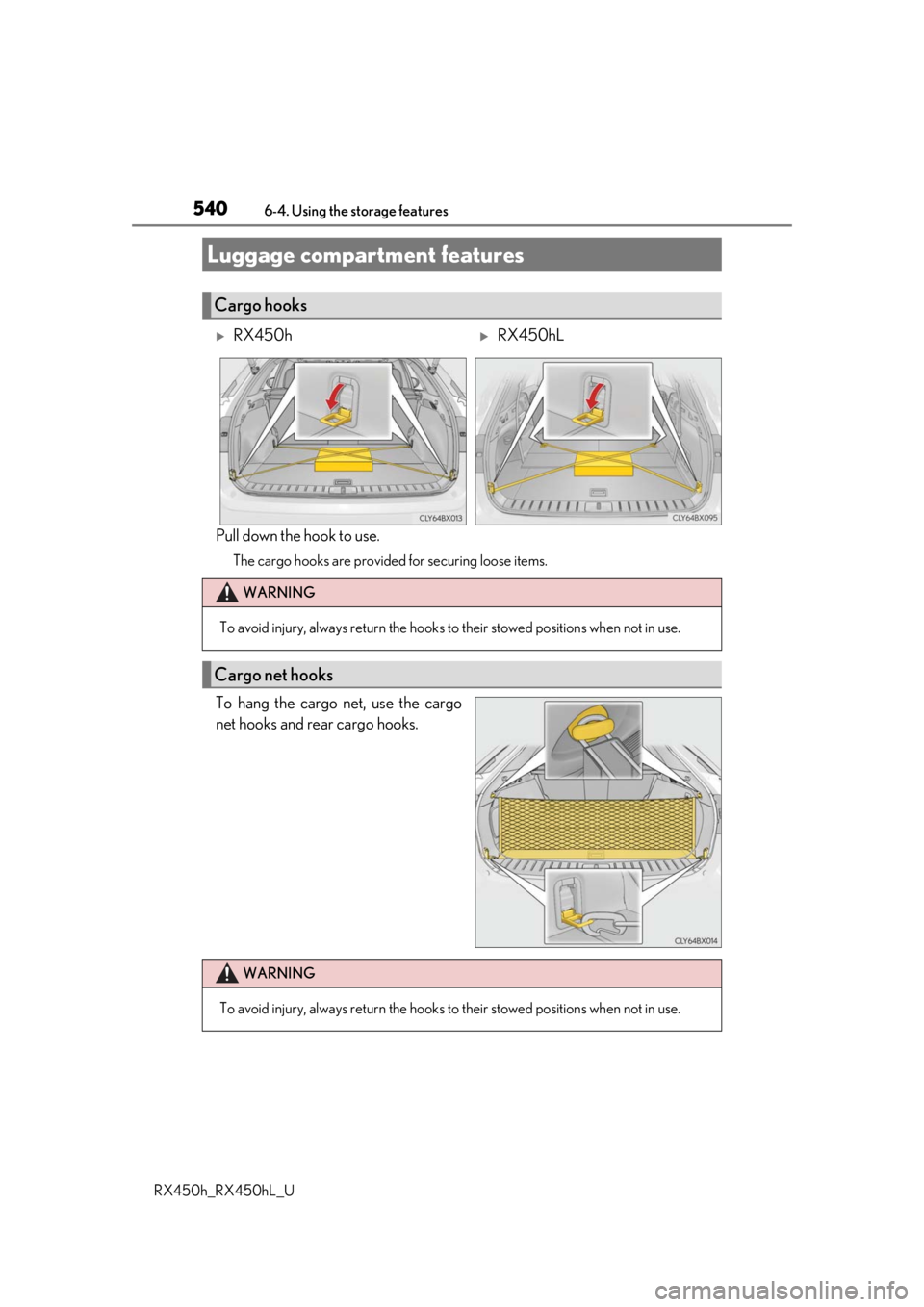
Pull down the hook to use.
The cargo hooks are provided for securing loose items.
To hang the cargo net, use the cargo
net hooks and rear cargo hooks.
Luggage compartment features
Cargo hooks
RX450hRX450hL
WARNING
To avoid injury, always return the hooks to their stowed positions when not in use.
Cargo net hooks
WARNING
To avoid injury, always return the hooks to their stowed positions when not in use.
Page 541 of 792
5416-4. Using the storage features
6
Interior features
RX450h_RX450hL_U
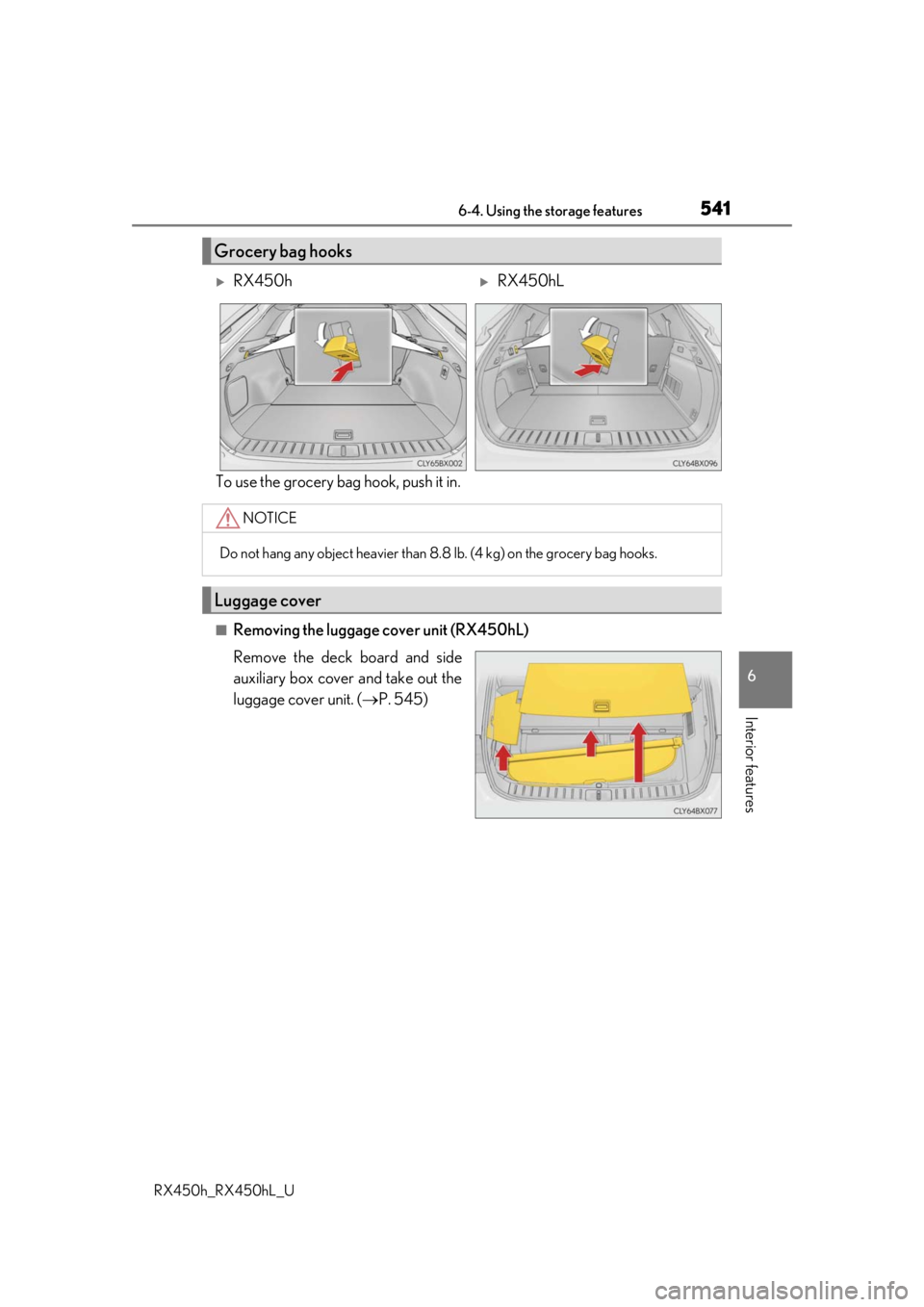
To use the grocery bag hook, push it in.
■Removing the luggage cover unit (RX450hL)
Remove the deck board and side
auxiliary box cover and take out the
luggage cover unit. (P. 545)
Grocery bag hooks
RX450hRX450hL
NOTICE
Do not hang any object heavier than 8. 8 lb. (4 kg) on the grocery bag hooks.
Luggage cover
Page 542 of 792
5426-4. Using the storage features
RX450h_RX450hL_U
■Using the luggage cover
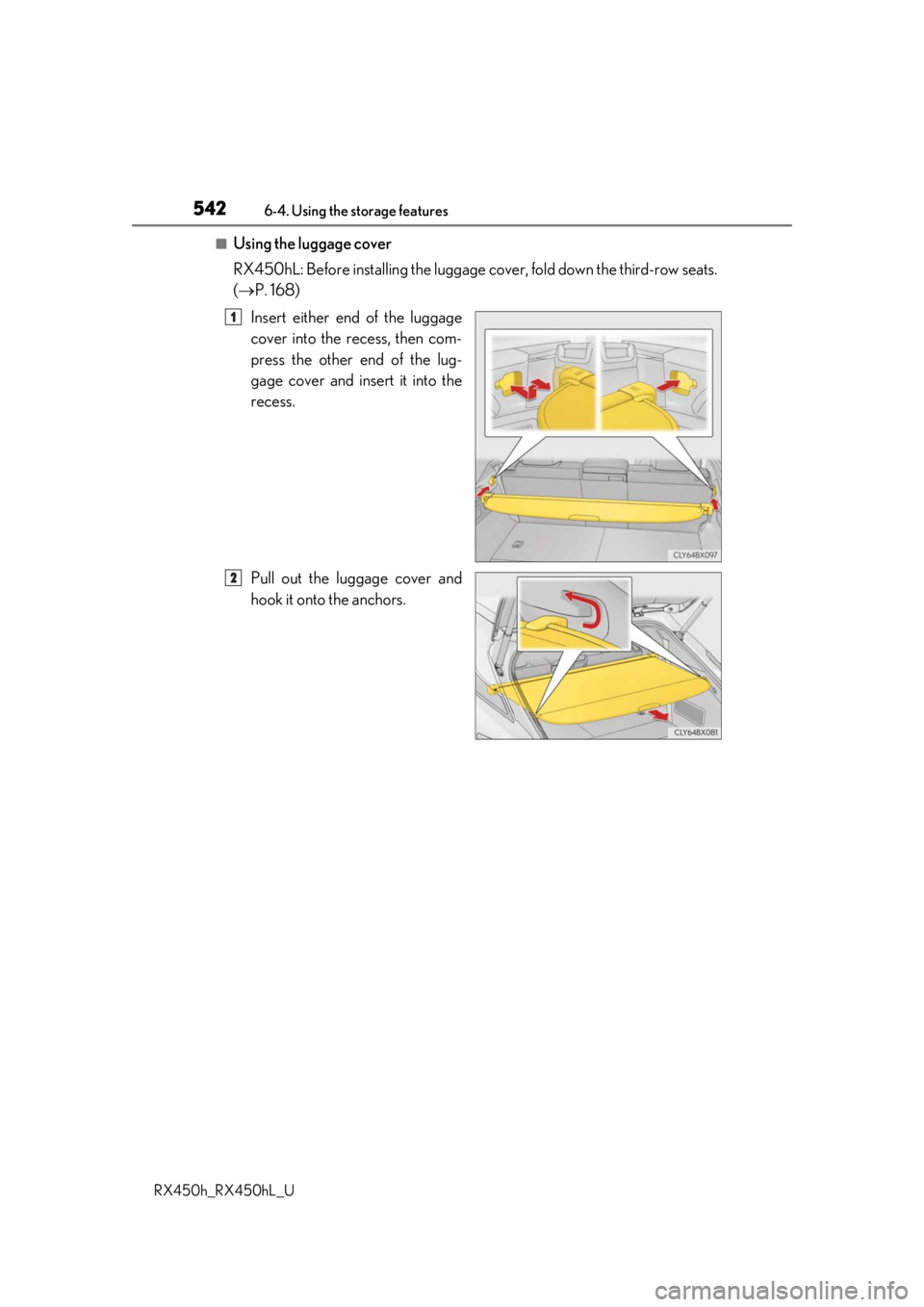
RX450hL: Before installing the luggage cover, fold down the third-row seats.
( P. 168)
Insert either end of the luggage
cover into the recess, then com-
press the other end of the lug-
gage cover and insert it into the
recess.
Pull out the luggage cover and
hook it onto the anchors.
1
2
Page 543 of 792
5436-4. Using the storage features
6
Interior features
RX450h_RX450hL_U
■Removing the luggage coverRelease the cover from the left
and right anchors and allow it to
retract.
Compress the end of the luggage
cover and lift the luggage cover
up.
RX450h: After removing the lug-
gage cover, place it somewhere
other than the passenger compart-
ment.
RX450hL: Stow the luggage cover
under the deck board and side auxil-
iary box cover.
1
2
WARNING
●Do not place anything on the luggage cover. In the event of sudden braking or turn-
ing, the item may go flying and strike an occupant. This could lead to an unexpected
accident, resulting in death or serious injury.
●Do not allow children to climb on the lugg age cover. Climbing on the luggage cover
could result in damage to the luggage cove r, possibly causing death or serious injury
to the child.
Page 555 of 792
5556-5. Using the other interior features
6
Interior features
RX450h_RX450hL_U
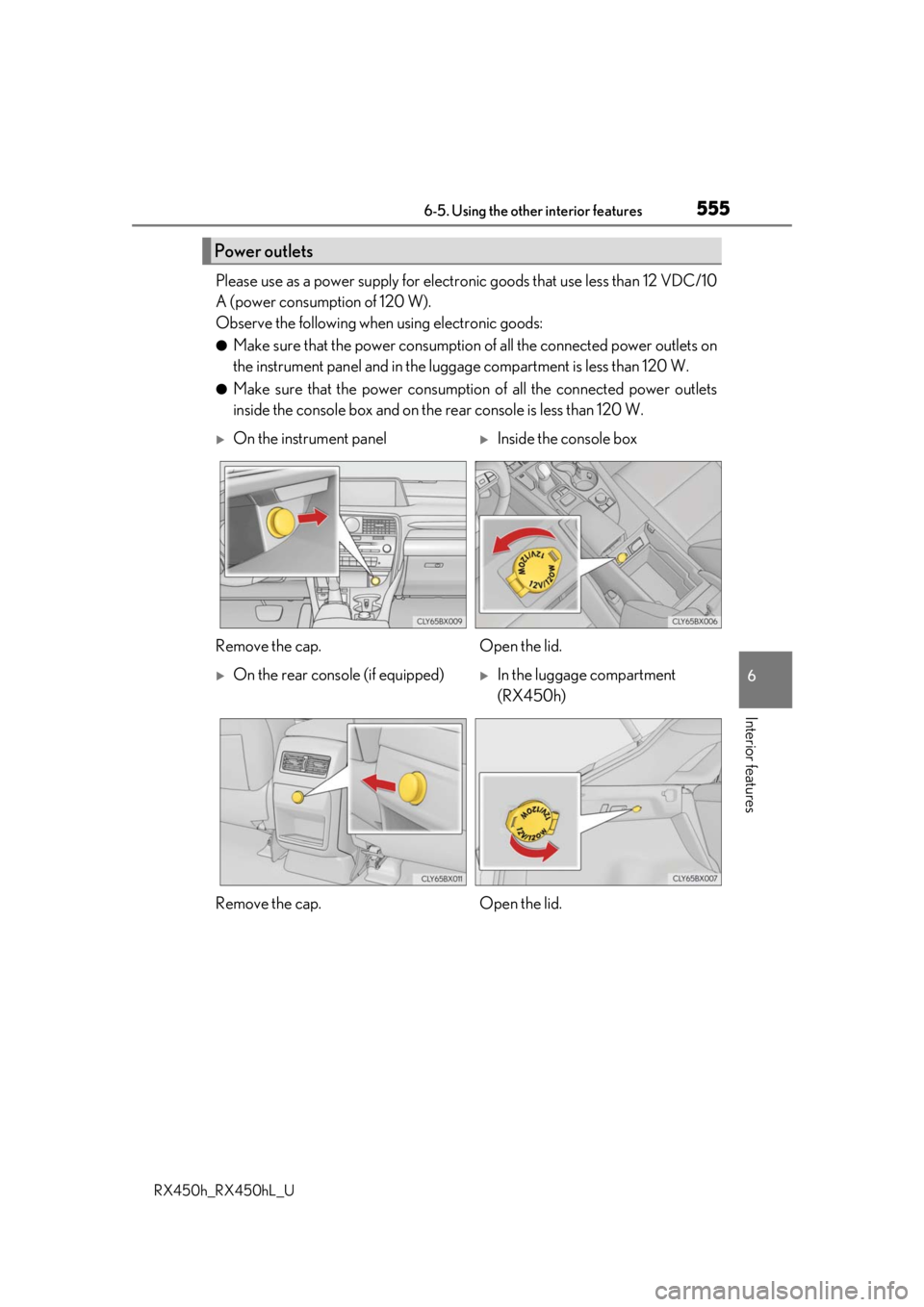
Please use as a power supply for electronic goods that use less than 12 VDC/10
A (power consumption of 120 W).
Observe the following when using electronic goods:
●Make sure that the power consumption of all the connected power outlets on
the instrument panel and in the lugg age compartment is less than 120 W.
●Make sure that the power consumptio n of all the connected power outlets
inside the console box and on the rear console is less than 120 W.
Power outlets
On the instrument panelInside the console box
Remove the cap. Open the lid.
On the rear console (if equipped)In the luggage compartment
(RX450h)
Remove the cap. Open the lid.