2019 LEXUS RX450H stop
[x] Cancel search: stopPage 143 of 792
1433-2. Opening, closing and locking the doors
3
Operation of each component
RX450h_RX450hL_U
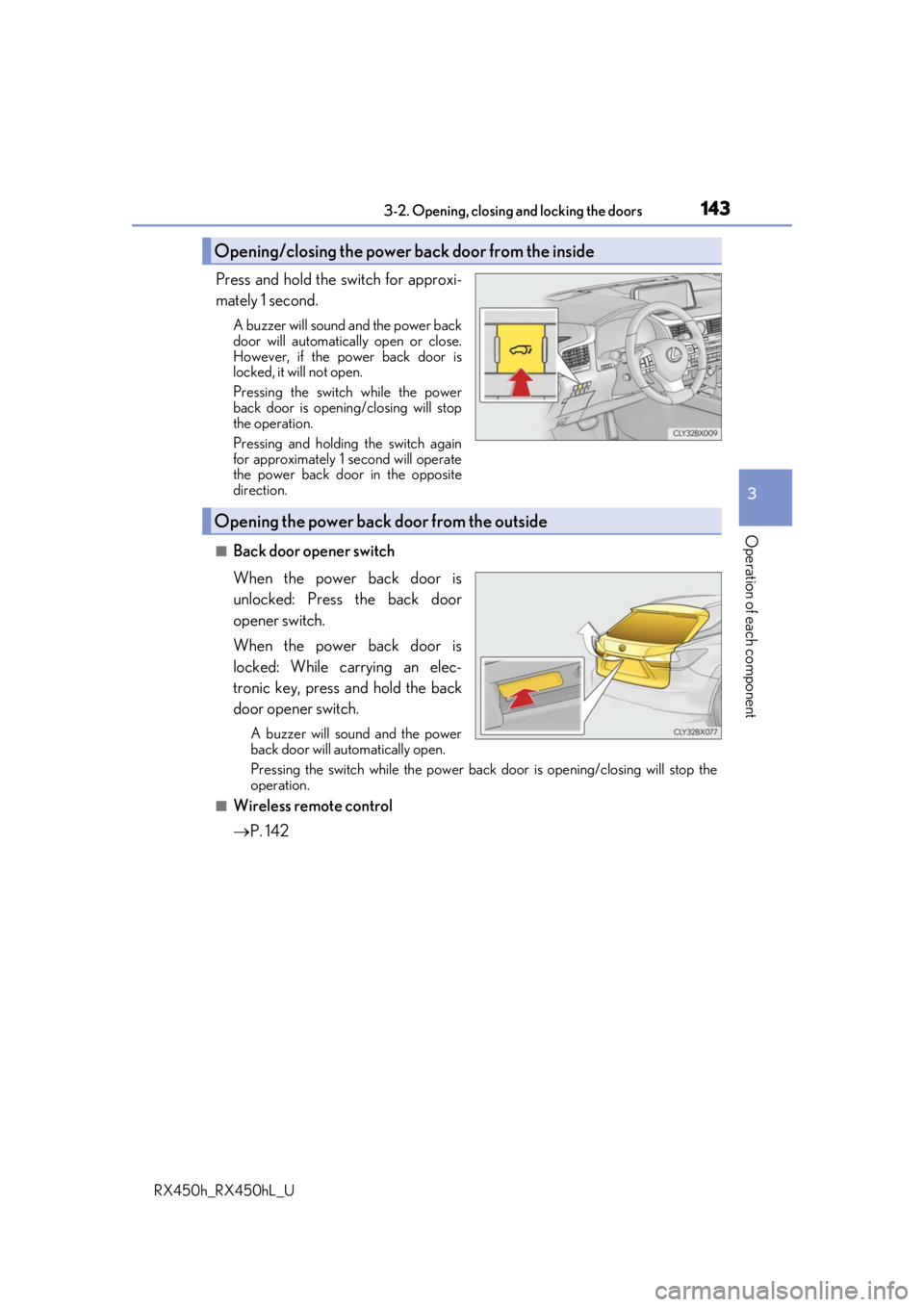
Press and hold the switch for approxi-
mately 1 second.
A buzzer will sound and the power back
door will automatically open or close.
However, if the power back door is
locked, it will not open.
Pressing the switch while the power
back door is opening/closing will stop
the operation.
Pressing and holding the switch again
for approximately 1 second will operate
the power back door in the opposite
direction.
■Back door opener switch
When the power back door is
unlocked: Press the back door
opener switch.
When the power back door is
locked: While carrying an elec-
tronic key, press and hold the back
door opener switch.
A buzzer will sound and the power
back door will automatically open.
Pressing the switch while the power back door is opening/closing will stop the
operation.
■Wireless remote control
P. 142
Opening/closing the power back door from the inside
Opening the power back door from the outside
Page 144 of 792

1443-2. Opening, closing and locking the doors
RX450h_RX450hL_U
■Touchless sensor (vehicles with a touchless power back door)
The touchless power back door enable s automatic opening of the power back
door by holding a hand over the upper part of the rear emblem or touching
the upper part of the rear emblem. When operating the touchless power back
door, make sure that the touchle ss sensor operation is enabled (P. 112) and
that you are carrying an electronic key.
While carrying an electronic key, move your hand slowly toward the upper
part of the rear emblem and hold it there until a buzzer sounds. (The upper
part of the rear emblem can also be touched.)
When all of the doors are locked: When your hand is detected, all of the doors will
be unlocked.
Immediately after the buzzer so unds, move your hand away.
If you do not move your hand away, a buzzer will sound twice and the power back
door will not operate.
Check that the power back door begins to open.
To stop the power back door partway, touch the rear emblem.
To operate the power back door again, use a power back door switch. ( P. 143,
145) (Holding your hand over the upper part of the rear emblem will not operate
the touchless sensor again.)
1
2
3
Page 145 of 792
1453-2. Opening, closing and locking the doors
3
Operation of each component
RX450h_RX450hL_U
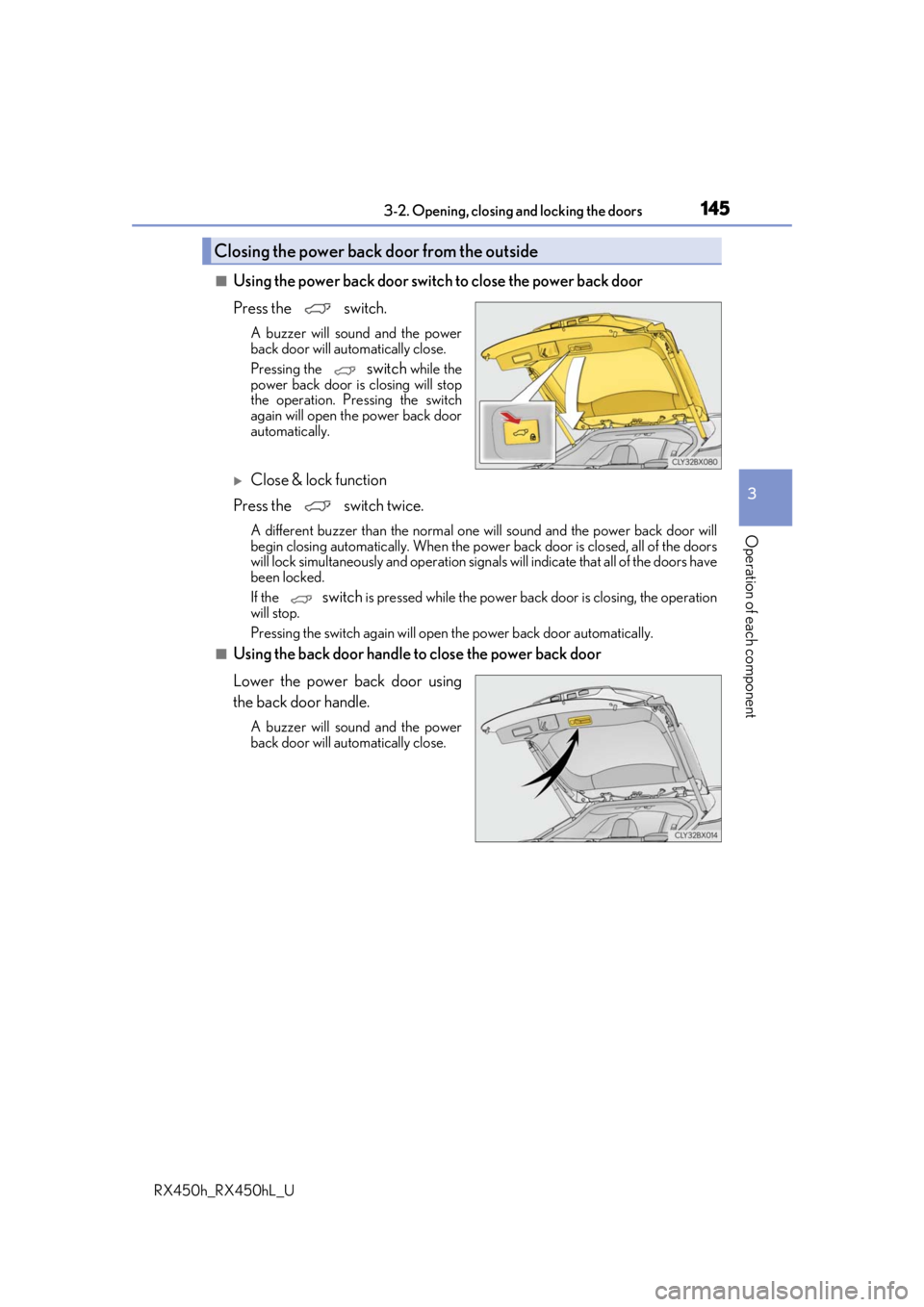
■Using the power back door switch to close the power back door
Press the switch.
A buzzer will sound and the power
back door will automatically close.
Pressing the
switch while the
power back door is closing will stop
the operation. Pressing the switch
again will open th e power back door
automatically.
Close & lock function
Press the switch twice.
A different buzzer than the normal one will sound and the power back door will
begin closing automatically. When the power back door is closed, all of the doors
will lock simultaneously and operation signal s will indicate that all of the doors have
been locked.
If the
switch is pressed while the power back door is closing, the operation
will stop.
Pressing the switch again will open the power back door automatically.
■Using the back door handle to close the power back door
Lower the power back door using
the back door handle.
A buzzer will sound and the power
back door will automatically close.
Closing the power back door from the outside
Page 146 of 792
1463-2. Opening, closing and locking the doors
RX450h_RX450hL_U
The power back door settings can be ch anged on the multi-information display.
( P. 108)
The position at which the power back door will stop when opened automatically
can be changed.
When setting using the switch
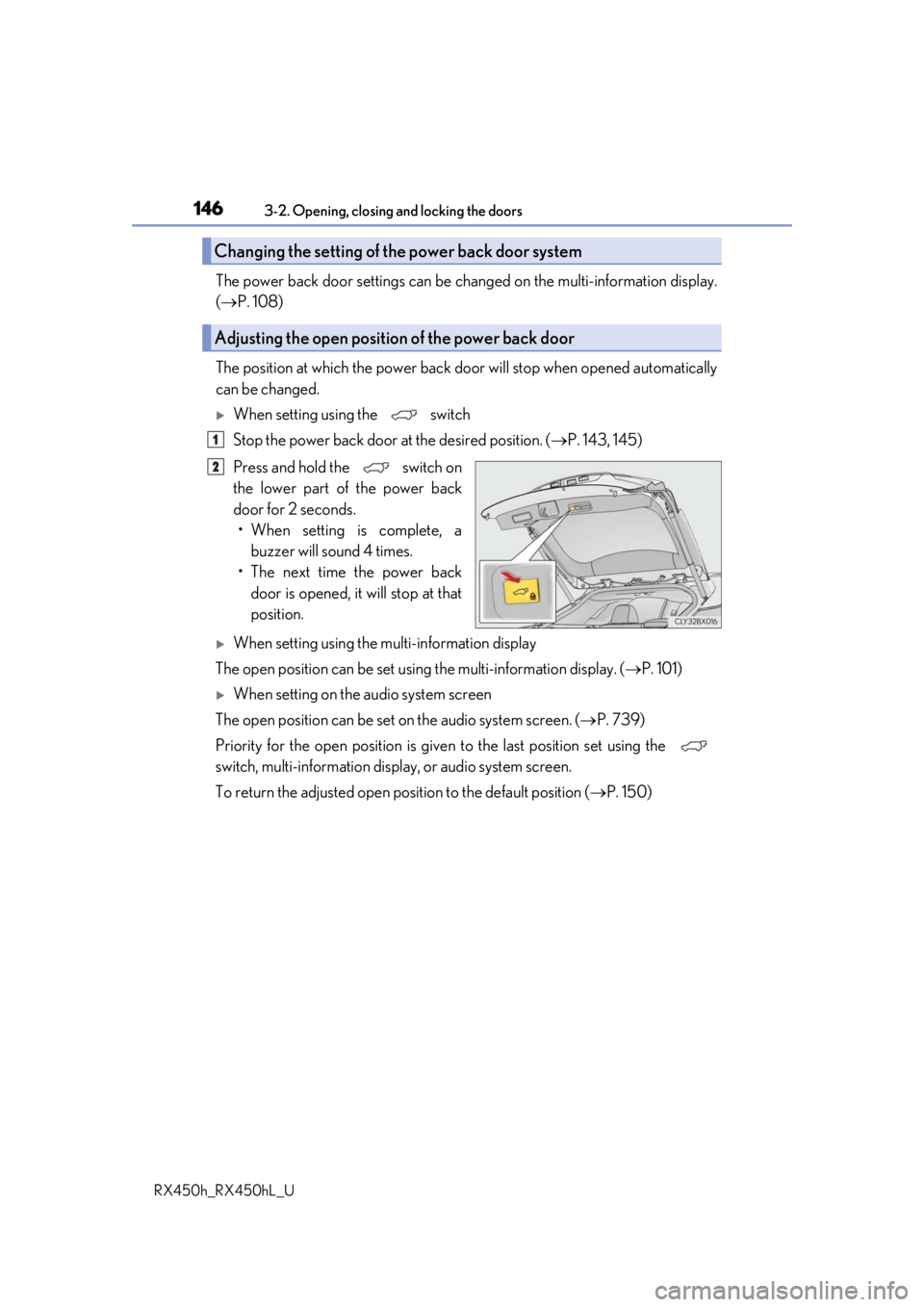
Stop the power back door at the desired position. ( P. 143, 145)
Press and hold the switch on
the lower part of the power back
door for 2 seconds. • When setting is complete, a buzzer will sound 4 times.
• The next time the power back door is opened, it will stop at that
position.
When setting using the multi-information display
The open position can be set usin g the multi-information display. (P. 101)
When setting on the audio system screen
The open position can be set on the audio system screen. ( P. 739)
Priority for the open position is give n to the last position set using the
switch, multi-information displa y, or audio system screen.
To return the adjusted open posi tion to the default position (P. 150)
Changing the setting of the power back door system
Adjusting the open position of the power back door
1
2
Page 149 of 792

1493-2. Opening, closing and locking the doors
3
Operation of each component
RX450h_RX450hL_U
■Back door closer
In the event that the power back door is left slightly open, the back door closer will auto-
matically close it to the fully closed position.
●The back door closer can function wh en the power switch is in any mode.
●The power back door can be opened using the back door opener switch even if the
back door closer is operating.
■Operation of the power back door
●When the power back door begins to operate, the emergency flashers will flash twice
and a buzzer will sound.
●When the power back door is disabled ( P. 112), the power back door will not operate
but can be opened and closed manually.
●The power back door turns to manual operat ion when the back door opener switch is
pressed while the power back door is in an automatic opening/closing operation.
●If anything obstructs the power back door while opening, a buzzer will sound and the
power back door will stop immediately. If anything obstructs the power back door while
closing, a buzzer will sound and the power back door will automatically move slightly in
the opposite direction and then stop.
■Back door reserve lock function
This function reserves the locking of the power back door when the power back door is
open. If the following operations are perfor med, all of the doors except the power back
door will lock and then the power back door will lock when it is completely closed.
Close all of the doors, ex cept the power back door.
Perform an automatic closing operation of the power back door and lock the doors
using the wireless remote control ( P. 136) or smart access system with push-button
start ( P. 136, 142) while the power back door is closing.
Also, if the back door does no t fully close due to the operation of the jam protection func-
tion, etc., while the back door is automatically closing after a reserve lock operation is
performed, the reserve lock function is canceled and all the doors will unlock.
1
2
Page 150 of 792

1503-2. Opening, closing and locking the doors
RX450h_RX450hL_U
■Close & lock function
When the power back door is open, this fu nction closes the power back door and then
locks all of the doors simultaneously.
Performing the following procedure will lock all of the doors when the power back door
is completely closed.
Close all of the doors except the power back door.
While carrying an electronic key, press the
switch on the lower part of the
power back door ( P. 145) twice.
A different buzzer than the normal one will sound and then the power back door will
begin closing automatically. When the power back door is closed, all of the doors will
lock simultaneously and operation signals w ill indicate that all of the doors have been
locked.
To enable this function, the fo llowing conditions must be met:
●The most recent power back door operation was an automatic opening operation and
the power back door is stopped.
●No electronic keys for your vehicle are in the vehicle.
■When reconnecting the 12-volt battery
To enable the power back door to operate pr operly, close the power back door manually.
■Jam protection function
■Returning the power back door opening position to the default setting
Sensors are installed in the right and left sides of
the power back door. When the door is auto-
matically closing and the sensors are pushed
due to an object being caught, etc., the jam pro-
tection function will operate.
From that position the door will automatically
move a little in the opposite direction and then
the function will stop.
Press and hold the switch on the lower
part of the power back door for 7 seconds.
A buzzer will sound twice. The next time the
power back door is opened, it will open to the
default position.
1
2
Page 154 of 792

1543-2. Opening, closing and locking the doors
RX450h_RX450hL_U
WARNING
■Back door closer
●Use caution when using the back door closer as it still operates when the power back
door system is disabled.
■Power back door
Observe the following precautions wh en operating the power back door.
Failure to do so may cause death or serious injury.
●Check the safety of the surrounding area to make sure there are no obstacles or any-
thing that could cause any of yo ur belongings to get caught.
●If anyone is in the vicinity, make sure they are safe and let them know that the power
back door is about to open or close.
●If the power back door system is disabled ( P. 112) while the power back door is
operating, the power back door will stop operating. The power back door must then
be operated manually. Take extra care in th is situation, as the power back door may
open or close suddenly.
●If the operating conditions of the power back door ( P. 147) are no longer met, a
buzzer may sound and the power back door may stop opening or closing. The power
back door must then be operated manually. Ta ke extra care on an incline in this situa-
tion, as the power back door may move suddenly.
●On an incline, the power back door may su ddenly shut after it opens. Make sure the
power back door is fully open and secure.
●In the following situations, the power back door may detect an abnormality and auto-
matic operation may be stopped. In this case, the power back door must then be
operated manually. Take extra care in this situation, as the stopped power back door
may suddenly open or close, causing an accident.
• When the power back door contacts an obstacle
• When the 12-volt battery voltage suddenly drops, such as when the power switch is turned to ON mode or the hybrid syst em is started during automatic operation
●In the event that the power back door is left
slightly open, the back door closer will auto-
matically close it to the fully closed position. It
takes several seconds before the back door
closer begins to operate. Be careful not to get
fingers caught or anything else in the power
back door, as this may cause bone fractures
or other serious injuries.
Page 156 of 792

1563-2. Opening, closing and locking the doors
RX450h_RX450hL_U
NOTICE
■Back door spindles
The power back door is equipped with spindles that hold the power back door in place.
Observe the following precautions.
Failure to do so may cause damage to the back door spindle, resulting in malfunction.
■To prevent back door closer malfunction
●Do not apply excessive force to the power back door while the back door closer is
operating. Applying excessive force may ca use the back door closer to malfunction.
●If the power back door is opened and closed repeatedly in a short amount of time, the
back door closer may stop operating. In this case, manually open the power back
door once and wait for a while bef ore attempting to close it again.
■To prevent malfunction of the power back door
●Make sure that there is no ice between the power back door and frame that would
prevent movement of the power back door. Operating the power back door when
excessive load is present on the power back door may cause a malfunction.
●Do not apply excessive force to the power back door while the power back door is
operating.
●Take care not to damage the sensors installed on the right and left edges of the power
back door (P. 150) with a knife or other sharp object. If a sensor is disconnected,
the power back door will not close automatically.
■Close & lock function
When closing the power back door using th e close & lock function, a different buzzer
than the normal one will sound before the operation begins.
To check that the operation has started corre ctly, check that a different buzzer than the
normal one has sounded.
Additionally, when the power back door is fully closed and locked, operation signals
will indicate that all of the doors have been locked.
Before leaving the vehicle, ma ke sure that the operational signals have operated and
that all of the doors are locked.
●Do not attach any foreign objects, such as
stickers, plastic sheets , or adhesives to the
spindle rod.
●Do not attach any accessories other than
genuine Lexus parts to the power back door.
●Do not place your hand on the spindle or
apply lateral forces to it.Spindles