Page 526 of 792
5266-2. Using the air conditioning system and defogger
RX450h_RX450hL_U
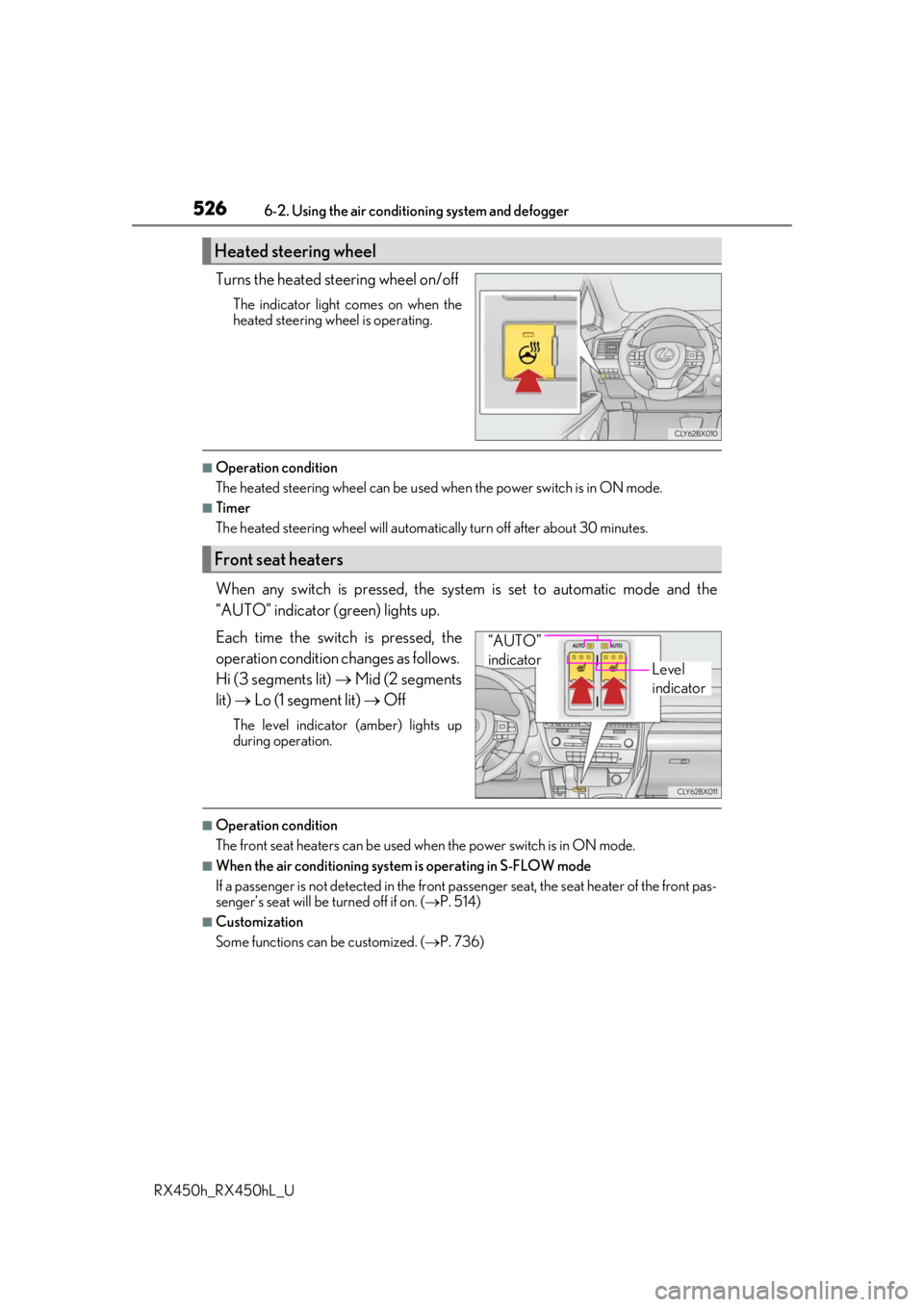
Turns the heated steering wheel on/off
The indicator light comes on when the
heated steering wheel is operating.
■Operation condition
The heated steering wheel can be used when the power switch is in ON mode.
■Timer
The heated steering wheel will automati cally turn off after about 30 minutes.
When any switch is pressed, the system is set to automatic mode and the
“AUTO” indicator (green) lights up.
Each time the switch is pressed, the
operation condition changes as follows.
Hi (3 segments lit) Mid (2 segments
lit) Lo (1 segment lit) Off
The level indicator (amber) lights up
during operation.
■Operation condition
The front seat heaters can be used when the power switch is in ON mode.
■When the air conditioning system is operating in S-FLOW mode
If a passenger is not detected in the front pa ssenger seat, the seat heater of the front pas-
senger’s seat will be turned off if on. ( P. 514)
■Customization
Some functions can be customized. ( P. 736)
Heated steering wheel
Front seat heaters
Level
indicator
“AUTO”
indicator
Page 527 of 792
5276-2. Using the air conditioning system and defogger
RX450h_RX450hL_U
6
Interior features
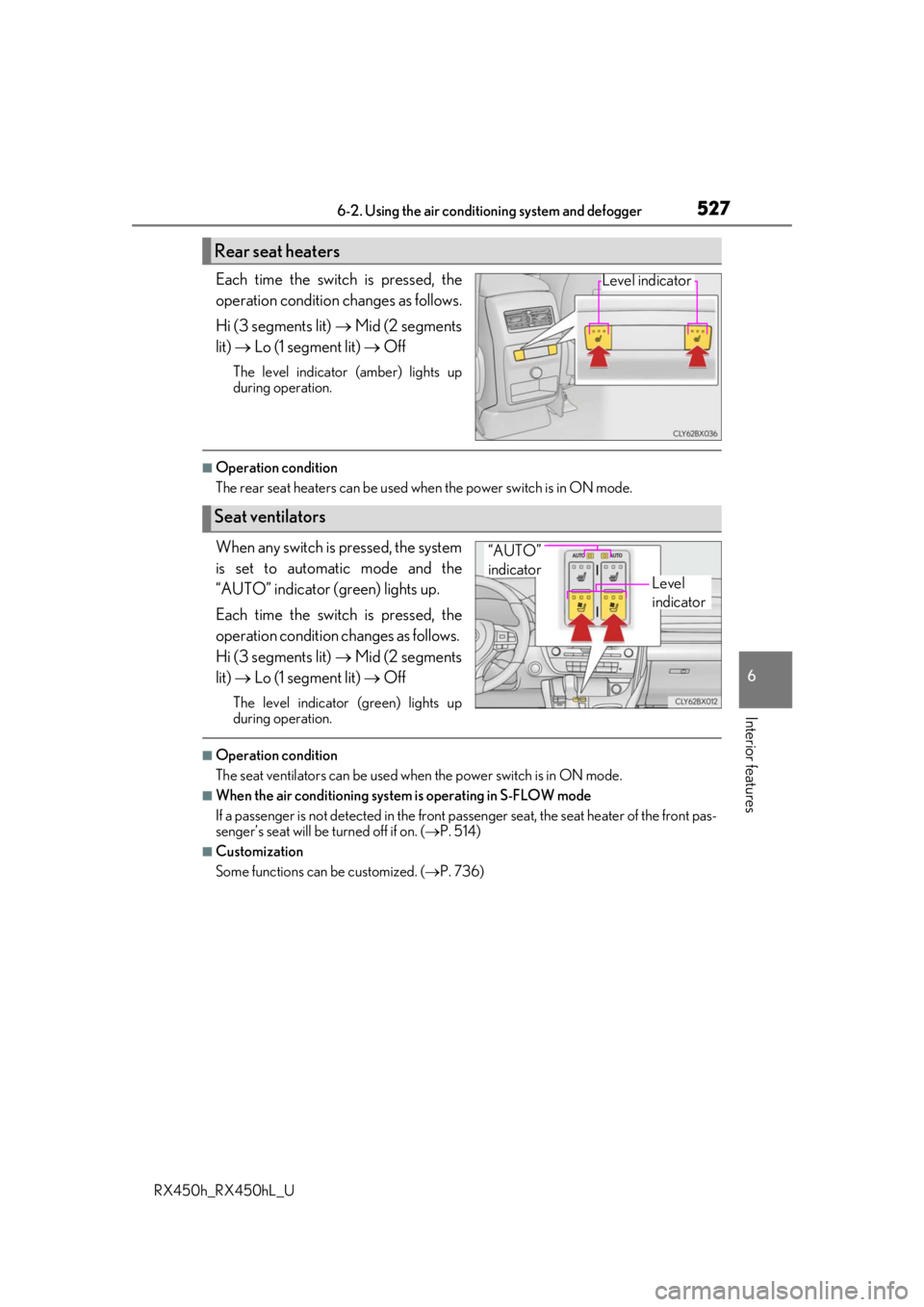
Each time the switch is pressed, the
operation condition changes as follows.
Hi (3 segments lit) Mid (2 segments
lit) Lo (1 segment lit) Off
The level indicator (amber) lights up
during operation.
■Operation condition
The rear seat heaters can be used wh en the power switch is in ON mode.
When any switch is pressed, the system
is set to automatic mode and the
“AUTO” indicator (green) lights up.
Each time the switch is pressed, the
operation condition changes as follows.
Hi (3 segments lit) Mid (2 segments
lit) Lo (1 segment lit) Off
The level indicator (green) lights up
during operation.
■Operation condition
The seat ventilators can be used when the power switch is in ON mode.
■When the air conditioning system is operating in S-FLOW mode
If a passenger is not detected in the front pa ssenger seat, the seat heater of the front pas-
senger’s seat will be turned off if on. ( P. 514)
■Customization
Some functions can be customized. ( P. 736)
Rear seat heaters
Level indicator
Seat ventilators
Level
indicator
“AUTO”
indicator
Page 531 of 792
5316-3. Using the interior lights
6
Interior features
RX450h_RX450hL_U
●Illuminated entry system: The lights automatically turn on/off according to power switch
mode, the presence of the electronic key, whether the doors are locked/unlocked, and
whether the doors are opened/closed.
●If the interior lights remain on when the power switch is turned off, the lights will go off
automatically after 20 minutes.
●In the following cases, the interior lights and front personal lights may not respond as
normal.
• When water, dirt, etc., have adhered to the lens surface
• When operated with a wet hand
• When wearing gloves, etc.
●Some functions can be customized ( P. 736)
NOTICE
●Never remove the lens for the front interior light and front personal lights. Otherwise,
the lights will be damaged. If the lens need to remove, contact your Lexus dealer.
●To prevent 12-volt battery discharge, do not leave the lights on longer than necessary
when the hybrid system is off.
Page 533 of 792
5336-4. Using the storage features
6
Interior features
RX450h_RX450hL_U
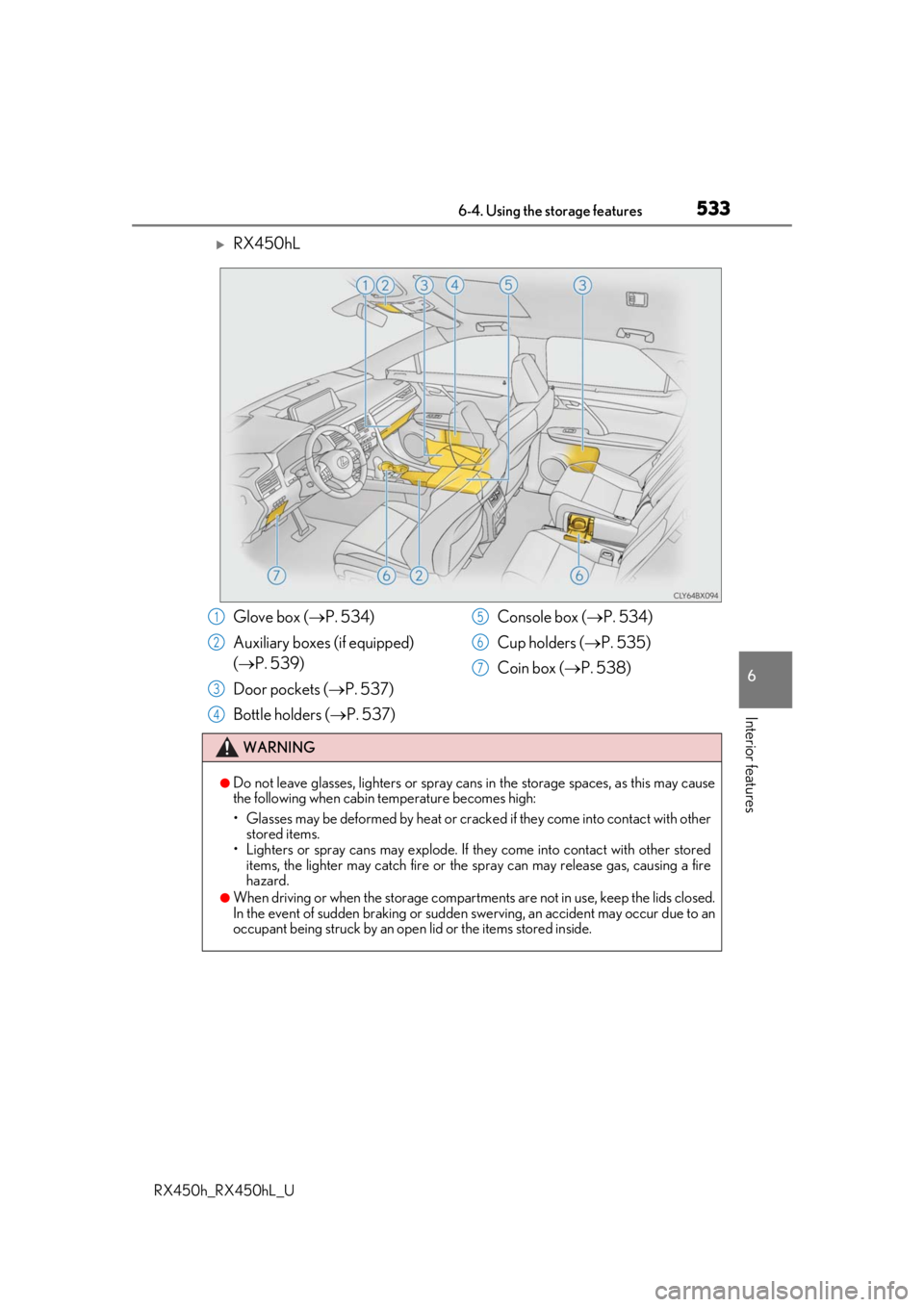
RX450hL
Glove box (P. 534)
Auxiliary boxes (if equipped)
( P. 539)
Door pockets ( P. 537)
Bottle holders ( P. 537) Console box (
P. 534)
Cup holders ( P. 535)
Coin box ( P. 538)
WARNING
●Do not leave glasses, lighters or spray cans in the storage spaces, as this may cause
the following when cabin temperature becomes high:
• Glasses may be deformed by heat or cracke d if they come into contact with other
stored items.
• Lighters or spray cans may explode. If they come into contact with other stored
items, the lighter may catch fire or the spray can may release gas, causing a fire
hazard.
●When driving or when the storage compartments are not in use, keep the lids closed.
In the event of sudden braking or sudden swerving, an accident may occur due to an
occupant being struck by an open lid or the items stored inside.
1
2
3
4
5
6
7
Page 543 of 792
5436-4. Using the storage features
6
Interior features
RX450h_RX450hL_U
■Removing the luggage coverRelease the cover from the left
and right anchors and allow it to
retract.
Compress the end of the luggage
cover and lift the luggage cover
up.
RX450h: After removing the lug-
gage cover, place it somewhere
other than the passenger compart-
ment.
RX450hL: Stow the luggage cover
under the deck board and side auxil-
iary box cover.
1
2
WARNING
●Do not place anything on the luggage cover. In the event of sudden braking or turn-
ing, the item may go flying and strike an occupant. This could lead to an unexpected
accident, resulting in death or serious injury.
●Do not allow children to climb on the lugg age cover. Climbing on the luggage cover
could result in damage to the luggage cove r, possibly causing death or serious injury
to the child.
Page 550 of 792
5506-5. Using the other interior features
RX450h_RX450hL_U
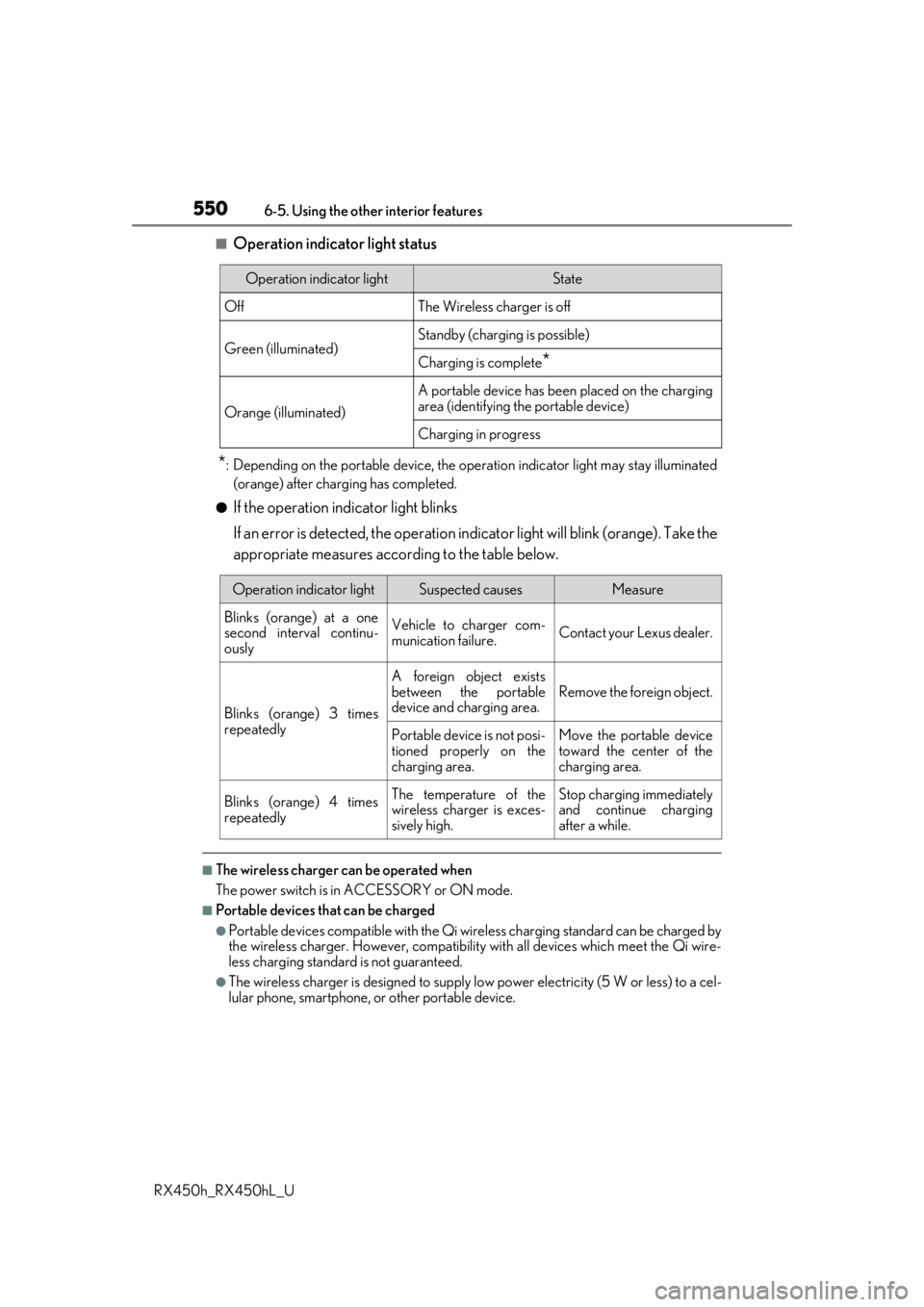
■Operation indicator light status
*: Depending on the portable device, the oper ation indicator light may stay illuminated
(orange) after charging has completed.
●If the operation indicator light blinks
If an error is detected, the operation in dicator light will blink (orange). Take the
appropriate measures according to the table below.
■The wireless charger can be operated when
The power switch is in ACCESSORY or ON mode.
■Portable devices t hat can be charged
●Portable devices compatible with the Qi wireless charging standard can be charged by
the wireless charger. However, compatibility with all devices which meet the Qi wire-
less charging standard is not guaranteed.
●The wireless charger is designed to supply low power electricity (5 W or less) to a cel-
lular phone, smartphone, or other portable device.
Operation indicator lightState
OffThe Wireless charger is off
Green (illuminated)Standby (charging is possible)
Charging is complete*
Orange (illuminated)
A portable device has been placed on the charging
area (identifying the portable device)
Charging in progress
Operation indicator lightSuspected causesMeasure
Blinks (orange) at a one
second interval continu-
ously Vehicle to charger com-
munication failure.
Contact your Lexus dealer.
Blinks (orange) 3 times
repeatedly A foreign object exists
between the portable
device and charging area.
Remove the foreign object.
Portable device is not posi-
tioned properly on the
charging area. Move the portable device
toward the center of the
charging area.
Blinks (orange) 4 times
repeatedly The temperature of the
wireless charger is exces-
sively high.Stop charging immediately
and continue charging
after a while.
Page 553 of 792

5536-5. Using the other interior features
6
Interior features
RX450h_RX450hL_U
WARNING
■Caution while driving
When charging a portable device while driving, for safety reasons, the driver should
not operate the portable device.
■Caution regarding interference with electronic devices
People with implantable card iac pacemakers, cardiac resynchronization therapy pace-
makers or implantable cardioverter defibrilla tors, as well as any other electrical medi-
cal device, should consult their physician about the usage of the wireless charger.
Operations of the wireless charger may have an affect on medical devices.
■To prevent damage or burns
Observe the following precautions.
Failure to do so may result in the possibi lity of fire, equipment failure or damage, or
burns due to heat.
●Do not put any metallic objects between th e charging area and the portable device
while charging.
●Do not attach metallic objects, such as aluminum stickers, to the charging area.
●Do not cover the wireless charger with a cloth or other object while charging.
●Do not attempt to charge portable devi ces which are not compatible with the Qi
wireless charging standard.
●Do not disassemble, modify or remove the wireless charger.
●Do not apply force or impact to the wireless charger.
Page 554 of 792

5546-5. Using the other interior features
RX450h_RX450hL_U
NOTICE
■Conditions in which the wireless charger may not operate correctly
In the following situations, the wire less charger may not operate correctly:
●When a portable device is fully charged
●When there is a foreign object between the charging area and portable device
●When a portable device becomes hot while charging
●When a portable device is placed on the wireless area with its charging surface fac-
ing up
●When a portable device is not centered on the charging area
●When the vehicle is near a TV tower, electric power plant, gas station, radio station,
large display, airport or other facility that generates stro ng radio waves or electrical
noise
●When the portable device is in contact with, or is covered by any of the following
metallic objects:
• Cards to which aluminum foil is attached
• Cigarette boxes that ha ve aluminum foil inside
• Metallic wallets or bags
•Coins
•Metal hand warmers
• Media such as CDs and DVDs
●When wireless keys (that emit radio waves) other than those of your vehicle are being
used nearby.
If in situations other than above the wirele ss charger does not operate properly or the
operation indicator light is blinking, the wireless charge r may be malfunctioning. Con-
tact your Lexus dealer.
■To prevent failure or damage to data
●Do not bring magnetic cards, such as a cr edit card, or magnetic recording media,
close to the wireless charger while charging. Otherwise, data may be erased due to
the influence of magnetism.
Additionally, do not bring pr ecision instruments such as wrist watches, close to the
wireless charger, as such objects may malfunction.
●Do not leave portable devices in the cab in. The temperature inside the cabin may
become high when parked in the sun, and cause damage to the device.
■To prevent 12-volt battery discharge
Do not use the wireless charger for a long pe riod of time with the hybrid system is
stopped.