2019 LEXUS RX450H windshield
[x] Cancel search: windshieldPage 270 of 792
2704-3. Operating the lights and wipers
RX450h_RX450hL_U
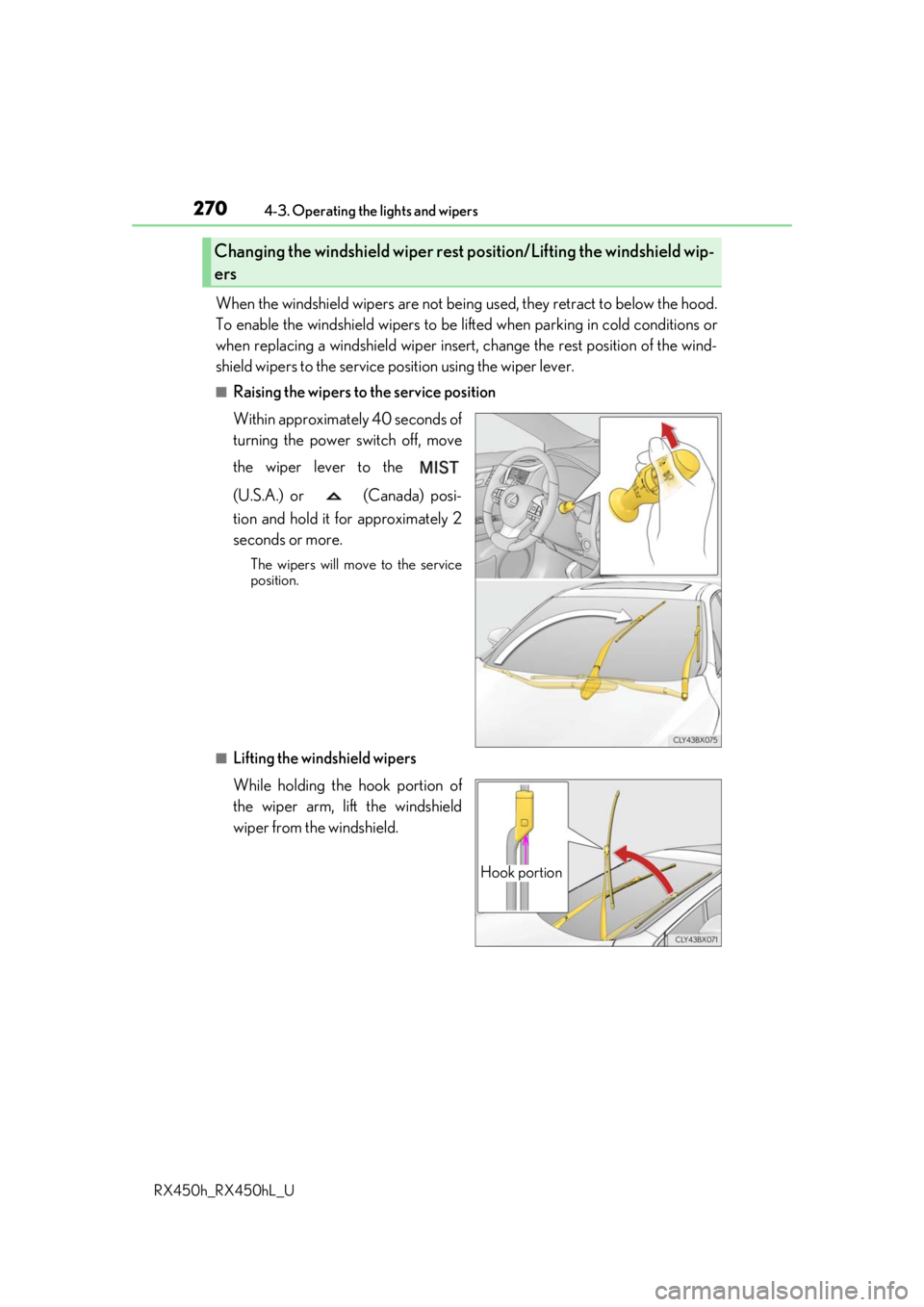
When the windshield wipers are not bein g used, they retract to below the hood.
To enable the windshield wi pers to be lifted when parking in cold conditions or
when replacing a windshield wiper insert, change the rest position of the wind-
shield wipers to the service position using the wiper lever.
■Raising the wipers to the service position
Within approximately 40 seconds of
turning the power switch off, move
the wiper lever to the
(U.S.A.) or (Canada) posi-
tion and hold it for approximately 2
seconds or more.
The wipers will move to the service
position.
■Lifting the windshield wipers
While holding the hook portion of
the wiper arm, lift the windshield
wiper from the windshield.
Changing the windshield wiper rest position/Lifting the windshield wip-
ers
Hook portion
Page 271 of 792
2714-3. Operating the lights and wipers
4
Driving
RX450h_RX450hL_U
■Lowering the windshield wipers to the retracted position
With the windshield wipers placed on the windshield, turn the power switch to ON mode
and then move the wiper lever to an operatin g position. When the wiper switch is turned
off, the windshield wipers will stop at the retracted position.
NOTICE
■When lifting the windshield wipers
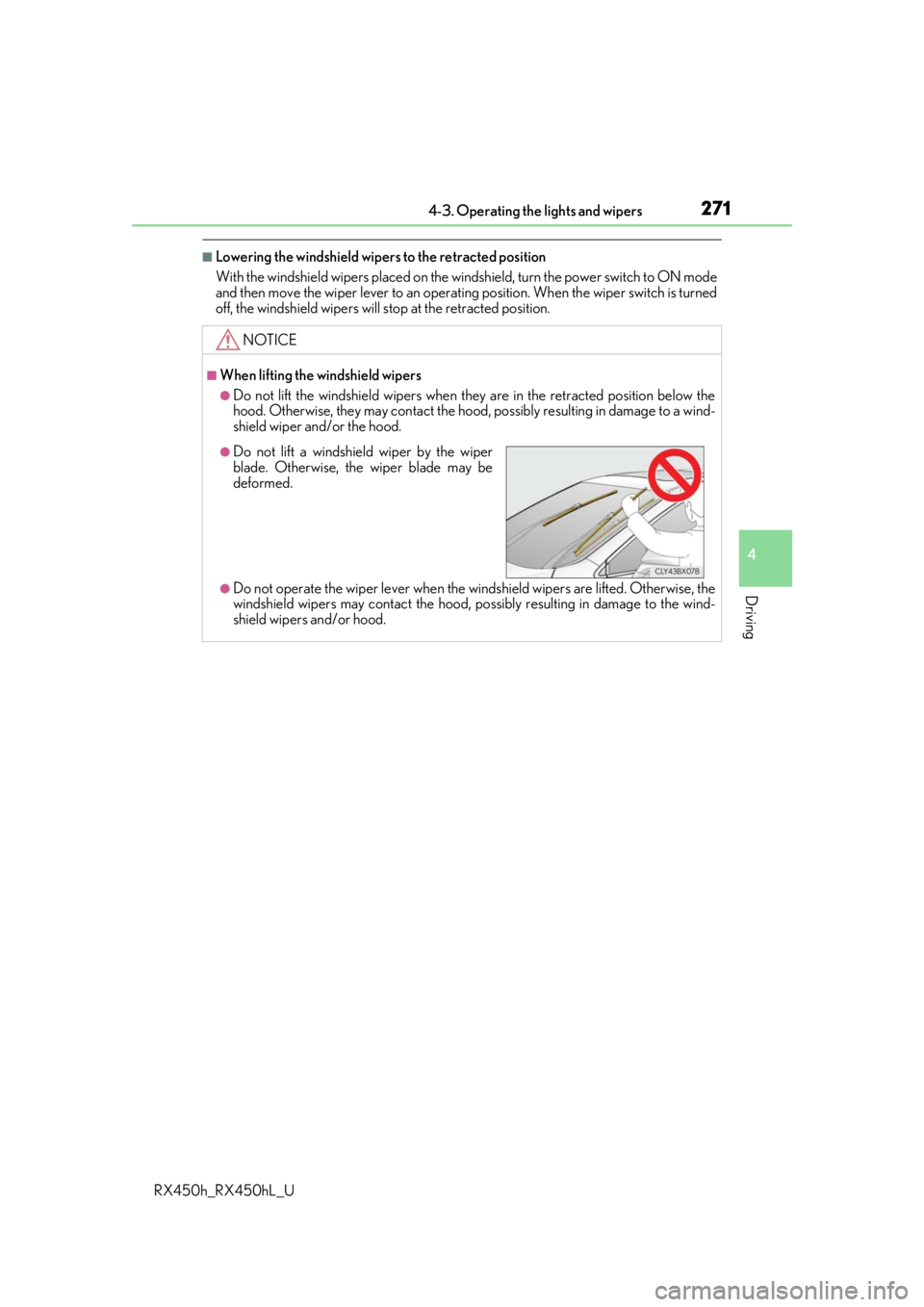
●Do not lift the windshield wipers when they are in the retracted position below the
hood. Otherwise, they may contact the hood, possibly resulting in damage to a wind-
shield wiper and/or the hood.
●Do not operate the wiper lever when the windshield wipers are lifted. Otherwise, the
windshield wipers may contact the hood, po ssibly resulting in damage to the wind-
shield wipers and/or hood.
●Do not lift a windshield wiper by the wiper
blade. Otherwise, the wiper blade may be
deformed.
Page 281 of 792

2814-5. Using the driving support systems
4
Driving
RX450h_RX450hL_U
Two types of sensors, located behind the front grille and windshield, detect infor-
mation necessary to operate the drive assist systems.
Radar sensor
Camera sensor
Sensors
1
2
WARNING
■To avoid malfunction of the radar sensor
Observe the following precautions.
Otherwise, the radar sensor may not operate properly, possibly leading to an accident
resulting in death or serious injury.
●Keep the radar sensor and front grille emblem clean at all times.
●Do not attach accessories, stickers (includi ng transparent stickers) or other items to
the radar sensor, front grille emblem or surrounding area.
●Do not subject the radar sensor or su rrounding area to a strong impact.
If the radar sensor, front grille, or front bumper has been subjected to a strong impact,
have the vehicle inspected by your Lexus dealer.
●Do not disassemble the radar sensor.
●Do not modify or paint the radar sensor, front grille emblem or surrounding area.
●If the radar sensor, front grille, or front bumper needs to be removed and installed, or
replaced, contact your Lexus dealer.
Radar sensor
Front grille emblem
If the front of the rada r sensor or the front or
back of the front grille emblem is dirty or
covered with water droplets, snow, etc., clean
it.
Clean the radar sensor and front grille
emblem with a soft cloth so you do not mark
or damage them.1
2
Page 282 of 792
2824-5. Using the driving support systems
RX450h_RX450hL_U
WARNING
■To avoid malfunction of the camera sensor
Observe the following precautions.
Otherwise, the camera sensor may not oper ate properly, possibly leading to an acci-
dent resulting in deat h or serious injury.
●Keep the windshield clean at all times.
• If the windshield is dirty or covered with an oily film, water droplets, snow, etc.,
clear the windshield.
• If a glass coating agent is applied to the wi ndshield, it will still be necessary to use
the windshield wipers to remove water droplets, etc. from the area of the wind-
shield in front of the camera sensor.
• If the inner side of the windshield where th e camera sensor is installed is dirty, con-
tact your Lexus dealer.
●If the part of the windshield in front of the camera sensor is fogged up or covered with
condensation or ice, use the windshield defogger to remove the fog, condensation or
ice. ( P. 516)
●If water droplets cannot be properly removed from the area of the windshield in front
of the camera sensor by th e windshield wipers, replace the wiper insert or wiper
blade.
• To replace the wiper insert: P. 628
• If the wiper blades need to be re placed, contact your Lexus dealer.
●Do not attach window tinting to the windshield.
●Replace the windshield if it is damaged or cracked.
If the windshield needs to be re placed, contact your Lexus dealer.
●Do not get the camera sensor wet.
●Do not allow bright lights to shine into the camera sensor.
●Do not dirty or damage the camera sensor.
When cleaning the inside of the windshield , do not allow glass cleaner to contact the
lens. Also, do not touch the lens.
If the lens is dirty or damaged, contact your Lexus dealer.
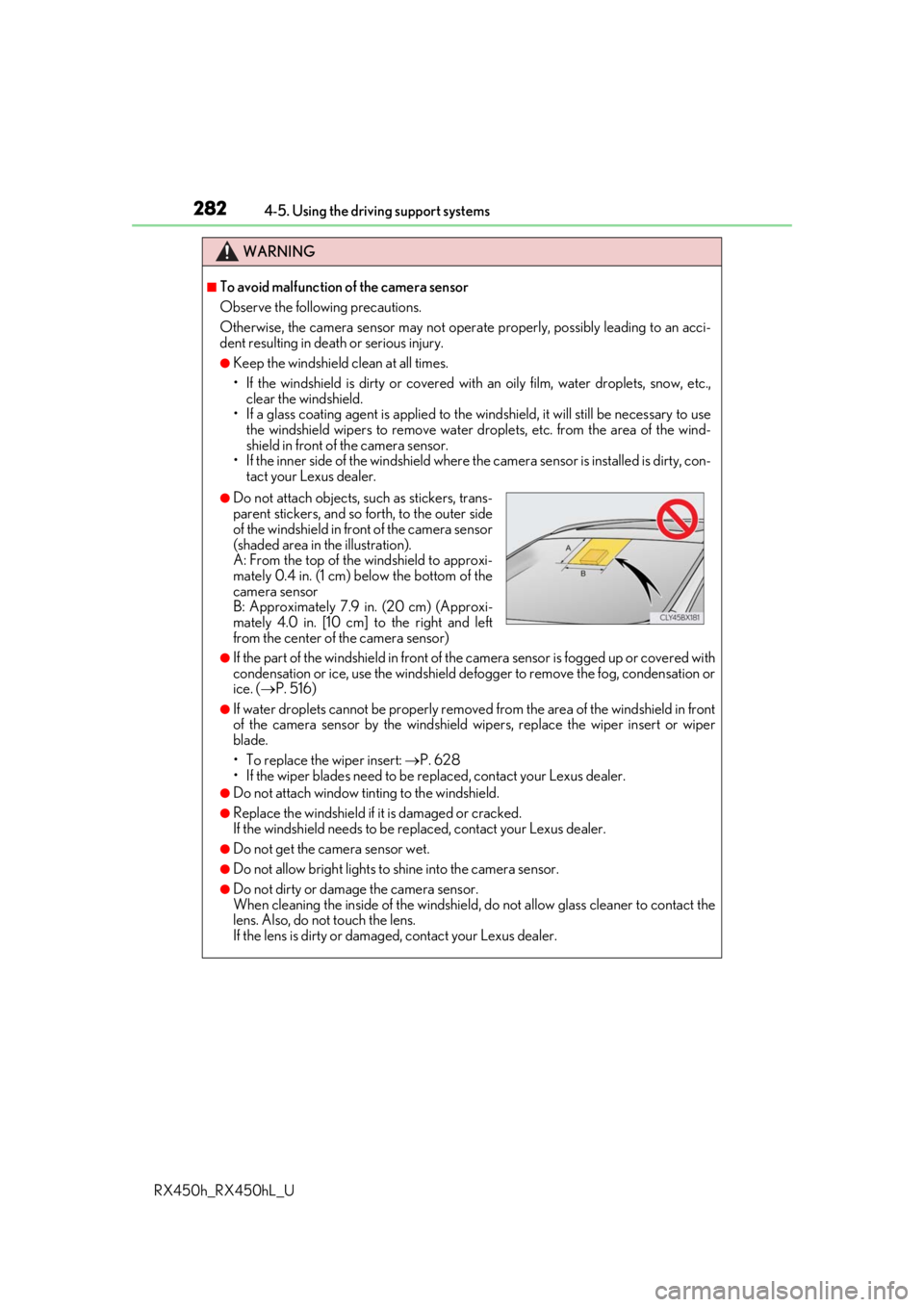
●Do not attach objects, such as stickers, trans-
parent stickers, and so forth, to the outer side
of the windshield in front of the camera sensor
(shaded area in the illustration).
A: From the top of the windshield to approxi-
mately 0.4 in. (1 cm) below the bottom of the
camera sensor
B: Approximately 7.9 in. (20 cm) (Approxi-
mately 4.0 in. [10 cm] to the right and left
from the center of the camera sensor)
Page 296 of 792

2964-5. Using the driving support systems
RX450h_RX450hL_U
■If the PCS warning light flas hes or illuminates and a warning message is displayed on
the multi-inform ation display
The pre-collision system may be temporarily unavailable or there may be a malfunction
in the system.
●In the following situations, the warning light will turn off, the message will disappear and
the system will become operational when normal operating conditions return:
• When the radar sensor or ca mera sensor or the area around either sensor is hot,
such as in the sun
• When the radar sensor or camera sensor or the area around either sensor is cold,
such as in an extremely cold environment
• When a front sensor is dirt y or covered with snow, etc.
• When the part of the windshield in front of the camera sensor is fogged up or cov-
ered with condensation or ice (Defogging the windshield: P. 516)
• If the camera sensor is obstructed, such as when the hood is open or a sticker is attached to the windshield near the camera sensor
●If the PCS warning light continues to flash or remains illuminated or the warning mes-
sage does not disappear even though the vehicle has returned to normal, the system
may be malfunctioning. Have the vehicle in spected by your Lexus dealer immediately.
■If VSC is disabled
●If VSC is disabled (P. 385), the pre-collision brake assist and pre-collision braking
functions are also disabled.
●The PCS warning light will turn on and “V SC Turned Off Pre-Collision Brake System
Unavailable” will be displayed on the multi-information display.
Page 297 of 792
2974-5. Using the driving support systems
4
Driving
RX450h_RX450hL_U
When driving on highways and freeways with white or yellow lines, this function
alerts the driver when the vehicle might depart from its lane and provides assis-
tance by operating the steering wheel to keep the vehicle in its lane. Further-
more, the system also provides steering assistance when dynamic radar cruise
control with full-speed range is operat ing to keep the vehicle in its lane.
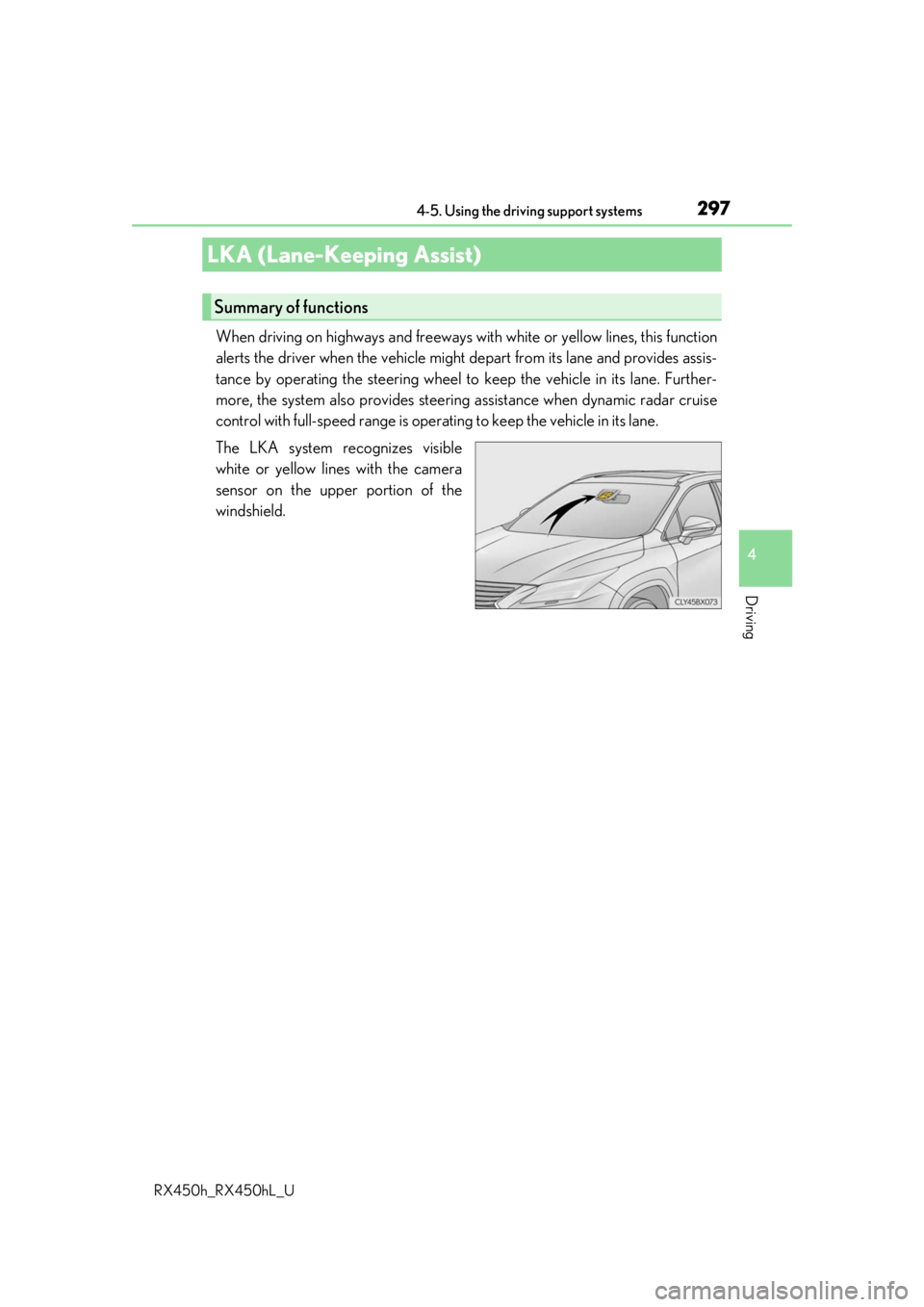
The LKA system recognizes visible
white or yellow lines with the camera
sensor on the upper portion of the
windshield.
LKA (Lane-Keeping Assist)
Summary of functions
Page 300 of 792

3004-5. Using the driving support systems
RX450h_RX450hL_U
WARNING
■Before using LKA system
Do not rely solely upon the LKA system. LKA is not a system which automatically
drives the vehicle or reduces the amount of attention that must be paid to the area in
front of the vehicle. The driver must always assume full responsibility for driving safely
by always paying careful attention to the surrounding conditions and operate the steer-
ing wheel to correct the path of the vehicle. Also, make sure to take adequate breaks
when fatigued, such as from driv ing for a long period of time.
Failure to perform appropriate driving operat ions and pay careful attention may lead to
an accident, resulting in death or serious injury.
■To avoid operating LKA by mistake
When not using the LKA system, use the LKA switch to turn the system off.
■Situations unsuitable for LKA
Do not use the LKA system in the following situations.
The system may not operate properly and lead to an accident, resulting in death or
serious injury.
●A spare tire, tire chains, etc., are equipped.
●When the tires have been excessively worn, or when the tire inflation pressure is low.
●Tires which differ by structure, manufacturer, brand or tread pattern are used.
●Objects or patterns that could be mistaken for white (yellow) lines are present on the
side of the road (guardrails, cu rbs, reflective poles, etc.).
●Vehicle is driven on a snow-covered road.
●White (yellow) lines are difficult to see due to rain, snow, fog, dust, etc.
●Asphalt repair marks, white (yellow) line marks, etc., are present due to road repair.
●Vehicle is driven in a temporary lane or restricted lane due to construction work.
●Vehicle is driven on a road surface which is slippery due to rainy weather, fallen snow,
freezing, etc.
●Vehicle is driven in traffic lanes ot her than on highways and freeways.
●Vehicle is driven in a construction zone.
●When your vehicle is towing a trailer or during emergency towing
■Preventing LKA system malfunctions and operations perf ormed by mistake
●Do not modify the headlights or place stickers, etc., on the surface of the lights.
●Do not modify the suspension etc. If the suspension etc. needs to be replaced, con-
tact your Lexus dealer.
●Do not install or place anything on the hood or grille. Also, do not install a grille guard
(bull bars, kangaroo bar, etc.).
●If your windshield needs repair s, contact your Lexus dealer.
Page 390 of 792

3904-6. Driving tips
RX450h_RX450hL_U
●Use fluids that are appropriate to the prevailing outside temperatures.
•Engine oil
• Engine/power cont rol unit coolant
• Washer fluid
●Have a service technician inspect the condition of the 12-volt battery.
●Have the vehicle fitted with four snow tires or purchase a set of tire chains for
the front tires.
Ensure that all tires are of the specified size and the same brand, and that chains
match the size of the tires.
Perform the following according to the driving conditions:
●Do not try to forcibly open a window or move a wiper that is frozen. Pour
warm water over the frozen area to me lt the ice. Wipe away the water imme-
diately to prevent it from freezing.
●To ensure proper operation of the c limate control system fan, remove any
snow that has accumulated on the air inlet vents in front of the windshield.
●Check for and remove any excess ice or snow that may have accumulated on
the exterior lights, vehicle’s roof, chassi s, around the tires or on the brakes.
●Remove any snow or mud from the bottom of your shoes before getting in the
vehicle.
Winter driving tips
Carry out the necessary preparations an d inspections before driving the vehi-
cle in winter. Always drive the vehicle in a manner appropriate to the prevail-
ing weather conditions.
Pre-winter preparations
Before driving the vehicle