Page 420 of 792
4205-3. Using the audio system
RX450h_RX450hL_U
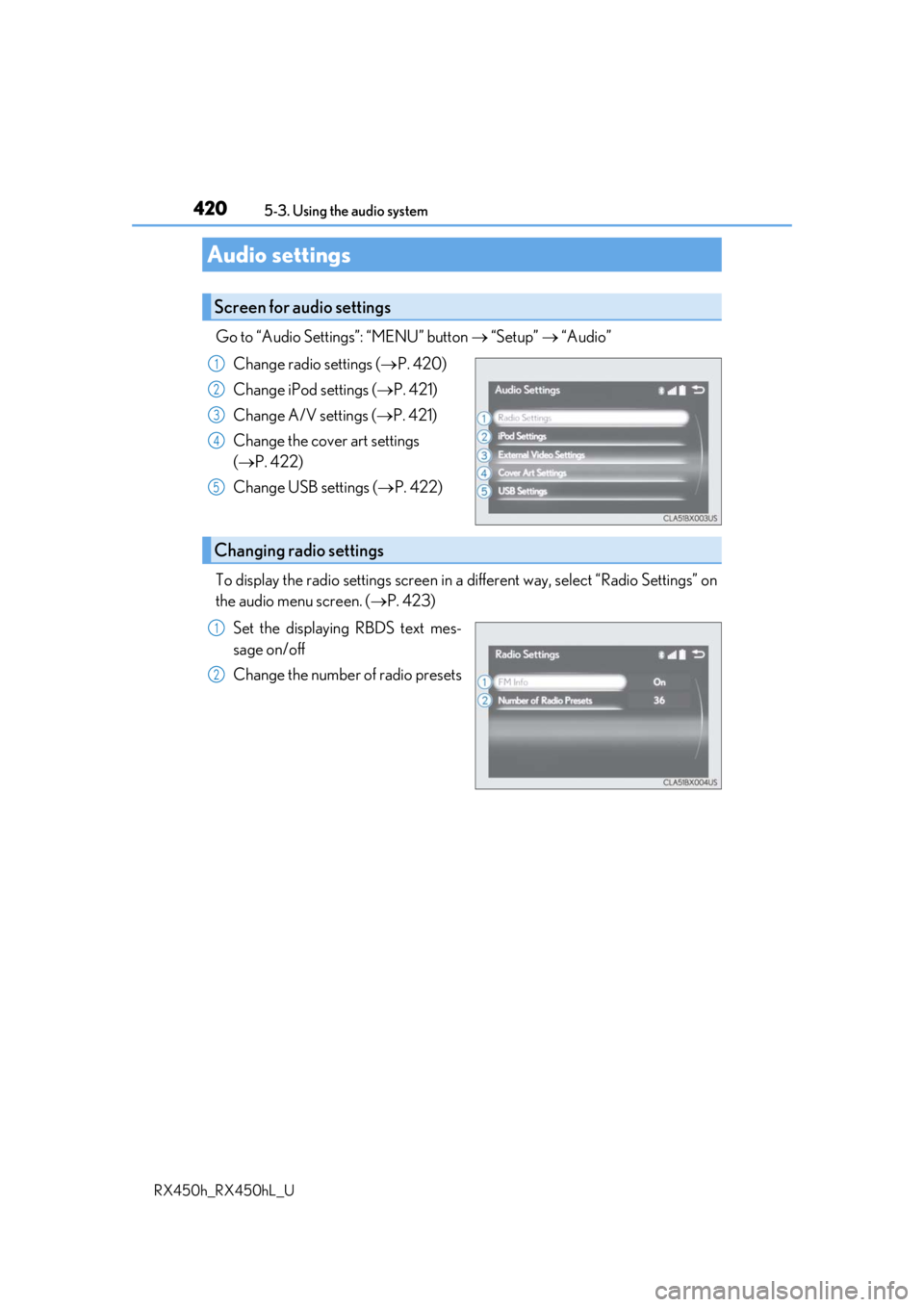
Go to “Audio Settings”: “MENU” button “Setup” “Audio”
Change radio settings ( P. 420)
Change iPod settings ( P. 421)
Change A/V settings ( P. 421)
Change the cover art settings
( P. 422)
Change USB settings ( P. 422)
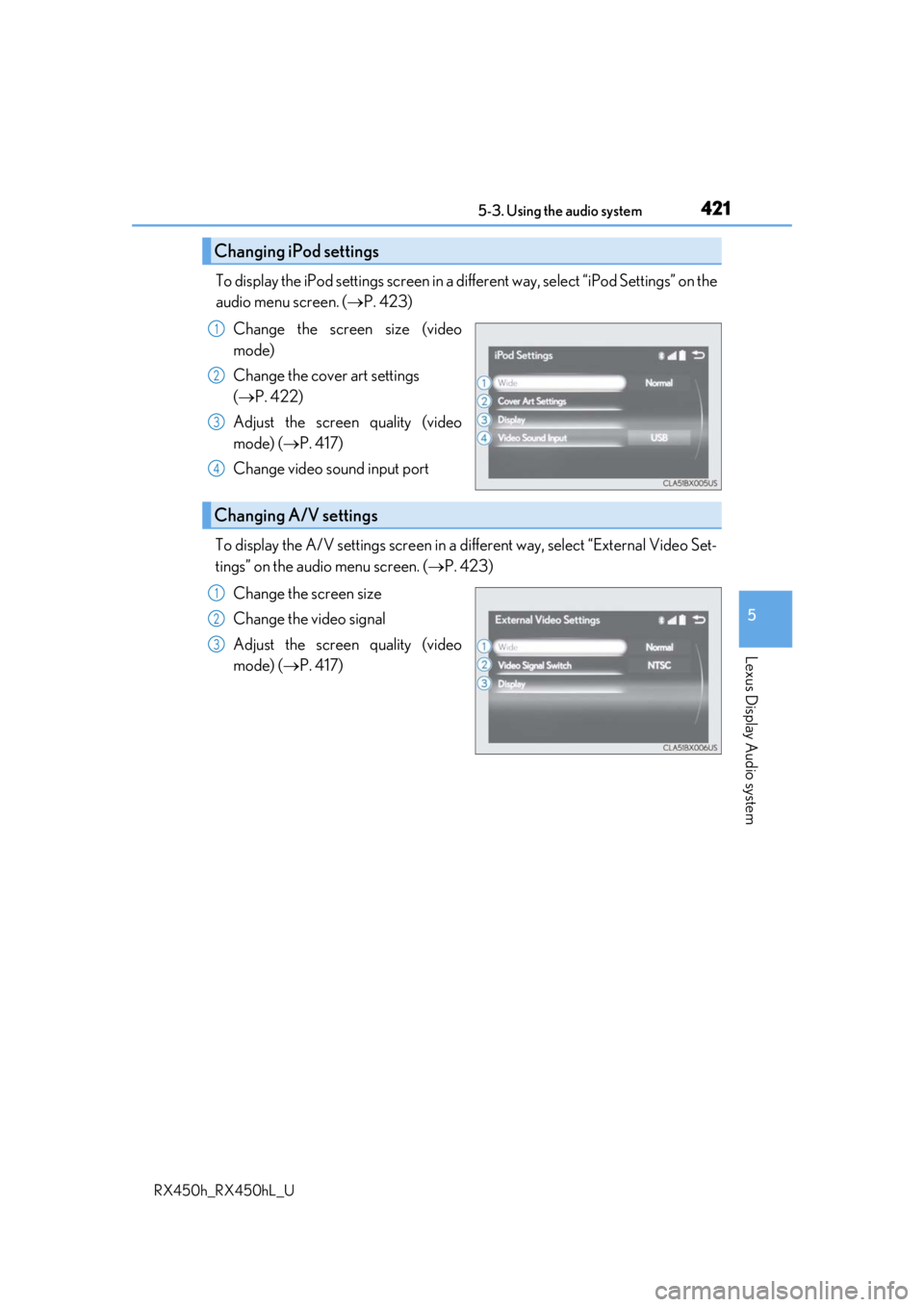
To display the radio settings screen in a different way, select “Radio Settings” on
the audio menu screen. ( P. 423)
Set the displaying RBDS text mes-
sage on/off
Change the number of radio presets
Audio settings
Screen for audio settings
1
2
3
4
5
Changing radio settings
1
2
Page 421 of 792
4215-3. Using the audio system
5
Lexus Display Audio system
RX450h_RX450hL_U
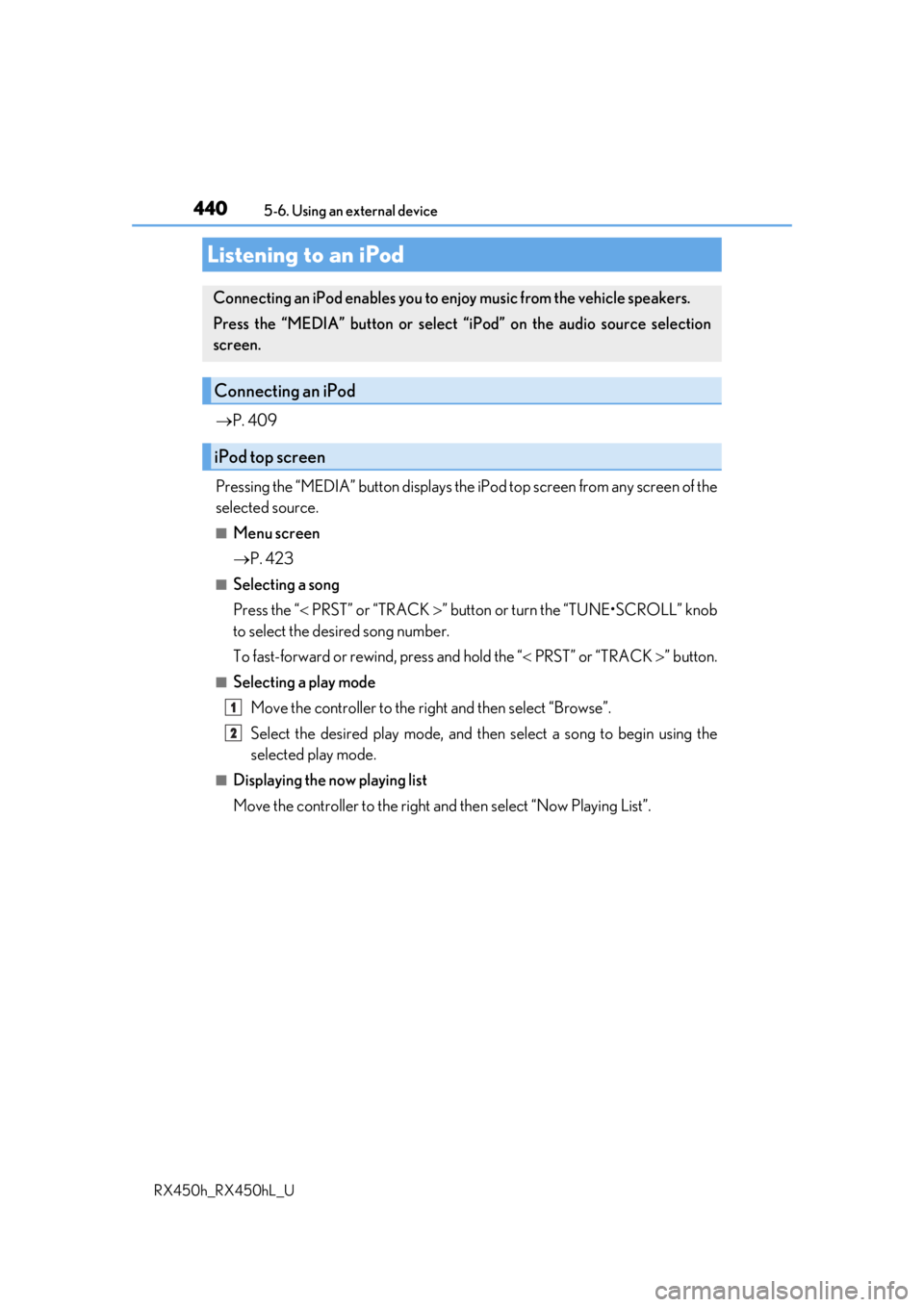
To display the iPod settings screen in a different way, select “iPod Settings” on the
audio menu screen. ( P. 423)
Change the screen size (video
mode)
Change the cover art settings
( P. 422)
Adjust the screen quality (video
mode) ( P. 417)
Change video sound input port
To display the A/V settings screen in a different way, select “External Video Set-
tings” on the audio menu screen. ( P. 423)
Change the screen size
Change the video signal
Adjust the screen quality (video
mode) ( P. 417)
Changing iPod settings
1
2
3
4
Changing A/V settings
1
2
3
Page 424 of 792
4245-3. Using the audio system
RX450h_RX450hL_U
Media mode
ButtonFunctionTarget audio source
“Play”Plays or pauses a track/fileAll media (except
A/V)
“Pause”
“Track Up”
Selects a track/fileAll media (except
A/V)“Track Down”
“File Up”
“File Down”
“Folder Up”Selects a folder/albumMP3/WMA/AAC
disc, USB
“Folder Down”
“Fast Forward”Selects and hold: Fast-f orward or rewind a
track/fileAll media (except
A/V)
“Rewind”
“Repeat”Selects a repeat mode ( P. 425)All media (except
A/V)
“Random”Selects a random/shuffle play mode
( P. 425)All media (except
A/V)
“Shuffle”
“Full Screen”Selects a full screen modeiPod, A/V
“Connect”Connects a Bluetooth® device ( P. 449)Bluetooth®
“Cover Art Set-
tings”Changes the cover art settings ( P. 422)
CD, MP3/WMA/
AAC disc,
Bluetooth
®
“iPod Settings”Changes iPod settings ( P. 421)iPod
“USB Settings”Changes USB settings ( P. 422)USB
“External Video
Settings”Changes A/V settings (P. 421)A/V
Page 440 of 792
440
RX450h_RX450hL_U5-6. Using an external device
P. 409
Pressing the “MEDIA” button displays the iPod top screen from any screen of the
selected source.
■Menu screen
P. 423
■Selecting a song
Press the “ PRST” or “TRACK ” button or turn the “TUNE•SCROLL” knob
to select the desired song number.
To fast-forward or rewind, press and hold the “ PRST” or “TRACK ” button.
■Selecting a play mode
Move the controller to the ri ght and then select “Browse”.
Select the desired play mode, and then select a song to begin using the
selected play mode.
■Displaying the now playing list
Move the controller to the right an d then select “Now Playing List”.
Listening to an iPod
Connecting an iPod enables you to enjoy music from the vehicle speakers.
Press the “MEDIA” button or select “i Pod” on the audio source selection
screen.
Connecting an iPod
iPod top screen
1
2
Page 441 of 792

4415-6. Using an external device
5
Lexus Display Audio system
RX450h_RX450hL_U
■iPod cover art
●Depending on the iPod and songs in the iPod, iPod cover art may be displayed.
●This function can be changed to on/off. (P. 422)
●It may take time to display iPod cover art, and the iPod may not be operated while the
cover art display is in process.
■iPod functions
●When an iPod is connected and the audio sour ce is changed to iPod mode, the iPod will
resume play from the same poin t in which it was last used.
●Depending on the iPod that is connected to the system, certain functions may not be
available. If a function is unavailable due to a malfunction (as opposed to a system spec-
ification), disconnecting th e device and reconnecting it may resolve the problem.
●Depending on the iPod, while connected to the system, the iPod cannot be operated
with its own controls. It is necessary to us e the controls of the vehicle’s audio system
instead.
●When the battery level of an iP od is very low, the iPod may not operate. If so, charge the
iPod before use.
●Compatible models ( P. 443)
■iPod problems
To resolve most problems encountered when using your iPod, disconnect your iPod from
the vehicle iPod connection and reset it. For instructions on how to reset your iPod, refer
to your iPod Owner’s Manual.
Page 442 of 792
4425-6. Using an external device
RX450h_RX450hL_U
■Error messages
If the following error messages appear on th e screen, refer to the table and take the
appropriate measures. If the pr oblem is not rectified, take the vehicle to your Lexus
dealer.
MessageCause/Correction procedures
“Connection error.
Please consult your
Owner’s Manual for
instructions on how to
connect the iPod.”
This indicates a problem in the iPod or its connection.
“There are no songs
available for playback.
Please add compatible
files to your iPod.”
This indicates that there is no music data in the iPod.
“No items available.”This indicates that songs are not found in a selected play-
list.
“Please check the iPod
firmware version.”This indicates that the softwa re version is not compatible.
Please check the co mpatible models. (P. 443)
“Unable to authorize the
iPod.”This indicates that the Lexu s Display Audio system failed
to authorize the iPod.
Please check your iPod.
NOTICE
■To prevent damage to th e iPod or its terminals
●Depending on the size and shape of the iPod that is connected to the system, the con-
sole box may not close fully. In this case, do not forcibly close the console box as this
may damage the iPod or the terminal, etc.
●Do not leave the iPod in the vehicle. The temperature inside the vehicle may become
high.
●Do not push down on or apply unnecessary pr essure to the iPod while it is connected.
●Do not insert foreign objects into the port.
Page 494 of 792
4945-12. Other function
RX450h_RX450hL_U
■Microphone
P. 462
■When using the microphone
●It is unnecessary to speak directly into the microphone when giving a command.
●Wait for the confirmation beep before speaking a command.
●Voice commands may not be recognized if:
• Spoken too quickly.
• Spoken at a low or high volume.
• The roof or windows are open.
• Passengers are talking while voice commands are spoken.
• The air conditioning speed is set high.
• The air conditioning vents are turned towards the microphone.
●In the following conditions, the system ma y not recognize the command properly and
using voice commands may not be possible:
• The command is incorrect or unclear. No te that certain words, accents or speech
patterns may be difficult for the system to recognize.
• There is excessive background noise, such as wind noise.
■When searching for a track
●A USB memory or iPod must be connected to enable track searching and playback.
( P. 409)
●When a USB memory or iPod is connected, recognition data is created so tracks can
be searched using voice commands.
●Recognition data is updated un der the following conditions:
• When the USB memory or iPod data has changed.
• When the voice recognition language is changed. ( P. 413)
●While the recognition data is being created or being updated, a track search cannot be
performed using a voice command.
■The Gracenote® media database
Page 771 of 792

771Alphabetical index
RX450h_RX450hL_U
Alarm ............................................................ 86
Anchor brackets ...................................... 57
AntennaRadio ........................................................429
Smart access system with push-button start ................... 158
Anti-lock Brake System (ABS)....... 382 Warning light ........................................ 661
Approach warning.................................314
Armrest ....................................................558
Assist grips .............................................. 559
Audio system (with Lexus Display Audio System) ...................400 Antenna ..................................................429
Audio input........................................... 409
AUX port.............................................. 409
Bluetooth
® audio ............................. 459
CD player ..............................................433
iPod .......................................................... 440
MP3/WMA disc ...............................433
Optimal use ........................................... 419
Portable music player ..................... 448
Radio ........................................................426
Setup menu .............................................412
Steering wheel audio switches .............................................. 406
USB memory ....................................... 444 Audio system
(with navigation system)
*
Automatic air conditioning system ......................................... 507, 522 Air conditioning filter ....................... 625
Rear automatic air conditioning system .................................................. 522
S-FLOW mode....................................514
Automatic headlight leveling system .................................................... 260
Automatic High Beam ........................262
Automatic light control system ...... 258
AUX port ................................................ 409
Auxiliary boxes .......................... 539, 544
*: Refer to the “NAVIGATION SYSTEM OWNER’S MANUAL”.