Page 350 of 792

3504-5. Using the driving support systems
RX450h_RX450hL_U
■Re-enabling the Intelligent Clearance Sonar system
To re-enable the Intelligent Clearance Sonar system when it is disabled due to operation
of the Intelligent Clearance Sonar function, either enable the system again ( P. 345), or
turn the power switch off an d then back to ON mode.
Additionally, if the object becomes no longer in the traveling direction of the vehicle or if
the traveling direction of the vehicle change s (such as changing from moving forward to
backing up, or from backing up to moving fo rward), the system will be re-enabled auto-
matically.
■Objects that the Intelligent Clearance Sonar function may not detect
The sensors may not be able to detect certain objects, such as the following.
●Cotton cloth, snow, and other materials that are poor reflectors of ultrasonic waves.
(People may also not be detected depending on the type of clothing they are wearing.)
●Objects which are not perpendicular to the ground, are not perpendicular to the travel-
ing direction of the vehicle, are uneven or are waving.
●Low objects
●Thin objects such as wires, fences, ropes and signposts
●Objects that are extremely close to the bumper
■Intuitive parking assist buzzer
Regardless of whether the in tuitive parking assist system is enabled or not ( P. 332), if
the Intelligent Clearance Sonar system is enabled ( P. 345), the front or rear sensors
detect an object and brake control is performed, the intuitive parking assist buzzer will
sound to notify the driver of the approximate distance to the object.
Page 366 of 792
3664-5. Using the driving support systems
RX450h_RX450hL_U
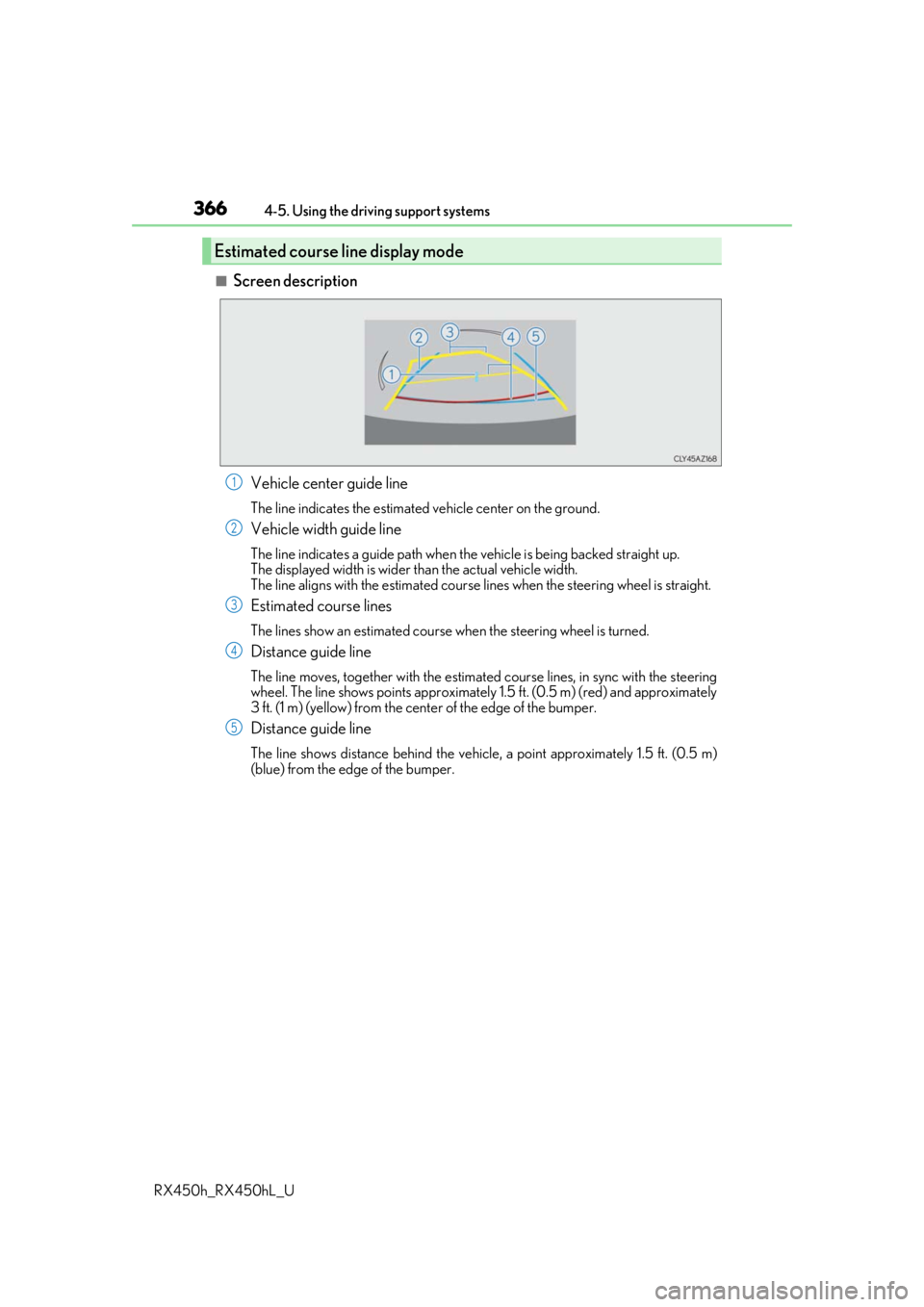
■Screen description Vehicle center guide line
The line indicates the estimated vehicle center on the ground.
Vehicle width guide line
The line indicates a guide path when the vehicle is being backed straight up.
The displayed width is wider th an the actual vehicle width.
The line aligns with the estimated course lines when the steering wheel is straight.
Estimated course lines
The lines show an estimated course when the steering wheel is turned.
Distance guide line
The line moves, together with the estimated course lines, in sync with the steering
wheel. The line shows points approximately 1.5 ft. (0.5 m) (red) and approximately
3 ft. (1 m) (yellow) from the center of the edge of the bumper.
Distance guide line
The line shows distance behind the vehicle, a point approximately 1.5 ft. (0.5 m)
(blue) from the edge of the bumper.
Estimated course line display mode
1
2
3
4
5
Page 368 of 792
3684-5. Using the driving support systems
RX450h_RX450hL_U
Once the vehicle width guide lines and the parking space lines are parallel,
straighten the steering wheel and back up slowly until the vehicle has com-
pletely entered the parking space.
Stop the vehicle in an approp riate place, and finish parking.
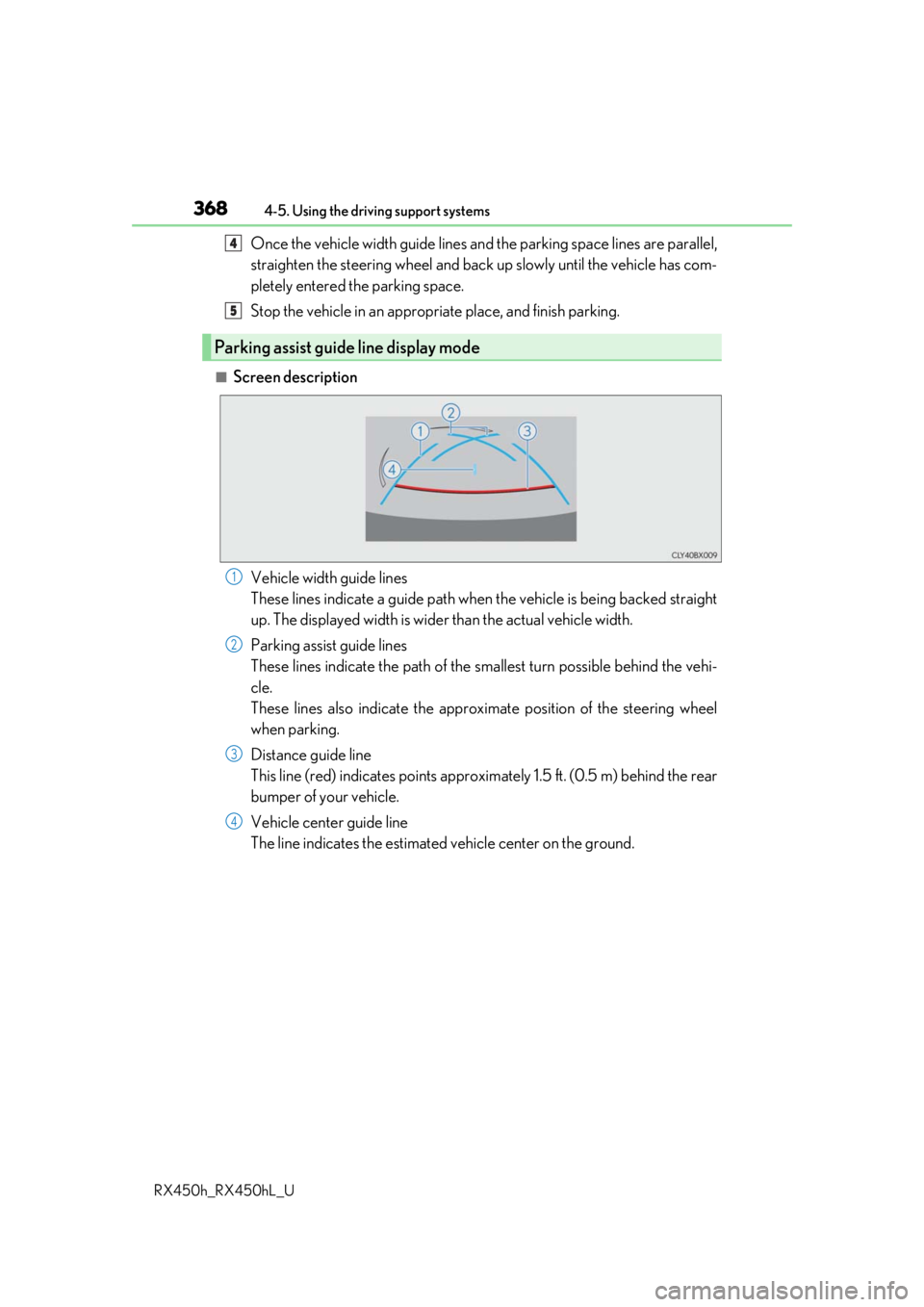
■Screen description
Vehicle width guide lines
These lines indicate a guide path when the vehicle is being backed straight
up. The displayed width is wider than the actual vehicle width.
Parking assist guide lines
These lines indicate the path of the sm allest turn possible behind the vehi-
cle.
These lines also indicate the approx imate position of the steering wheel
when parking.
Distance guide line
This line (red) indicates points approxim ately 1.5 ft. (0.5 m) behind the rear
bumper of your vehicle.
Vehicle center guide line
The line indicates the estimated vehicle center on the ground.
Parking assist guide line display mode
4
5
1
2
3
4
Page 371 of 792
3714-5. Using the driving support systems
4
Driving
RX450h_RX450hL_U
■Differences between the screen and the actual road
The distance guide lines and the vehicle width guide lines may not actually be
parallel with the dividing lines of the parking space, even when they appear to
be so. Be sure to check visually.
The distances between the vehicle width guide lines and the left and right
dividing lines of the parking space may not be equal, even when they appear
to be so. Be sure to check visually.
The distance guide lines give a distance guide for flat road surfaces. In any of
the following situations, there is a margin of error between the guide lines on
the screen and the actual distance/course on the road.
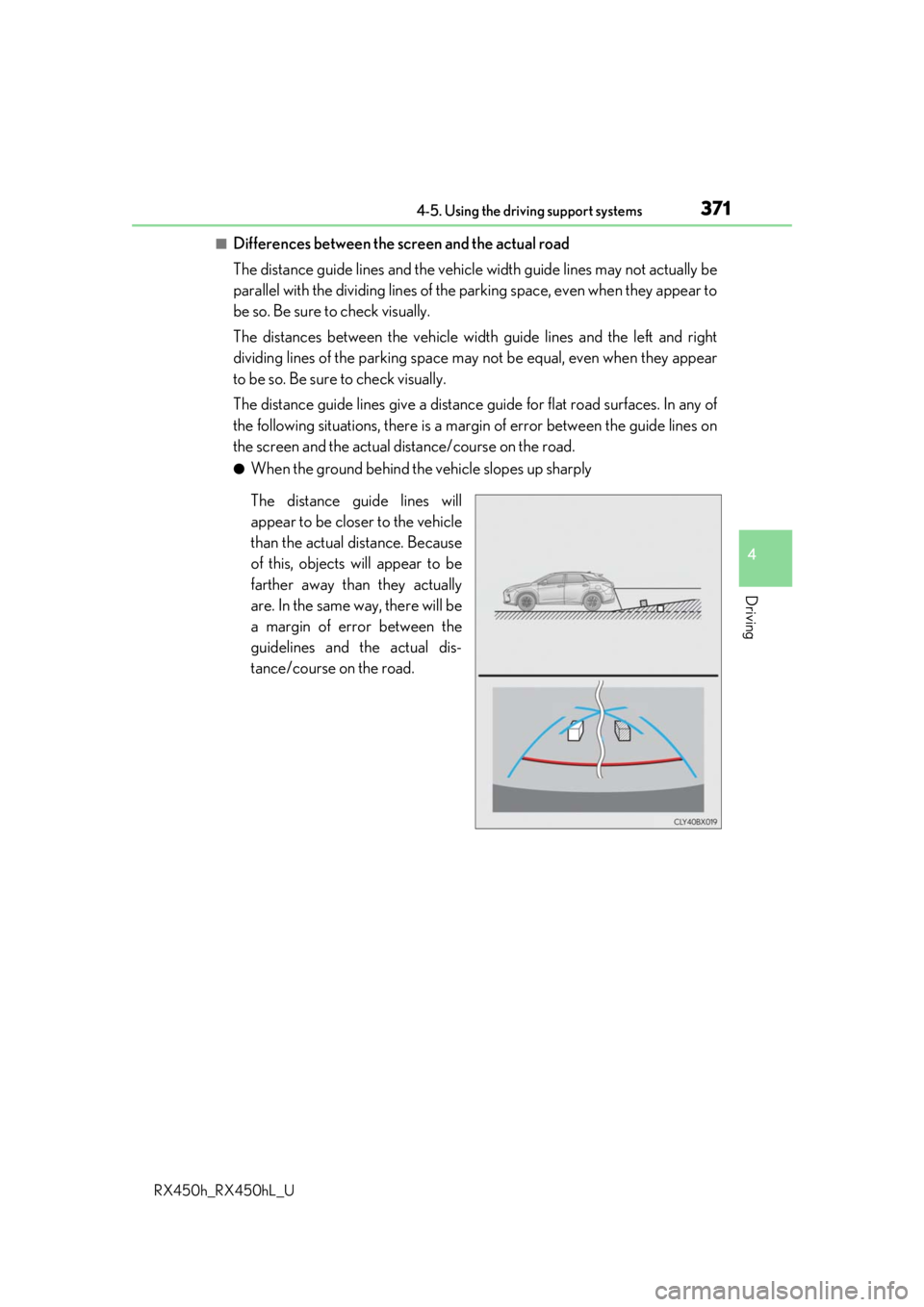
●When the ground behind the vehicle slopes up sharply
The distance guide lines will
appear to be closer to the vehicle
than the actual distance. Because
of this, objects will appear to be
farther away than they actually
are. In the same way, there will be
a margin of error between the
guidelines and the actual dis-
tance/course on the road.
Page 372 of 792
3724-5. Using the driving support systems
RX450h_RX450hL_U
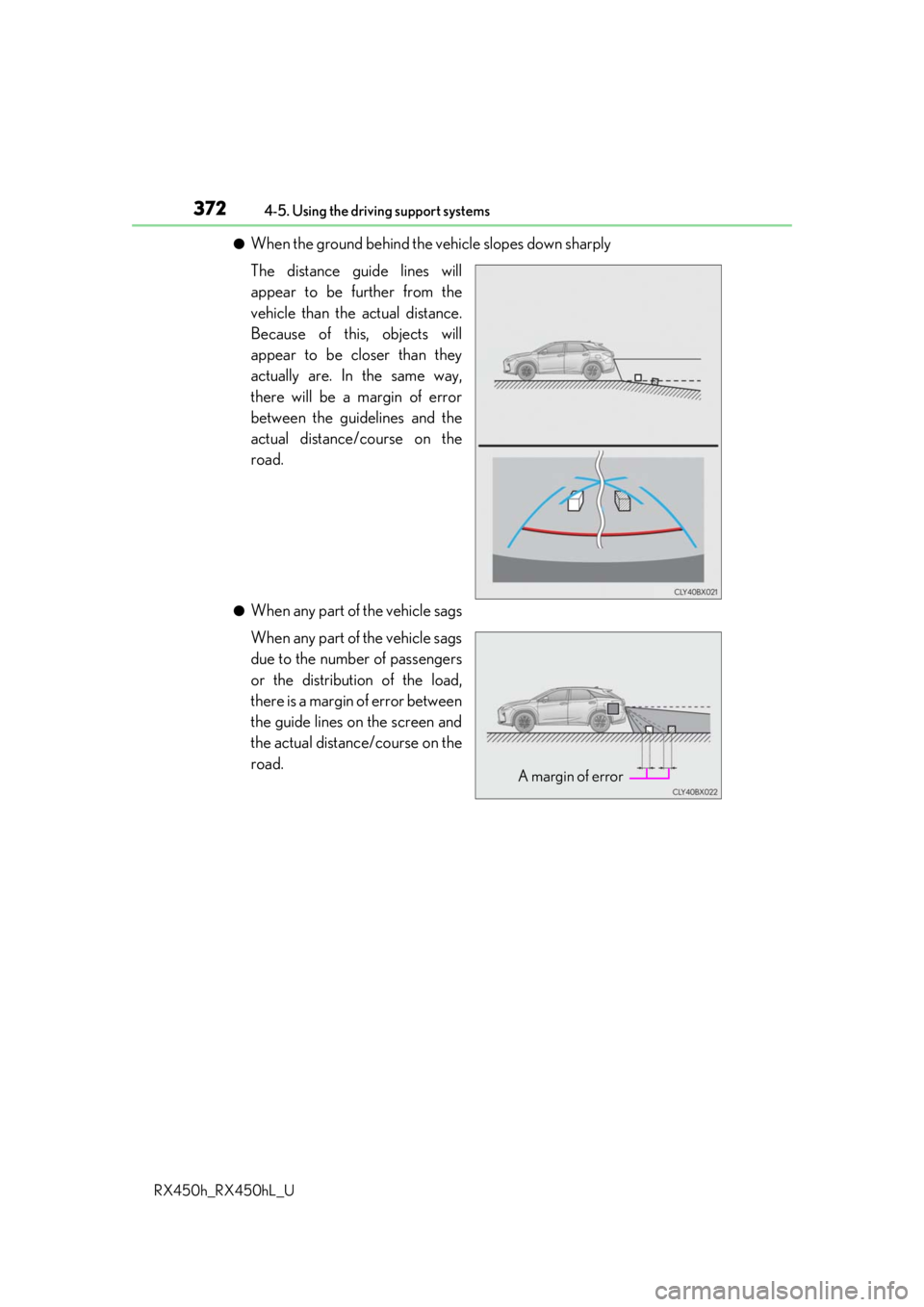
●When the ground behind the vehicle slopes down sharply
The distance guide lines will
appear to be further from the
vehicle than the actual distance.
Because of this, objects will
appear to be closer than they
actually are. In the same way,
there will be a margin of error
between the guidelines and the
actual distance/course on the
road.
●When any part of the vehicle sags
When any part of the vehicle sags
due to the number of passengers
or the distribution of the load,
there is a margin of error between
the guide lines on the screen and
the actual distance/course on the
road.
A margin of error
Page 394 of 792
3944-6. Driving tips
RX450h_RX450hL_U
●Specific design characteristics give it a higher center of gravity than ordinary
passenger cars. This vehicle design feature causes this type of vehicle to be
more likely to rollover. And, utility vehi cles have a significantly higher rollover
rate than other types of vehicles.
●An advantage of the higher ground cl earance is a better view of the road
allowing you to anticipate problems.
●It is not designed for cornering at the same speeds as ordinary passenger cars
any more than low-slung sports cars are designed to perform satisfactorily
under off-road conditions. Therefore, sharp turns at excessive speeds may
cause the vehicle to rollover.
Utility vehicle precautions
This vehicle belongs to the utility vehicl e class, which has higher ground clear-
ance and narrower tread in relation to the height of its center of gravity.
Utility vehicle feature
WARNING
■Utility vehicle precautions
Always observe the following precautions to minimize the risk of death, serious injury
or damage to your vehicle:
●In a rollover crash, an unbelted person is si gnificantly more likely to die than a person
wearing a seat belt. Therefore, the driver and all passengers should always fasten
their seat belts.
●Avoid sharp turns or abrupt maneuvers, if at all possible.
Failure to operate this vehicle correctly may result in loss of control or vehicle rollover
causing death or serious injury.
●Loading cargo on the roof luggage carrier will make the ce nter of the vehicle gravity
higher. Avoid high speeds, sudden starts, sharp turns, sudden braking or abrupt
maneuvers, otherwise it may re sult in loss of control or vehicle rollover due to failure
to operate this vehicle correctly.
●Always slow down in gusty crosswinds. Be cause of its profile and higher center of
gravity, your vehicle is more sensitive to side winds than an ordinary passenger car.
Slowing down will allow you to have better control.
●Do not drive horizontally across steep slopes . Driving straight up or straight down is
preferred. Your vehicle (or any similar off- road vehicle) can tip over sideways much
more easily than forward or backward.
Page 410 of 792
4105-1. Basic Operations
RX450h_RX450hL_U
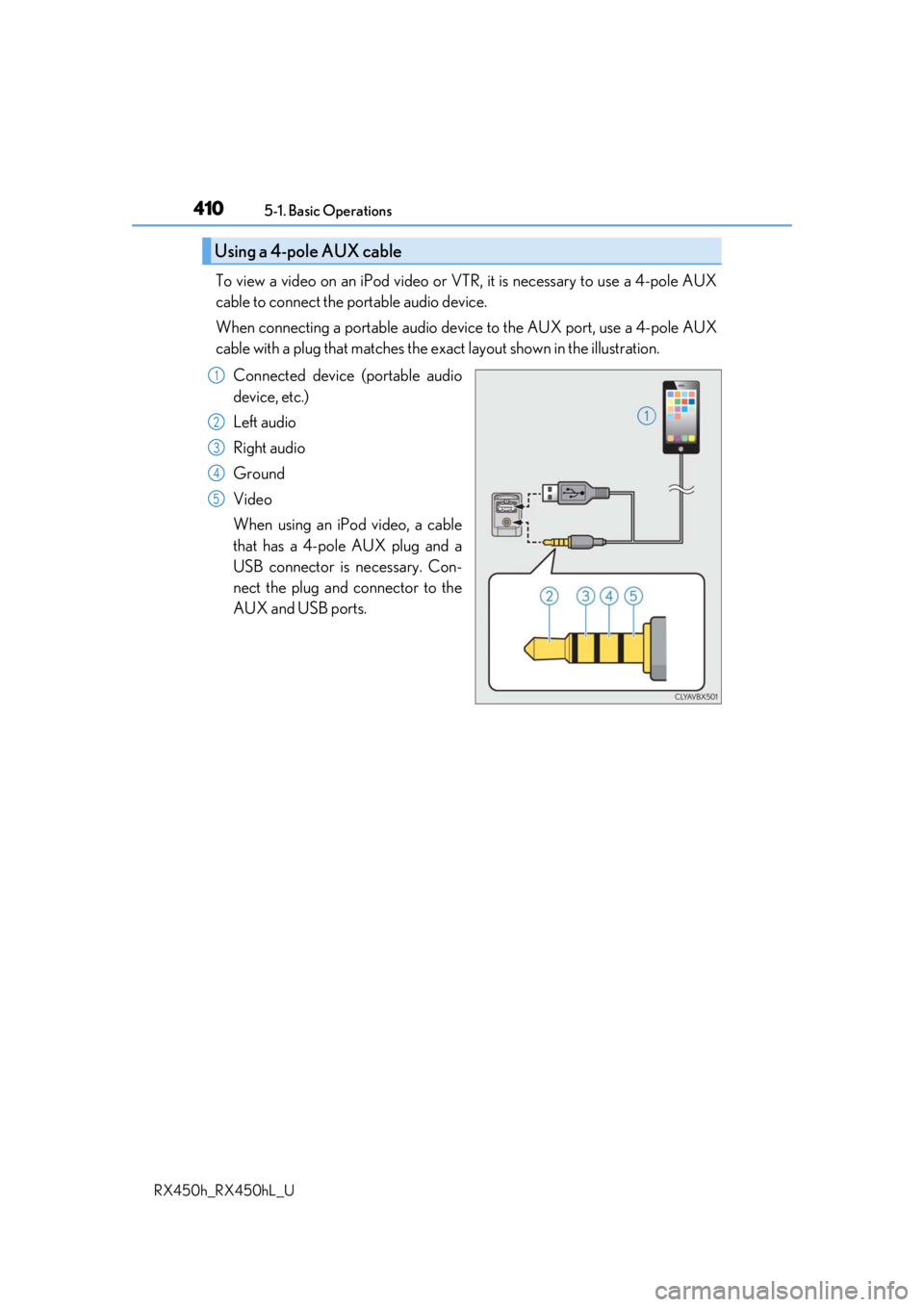
To view a video on an iPod video or VTR, it is necessary to use a 4-pole AUX
cable to connect the portable audio device.
When connecting a portable audio devi ce to the AUX port, use a 4-pole AUX
cable with a plug that matches the ex act layout shown in the illustration.
Connected device (portable audio
device, etc.)
Left audio
Right audio
Ground
Video
When using an iPod video, a cable
that has a 4-pole AUX plug and a
USB connector is necessary. Con-
nect the plug and connector to the
AUX and USB ports.
Using a 4-pole AUX cable
1
2
3
4
5
Page 494 of 792

4945-12. Other function
RX450h_RX450hL_U
■Microphone
P. 462
■When using the microphone
●It is unnecessary to speak directly into the microphone when giving a command.
●Wait for the confirmation beep before speaking a command.
●Voice commands may not be recognized if:
• Spoken too quickly.
• Spoken at a low or high volume.
• The roof or windows are open.
• Passengers are talking while voice commands are spoken.
• The air conditioning speed is set high.
• The air conditioning vents are turned towards the microphone.
●In the following conditions, the system ma y not recognize the command properly and
using voice commands may not be possible:
• The command is incorrect or unclear. No te that certain words, accents or speech
patterns may be difficult for the system to recognize.
• There is excessive background noise, such as wind noise.
■When searching for a track
●A USB memory or iPod must be connected to enable track searching and playback.
( P. 409)
●When a USB memory or iPod is connected, recognition data is created so tracks can
be searched using voice commands.
●Recognition data is updated un der the following conditions:
• When the USB memory or iPod data has changed.
• When the voice recognition language is changed. ( P. 413)
●While the recognition data is being created or being updated, a track search cannot be
performed using a voice command.
■The Gracenote® media database