Page 110 of 792
1102. Instrument cluster
RX450h_RX450hL_U
■ ICS (Intelligent Clearance Sonar) (if equipped) ( P. 342)
■HUD (Head-up display) (if equipped) (P. 118)
The following head-up displa y settings can be changed:
ItemSettingsDetails
ICS On
Select to enable/disable the Intelli-
gent Clearance Sonar system.
Off
ItemSettingsDetails
Brightness/Position Select to adjust the brightness/posi-
tion of the head-up display.
• Press the / switch to adjust
the display brightness.
• Press the / switch to adjust the display position.
Gauge information
No display
Select to set the content displayed on
the head-up display.Hybrid System Indi-
cator
Tachometer
Driving support
Navigation system
(if equipped)
Select to enable/d isable head-up dis-
play content.Driving Assist
(if equipped)
Compass
(if equipped)
Audio system
Page 111 of 792
1112. Instrument cluster
2
Instrument cluster
RX450h_RX450hL_U
■Clock (on the multi-information display) (P. 96)
Vehicles with a navigation system
The following clock setting can be changed:
Vehicles with a Lexus Display Audio system
The following clock settings can be changed:
Press the / switch to select an it em and then press the / switch to
change the setting or adjust the time.
ItemSettingsDetails
Display mode 12-hour display
Select to set the display mode of the
clock.
24-hour display
ItemSettingsDetails
Display mode 12-hour display
Select to set the display mode of the
clock.
24-hour display
Adjust timeSelect to adjust the hour/minute.
Page 118 of 792

1182. Instrument cluster
RX450h_RX450hL_U
The head-up display is linked to the meters and navigation system (if equipped)
and projects a variety of information in front of the driver, such as the current
vehicle speed and route guid ance to a set destination.
Navigation system-linked display area (if equipped) ( P. 121)
Displays the following items, which are linked to the navigation system:
•Street name
• Route guidance to destination
•Compass
Message display area ( P. 120)
Displays the following items:
• Warning/Message (if equipped)
• Audio system operation status
• Outside temperature
/ icon ( P. 120)
Driving assist system status display area (if equipped)
Displays the operational stat us of the following systems:
• Dynamic radar cruise control with full-speed range ( P. 306)
• LKA (Lane-Keeping Assist) ( P. 297)
• Intuitive parking assist ( P. 332)
• Intelligent Clearance Sonar (ICS) ( P. 342)
Displayed content is the same as that disp layed on the multi-information display. For
details, refer to the explanations of each system.
Head-up display
: If equipped
Summary of functions
1
2
3
4
Page 119 of 792
1192. Instrument cluster
2
Instrument cluster
RX450h_RX450hL_U
Vehicle speed display area
Displays the following items:• Vehicle speed
• Speed limit (vehicles with a na vigation system) (U.S.A. only)
Hybrid System Indicator/Tachometer ( P. 121)
Shift position display ( P. 246)
HUD (Head-up display) switch ( P. 119)
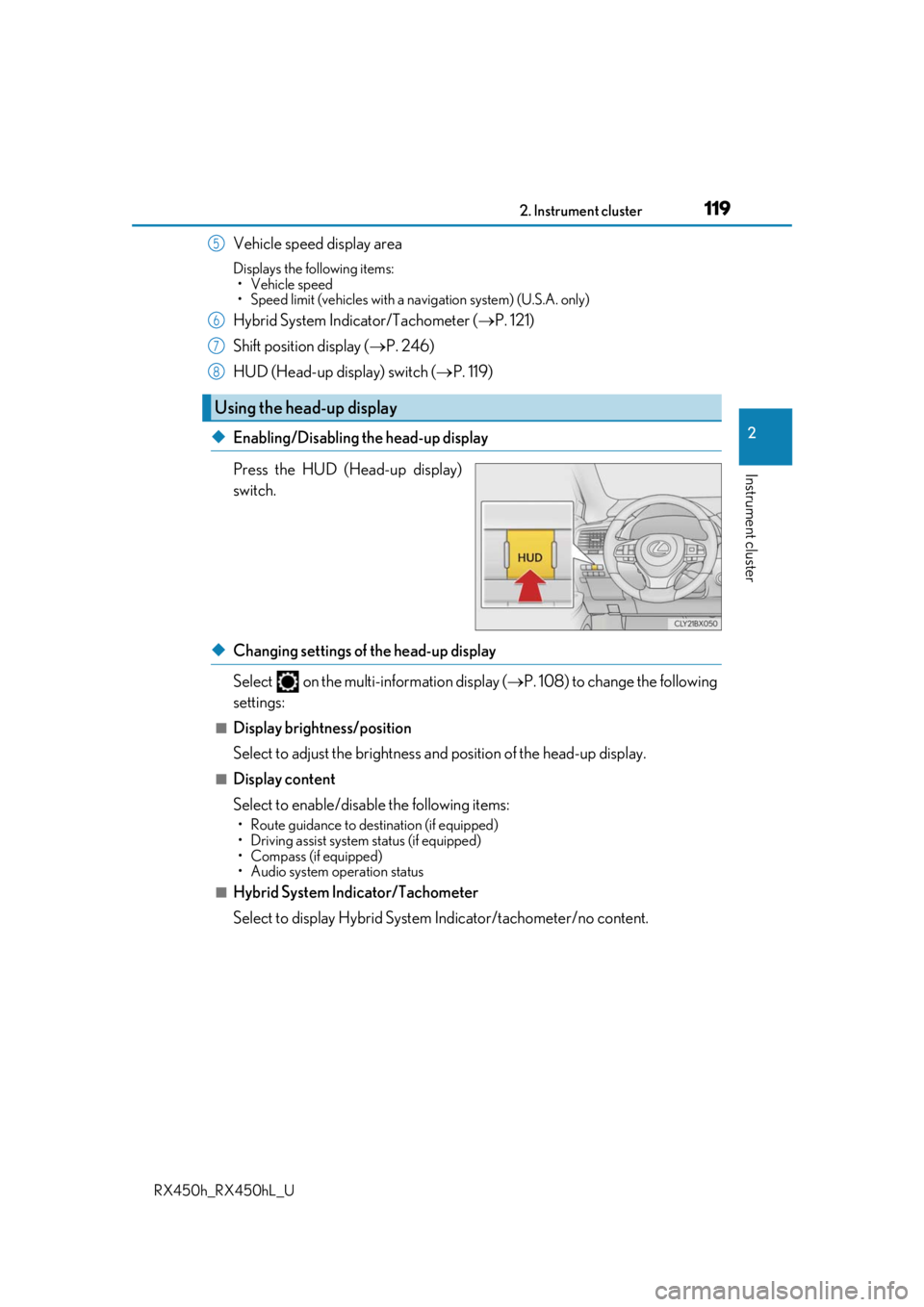
◆Enabling/Disabling the head-up display
Press the HUD (Head-up display)
switch.
◆Changing settings of the head-up display
Select on the multi-information display ( P. 108) to change the following
settings:
■Display brightness/position
Select to adjust the brightness and position of the head-up display.
■Display content
Select to enable/disable the following items:
• Route guidance to destination (if equipped)
• Driving assist system status (if equipped)
• Compass (if equipped)
• Audio system operation status
■Hybrid System Indicator/Tachometer
Select to display Hybrid System Indicator/tachometer/no content.
Using the head-up display
5
6
7
8
Page 120 of 792
1202. Instrument cluster
RX450h_RX450hL_U
Displays the following multi-in formation display linked icons:
: Master warning icon Displayed when a warning message is displayed on the multi-information
display. ( P. 667)
: Information icon Displayed when a suggestion/advice po p-up display is displayed on the
multi-information display. ( P. 116)
Displays the following items in the appropriate situation:
■Warning/Message (if equipped)
Displays the following system warning/messages:
• Pre-collision warning (pre-collision system)
• Alert from the Intelligent Clearance Sonar system
• Notification message (Dynamic radar cruise control with full-speed range)
■Audio system operation status
Displayed when the audio system is operated.
■Outside temperature
Displayed in the following situations:
• When the power switch is turned to ON mode
• When the low outside temperature indicator is flashing
Displayed content is the same as that disp layed on the multi-information display. For
details, refer to the explanation of the outs ide temperature display on the multi-infor-
mation display. ( P. 96)
/ icons
Message display area
Page 124 of 792
1242. Instrument cluster
RX450h_RX450hL_U
Energy monitor/consumption screen
You can view the status of your hybrid system on the multi-information display
and the audio system screen.
Vehicles with a navigation system (12.3-inch display): The energy monitor or
consumption screen can be displayed and operated on the side display.
Multi-information display
Audio system screen
Meter control switches
“MENU” button
Lexus Display Audio controller
“MENU” button
Remote Touch knob
“ENTER” button
*1: Vehicles with a Lexus Display Audio sys- tem
*2: Vehicles with a navigation system
1
2
3
4
5
6
7
8*1*2
Page 125 of 792
1252. Instrument cluster
2
Instrument cluster
RX450h_RX450hL_U
Lexus Display Audio screen
Press the “MENU” button on the Lexus
Display Audio controller, then select
“Info” on the “Menu” screen, and then
select “Fuel Consumption”.
If the “Energy Monitor” screen does not
appear, move the controller to the right
and select “Energy”.
Navigation system screen
Press the “MENU” button on the
Remote Touch, then select on the
“Menu” screen, and then select “Fuel
Consumption”.
If the “Trip Information” or “Past Record”
screen is displayed, select “Energy”.
Multi-information display
Press the “ ” or “” of the meter control switches and select , and then press
the “ ” or “ ” to select the energy monitor display.
Energy monitor
Audio system screenMulti-information display
When the vehicle is
powered by the elec-
tric motor (traction
motor)
When the vehicle is
powered by both the
gasoline engine and
the electric motor
(traction motor)
Page 126 of 792
1262. Instrument cluster
RX450h_RX450hL_U
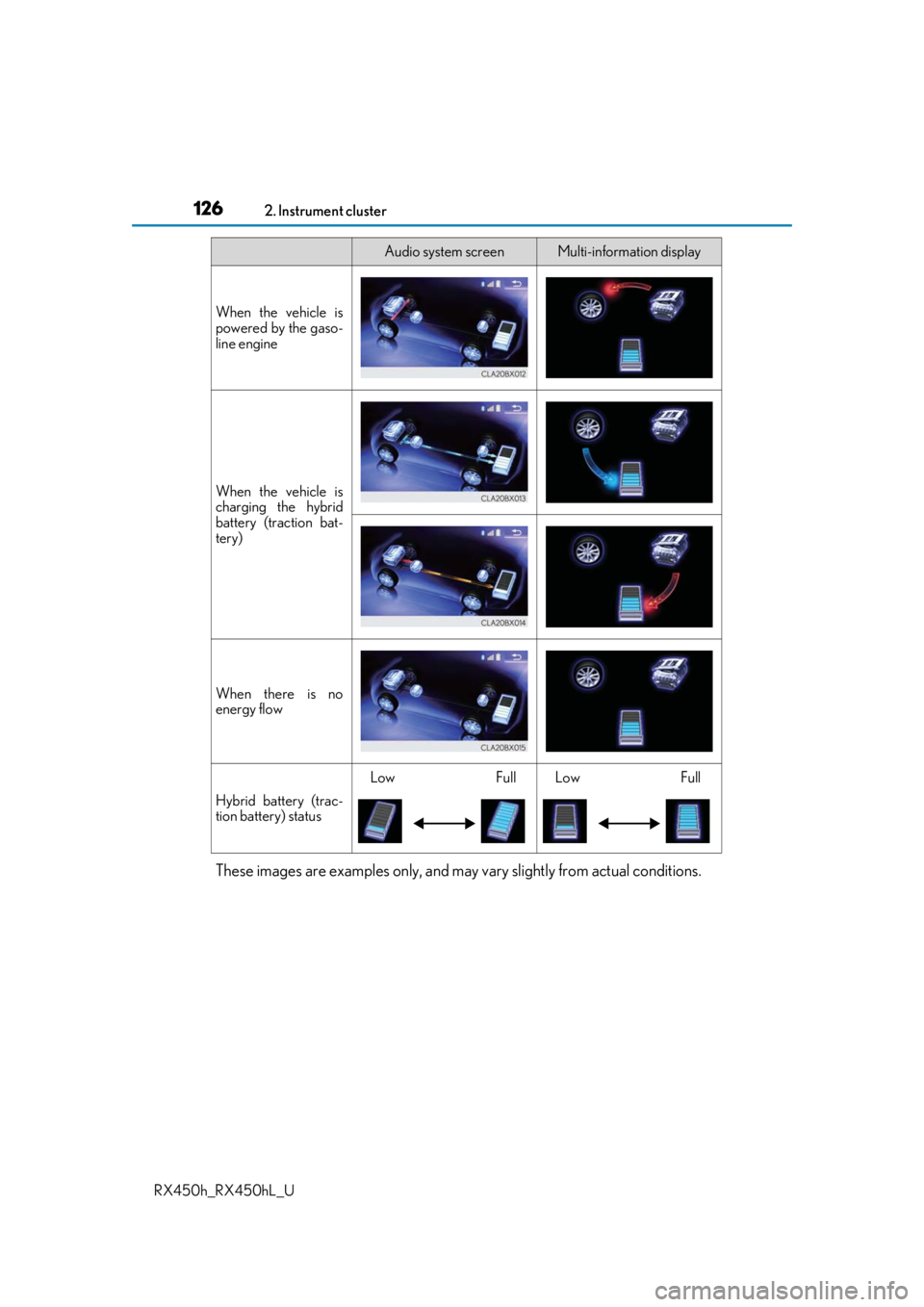
These images are examples only, and may vary slightly from actual conditions.
When the vehicle is
powered by the gaso-
line engine
When the vehicle is
charging the hybrid
battery (traction bat-
tery)
When there is no
energy flow
Hybrid battery (trac-
tion battery) status
LowFullLowFull
Audio system screenMulti-information display