2019 LEXUS RX450H audio
[x] Cancel search: audioPage 697 of 792

6978-2. Steps to take in an emergency
8
When trouble arises
RX450h_RX450hL_U
Start the engine of the second vehicle. Increase the engine speed slightly and
maintain at that level for approximatel y 5 minutes to recharge the 12-volt bat-
tery of your vehicle.
Open and close any of the doors of your vehicle with the power switch off.
Maintain the engine speed of the seco nd vehicle and start the hybrid system
of your vehicle by turning th e power switch to ON mode.
Make sure the “READY” indicator comes on. If the indicator light does not
come on, contact your Lexus dealer.
Once the hybrid system has started, remove the jumper cables in the exact
reverse order from which they were connected.
Close the exclusive jump starting termin al cover, and reinstall the fuse box
cover to its original position.
Once the hybrid system starts, have th e vehicle inspected at your Lexus dealer
as soon as possible.
■Starting the hybrid system when the 12-volt battery is discharged
The hybrid system cannot be started by push-starting.
■To prevent 12-volt battery discharge
●Turn off the headlights and the audio system while the hybrid system is off.
●Turn off any unnecessary electrical components when the vehicle is running at a low
speed for an extended period , such as in heavy traffic.
■When removing the battery terminals
When the battery terminals are removed, the information stored in the ECU is cleared.
Before removing the battery termin als, contact your Lexus dealer.
6
7
8
9
10
11
Page 736 of 792

736
RX450h_RX450hL_U9-2. Customization
When customizing vehicle features, ensure
that the vehicle is parked in a safe
place with the shift lever in P and the parking brake set.
■Changing on the audio system screen
Vehicles with a Lexus Display Audio system
Press the “MENU” button on the Lexus Display Audio controller.
Select “Setup” on the “Menu” screen and select “Vehicle”.
Various setting can be changed. Refer to the list of settings that can be
changed for details.
Vehicles with a navigation system
Press the “MENU” button on the Remote Touch.
Select on the “Menu” screen and select .
Various setting can be changed. Refer to the list of settings that can be
changed for details.
■Changing using the multi-information display
P. 108
Customizable features
Your vehicle includes a variety of elec tronic features that can be personalized
to suit your preferences. The settings of these features can be changed using
the multi-information display, on the audio system screen, or at your Lexus
dealer.
Customizing vehicle features
1
2
1
2
Page 737 of 792
7379-2. Customization
9
Vehicle specifications
RX450h_RX450hL_U
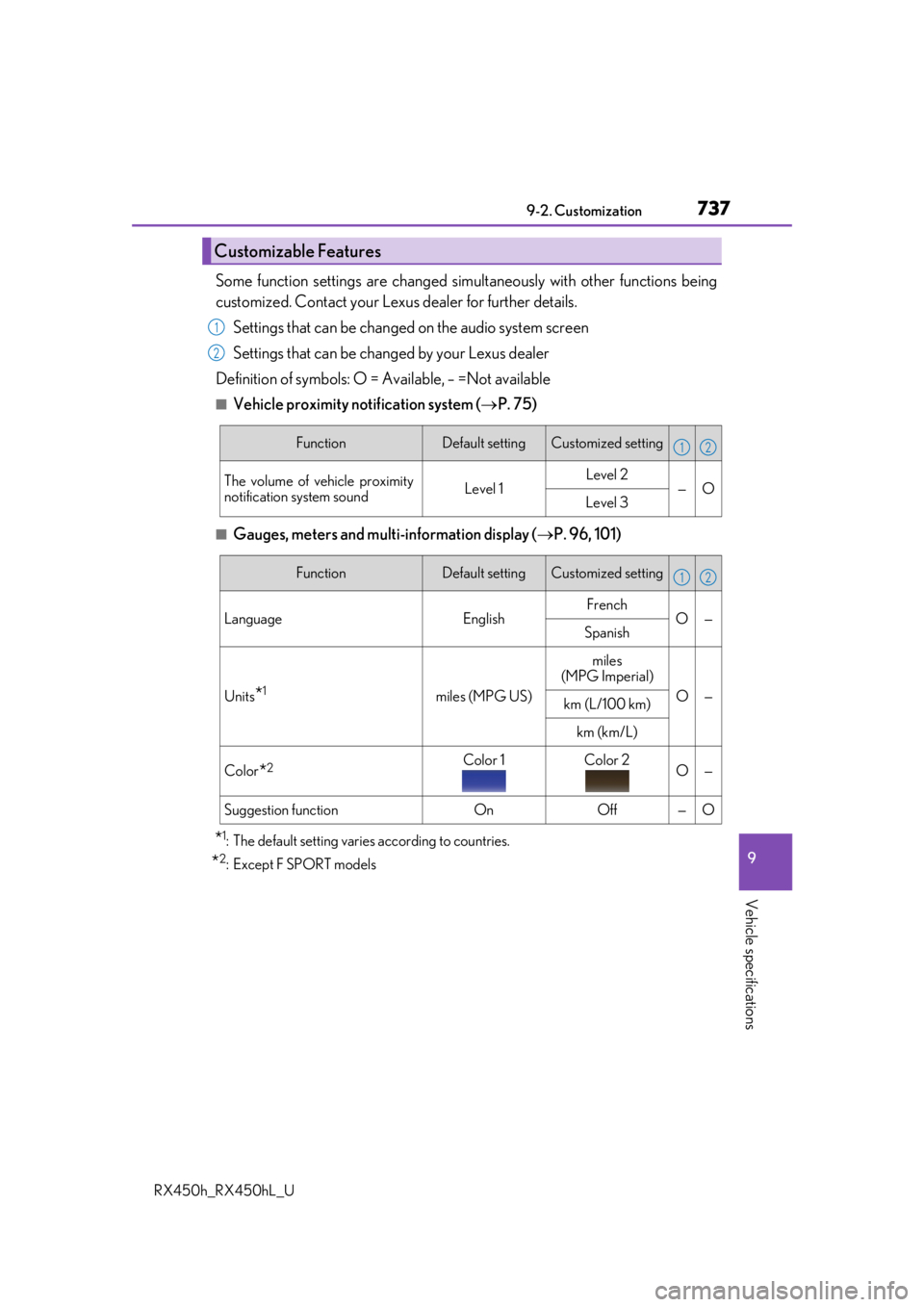
Some function settings are changed simultaneously with other functions being
customized. Contact your Lexus dealer for further details.
Settings that can be changed on the audio system screen
Settings that can be changed by your Lexus dealer
Definition of symbols: O = Available, – =Not available
■Vehicle proximity no tification system (P. 75)
■Gauges, meters and multi-information display ( P. 96, 101)
*1: The default setting varies according to countries.
*2:Except F SPORT models
Customizable Features
1
2
FunctionDefault settingCustomized setting
The volume of vehicle proximity
notification system soundLevel 1Level 2—OLevel 3
12
FunctionDefault settingCustomized setting
Language EnglishFrench
O—
Spanish
Units*1miles (MPG US)
miles
(MPG Imperial)
O—km (L/100 km)
km (km/L)
Color*2Color 1Color 2O—
Suggestion functionOnOff—O
12
Page 748 of 792
7489-2. Customization
RX450h_RX450hL_U
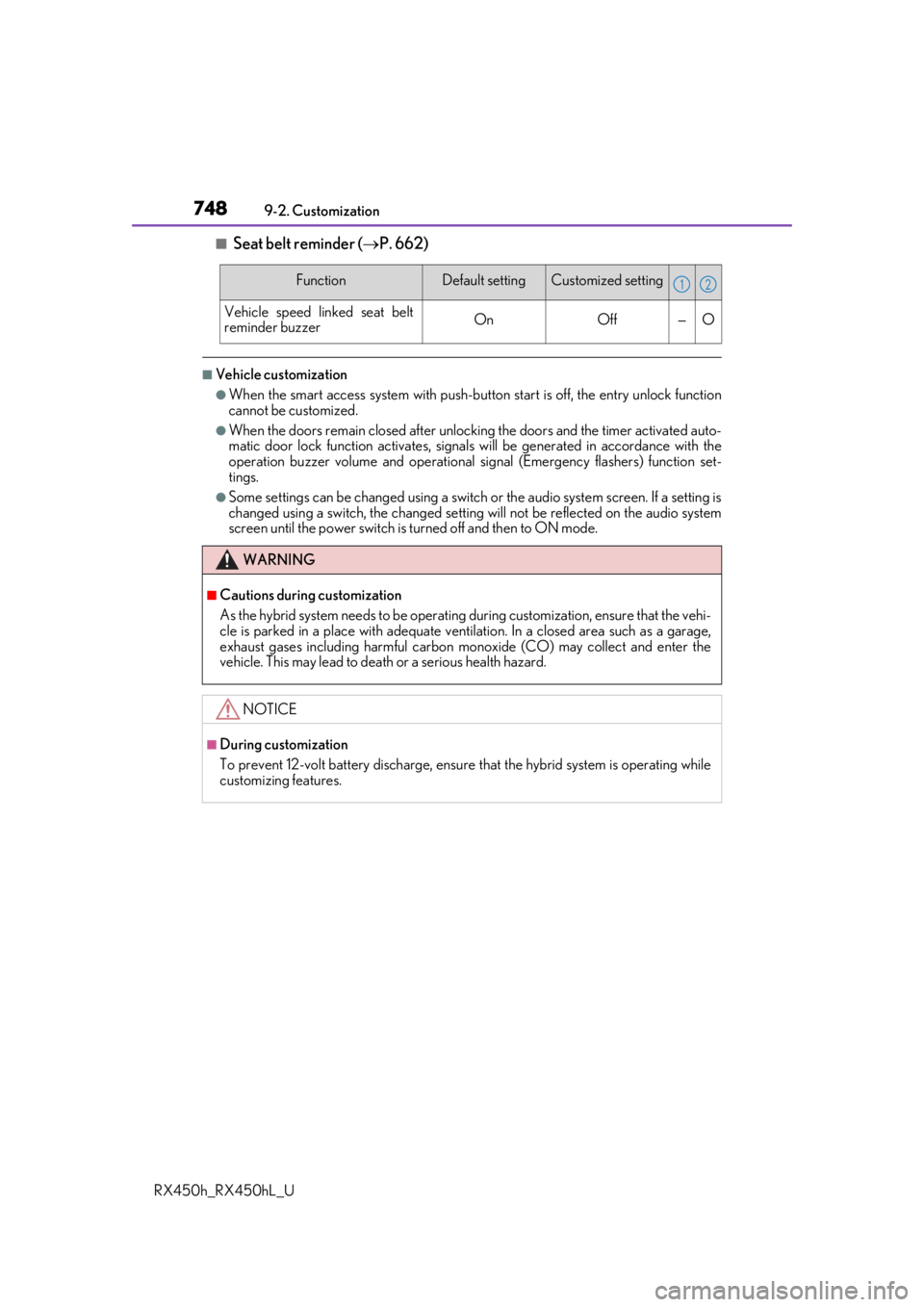
■Seat belt reminder ( P. 662)
■Vehicle customization
●When the smart access system with push-button start is off, the entry unlock function
cannot be customized.
●When the doors remain closed after unlocking the doors and the timer activated auto-
matic door lock function activates, signals will be generated in accordance with the
operation buzzer volume and operational si gnal (Emergency flashers) function set-
tings.
●Some settings can be changed using a switch or the audio system screen. If a setting is
changed using a switch , the changed setting will not be reflected on the audio system
screen until the power switch is turned off and then to ON mode.
FunctionDefault settingCustomized setting
Vehicle speed linked seat belt
reminder buzzerOnOff—O
WARNING
■Cautions during customization
As the hybrid system needs to be operating during customization, ensure that the vehi-
cle is parked in a place with adequate ventil ation. In a closed area such as a garage,
exhaust gases including harmful carbon mo noxide (CO) may collect and enter the
vehicle. This may lead to death or a serious health hazard.
NOTICE
■During customization
To prevent 12-volt battery discharge, ensure that the hybrid system is operating while
customizing features.
12
Page 765 of 792

765
Index
RX450h_RX450hL_U
What to do if... (Troubleshooting) ............................... 766
Alphabetical index................................. 770
For vehicles with a navigation system, refer to the “NAVIGATION
SYSTEM OWNER’S MANUAL” for information regarding the equip-
ment listed below.
• Navigation system
• Audio/visual system • Panoramic view monitor
•Lexus Enform
Page 771 of 792

771Alphabetical index
RX450h_RX450hL_U
Alarm ............................................................ 86
Anchor brackets ...................................... 57
AntennaRadio ........................................................429
Smart access system with push-button start ................... 158
Anti-lock Brake System (ABS)....... 382 Warning light ........................................ 661
Approach warning.................................314
Armrest ....................................................558
Assist grips .............................................. 559
Audio system (with Lexus Display Audio System) ...................400 Antenna ..................................................429
Audio input........................................... 409
AUX port.............................................. 409
Bluetooth
® audio ............................. 459
CD player ..............................................433
iPod .......................................................... 440
MP3/WMA disc ...............................433
Optimal use ........................................... 419
Portable music player ..................... 448
Radio ........................................................426
Setup menu .............................................412
Steering wheel audio switches .............................................. 406
USB memory ....................................... 444 Audio system
(with navigation system)
*
Automatic air conditioning system ......................................... 507, 522 Air conditioning filter ....................... 625
Rear automatic air conditioning system .................................................. 522
S-FLOW mode....................................514
Automatic headlight leveling system .................................................... 260
Automatic High Beam ........................262
Automatic light control system ...... 258
AUX port ................................................ 409
Auxiliary boxes .......................... 539, 544
*: Refer to the “NAVIGATION SYSTEM OWNER’S MANUAL”.
Page 772 of 792

772Alphabetical index
RX450h_RX450hL_U
Back doorPower back door .................................142
Touchless power back door ......... 144
Wireless remote control ..................142
Back-up lights Replacing light bulbs ........................637
Wattage ....................................................719
Battery (12-volt battery) Battery checking ............................... 605
If the 12-volt battery is discharged ........................................ 695
Preparing and checking before winter ................................................... 390
Replacing .............................................. 698
Warning light ...................................... 660
Battery (traction battery) ..................... 78
Blind Spot Monitor (BSM)..................319 Blind Spot Monitor function ............................................ 323
Rear Cross Traffic Alert function ............................................ 327 Bluetooth
®............................................. 482
Audio system ....................................... 459
Hands-free system (for cellular phone) .........................461
Bottle holders .........................................537
Brake Brake Hold ........................................... 256
Fluid ............................................................ 716
Parking brake ...................................... 253
Regenerative braking ..........................76
Warning light ...................................... 660
Brake assist ............................................. 382
Brake Hold.............................................. 256 Warning light .........................................661
Break-in tips ............................................. 214
Brightness control Instrument panel light control ........ 98
BSM (Blind Spot Monitor) ................. 319 Blind Spot Monitor function......... 323
Rear Cross Traffic Alert function.................................................327B
Page 780 of 792

780Alphabetical index
RX450h_RX450hL_U
Keyless entrySmart access system with push-button start ............................. 158
Wireless remote control ....... 136, 142
Keys..............................................................132 Battery-saving function .................... 160
Electronic key ........................................132
Engine switch .......................................239
If the electronic key does not operate properly.............................692
If you lose your keys ................ 133, 135
Key number plate ................................132
Keyless entry ..........................................132
Mechanical key .................................... 133
Power switch........................................239
Replacing the battery ...................... 630
Warning buzzer ...................................137
Wireless remote control ..................132
Knee airbags ............................................. 37 Lane-Keeping Assist (LKA) ............. 297
Language (multi-information
display) ..................................................... 113
LATCH anchors ....................................... 67
Lever Auxiliary catch lever .........................595
Hood lock release lever.................595
Shift lever ............................................... 246
Turn signal lever ................................. 252
Wiper lever................................ 267, 272
Lexus Climate Concierge................ 506
Lexus Display Audio controller.............................................. 402
Lexus Enform
*
Lexus Enform Remote*
LEXUS Enform Safety Connect.................................................. 571
LEXUS Enform Service Connect................................................. 577
Lexus parking assist monitor ........... 363 Display..................................................... 364
Precautions ........................................... 370
Lexus Safety System+ ......................... 279 Automatic High Beam.................... 262
Dynamic radar cruise control with full-speed range ................. 306
LKA (Lane-Keeping Assist) ........ 297
PCS (Pre-Collision System) ...... 286
KL