Page 518 of 792

5186-2. Using the air conditioning system and defogger
RX450h_RX450hL_U
■Registering air conditioning settings to electronic keys
●Unlocking the vehicle using an electronic key and turning the power switch to ON
mode will recall that ke y’s registered air conditioning settings.
●When the power switch is turned off, the cu rrent air conditioning settings will automati-
cally be registered to the electronic key that was used to unlock the vehicle.
●The system may not operate correctly if more th an one electronic key is in the vicinity or
if the smart access system with push-button start is used to unlock a passenger door.
●The doors that can recall the air conditioning setting when unlocked using the smart
access system with push-button start can be changed.
* For details, contact your Lexus
dealer.
*: The doors that can recall the driving positi on memory are changed at the same time.
■Using automatic mode
Fan speed is adjusted automatically according to the temperature setting and the ambi-
ent conditions.
Therefore, the fan may stop for a while until wa rm or cool air is ready to flow immediately
after the “AUTO” button is pressed or “AUTO” is selected.
■How the system judges if a passenger is in the vehicle when in S-FLOW mode
In S-FLOW mode, the system judges if a passenger is in the vehicle as follows:
• Front passenger seat: A passeng er is judged to be in the front passenger seat when the
system detects an object on the front passenger seat, fastening of the front passenger
seat belt, changing of the set temperature for the front passenger seat or the opening
and closing of the front passenger door. (However, when only opening and closing of
the front passenger door is detected, the sy stem will judge that a passenger is not in
the front passenger seat after the vehicl e speed reaches approximately 12 mph (20
km/h) or more.)
• Rear seats (automatic S-FLOW mode only): A passenger is judged to be in a rear seat
when the system detects the opening and closin g of a rear door or the operation of the
rear air conditioning system (RX450hL).
If a passenger is judged to be in the vehicl e, the system will retain the judgement for a
certain amount of time after th e power switch is turned off.
■Operation of automatic S-FLOW mode
When the system is operating in automati c S-FLOW mode, if the system detects the
opening and closing of a rear door or the op eration of the rear air conditioning system
(RX450hL), S-FLOW mode will be disabled. To enable S-FLOW mode, select
on the option control screen. (In this case , the system will operate in manual S-FLOW
mode.)
■Changing from manual S-FLOW mode to automatic S-FLOW mode
Select on the option control screen to disable S-FLOW mode.
Turn the power switch off.
Wait for 60 minutes or more and change the power switch to ON mode.
■Using the voice command system
Air conditioning system can be operated using voice commands. For details, refer to the
“NAVIGATION SYSTEM OWNER’S MANUAL”.
1
2
3
Page 528 of 792
528
RX450h_RX450hL_U6-3. Using the interior lights
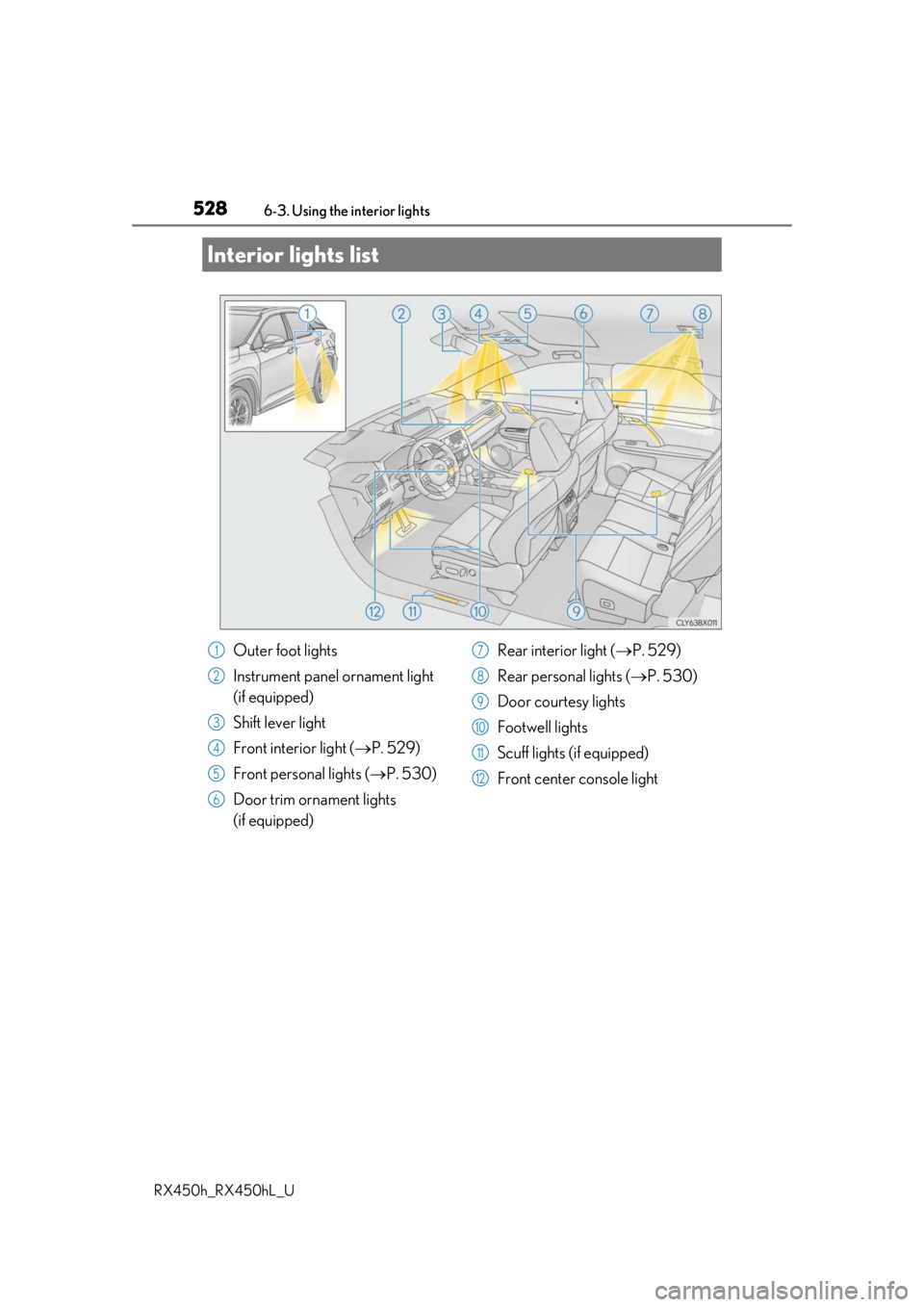
Interior lights list
Outer foot lights
Instrument panel ornament light
(if equipped)
Shift lever light
Front interior light (
P. 529)
Front personal lights ( P. 530)
Door trim ornament lights
(if equipped) Rear interior light (
P. 529)
Rear personal lights ( P. 530)
Door courtesy lights
Footwell lights
Scuff lights (if equipped)
Front center console light1
2
3
4
5
6
7
8
9
10
11
12
Page 529 of 792
5296-3. Using the interior lights
6
Interior features
RX450h_RX450hL_U
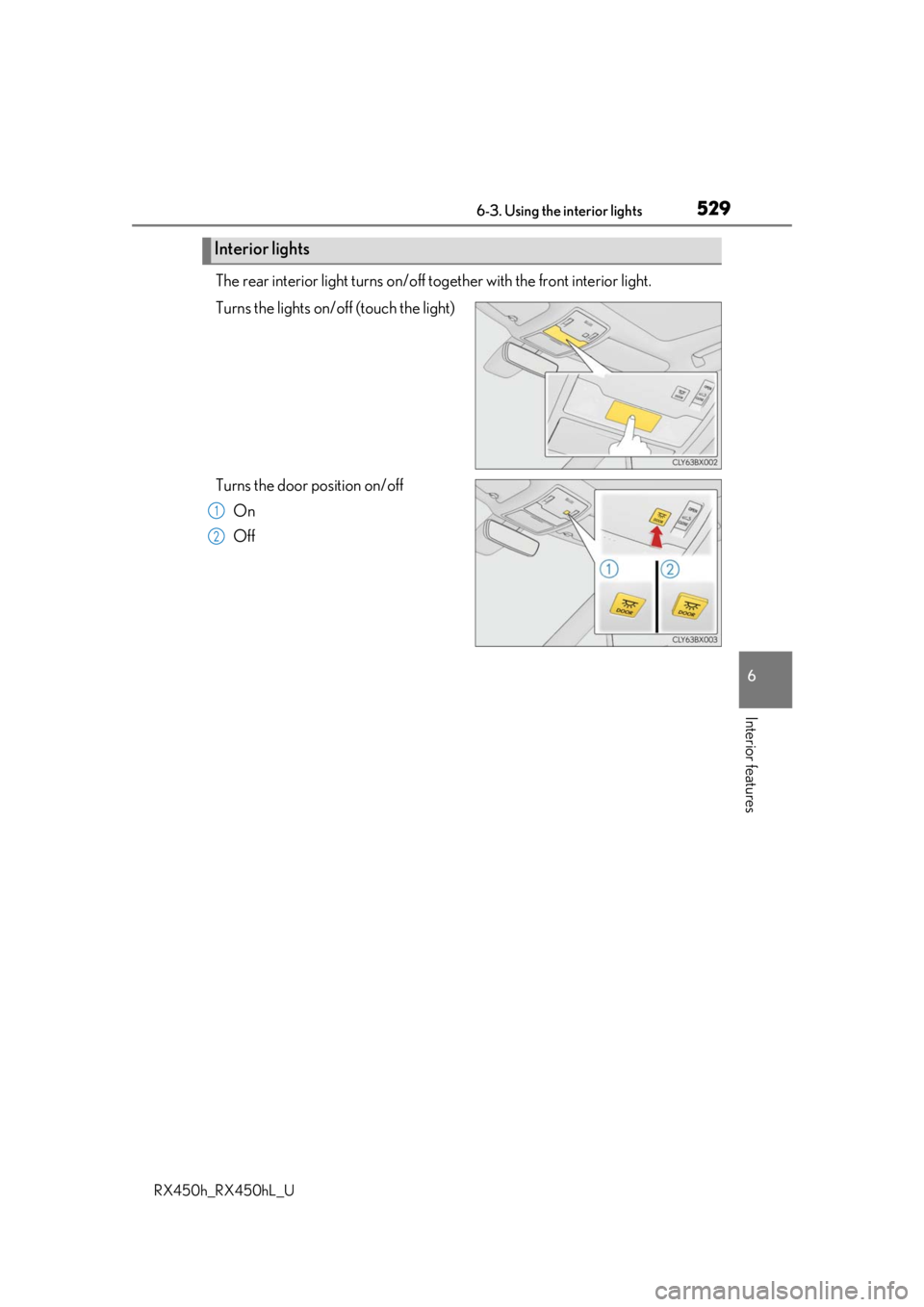
The rear interior light turns on/off together with the front interior light.
Turns the lights on/off (touch the light)
Turns the door position on/off On
Off
Interior lights
1
2
Page 531 of 792
5316-3. Using the interior lights
6
Interior features
RX450h_RX450hL_U
●Illuminated entry system: The lights automatically turn on/off according to power switch
mode, the presence of the electronic key, whether the doors are locked/unlocked, and
whether the doors are opened/closed.
●If the interior lights remain on when the power switch is turned off, the lights will go off
automatically after 20 minutes.
●In the following cases, the interior lights and front personal lights may not respond as
normal.
• When water, dirt, etc., have adhered to the lens surface
• When operated with a wet hand
• When wearing gloves, etc.
●Some functions can be customized ( P. 736)
NOTICE
●Never remove the lens for the front interior light and front personal lights. Otherwise,
the lights will be damaged. If the lens need to remove, contact your Lexus dealer.
●To prevent 12-volt battery discharge, do not leave the lights on longer than necessary
when the hybrid system is off.
Page 532 of 792
532
RX450h_RX450hL_U6-4. Using the storage features
RX450h
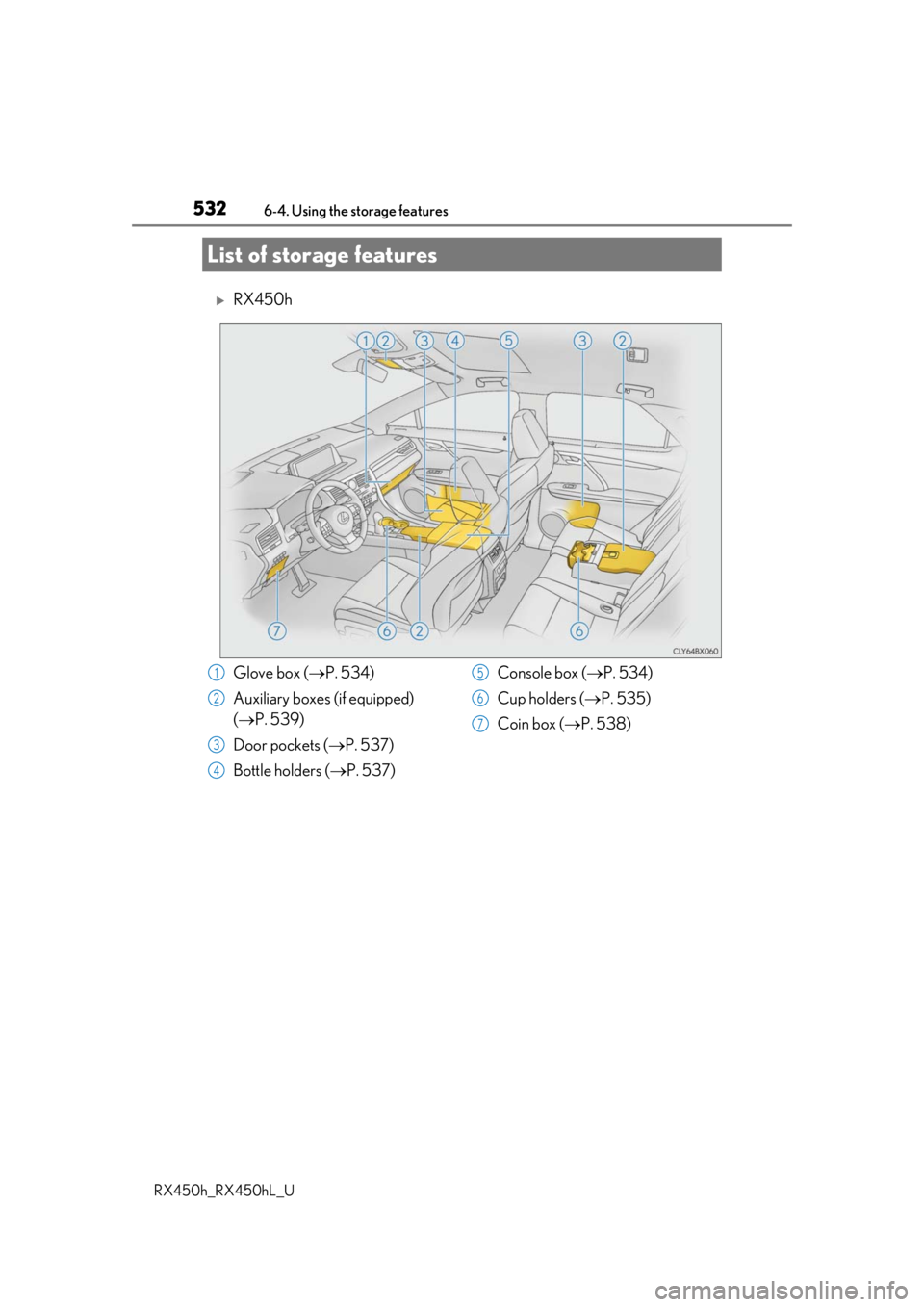
List of storage features
Glove box (
P. 534)
Auxiliary boxes (if equipped)
( P. 539)
Door pockets ( P. 537)
Bottle holders ( P. 537) Console box (
P. 534)
Cup holders ( P. 535)
Coin box ( P. 538)1
2
3
4
5
6
7
Page 533 of 792
5336-4. Using the storage features
6
Interior features
RX450h_RX450hL_U
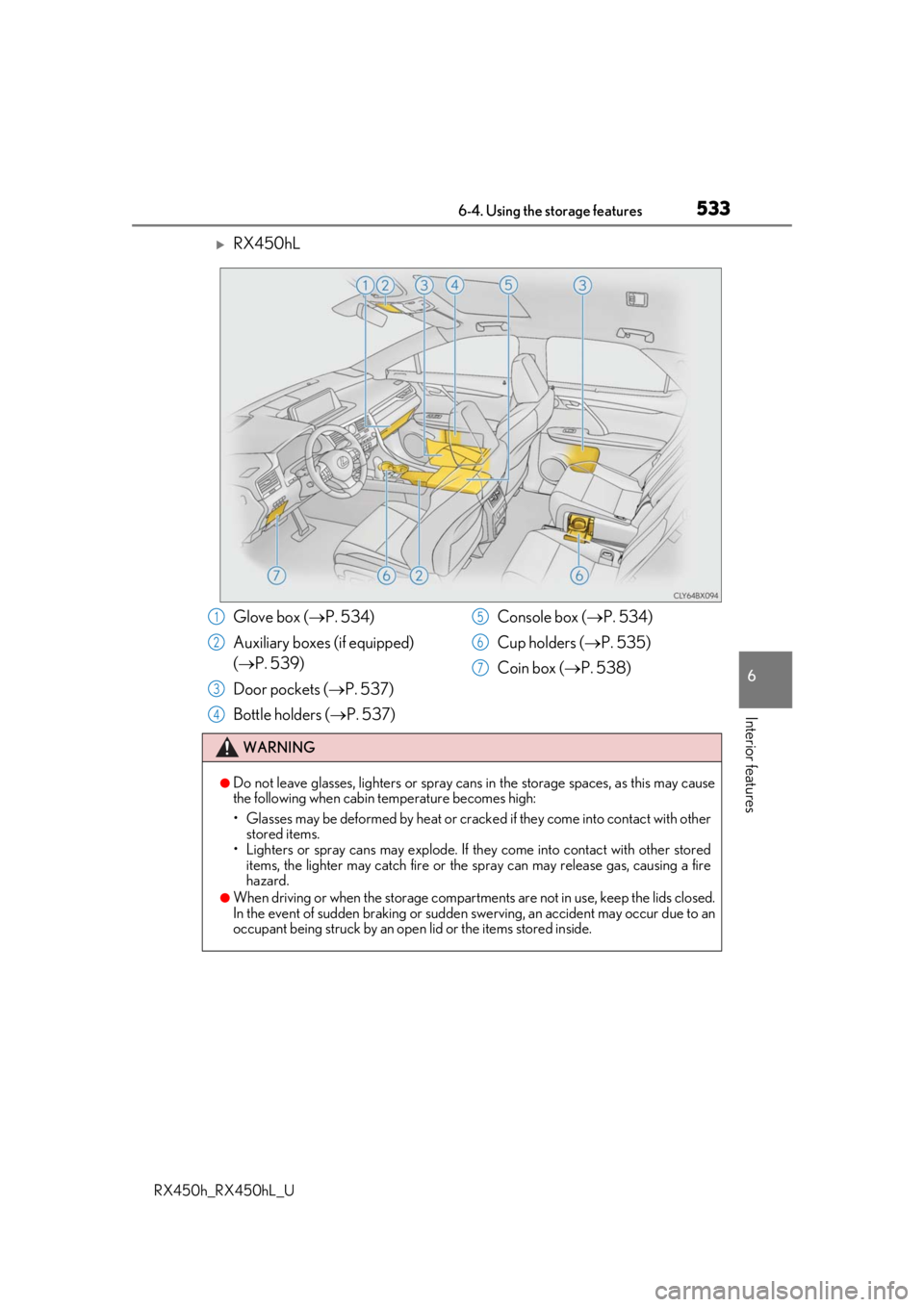
RX450hL
Glove box (P. 534)
Auxiliary boxes (if equipped)
( P. 539)
Door pockets ( P. 537)
Bottle holders ( P. 537) Console box (
P. 534)
Cup holders ( P. 535)
Coin box ( P. 538)
WARNING
●Do not leave glasses, lighters or spray cans in the storage spaces, as this may cause
the following when cabin temperature becomes high:
• Glasses may be deformed by heat or cracke d if they come into contact with other
stored items.
• Lighters or spray cans may explode. If they come into contact with other stored
items, the lighter may catch fire or the spray can may release gas, causing a fire
hazard.
●When driving or when the storage compartments are not in use, keep the lids closed.
In the event of sudden braking or sudden swerving, an accident may occur due to an
occupant being struck by an open lid or the items stored inside.
1
2
3
4
5
6
7
Page 537 of 792
5376-4. Using the storage features
6
Interior features
RX450h_RX450hL_U
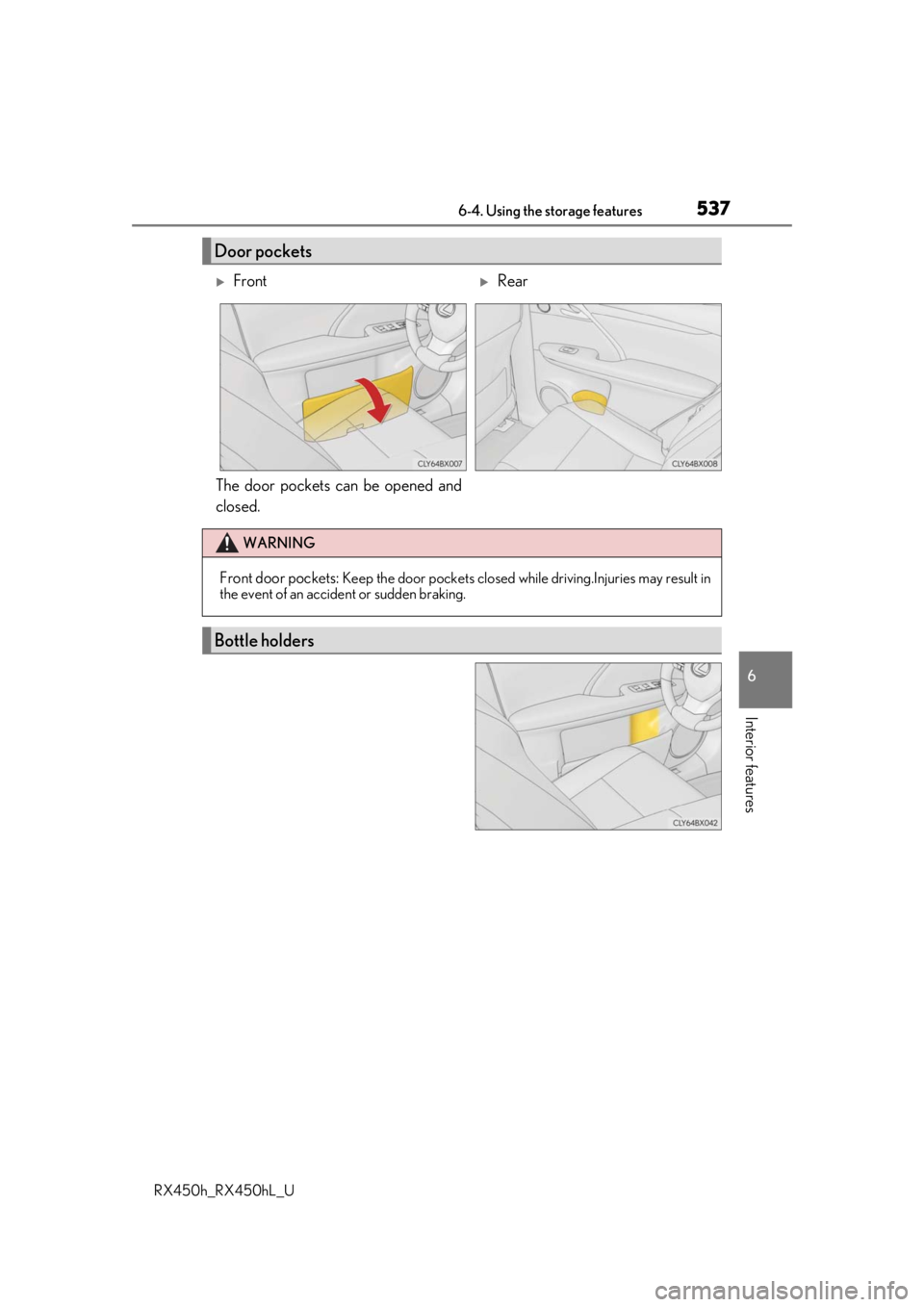
The door pockets can be opened and
closed.
Door pockets
FrontRear
WARNING
Front door pockets: Keep the door pockets closed while driving.Injuries may result in
the event of an accident or sudden braking.
Bottle holders
Page 544 of 792
5446-4. Using the storage features
RX450h_RX450hL_U
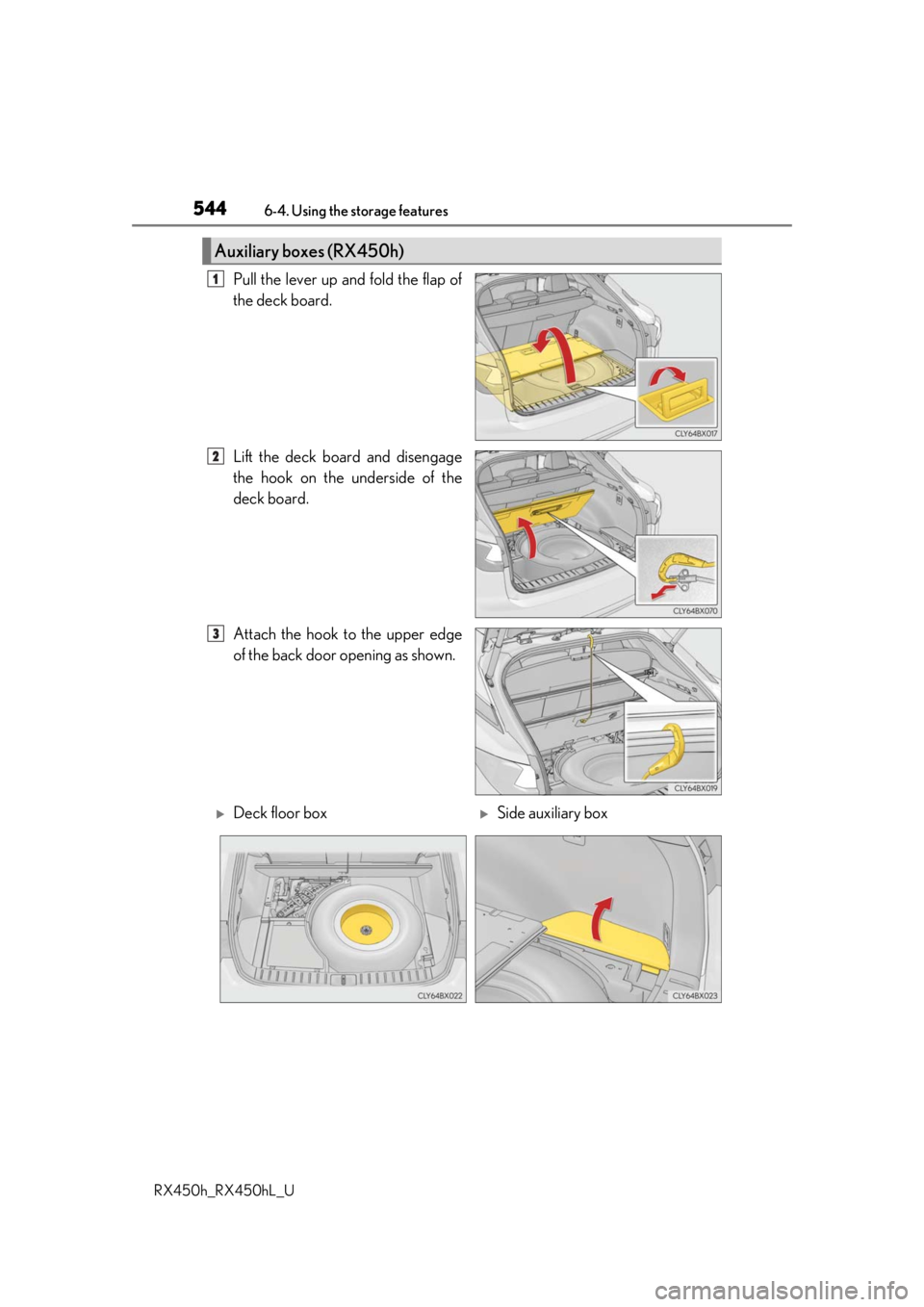
Pull the lever up and fold the flap of
the deck board.
Lift the deck board and disengage
the hook on the underside of the
deck board.
Attach the hook to the upper edge
of the back door opening as shown.
Auxiliary boxes (RX450h)
1
2
3
Deck floor boxSide auxiliary box