Page 446 of 777

4455-7. Connecting Bluetooth ®
5
Lexus Display Audio system
RX350/RX350L_U Turn the Bluetooth ®
connection setting of your device set to on.
Go to “Bluetooth
* Setup”: “MENU” button “Setup” “Bluetooth
* ”
Move the controller to the left and then select “Add Device”.
When this screen is displayed,
search for the device name dis-
played on this screen on your
Bluetooth ®
device.For operation of the Bluetooth ®
device,
see the manual that comes with your
Bluetooth ®
device.
Register the Bluetooth ®
device
using your Bluetooth ®
device.A PIN code are not required for SSP (Secur e Simple Pairing) compatible Bluetooth ®
devices. Depending on the device, you may need to select Yes to register, or No to
cancel on the device.
If an error message is disp layed, follow the guidance on the screen to try again.
* : Bluetooth is a registered trademark of Bluetooth SIG, Inc.
Go to “Bluetooth
* Setup”: “MENU” button “Setup” “Bluetooth
* ”
Move the controller to the left and then select “Remove Device”.
Select the device to remove.
* : Bluetooth is a registered trademark of Bluetooth SIG, Inc.Registering a Bluetooth ®
deviceBluetooth ®
compatible phones (HFP) and portable audio players (AVP) can
be registered simultaneously. You can register up to 5 Bluetooth ®
devices.
How to register a Bluetooth ®
device1
2
3
4
5
Removing a Bluetooth ®
device 1
2
3
Page 476 of 777
4755-11. Bluetooth ®
5
Lexus Display Audio system
RX350/RX350L_U
In other situations Even though all conceivable measures have been taken, the symptom status does not
change.
The cellular phone is not clos e enough to this system.
Bring the cellular phone closer to this system.
The cellular phone is the most likely cause of the symptom.
Turn the cellular phone off, remove and reinstall the battery pack, and then
restart the cellular phone.
Enable the cellular phone’s Bluetooth ®
connection.
Stop the cellular phone’s security software and close all applications.
Before using an application installed on the cellular phone, carefully check its
source and how its operation might affect this system.
Page 537 of 777
536 6-4. Using the storage features
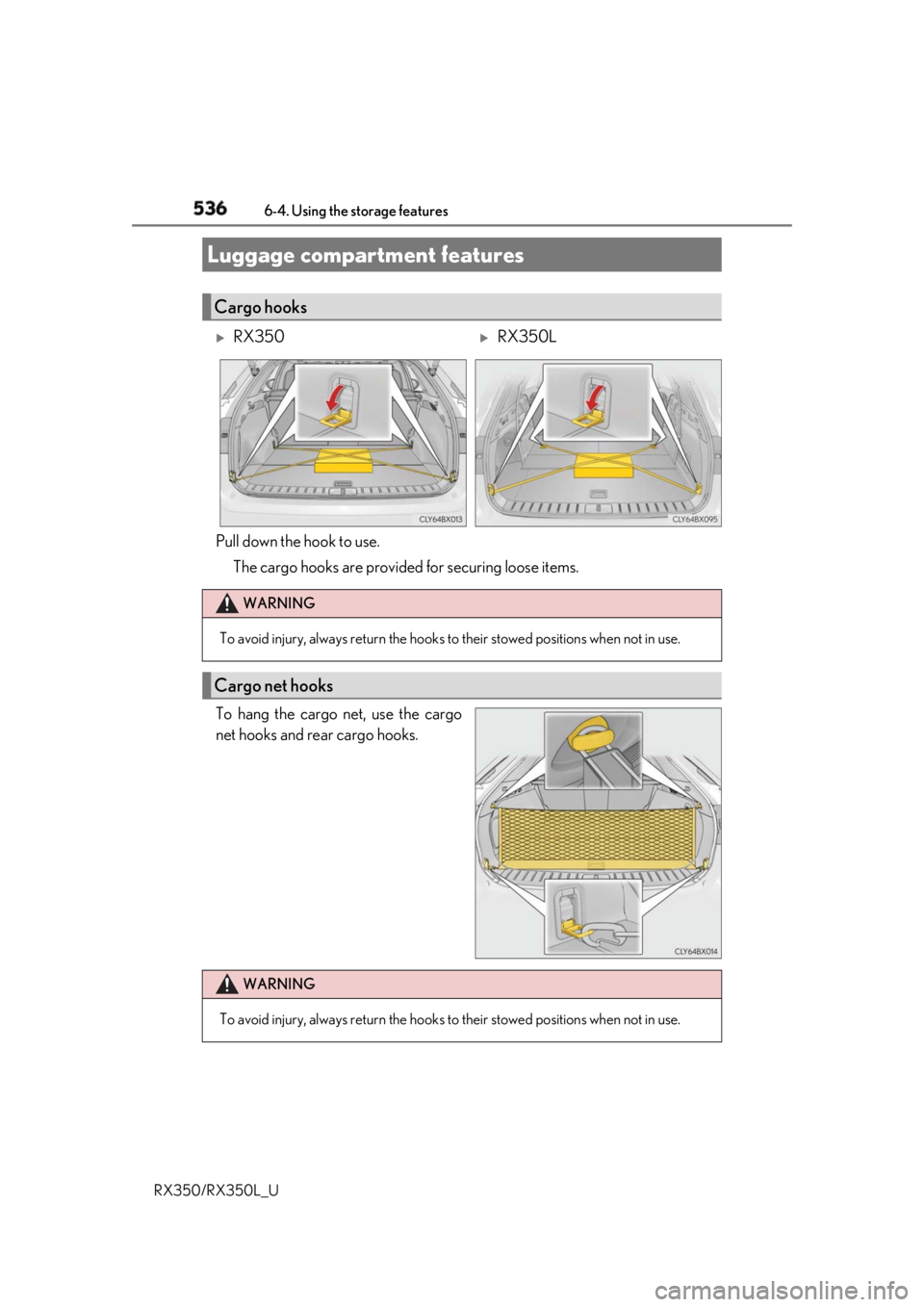
RX350/RX350L_U Pull down the hook to use.
The cargo hooks are provided for securing loose items.
To hang the cargo net, use the cargo
net hooks and rear cargo hooks.Luggage compartment features Cargo hooks
RX350
RX350L
WARNING
To avoid injury, always return the hooks to their stowed positions when not in use.
Cargo net hooks
WARNING
To avoid injury, always return the hooks to their stowed positions when not in use.
Page 558 of 777
5576-5. Using the other interior features
6
Interior features
RX350/RX350L_U The HomeLink ®
wireless control system in your vehicle has 3 buttons which can
be programmed to operate 3 different de vices. Refer to the programming meth-
ods on the following pages to determine the method which is appropriate for the
device.
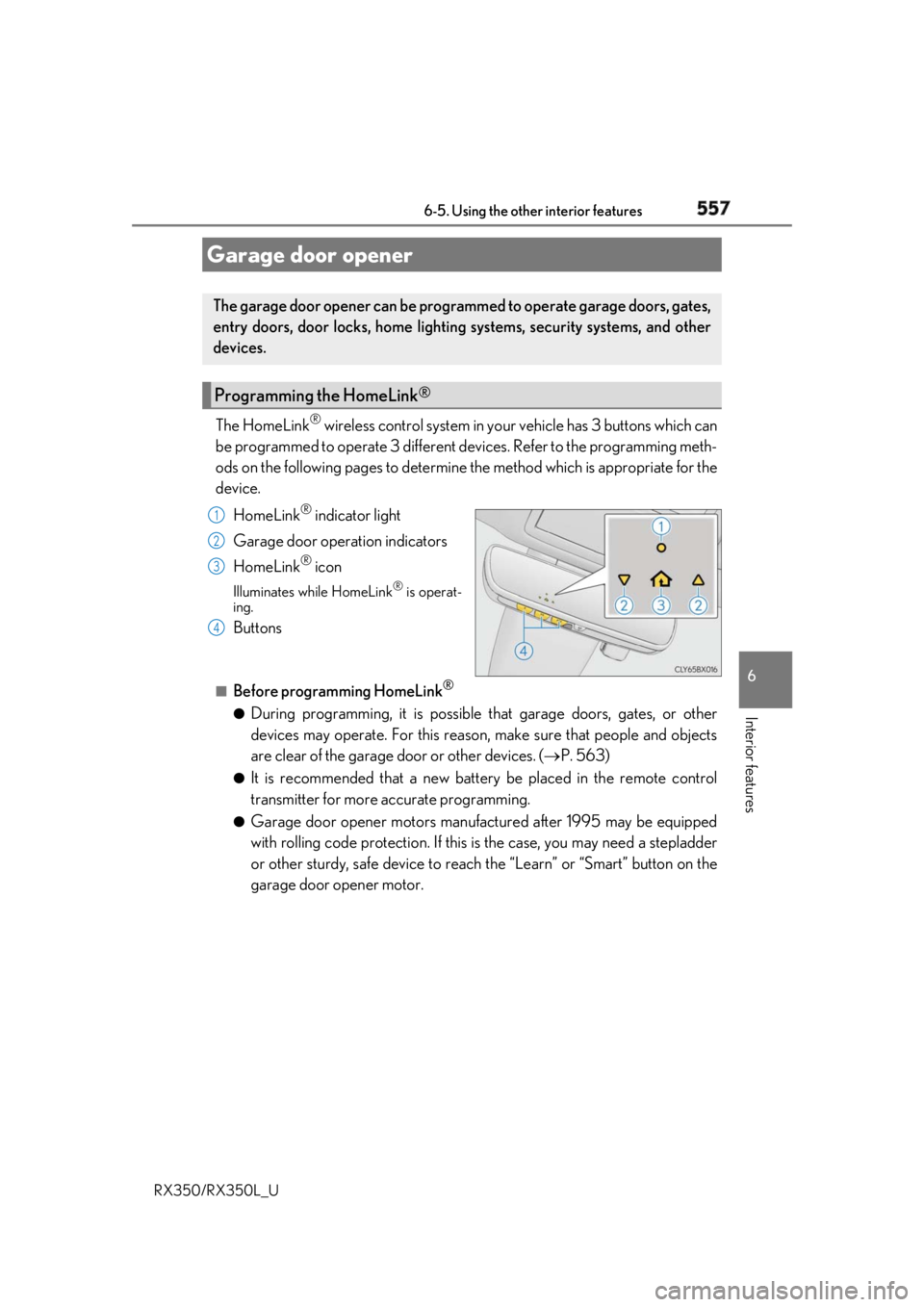
HomeLink ®
indicator light
Garage door operation indicators
HomeLink ®
iconIlluminates while HomeLink ®
is operat-
ing.
Buttons ■
Before programming HomeLink ®
●
During programming, it is possible that garage doors, gates, or other
devices may operate. For this reason, make sure that people and objects
are clear of the garage door or other devices. ( P. 563)●
It is recommended that a new batter y be placed in the remote control
transmitter for more accurate programming. ●
Garage door opener motors manufa ctured after 1995 may be equipped
with rolling code protection. If this is the case, you may need a stepladder
or other sturdy, safe device to reach the “Learn” or “Smart” button on the
garage door opener motor.Garage door opener The garage door opener can be programmed to operate garage doors, gates,
entry doors, door locks, home lightin g systems, security systems, and other
devices.
Programming the HomeLink ®
1
2
3
4
Page 568 of 777
5676-5. Using the other interior features
6
Interior features
RX350/RX350L_U WARNING ■
While driving the vehicle
Do not adjust the display. Adjust the di splay only when the vehicle is stopped.■
When doing the circling calibration
Secure a wide space, and watch out for people and vehicles in the vicinity. Do not vio-
late any local traffic rules while performing circling calibration.
NOTICE ■
To avoid compass malfunctions
Do not place magnets or any metal object s near the inside rear view mirror.
Doing this may cause the comp ass sensor to malfunction.■
To ensure normal oper ation of the compass●
Do not perform a circling calibration of the compass in a place where the earth’s
magnetic field is subject to interference by artificial magnetic fields. ●
During calibration, do not operate elec tric systems (moon roof, panoramic moon
roof, power windows, etc.) as they may interfere with the calibration.
Page 569 of 777
568 6-5. Using the other interior features
RX350/RX350L_U Microphone
“SOS” button
LED light indicatorsLEXUS Enform Safety Connect
: If equippedSafety Connect is a subscription-based telematics service that uses Global
Positioning System (GPS) data and embe dded cellular techno logy to provide
safety and security features to subscribers. Safety Connect is supported by
Lexus’ designated response center, wh ich operates 24 hours per day, 7 days
per week.
Safety Connect service is available by su bscription on select, telematics hard-
ware-equipped vehicles.
By using the Safety Connect service, you are agreeing to be bound by the
Telematics Subscription Service Agre ement and its Terms and Conditions, as
in effect and amended from time to time, a current copy of which is available
at Lexus.com. All use of the Safety Co nnect service is subject to such then-
applicable Terms and Conditions.
System components 1
2
3
Page 588 of 777
5877-2. Maintenance
7
Maintenance and care
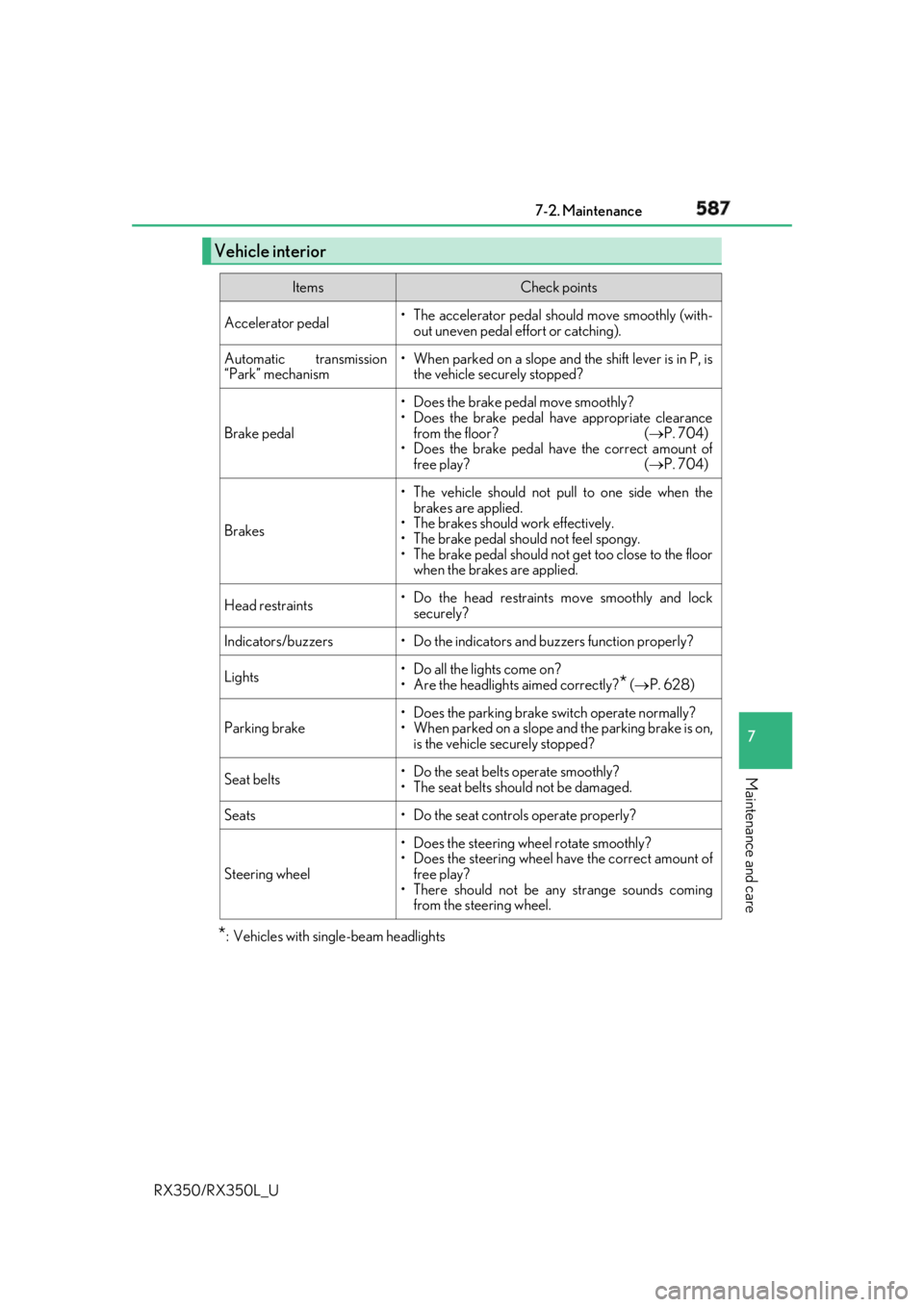
RX350/RX350L_U * : Vehicles with single-beam headlightsVehicle interior Items Check points
Accelerator pedal • The accelerator pedal sh ould move smoothly (with-
out uneven pedal effort or catching).
Automatic transmission
“Park” mechanism • When parked on a slope and the shift lever is in P, is
the vehicle securely stopped?
Brake pedal • Does the brake pedal move smoothly?
• Does the brake pedal have appropriate clearance
from the floor? ( P. 704)
• Does the brake pedal have the correct amount of
free play? ( P. 704)
Brakes • The vehicle should not pull to one side when the
brakes are applied.
• The brakes should work effectively.
• The brake pedal should not feel spongy.
• The brake pedal should no t get too close to the floor
when the brakes are applied.
Head restraints • Do the head restraints move smoothly and lock
securely?
Indicators/buzzers • Do the indicators and buzzers function properly?
Lights • Do all the lights come on?
• Are the headlights aimed correctly?
* ( P. 628)
Parking brake • Does the parking brake switch operate normally?
• When parked on a slope and the parking brake is on,
is the vehicle securely stopped?
Seat belts • Do the seat belts operate smoothly?
• The seat belts should not be damaged.
Seats • Do the seat controls operate properly?
Steering wheel • Does the steering wheel rotate smoothly?
• Does the steering wheel have the correct amount of
free play?
• There should not be any strange sounds coming
from the steering wheel.
Page 622 of 777
6217-3. Do-it-yourself maintenance
7
Maintenance and care
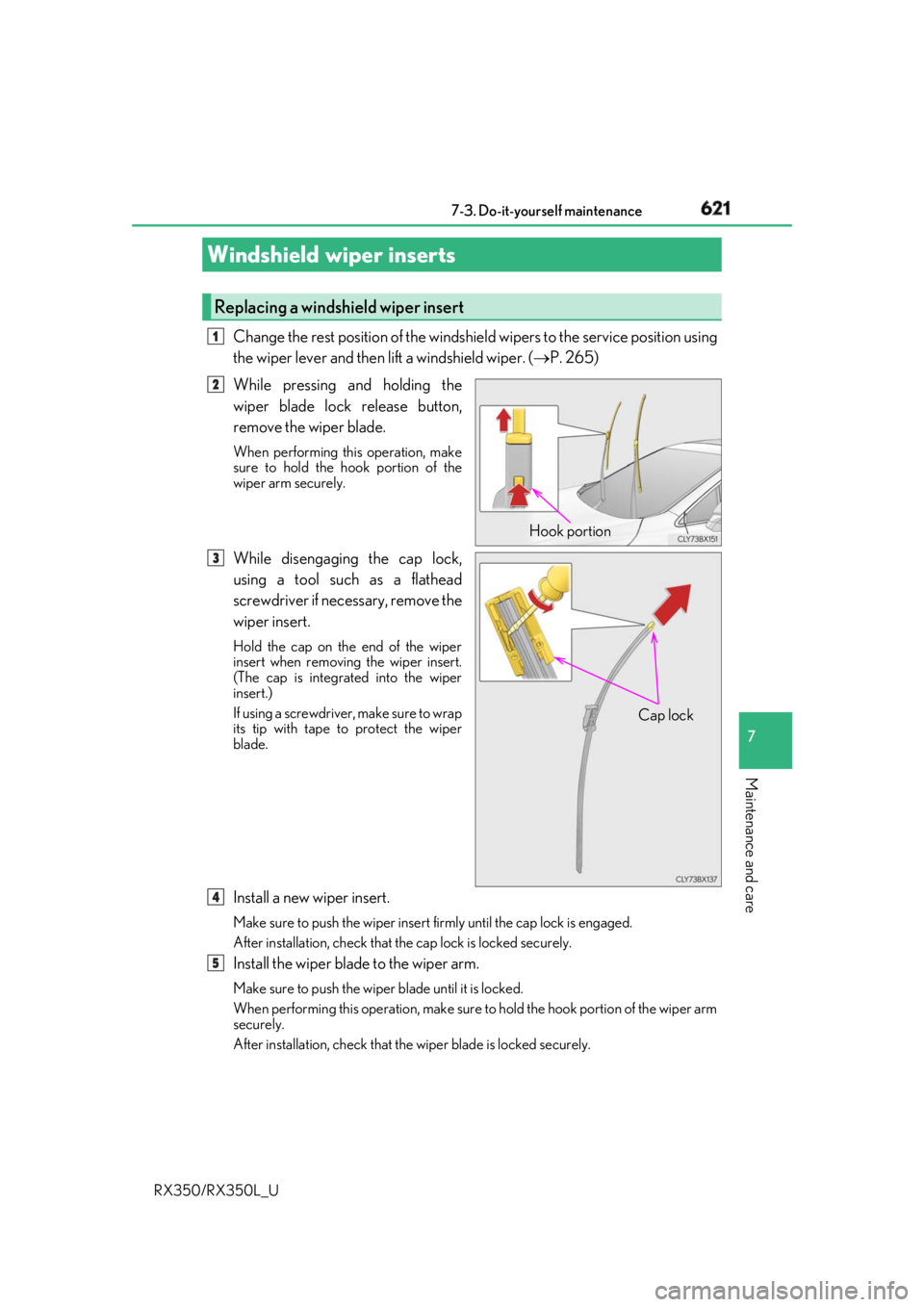
RX350/RX350L_U Change the rest position of the windshie ld wipers to the service position using
the wiper lever and then lift a windshield wiper. ( P. 265)
While pressing and holding the
wiper blade lock release button,
remove the wiper blade. When performing this operation, make
sure to hold the hook portion of the
wiper arm securely.
While disengaging the cap lock,
using a tool such as a flathead
screwdriver if necessary, remove the
wiper insert. Hold the cap on the end of the wiper
insert when removing the wiper insert.
(The cap is integrated into the wiper
insert.)
If using a screwdriver, make sure to wrap
its tip with tape to protect the wiper
blade.
Install a new wiper insert. Make sure to push the wiper insert firmly until the cap lock is engaged.
After installation, check that th e cap lock is locked securely.
Install the wiper blade to the wiper arm. Make sure to push the wiper blade until it is locked.
When performing this operation, make sure to hold the hook portion of the wiper arm
securely.
After installation, check that the wiper blade is locked securely.Windshield wiper inserts Replacing a windshield wiper insert 1
Hook portion12
Cap lock3
14
5