Page 94 of 777

932. Instrument cluster
2
Instrument cluster
RX350/RX350L_U ◆ Using the odometer/trip meter display area
Items in this area are operated using the “ODO/TRIP” switch.
Press: Change displayed item Each time the switch is pressed, the
displayed item will be changed.
Press and hold: Reset Display the desired trip meter and
press and hold the switch to reset the
trip meter.
Select a menu icon to display its content.
Drive information ( P. 94)Select to display various drive data.
Navigation system-linked display (if equipped) Select to display the following na vigation system-linked information.
•Route guidance
• Compass display (heading-up display)
Audio system-linked display Select to enable selection of an audio source or track on the meter using the meter
control switches.
Driving assist system information Select to display the operational status of the following systems:
• Dynamic radar cruise control with full-speed range ( P. 300)
• LKA (Lane-Keeping Assist) ( P. 291)
Warning message display ( P. 661)Select to display warning messages and me asures to be taken if a malfunction is
detected.
Settings display ( P. 97)Select to change the meter display settings and other settings.Menu icons
Page 95 of 777

94 2. Instrument cluster
RX350/RX350L_U ■
Drive information 1/Drive information 2/Drive information 3
Displays drive informatio n such as the following:●
Drive information 1
• Current fuel consumption
• Average fuel economy (after reset) ●
Drive information 2
• Distance (driving range)
• Average vehicle speed (after reset) ●
Drive information 3
• Average fuel economy (after refuel)
• Elapsed time (after start)
Displayed items (listed below) can be changed on . ( P. 97)Drive information ( )
Item Content
Current fuel consumption Displays in stantaneous current fuel consumption
Average fuel
economy After reset Displays average fuel consumption since the dis-
play was reset
* 1, 2
After start Displays average fuel consumption since engine
start
* 2
After refuel Displays average fuel consumption since refuel
* 2, 3
Average
vehicle
speed After reset Displays average vehicle speed since the display
was reset
* 1
After start Displays average vehicle speed since engine start
Elapsed time After reset Displays elapsed time since the display was reset
* 1
After start Displays elapsed time since engine start
Distance Driving range Displays driving rang e with remaining fuel
* 3, 4
After start Displays drive distance since vehicle start
Other Blank No item
Page 96 of 777
952. Instrument cluster
2
Instrument cluster
RX350/RX350L_U * 1
:Resetting: P. 92
* 2
: Use the displayed fuel consumption as a reference.
* 3
: When only a small amount of fuel is added to the tank, the display may not be
updated.
When refueling, turn the engine switch off. If the vehicle is refueled without turning the
engine switch off, the display may not be updated.
* 4
: This distance is computed based on your average fuel consumption. As a result, the
actual distance that can be driven may differ from that displayed.■
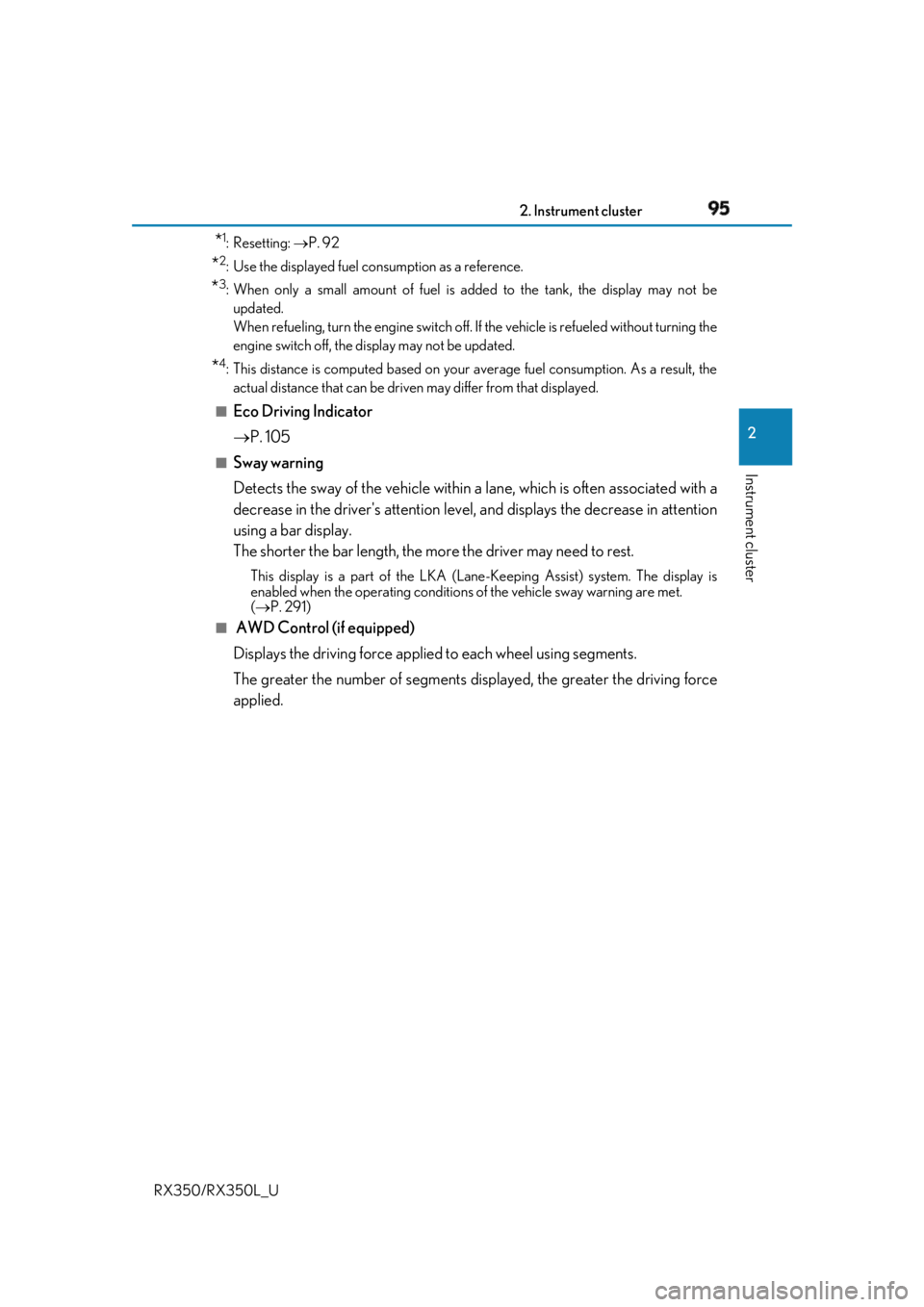
Eco Driving Indicator
P. 105■
Sway warning
Detects the sway of the vehicle within a lane, which is often associated with a
decrease in the driver's at tention level, and displays the decrease in attention
using a bar display.
The shorter the bar length, the more the driver may need to rest. This display is a part of the LKA (Lan e-Keeping Assist) system. The display is
enabled when the operating conditions of the vehicle sway warning are met.
( P. 291)■
AWD Control (if equipped)
Displays the driving force applie d to each wheel using segments.
The greater the number of segments di splayed, the greater the driving force
applied.
Page 97 of 777
96 2. Instrument cluster
RX350/RX350L_U ■
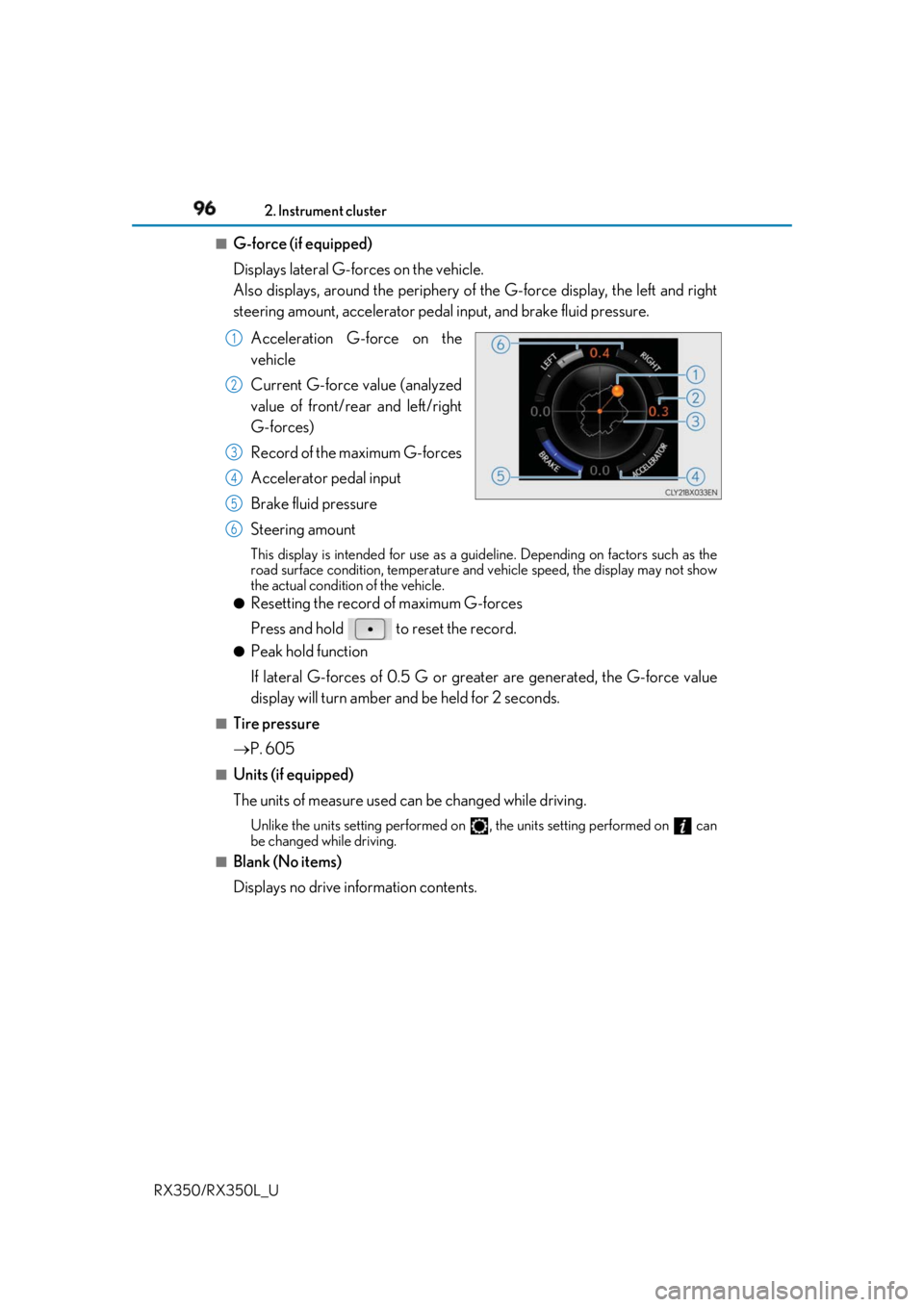
G-force (if equipped)
Displays lateral G-forces on the vehicle.
Also displays, around the periphery of the G-force display, the left and right
steering amount, accelerator pedal input, and brake fluid pressure.
Acceleration G-force on the
vehicle
Current G-force value (analyzed
value of front/rear and left/right
G-forces)
Record of the maximum G-forces
Accelerator pedal input
Brake fluid pressure
Steering amount This display is intended for use as a guideline. Depending on factors such as the
road surface condition, temperature and vehicle speed, the display may not show
the actual condition of the vehicle. ●
Resetting the record of maximum G-forces
Press and hold to reset the record. ●
Peak hold function
If lateral G-forces of 0.5 G or grea ter are generated, the G-force value
display will turn amber and be held for 2 seconds.■
Tire pressure
P. 605■
Units (if equipped)
The units of measure used can be changed while driving. Unlike the units setting performed on , the units setting performed on can
be changed while driving.■
Blank (No items)
Displays no drive information contents. 1
2
3
4
5
6
Page 98 of 777

972. Instrument cluster
2
Instrument cluster
RX350/RX350L_U ◆ Changing settings
Use the meter control switches on th e steering wheel to change settings.
Press or to select .
Operate the switches to select a desired item.
Change the setting by referring to the message displayed on the screen.
◆ Setting items ■
LKA (Lane-Keeping Assist) ( P. 291)
The following LKA system settings can be changed:
* 1
: If the lane centering function is enabled/ disabled, steering wheel assistance will also
be enabled/disabled accordingly.
* 2
: If the steering wheel assistance is disabled, lane cent ering function will also be dis-
abled automatically.Settings display ( ) 1
2
3
Item Settings Details
Lane center tracing On
Select to enable/dis able the lane cen-
tering function.
* 1
Off
Steering assist On
Select to enable/disable steering
wheel assistance.
* 2
Off
Alert Select to set a vibrator or buzzer as
the notification method used to warn
the driver.
Alert sensitivity High
Select to set the warning sensitivity.
Normal
Sway warning On
Select to enable/disable the vehicle
sway warning.
Off
Sway sensitivity High
Select to set the vehicle sway warning
sensitivity.Medium
Low
Page 99 of 777
98 2. Instrument cluster
RX350/RX350L_U ■
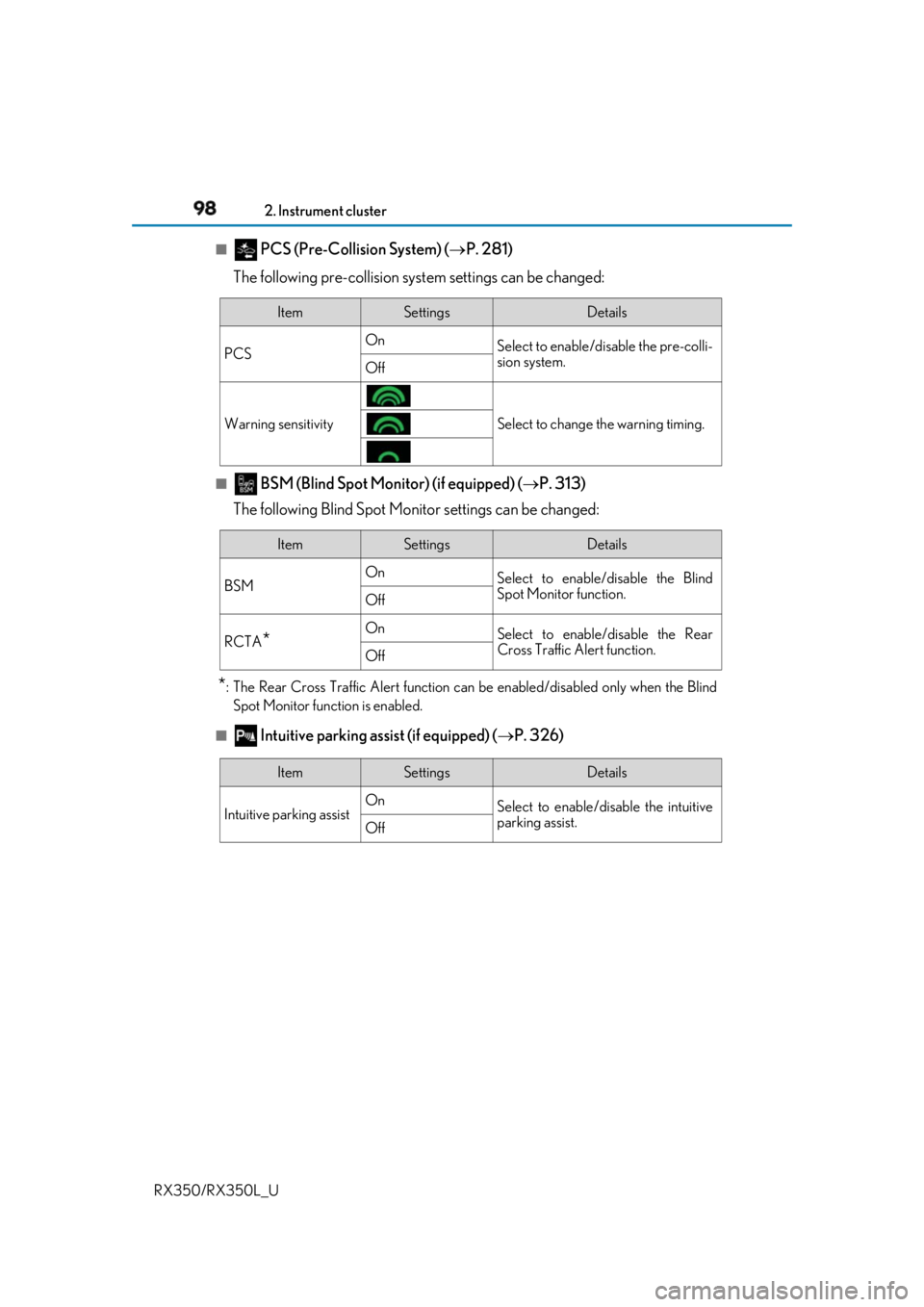
PCS (Pre-Collision System) ( P. 281)
The following pre-collision syst em settings can be changed:
■
BSM (Blind Spot Monitor) (if equipped) ( P. 313)
The following Blind Spot Monitor settings can be changed:
* : The Rear Cross Traffic Alert function can be enabled/disabled only when the Blind
Spot Monitor function is enabled.
■
Intuitive parking assist (if equipped) ( P. 326)Item Settings Details
PCS On
Select to enable/disable the pre-colli-
sion system.
Off
Warning sensitivity Select to change the warning timing.
Item Settings Details
BSM On
Select to enable/disable the Blind
Spot Monitor function.
Off
RCTA
* On
Select to enable/disable the Rear
Cross Traffic Alert function.
Off
Item Settings Details
Intuitive parking assist On
Select to enable/disable the intuitive
parking assist.
Off
Page 100 of 777
992. Instrument cluster
2
Instrument cluster
RX350/RX350L_U ■
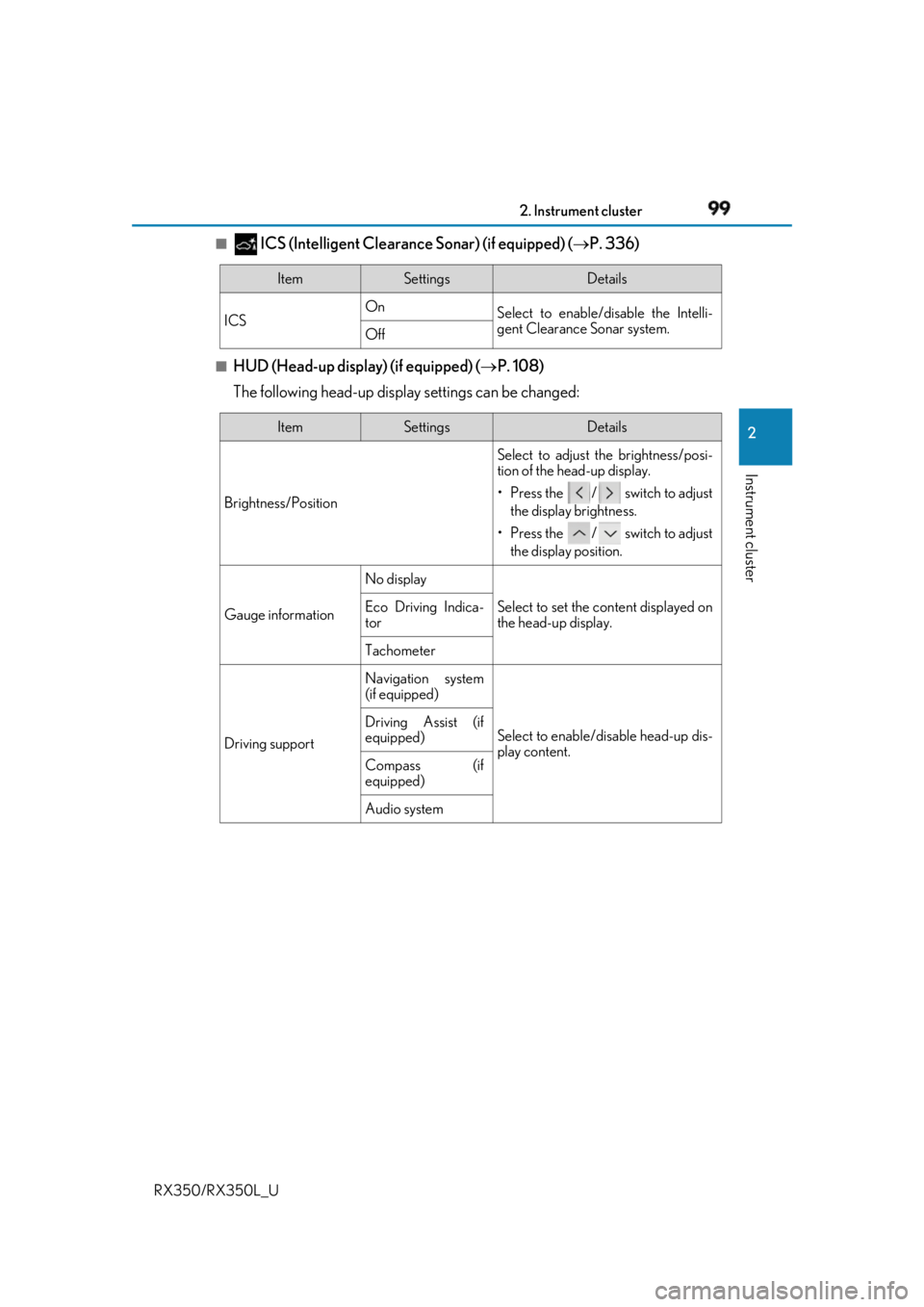
ICS (Intelligent Clearance Sonar) (if equipped) ( P. 336)■
HUD (Head-up display) (if equipped) ( P. 108)
The following head-up displa y settings can be changed:Item Settings Details
ICS On
Select to enable/disable the Intelli-
gent Clearance Sonar system.
Off
Item Settings Details
Brightness/Position Select to adjust the brightness/posi-
tion of the head-up display.
• Press the / switch to adjust
the display brightness.
• Press the / switch to adjust
the display position.
Gauge information No display
Select to set the content displayed on
the head-up display.Eco Driving Indica-
tor
Tachometer
Driving support Navigation system
(if equipped)
Select to enable/d isable head-up dis-
play content.Driving Assist (if
equipped)
Compass (if
equipped)
Audio system
Page 101 of 777
100 2. Instrument cluster
RX350/RX350L_U ■
Clock (on the multi-information display) ( P. 86)
Vehicles with a navigation system
The following clock setting can be changed:
Vehicles with a Lexus Display Audio system
The following clock settings can be changed: Press the / switch to select an it em and then press the / switch to
change the setting or adjust the time. Item Settings Details
Display mode 12-hour display
Select to set the display mode of the
clock.
24-hour display
Item Settings Details
Display mode 12-hour display
Select to set the display mode of the
clock.
24-hour display
Adjust time Select to adjust the hour/minute.