2019 LEXUS RX350 audio
[x] Cancel search: audioPage 659 of 777

658 8-2. Steps to take in an emergency
RX350/RX350L_U ■
If the malfunction indicator lamp comes on while driving
First check the following: ●
Is the fuel tank empty?
If it is, fill the fu el tank immediately.●
Is the fuel tank cap loose?
If it is, tighten it securely.
The light will go off after several driving trips.
If the light does not go off even after severa l trips, contact your Lexus dealer as soon as
possible. ■
When the tire pressure warning light comes on
Inspect the tires to check if a tire is punctured.
If a tire is punctured: P. 666
If none of the tires are punctured:
Turn the engine switch off then turn it to IGNITION ON mode. Check if the tire pressure
warning light comes on or blinks.
If the tire pressure warning light comes on
After the temperature of the tires has lowere d sufficiently, check the inflation pressure
of each tire and adjust th em to the specified level.
If the warning light does not turn off even after several minutes have elapsed, check
that the inflation pressure of each tire is at the specified level an d perform initialization.
( P. 606)
If the warning light does not turn off severa l minutes after the init ialization has been per-
formed, have the vehicle inspected by your Lexus dealer immediately.
If the tire pressure wa rning light blinks for 1 minute then stays on
There may be a malfunction in the tire pressure warnin g system. Have the vehicle
inspected by your Lexus dealer immediately. ■
The tire pressure warning light ma y come on due to natural causes
The tire pressure warning light may come on due to natural causes such as natural air
leaks and tire inflation pressure changes caus ed by temperature. In this case, adjusting
the tire inflation pressure will turn off the warning light (aft er a few minutes).■
When a tire is replaced with a spare tire
The compact spare tire is not equipped with a tire pressure warning valve and transmit-
ter. If a tire goes flat, the tire pressure warning light will not turn off even though the flat
tire has been replaced with the spare tire. Replace the spare tire with the repaired tire
and adjust the tire inflation pressure. The tire pressure warnin g light will go off after a few
minutes. ■
Conditions that the tire pressure wa rning system may not function properly
P. 609 ■
Warning buzzer
In some cases, the buzzer ma y not be heard due to being in a noisy location or audio
sound. ■
Customization
Some functions can be customized. ( P. 722)1
2
Page 690 of 777

6898-2. Steps to take in an emergency
8
When trouble arises
RX350/RX350L_U ■
Starting the engine when the battery is discharged
The engine cannot be started by push-starting. ■
To prevent battery discharge ●
Turn off the headlights and the audio system while the engine is off. ●
Turn off any unnecessary electrical componen ts when the vehicle is running at a low
speed for an extended period , such as in heavy traffic.■
When removing the battery terminals
When the battery terminals are removed, the information stored in the ECU is cleared.
Before removing the battery termin als, contact your Lexus dealer.■
Charging the battery
The electricity stored in the battery will disc harge gradually even when the vehicle is not
in use, due to natural discharge and the draini ng effects of certain electrical appliances. If
the vehicle is left for a long time, the battery may discharge, and the engine may be
unable to start. (The battery recharges automatically during driving.) ■
When the battery is removed or discharged ●
In some cases, it may not be possible to un lock the doors using the smart access system
with push-button start when the battery is discharged. Use the wireless remote control
or the mechanical key to lock or unlock the doors. ●
The engine may not start on the first attempt after the battery has recharged but will
start normally after the second attempt. This is not a malfunction. ●
The engine switch mode is memorized by the vehicle. When the battery is recon-
nected, the system will return to the mode it was in before the battery was discharged.
Before disconnecting the battery, turn the engine switch off.
If you are unsure what mode the engine switch was in before the battery discharged, be
especially careful when reconnecting the battery. ●
The power back door must be initialized. ( P. 138)■
When replacing the battery ●
Use a battery with the same case size as the previous battery and an equivalent 20
hour rate capacity (20HR) or greater.
• If the sizes differ, the battery cannot be properly secured.
• If the 20 hour rate capacity is low, even if the time period where the vehicle is not
used is a short time, the battery may discharge and the engine may not be able to
start. ●
For details, consult your Lexus dealer.
Page 723 of 777
722
RX350/RX350L_U 9-2. Customization
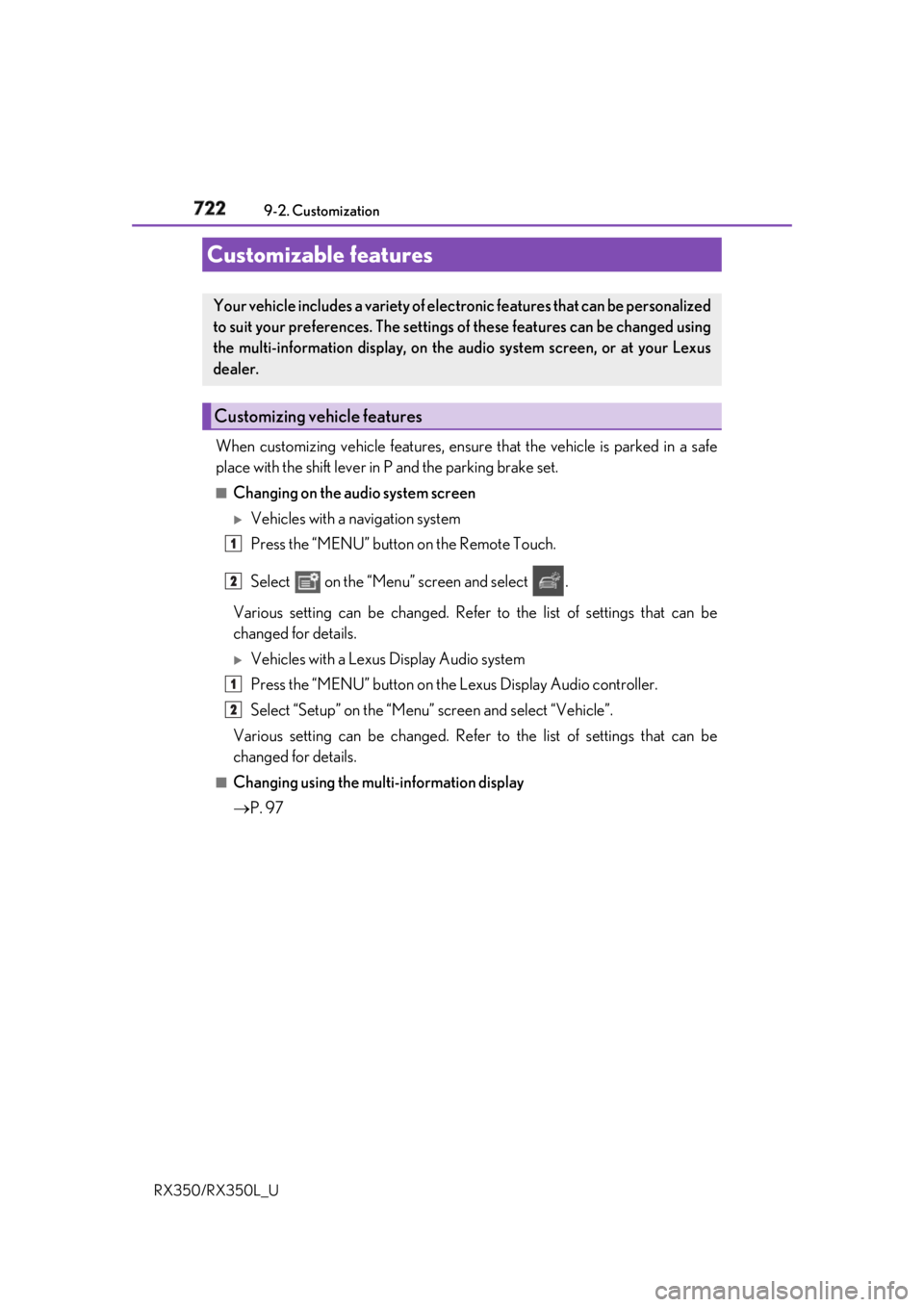
When customizing vehicle features, ensure that the vehicle is parked in a safe
place with the shift lever in P and the parking brake set.■
Changing on the audio system screen
Vehicles with a navigation system
Press the “MENU” button on the Remote Touch.
Select on the “Menu” screen and select .
Various setting can be changed. Refer to the list of settings that can be
changed for details.
Vehicles with a Lexus Display Audio system
Press the “MENU” button on the Lexus Display Audio controller.
Select “Setup” on the “Menu” screen and select “Vehicle”.
Various setting can be changed. Refer to the list of settings that can be
changed for details. ■
Changing using the multi-information display
P. 97Customizable features Your vehicle includes a variety of elec tronic features that can be personalized
to suit your preferences. The settings of these features can be changed using
the multi-information display, on the audio system screen, or at your Lexus
dealer.
Customizing vehicle features 1
2
1
2
Page 724 of 777

7239-2. Customization
9
Vehicle specifications
RX350/RX350L_U Some function settings are changed simultaneously with other functions being
customized. Contact your Lexu s dealer for further details.
Settings that can be changed on the audio system screen
Settings that can be changed by your Lexus dealer
Definition of symbols: O = Available, – =Not available ■
Gauges, meters and multi-information display ( P. 86, 90)
* 1
: The default setting varies according to countries.
* 2
:Except F SPORT modelsCustomizable Features 1
2
Function Default setting Customized setting
Language English French
O—
Spanish
Units
* 1
miles (MPG US) miles
(MPG Imperial)
O —
km (L/100 km)
km (km/ L)
Color
* 2
Color 1 Color 2
O —
Suggestion function On Off — O 1 2
Page 735 of 777
734 9-2. Customization
RX350/RX350L_U ■
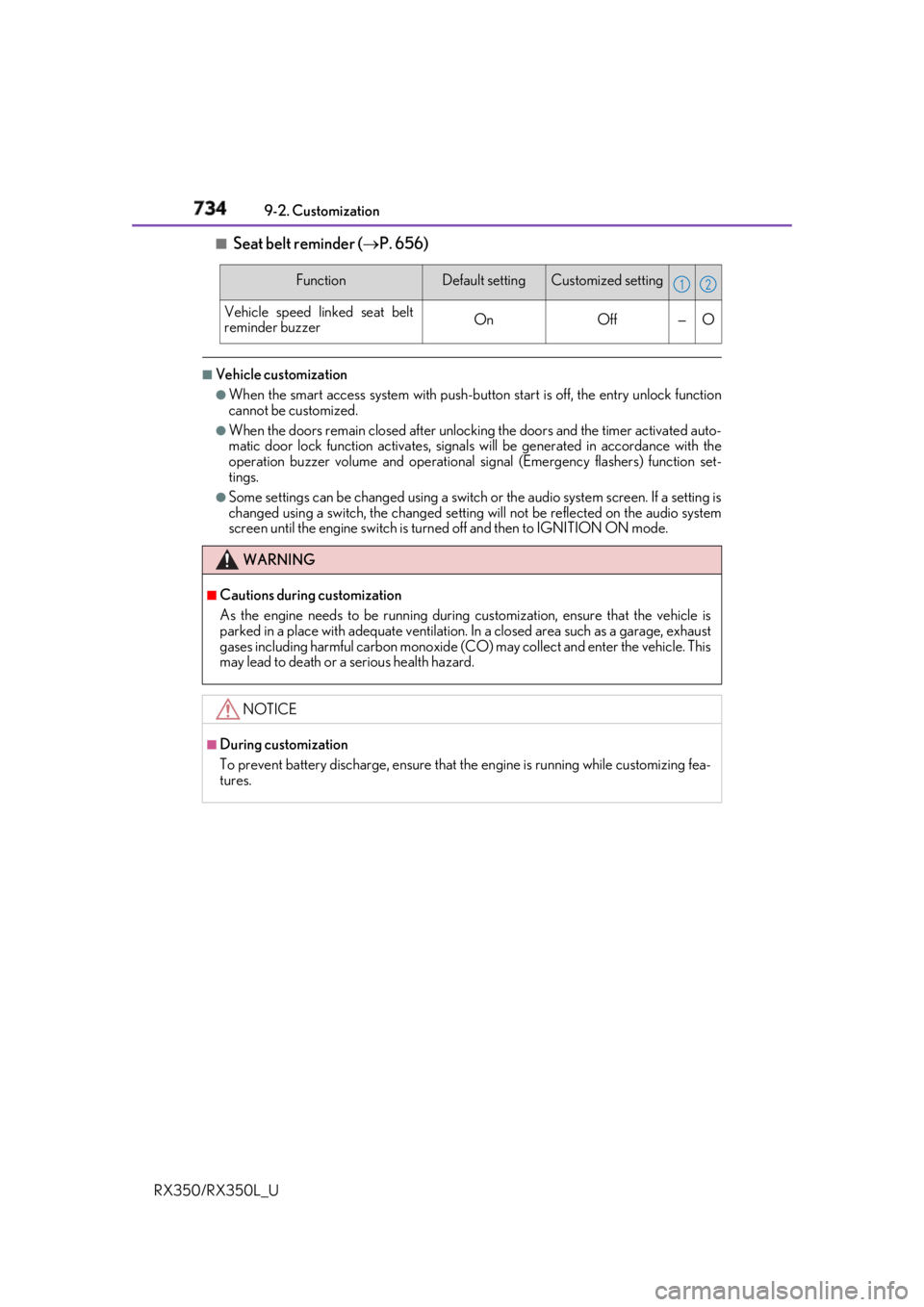
Seat belt reminder ( P. 656)■
Vehicle customization ●
When the smart access system with push-button start is off, the entry unlock function
cannot be customized. ●
When the doors remain closed after unlocking the doors and the timer activated auto-
matic door lock function activates, signals will be generated in accordance with the
operation buzzer volume and operational si gnal (Emergency flashers) function set-
tings. ●
Some settings can be changed using a switch or the audio system screen. If a setting is
changed using a switch , the changed setting will not be reflected on the audio system
screen until the engine switch is turn ed off and then to IGNITION ON mode.Function Default setting Customized setting
Vehicle speed linked seat belt
reminder buzzer On Off — O
WARNING ■
Cautions during customization
As the engine needs to be running during customization, ensure that the vehicle is
parked in a place with adequate ventilation. In a closed area such as a garage, exhaust
gases including harmful carbon monoxide (CO) may collect and enter the vehicle. This
may lead to death or a serious health hazard.
NOTICE ■
During customization
To prevent battery discharge, ensure that the engine is running while customizing fea-
tures. 1 2
Page 752 of 777

751
Index
RX350/RX350L_U What to do if...
(Troubleshooting) ............................... 752
Alphabetical index................................. 756
For vehicles with a navigation system, refer to the “NAVIGATION
SYSTEM OWNER’S MANUAL” for information regarding the equip-
ment listed below.
• Navigation system
• Audio/visual system
• Rear seat entertainment sys-
tem • Panoramic view monitor
•Lexus Enform
Page 758 of 777

757Alphabetical index
RX350/RX350L_U Alarm ............................................................. 77
All-wheel drive lock mode ................377
Anchor brackets ...................................... 57
Antenna
Radio ........................................................ 423
Smart access system
with push-button start ................... 146
Anti-lock Brake System (ABS)....... 378
Warning light ...................................... 654
Approach warning...............................308
Armrest .................................................... 555
Assist grips .............................................. 556
Audio system (with Lexus
Display Audio System) ................... 394
Antenna .................................................. 423
Audio input........................................... 403
AUX port.............................................. 403
Bluetooth ®
audio ..............................453
CD player .............................................. 427
iPod ...........................................................434
MP3/WMA disc ............................... 427
Optimal use ........................................... 413
Portable music player ...................... 442
Radio ........................................................420
Setup menu .......................................... 406
Steering wheel audio
switches .............................................. 400
USB memory ...................................... 438 Audio system
(with navigation system)
* Automatic air conditioning
system .......................................... 503, 518
Air conditioning filter ........................ 618
S-FLOW mode..................................... 511
Automatic headlight leveling
system .....................................................254
Automatic High Beam ....................... 256
Automatic light control system .......252
Automatic transmission.......... 236, 240
If the shift lever cannot be
shifted from P ....................... 239, 244
M mode .................................................. 242
Paddle shift switches.............. 241, 242
S mode.....................................................237
AUX port ................................................ 403
Auxiliary boxes ......................... 535, 540
* : Refer to the “NAVIGATION SYSTEM OWNER’S MANUAL”.
Page 759 of 777

758 Alphabetical index
RX350/RX350L_U Back door
Power back door ................................ 130
Touchless power back door ..........132
Wireless remote control ................. 130
Back-up lights
Replacing light bulbs ....................... 630
Wattage ................................................. 705
Battery
Battery checking ................................. 601
If the battery is discharged ........... 687
Preparing and checking before
winter ................................................... 384
Warning light ...................................... 654
Blind Spot Monitor (BSM)..................313
Blind Spot Monitor function ...........317
Rear Cross Traffic
Alert function ......................................321
Bluetooth ®
.............................................. 476
Audio system .......................................453
Hands-free system
(for cellular phone) ....................... 455 Bottle holders ........................................ 533
Brake
Brake Hold ...........................................250
Fluid .......................................................... 704
Parking brake .......................................247
Warning light ....................................... 654
Brake assist ............................................. 378
Brake Hold.............................................. 250
Warning light .......................................655
Break-in tips ........................................... 204
Brightness control
Instrument panel light control ........88
BSM (Blind Spot Monitor) ................. 313
Blind Spot Monitor function........... 317
Rear Cross Traffic Alert
function.................................................. 321B