Page 80 of 636

80 1-2. Theft deterrent system
RC F_U The alarm uses light and sound to give an alert when an intrusion is detected.
The alarm is triggered in the following situations when the alarm is set:●
A locked door is unlocked or opened in any way other than using the entry
function, wireless remote control or mech anical key. (The doors will lock again
automatically.) ●
The trunk is opened in any way other th an using the entry function or wireless
remote control. ●
The hood is opened.
Close the doors, trunk and hood, and
lock both side doors. The system will be
set automatically after 30 seconds. The indicator light changes from being
on to flashing when the system is set.
Do one of the following to de activate or stop the alarms:●
Unlock the doors. ●
Open the trunk using the entry func tion or wireless remote control.●
Turn the engine switch to ACCESSOR Y or IGNITION ON mode, or start
the engine. (The alarm will be deactivat ed or stopped after a few seconds.)■
System maintenance
The vehicle has a maintenance-free type alarm system. ■
Items to check before locking the vehicle
To prevent unexpected triggering of the alarm and vehicle theft, make sure of the follow-
ing: ●
Nobody is in the vehicle. ●
The windows and moon roof (if equipped) are closed before the alarm is set. ●
No valuables or other personal items are left in the vehicle.Alarm The alarm
Setting the alarm system
Deactivating or stopping the alarm
Page 81 of 636
811-2. Theft deterrent system
1
For safety and security
RC F_U ■
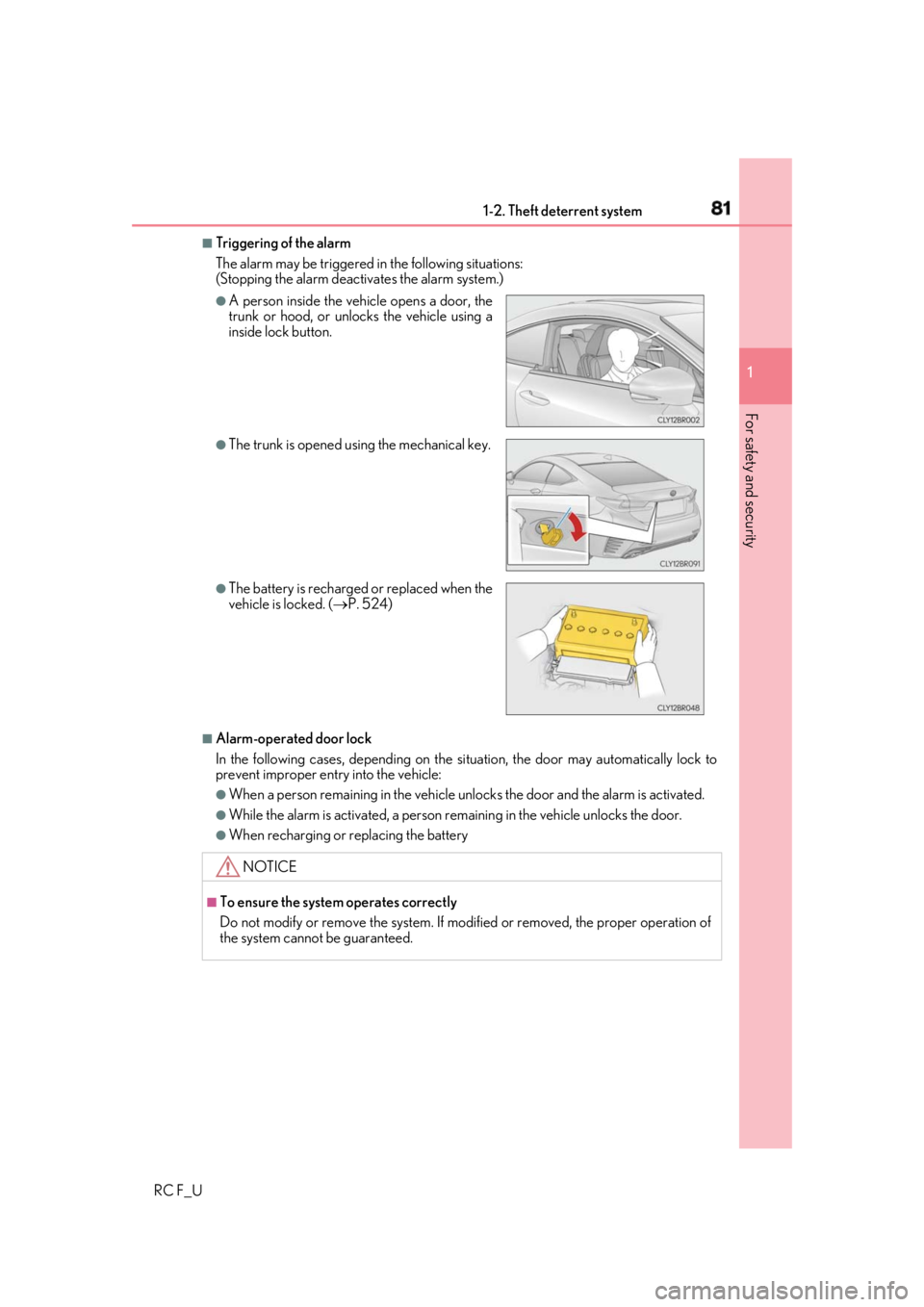
Triggering of the alarm
The alarm may be triggered in the following situations:
(Stopping the alarm deactivates the alarm system.)
■
Alarm-operated door lock
In the following cases, depending on the si tuation, the door may automatically lock to
prevent improper entry into the vehicle: ●
When a person remaining in the vehicle un locks the door and the alarm is activated.●
While the alarm is activated, a person re maining in the vehicl e unlocks the door.●
When recharging or replacing the battery ●
A person inside the vehicle opens a door, the
trunk or hood, or unlocks the vehicle using a
inside lock button. ●
The trunk is opened using the mechanical key.
●
The battery is recharged or replaced when the
vehicle is locked. ( P. 524)
NOTICE ■
To ensure the system operates correctly
Do not modify or remove the system. If mo dified or removed, the proper operation of
the system cannot be guaranteed.
Page 139 of 636
139
Operation of
each component
3
RC F_U 3-1. Key information
Keys .................................................. 140
3-2. Opening, closing and
locking the doors and
trunk
Doors ............................................... 145
Trunk .................................................. 151
Smart access system with
push-button start ...................... 156
3-3. Adjusting the seats
Front seats........................................ 161
Rear seats....................................... 164
Power easy access system/
driving position memory/
memory recall function ......... 166
Head restraints .............................. 171
3-4. Adjusting the steering
wheel and mirrors
Steering wheel ..............................174
Inside rear view mirror ..............176
Outside rear view mirrors....... 178
3-5. Opening, closing the
windows and moon roof
Power windows ........................... 182
Moon roof ...................................... 186
Page 140 of 636
140
RC F_U 3-1. Key information
The following keys are provided with the vehicle.
Electronic keys • Operating the smart access system
with push-button start ( P. 156)
• Operating the wireless remote con-
trol function
Mechanical keys
Key number plate
Card key (electronic key) (if
equipped) Operating the smart access system with
push-button start ( P. 156)
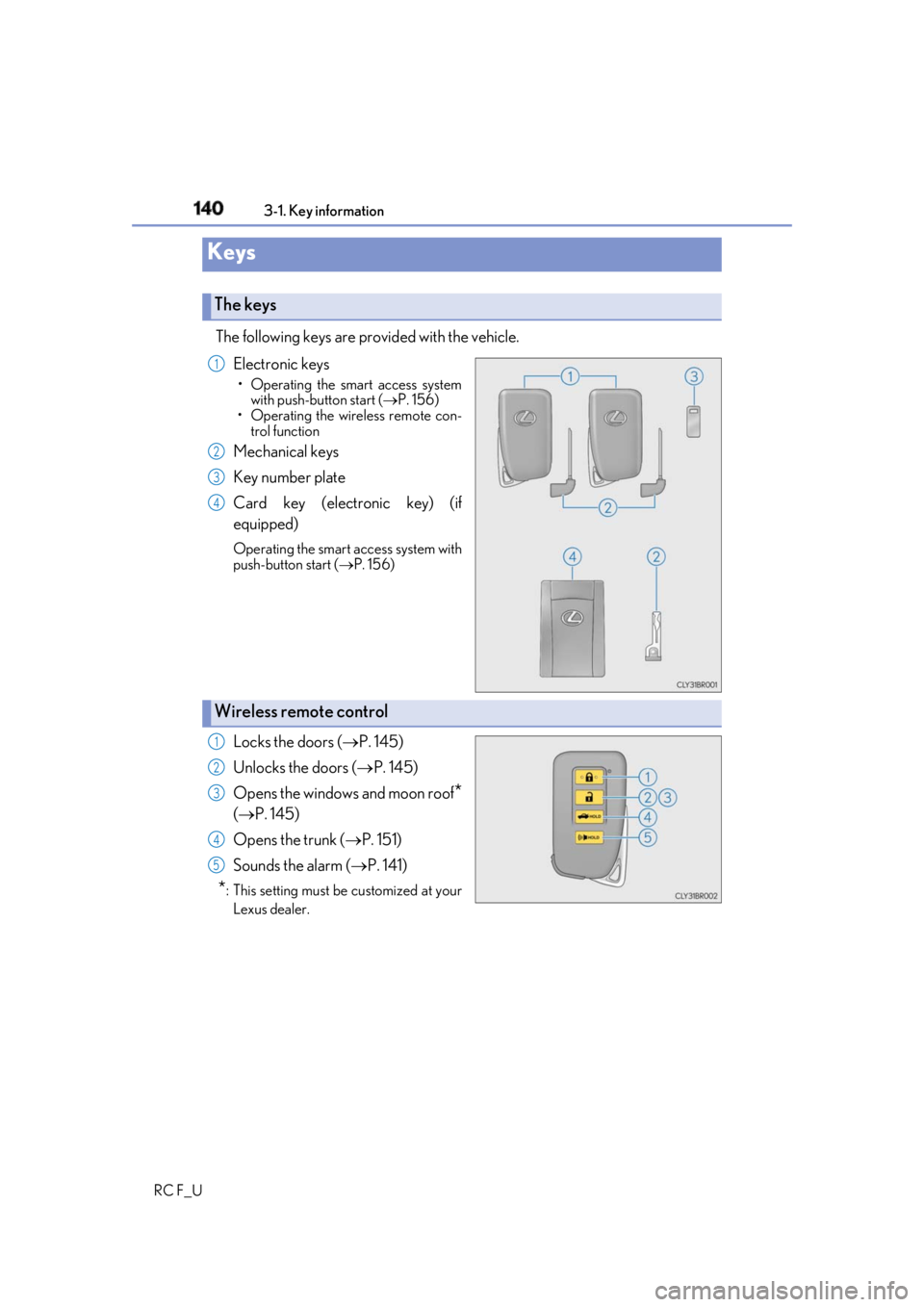
Locks the doors ( P. 145)
Unlocks the doors ( P. 145)
Opens the windows and moon roof
*( P. 145)
Opens the trunk ( P. 151)
Sounds the alarm ( P. 141)
* : This setting must be customized at your
Lexus dealer.Keys The keys 1
2
3
4
Wireless remote control 1
2
3
4
5
Page 145 of 636

145
3
Operation of each component
RC F_U 3-2. Opening, closing and locking the doors and trunk
◆ Smart access system with push-button start
Carry the electronic key to enable this function.
Grip the driver’s door handle to
unlock the door. Grip the passen-
ger’s door handle to unlock both
side doors.
* Make sure to touch the sensor on the
back of the handle.
The doors cannot be unlocked for 3
seconds after the doors are locked.
* : The door unlock settings can be
changed. ( P. 149, 569)
Touch the lock sensor (indentation on the side of the door handle) to lock
both side doors. Check that the door is securely locked.
◆ Wireless remote control
Locks both side doors Check that the door is securely
locked.
Unlocks both side doors Pressing the button unlocks the
driver’s door. Pressing the button
again within 5 seconds unlocks the
other door.
Press and hold to open the windows
and moon roof.
*
* : This setting must be custom ized at your Lexus dealer.Doors Unlocking and locking the doors from the outside 1
2
1
2
Page 146 of 636

146 3-2. Opening, closing and locking the doors and trunk
RC F_U ■
Operation signals
A buzzer sounds and the emergency flashers flash to indicate that the doors have been
locked/unlocked. (Locked: once; Unlocked: twice)
A buzzer sounds to indicate that th e windows and moon roof are operating.■
Security feature
If a door is not opened within approximately 60 seconds after the vehicle is unlocked, the
security feature automatically locks the vehicle again. ■
Welcome light illumination control
The side marker, parking, tail and license plate lights automati cally turn on at night when
the doors are unlocked using the entry function or wireless remote control if the light
switch is in the “AUTO” position. ■
When the door cannot be locked by the lock sensor on the surface of the door handle
■
Door lock buzzer
If an attempt to lock the doors is made when a door is not fully closed, a buzzer sounds
continuously for 5 seconds. Fully close the d oor to stop the buzzer, and lock the vehicle
once more. ■
Setting the alarm
Locking the doors will set the alarm system. ( P. 80)■
If the smart access system with push-button start or the wireless remote control does
not operate properly
Use the mechanical key and/or inside lock buttons to lock and unlock the doors.
( P. 518)
Replace the key battery with a new one if it is depleted. ( P. 427)Use your palm to touch the lock sensor.
Page 147 of 636
1473-2. Opening, closing and locking the doors and trunk
3
Operation of each component
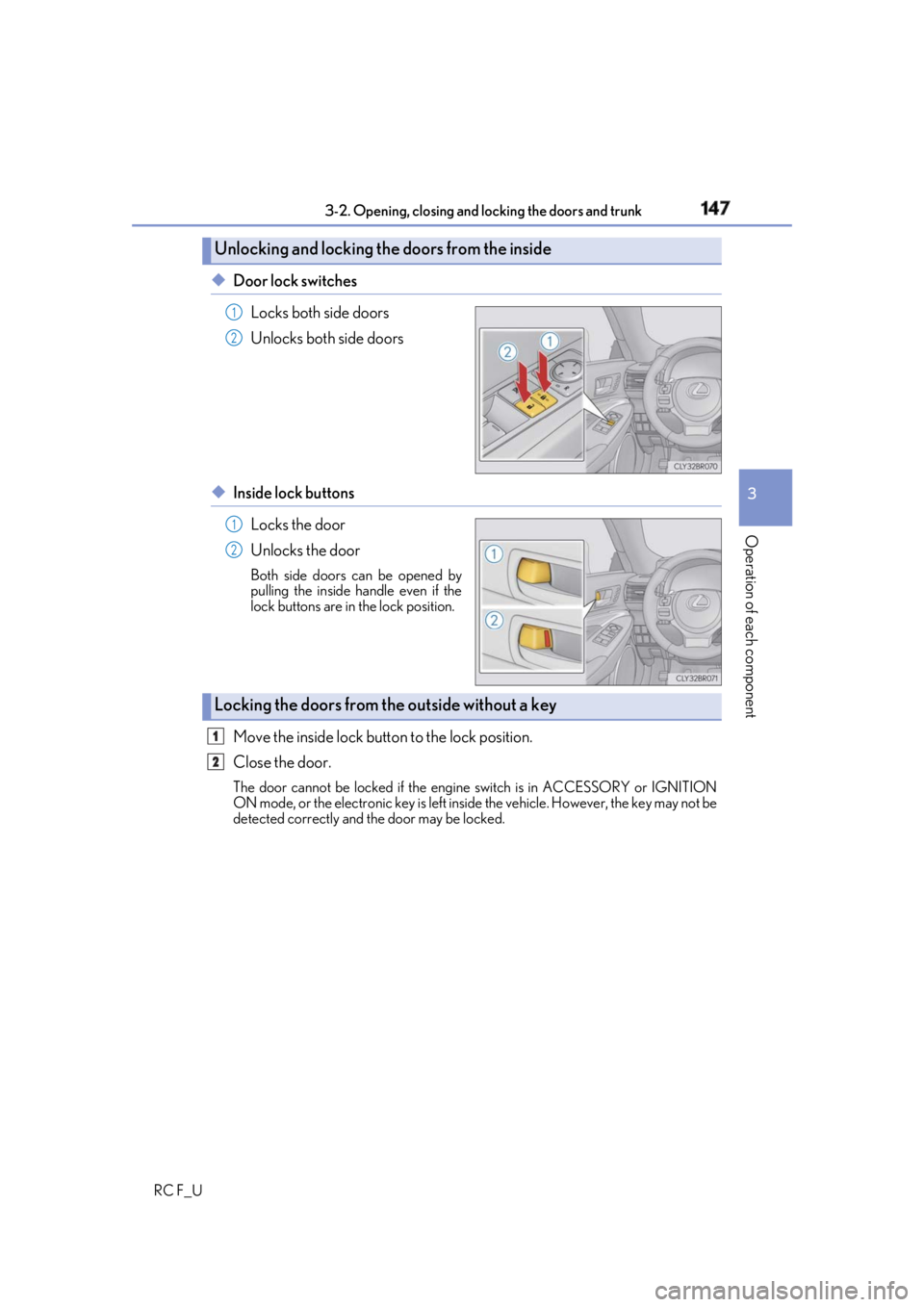
RC F_U ◆ Door lock switches
Locks both side doors
Unlocks both side doors
◆ Inside lock buttons
Locks the door
Unlocks the door Both side doors can be opened by
pulling the inside handle even if the
lock buttons are in the lock position.
Move the inside lock button to the lock position.
Close the door. The door cannot be locked if the engine switch is in ACCESSORY or IGNITION
ON mode, or the electronic key is left insi de the vehicle. However, the key may not be
detected correctly and the door may be locked.Unlocking and locking the doors from the inside 1
2
1
2
Locking the doors from the outside without a key 1
2
Page 148 of 636
148 3-2. Opening, closing and locking the doors and trunk
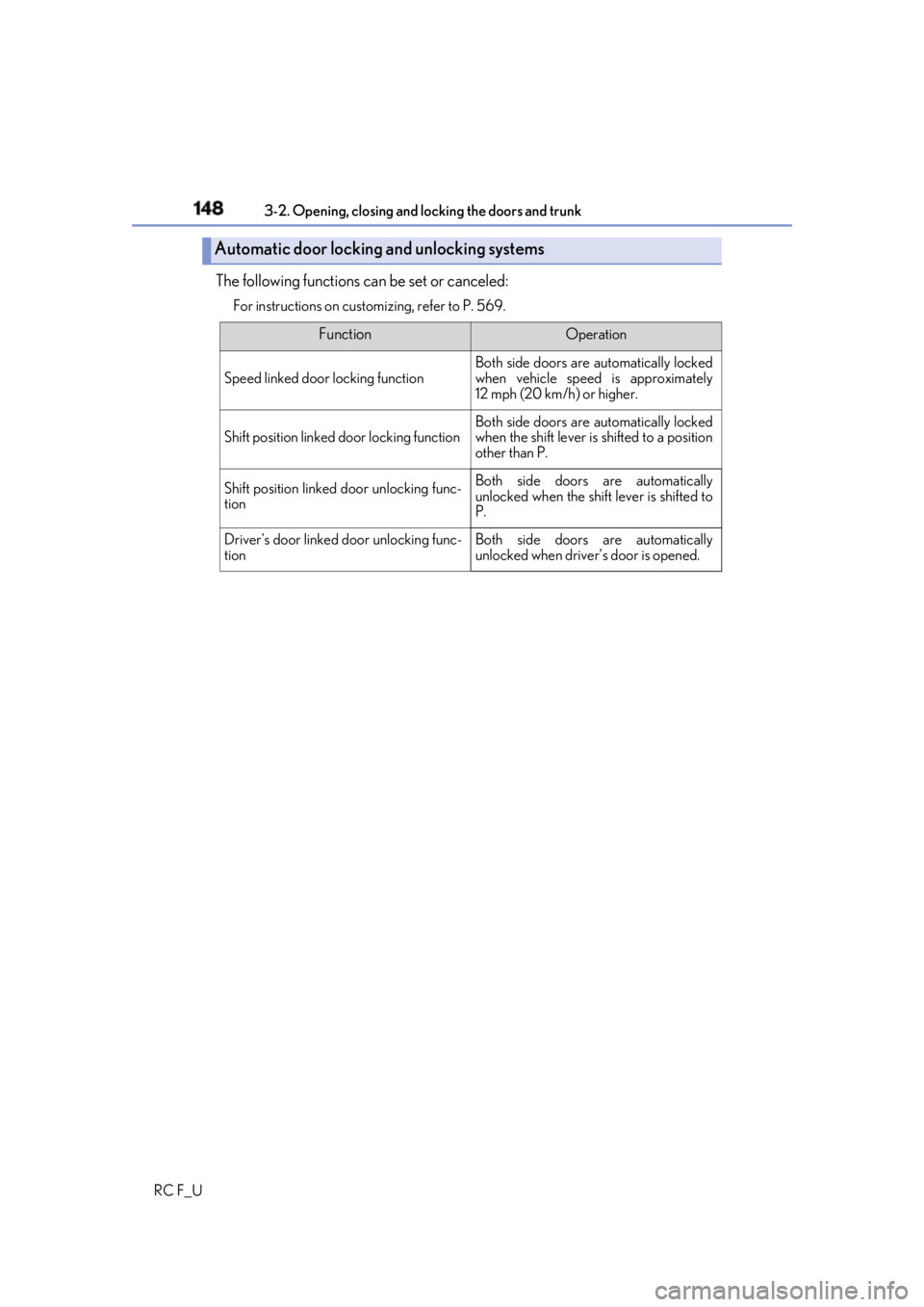
RC F_U The following functions can be set or canceled: For instructions on custom izing, refer to P. 569.
Automatic door locking and unlocking systems Function Operation
Speed linked door locking function Both side doors are automatically locked
when vehicle speed is approximately
12 mph (20 km/h) or higher.
Shift position linked door locking function Both side doors are automatically locked
when the shift lever is shifted to a position
other than P.
Shift position linked door unlocking func-
tion Both side doors are automatically
unlocked when the shift lever is shifted to
P.
Driver's door linked door unlocking func-
tion Both side doors are automatically
unlocked when driver’s door is opened.