2019 LEXUS RC350 alarm
[x] Cancel search: alarmPage 93 of 390
933-2. Opening, closing and locking the doors and trunk
RC350AWD_RC350_RC300AWD_RC30
0_OM_(U)_1810
3
Before driving
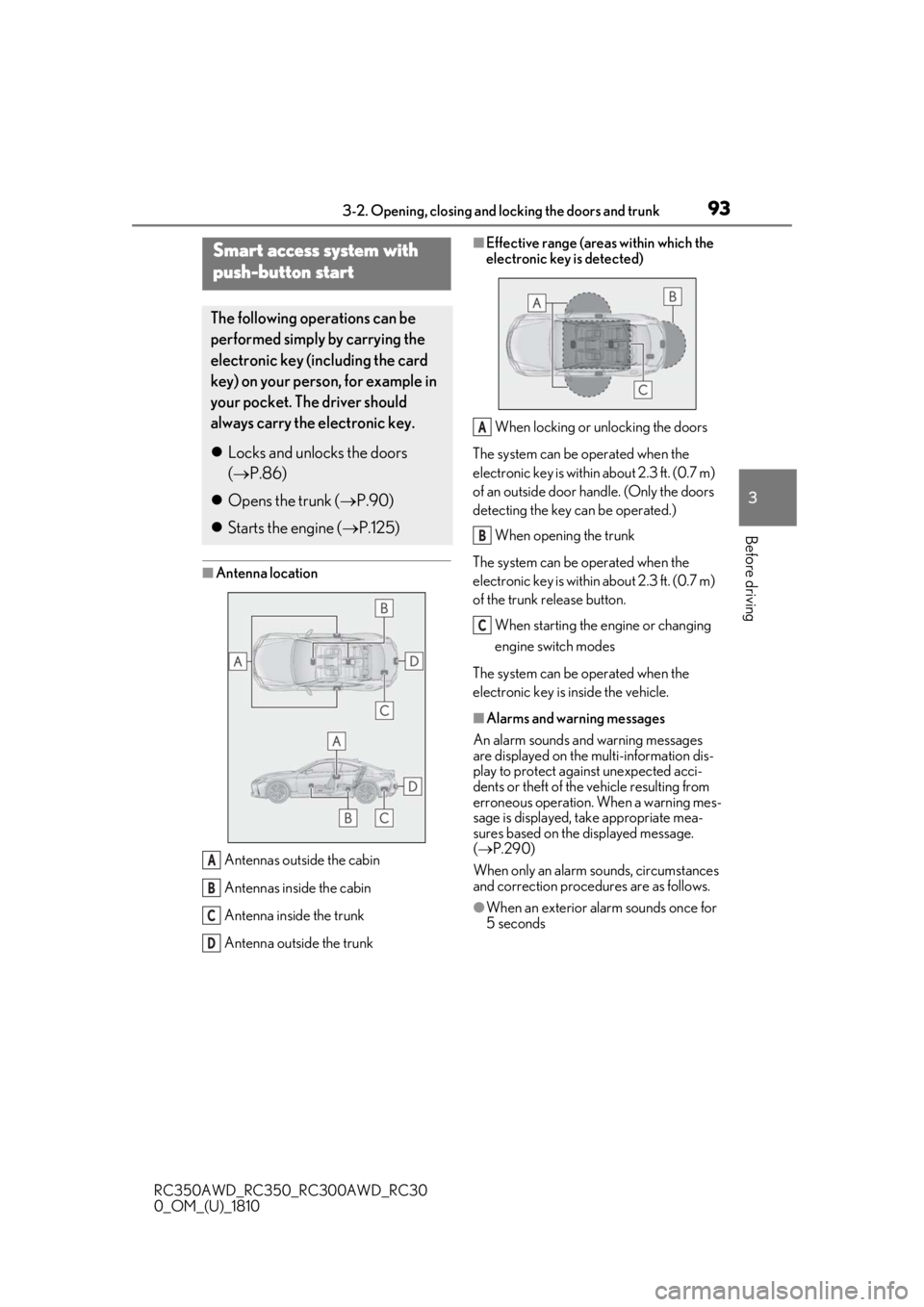
■Antenna location Antennas outside the cabin
Antennas inside the cabin
Antenna inside the trunk
Antenna outside the trunk
■Effective range (areas within which the
electronic key is detected)When locking or unlocking the doors
The system can be operated when the
electronic key is within about 2.3 ft. (0.7 m)
of an outside door handle. (Only the doors
detecting the key can be operated.)
When opening the trunk
The system can be operated when the
electronic key is within about 2.3 ft. (0.7 m)
of the trunk release button.
When starting the engine or changing
engine switch modes
The system can be operated when the
electronic key is inside the vehicle.
■Alarms and warning messages
An alarm sounds and warning messages
are displayed on the multi-information dis-
play to protect against unexpected acci-
dents or theft of the vehicle resulting from
erroneous operation. When a warning mes-
sage is displayed, take appropriate mea-
sures based on the displayed message.
( P.290)
When only an alarm sounds, circumstances
and correction procedures are as follows.
●When an exterior alarm sounds once for
5 seconds
Smart access system with
push-button start
The following operations can be
performed simply by carrying the
electronic key (including the card
key) on your person, for example in
your pocket. The driver should
always carry the electronic key.
Locks and unlocks the doors
( P.86)
Opens the trunk ( P.90)
Starts the engine ( P.125)
A
B
C
D
A
B
C
Page 94 of 390

943-2. Opening, closing and locking the doors and trunk
RC350AWD_RC350_RC300AWD_RC30
0_OM_(U)_1810
●When an interior alarm sounds continu-
ously
■Battery-saving function
The battery-saving fu nction will be acti-
vated in order to prevent the electronic key
battery and the vehicle battery from being
discharged while the vehicle is not in opera-
tion for a long time.
●In the following situations, the smart
access system with pu sh-button start may
take some time to unlock the doors.
• The electronic key has been left within approximately 6 ft. (2 m) of the outside of
the vehicle for 10 minutes or longer.
• The smart access system with push-but- ton start has not been used for 5 days or
longer.
●If the smart access system with push-but-
ton start has not been used for 14 days or longer, the doors cann
ot be unlocked at
the passenger door. In this case, take hold
of the driver’s door handle, or use the
wireless remote control or mechanical
key, to unlock the doors.
■Electronic Key Battery-Saving Function
When battery-saving mode is set, battery
depletion is minimized by stopping the elec-
tronic key from receiving radio waves.
Press twice while pressing and holding
. Confirm that the electronic key indica-
tor flashes 4 times.
While the battery-saving mode is set, the
smart access system with push-button start
cannot be used. To cancel the function,
press any of the electronic key buttons.
■Conditions affecting operation
The smart access system with push-button
start uses weak radio waves. In the following
situations, the communication between the
electronic key and the vehicle may be
affected, preventing the smart access sys-
tem with push-button start, wireless remote
control and engine immobilizer system
from operating properly.
(Ways of coping: P.304)
●When the electronic key battery is
depleted
●Near a TV tower, electric power plant,
gas station, radio stat ion, large display,
airport or other fac ility that generates
strong radio waves or electrical noise
●When carrying a portable radio, cellular
phone, cordless phone or other wireless
communication device
●When the electronic key is in contact
with, or is covered by the following metal-
lic objects
• Cards to which aluminum foil is attached
SituationCorrection
procedure
The trunk was closed
while the electronic key
was still inside the trunk
and both side doors were
locked.Retrieve the
electronic key
from the trunk
and close the
trunk lid.
An attempt was made to
lock the vehicle while a
door was open.Close both
side doors and
lock the doors
again.
SituationCorrection procedure
The engine switch was
turned to ACCESSORY
mode while the driver’s
door was open (or the
driver’s door was opened
while the engine switch
was in ACCESSORY
mode).
Turn the engine
switch off and
close the
driver’s door.
The engine switch was
turned off while the
driver’s door was open.Close the
driver’s door.
Page 95 of 390

953-2. Opening, closing and locking the doors and trunk
RC350AWD_RC350_RC300AWD_RC30
0_OM_(U)_1810
3
Before driving
• Cigarette boxes that have aluminum foil
inside
• Metallic wallets or bags
•Coins
• Hand warmers made of metal
• Media such as CDs and DVDs
●When other wireless ke ys (that emit radio
waves) are being used nearby
●When carrying the electronic key
together with the following devices that
emit radio waves
• Another vehicle’s electronic key or a wireless key that emits radio waves
• Personal computers or personal digital assistants (PDAs)
• Digital audio players
• Portable game systems
●If window tint with a metallic content or
metallic objects are attached to the rear
window
●When the electronic key is placed near a
battery charger or electronic devices
■Note for the entry function
●Even when the electronic key is within the
effective range (detection areas), the sys-
tem may not operate properly in the fol-
lowing cases:
• The electronic key is too close to the win- dow or outside door handle, near the
ground, or in a high place when the doors
are locked or unlocked.
• The electronic key is near the ground or
in a high place, or too close to the rear
bumper center when the trunk is opened.
• The electronic key is on the instrument
panel, rear package tray or floor, or in the
door pockets or glove box when the
engine is started or engine switch modes
are changed.
●Do not leave the electronic key on top of
the instrument panel or near the door
pockets when exiting the vehicle.
Depending on the radio wave reception
conditions, it may be detected by the
antenna outside the cabin and the doors
will become lockable from the outside,
possibly trapping the electronic key
inside the vehicle.
●As long as the electron ic key is within the
effective range, the doors may be locked
or unlocked by anyone. However, only the doors detecting the electronic key
can be used to unlock the vehicle.
●Even if the electronic
key is not inside the
vehicle, it may be po ssible to start the
engine if the electronic key is near the
window.
●The doors may unlock or lock if a large
amount of water splashes on the door
handle, such as in the rain or in a car
wash, when the electronic key is within
the effective range. (The doors will auto-
matically be locked after approximately
60 seconds if the doors are not opened
and closed.)
●If the wireless remote control is used to
lock the doors when the electronic key is
near the vehicle, there is a possibility that
the door may not be unlocked by the
entry function. (Use the wireless remote
control to unlock the doors.)
●Touching the door lock or unlock sensor
while wearing gloves may prevent lock or
unlock operation.
●When the lock operation is performed
using the lock sensor, recognition signals
will be shown up to two consecutive
times. After this, no recognition signals
will be given.
●If the door handle becomes wet while the
electronic key is within the effective
range, the door may lock and unlock
repeatedly. In this case, follow the follow-
ing correction procedures to wash the
vehicle:
• Place the electronic key in a location 6 ft. (2 m) or more away from the vehicle.
(Take care to ensure that the key is not
stolen.)
• Set the electronic key to battery-saving
mode to disable the smart access system
with push-button start. ( P.94)
●If the electronic key is inside the vehicle
and a door handle becomes wet during a
car wash, a message may be shown on
the multi-information display and a
buzzer will sound outside the vehicle. To
turn off the alarm, lock both side doors.
●The lock sensor may not work properly if
it comes into contact with ice, snow, mud,
etc. Clean the lock sensor and attempt to
operate it again.
Page 96 of 390

963-2. Opening, closing and locking the doors and trunk
RC350AWD_RC350_RC300AWD_RC30
0_OM_(U)_1810
●A sudden handle operation or a handle
operation immediately after entering the
effective range may prevent the doors
from being unlocked. Touch the door
unlock sensor and check that the doors
are unlocked before pulling the door
handle again.
●Unlocking the vehicle may take more
time if another electronic key is within the
effective range.
■When the vehicle is not driven for
extended periods
●To prevent theft of the vehicle, do not
leave the electronic key within 6 ft. (2 m)
of the vehicle.
●The smart access system with push-but-
ton start can be deactivated in advance.
■To operate the system properly
●Make sure to carry the electronic key
when operating the system. Do not get
the electronic key too close to the vehicle
when operating the system from the out-
side of the vehicle.
Depending on the position and holding
condition of the electronic key, the key may
not be detected correctly and the system
may not operate properly. (The alarm may
go off accidentally, or the door lock pre-
vention function may not operate.)
●Do not leave the electronic key inside the
trunk.
The key confinement prevention function
may not operate, depending on the loca-
tion of the key (close to a spare tire [if
equipped], the inside edge of the trunk),
conditions (inside a metal bag, close to
metallic objects) and the radio waves in
the surrounding area. ( P.93)
■If the smart access system with
push-button start does not operate
properly
●Locking and unlocking the doors and
opening the trunk: P.304
●Starting the engine: P.305
■Customization
Some functions can be customized.
( P.339)
■If the smart access system with
push-button start has been deactivated
in a customized setting
●Locking and unloc king the doors and
opening the trunk:
Use the wireless remote control or
mechanical key. ( P.86, 90, 304)
●Starting the engine and changing engine
switch modes: P.305
●Stopping the engine: P.126
WARNING
■Caution regarding interference with
electronic devices
●People with implantable cardiac pace-
makers, cardiac resynchronization
therapy-pacemakers or implantable
cardioverter defibrillators should keep
away from the smart access system
with push-button start antennas.
( P.93)
The radio waves may affect the opera-
tion of such devices. If necessary, the
entry function can be disabled. Ask
your Lexus dealer for details, such as
the frequency of radio waves and tim-
ing of the emitted radio waves. Then,
consult your doctor to see if you
should disable the entry function.
●Users of any electrical medical device
other than implantable cardiac pace-
makers, cardiac resynchronization
therapy-pacemakers or implantable
cardioverter defibrillators should con-
sult the manufacturer of the device for
information about its operation under
the influence of radio waves.
Radio waves could have unexpected
effects on the operation of such medi-
cal devices.
Ask your Lexus dealer for details on dis-
abling the entry function.
Page 308 of 390

3067-2. Steps to take in an emergency
RC350AWD_RC350_RC300AWD_RC30
0_OM_(U)_1810
■Stopping the engine
Shift the shift lever to P and press the engine
switch as you normally do when stopping
the engine.
■Electronic key battery
As the above procedure is a temporary
measure, it is recomme nded that the elec-
tronic key battery be replaced immediately
when the battery is depleted. ( P.265)
■Changing engine switch modes
Release the brake pedal and press the
engine switch in step 3 above.
The engine does not start and modes will be
changed each time the switch is pressed.
( P.126)
If you have a set of jumper (or booster)
cables and a second vehicle with a
12-volt battery, you can jump start your
vehicle by following the steps below.
1 Confirm that the electronic key is
being carried.
When connecting the jumper (or booster)
cables, depending on the situation, the
alarm may activate and doors locked.
( P.59)
2 Open the hood. ( P.245)
If the vehicle battery is dis-
charged
The following procedures may be
used to start the engine if the vehi-
cle’s battery is discharged.
You can also call your Lexus dealer
or a qualified repair shop.
Restarting the engine
Page 345 of 390
3438-2. Customization
RC350AWD_RC350_RC300AWD_RC30
0_OM_(U)_1810
8
Vehicle specifications
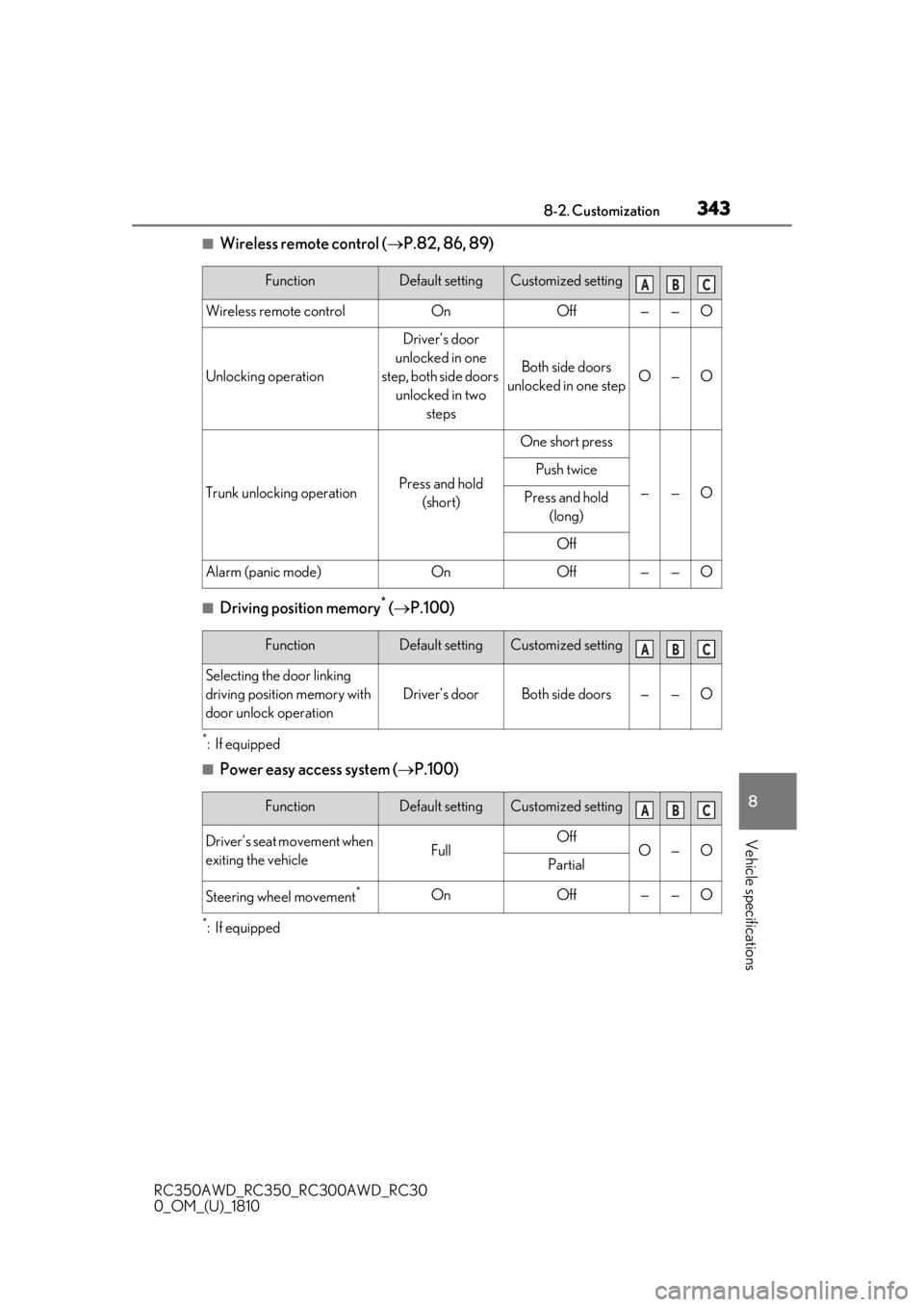
■Wireless remote control ( P.82, 86, 89)
■Driving position memory* ( P.100)
*:If equipped
■Power easy access system ( P.100)
*:If equipped
FunctionDefault settingCustomized setting
Wireless remote controlOnOff——O
Unlocking operation
Driver’s door
unlocked in one
step, both side doors unlocked in two steps
Both side doors
unlocked in one stepO—O
Trunk unlocking operationPress and hold (short)
One short press
——O
Push twice
Press and hold (long)
Off
Alarm (panic mode)OnOff——O
ABC
FunctionDefault settingCustomized setting
Selecting the door linking
driving position memory with
door unlock operation
Driver’s doorBoth side doors——O
ABC
FunctionDefault settingCustomized setting
Driver’s seat movement when
exiting the vehicleFullOffO—OPartial
Steering wheel movement*OnOff——O
ABC
Page 373 of 390

3711-1. What to do if... (Troubleshooting)
RC350AWD_RC350_RC300AWD_RC30
0_OM_(U)_1810371What to do if... (Troubleshooting)
Is the engine switch in IGNITION
ON mode?
If you cannot release the shift lever by
depressing the brake pedal with the engine
switch in IGNITION ON mode. (
P.129)
It is locked automatically to prevent
theft of the vehicle. ( P.125)
Is the window lock switch pressed?
The power window except for the one at
the driver’s seat cannot be operated if the
window lock switch is pressed. (
P.111)
The auto power off function will be
operated if the vehicle is left in
ACCESSORY or IGNITION ON
mode (the engine is not running) for
a period of time. ( P.127)
The seat belt reminder light is flash-
ing
Are the driver and the front passenger
wearing the seat belts? (
P.286)
The parking brake indicator is on
Is the parking brake released? ( P.134)
Depending on the situation, other
types of warning buzzer may also
sound. (P.282, 290)
Did anyone inside the vehicle open
a door during setting the alarm?
The sensor detects it and the alarm sounds.
(
P.58)
Do one of the following to deactivate
or stop the alarm:
Unlock the doors.
Open the trunk using the entry
function or wireless remote control.
Turn the engine switch to ACCES-
SORY or IGNITION ON mode, or
start the engine.
Is the message displayed on the
multi-information display?
Check the message on the multi-informa-
tion display. (
P.290)
When a warning light turns on or a
warning message is displayed, refer
to P.282, 290.
The steering wheel cannot be
turned after the engine is
stopped
The windows do not open or
close by operating the power
window switches
The engine switch is turned off
automatically
A warning buzzer sounds during
driving
An alarm is activated and the
horn sounds
A warning buzzer sounds when
leaving the vehicle
A warning light turns on or a
warning message is displayed
Page 375 of 390

3731-1. What to do if... (Troubleshooting)
RC350AWD_RC350_RC300AWD_RC30
0_OM_(U)_1810373Alphabetical Index
Alphabetical Index
A
A/C Air conditioning filter ............................... 264
Automatic air conditioning system ...205
Micro dust and pollen filter...................209
ABS (Anti-lock Brake System)................192 Warning light ............................................... 283
Active Sound Control (ASC) ..................134
Adaptive Variable Suspension System 192
Air conditioning filter ................................. 264
Air conditioning system Air conditioning filter ............................... 264
Automatic air conditioning system ...205
Micro dust and pollen filter...................209
Airbags Airbag operating conditions................... 30
Airbag precautions for your child .........32
Correct driving posture .............................23
Curtain shield airbag operating condi-tions .................................................................. 30
Curtain shield airbag precautions ........32
Front passenger occupant classification system ............................................................. 36
General airbag precautions ....................32
Locations of airbags.................................... 28
Modification and disposal of airbags . 35
Side airbag operating conditions ......... 30
Side airbag precautions .............................32
Side and curtain shield airbags operating conditions...................................................... 30
Side and curtain shield airbags precau- tions ...................................................................32
SRS airbags ..................................................... 28
SRS warning light ...................................... 283
Alarm ................................................................... 58 Warning buzzer ......................................... 282
Anchor brackets ............................................... 41
Antennas (smart access system with push-button start)........................................ 93
Anti-lock Brake System (ABS)................192 Warning light ............................................... 283 Approach warning........................................ 173
ASC (Active Sound Control) ..................134
Assist grips ..................................................... 220
Audio system-linked display ...................... 75
Automatic air conditioning system ...... 205
Automatic headlight leveling system .... 137
Automatic High Beam ............................... 138
Automatic light control system................136
Automatic transmission ..............................128
M mode ............................................................. 131
Paddle shift switches ........................ 130, 131
Snow mode.................................................... 130
Average fuel economy..................................72
Average vehicle speed .................................72
B
Back-up light Replacing light bulbs ................................270
Wattage ..........................................................326
Battery Battery checking ........................................253
If the battery is discharged ................... 306
Preparing and checking before winter.....196
Warning light ...............................................282
Boost gauge.......................................................74
Brake Fluid.....................................................................321
Parking brake ................................................134
Warning light ...............................................282
Brake assist ......................................................192
Break-in tips...................................................... 117
Brightness control Instrument panel light control................... 71
C
Card key ............................................................ 82
CareAluminum wheels ...................................... 232
Exterior............................................................ 232
Interior .............................................................235