2019 LEXUS NX300H steering
[x] Cancel search: steeringPage 165 of 460

1654-1. Before driving
LEXUS NX300h Owners Manu-
al_USA_M78287_en
4
Driving
Your vehicle will handle differently
when towing a trailer. Help to avoid an
accident, death or serious injury, keep
the following in mind when towing:
Speed limits for towing a trailer vary
by state or province. Do not exceed
the posted towing speed limit.
Lexus recommends that the vehicle-
trailer speed limit is 65 mph (104
km/h) on a flat, straight, dry road.
Do not exceed this limit, the posted
towing speed limit or the speed limit
for your trailer as set forth in your
trailer owner’s manual, whichever is
lowest. Instability of the towing vehi-
cle-trailer combination (trailer
sway) increases as speed increases.
Exceeding speed limits may cause
loss of control.
Before starting out, check the trailer
lights, tires and the vehicle-trailer
connections. Recheck after driving
a short distance.
Practice turning, stopping and
reversing with the trailer attached in
an area away from traffic until you
become accustomed to the feel of
the vehicle-trailer combination.
Reversing with a tr ailer attached is
difficult and requires practice. Grip
the bottom of the steering wheel
and move your hand to the left to
move the trailer to the left. Move
your hand to the right to move the
trailer to right. (This is generally
opposite to reversing without a
trailer attached.) Avoid sharp or prolonged turning. Have someone
guide you when reversing to reduce
the risk of an accident.
As stopping distance is increased
when towing a trailer, vehicle-to
vehicle distance should be
increased. For each 10 mph (16 km/
h) of speed, allow at least one vehi-
cle and trailer length.
Avoid sudden braking as you may
skid, resulting in the trailer jackknif-
ing and a loss of vehicle control. This
is especially true on wet or slippery
surfaces.
Avoid jerky starts or sudden accel-
eration.
Avoid jerky steering and sharp
turns, and slow down before making
turn.
Note that when making a turn, the
trailer wheels will be closer than the
vehicle wheels to the inside of the
turn. Compensate by making a
wider than normal turning radius.
Slow down before making a turn, in
cross winds, on wet or slippery sur-
faces, etc.
Increasing vehicle speed can desta-
bilize the trailer.
Take care when passing other vehi-
cles. Passing requires considerable
distance. After pass ing a vehicle, do
not forget the length of your trailer,
and be sure you have plenty of room
before changing lanes.
To maintain engine braking effi-
ciency and charging system perfor-
mance when using engine braking,
Trailer towing tips
Page 168 of 460

1684-2. Driving procedures
LEXUS NX300h Owners Manu-
al_USA_M78287_en
4-2.Driving procedures
1Check that the parking brake is set.
2 Check that the shift lever is in P.
3 Firmly depress the brake pedal.
and a message will be displayed on the
multi-information display.
If it is not displayed, the hybrid system can-
not be started.
4 Press the power switch shortly and
firmly.
When operating the power switch, one
short, firm press is enough.
It is not necessary to press and hold the
switch.
If the “READY” indicator turns on, the
hybrid system will operate normally.
Continue depressing the brake pedal until
the “READY” indicator is illuminated.
The hybrid system can be started from any
power switch mode.
5Check that the “READY” indicator
is illuminated.
The vehicle will not move when the
“READY” indicator is off.
■If the hybrid system does not start
●The immobilizer system may not have
been deactivated. ( P.69)
Contact your Lexus dealer.
●Check that the shift leve r is securely set in
P. The hybrid system may not start if the
shift lever is displaced out of P. “To Start
Vehicle, Put Shift Lever into P” will be dis-
played on the multi-information display.
●The smart access system with push-but-
ton start may not be operating prop-
erly.( P.390)
■When the ambient temperature is low,
such as during winter driving conditions
When starting the hybrid system, the flash-
ing time of the “READY” indicator may be
long. Leave the vehicle as it is until the
“READY” indicator is steady on, as steady
means the vehicle is able to move.
■Sounds and vibrations specific to a
hybrid vehicle
P.63
■Electronic key battery depletion
P.100
■Conditions affecting operation
P.121
■Note for the entry function
P.122
■Steering lock function
●After turning the power switch off and
opening and closing the doors, the steer-
ing wheel will be lock ed due to the steer-
ing lock function. Operating the power
switch again automatically cancels the
steering lock.
●When the steering lock cannot be
released, “Steering Wheel Lock Press
Power Switch while Turning Wheel” will
be displayed on the multi-information dis-
play.
Power (ignition) switch
Performing the following opera-
tions when carryin g the electronic
key on your person starts the hybrid
system or changes power switch
modes.
Starting the hybrid system
Page 169 of 460

1694-2. Driving procedures
LEXUS NX300h Owners Manu-
al_USA_M78287_en
4
Driving
Check that the shift leve r is in P. Press the
power switch while turning the steering
wheel left and right.
●To prevent the steering lock motor from
overheating, operation of the motor may
be suspended if the hybrid system is
turned on and off repeatedly in a short
period of time. In this case, refrain from
operating the hybrid system. After about
10 seconds, the stee ring lock motor will
resume functioning.
■If “Smart Access System Malfunction
See Owner’s Manual” is displayed on
the multi-inform ation display
The system may be malfunctioning. Have
the vehicle inspected by your Lexus dealer
immediately.
■If the “READY” indicator does not come
on
In the event that the “READY” indicator
does not come on even after performing
the proper procedures for starting the vehi-
cle, contact your Lexus dealer immediately.
■If the hybrid system is malfunctioning
P.67
■Electronic key battery
P.349
■Operation of the power switch
●If the switch is not pressed shortly and
firmly, the power switch mode may not
change or the hybrid system may not
start.
●If attempting to restart the hybrid system
immediately after turning the power
switch off, the hybrid system may not start
in some cases. After turning the power
switch off, please wait a few seconds
before restarting the hybrid system.
■Customizable functions
P.423
1 Stop the vehicle completely.
2 Set the parking brake ( P.178),
and shift the shift lever to P
( P.173).
3 Press the power switch.
WARNING
■When starting the hybrid system
Always start the hybrid system while sit-
ting in the driver’s seat. Do not depress
the accelerator pedal while starting the
hybrid system under any circumstances.
Doing so may cause an accident result-
ing in death or serious injury.
■Caution while driving
If hybrid system failure occurs while the
vehicle is moving, do not lock or open the
doors until the vehicle reaches a safe and
complete stop. The steering lock func-
tion will activate and this may lead to an
accident, resulting in death or serious
injury.
NOTICE
■When starting the hybrid system
If the hybrid system becomes difficult to
start, have your vehicle checked by your
Lexus dealer immediately.
NOTICE
■Symptoms indicating a malfunction
with the power switch
If the power switch seems to be operat-
ing somewhat differently than usual, such
as the switch sticking slightly, there may
be a malfunction. Contact your Lexus
dealer immediately.
Stopping the hybrid system
Page 170 of 460
1704-2. Driving procedures
LEXUS NX300h Owners Manu-
al_USA_M78287_en
4Release the brake pedal and check
that the display on the instrument
cluster is off.
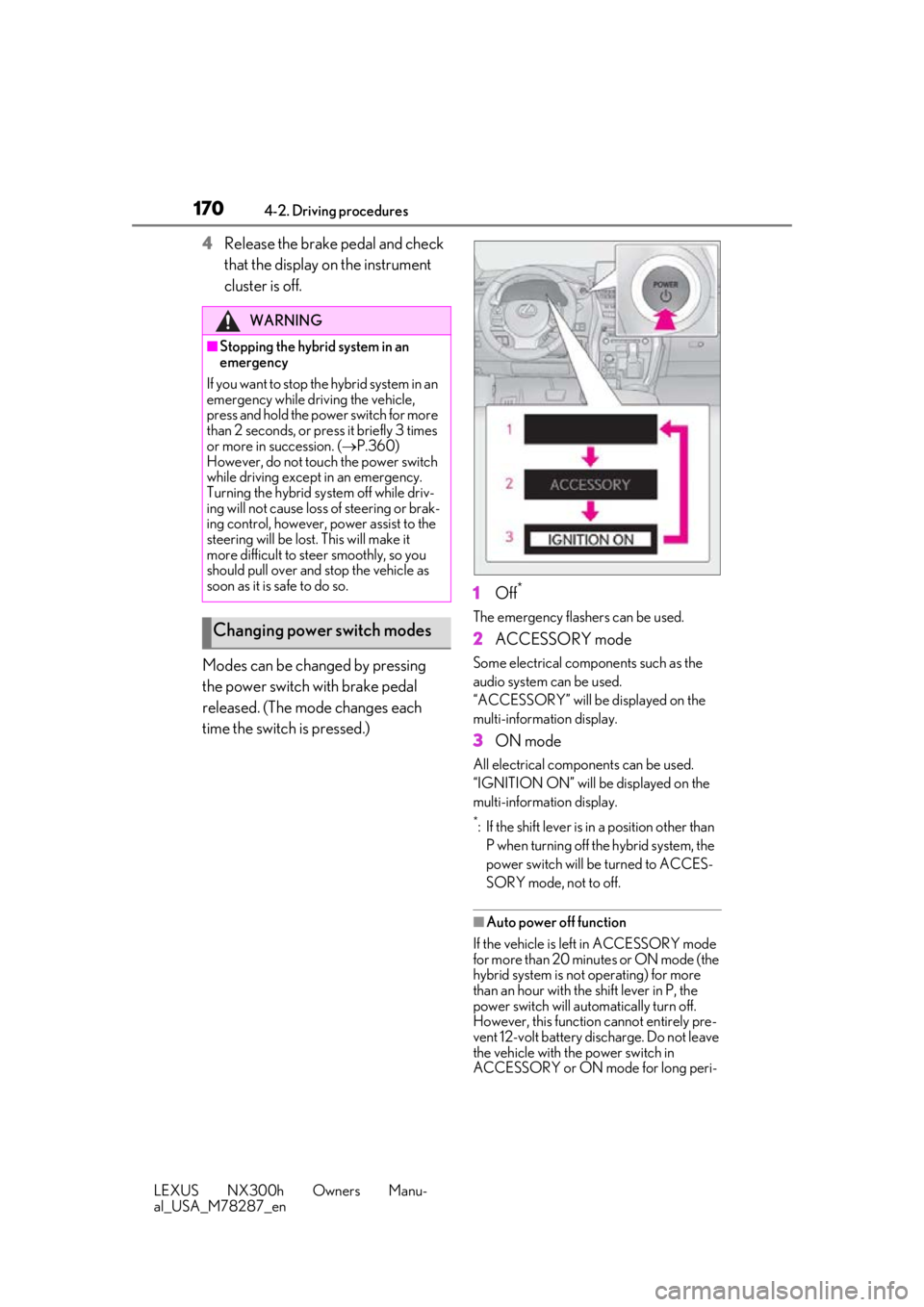
Modes can be changed by pressing
the power switch with brake pedal
released. (The mode changes each
time the switch is pressed.) 1
Off
*
The emergency flashers can be used.
2ACCESSORY mode
Some electrical components such as the
audio system can be used.
“ACCESSORY” will be displayed on the
multi-information display.
3ON mode
All electrical components can be used.
“IGNITION ON” will be displayed on the
multi-information display.
*: If the shift lever is in a position other than
P when turning off the hybrid system, the
power switch will be turned to ACCES-
SORY mode, not to off.
■Auto power off function
If the vehicle is left in ACCESSORY mode
for more than 20 minutes or ON mode (the
hybrid system is not operating) for more
than an hour with the shift lever in P, the
power switch will automatically turn off.
However, this function cannot entirely pre-
vent 12-volt battery discharge. Do not leave
the vehicle with the power switch in
ACCESSORY or ON mode for long peri-
WARNING
■Stopping the hybrid system in an
emergency
If you want to stop the hybrid system in an
emergency while driving the vehicle,
press and hold the power switch for more
than 2 seconds, or press it briefly 3 times
or more in succession. ( P.360)
However, do not touch the power switch
while driving except in an emergency.
Turning the hybrid sy stem off while driv-
ing will not cause loss of steering or brak-
ing control, however, power assist to the
steering will be lost. This will make it
more difficult to st eer smoothly, so you
should pull over and stop the vehicle as
soon as it is safe to do so.
Changing power switch modes
Page 184 of 460

1844-3. Operating the lights and wipers
LEXUS NX300h Owners Manu-
al_USA_M78287_enWhen any of the following are performed,
the 12-volt battery-saving function is can-
celed once and then reactivated. All the
lights will turn off automatically 20 minutes
after the 12-volt battery-saving function has
been reactivated:
●When the headlight switch is operated
●When a door is opened or closed
■Customization
Settings (e.g. light sens or sensitivity) can be
changed. (Customizable features: P.421)
1 With the headlights on, push the
lever away from you to turn on the
high beams.
Pull the lever toward you to the center
position to turn the high beams off.
2Pull the lever toward you and
release it to flash the high beams
once.
You can flash the high beams with the
headlights on or off.
When the following conditions are met,
while the headlights (low beam) are on,
the cornering lights will additionally
turn on and light up the direction of
movement for the vehicle. This is to
ensure excellent visibility when either
driving at intersections or parking at
night.
The steering wheel is operated
The turn signal lever is operated
The shift lever is in R
■Cornering light control
●However, when vehicle speed is 25 mph
(40 km/h) or above, the cornering lights
do not turn on.
●After the lights remain illuminated for 30
minutes, they automatically turn off.
AFS (Adaptive Front-lighting System)
secures excellent visibility at intersec-
tions and on curves by automatically
adjusting the direction of the light axis
of the headlights according to vehicle
speed and the degree of the tire’s angle
as controlled by steering input.
AFS operates at speeds of 6 mph (10 km/
h) or higher.
NOTICE
■To prevent 12-volt battery discharge
Do not leave the lights on longer than
necessary when the hy brid system is off.
Turning on the high beam head-
lights
Cornering lights (if equipped)
AFS (Adaptive Front-lighting
System) (if equipped)
Page 197 of 460

1974-5. Using the driving support systems
LEXUS NX300h Owners Manu-
al_USA_M78287_en
4
Driving
4-5.Using the driving support systems
■PCS (Pre-Collision System)
P.202
■LDA (Lane Departure Alert with
steering control)
P.209
■Automatic High Beam
P.185
■Dynamic radar cruise control with
full-speed range
P.217
The pre-collision system is equipped with a sophisticated computer that will
record certain data, such as:
• Accelerator status
•Brake status
• Vehicle speed
• Operation status of the pre-collision
system functions
• Information (such as the distance and relative speed between your
vehicle and the vehicle ahead or
other objects)
• Images from the camera sensor (available only when the pre-colli-
sion braking function or the pre-col-
lision brake assist function was
operating)
The pre-collision system does not
record conversations, sounds or
images of the inside of the vehicle.
Data usage
Lexus may use the data recorded in this
computer to diagnose malfunctions, con-
duct research and development, and
improve quality.
Lexus will not disclose the recorded data to
a third party except:
• With the consent of the vehicle owner or
with the consent of the lessee if the vehi-
cle is leased
• In response to an official request by the police, a court of law or a government
agency
• For use by Lexus in a lawsuit
• For research purposes where the data is not tied to a specific vehicle or vehicle
owner
Recorded images can be erased
using a specialized device.
The image recording function can be dis-
Lexus Safety System+
The Lexus Safety System+ consists
of the following drive assist systems
and contributes to a safe and com-
fortable driving experience:
Drive assist systems of Lexus
Safety System+
WARNING
■Lexus Safety System+
The Lexus Safety System+ is designed to
operate under the assumption that the
driver will drive safely, and is designed to
help reduce the impact to the occupants
and the vehicle in the case of a collision
or assist the driver in normal driving con-
ditions.
As there is a limit to the degree of recog-
nition accuracy and control performance
that this system can provide, do not
overly rely on this system. The driver is
always responsible for paying attention
to the vehicle’s surro undings and driving
safely.
Vehicle data recording
Page 203 of 460

2034-5. Using the driving support systems
LEXUS NX300h Owners Manu-
al_USA_M78287_en
4
Driving
WARNING
●Although this system is designed to
help avoid a collision or help reduce
the impact of the coll ision, its effective-
ness may change according to various
conditions, therefore the system may
not always be able to achieve the same
level of performance.
Read the following conditions care-
fully. Do not overly rely on this system
and always drive carefully.
• Conditions under which the system may operate even if there is no possi-
bility of a collision: P.206
• Conditions under which the system may not operate properly: P.207
●Do not attempt to test the operation of
the pre-collision system yourself, as the
system may not operate properly, pos-
sibly leading to an accident.
■Pre-collision braking
●When the pre-collision braking func-
tion is operating, a large amount of
braking force will be applied.
●If the vehicle is stopped by the opera-
tion of the pre-collision braking func-
tion, the pre-collision braking function
operation will be canceled after
approximately 2 seco nds. Depress the
brake pedal as necessary.
●The pre-collision braking function may
not operate if certain operations are
performed by the driver. If the acceler-
ator pedal is being depressed strongly
or the steering wheel is being turned,
the system may determine that the
driver is taking evasive action and pos-
sibly prevent the pre-collision braking
function from operating.
●In some situations, while the pre-colli-
sion braking function is operating,
operation of the function may be can-
celed if the accelerator pedal is
depressed strongly or the steering
wheel is turned and the system deter-
mines that the driver is taking evasive
action.
●If the brake pedal is being depressed,
the system may determine that the
driver is taking evasive action and pos-
sibly delay the operat ion timing of the
pre-collision braking function.
■When to disable the pre-collision sys-
tem
In the following situations, disable the
system, as it may not operate properly,
possibly leading to an accident resulting
in death or serious injury:
●When the vehicle is being towed
●When your vehicle is towing another
vehicle
●When transporting the vehicle via
truck, boat, train or similar means of
transportation
●When the vehicle is raised on a lift with
the hybrid system on and the tires are
allowed to rotate freely
●When inspecting the vehicle using a
drum tester such as a chassis dyna-
mometer or speedometer tester, or
when using an on vehicle wheel bal-
ancer
●When a strong impact is applied to the
front bumper or front grille, due to an
accident or other reasons
●If the vehicle cannot be driven in a sta-
ble manner, such as when the vehicle
has been in an accid ent or is malfunc-
tioning
●When the vehicle is driven in a sporty
manner or off-road
●When the tires are not properly
inflated
●When the tires are very worn
●When tires of a size other than speci-
fied are installed
●When tire chains are installed
Page 205 of 460

2054-5. Using the driving support systems
LEXUS NX300h Owners Manu-
al_USA_M78287_en
4
Driving
1 Far
The warning will begin to operate earlier
than with the default timing.
2Middle
This is the default setting.
3Near
The warning will begin to operate later
than with the default timing.
■Operational conditions
The pre-collision system is enabled and the
system determines that the possibility of a
frontal collision with a vehicle or pedestrian
is high.
Each function is operat ional at the following
speeds:
●Pre-collision warning:
• Vehicle speed is be tween approximately
7 and 110 mph (10 and 180 km/h). (For
detecting a pedestrian, vehicle speed is
between approximately 7 and 50 mph
[10 and 80 km/h].)
• The relative speed between your vehicle
and the vehicle or pedestrian ahead is
approximately 7 mph (10 km/h) or more.
●Pre-collision brake assist:
• Vehicle speed is be tween approximately
20 and 110 mph (30 and 180 km/h). (For
detecting a pedestrian, vehicle speed is
between approximately 20 and 50 mph
[30 and 80 km/h].)
• The relative speed between your vehicle and the vehicle or pedestrian ahead is
approximately 20 mph (30 km/h) or
more.
●Pre-collision braking:
• Vehicle speed is between approximately
7 and 110 mph (10 and 180 km/h). (For
detecting a pedestrian, vehicle speed is
between approximately 7 and 50 mph
[10 and 80 km/h].)
• The relative speed between your vehicle and the vehicle or pedestrian ahead is
approximately 7 mph (10 km/h) or more.
The system may not operate in the following
situations:
●If a 12-volt battery terminal has been dis-
connected and reconnected and then the
vehicle has not been driven for a certain
amount of time
●If the shift lever is in R
●If VSC is disabled (only the pre-collision
warning function wi ll be operational)
■Pedestrian detection function
The pre-collision system detects pedestri-
ans based on the size, profile, and motion of
a detected object. However, a pedestrian
may not be detected depending on the sur-
rounding brightness and the motion, pos-
ture, and angle of the detected object,
preventing the system from operating prop-
erly. ( P.207)
■Cancelation of the pre-collision braking
If either of the follo wing occur while the
pre-collision braking function is operating, it
will be canceled:
●The accelerator pedal is depressed
strongly.
●The steering wheel is turned sharply or
abruptly.