2019 LEXUS LS500H lock
[x] Cancel search: lockPage 171 of 523
1714-2. Driving procedures
LS500h_OM_(U)_1809
4
Driving
■If the 12-volt battery is discharged
The hybrid system cannot be started using
the smart access system with push-button
start. Refer to P.445 to restart the hybrid
system.
■Electronic key battery depletion
P.108
■Conditions affe cting operation
P.125
■Notes for the entry function
P.125
■Steering lock function
●After turning the power switch off and
opening and closing the doors, the steer-
ing wheel will be lock ed due to the steer-
ing lock function. Operating the power
switch again automatically cancels the
steering lock.
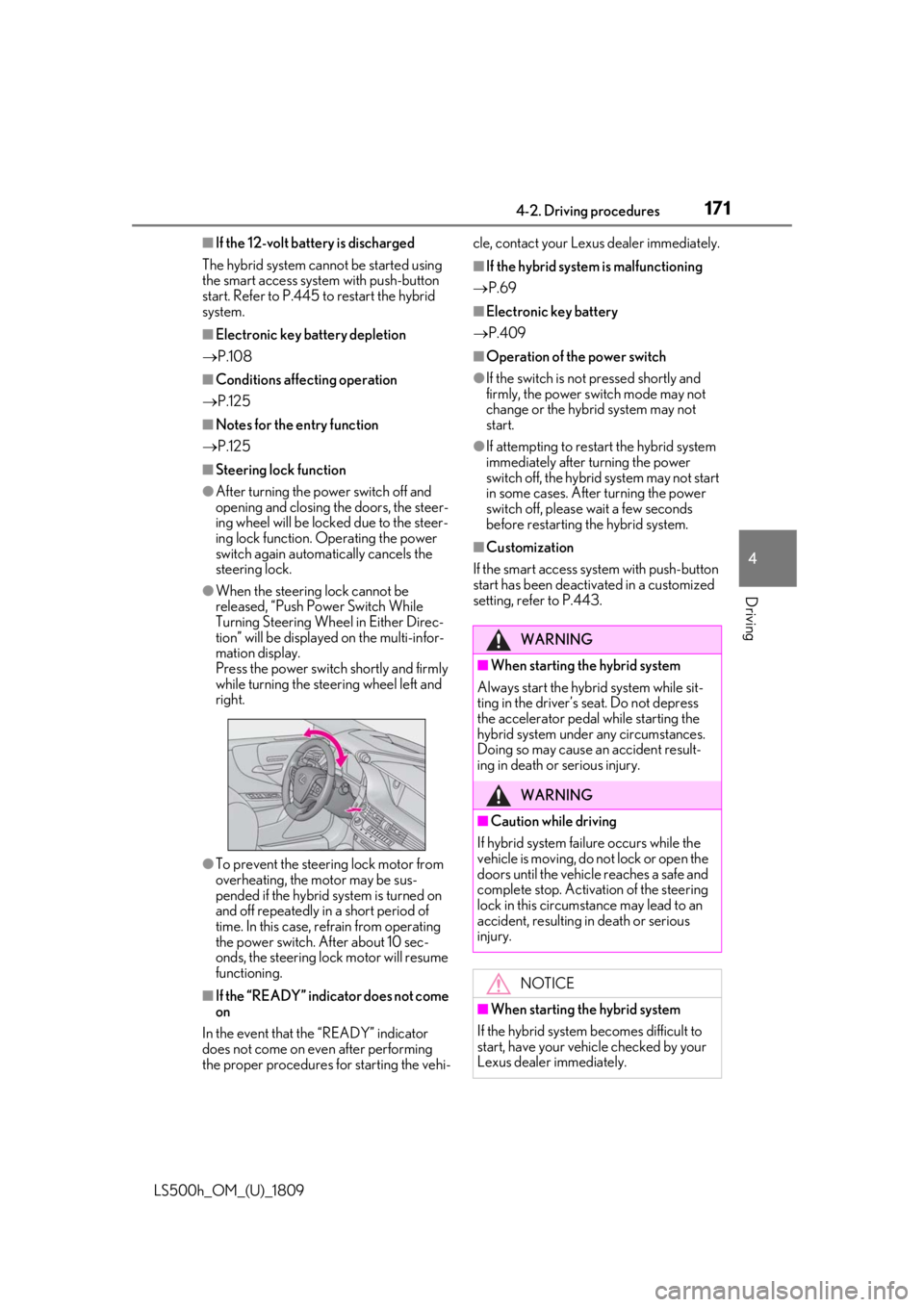
●When the steering lock cannot be
released, “Push Power Switch While
Turning Steering Whee l in Either Direc-
tion” will be displayed on the multi-infor-
mation display.
Press the power switch shortly and firmly
while turning the steering wheel left and
right.
●To prevent the steering lock motor from
overheating, the motor may be sus-
pended if the hybrid system is turned on
and off repeatedly in a short period of
time. In this case, refrain from operating
the power switch. After about 10 sec-
onds, the steering lock motor will resume
functioning.
■If the “READY” indicator does not come
on
In the event that the “READY” indicator
does not come on even after performing
the proper procedures for starting the vehi- cle, contact your Lexus dealer immediately.
■If the hybrid system
is malfunctioning
P.69
■Electronic key battery
P.409
■Operation of the power switch
●If the switch is no t pressed shortly and
firmly, the power switch mode may not
change or the hybrid system may not
start.
●If attempting to restart the hybrid system
immediately after turning the power
switch off, the hybrid system may not start
in some cases. After turning the power
switch off, please wait a few seconds
before restarting the hybrid system.
■Customization
If the smart access system with push-button
start has been deactivated in a customized
setting, refer to P.443.
WARNING
■When starting the hybrid system
Always start the hybrid system while sit-
ting in the driver’s seat. Do not depress
the accelerator pedal while starting the
hybrid system under any circumstances.
Doing so may cause an accident result-
ing in death or serious injury.
WARNING
■Caution while driving
If hybrid system failure occurs while the
vehicle is moving, do not lock or open the
doors until the vehicle reaches a safe and
complete stop. Activation of the steering
lock in this circumstance may lead to an
accident, resulting in death or serious
injury.
NOTICE
■When starting the hybrid system
If the hybrid system becomes difficult to
start, have your vehicle checked by your
Lexus dealer immediately.
Page 188 of 523

1884-3. Operating the lights and wipers
LS500h_OM_(U)_1809The sensor may not function properly if an
object is placed on th
e sensor, or anything
that blocks the sensor is affixed to the wind-
shield.
Doing so interferes with the sensor detect-
ing the level of ambient light and may cause
the automatic headlight system to malfunc-
tion.
■Automatic light off system
●When the headlights are on: The head-
lights and tail lights turn off 30 seconds
after the driver’s door is opened and
closed if the power switch is turned to
ACCESSORY mode or turned off. (The
lights turn off immediately if on the
key is pressed after all the doors are
closed.)
●When only the tail lights are on: The tail
lights turn off automatically if the power
switch is turned to ACCESSORY mode
or turned off and the driver’s door is
opened.
To turn the lights on again, turn the power
switch to ON mode, or turn the light switch
off once and then back to or .
■Light reminder buzzer
A buzzer sounds when the power switch is
turned off or turned to ACCESSORY
mode and the driver’s door is opened while
the lights are turned on.
■Automatic headlight leveling system
The level of the headlights is automatically
adjusted according to the number of pas-
sengers and the loading condition of the
vehicle to ensure that the headlights do not
interfere with other road users.
■Windshield wiper linked headlight illu-
mination
When driving during daytime with the
headlight switch turned to , if the wind-
shield wipers are used, the headlights will
turn on automatically after several seconds
to help enhance the visibility of your vehicle.
■12-volt battery-saving function
In order to prevent the 12-volt battery of the
vehicle from discharging, if the headlights
and/or tail lights are on when the power switch is turned off the 12-volt battery sav-
ing function will operate and automatically
turn off all the lights
after approximately 20
minutes. When the power switch is turned
to ON mode, the 12-volt battery-saving
function will be disabled.
When any of the following are performed,
the 12-volt battery-saving function is can-
celed once and then reactivated. All the
lights will turn off automatically 20 minutes
after the 12-volt battery-saving function has
been reactivated:
●When the headlight switch is operated
●When a door is opened or closed
■Welcome light illumination control
The parking lights and tail lights automati-
cally turn on at night when the doors are
unlocked using the entr y function or wire-
less remote control if the light switch is in
the position.
■Customization
Some functions can be customized.
( P.479)
1 With the headlights on, push the
lever away from you to turn on the
high beams.
NOTICE
■To prevent 12-volt battery discharge
Do not leave the lights on longer than
necessary when the hy brid system is off.
Turning on the high beam head-
lights
Page 194 of 523

1944-3. Operating the lights and wipers
LS500h_OM_(U)_1809
●If the wiper is turned to AUTO mode
while the power switch is in ON mode,
the wipers will operate once to show that
AUTO mode is activated.
●If the temperature of the raindrop sensor
is 185°F (85°C) or higher, or 5°F
(-15°C) or lower, automatic operation
may not occur. In this case, operate the
wipers in any mode other than AUTO
mode.
■If no windshield washer fluid sprays
Check that the washer nozzles are not
blocked if there is wash er fluid in the wind-
shield washer fluid reservoir.
■Front door opening linked windshield
wiper stop function
When is selected and the windshield
wipers are operating, if a front door is
opened while the vehicle is stopped and the
P shift position is sele cted, operation of the
windshield wipers w ill be stopped to pre-
vent anyone near the vehicle from being
sprayed by water from the wipers. When
the front door is closed, wiper operation will
resume.
■When stopping hybrid system in an
emergency while driving
If the windshield wipers are operating when
hybrid system is stop ped, the windshield
wipers will operate in high speed operation.
After the vehicle is stopped, operation will
return to normal when the power switch is turned to ON mode, or operation will stop
when the driver’s door is opened.
■Outside rear view mirror defogger acti-
vation linked to windshield wiper opera-
tion
The outside rear view mirror defoggers
automatically turn on when you operate the
windshield wipers.
The outside rear view mirror defoggers
automatically turn off approximately 15
minutes after the wipers stop.
For details about the outside rear view mir-
ror defoggers: P.324
WARNING
■Caution regarding the use of wind-
shield wipers in AUTO mode
The windshield wipers may operate
unexpectedly if the sensor is touched or
the windshield is subj ect to vibration in
AUTO mode. Take care that your fingers
or anything else do not become caught
in the windshield wipers.
■Caution regarding the use of washer
fluid
When it is cold, do not use the washer
fluid until the windshield becomes warm.
The fluid may freeze on the windshield
and cause low visibility. This may lead to
an accident, resulting in death or serious
injury.
NOTICE
■When there is no washer fluid spray
from the nozzle
Damage to the washer fluid pump may
be caused if the lever is pulled toward
you and held continually.
■When a nozzle becomes blocked
In this case, contact your Lexus dealer.
Do not try to clear it with a pin or other
object. The nozzle will be damaged.
Page 214 of 523

2144-5. Using the driving support systems
LS500h_OM_(U)_1809
WARNING
■Pre-collision braking
●When the pre-collision braking func-
tion is operating, a large amount of
braking force will be applied.
●If the vehicle is stopped by the opera-
tion of the pre-collision braking func-
tion, the pre-collision braking function
operation will be canceled after
approximately 2 seco nds. Depress the
brake pedal as necessary.
●The pre-collision braking function may
not operate if certain operations are
performed by the driver. If the acceler-
ator pedal is being depressed strongly
or the steering wheel is being turned,
the system may determine that the
driver is taking evasive action and pos-
sibly prevent the pre-collision braking
function from operating.
●In some situations, while the pre-colli-
sion braking function is operating,
operation of the function may be can-
celed if the accelerator pedal is
depressed strongly or the steering
wheel is turned and the system deter-
mines that the driver is taking evasive
action.
●If the brake pedal is being depressed,
the system may determine that the
driver is taking evasive action and pos-
sibly delay the operation timing of the
pre-collision braking function.
■Active steering assist
●The steering wheel may turn automati-
cally when active steering assist is
operating.
●As active steering assist operation will
be canceled when the system deter-
mines that a collision has been
avoided, operate the steering wheel as
necessary.
●In the following situations, the system
may determine that th e driver is taking
evasive action. In this case, the active
steering assist may not operate or may
be canceled.
• If the accelerator pedal is being depressed strongly or the steering
wheel is being operat ed. In this case
the system may determine that the
driver is taking evasive action and the
pre-collision braking may not operate.
• In some situations, while the active steering assist is operating, operation
of the function may be canceled if the
accelerator pedal is depressed
strongly or the steering wheel is turned
and the system determines that the
driver is taking evasive action.
• When the active steering assist is operating, if the stee ring wheel is held
firmly or is operated in the opposite
direction to that which the system is
generating torque, the function may be
canceled.
• If the brake pedal is depressed, the sys- tem may determine that the driver is
taking evasive action and the active
steering assist operation may be
delayed.
■Pre-collision seat belts with comfort
function
If the pre-collision se at belts have oper-
ated and the seat belts are locked in a
retracted position, immediately stop the
vehicle in a safe place, release and
retract the seat belts to unlock them and
then fasten them again.
Also, if a seat belt ca n be loosened, it can
be unlocked by slightly retracting it with-
out releasing it.
■When to disable the pre-collision sys-
tem
In the following situations, disable the
system, as it may not operate properly,
possibly leading to an accident resulting
in death or serious injury:
●When the vehicle is being towed
Page 221 of 523

2214-5. Using the driving support systems
LS500h_OM_(U)_1809
4
Driving
• If a vehicle ahead has extremely high ground clearance
• If a vehicle ahead is carrying a load which protrudes past its rear bumper
• If a vehicle ahead is irregularly shaped,
such as a tractor or side car
• If a vehicle ahead is a child sized bicycle, a bicycle that is carrying a large load, a
bicycle ridden by more than one person,
or a uniquely shaped bicycle (bicycle with
a child seat, tandem bicycle, etc.)
• If a pedestrian/or the riding height of a bicyclist ahead is shorter than approxi-
mately 3.2 ft. (1 m) or taller than approxi-
mately 6.5 ft. (2 m)
• If a pedestrian/bicyclist is wearing over- sized clothing (a rain coat, long skirt,
etc.), making their silhouette obscure
• If a pedestrian is bending forward or squatting or bicyclist is bending forward
• If a pedestrian/bicyclist is moving fast
• If a pedestrian is pushing a stroller, wheel- chair, bicycle or other vehicle
• When driving in incl ement weather such
as heavy rain, fog, snow or a sandstorm
• When driving through steam or smoke
• When the surrounding area is dim, such
as at dawn or dusk, or while at night or in
a tunnel, making a vehicle, pedestrian or
bicyclist appear to be nearly the same
color as its surroundings
• When driving in a place where the sur- rounding brightness changes suddenly,
such as at the entrance or exit of a tunnel
• When driving in a lo cation where there are many objects which reflect radar,
such as a tunnel or parking garage
• After the hybrid system has started the
vehicle has not been driven for a certain
amount of time
• While making a left/r ight turn and for a
few seconds after making a left/right turn
• While driving on a curve and for a few seconds after driving on a curve
• If your vehicle is skidding
• If the front of the vehicle is raised or low- ered
• If the wheels are misaligned
• If a wiper blade is blocking the front cam- era
• The vehicle is being driven at extremely high speeds.
• When driving on a hill
• If the radar sensor or front camera is mis- aligned
• If the headlights are misaligned
• When approaching a guardrail at a wide or narrow angle
• When a vehicle approaches your vehicle from the front left or right side while your
vehicle is entering an intersection with
poor visibility
• When a vehicle approaches your vehicle from the rear left or right side
• When a vehicle approaches the side of your vehicle at a shallow angle
• When driving on a road with a grade that
changes sharply (sha rp incline/decline)
• Pedestrians and bicyclists which are not illuminated by the head lights at night, in a
tunnel, etc.
• Pedestrians and bicyclists which change speed or direction abruptly
• Pedestrians and bicyclists which suddenly
emerge from behind a vehicle or large
object
• Pedestrians and bicyclists which are
extremely close to the side of the vehicle
(outside rear view mirror, etc.)
Page 230 of 523

2304-5. Using the driving support systems
LS500h_OM_(U)_1809• If the wheels are misaligned
• If a wiper blade is blocking the front cam-
era
• The vehicle is being driven at extremely high speeds
• When driving on a hill
• If the radar sensor or front camera is mis-
aligned
●In some situations such as the following,
sufficient braking force may not be
obtained, preventing the system from
performing properly:
• If the braking functions cannot operate to their full extent, such as when the brake
parts are extremely cold, extremely hot,
or wet
• If the vehicle is not properly maintained
(brakes or tires are excessively worn,
improper tire inflation pressure, etc.)
• When the vehicle is being driven on a
gravel road or other slippery surface
■If VSC is disabled
●If VSC is disabled ( P.303), the
pre-collision brake assist and pre-colli-
sion braking functions are also disabled.
●The PCS warning light will turn on and
“VSC Turned Off Pre-Collision Brake
System Unavailable” will be displayed on
the multi-information display.
*: If equipped
When the system detects a vehicle
approaching from the left or right in
front of your vehicle when approaching
an intersection, a notification will be
displayed on the head-up display and
panoramic view monitor
*.
*: Refer to “NAVIGATION AND MULTI-
MEDIA SYSTEM OWNER’S MAN-
UAL”.
When the system determines that your
vehicle may be about to enter an inter-
section even though a vehicle is
approaching from the left or right in
front of your vehicle, a buzzer will
sound and a message will be displayed
on the multi-information display to
urge you to depress the brake pedal.
Head-up display
FCTA (Front Cross Traffic
Alert)*
When approaching an intersection
at low speed, the radar sensors on
the front side of the vehicle can
detect approaching vehicles to the
left and right of the front of the vehi-
cle. In this case, the head-up display
is used to inform the driver of
detected vehicles.
FCTA system functions
Page 299 of 523
2994-5. Using the driving support systems
LS500h_OM_(U)_1809
4
Driving
sound may be heard. This does not indicate
a malfunction.
■When the accumulator tank pressure is
low
When the accumulator tank pressure is low,
the air suspension compressor and valves
may operate repeatedly even though the
vehicle height is not being changed. This
does not indicate a malfunction.
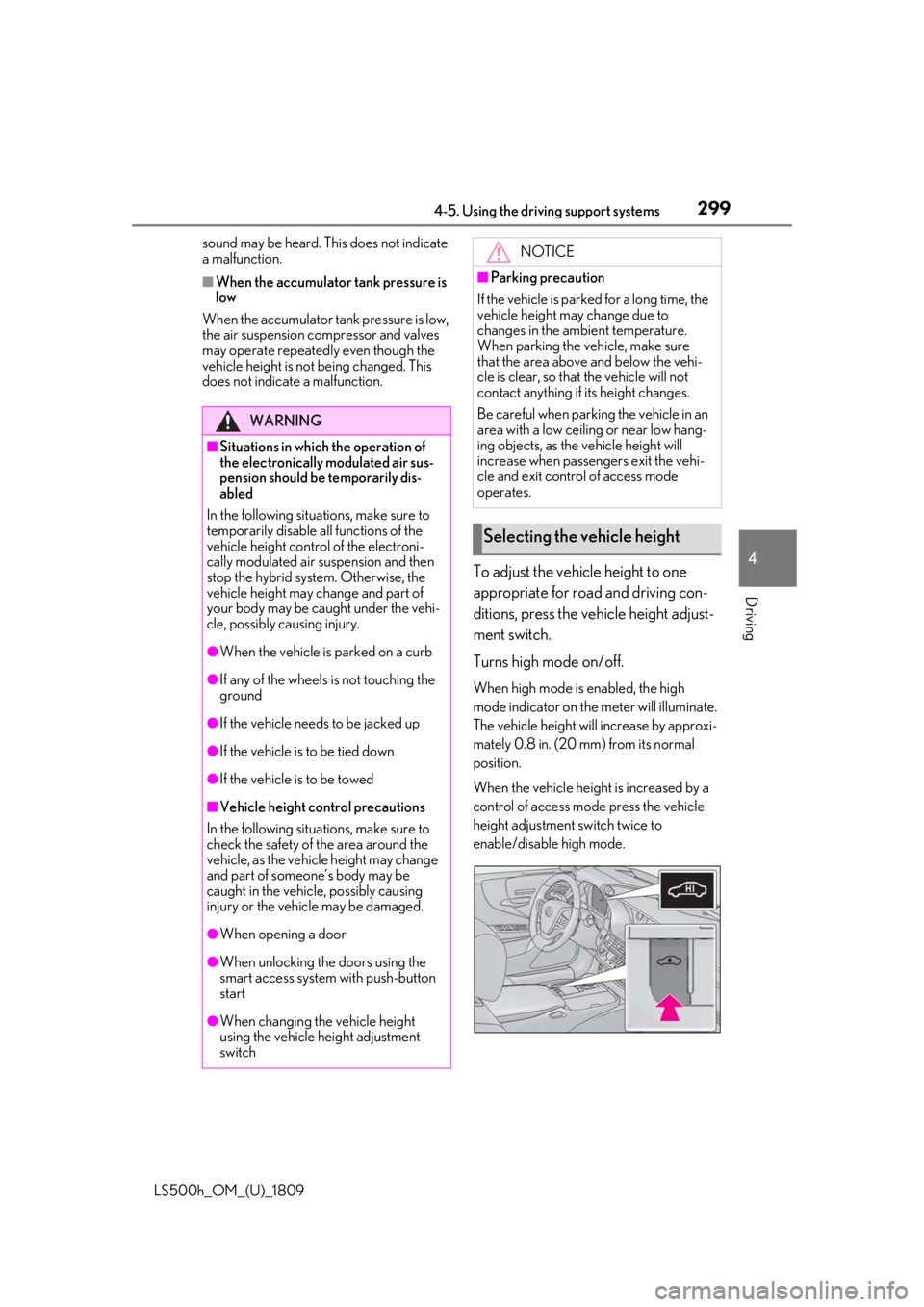
To adjust the vehicle height to one
appropriate for road and driving con-
ditions, press the vehicle height adjust-
ment switch.
Turns high mode on/off.
When high mode is enabled, the high
mode indicator on the meter will illuminate.
The vehicle height will increase by approxi-
mately 0.8 in. (20 mm) from its normal
position.
When the vehicle height is increased by a
control of access mode press the vehicle
height adjustment switch twice to
enable/disable high mode.
WARNING
■Situations in which the operation of
the electronically modulated air sus-
pension should be temporarily dis-
abled
In the following situations, make sure to
temporarily disable al l functions of the
vehicle height control of the electroni-
cally modulated air suspension and then
stop the hybrid system. Otherwise, the
vehicle height may change and part of
your body may be caught under the vehi-
cle, possibly causing injury.
●When the vehicle is parked on a curb
●If any of the wheels is not touching the
ground
●If the vehicle needs to be jacked up
●If the vehicle is to be tied down
●If the vehicle is to be towed
■Vehicle height co ntrol precautions
In the following situations, make sure to
check the safety of the area around the
vehicle, as the vehicle height may change
and part of someone’s body may be
caught in the vehicle, possibly causing
injury or the vehicle may be damaged.
●When opening a door
●When unlocking the doors using the
smart access system with push-button
start
●When changing the vehicle height
using the vehicle height adjustment
switch
NOTICE
■Parking precaution
If the vehicle is parked for a long time, the
vehicle height may change due to
changes in the ambient temperature.
When parking the vehicle, make sure
that the area above and below the vehi-
cle is clear, so that the vehicle will not
contact anything if its height changes.
Be careful when parking the vehicle in an
area with a low ceiling or near low hang-
ing objects, as the vehicle height will
increase when passengers exit the vehi-
cle and exit control of access mode
operates.
Selecting the vehicle height
Page 300 of 523

3004-5. Using the driving support systems
LS500h_OM_(U)_1809
■The vehicle height adjustment switch
can be used to change the mode when
The power switch is in ON mode.
■System protection function
If the vehicle height is repeatedly increased
and decreased using the vehicle height
adjustment switch, etc., the system may not
operate temporarily.
In order to improve the ease of enter-
ing and exiting the vehicle, the vehicle
height will increase automatically.
Enter control
If any of the following operations are
performed, the vehicle height will
increase automatically:
When the doors are unlocked using
the smart access system with
push-button start
When the doors are unlocked using
the wireless remote control and
then a door is opened.
The vehicle height will increase by approxi-
mately 1.2 in. (30 mm) from its normal
position.
The vehicle height may not increase, if the
vehicle height already reaches the
selected height.
The vehicle will return to its normal height
when the vehicle speed reaches approxi-
mately 12 mph (20 km/h).
Exit control
When “Select Parking Height” is set to
“High”, the vehicle height will automati-
cally increase when the P shift position is selected and a door is opened.
1
Press or to select .
2 Press or to select “Vehicle
Settings” and then press .
3 Press or to select
and then press .
4 Press or to select “Select
Parking Height” and then press
.
The vehicle height will increase by approxi-
mately 0.4 in. (10 mm) from its normal
position.
The vehicle height may not increase, if the
vehicle height al ready reaches the
selected height.
The vehicle will return to its normal height
when the vehicle speed reaches approxi-
mately 12 mph (20 km/h).
■Enabling/Disabling access mode
1 Press the or meter control
switch to select .
2 Press the or meter control
switch to select “Vehicle Settings”
and then press .
3 Press the or meter control
switch to select and then
press .
4 Press the or meter control
switch to select “Access Mode”
and then press .
The setting will change between
enabled/disabled each time the
Vehicle height control when
entering/exiting the vehicle
(“Access Mode”)