Page 313 of 523
313
LS500h_OM_(U)_1809
5
5
Interior features
Interior features
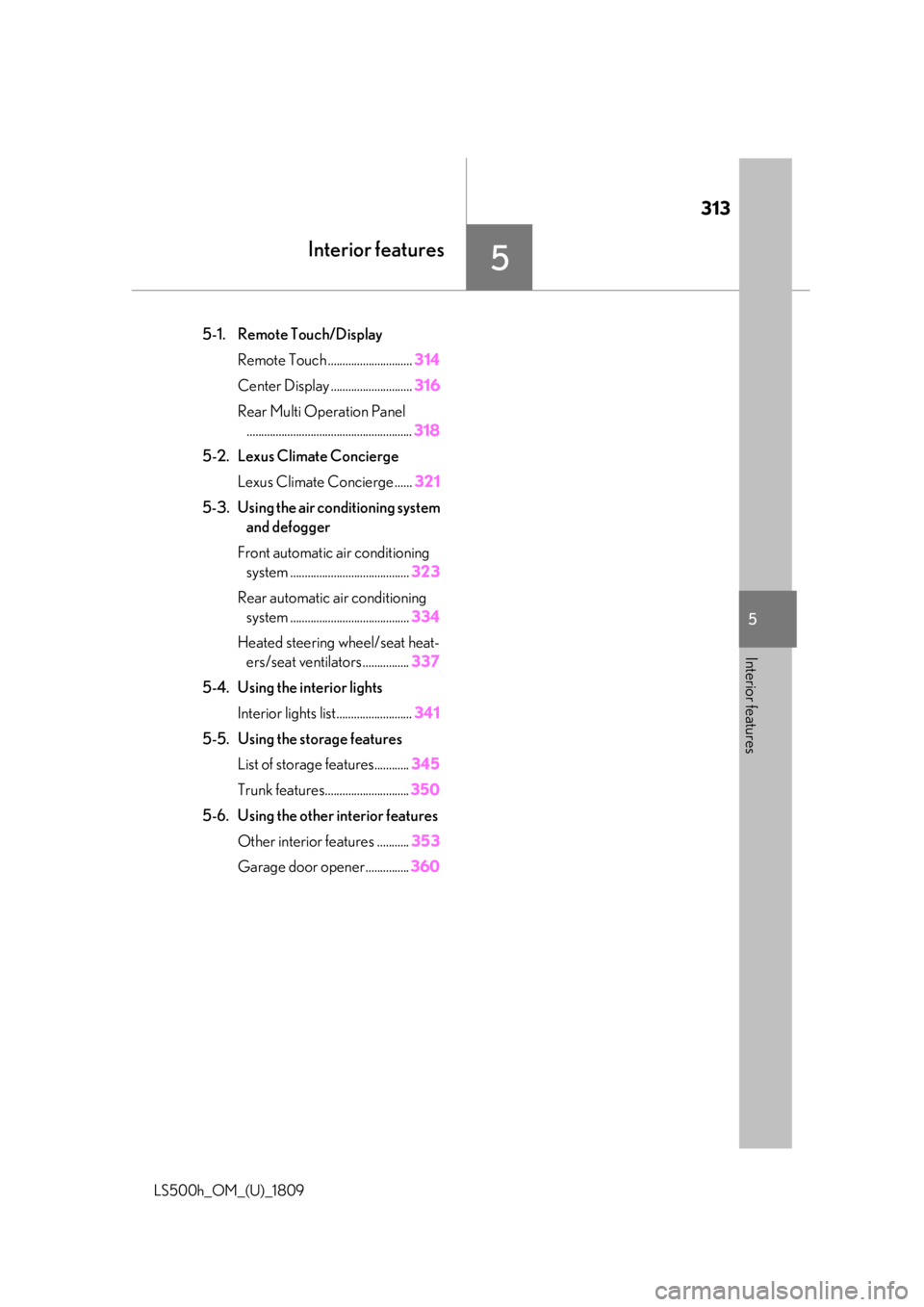
.5-1. Remote Touch/DisplayRemote Touch ............................. 314
Center Display ............................ 316
Rear Multi Operation Panel ......................................................... 318
5-2. Lexus Climate Concierge Lexus Climate Concierge ...... 321
5-3. Using the air conditioning system and defogger
Front automatic air conditioning system ......................................... 323
Rear automatic air conditioning system ......................................... 334
Heated steering wheel/seat heat- ers/seat ventilators ................ 337
5-4. Using the interior lights Interior lights list.......................... 341
5-5. Using the storage features List of storage features............ 345
Trunk features............................. 350
5-6. Using the other interior features Other interior features ........... 353
Garage door opener............... 360
Page 341 of 523
3415-4. Using the interior lights
LS500h_OM_(U)_1809
5
Interior features
5-4.Using the interior lights
Rear personal lights ( P.342)
Inside door handle lights
Instrument panel orname nt lights (if equipped)
Front personal lights ( P.342)
Front interi or lights ( P.342)
Clock light
Footwell lights
Power switch light
Door trim ornament lights
Door courtesy lights
Seat belt buckle lights
Outer foot lights
Rear interior light ( P.342)
Shift lever lights
Interior lights list
Location of the interior lights
A
B
C
D
E
F
G
H
I
J
K
L
M
N
Page 342 of 523
3425-4. Using the interior lights
LS500h_OM_(U)_1809
■Turning the door position on
Press the door-linked interior light
switch
The lights are turned on and off according
to whether the doors are opened/closed.
When the door position is on, the indicator illuminates.
■Turning the lights on/off
Front
Turns the lights on/off (touch the light)
When a door is opened while the door
position is on, the lights turn on.
Rear
On/off
The rear interior lights turn on/off together
the front interior lights.
When a door is opened while the door
position is on, the lights turn on.
■Using the Rear Multi Operation
Panel (if equipped)
1 Display the home screen and then
touch “Rear Shade/Lamp”.
(P.318)
2 To turn on/off the rear interior
lights, touch the respective button.
■Turning the lights on/off
Front
Turns the lights on/off (touch the light)
When a door is opened while the door
position is on, the lights turn on.
Operating the interior lights
A
Operating the personal lights
Page 343 of 523

3435-4. Using the interior lights
LS500h_OM_(U)_1809
5
Interior features
Rear
On/dimmed/off
When a door is opened while the door
position is on, the lights turn on.
■Using the Rear Multi Operation
Panel (if equipped)
1 Display the home screen and then
touch “Rear Shade/Lamp”.
(P.318)
2 To turn on/dimmed/off the rear per-
sonal lights, touch the respective
button.
■Illuminated entry system
The lights automatically turn on/off accord-
ing to the power switch mode, the presence
of the electronic key, whether the doors are
locked/unlocked, and whether the doors
are open/closed.
■To prevent the 12-volt battery from
being discharged
If the interior lights remain on when the
power switch is turned off, the lights will go
off automatically after 20 minutes.
■When front interior light or front per-
sonal lights do not respond as normal
●When water, dirt, etc., have adhered to
the lens surface
●When operated with a wet hand
●When wearing gloves, etc.
■The interior lights may turn on automati-
cally when
If any of the SRS airbag s deploy (inflate) or
in the event of a strong rear impact, the inte-
rior lights will turn on automatically.
The interior lights will turn off automatically
after approximately 20minutes.
The interior lights can be turned off manu-
ally. However, in order to help prevent fur-
ther collisions, it is recommended that they
be left on until sa fety can be ensured.
(The interior lights may not turn on auto-
matically depending on the force of the
impact and conditions of the collision.)
■Customization
Some functions can be customized.
( P.479)
NOTICE
■To prevent 12-volt battery discharge
Do not leave the lights on longer than
necessary when the hy brid system is off.
Page 344 of 523
3445-4. Using the interior lights
LS500h_OM_(U)_1809
NOTICE
■Removing light lenses
Never remove the lens for the front inte-
rior light and front personal lights. Other-
wise, the lights will be damaged. If a lens
needs to be removed, contact your Lexus
dealer.
Page 347 of 523
3475-5. Using the storage features
LS500h_OM_(U)_1809
5
Interior features
■Glove box light
The glove box light turns on when the tail
lights are on.
■Trunk opener main switch
The trunk opener main switch is located in
the glove box. ( P.122)
■Removing the partition
The partition inside the glove box can be
removed by pulling it.
Push the button.
Front
Press in and release the button.
Rear (vehicles without power rear
seat)
Pull the armrest down then push in the
cup holder trim to extend the cup hold-
ers.
Rear (vehicles with power rear seat)
Press in and release the button.
WARNING
■Caution while driving
Keep the glove box closed. In the event
of sudden braking or sudden swerving,
an accident may occur due to an occu-
pant being struck by the open glove box
or the items stored inside.
Coin holder
WARNING
■Caution while driving
Keep the coin holder closed.
Injuries may result in the event of an acci-
dent or sudden braking.
Cup holders
Page 348 of 523

3485-5. Using the storage features
LS500h_OM_(U)_1809
■When stowing the rear cup holders
(vehicles without power rear seat)
Stow the cup holder with the armrest down.
The cup holder cannot be stowed if the
armrest is not down. Press a button to open the console box.
The console box can be opened from
either side.
■Tray in the console box
The tray can be slid and removed.
■Console box light
The console box light turns on when the tail
lights are on.
WARNING
■Items unsuitable for the cup holder
Do not place anything other than cups or
beverage cans in the cup holders.
Inappropriate items must not be stored in
the cup holders even if the lid is closed.
Other items may be thrown out of the
holders in the event of an accident or
sudden braking and cause injury. If possi-
ble, cover hot drinks to prevent burns.
■When not in use
Keep the cup holders closed.
Injuries may result in the event of an acci-
dent or sudden braking.
NOTICE
■To prevent damage to the rear cup
holder (vehicles without power rear
seat)
Stow the cup holder before stowing the
armrest.
■To avoid damaging the power outlet
Close the lid of the power outlet in the
front cup holder when the power outlet is
not in use. Foreign ob jects or liquids that
enter the power outlet may cause a short
circuit.
Console box
WARNING
■Caution while driving
Keep the console box closed.
Injuries may result in the event of an acci-
dent or sudden braking.
NOTICE
■Tray
Do not insert items exceeding the height
of the tray. Doing so may prevent open-
ing and closing of the lid.
Page 356 of 523

3565-6. Using the other interior features
LS500h_OM_(U)_1809
■The power outlet can be used when
●12 V
The power switch is in ACCESSORY or
ON mode.
●120 VAC
The power switch is in ON mode.
1 To set the visor in the forward posi-
tion, flip it down.
NOTICE
■To avoid damaging the power outlet
Close the power outlet lid when the
power outlet is not in use.
Foreign objects or liquids that enter the
power outlet may cause a short circuit.
■To prevent the fuse from being blown
●12 V
Do not use an accessory that uses more
than 12 V 10 A.
●120 VAC
Do not use a 120 VAC appliance that
requires more than 100 W. If a 120 VAC
appliance that consumes more than 100
W is used, the protection circuit will cut
the power supply.
■To prevent incorrect operation of the
vehicle
When turning the powe r switch off, make
sure to disconnect accessories designed
for charging, such as portable chargers,
power banks, etc. from the power outlets.
If such an accessory is left connected, the
following may occur:
●The doors cannot be locked using the
smart access system with push-button
start or wireless remote control.
●The opening screen will be displayed
on the multi-information display.
●The interior lights, instrument panel
lights, etc. will illuminate.
■To prevent 12-volt battery discharge
Do not use the power outlet longer than
necessary when the hy brid system is off.
■Appliances that may not operate
properly (120 VAC)
The following 120 VAC appliances may
not operate properly even if their power
consumption is under 100 W.
●Appliances with high initial peak watt-
age
●Measuring devices that process pre-
cise data
●Other appliances that require an
extremely stable power supply
Sun visors