2019 LEXUS LS500H seats
[x] Cancel search: seatsPage 331 of 523

3315-3. Using the air conditioning system and defogger
LS500h_OM_(U)_1809
5
Interior features
flow is given to the front seats, reducing
the airflow and air conditioning effect
on the rear seats. When in S-FLOW
mode, airflow from the rear air condi-
tioning system is stopped.
Operation in S-FLOW mode differs
according to the following conditions:
Priority is given to the driver’s seat
only when:
Manual S-FLOW mode: When no
passenger is judged to be in the
front passenger seat.
Automatic S-FLOW mode: When
no passengers are judged to be in
the front passenger seat or rear
seats.
Priority is given to the front seats
when: Manual S-FLOW mode is
selected or no passengers are
judged to be in the rear seats when
in automatic S-FLOW mode.
S-FLOW mode will be disabled
when: A passenger is judged to be
in a rear seat when in automatic
S-FLOW mode.
Depending on the set temperature, opera-
tion in S-FLOW mode may not change as
described above.
When certain conditions are met and pri-
ority is given to the driver’s seat only, the
temperature indicator for the front passen-
ger side will turn off.
How the system judges if a passenger is in
the vehicle: P.331
The following S-FLOW modes are
available:
Automatic S-FLOW mode
In this mode, when a passenger is judged to be in a rear seat, S-FLOW
mode will be automatically disabled.
(
P.331)
The indicator will illuminate on the air con-
ditioning control screen when S-FLOW
mode is enabled.
To enable/disable S-FLOW mode and
enter manual S-FLOW mode, select the
S-FLOW mode switch.
How the system judges if a passenger is in
the vehicle: P.331
Manual S-FLOW mode
When the S-FLOW mode switch is
selected, S-FLOW mode will be manu-
ally enabled/ disabled.
The indicator will illuminate on the air con-
ditioning control screen when S-FLOW
mode is enabled.
In manual S-FLOW mode, as the system
does not judge if a passenger is in a rear
seat.
If the rear air conditioning control screen
on the Rear Multi Operation Panel (if
equipped) is operated , S-FLOW mode will
automatically be disabled
■How the system judges if a passenger is
in the vehicle when in S-FLOW mode
In S-FLOW mode, the system judges if a
passenger is in the vehicle as follows:
●Front passenger seat: A passenger is
judged to be in the front passenger seat
when the system detect s an object on the
front passenger seat, fastening of the
front passenger seat belt, changing of the
set temperature for the front passenger
seat, changing of the air outlets for the
front passenger seat or the opening and
closing of the front passenger door.
(However, when only opening and clos-
ing of the front passenger door is
detected, the system will judge that a pas-
senger is not in the front passenger seat
after the vehicle speed reaches approxi-
Page 332 of 523

3325-3. Using the air conditioning system and defogger
LS500h_OM_(U)_1809mately 12 mph (20 km/h) or more.)
●Rear seats: A passenger is judged to be in
a rear seat when the system detects the
opening and closing of a rear door (auto-
matic S-FLOW mode only) or the opera-
tion of the rear air conditioning control
screen on the Rear Multi Operation
Panel.
■Operation of automatic S-FLOW mode
When the system is operating in automatic
S-FLOW mode, if the system detects the
opening and closing of a rear door or the
operation of the rear air conditioning con-
trol screen on the Rear Multi Operation
Panel, S-FLOW mode will be disabled. To
enable S-FLOW mode, select the S-FLOW
mode switch. (In this case, the system will
operate in manual S-FLOW mode.)
■Changing from manual S-FLOW mode
to automatic S-FLOW mode
1 Select the S-FLOW mode switch to dis-
able S-FLOW mode.
2 Turn the power switch off.
3 After 60 minutes have elapsed, change
the power switch to ON mode.
Vehicles with DUAL-ZONE climate
control
To turn on the “DUAL” mode, perform
any of the following procedures:
Select “DUAL” on the sub function
menu. ( P.326)
Select “DUAL” on the option con-
trol screen.
Adjust the passenger’s side tem-
perature setting.
The indicator on the main control screen
comes on when the “DUAL” mode is on.
Vehicles with 4-ZONE climate con-
trol
To turn on the “4-ZONE” mode, per-
form any of the following procedures:
Select “4-ZONE” on the sub func-
tion menu. ( P.326)
Select “4-ZONE” on the option
control screen.
Adjust a passenger seat tempera-
ture setting.
The indicator on the main control screen
comes on when the “4-ZONE” mode is on.
■Location of air outlets
The air outlets and air volume changes
according to the selected air flow
mode.
Adjusting the temperature for
the driver and passenger seats
separately
Air outlet layout and operations
Page 334 of 523

3345-3. Using the air conditioning system and defogger
LS500h_OM_(U)_1809
*:If equipped■Center Display
Using the touchpad of the Remote
Touch, select the button on the screen.
to can be adjusted by perform-
ing the following operations.
Flick operation: Move the pointer to
the desired item and flick the touchpad
up or down.
The item can be adjusted by one level.
Trace operation: After selecting the
desired item, trace the pad surface.
The item can be adjusted by the amount
that you trace.
Trace operation cannot be used while driv-
ing.
Adjust the left side rear seat tem-
perature setting
Select the left side rear seat air flow
mode
: Air flows to the upper body
: Air flows to the upper body and feet
: Air flows to the feet
Adjust the rear seats fan speed set-
Rear automatic air condi-
tioning system*
The air outlets and fan speed are
automatically adjusted according
to the temperature setting.
The rear air conditioning system
can be operated using the Center
Display and Rear Multi Operation
Panel.
Center Display
Press the “MENU” button on the
Remote Touch to display the main
menu and move the cursor to to
display the climate control shortcut
buttons. Then, select to display
the rear air conditioning control
screen.
Rear Multi Operation Panel
*
Touch “Climate” on the home screen
to display the rear air conditioning
control screen.( P.318)
Touching the shortcut button on the
home screen will also display opera-
tion buttons for some of the rear air
conditioning system functions.
*: The Rear Multi Operation Panel can- not be used to operate the rear air
conditioning system if the function is
disabled. ( P.334)
Rear air conditioning control
screen
AE
A
B
C
Page 335 of 523

3355-3. Using the air conditioning system and defogger
LS500h_OM_(U)_1809
5
Interior features
ting
Select the right side rear seat air
flow mode
Adjust the right side rear seat tem-
perature setting
Function on/off indicators
When the function is on, the indicator illu-
minates on the control screen.
Sub function menu
When the sub function button on the
Remote Touch is pressed, the following
functions can be switched on and off.
“Rear off”: Turn the rear seats fan off
“Rear AUTO”: Set the rear seats automatic
mode on/off ( P.335)
: Disables operation of the rear air
conditioning system using the Rear Multi
Operation Panel
■Rear Multi Operation Panel*
Various functions can be operated by
touching the displayed buttons on the
Rear Multi Operation Panel.
*: The Rear Multi Operation Panel cannot be used to operate the rear air condi-
tioning system if the function is disabled.
( P.334)
Rear air conditioning control screen
Adjust the left side rear seat tem-
perature setting Select the left side rear seat air flow
mode
: Air flows to the upper body
: Air flows to the upper body and feet
: Air flows to the feet
Set the rear seats automatic mode
on/off (
P.335)
Select the right side rear seat air
flow mode
Turn the rear seats fan off
Adjust the right side rear seat tem-
perature setting
Adjust the rear seats fan speed set-
ting
Shortcut screen
Adjust the left side rear seat tem-
perature setting
Adjust the right side rear seat tem-
perature setting
Center Display
1 Select “Rear AUTO” on the sub
function menu. ( P.334)
D
E
F
G
A
Using automatic mode
B
C
D
E
F
G
A
B
Page 336 of 523
3365-3. Using the air conditioning system and defogger
LS500h_OM_(U)_1809
2To stop the operat ion, select “Rear
off” on the sub function menu.
( P.334)
If the fan speed setting or air flow
modes are operated , the automatic
mode indicator goes off. However,
automatic mode for functions other
than that operated is maintained.
Rear Multi Operation Panel
1 Select “AUTO” on the rear air con-
ditioning control screen. ( P.335)
2 To stop the operation, select “OFF”
on the rear air co nditioning control
screen. ( P.334)
If the fan speed setting or air flow
modes are operated , the automatic
mode indicator goes off. However,
automatic mode for functions other
than that operated is maintained.
■Using automatic mode
Fan speed is adjusted automatically accord-
ing to the temperature setting and the
ambient conditions.
Therefore, the fan may stop for a while until
warm or cool air is ready to flow immedi-
ately after “Rear AUTO” is selected or
“AUTO” is touched.
Cool air may blow around the upper body
even when the heater is on due to sunlight.
The temperature setting of the rear
seats can be adjusted using the follow-
ing methods:
When the “4-ZONE” indicator is
off: Adjust the driv er’s seat tempera-
ture.
Adjust the temperature setting of each
rear seat using the Ce nter Display or Rear
Multi Operation Panel.
Adjust the temperature setting of
each rear seat using the Center Dis-
play (rear air conditioning control
screen) or Rear Multi Operation
Panel.
The temperature setting of each rear seat
can be changed independently.
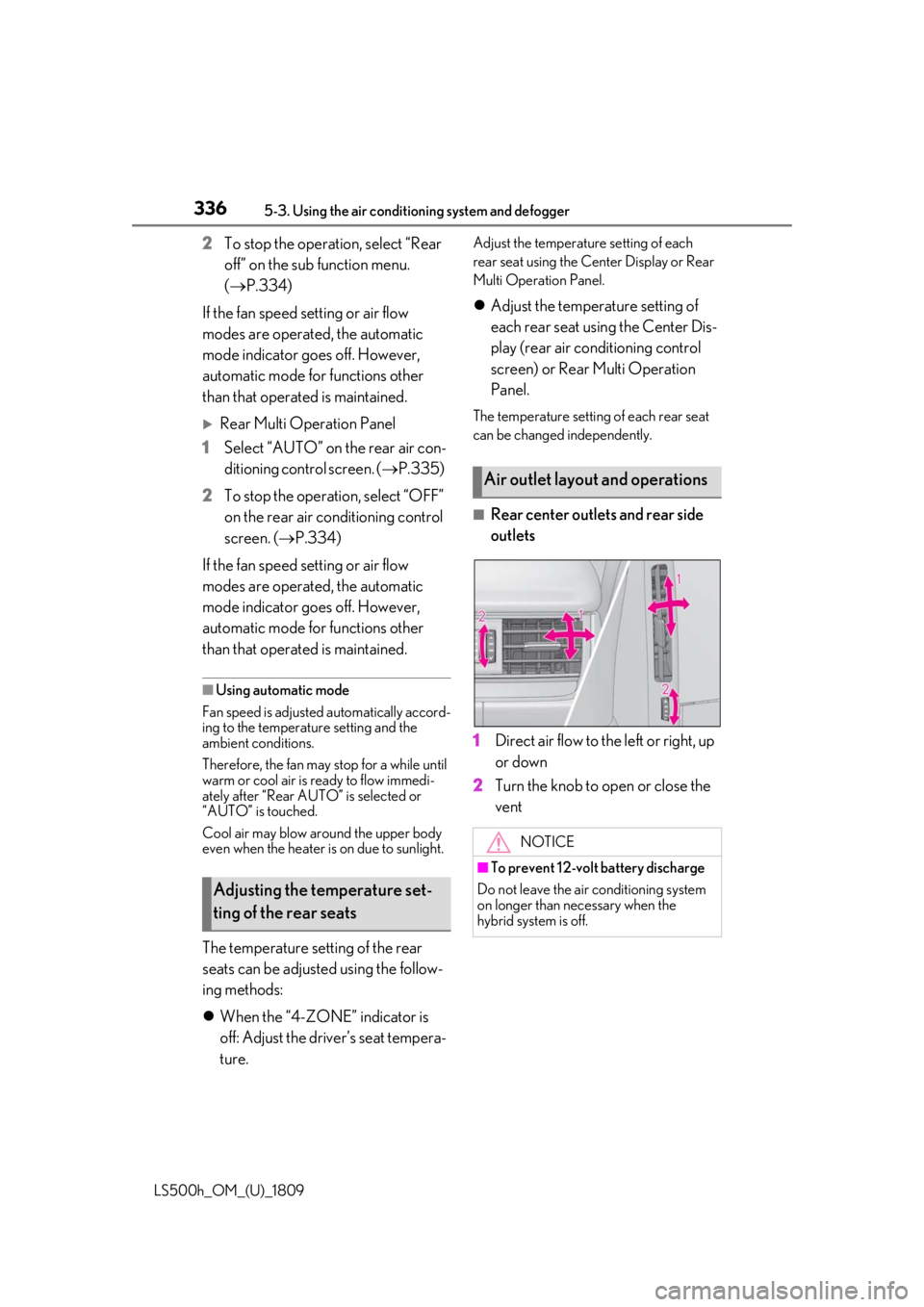
■Rear center outlets and rear side
outlets
1 Direct air flow to the left or right, up
or down
2 Turn the knob to open or close the
vent
Adjusting the temperature set-
ting of the rear seats
Air outlet layout and operations
NOTICE
■To prevent 12-volt battery discharge
Do not leave the air conditioning system
on longer than necessary when the
hybrid system is off.
Page 337 of 523

3375-3. Using the air conditioning system and defogger
LS500h_OM_(U)_1809
5
Interior features
*:If equipped
Heated steering wheel*/seat
heaters/seat ventilators
Heated steering wheel
Warms up the grip of the steering
wheel
Front seat heaters/Rear seat
heaters
Warm up the seat upholstery
Front seat ventilators/Rear seat
ventilators
Maintain good ventilation by pulling
air through the seat upholstery
The Center Display and Rear Multi
Operation Panel/rear control
panel can be used to operate the
heated steering wheel, seat heaters
and seat ventilators as follows:
Center Display
Press the “MENU” button on the
Remote Touch to display the main
menu and move the cursor to to
display the shortcut buttons. Then,
select to display the heated
steering wheel/front seat
heater/front seat ventilator control
screen.
To display the rear seat heater/rear
seat ventilator cont rol screen, select
. (if equipped)
Rear Multi Operation Panel
Touch “Climate” on the home screen
to display the air conditioning con-
trol screen.( P.318)
Touching the shortcut button on the
home screen will display operation
buttons for the rear seat heaters and
rear seat ventilators.
Rear control panel
The rear seat heaters can be oper-
ated.
WARNING
■To prevent minor burn injuries
Care should be taken if anyone in the fol-
lowing categories comes in contact with
the steering wheel or seats when the
heater is on:
●Babies, small children, the elderly, the
sick and the physically challenged
●Persons with sensitive skin
●Persons who are fatigued
Page 371 of 523

3716-1. Maintenance and care
LS500h_OM_(U)_1809
6
Maintenance and care
Remove dirt and dust using a vac-
uum cleaner. Wipe dirty surfaces
with a cloth dampened with luke-
warm water.
If dirt cannot be removed, wipe it off
with a soft cloth dampened with
neutral detergent diluted to approx-
imately 1%.
Wring out any excess water from
the cloth and thoroughly wipe off
remaining traces of detergent and
water.
■Shampooing the carpets
There are several commercial foaming-type
cleaners available. Use a sponge or brush
to apply the foam. Rub in overlapping cir-
cles. Do not use water. Wipe dirty surfaces
and let them dry. Excellent results are
obtained by keeping the carpet as dry as
possible.
■Handling the seat belts
Clean with mild soap and lukewarm water
using a cloth or spon ge. Also check the
belts periodically for excessive wear, fraying
or cuts.
■When cleaning the carpeted portions of
the glove box, console box, etc.
If a strong adhesive tape is used, there is a
possibility that the surface of the carpet
could be damaged.
Cleaning and protecting the
vehicle interior
Perform cleaning in a manner
appropriate to each component
and its material.
Protecting the vehicle interior
WARNING
■Water in the vehicle
●Do not splash or spill liquid in the vehi-
cle, such as on the floor, in the hybrid
battery (traction battery) air vents, and
in the trunk. ( P.69)
Doing so may cause the hybrid battery,
electrical components, etc. to mal-
function or catch fire.
●Do not get any of the SRS components
or wiring in the vehicle interior wet.
( P.29)
An electrical malfunction may cause
the airbags to deploy or not function
properly, resulting in death or serious
injury.
■Cleaning the interior (especially
instrument panel)
Do not use polish wax or polish cleaner.
The instrument panel may reflect off the
windshield, obstructin g the driver’s view
and leading to an accident, resulting in
death or serious injury.
NOTICE
■Cleaning detergents
●Do not use the following types of
detergent, as they may discolor the
vehicle interior or cause streaks or
damage to painted surfaces:
• Areas other than the seats and steer- ing wheel: Organic substances such as
benzene or gasoline, alkaline or acidic
solutions, dye, and bleach
• Seats: Alkaline or acidic solutions, such as thinner, benzene, and alcohol
• Steering wheel: Organic substances, such as thinner, and cleaner that con-
tains alcohol
●Do not use polish wax or polish
cleaner. The instrument panel’s or
other interior part’s painted surface
may be damaged.
Page 374 of 523

3746-1. Maintenance and care
LS500h_OM_(U)_1809vents periodically to
prevent dust, etc.,
from collecting in the air intake vents and
filters.
●If the massage in the multi-information
display does not turn off, even if the air
intake vents are cleaned, have the vehicle
inspected at your Lexus dealer.
Remove dirt using a water-damp-
ened soft cloth or synthetic chamois.
Wipe the surface with a dry, soft
cloth to remove any remaining
moisture.
■Cleaning the areas with satin-finish
metal accents
The metal areas use a layer of real metal for
the surface. It is necessary to clean them
regularly. If dirty areas are left uncleaned for
long periods of time, they may be difficult to
clean.
Remove dirt and dust using a vac-
uum cleaner.
Wipe off any excess dirt and dust
with a soft cloth dampened with diluted detergent.
Use a diluted water solution of approxi-
mately 5% neutral wool detergent.
Wring out any excess water from
the cloth and thoroughly wipe off all
remaining traces of detergent.
Wipe the surface with a dry, soft
cloth to remove any remaining
moisture. Allow the leather to dry in
a shaded and ventilated area.
■Caring for leather areas
Lexus recommends cleani ng the interior of
the vehicle at least twice a year to maintain
the quality of the vehicle’s interior.
Remove dirt and dust using a vac-
uum cleaner.
Wipe it off with a soft cloth damp-
ened with neutral detergent diluted
to approximately 1%.
Wring out any excess water from
the cloth and thoroughly wipe off
remaining traces of detergent and
water.
To remove dust from the fabric, use
a vacuum cleaner or adhesive tape.
Use a cloth dampened with water to
gently wipe the fabric clean.
Do not use detergents to clean the fabric.
WARNING
■When cleaning the hybrid battery
(traction battery) air intake vents/fil-
ters
●Do not use water or other liquids to
clean the air intake vents/filters. If
water is applied to the hybrid battery
(traction battery) or other compo-
nents, a malfunction or fire may occur.
●When the air intake vent grilles,
located near the rear seats are to be
removed, make sure to turn the power
switch off to stop the hybrid system.
Cleaning the areas with satin-fin-
ish metal accents
Cleaning the leather areas
Cleaning the synthetic leather
areas
Cleaning fabric portions of the
instrument panel