2019 LEXUS LS500H change wheel
[x] Cancel search: change wheelPage 236 of 523

2364-5. Using the driving support systems
LS500h_OM_(U)_1809
■Lane departure alert function
When the system determines that the
vehicle might depart from its lane or
course
*, a warning is displayed on the
multi-information display, and either a
warning buzzer will sound or the steer-
ing wheel will vibrate to alert the driver.
When the warning buzzer sounds or
the steering wheel vibrates, check the
area around your vehicle and carefully
operate the steering wheel to move the
vehicle back to the center of the lane.
When the system determines that the
vehicle might depart from its lane and
that the possibility of a collision with an
overtaking vehicle in the adjacent lane
is high, the lane departure alert will
operate even if the turn signals are
operating.
*: Boundary between asphalt and the side of the road, such as grass, soil, or a curb
WARNING
●The traffic lines are yellow (which may
be more difficult to recognize than
lines that are white).
●The white (yellow) lines cross over a
curb, etc.
●The vehicle is driven on a bright sur-
face, such as concrete.
●If the edge of the road is not clear or
straight.
●The vehicle is driven on a surface that
is bright due to reflected light, etc.
●The vehicle is driven in an area where
the brightness changes suddenly, such
as at the entrances and exits of tunnels,
etc.
●Light from the headlights of an oncom-
ing vehicle, the sun, etc. enters the
camera.
●The vehicle is driven on a slope.
●The vehicle is driven on a road which
tilts left or right, or a winding road.
●The vehicle is driven on an unpaved or
rough road.
●The traffic lane is excessively narrow
or wide.
●The vehicle is extremely tilted due to
carrying heavy luggage or having
improper tire pressure.
●The distance to the preceding vehicle
is extremely short.
●The vehicle is moving up and down a
large amount due to road conditions
during driving (poor roads or road
seams).
●When driving in a tunnel or at night
with the headlights off or when a head-
light is dim due to its lens being dirty or
it being misaligned.
●The vehicle is struck by a crosswind.
●The vehicle is affected by wind from a
vehicle driven in a nearby lane.
●The vehicle has just changed lanes
through operation of the steering
wheel by the driver or crossed an
intersection.
●Tires which differ by structure, manu-
facturer, brand or tread pattern are
used.
●Snow tires, etc. are equipped.
●The vehicle is being driven at
extremely high speeds.
Functions included in LTA system
Page 238 of 523

2384-5. Using the driving support systems
LS500h_OM_(U)_1809
■Lane centering function
This function is linked with dynamic
radar cruise control with full-speed
range and provides the required assis-
tance by operating the steering wheel
to keep the vehicle in its current lane.
When dynamic radar cruise control with
full-speed range is not operating, the lane
centering function does not operate.
In situations where the white (yellow) lane
lines are difficult to see or are not visible,
such as when in a traffic jam, this function
will operate to help follow a preceding
vehicle by monitoring the position of the
preceding vehicle.
If the system detect s that the steering
wheel has not been operated for a fixed
amount of time or the steering wheel is not
being firmly gripped, a warning is displayed
on the multi-information display and the
warning buzzer sounds. Make sure to grip
the steering wheel firmly.
■Lane change assist function (vehi-
cles with Lexus Safety System + A)
This function is linked to the dynamic
radar cruise control with full-speed
range and provides assistance for per-
forming lane changes by operating the
steering wheel when you hold the turn
signal lever partway (lane change posi-
tion).( P.182)
When lane change assist function is
operating, the acceleration and decel-
eration of the vehicle is controlled
while the preceding vehicle and vehi-
cles driven in the lane toward which the
turn signal is oper ated are monitored.
When the lane center ing function is not
operating, the lane change assist function
will not operate.
The lane change assist function should not
be operated when ch anging lanes on a
road that is diverging or merging.
Page 240 of 523

2404-5. Using the driving support systems
LS500h_OM_(U)_1809Illuminated in white: LTA system is operat-
ing.
Illuminated in green: Steering wheel assis-
tance of the steering assi
st function or lane
centering function is operating.
Flashing in orange: Lane departure alert
function is operating.
Operation display of steering
wheel operation support
Displayed when the mu lti-information dis-
play is switched to the driving assist system
information screen.
Indicates that steering wheel assistance of
the steering assist function or lane center-
ing function is operating.
Both outer sides of the lane are displayed:
Indicates that steering wheel assist of the
lane centering function is operating.
One outer side of the lane is displayed:
Indicates that steering wheel assist of the
steering assist function is operating.
Both outer sides of the lane are flashing:
Alerts the driver that their input is neces-
sary to stay in the center of the lane (lane
centering function).
Lane departure alert function dis-
play
Displayed when the mu lti-information dis-
play is switched to the driving assist system
information screen.
Inside of displayed white lines is
white
Indicates that the system is recognizing
white (yellow) lines or a course
*. When the
vehicle departs from it s lane, the white line
displayed on the side the vehicle departs
from flashes orange.
Inside of displayed white lines is
black
Indicates that the system is not able to rec-
ognize white (yellow) lines or a course
* or
is temporarily canceled.
*: Boundary between asphalt and the side of the road, such as grass, soil, or a curb
Follow-up cruising display
Displayed when the multi-information dis-
play is switched to th e driving assist system
information screen.
Indicates that steering assist of the lane
centering function is operating by monitor-
ing the position of a preceding vehicle.
When the follow-up cruising display is dis-
played, if the preceding vehicle moves,
your vehicle may move in the same way.
Always pay careful attention to your sur-
roundings and operate the steering wheel
as necessary to correct the path of the
vehicle and ensure safety.
■Lane change assist function (vehi-
cles with Lexus Safety System + A)
Lane change assist display
B
C
D
Page 241 of 523

2414-5. Using the driving support systems
LS500h_OM_(U)_1809
4
Driving
Indicates that steering wheel assist of the
lane change assist function is operating.
Approaching vehicle warning dis-
play
Indicates that an approaching vehicle is
detected in the adjacent lane.
■Warning display (vehicles with
Lexus Safety System + A)
When the lane centering function is oper-
ating and the system determines that the
vehicle may depart from its lane due to a
sharp curve, etc., a warning display urging
the driver to operate the steering wheel,
will be displayed.
This display will also be displayed when
operation of the lane change assist func-
tion is canceled.
In some situations a warning display may
not be displayed.
Some displays, which are the same as
those displayed on the multi-informa-
tion display, will be displayed.
■LTA system curve display on the
head-up display
The curve display on the head-up display
changes according to the direction and
curvature of the curve.
■Operation conditions of each function
●Lane departure alert function
This function operates when all of the fol-
lowing conditions are met.
• LTA is turned on.
• Vehicle speed is approximately 32 mph (50 km/h) or more.
*1
• System recognizes white (yellow) lane lines or a course*2. (When a white [yel-
low] line or course*2 is recognized on
only one side, the system will operate
only for the recognized side.)
• Width of traffic lane is approximately 9.8 ft. (3 m) or more.
• Turn signal lever is not operated. (Except when a vehicle is in the lane on the side
the turn signal was operated)
• Vehicle is not being driven around a sharp curve.
• No system malfunctions are detected. ( P.245)
*1: The function operates even if the vehi-
Indications on head-up display
(vehicles with Lexus Safety Sys-
tem + A)
Page 242 of 523

2424-5. Using the driving support systems
LS500h_OM_(U)_1809cle speed is less than approximately 32
mph (50 km/h) when the lane center-
ing function is operating.
*2: Boundary between asphalt and the side
of the road, such as grass, soil, or a curb
●Steering assist function
This function operates when all of the fol-
lowing conditions are me t in addition to the
operation conditions for the lane depar-
ture alert function.
•Setting for “Steering Assist” in of the multi-information display is set to “ON”.
( P.90)
• Vehicle is not accelerated or decelerated by a fixed amount or more.
• Steering wheel is not operated with a
steering force level su itable for changing
lanes.
• ABS, VSC, TRAC and PCS are not oper-
ating.
• TRAC or VSC is not turned off.
• Hands off steering wheel warning is not displayed. ( P.244)
●Vehicle sway warning function
This function operates when all of the fol-
lowing conditions are met.
• Setting for “Sway Warning” in of the multi-information display is set to “ON”.
( P.90)
• Vehicle speed is approximately 32 mph (50 km/h) or more.
• Width of traffic lane is approximately 9.8
ft. (3 m) or more.
• No system malfunctions are detected. ( P.245)
●Lane centering function
This function operates when all of the fol-
lowing conditions are met.
• LTA is turned on.
• Setting for “Steering Assist” and “Lane Center” in of the multi-information
display are set to “ON”. ( P.90)
• This function recognizes white (yellow)
lane lines or the position of a preceding
vehicle (except when the preceding vehi-
cle is small, such as a motorcycle).
• The dynamic radar cruise control with full-speed range is operating in vehi-
cle-to-vehicle distance control mode.
• Width of traffic lane is approximately 10
to 13 ft. (3 to 4 m).
• Turn signal lever is not operated.
• Vehicle is not being driven around a sharp curve.
• No system malfunctions are detected. ( P.245)
• Vehicle does not ac celerate or deceler-
ate by a fixed amount or more.
• Steering wheel is not operated with a
steering force level su itable for changing
lanes.
• ABS, VSC, TRAC and PCS are not oper-
ating.
• TRAC or VSC is not turned off.
• Hands off steering wheel warning is not displayed. ( P.244)
• The driver has one or both hands on the steering wheel.
• The vehicle is being driven in the center of a lane.
• Steering assist function is not operating.
●Lane change assist fu nction (vehicles with
Lexus Safety System + A)
This function will operate when all of the
following conditions are met:
• The lane centering function is operating.
• “Lane Change Assist” is set to “ON” in of the multi-information dis-
play.( P.90)
• The vehicle speed is between approxi- mately 57 and 85 mph (90 and 140
km/h).
• White (yellow) lane lines are detected by
the system.
• A broken white line is detected between your vehicle and the lane toward which
the turn signal is operated.
• The turn signal lever is held partway (lane change position) for approximately 1 sec-
ond.
• A vehicle is not overtaking your vehicle
or detected in the lane toward which the
turn signal is operated.
• The vehicle is being driven straight or
around a slight curve.
• The vehicle is not a ccelerating or decel-
erating more than a certain amount.
• The steering wheel is not being turned sufficiently to perf orm a lane change.
Page 243 of 523
2434-5. Using the driving support systems
LS500h_OM_(U)_1809
4
Driving
• ABS, VSC, TRAC and PCS are not oper- ating.
• TRAC or VSC is not turned off.
• Hands off steering wheel warning is not
displayed. ( P.244)
• The dynamic radar cruise control with
full-speed range approach warning is not
operating.
• The lane departure alert function is not
operating.
■Temporary cancellation of functions
●When operation conditions are no longer
met, a function may be temporarily can-
celed. However, when the operation con-
ditions are met again, operation of the
function is automa tically restored.
( P.241)
●If the operation conditions ( P.241) are
no longer met while the lane centering
function is operating, the steering wheel
may vibrate and the buzzer may sound to
indicate that the function has been tem-
porarily canceled. However, if the “Alert”
customization setting is set to ,
the system will notify the driver by vibrat-
ing the steering wheel instead of sound-
ing the buzzer.
●If the operating conditions ( P.241) are
no longer met, the lane change assist
function will be canceled. (vehicles with
Lexus Safety System + A)
If a message urging operation of the steer-
ing wheel is displayed, operate the steering
wheel.
■Steering assist function/lane centering
function
●Depending on the vehicle speed, lane
departure situation, road conditions, etc.,
the driver may not feel the function is
operating or the function may not oper-
ate at all.
●The steering control of the function is
overrided by the driver’s steering wheel
operation.
●When the vehicle speed is approximately
31 mph (50 km/h) or less, the warning
display of the lane ce ntering function will
not operate.
●Do not attempt to test the operation of the steering assist function.
●The steering assist function may operate
when attempting to cut closely in front of
another vehicle while
changing lanes.
■Lane departure alert function
●The warning buzzer may be difficult to
hear due to external noise, audio play-
back, etc. Also, it may be difficult to feel
steering wheel vibrations due to the road
conditions, etc.
●If the edge of the course* is not clear or
straight, the lane departure alert function
may not operate.
●It may not be possible for the system to
determine if there is a danger of a colli-
sion with a vehicle in an adjacent lane.
●Do not attempt to test the operation of
the lane departure alert function.
●This function may operate if, when chang-
ing lanes, your vehicle cuts closely in front
of another vehicle.
*: Boundary between asphalt and the side
of the road, such as grass, soil, or a curb
■Lane change assist function (vehicles
with Lexus Safety System + A)
Depending on the vehicle speed, vehicle
condition, road conditions, or conditions of
the area around the vehicle, the lane
change assist function may not operate or it
may be difficult to recognize that it has
operated.
If steering control oper ation is excessive or
insufficient, it can be corrected by the
driver’s operation of the steering wheel.
In situations such as the following, the lane
change assist function may be canceled:
●When the system no longer detects white
(yellow) lane lines
●When the turn signal lever is operated
fully (right/left turn position)
●When the vehicle speed is outside of the
operational range of the function
●When the system detects operation of
the steering wheel, brake or accelerator
pedal by the driver
While the lane change assist function is
Page 299 of 523
2994-5. Using the driving support systems
LS500h_OM_(U)_1809
4
Driving
sound may be heard. This does not indicate
a malfunction.
■When the accumulator tank pressure is
low
When the accumulator tank pressure is low,
the air suspension compressor and valves
may operate repeatedly even though the
vehicle height is not being changed. This
does not indicate a malfunction.
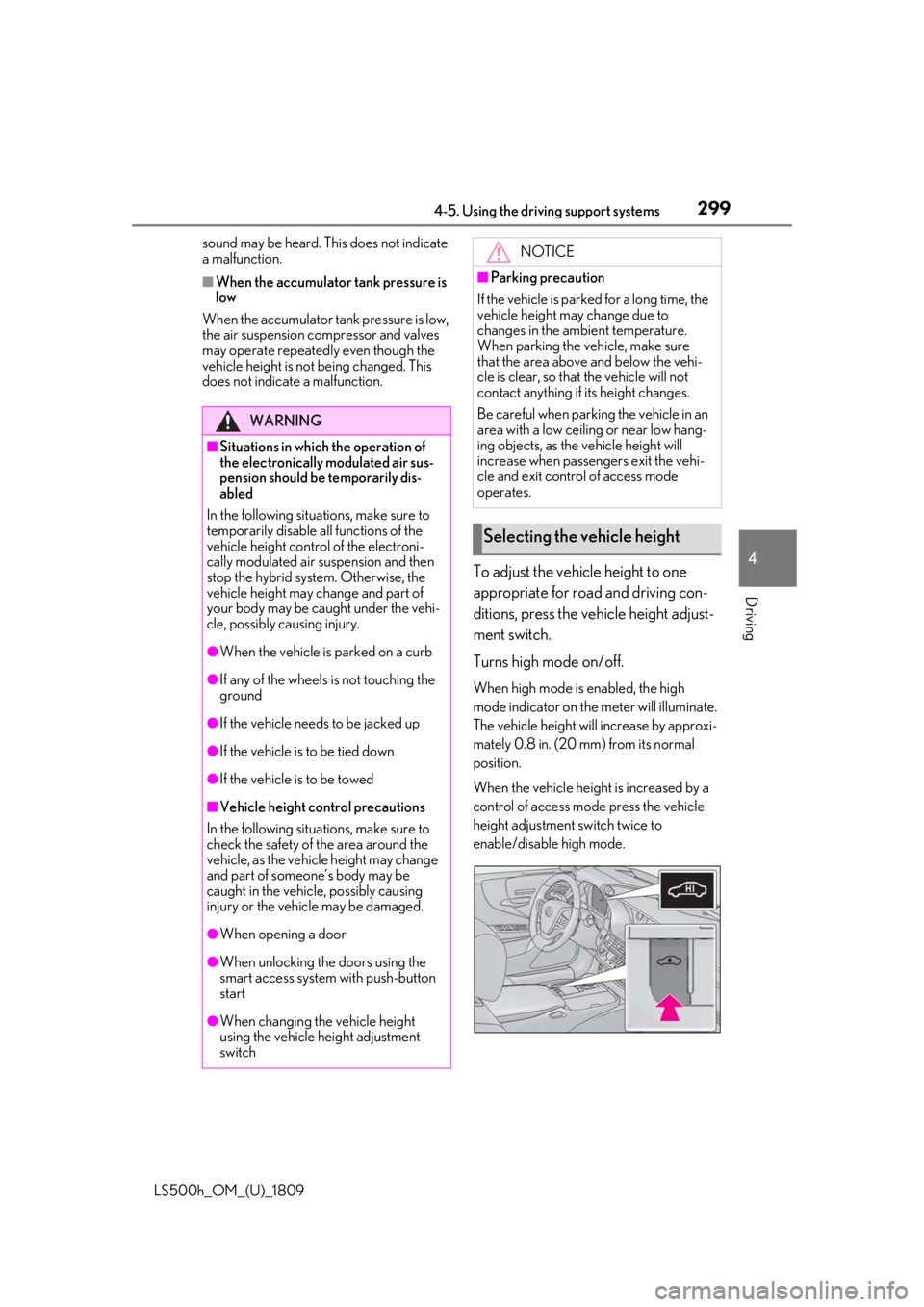
To adjust the vehicle height to one
appropriate for road and driving con-
ditions, press the vehicle height adjust-
ment switch.
Turns high mode on/off.
When high mode is enabled, the high
mode indicator on the meter will illuminate.
The vehicle height will increase by approxi-
mately 0.8 in. (20 mm) from its normal
position.
When the vehicle height is increased by a
control of access mode press the vehicle
height adjustment switch twice to
enable/disable high mode.
WARNING
■Situations in which the operation of
the electronically modulated air sus-
pension should be temporarily dis-
abled
In the following situations, make sure to
temporarily disable al l functions of the
vehicle height control of the electroni-
cally modulated air suspension and then
stop the hybrid system. Otherwise, the
vehicle height may change and part of
your body may be caught under the vehi-
cle, possibly causing injury.
●When the vehicle is parked on a curb
●If any of the wheels is not touching the
ground
●If the vehicle needs to be jacked up
●If the vehicle is to be tied down
●If the vehicle is to be towed
■Vehicle height co ntrol precautions
In the following situations, make sure to
check the safety of the area around the
vehicle, as the vehicle height may change
and part of someone’s body may be
caught in the vehicle, possibly causing
injury or the vehicle may be damaged.
●When opening a door
●When unlocking the doors using the
smart access system with push-button
start
●When changing the vehicle height
using the vehicle height adjustment
switch
NOTICE
■Parking precaution
If the vehicle is parked for a long time, the
vehicle height may change due to
changes in the ambient temperature.
When parking the vehicle, make sure
that the area above and below the vehi-
cle is clear, so that the vehicle will not
contact anything if its height changes.
Be careful when parking the vehicle in an
area with a low ceiling or near low hang-
ing objects, as the vehicle height will
increase when passengers exit the vehi-
cle and exit control of access mode
operates.
Selecting the vehicle height
Page 303 of 523

3034-5. Using the driving support systems
LS500h_OM_(U)_1809
4
Driving
vehicle posture.
Also, the damping force changes
depending on the selected driving
mode. ( P.297)
■LDH (Lexus Dynamic Handling
system) (if equipped)
Provides integrated control of the
VGRS, DRS and EPS. Contributes to
turning characteristics at low speeds,
responsiveness at medium speeds and
safety at high speeds by controlling the
steering angle of the front and rear
wheels in accordance with the steering
wheel operation and vehicle speed.
■VDIM (Vehicle Dynamics Inte-
grated Management)
Provides integrated control of the
ABS, brake assist, TRAC, VSC,
hill-start assist control, EPS, VGRS (if
equipped), DRS (if equipped) and
Adaptive Variable Suspension System
Helps to maintain vehicle stability when
swerving on slippery road surfaces by
controlling the brakes, hybrid system
output, steering assist, and steering
ratio
■When the TRAC/VSC/ABS systems are
operating
The slip indicator light will flash while the
TRAC/VSC/ABS systems are operating.
■Disabling the TRAC system
If the vehicle gets stuck in mud, dirt or snow,
the TRAC system may reduce power from
the hybrid system to the wheels. Pressing
the switch to turn the system off may
make it easier for you to rock the vehicle in
order to free it.
To turn the TRAC system off, quickly press
and release the switch.
The “Traction Co ntrol Turned Off” will be
shown on the multi-information display.
Press the switch ag ain to turn the sys-
tem back on.
■Disabling both TRAC and VSC systems
To turn the TRAC and VSC systems off,
press and hold the switch for more
than 3 seconds while the vehicle is stopped.
The VSC OFF indicator light will come on
and the “Traction Control Turned Off” will
be shown on the multi-information display.
*
Press the switch ag ain to turn the sys-
tem back on.
*: On vehicles with PCS (Pre-Collision System), PCS will also be disabled (only
Pre-Collision warning is available). The
PCS warning light will come on and a
message will be di splayed on the
multi-information display. ( P.222,
230)
■When the message is displayed on the
multi-information display showing that
TRAC has been disabled even if the
switch has not been pressed
TRAC cannot be oper ated. Contact your