2019 LEXUS LS500H radio
[x] Cancel search: radioPage 122 of 523
1223-2. Opening, closing and locking the doors and trunk
LS500h_OM_(U)_1809between the electronic key and the vehi-
cle (
P.125)
●When the vehicle is parked near an elec-
trical noise source which affects the sen-
sitivity of the Hands Free Power Trunk Lid,
such as a pay parking spot, gas station,
electrically heated road, or fluorescent
light
●When the vehicle is near a TV tower,
electric power plant, radio station, large
display, airport or other facility that gen-
erates strong radio waves or electrical
noise
●When a large amount of water is applied
to the rear bumper, such as when the
vehicle is being washed or in heavy rain
●When mud, snow, ice, etc. is attached to
the rear bumper
●When the vehicle has been parked for a
while near objects that may move and
contact the rear bumper, such as plants
●When an accessory is installed to the rear
bumper
If an accessory has been installed, turn the
Hands Free Power Trunk Lid (kick sensor)
operation setting off.
■Preventing unintentional operation of
the Hands Free Power Trunk Lid (if
equipped)
When an electronic ke y is in the operation
detection area, the Ha nds Free Power Trunk
Lid may operate unintentionally, so be care-
ful in the following situations:
●When a large amount of water is applied
to the rear bumper, such as when the
vehicle is being washed or in heavy rain
●When dirt is wiped off the rear bumper
●When a small animal or small object, such
as a ball, moves under the rear bumper
●When an object is moved from under the
rear bumper
●If someone is swinging their legs while sit-
ting on the rear bumper
●If the legs or another part of someone’s
body contacts the rear bumper while
passing by the vehicle
●When the vehicle is parked near an elec- trical noise source
which affects the sen-
sitivity of the Hands Free Power Trunk Lid,
such as a pay parking spot, gas station,
electrically heated road, or fluorescent
light
●When the vehicle is near a TV tower,
electric power plant, radio station, large
display, airport or ot her facility that gen-
erates strong radio waves or electrical
noise
●When the vehicle is parked in a place
where objects such as plants are near the
rear bumper
●If luggage, etc. is set near the rear
bumper
●If accessories or a vehicle cover is
installed/removed ne ar the rear bumper
●When the vehicle is being towed
To prevent unintentiona l operation, turn the
Hands Free Power Trunk Lid (kick sensor)
operation setting off.
■Open door warning buzzer
P.115
■Customization
Some functions can be customized.
( P.479)
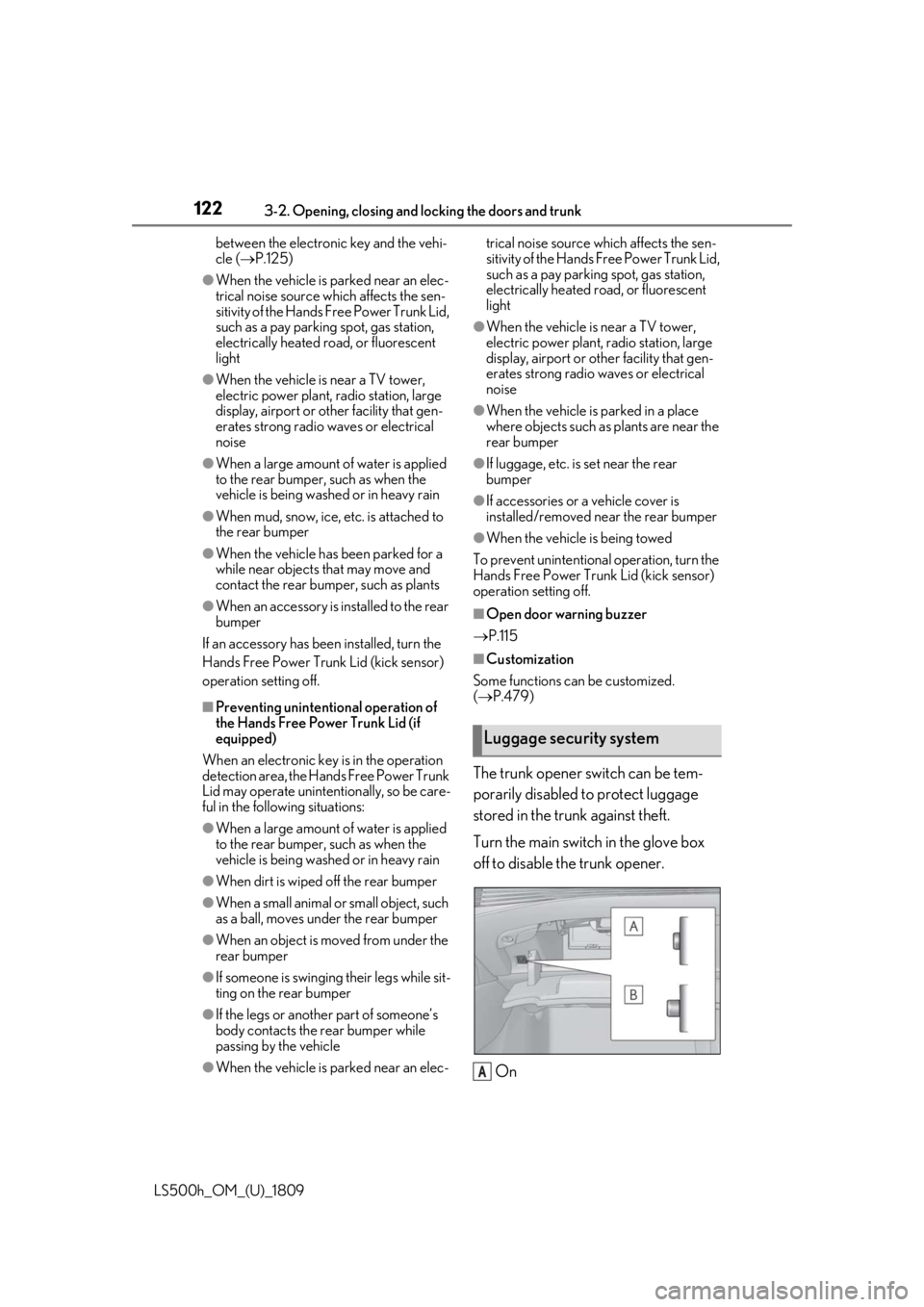
The trunk opener switch can be tem-
porarily disabled to protect luggage
stored in the trunk against theft.
Turn the main switch in the glove box
off to disable the trunk opener.
On
Luggage security system
A
Page 125 of 523

1253-2. Opening, closing and locking the doors and trunk
LS500h_OM_(U)_1809
3
Before driving
take some time to unlock the doors.
• The electronic key has been left in an area of approximately 6 ft. (2 m) of the
outside of the vehicle for 10 minutes or
longer.
• The smart access system with push-but-
ton start has not been used for 5 days or
longer.
●If the smart access system with push-but-
ton start has not been used for 14 days or
longer, the doors cannot be unlocked at
any doors except the driver’s door. In this
case, take hold of the driver’s door han-
dle, or use the wireless remote control or
the mechanical key, to unlock the doors.
■Turning an electronic key to bat-
tery-saving mode
When battery-saving mode is set, battery
depletion is minimized by stopping the elec-
tronic key from re ceiving radio waves.
Press twice while pressing and holding . Confirm that the electronic key indica-
tor flashes 4 times.
While the battery-saving mode is set, the
smart access system with push-button start
cannot be used. To cancel the function,
press any of the electronic key buttons.
■Conditions affe cting operation
The smart access system with push-button
start uses weak radio waves. In the following
situations, the communication between the
electronic key and the vehicle may be
affected, preventing the smart access sys-
tem with push-button start, wireless remote
control and immobilizer system from oper-
ating properly. (Ways of coping: P.443)
●When the electronic key battery is
depleted
●Near a TV tower, electric power plant,
gas station, radio stat ion, large display, airport or other fac
ility that generates
strong radio waves or electrical noise
●When carrying a portable radio, cellular
phone, cordless phone or other wireless
communication device
●When the electronic key is in contact
with, or is covered by the following metal-
lic objects
• Cards to which aluminum foil is attached
• Cigarette boxes that have aluminum foil inside
• Metallic wallets or bags
•Coins
• Hand warmers made of metal
• Media such as CDs and DVDs
●When other wireless keys (that emit radio
waves) are being used nearby
●When carrying the electronic key
together with the following devices that
emit radio waves
• Another vehicle’s electronic key or a wireless key that emits radio waves
• Personal computers or personal digital
assistants (PDAs)
• Digital audio players
• Portable game systems
●If window tint with a metallic content or
metallic objects are attached to the rear
window
●When the electronic key is placed near a
battery charger or electronic devices
●When the vehicle is parked in a pay park-
ing spot where radio waves are emitted.
■Note for the entry function
●Even when the electronic key is within the
effective range (detection areas), the sys-
tem may not operate properly in the fol-
lowing cases:
• The electronic key is too close to the win- dow or outside door handle, near the
ground, or in a high place when the doors
are locked or unlocked.
• The electronic key is near the ground or in a high place, or too close to the center
of the rear bumper when the trunk is
opened.
• The electronic key is on the instrument panel, rear package tray or floor, or in the
door pockets or glove box when the
hybrid system is started or power switch
Page 126 of 523

1263-2. Opening, closing and locking the doors and trunk
LS500h_OM_(U)_1809modes are changed.
●Do not leave the electronic key on top of
the instrument panel
or near the door
pockets when exiting the vehicle.
Depending on the radio wave reception
conditions, it may be detected by the
antenna outside the cabin and the doors
will become lockable from the outside,
possibly trapping the electronic key
inside the vehicle.
●As long as the electron ic key is within the
effective range, the doors may be locked
or unlocked by anyone. However, only
the doors detecting the electronic key
can be used to unlock the vehicle.
●Even if the electronic key is not inside the
vehicle, it may be possible to start the
hybrid system if the electronic key is near
the window.
●The doors may unlock or lock if a large
amount of water spla shes on the door
handle, such as in the rain or in a car
wash, when the electronic key is within
the effective range. (The doors will auto-
matically be locked after approximately
60 seconds if the d oors are not opened
and closed.)
●If the wireless remote control is used to
lock the doors when the electronic key is
near the vehicle, there is a possibility that
the door may not be unlocked by the
entry function. (Use the wireless remote
control to unlock the doors.)
●Touching the door lock sensor while
wearing gloves may delay or prevent lock
operation.
●When the lock operation is performed
using the lock sensor, recognition signals
will be shown up to two consecutive
times. After this, no recognition signals
will be given.
●If the door handle becomes wet while the
electronic key is within the effective
range, the door may lock and unlock
repeatedly. In this case, follow the follow-
ing correction procedures to wash the
vehicle:
• Place the electronic key in a location 6 ft. (2 m) or more away from the vehicle.
(Take care to ensure that the key is not
stolen.) • Set the electronic key to battery-saving
mode to disable the smart access system
with push-button start. ( P.125)
●If the electronic key is inside the vehicle
and a door handle becomes wet during a
car wash, a message may be shown on
the multi-information display and a
buzzer will sound outside the vehicle. To
turn off the alarm, lock all the doors.
●The lock sensor may not work properly if
it comes into contact with ice, snow, mud,
etc. Clean the lock sensor and attempt to
operate it again.
●A sudden approach to the effective
range or door handle may prevent the
doors from being unlocked. In this case,
return the door handle to the original
position and check that the doors unlock
before pulling the door handle again.
●If there is another electronic key in the
detection area, it may take slightly longer
to unlock the doors after the door handle
is gripped.
■When the vehicle is not driven for
extended periods
●To prevent theft of the vehicle, do not
leave the electronic key within 6 ft. (2 m)
of the vehicle.
●The smart access system with push-but-
ton start can be deactivated in advance.
●Setting the electronic key to battery-sav-
ing mode helps to reduce key battery
depletion. ( P.125)
■To operate the system properly
●Make sure to carry the electronic key
when operating the system. Do not get
the electronic key too close to the vehicle
when operating the system from the out-
side of the vehicle.
Depending on the position and holding
condition of the electr onic key, the key may
not be detected correctly and the system
may not operate properly. (The alarm may
go off accidentally, or the door lock pre-
vention function may not operate.)
●Do not leave the electr onic key inside the
trunk.
The key confinement prevention function
Page 127 of 523

1273-2. Opening, closing and locking the doors and trunk
LS500h_OM_(U)_1809
3
Before driving
may not operate, depending on the loca-
tion of the key (the inside edge of the
trunk), conditions (inside a metal bag,
close to metallic objects) and the radio
waves in the surrounding area. ( P.120)
■If the smart access system with
push-button start does not operate
properly
●Locking and unlocking the doors and
trunk: P.443
●Starting the hybrid system: P.444
■Customization
Some functions can be customized.
( P.479)
■If the smart access system with
push-button start has been deactivated
in a customized setting
●Locking and unloc king the doors and
opening the trunk:
Use the wireless remote control or
mechanical key. ( P.112, 119, 443)
●Starting the hybrid system and changing
power switch modes: P.444
●Stopping the hybrid system: P.172
■Certification for the smart access system with push-button start
For vehicles sold in the U.S.A., Hawaii, Guam and Puerto Rico
Page 130 of 523

1303-2. Opening, closing and locking the doors and trunk
LS500h_OM_(U)_1809
WARNING
■Caution regarding interference with
electronic devices
●People with implantable cardiac pace-
makers, cardiac resynchronization
therapy-pacemakers or implantable
cardioverter defibrillators should keep
away from the smart access system
with push-button start antennas.
( P.123)
The radio waves may affect the opera-
tion of such devices. If necessary, the
entry function can be disabled. Ask
your Lexus dealer for details, such as
the frequency of radio waves and tim-
ing of the emitted radio waves. Then,
consult your doctor to see if you
should disable the entry function.
●Users of any electrical medical device
other than implantable cardiac pace-
makers, cardiac resynchronization
therapy-pacemakers or implantable
cardioverter defibrillators should con-
sult the manufacturer of the device for
information about its operation under
the influence of radio waves.
Radio waves could have unexpected
effects on the operation of such medi-
cal devices.
Ask your Lexus dealer for details on dis-
abling the entry function.
Page 219 of 523

2194-5. Using the driving support systems
LS500h_OM_(U)_1809
4
Driving
• When driving on a road surrounded by a structure, such as in a tunnel or on an iron
bridge
• When there is a metal object (manhole cover, steel plate, etc.), steps, dips, or a
protrusion on the ro ad surface or road-
side
• When a crossing pedestrian or bicyclist approaches very close to the vehicle
• When passing through a place with a low structure above the road such as a low
ceiling, underpass, br idge girder, traffic
sign, etc.
• When passing under an object (road sign, billboard, etc.)
• When approaching an electric toll gate barrier, parking area barrier, or other
barrier that opens and closes
• When using an automatic car wash
• When driving through or under objects that may contact the vehicle, such as thick
grass, tree branches, or a banner • When driving through steam or smoke
• When driving near an object that reflects
radio waves, such as a large truck or
guardrail
• When driving near a TV tower, broad- casting station, electr ic power plant, or
other location where strong radio waves
or electrical noise may be present
• When passing an oncoming vehicle on a
narrow road
• When driving close to objects such as walls or poles on a median
• When passing an oncoming vehicle around a sharp curve
• When passing a vehicle which is making
a left/right turn
• When being passed by a vehicle approaching from the le ft or right side in
front of your vehicle
• When making a left/right turn while a vehicle is approachin g from the left or
right side in front of your vehicle
Page 228 of 523

2284-5. Using the driving support systems
LS500h_OM_(U)_1809• When there are patterns or paint in front
of your vehicle that may be mistaken for a
detectable object
• When the front of your vehicle is hit by water, snow, dust, etc.
• When overtaking a detectable object
that is changing lanes or making a
right/left turn
• When passing a detectable object in an oncoming lane that is stopped to make a
right/left turn
• When a detectable object approaches very close and then stops before entering
the path of your vehicle
• If the front of your vehicle is raised or low- ered, such as when on an uneven or
undulating road surface
• When driving on a road surrounded by a structure, such as in a tunnel or on an iron
bridge
• When there is a metal object (manhole cover, steel plate, etc.), steps, or a protru-
sion in front of your vehicle
• When passing under an object (road sign, billboard, etc.) • When approaching an electric toll gate
barrier, parking area barrier, or other
barrier that opens and closes
• When using an automatic car wash
• When driving through or under objects that may contact your vehicle, such as
thick grass, tree br anches, or a banner
• When driving through steam or smoke
• When driving near an object that reflects radio waves, such as a large truck or
guardrail
• When driving near a TV tower, broad- casting station, electr ic power plant, or
other location where strong radio waves
or electrical noise may be present
■Situations in which the system may not
operate properly
●In some situations su ch as the following,
an object may not be detected by the
radar sensor and front camera, prevent-
ing the system from operating properly:
• When a detectable object is approaching your vehicle
• When your vehicle or a detectable object is wobbling
• If a detectable object makes an abrupt
maneuver (such as sudden swerving,
acceleration or deceleration)
• When your vehicle approaches a detect-
able object rapidly
• When a detectable object is not directly in front of your vehicle
Page 231 of 523

2314-5. Using the driving support systems
LS500h_OM_(U)_1809
4
Driving
Multi-information display
■The FCTA function is operational when
The system operates when all of the follow-
ing conditions are met.
●Setting for “PCS” and “CAUTION” in ( P.90) of the multi-information
display are set to “ON”.
●A shift position other than P or R is
selected.
●Vehicle speed is approximately 9 mph
(15 km/h) or lower.
●A vehicle is approaching from the left or
right in front of your vehicle at a speed
between approximately 6 mph (10 km/h)
and 37 mph (60 km/h).
●There are no preceding vehicles ahead of
your vehicle.
●The accelerator peda l is not strongly
depressed.
●The brake pedal is not being strongly
depressed.
■Situations in which the system may
operate even though no vehicles are
approaching
In certain situations, such as the following,
the system may operate even though no
vehicles are approaching:
●When approaching objects on the road-
side, such as guardrails , traffic signs, util-
ity poles, street lig hts, trees, or walls
●When driving near a TV tower, broad-
casting station, electr ic power plant, or
other location where strong radio waves
or electrical noise may be present
●When passing an object on the side of the
road, such as a parked vehicle
●When a vehicle or pedestrian is
approaching from the left or right in front
of your vehicle from far away
●When a vehicle or pedestrian is moving
within a parking spot, etc. next to the lane
your vehicle is driving in
●When a pedestrian or bicyclist is moving
on a sidewalk
●When a vehicle or pedestrian is moving
away from your vehicle
●When a vehicle approaching from the left
or right in front of your vehicle is deceler-
ating or stops
●When a vehicle approaching from the left
or right in front of your vehicle makes a
WARNING
■Cautions regarding the use of the
function
The driver is solely responsible for safe
driving. Always driv e safely, taking care
to observe your surroundings.
The FCTA system is a supplementary
system that informs the driver of vehicles
approaching from the left and right of the
front of the vehicle.
Do not overly rely on the FCTA system.
Over reliance on the system may lead to
an accident, resulting in death or serious
injury.
The details of the warning display may
differ from the actual traffic conditions.
Although the warnin g display will stop
being displayed after a certain amount of
time, this does not indicate that vehicles
or pedestrians are no longer around your
vehicle.