2019 LEXUS LS500H brake
[x] Cancel search: brakePage 67 of 523

671-4. Hybrid system
LS500h_OM_(U)_1809
1
For safety and security
change in accordance with driving style and
driving conditions.
■Starting the hybrid system in an
extremely cold environment
When the hybrid battery (traction battery)
is extremely cold (below approximately
-22°F [-30°C]) under the influence of the
outside temperature, it may not be possible
to start the hybrid system. In this case, try to
start the hybrid system again after the tem-
perature of the hybrid battery increases due
to the outside temperature increase etc.
WARNING
■High voltage precautions
This vehicle has high voltage DC and AC
systems as well as a 12-volt system. DC
and AC high voltage is very dangerous
and can cause severe burns and electric
shock that may result in death or serious
injury.
●Never touch, disassemble, remove or
replace the high voltage parts, cables
or their connectors.
●The hybrid system will become hot
after starting as the system uses high
voltage. Be careful of both the high
voltage and the high temperature, and
always obey the warning labels
attached to the vehicle.
●Never try to open the service plug
access hole located behind the rear
seat. The service plug is used only
when the vehicle is serviced and is
subject to high voltage.
■Road accident cautions
Observe the following precautions to
reduce the risk of death or serious injury:
●Stop the vehicle in a safe place to pre-
vent subsequent accidents. While
depressing the brake pedal, apply the
parking brake and sh ift the shift posi-
tion to P to stop the hybrid system.
Then, slowly release the brake pedal.
●Do not touch the high voltage parts,
cables and connectors.
●If electric wires ar e exposed inside or
outside your vehicle, an electric shock
may occur. Never touch exposed elec-
tric wires.
●Do not touch the battery if liquid is
leaking from or adhering to it.
If electrolyte (carbonate ester-based
organic electrolyte) from the hybrid
battery (traction battery) comes into
contact with the eyes or skin, it could
cause blindness or skin wounds. In the
unlikely event that it comes into con-
tact with the eyes or skin, wash it off
immediately with a large amount of
water, and seek immediate medical
attention.
●If electrolyte is leaking from the hybrid
battery (traction battery), do not
approach the vehicle.
Even in the unlikely event that the
hybrid battery (traction battery) is
damaged, the internal construction of
the battery will prev ent a large amount
of electrolyte from leaking out. How-
ever, any electrolyte that does leak out
will give off a vapor. This vapor is an
irritant to skin and eyes and could
cause acute poisoning if inhaled.
●Do not bring burning or high-tem-
perature items close to the electrolyte.
The electrolyte may ignite and cause a
fire.
●If a fire occurs in the hybrid vehicle,
leave the vehicle as soon as possible.
Never use a fire extinguisher that is not
meant for electric fires. Using even a
small amount of water may be danger-
ous.
Page 77 of 523

772-1. Instrument cluster
LS500h_OM_(U)_1809
2
Vehicle status information and indicators
Warning lights inform the driver of mal-
functions in the indicated vehicle’s sys-
tems.
Warning lights
(U.S.A.)
Brake system warning light*1
( P.424)
(red)
(Canada)
Brake system warning light*1
( P.424)
(yellow)
Brake system warning light*1
( P.424)
High coolant temperature
warning light
*2 ( P.424)
Hybrid system overheat warn-
ing light
*2 ( P.425 )
Charging system warning
light
*2 ( P.425)
Low traction battery warning
light
*2 ( P.425 )
Low engine oil pressure warn-
ing light
*2 ( P.425)
(U.S.A.)
Malfunction indicator lamp*1
( P.426)
(Canada)
Malfunction indicator lamp*1
( P.426)
SRS warning light
*1 ( P.426)
Pop Up Hood warning light
*1
( P.426)
(U.S.A.)
ABS warning light*1 ( P.426)
(Canada)
ABS warning light*1 ( P.426)
Brake Override System warn-
ing light/Drive-Start Control
warning light
*2 ( P.427)
(red)
Electric power steering system
warning light
*1 ( P.427)
(yellow)
Electric power steering system
warning light
*1 ( P.427)
Low fuel level warning light
( P.427)
Driver’s and front passenger’s
seat belt reminder light
( P.427)
Rear passengers’ seat belt
reminder lights
*3 ( P.428)
Tire pressure warning light
*1
( P.428)
(orange)
LTA indicator ( P.429)
(flashes)
Intuitive parking assist OFF indi-
cator
*1 ( P.429)
(flashes)
RCTA OFF indicator*1
( P.429)
(flashes)
RCD OFF indicator (if
equipped) ( P.429)
(flashes)
PKSB OFF indicator*1
( P.430)
(flashes or
illuminates)PCS warning light*1 ( P.430)
Slip indicator
*1 ( P.430)
(flashes)
(U.S.A.)
Parking brake indicator
( P.431)
Page 78 of 523
782-1. Instrument cluster
LS500h_OM_(U)_1809
*1: These lights come on when the power switch is turned to ON mode to indi-
cate that a system check is being per-
formed. They will turn off after the
hybrid system is on, or after a few sec-
onds. There may be a malfunction in a
system if the lights do not come on, or
turn off. Have the vehicle inspected by
your Lexus dealer.
*2: This light illuminates on the multi-infor-mation display.
*3: This light illuminates on the center panel.
*4: F SPORT models: This light comes on when the power switch is turned to ON
mode to indicate that a system check is
being performed. They will turn off after
the hybrid system is on, or after a few
seconds. There may be a malfunction in
a system if the lights do not come on, or
turn off. Have the vehicle inspected by
your Lexus dealer.
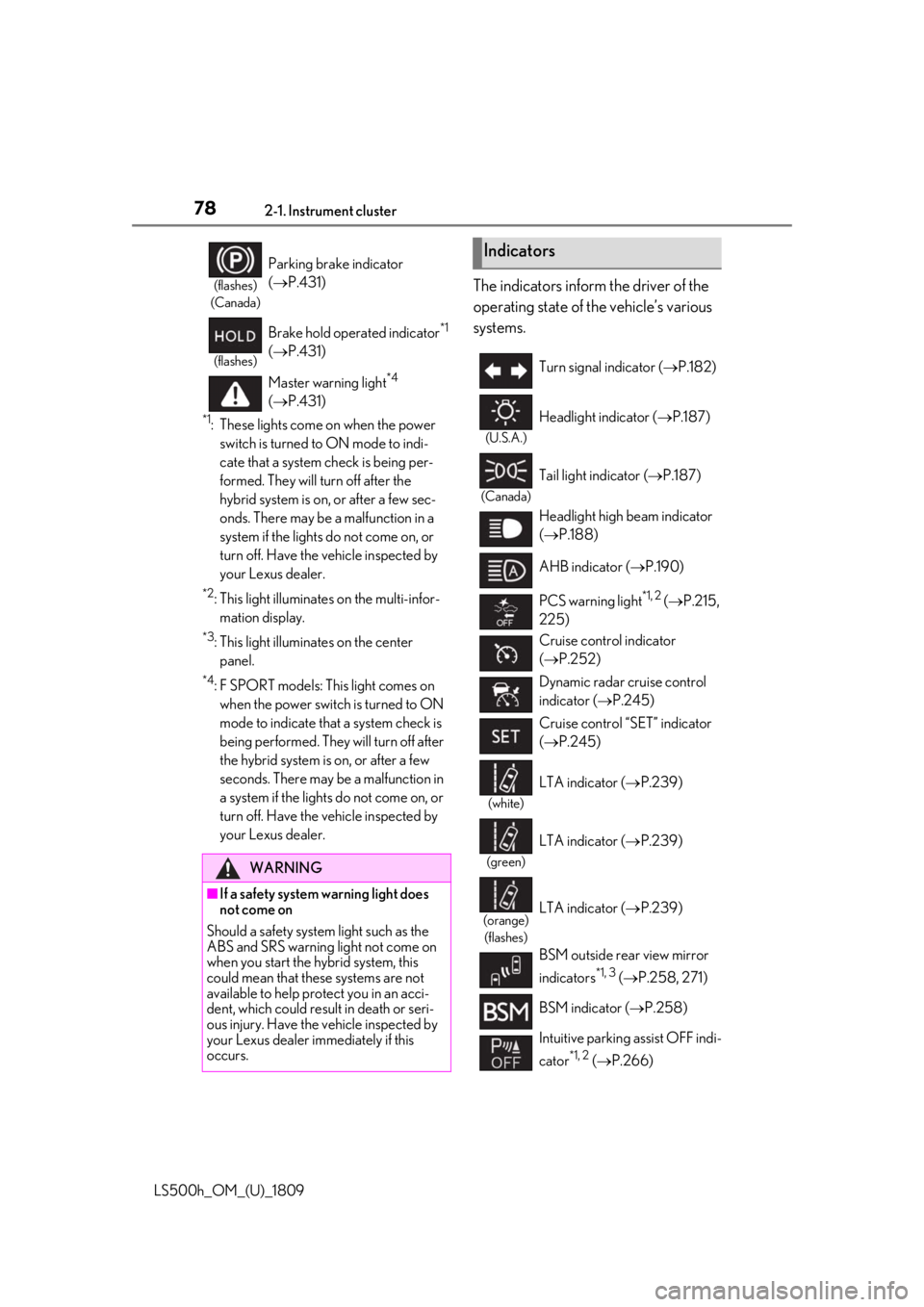
The indicators inform the driver of the
operating state of the vehicle’s various
systems.(flashes)
(Canada)
Parking brake indicator
( P.431)
(flashes)
Brake hold operated indicator*1
( P.431)
Master warning light
*4
( P.431)
WARNING
■If a safety system warning light does
not come on
Should a safety system light such as the
ABS and SRS warning light not come on
when you start the hybrid system, this
could mean that these systems are not
available to help pr otect you in an acci-
dent, which could result in death or seri-
ous injury. Have the vehicle inspected by
your Lexus dealer immediately if this
occurs.
Indicators
Turn signal indicator ( P.182)
(U.S.A.)
Headlight indicator ( P.187)
(Canada)
Tail light indicator ( P.187)
Headlight high beam indicator
( P.188)
AHB indicator ( P.190)
PCS warning light
*1, 2 ( P.215,
225)
Cruise control indicator
( P.252)
Dynamic radar cruise control
indicator ( P.245)
Cruise control “SET” indicator
( P.245)
(white)
LTA indicator ( P.239)
(green)
LTA indicator ( P.239)
(orange)
(flashes)LTA indicator ( P.239)
BSM outside rear view mirror
indicators
*1, 3 ( P.258, 271)
BSM indicator ( P.258)
Intuitive parking assist OFF indi-
cator
*1, 2 ( P.266)
Page 79 of 523

792-1. Instrument cluster
LS500h_OM_(U)_1809
2
Vehicle status information and indicators
Drive mode indicators
Except F SPORT models
F SPORT models
RCTA OFF indicator*1, 2
( P.271)
RCD OFF indicator
*2 (if
equipped) ( P.275)
PKSB OFF indicator
*1, 2
( P.279)
(flashes)
Slip indicator*1 ( P.303)
VSC OFF indicator
*1, 2
( P.303)
High mode indicator (if
equipped) ( P.299)
Smart access system with
push-button start indicator
*4
( P.170)
“READY” indicator ( P.170)
EV drive mode indicator
( P.174)
(U.S.A.)
Parking brake indicator
( P.183)
(Canada)
Parking brake indicator
( P.183)
Brake hold standby indicator
*1
( P.185)
Brake hold operated indicator
*1
( P.185)
EV indicator ( P.64)
Low outside temperature indi-
cator
*5 ( P.81, 85)
Security indicator
*6 ( P.71,
73)
(U.S.A.)
“AIR BAG ON/OFF” indica-
tor
*1, 6 ( P.40)
(Canada)
“AIR BAG ON/OFF” indica-
tor
*1, 6 ( P.40)
Snow mode indicator ( P.179)
Normal mode indicator
( P.297)
Custom mode indicator
( P.297)
Comfort mode indicator
( P.297)
Eco drive mode indicator
( P.297)
Sport S mode indicator
( P.297)
Sport S+ mode indicator
( P.297)
Snow mode indicator ( P.179)
Normal mode indicator
( P.297)
Custom mode indicator
( P.297)
Comfort mode indicator
( P.297)
Page 93 of 523

932-1. Instrument cluster
LS500h_OM_(U)_1809
2
Vehicle status information and indicators
■G-force (F SPORT models)
Displays lateral G-forces on the vehi-
cle. Also displays, around the periph-
ery of the G-force display, the left and
right steering amount, accelerator
pedal input, and brake fluid pressure.
Acceleration G-force on the vehi-
cle
Current G-force value (analyzed
value of front/rear and left/right
G-forces)
Record of the maximum G-forces
Accelerator pedal input
Brake fluid pressure
Steering amount
This display is intended for use as a guide-
line. Depending on factors such as the road
surface condition, temperature and vehicle
speed, the display may not show the actual
condition of the vehicle.
Resetting the record of maximum
G-forces
Press and hold of the meter control
switch to reset the record.
Peak hold function
If lateral G-forces of 0.5 G or greater are
generated, the G-forc e value display will
turn amber and be held for 2 seconds.
■Gear Position (F SPORT models)
Displays the current shift range or gear
position when the shift position is in D
or M.
■Units (F SPORT models)
The units of measure used can be
changed while driving.
Unlike the units sett ing performed on the
settings display, th e units setting per-
formed on the drive information display
can be changed while driving.
Select to display the following naviga-
tion system-linked information.
Route guidance to destination
Compass display (heading-up dis-
play)
■Route guidance to destination display
When the route guidance to destination
display is enabled on th e head-up display, it
will not be displayed on the multi-informa-
tion display. ( P.98)
Select to enable se lection of an audio
source or track on the meter using the
meter control switches.
Select to display the operational status
of the following systems:
A
B
C
D
E
F
Navigation system-linked dis-
play (if equipped)
Audio system-linked display
Driving support system informa-
tion display
Page 99 of 523

992-1. Instrument cluster
LS500h_OM_(U)_1809
2
Vehicle status information and indicators
Displays the operational status of the
following systems:
LTA (Lane Tracing Assist) ( P.233)
Dynamic radar cruise control with
full-speed range ( P.245)
Details of content displayed on the
head-up display may differ from that dis-
played on the multi-information display. For
details, refer to the explanation of each sys-
tem.
Pop-up displays for the following sys-
tems will be displayed when necessary.
■Driving support systems
Displays a warning/suggestion/advice
message or the operating state of a rel-
evant system.
PCS (Pre-Collision System)
( P.212, 223)
FCTA (Front Cross Traffic Alert) (if
equipped) ( P.230)
Intuitive parking assist ( P.265)
Parking Support Brake function (for
static objects) ( P.284)
Brake Override System ( P.161)
Drive-Start Control ( P.161)
Details of content displayed on the
head-up display may differ from that dis-
played on the multi-information display. For
details, refer to the explanation of each sys-
tem.
■/ icons
These icons are linked to the
multi-information display
: Master warning icon
Displayed when a warn ing message is dis-
played on the multi-information display.
( P.434)
: Information icon
Displayed when a suggestion pop-up dis-
play ( P.95) or advice pop-up display is
displayed on the multi-information display.
■Warning message
Some warning messages are displayed
when necessary, according to certain
conditions.
Details of content displayed on the
head-up display may differ from that dis-
played on the multi-information display.
■Audio system operation status
Displayed when an audio remote con-
trol switch on the steering wheel is
operated.
■Hands-free system status
Displayed when the hands-free system
is operated.
■When a pop-up display is displayed
When a pop-up display is displayed, a cur-
rent display may no long er be displayed. In
this case, the display will return after the
pop-up display disappears.
Driving support system display
area
Pop-up display
Page 159 of 523

159
LS500h_OM_(U)_1809
4
4
Driving
Driving
.4-1. Before drivingDriving the vehicle ..................... 160
Cargo and luggage ................... 166
Vehicle load limits ...................... 168
Trailer towing ............................... 168
Dinghy towing ............................. 169
4-2. Driving procedures Power (ignition) switch ............ 170
EV drive mode ............................ 174
Hybrid transmission .................. 176
Turn signal lever.......................... 182
Parking brake .............................. 183
Brake Hold.................................... 185
4-3. Operating the lights and wipers Headlight switch ......................... 187
AHB (Automatic High Beam) ......................................................... 190
Windshield wipers and washer ......................................................... 192
4-4. Refueling Opening the fuel tank cap...... 197
4-5. Using the driving support sys- tems
Lexus Safety System + A......... 199
Lexus Safety System + 2.0 .... 206
PCS (Pre-Collision System) (vehi- cles with Lexus Safety System +
A) ................................................... 212
PCS (Pre-Collision System) (vehi- cles with Lexus Safety System +
2.0)............................................... 223FCTA (Front Cross Traffic Alert)
....................................................... 230
LTA (Lane Tracing Assist) .... 233
Dynamic radar cruise control with full-speed range...................... 245
RSA (Road Sign Assist).......... 255
BSM (Blind Spot Monitor) .... 258
PKSA (Parking Support Alert) ....................................................... 263
Intuitive parking assist ............. 265
RCTA (Rear Cross Traffic Alert) function......................................... 271
RCD (Rear Camera Detection) function....................................... 275
PKSB (Parking Support Brake) ....................................................... 278
Parking Support Brake function (static objects) ......................... 284
Parking Support Brake function (rear-crossing vehicles) ...... 290
Parking Support Brake function (rear pedestrians) .................. 294
Driving mode select switch .. 297
Electronically modulated air sus- pension ....................................... 298
Driving assist systems.............. 302
4-6. Driving tips Hybrid vehicle driving tips .... 307
Winter driving tips .................... 309
Page 160 of 523

1604-1. Before driving
LS500h_OM_(U)_1809
4-1.Before driving
■Starting the hybrid system
P.170
■Driving
1 With the brake pedal depressed,
shift the shift position to D. ( P.176)
Check that the shift position indicator
shows D.
2 If the parking brake is in manual
mode, release the parking brake.
(P.183)
3 Gradually release the brake pedal
and gently depress the accelerator
pedal to accelerate the vehicle.
■Stopping
1 With the shift position in D, depress
the brake pedal.
2 If necessary, set the parking brake.
If the vehicle is to be stopped for an
extended period of time, shift the shift posi-
tion to P. ( P.178)
■Parking the vehicle
1 With the shift position in D, depress
the brake pedal to stop the vehicle
completely.
2 If the parking brake is in manual
mode, set the parking brake.
(P.183)
3 Shift the shift position to P.
(P.178)
Check that the shift position indicator shows P and the parking brake indicator is
illuminated.
4
Press the power switch to stop the
hybrid system.
5 Slowly release the brake pedal.
6 Lock the door, making sure that you
have the electronic key on your
person.
If parking on a hill, block the wheels as
needed.
■Starting off on a steep uphill
1 Make sure that the parking brake is
set and shift the shift position to D.
Hill-start assist control will operate.
( P.302)
2 Gently depress the accelerator
pedal.
3 Release the parking brake.
■For fuel-efficient driving
Keep in mind that hybr id vehicles are similar
to conventional vehicles, and it is necessary
to refrain from activi ties such as sudden
acceleration. ( P.307)
■Driving in the rain
●Drive carefully when it is raining, because
visibility will be reduced, the windows
may become fogged-up, and the road
will be slippery.
●Drive carefully when it starts to rain,
because the road surface will be espe-
cially slippery.
●Refrain from high speeds when driving on
an expressway in the rain, because there
may be a layer of wa ter between the tires
and the road surface, preventing the
steering and brakes from operating prop-
erly.
■Engine speed while driving
In the following conditions, the engine
speed may become high while driving. This
is due to automatic up-shifting control or
down-shifting implementation to meet driv-
Driving the vehicle
The following procedures should be
observed to ensure safe driving:
Driving procedure