2019 LEXUS LS500 warning light
[x] Cancel search: warning lightPage 252 of 512

252 4-5. Using the driving support systems
LS500_OM_(U)_1810 Use the meter control switches to turn
on/off the function.
1 Press or to select .
2 Press or to select and
then press .WARNING●
Keep the sensors and the surrounding
areas on the rear bumper clean at all
times.
If a sensor or its su rrounding area on the
rear bumper is dirty or covered with
snow, the Blind Spot Monitor may not
operate and a warning message
( P.250) will be displayed. In this situa-
tion, clear off the dirt or snow and drive
the vehicle with the operation conditions
of the BSM function ( P.254) satisfied
for approximately 10 minutes. If the
warning message does not disappear,
have the vehicle inspected by your Lexus
dealer.
●
Do not attach accessories, stickers
(including transparen t stickers), alumi-
num tape, etc. to a sensor or its sur-
rounding area on the rear bumper.
●
Do not subject a sensor or its sur-
rounding area on the rear bumper to a
strong impact.
If a sensor is moved even slightly off
position, the system may malfunction
and vehicles may not be detected cor-
rectly.
In the following situations, have your
vehicle inspected by your Lexus
dealer.
• A sensor or its surrounding area is
subject to a strong impact.
• If the surrounding area of a sensor is
scratched or dented, or part of them
has become disconnected.
●
Do not disassemb le the sensor. ●
Do not modify the sensor or surround-
ing area on the rear bumper. ●
If a sensor or the rear bumper needs to
be removed/installed or replaced,
contact your Lexus dealer. ●
Do not paint the rear bumper any
color other than an official Lexus color.
Turning the Blind Spot Monitor
on/off
Page 258 of 512

258 4-5. Using the driving support systems
LS500_OM_(U)_1810 When an object is detected, a graphic will
be displayed on the panoramic view moni-
tor (if equipped).
Use the meter control switches to
enable/disable the Lexus parking
assist-sensor. ( P.81)
1 Press or to select .
2 Press or to select “PKSA”
and then press .
3 Press or to select and
then press .
When the intuitive parking assist func-
tion is disabled, the intuitive parking
assist OFF indicator ( P.68) illumi-
nates.
To re-enable the system when it was disabled, select on the multi-infor-
mation display, select and then On.
If disabled using this method, the sys-
tem will not be re-enabled by turning
the engine switch off and then to IGNI-
TION ON mode.
Turning intuitive parking assist
on/off WARNING■
When using the intuitive parking
assist
Observe the following precautions.
Failing to do so may result in the vehicle
being unable to be driven safely and pos-
sibly cause an accident. ●
Do not use the sensor at speeds in
excess of 6 mph (10 km/h). ●
The sensors’ detection areas and reac-
tion times are limited. When moving
forward or reversin g, check the areas
surrounding the vehicle (especially the
sides of the vehicl e) for safety, and
drive slowly, using the brake to control
the vehicle’s speed. ●
Do not install accessories within the
sensors’ detection areas. ●
The area directly under the bumpers is
not detected.
■
When to disable the function
In the following situations, disable the
function as it may operate even though
there is no possibility of a collision. ●
The vehicle is equipped with a fender
pole, wireless antenna or fog lights.
●
The front or rear bumper or a sensor
receives a strong impact.
●
A non-genuine Lexus suspension
(lowered suspension, etc.) is installed.
●
Towing eyelets are installed.
●
A backlit licence pl ate is installed.
Page 264 of 512

264 4-5. Using the driving support systems
LS500_OM_(U)_1810 If a vehicle approaching from the right or
left at the rear of the vehicle is detected,
the RCTA icon ( P.265) for the detected
side will be displayed on the Center Dis-
play. This illustration shows an example of a
vehicle approaching from both sides of the
vehicle.
RCTA buzzerIf a vehicle approaching from the right or
left at the rear of the vehicle is detected, a
buzzer will sound. The buzzer also sounds
for approximately 1 second immediately
after the RCTA function is turned on.
Use the meter control switches to
enable/disable the RCTA function.
( P.81)
1 Press or to select .
2 Press or to select “PKSA”
and then press .
3 Press or to select “RCTA”
and then press .When the RCTA function is disabled, the
RCTA OFF indicator ( P.68) illuminates.
(Each time the engine switch is turned off
then changed to IGNITION ON mode,
the RCTA function will be enabled auto-
matically.) ■
Outside rear view mirror indicator visi-
bility
In strong sunlight, the outside rear view mir-
ror indicator may be difficult to see. ■
Hearing the RCTA buzzer
The RCTA buzzer may be difficult to hear
over loud noises, such as if the audio system
volume is high. ■
When “RCTA Not Available” is shown
on the multi-information display
Water, snow, mud, etc., may be attached to
the rear bumper around the sensors.
( P.252) Removing the water, snow, mud,
etc., from the attached to the rear bumper
around the sensors to normal.
Additionally, the function may not function
normally when used in extremely hot or
cold environments.
■
Rear side radar sensors
P.252
■
Operation of the RCTA function
The RCTA function uses rear side radar sensors to detect vehicles approaching
from the right or left at the rear of the ve hicle and alerts the driver of the presence
of such vehicles by flashing the outside rear view mirror indi cators and sounding a
buzzer.Turning the RCTA function
on/off D WARNING■
Cautions regarding the use of the
function
The driver is solely responsible for safe
driving. Always drive safely, taking care
to observe your surroundings.
The RCTA function is only a supplemen-
tary function which alerts the driver that a
vehicle is approaching from the right or
left at the rear of the vehicle. As the
RCTA function may not function cor-
rectly under certai n conditions, the
driver’s own visual confirmation of safety
is necessary. Over re liance on this func-
tion may lead to an accident resulting
death or serious injury.
RCTA function
Page 296 of 512

296 4-5. Using the driving support systems
LS500_OM_(U)_1810 ■
When the TRAC/VSC systems are
operating (vehicles without Lexus
Safety System + A)
The slip indicator light will flash while the
TRAC/VSC systems are operating.
■
When the TRAC/VSC/ABS systems are
operating (vehicles with Lexus Safety
System + A)
The slip indicator light will flash while the
TRAC/VSC/ABS systems are operating.
■
Disabling the TRAC system
If the vehicle gets stuck in mud, dirt or snow,
the TRAC system may reduce power from
the engine to the wheels. Pressing the
switch to turn the system off may make it
easier for you to rock the vehicle in order to
free it.
To turn the TRAC system off, quickly press
and release the switch.
The “Traction Control Turned Off” will be
shown on the multi-information display.
Press the switch again to turn the sys-
tem back on. ■
Disabling both TRAC and VSC systems
To turn the TRAC and VSC systems off,
press and hold the switch for more
than 3 seconds while the vehicle is stopped.
The VSC OFF indicator light will come on
and the “Traction Control Turned Off” will
be shown on the multi-information display. *
Press the switch ag ain to turn the sys-
tem back on. *
: On vehicles with PCS (Pre-Collision
System), PCS will also be disabled (only
Pre-Collision warning is available). The
PCS warning light will come on and a
message will be di splayed on the
multi-information display. ( P.214,
222) ■
When the message is displayed on the
multi-information display showing that
TRAC has been disabled even if the
switch has not been pressed
TRAC cannot be oper ated. Contact your
Lexus dealer. ■
Operating conditions of hill-start assist
control
When the following four conditions are met,
the hill-start assist control will operate:
●
The shift position is in a position other
than P or N (when stating off for-
ward/backward on an upward incline)
●
The vehicle is stopped
●
The accelerator pedal is not depressed
●
The parking brake is not engaged
■
Automatic system cancelation of
hill-start assist control
The hill-start assist control will turn off in any
Page 298 of 512

298 4-5. Using the driving support systems
LS500_OM_(U)_1810 (10 km/h) or more and the airbag sensor
detects a collision. (The Secondary Colli-
sion Brake will not operate when the vehicle
speed is below approximately 6 mph [10
km/h].) ■
Secondary Collision Brake automatic
cancellation
The Secondary Collision Brake is automati-
cally canceled in the following situations: ●
The vehicle speed drops below approxi-
mately 6 mph (10 km/h)●
A certain amount of time elapses during
operation●
The accelerator pedal is depressed a
large amount■
When “Check VGRS System” or
“CHECK DRS” is displayed on the
multi-information display
The VGRS or DRS may not operate prop-
erly. Have the vehicle inspected by your
Lexus dealer.
WARNING■
The ABS does not operate effectively
when●
The limits of tire gripping performance
have been exceeded (such as exces-
sively worn tires on a snow covered
road).
●
The vehicle hydroplanes while driving
at high speed on wet or slick roads.
■
Stopping distance when the ABS is
operating may exceed that of normal
conditions
The ABS is not designed to shorten the
vehicle’s stopping di stance. Always main-
tain a safe distance from the vehicle in
front of you, especially in the following
situations:
●
When driving on dirt, gravel or
snow-covered roads
●
When driving with tire chains
●
When driving over bumps in the road ●
When driving over roads with potholes
or uneven surfaces ■
TRAC/VSC may not operate effec-
tively when
Directional control and power may not
be achievable while driving on slippery
road surfaces, even if the TRAC/VSC
system is operating. Drive the vehicle
carefully in conditions where stability and
power may be lost. ■
Hill-start assist control does not oper-
ate effectively when ●
Do not overly rely on hill-start assist
control. Hill-start assist control may
not operate effectively on steep
inclines and roads covered with ice. ●
Unlike the parking brake, hill-start
assist control is not intended to hold
the vehicle stationary for an extended
period of time. Do not attempt to use
hill-start assist control to hold the vehi-
cle on an incline, as doing so may lead
to an accident. ■
When the TRAC/VSC is activated
(vehicles without Lexus Safety Sys-
tem + A)
The slip indicator light flashes. Always
drive carefully. Reckless driving may
cause an accident. Exercise particular
care when the indicator light flashes.
■
When the TRAC/ABS/VSC is acti-
vated (vehicles with Lexus Safety Sys-
tem + A)
The slip indicator light flashes. Always
drive carefully. Reckless driving may
cause an accident. Exercise particular
care when the indicator light flashes.
■
When the TRAC/VSC systems are
turned off
Be especially careful and drive at a speed
appropriate to the road conditions. As
these are the systems to help ensure
vehicle stability and driving force, do not
turn the TRAC/VSC systems off unless
necessary.
Page 301 of 512
3014-6. Driving tips
LS500_OM_(U)_1810 4
Driving Perform the following according to the
driving conditions:
Do not try to forcib ly open a window
or move a wiper that is frozen. Pour
warm water over the frozen area to
melt the ice. Wipe away the water
immediately to prevent it from
freezing.
To ensure proper operation of the
climate control system fan, remove
any snow that has accumulated on
the air inlet vents in front of the
windshield.
Check for and remove any excess
ice or snow that may have accumu-
lated on the exterior lights, vehicle’s
roof, chassis, around the tires or on
the brakes.
Remove any snow or mud from the
bottom of your shoes before getting
in the vehicle.
Accelerate the vehicle slowly, keep a
safe distance between you and the
vehicle ahead, and drive at a reduced
speed suitable to road conditions. Park the vehicle and shift the shift posi-
tion to P without setting the parking
brake. The parking brake may freeze
up, preventing it from being released. If
the vehicle is parked without setting
the parking brake, make sure to block
the wheels.
Failure to do so may be dangerous
because it may cause the vehicle to
move unexpectedly, possibly leading to
an accident.
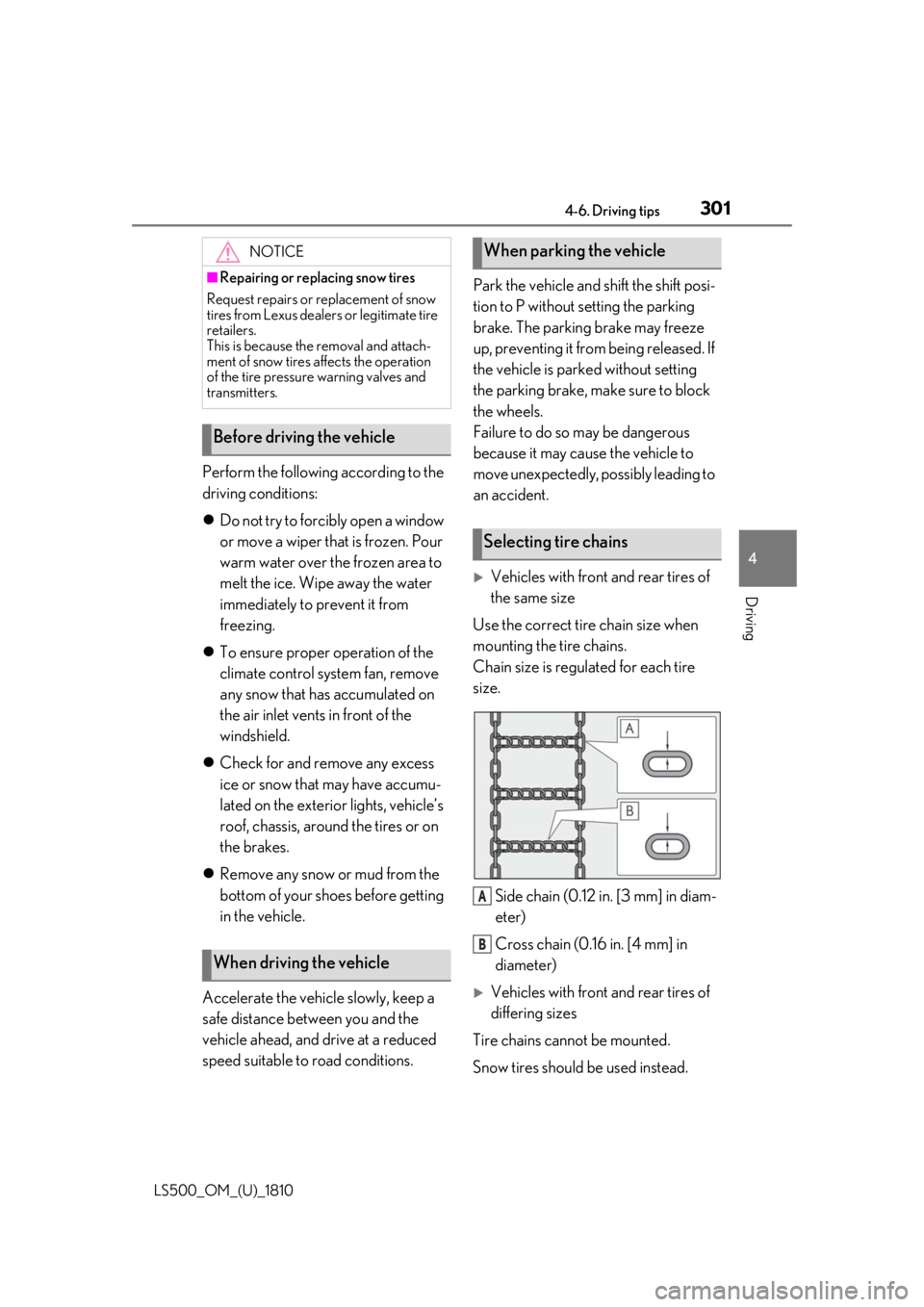
Vehicles with front and rear tires of
the same size
Use the correct tire chain size when
mounting the tire chains.
Chain size is regulated for each tire
size.
Side chain (0.12 in. [3 mm] in diam-
eter)
Cross chain (0.16 in. [4 mm] in
diameter)
Vehicles with front and rear tires of
differing sizes
Tire chains cannot be mounted.
Snow tires should be used instead.NOTICE■
Repairing or replacing snow tires
Request repairs or replacement of snow
tires from Lexus dealers or legitimate tire
retailers.
This is because the removal and attach-
ment of snow tires affects the operation
of the tire pressure warning valves and
transmitters.
Before driving the vehicle
When driving the vehicle When parking the vehicle
Selecting tire chains
A
B
Page 320 of 512
320 5-3. Using the air conditioning system and defogger
LS500_OM_(U)_1810 off after a while.
In order to prevent the windshield from fog-
ging up when the outside air is cold, the
dehumidification function may operate or
the outside/recirculat ed air mode may not
switch to (recirculated air) mode.
Pollen is filtered even if the micro dust and
pollen filter is turned off.
1 Press the automatic mode switch or
select “AUTO” on the sub function
menu. ( P.316)
2 Press the outside/recirculated air
mode switch to switch to automatic
air intake mode.The air conditioning system automatically
switches between outside air and recircu-
lated air modes.
3 Adjust the temperature setting.
4 To stop the operation, press the off
switch or select “OFF” on the sub
function menu. ( P.316)If the fan speed settin g or air flow modes
are operated, the automatic mode indica-
tor goes off. However, automatic mode for
functions other than th at operated is main-
tained.
■
Using automatic mode
Fan speed is adjusted automatically accord-
ing to the temperature setting and the
ambient conditions.
Therefore, the fan may stop for a while until warm or cool air is ready to flow immedi-
ately after the automatic mode switch is
pressed or “AUTO” is selected.
Cool air may blow around the upper body
even when the heater is on due to sunlight. ■
Automatic mode for air intake control
In automatic mode, the system detects
exhaust gas and other pollutants and auto-
matically switches between outside air and
recirculated air modes.
When the dehumidification function is off,
and the fan is operating, turning automatic
mode on will activate the dehumidification
function.
In S-FLOW mode, priority for the air-
flow is given to the front seats, reducing
the airflow and air co nditioning effect
on the rear seats. When in S-FLOW
mode, airflow from the rear air condi-
tioning system is stopped.
Operation in S-FLOW mode differs
according to the following conditions:
Priority is given to the driver’s seat
only when:
Manual S-FLOW mode: When no
passenger is judged to be in the
front passenger seat.
Automatic S-FLOW mode: When
no passengers are judged to be in
the front passenger seat or rear
seats.
Priority is given to the front seats
when: Manual S-FLOW mode is
selected or no passengers are
judged to be in the rear seats when
in automatic S-FLOW mode.
S-FLOW mode will be disabled
when: A passenger is judged to be WARNING■
To prevent burns (vehicles with wind-
shield wiper de-icer)
Do not touch the glass at lower part of
the windshield or to the side of the front
pillars when the wind shield wiper de-icer
is on.
Using automatic mode S-FLOW mode
Page 336 of 512
336 5-5. Using the storage features
LS500_OM_(U)_1810
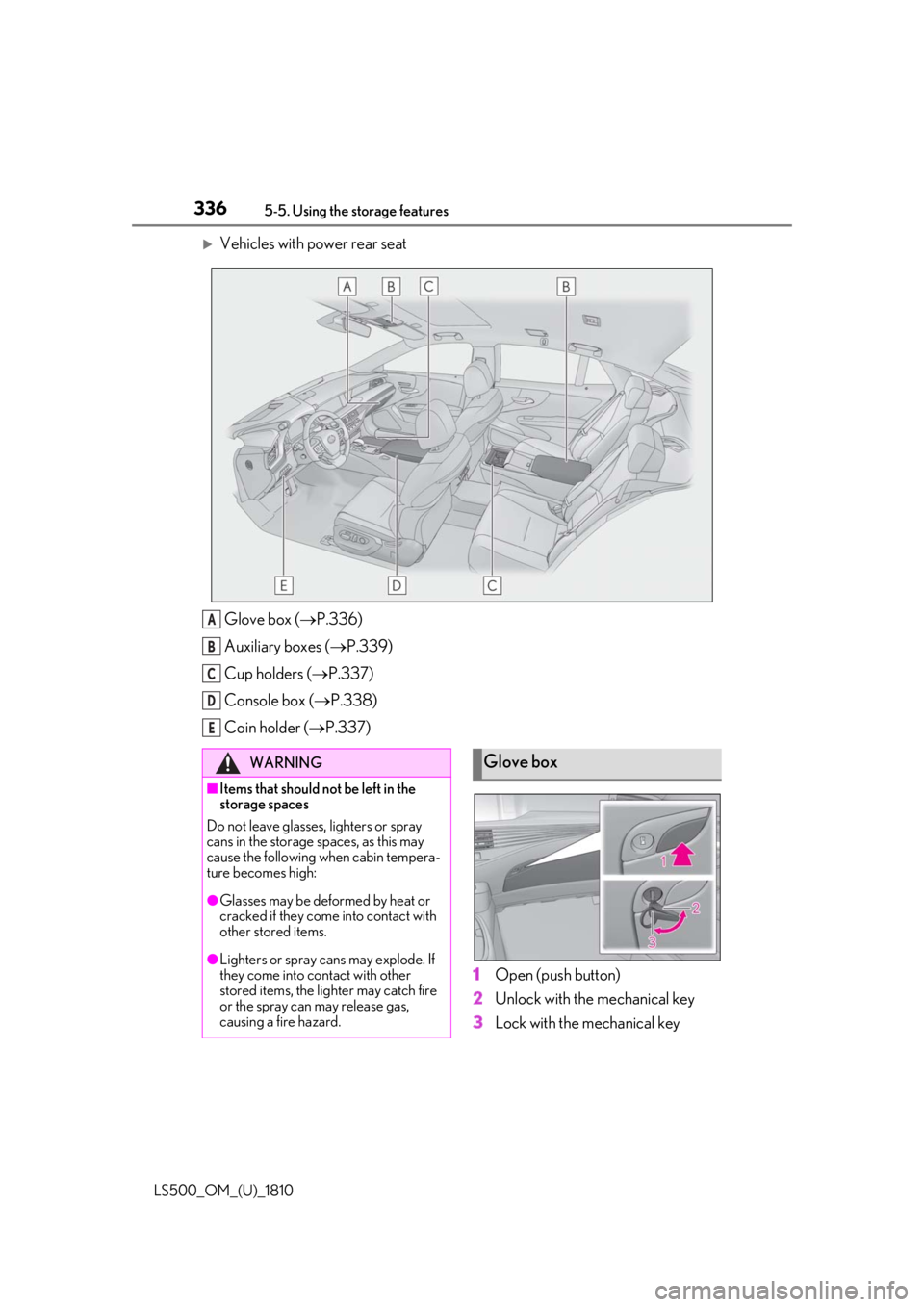
Vehicles with power rear seat
Glove box ( P.336)
Auxiliary boxes ( P.339)
Cup holders ( P.337)
Console box ( P.338)
Coin holder ( P.337)
1 Open (push button)
2 Unlock with the mechanical key
3 Lock with the mechanical keyA
B
C
D
E
WARNING■
Items that should not be left in the
storage spaces
Do not leave glasses, lighters or spray
cans in the storage spaces, as this may
cause the following when cabin tempera-
ture becomes high:
●
Glasses may be deformed by heat or
cracked if they come into contact with
other stored items.
●
Lighters or spray cans may explode. If
they come into contact with other
stored items, the lighter may catch fire
or the spray can may release gas,
causing a fire hazard. Glove box