2019 LEXUS LS500 door lock
[x] Cancel search: door lockPage 346 of 512

346 5-6. Using the other interior features
LS500_OM_(U)_1810 ■
The power outlet can be used when●
12 V
The engine switch is in ACCESSORY or
IGNITION ON mode. ●
120 VAC
The engine switch is in IGNITION ON
mode.
NOTICE■
To avoid damaging the power outlet
Close the power outlet lid when the
power outlet is not in use.
Foreign objects or liquids that enter the
power outlet may cause a short circuit. ■
To prevent the fuse from being blown●
12 V
Do not use an accessory that uses more
than 12 V 10 A.
●
120 VAC
Do not use a 120 VAC appliance that
requires more than 100 W. If a 120 VAC
appliance that consumes more than 100
W is used, the protection circuit will cut
the power supply. ■
To prevent incorrect operation of the
vehicle
When turning the engine switch off,
make sure to disc onnect accessories
designed for charging , such as portable
chargers, power banks, etc. from the
power outlets.
If such an accessory is left connected, the
following may occur: ●
The doors cannot be locked using the
smart access system with push-button
start or wireless remote control. ●
The opening screen will be displayed
on the multi-information display. ●
The interior lights, instrument panel
lights, etc. will illuminate. ■
To prevent the battery from being dis-
charged
Do not use the power outlet longer than
necessary when the engine is not run-
ning. ■
Appliances that may not operate
properly (120 VAC)
The following 120 VAC appliances may
not operate properly even if their power
consumption is under 100 W. ●
Appliances with high initial peak watt-
age
●
Measuring devices that process pre-
cise data
●
Other appliances that require an
extremely stable power supply
Sun visors
Page 350 of 512
350 5-6. Using the other interior features
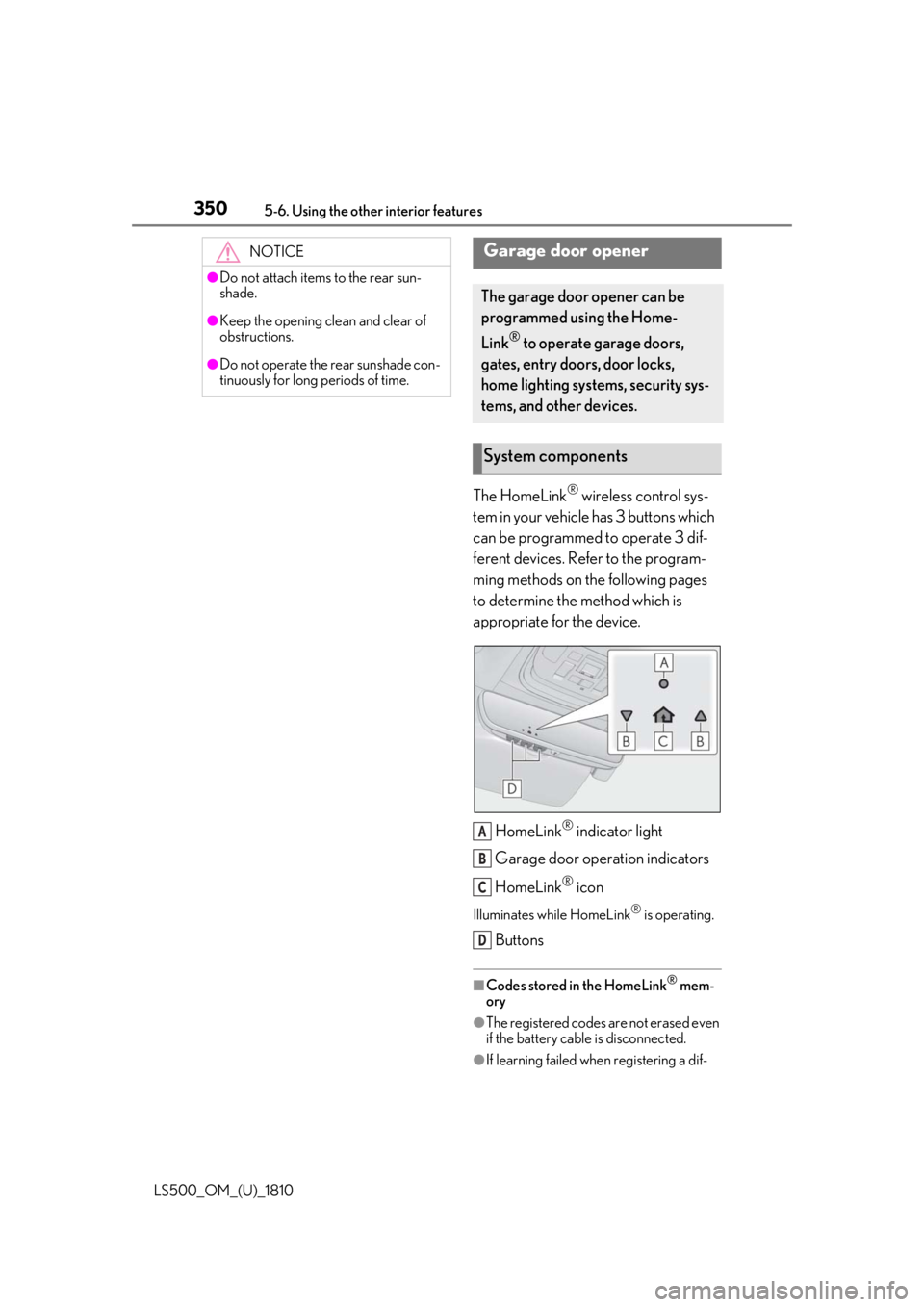
LS500_OM_(U)_1810 The HomeLink ®
wireless control sys-
tem in your vehicle has 3 buttons which
can be programmed to operate 3 dif-
ferent devices. Refer to the program-
ming methods on the following pages
to determine the method which is
appropriate for the device.
HomeLink ®
indicator light
Garage door operation indicators
HomeLink ®
iconIlluminates while HomeLink ®
is operating.
Buttons ■
Codes stored in the HomeLink ®
mem-
ory
●
The registered codes are not erased even
if the battery cable is disconnected.
●
If learning failed when registering a dif-NOTICE●
Do not attach items to the rear sun-
shade.●
Keep the opening clean and clear of
obstructions.●
Do not operate the rear sunshade con-
tinuously for long periods of time.
Garage door opener The garage door opener can be
programmed using the Home-
Link ®
to operate garage doors,
gates, entry doors, door locks,
home lighting systems, security sys-
tems, and other devices.
System components
A
B
C
D
Page 358 of 512
358 6-1. Maintenance and care
LS500_OM_(U)_1810 6-1.Maintenance and care
Working from top to bottom, liber-
ally apply water to the vehicle body,
wheel wells and underside of the
vehicle to remove any dirt and dust.
Wash the vehicle body using a
sponge or soft cloth, such as a
chamois.
For hard-to-remove marks, use car
wash soap and rinse thoroughly with
water.
Wipe away any water.
Wax the vehicle when the water-
proof coating deteriorates. If water does not bead on a clean surface,
apply wax when the vehicle body is cool.
■
Self-restoring coat
The vehicle body has a self-restoring coat-
ing that is resistant to small surface
scratches caused in a car wash etc.
●
The coating lasts for 5 to 8 years from
when the vehicle is delivered from the
plant.
●
The restoration time differs depending on
the depth of the scratch and outside tem-
perature.
The restoration time may become
shorter when the coating is warmed by
applying warm water.
●
Deep scratches caused by keys, coins,
etc. cannot be restored.
●
Do not use wax that contains abrasives. ■
Automatic car washes ●
Before washing the vehicle:
• Fold the mirrors
• Turn off the power trunk opener and
closer (if equipped)
Start washing from the front of the vehicle.
Extend the mirrors before driving.●
Brushes used in automatic car washes
may scratch the vehicl e surface and harm
your vehicle’s paint. ■
High pressure car washes ●
Do not allow the nozzles of the car wash
to come within close proximity of the win-
dows and the air suspension unit (if
equipped). ●
Before using the car wash, check that the
fuel filler door on your vehicle is closed
properly. ■
When using a car wash
If the door handle becomes wet while the
electronic key is within the effective range,
the door may lock and unlock repeatedly. In
that case, follow the following correction
procedures to wash the vehicle: ●
Place the key in a position 6 ft. (2 m) or
more separate from the vehicle while the
vehicle is being wash ed. (Take care to
ensure that the key is not stolen.) ●
Set the electronic key to battery-saving
mode to disable the smart access system
with push-button start. ( P.112)■
Aluminum wheels ●
Remove any dirt immediately by using a
neutral detergent. ●
Wash detergent off with water immedi-
ately after use.
●
To protect the paint from damage, make
sure to observe the following precau-
tions.
• Do not use acidic, alkaline or abrasive
detergent
• Do not use hard brushes
• Do not use detergent on the wheels when
they are hot, such as after driving or park-
ing in hot weatherCleaning and protecting the
vehicle exterior Perform cleaning in a manner
appropriate to each component
and its material.
Cleaning instructions
Page 367 of 512

3676-2. Maintenance
LS500_OM_(U)_1810 6
Maintenance and care Parking brake • Does the parking
brake operate nor-
mally?
•When parked on a
slope and the park-
ing brake is on, is the
vehicle securely
stopped?
Seat belts • Do the seat belts
operate smoothly?
• The seat belts should
not be damaged.
Seats • Do the seat controls
operate properly?
Steering wheel • Does the steering
wheel rotate
smoothly?
• Does the steering
wheel have the cor-
rect amount of free
play?
•There should not be
any strange sounds
coming from the
steering wheel.
Vehicle exterior Items Check points
Doors/trunk • Do the doors/trunk
operate smoothly?
Engine hood •Does the engine
hood lock system
work properly?
Fluid leaks •There should not be
any signs of fluid
leakage after the
vehicle has been
parked.Items Check points
Tires • Is the tire inflation
pressure correct?
• The tires should not
be damaged or
excessively worn.
• Have the tires been
rotated according to
the maintenance
schedule?
•The wheel nuts
should not be loose.
Windshield wip-
ers • The wiper blades
should not show any
signs of cracking,
splitting, wear, con-
tamination or defor-
mation.
• The wiper blades
should clear the
windshield without
streaking or skip-
ping.Items Check points
Page 380 of 512

380 6-3. Do-it-yourself maintenance
LS500_OM_(U)_1810 The battery is located in the trunk
under the luggage mat.
Removing the luggage mat: P.340
■
Before recharging
When recharging, the battery produces
hydrogen gas which is flammable and
explosive. Therefore, observe the following
precautions before recharging: ●
If recharging with the battery installed on
the vehicle, be sure to disconnect the
ground cable. ●
Make sure the engine switch on the char-
ger is off when connecting and discon-
necting the charger cables to the battery. ■
After recharging/reconnecting the bat-
tery ●
Unlocking the doors using the smart
access system with pu sh-button start may
not be possible immediately after recon-
necting the battery. If this happens, use
the wireless remote control or the
mechanical key to lo ck/unlock the doors.
●
Start the engine with the engine switch in
ACCESSORY mode. The engine may
not start with the engine switch turned off.
However, the engine will operate nor-
mally from the second attempt.
●
The engine switch mode is recorded by
the vehicle. If the battery is reconnected,
the vehicle will return the engine switch
mode to the status it was in before the NOTICE■
Do not use any fluid other than
washer fluid
Do not use soapy water or engine anti-
freeze instead of washer fluid.
Doing so may cause streaking on the
vehicle’s painted surfaces, as well as
damaging the pump leading to problems
of the washer fluid not spraying. ■
Diluting washer fluid
Dilute washer fluid with water as neces-
sary.
Refer to the freezing temperatures listed
on the label of the washer fluid bottle. Battery
Location
Page 433 of 512

4337-2. Steps to take in an emergency
LS500_OM_(U)_1810 7
When trouble arises ■
When the electronic key does not work
properly●
Make sure that the smart access system
with push-button start has not been dis-
abled at your Lexus dealer. If it has been
disabled, re-enable it.●
Check if battery-saving mode is set. If it is
set, cancel the function. ( P.113)
■
Unlocking the door
Use the mechanical key ( P.98) in
order to perform the following opera-
tions: 1 Pull the driver’s door handle and
insert the mechanical key.
2 Unlock the door.
3 Remove the key, return the handle,
and then pull the handle again. ■
Locking the door
1 With the door open, push down the
inside lock button.
2 Close the door. ■
Trunk
Turn the mechanical key clockwise to
open. ( P.65)If the electronic key does not
operate properly If communication between the
electronic key and vehicle is inter-
rupted ( P.113) or the electronic
key cannot be used because the
battery is depleted, the smart
access system with push-button
start and wireless remote control
cannot be used. In such cases, the
doors and trunk can be opened and
the engine can be started by follow-
ing the procedure below.
NOTICE■
In case of a smart access system with
push-button start malfunction or
other key-related problems
Take your vehicle with all the electronic
keys provided with your vehicle to your
Lexus dealer.
Locking and unlocking the
doors, unlocking the trunk
Page 435 of 512
4357-2. Steps to take in an emergency
LS500_OM_(U)_1810 7
When trouble arises If you have a set of jumper (or booster)
cables and a second vehicle with a
12-volt battery, you can jump start your
vehicle by following the steps below.
Method connecting jumper (or
booster) cables to the battery
1 Confirm that the electronic key is
being carried. When connecting the jumper (or booster)
cables, depending on the situation, the
alarm may activate and doors locked.
( P.66)
2 Open the trunk lid and remove the
luggage mat. ( P.340)In the event that the trunk opener cannot
be used, use the mechanical key to open
the trunk. ( P.433)
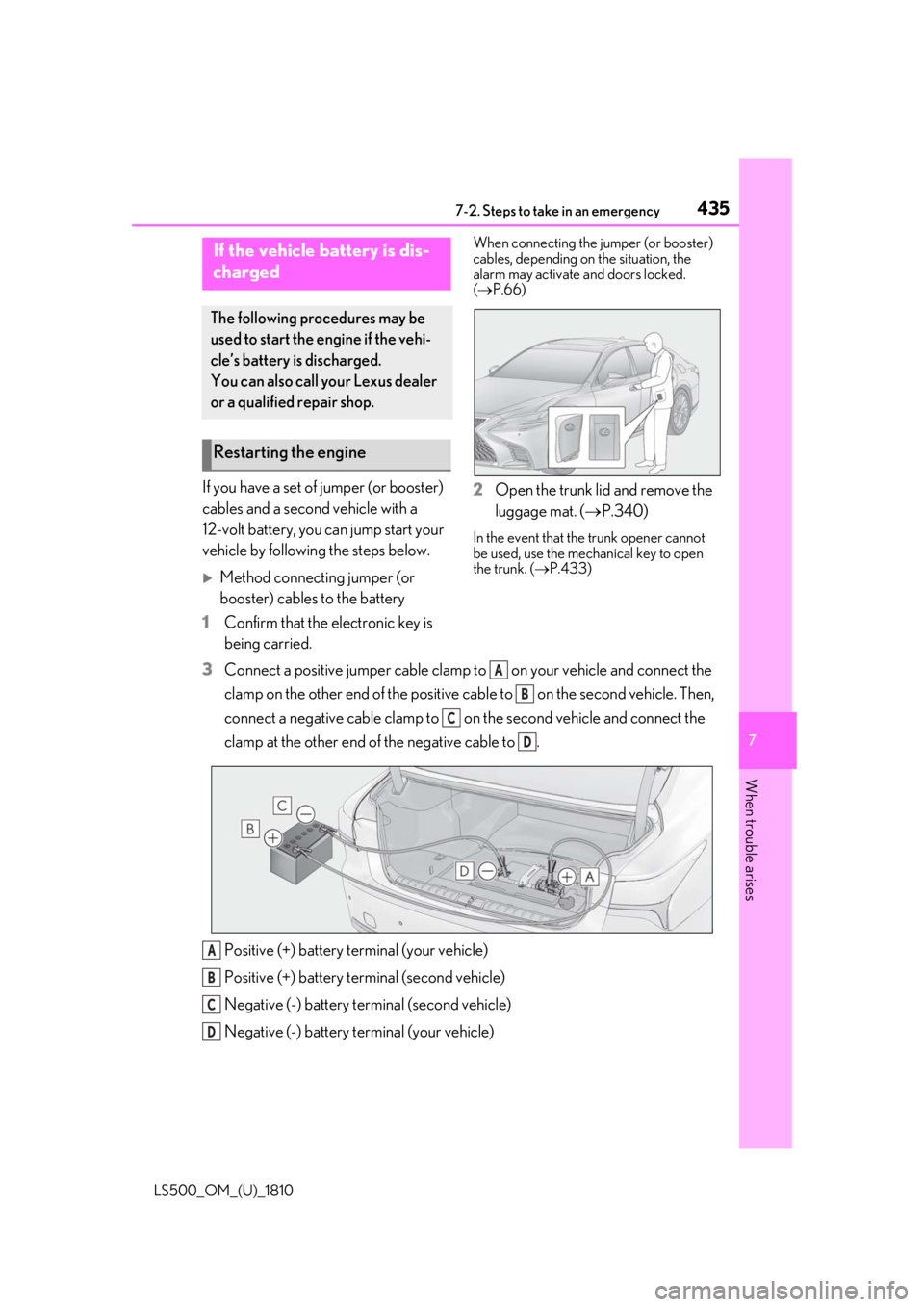
3 Connect a positive jumper cable clamp to on your vehicle and connect the
clamp on the other end of the positive cab le to on the second vehicle. Then,
connect a negative cable clamp to on the second vehicle and connect the
clamp at the other end of the negative cable to .
Positive (+) battery terminal (your vehicle)
Positive (+) battery terminal (second vehicle)
Negative (-) battery terminal (second vehicle)
Negative (-) battery terminal (your vehicle)If the vehicle battery is dis-
charged The following procedures may be
used to start the engine if the vehi-
cle’s battery is discharged.
You can also call your Lexus dealer
or a qualified repair shop.
Restarting the engine
A
B
C
D
A
B
C
D
Page 436 of 512

436 7-2. Steps to take in an emergency
LS500_OM_(U)_1810 4 Start the engine of the second vehi-
cle. Increase the engine speed
slightly and maintain at that level for
approximately 5 minutes to
recharge the battery of your vehi-
cle.
5 Open and close any of the doors of
your vehicle with the engine switch
off.
6 Maintain the engine speed of the
second vehicle and start the engine
of your vehicle by turning the
engine switch to IGNITION ON
mode.
7 Once the vehicle’s engine has
started, remove the jumper cables
in the exact reverse order from
which they were connected.
Method connecting jumper (or
booster) cables to the exclusive
jump starting terminal
1 Confirm that the electronic key is
being carried.When connecting the jumper (or booster)
cables, depending on the situation, the
alarm may activate and doors locked.
( P.66) 2 Open the hood. Remove the pas-
senger side engine compartment
cover. ( P.371, 374)
3 Remove the service
cover.( P.375)
4 Open the fuse box cover. Push the tab in and lift the lid off.
5 Open the exclusive jump starting
terminal cover.
6 Connect a positive jumper cable clamp to on your vehicle and connect the
clamp on the other end of the positive cab le to on the second vehicle. Then, A
B