2019 LEXUS LS500 air condition
[x] Cancel search: air conditionPage 318 of 512

318 5-3. Using the air conditioning system and defogger
LS500_OM_(U)_1810 ■
Option control screen
Select on the sub menu to display
the option control screen. The functions can be switched on and off.
When the function is on, the indicator illu-
minates on the screen.
Vehicles with DUAL-ZONE climate
control
Set Lexus Climate Concierge
( P.311)
Adjusting the temperature for
driver and passenger seats sepa-
rately (“DUAL” mode) ( P.322)
Set eco air conditioning modeAir conditioning and heater output is lim-
ited to prioritize fuel economy.
Cooling and dehumidification func-
tionIf the “A/C” indicator is turned off, the sys-
tem will blow ambient temperature airor
heated air.
Select the S-FLOW mode
( P.320)
Prevent ice from building up on the
windshield and wiper blades
(Windshield wiper de-icer) (if
equipped)
Removing pollen from the air (Micro dust and pollen filter)
Vehicles with 4-ZONE climate con-
trol
Set Lexus Climate Concierge
( P.311)
Adjust the temperature for driver,
passenger and rear seats sepa-
rately (“4-ZONE” mode)
( P.322)
Set eco air conditioning mode Air conditioning and heater output is lim-
ited to prioritize fuel economy.
Cooling and dehumidification func-
tion If the “A/C” indicator is turned off, the sys-
tem will blow ambient temperature airor
heated air.
Select the S-FLOW mode
( P.320)
Prevent ice from building up on the
windshield and wiper blades
(Windshield wiper de-icer) (if
equipped)
Removing pollen from the air
(Micro dust and pollen filter) A
B
C
D
E
F
G A
B
C
D
E
F
G
Page 319 of 512

3195-3. Using the air conditio ning system and defogger
LS500_OM_(U)_1810 5
Interior features ■
Side display
Vehicles with DUAL-ZONE climate
control
Display the front seat heaters/front
seat ventilators control screen
( P.327)
Adjust the left side seat tempera-
ture setting
Adjust the fan speed setting
Adjust the right side seat tempera-
ture setting
Set cooling and dehumidification
function on/off
Adjusting the temperature for
driver and passenger seats sepa-
rately (“DUAL” mode) ( P.322)
Select the air flow mode
Vehicles with 4-ZONE climate con-
trol
Display the front seat heaters/front seat ventilators control screen
( P.327)
Adjust the left side seat tempera-
ture setting
Adjust the fan speed setting
Adjust the right side seat tempera-
ture setting
Select the left side seat air flow
mode
Set cooling and dehumidification
function on/off If the “A/C” indicator is turned off, the sys-
tem will blow ambient temperature airor
heated air.
Adjust the temperature for driver,
passenger and rear seats sepa-
rately (“4-ZONE” mode)
( P.322)
Select the right side seat air flow
mode ■
Windshield wiper de-icer (if equipped)
This feature is used to prevent ice from
building up on the windshield and wiper
blades.
The windshield de-icer will automatically
turn off after a while. ■
Eco air conditioning mode
When Eco drive mode is selected using the
driving mode select switch, eco air condi-
tioning mode turns on.
When a drive mode other than Eco drive
mode is selected, eco air conditioning
mode may turn off.
■
Micro dust and pollen filter
Outside air mode switches to
(recirculated air) mode. Pollen is removed
from the air and the air flows to the upper
part of the body.
Usually the system will automatically turn A
B
C
D
E
F
G
A B
C
D
E
F
G
H
Page 320 of 512
320 5-3. Using the air conditioning system and defogger
LS500_OM_(U)_1810 off after a while.
In order to prevent the windshield from fog-
ging up when the outside air is cold, the
dehumidification function may operate or
the outside/recirculat ed air mode may not
switch to (recirculated air) mode.
Pollen is filtered even if the micro dust and
pollen filter is turned off.
1 Press the automatic mode switch or
select “AUTO” on the sub function
menu. ( P.316)
2 Press the outside/recirculated air
mode switch to switch to automatic
air intake mode.The air conditioning system automatically
switches between outside air and recircu-
lated air modes.
3 Adjust the temperature setting.
4 To stop the operation, press the off
switch or select “OFF” on the sub
function menu. ( P.316)If the fan speed settin g or air flow modes
are operated, the automatic mode indica-
tor goes off. However, automatic mode for
functions other than th at operated is main-
tained.
■
Using automatic mode
Fan speed is adjusted automatically accord-
ing to the temperature setting and the
ambient conditions.
Therefore, the fan may stop for a while until warm or cool air is ready to flow immedi-
ately after the automatic mode switch is
pressed or “AUTO” is selected.
Cool air may blow around the upper body
even when the heater is on due to sunlight. ■
Automatic mode for air intake control
In automatic mode, the system detects
exhaust gas and other pollutants and auto-
matically switches between outside air and
recirculated air modes.
When the dehumidification function is off,
and the fan is operating, turning automatic
mode on will activate the dehumidification
function.
In S-FLOW mode, priority for the air-
flow is given to the front seats, reducing
the airflow and air co nditioning effect
on the rear seats. When in S-FLOW
mode, airflow from the rear air condi-
tioning system is stopped.
Operation in S-FLOW mode differs
according to the following conditions:
Priority is given to the driver’s seat
only when:
Manual S-FLOW mode: When no
passenger is judged to be in the
front passenger seat.
Automatic S-FLOW mode: When
no passengers are judged to be in
the front passenger seat or rear
seats.
Priority is given to the front seats
when: Manual S-FLOW mode is
selected or no passengers are
judged to be in the rear seats when
in automatic S-FLOW mode.
S-FLOW mode will be disabled
when: A passenger is judged to be WARNING■
To prevent burns (vehicles with wind-
shield wiper de-icer)
Do not touch the glass at lower part of
the windshield or to the side of the front
pillars when the wind shield wiper de-icer
is on.
Using automatic mode S-FLOW mode
Page 321 of 512
3215-3. Using the air conditio ning system and defogger
LS500_OM_(U)_1810 5
Interior features in a rear seat when in automatic
S-FLOW mode. Depending on the set temperature, opera-
tion in S-FLOW mode may not change as
described above.
When certain conditions are met and pri-
ority is given to the driver’s seat only, the
temperature indicator for the front passen-
ger side will turn off.
How the system judges if a passenger is in
the vehicle: P.321
The following S-FLOW modes are
available:
Automatic S-FLOW mode
In this mode, when a passenger is
judged to be in a rear seat, S-FLOW
mode will be automatically disabled.
( P.321)The indicator will illuminate on the air con-
ditioning control screen when S-FLOW
mode is enabled.
To enable/disable S-FLOW mode and
enter manual S-FLOW mode, select the
S-FLOW mode switch.
How the system judges if a passenger is in
the vehicle: P.321
Manual S-FLOW mode
When the S-FLOW mode switch is
selected, S-FLOW mode will be manu-
ally enabled/ disabled. The indicator will illuminate on the air con-
ditioning control screen when S-FLOW
mode is enabled.
In manual S-FLOW mode, as the system
does not judge if a pa ssenger is in a rear
seat.
If the rear air conditioning control screen
on the Rear Multi Operation Panel (if
equipped) is operated , S-FLOW mode will automatically be disabled ■
How the system judges if a passenger is
in the vehicle when in S-FLOW mode
In S-FLOW mode, the system judges if a
passenger is in the vehicle as follows: ●
Front passenger seat: A passenger is
judged to be in the front passenger seat
when the system detect s an object on the
front passenger seat, fastening of the
front passenger seat belt, changing of the
set temperature for the front passenger
seat, changing of the air outlets for the
front passenger seat or the opening and
closing of the front passenger door.
(However, when only opening and clos-
ing of the front passenger door is
detected, the system will judge that a pas-
senger is not in the front passenger seat
after the vehicle speed reaches approxi-
mately 12 mph (20 km/h) or more.) ●
Rear seats: A passenger is judged to be in
a rear seat when th e system detects the
opening and closing of a rear door (auto-
matic S-FLOW mode only) or the opera-
tion of the rear air conditioning control
screen on the Rear Multi Operation
Panel. ■
Operation of automatic S-FLOW mode
When the system is operating in automatic
S-FLOW mode, if the system detects the
opening and closing of a rear door or the
operation of the rear air conditioning con-
trol screen on the Rear Multi Operation
Panel, S-FLOW mode will be disabled. To
enable S-FLOW mode, select the S-FLOW
mode switch. (In this case, the system will
operate in manual S-FLOW mode.)
■
Changing from manual S-FLOW mode
to automatic S-FLOW mode
1 Select the S-FLOW mode switch to dis-
able S-FLOW mode.
2 Turn the engine switch off.
3 After 60 minutes have elapsed, change
the engine switch to ON mode.
Page 322 of 512
322 5-3. Using the air conditioning system and defogger
LS500_OM_(U)_1810
Vehicles with DUAL-ZONE climate
control
To turn on the “DUAL” mode, perform
any of the following procedures:
Select “DUAL” on the sub function
menu. ( P.316)
Select “DUAL” on the option con-
trol screen.
Adjust the passenger’s side tem-
perature setting. The indicator on the main control screen
comes on when the “DUAL” mode is on.
Vehicles with 4-ZONE climate con-
trol
To turn on the “4-ZONE” mode, per-
form any of the following procedures:
Select “4-ZONE” on the sub func-
tion menu. ( P.316)
Select “4-ZONE” on the option
control screen.
Adjust a passenger seat tempera-
ture setting. The indicator on the main control screen
comes on when the “4-ZONE” mode is on.
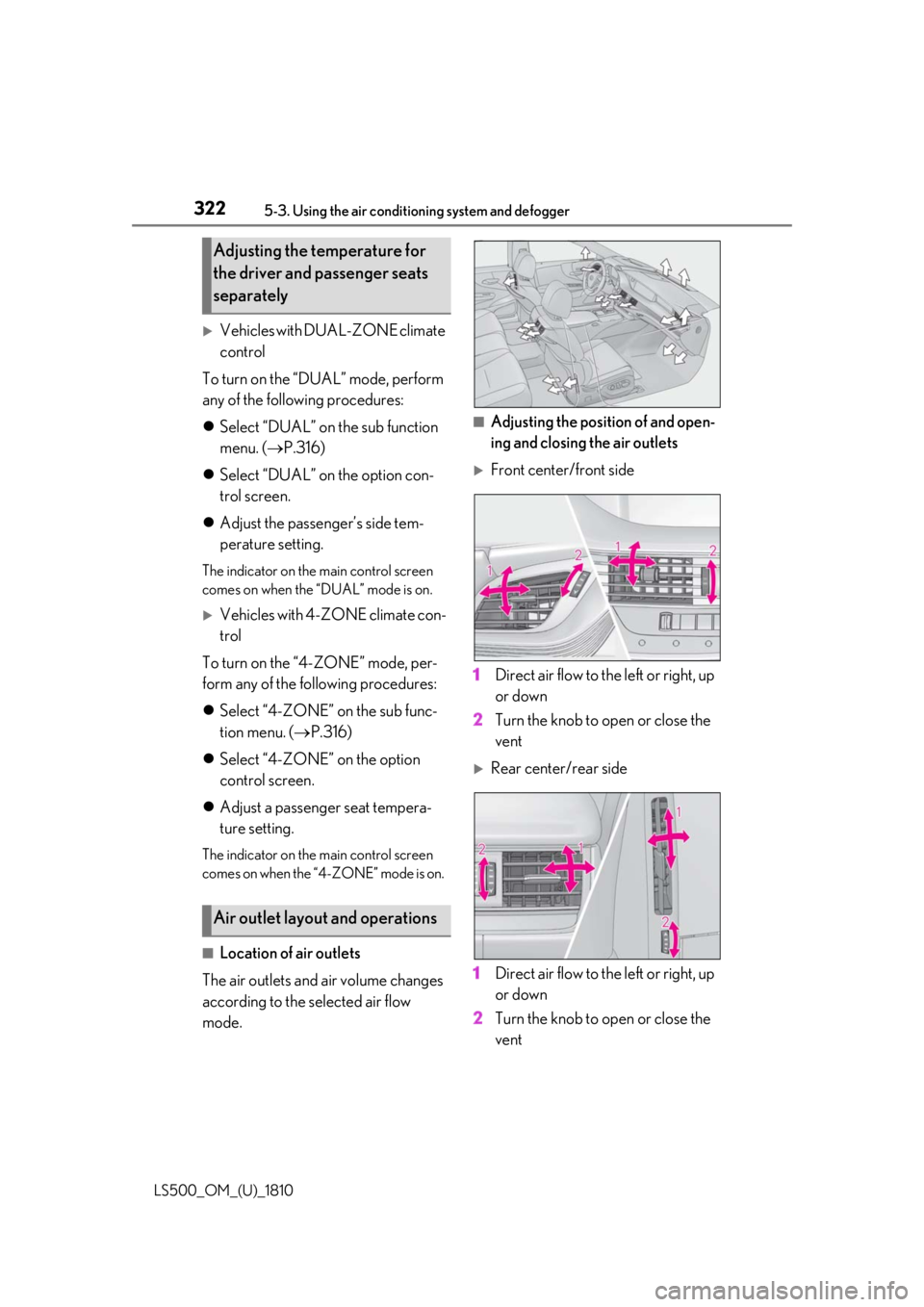
■
Location of air outlets
The air outlets and air volume changes
according to the selected air flow
mode. ■
Adjusting the position of and open-
ing and closing the air outlets
Front center/front side
1 Direct air flow to the left or right, up
or down
2 Turn the knob to open or close the
vent
Rear center/rear side
1 Direct air flow to the left or right, up
or down
2 Turn the knob to open or close the
ventAdjusting the temperature for
the driver and passenger seats
separately
Air outlet layout and operations
Page 323 of 512

3235-3. Using the air conditio ning system and defogger
LS500_OM_(U)_1810 5
Interior features *
: If equippedWARNING■
To prevent the windshield defogger
from operating improperly
Do not place anything on the instrument
panel which may cover the air outlets.
Otherwise, air flow may be obstructed,
preventing the windshield defoggers
from defogging.
Rear automatic air condi-
tioning system *
The air outlets and fan speed are
automatically adjusted according
to the temperature setting.
The rear air conditioning system
can be operated using the Center
Display and Rear Multi Operation
Panel.
Center Display
Press the “MENU” button on the
Remote Touch to display the main
menu and move the cursor to to
display the climate control shortcut
buttons. Then, select to display
the rear air conditioning control
screen.
Rear Multi Operation Panel *
Touch “Climate” on the home screen
to display the rear air conditioning
control screen.( P.308)
Touching the shortcut button on the
home screen will also display opera-
tion buttons for some of the rear air
conditioning system functions. *
: The Rear Multi Op eration Panel can-
not be used to operate the rear air
conditioning system if the function is
disabled. ( P.324)
Page 324 of 512

324 5-3. Using the air conditioning system and defogger
LS500_OM_(U)_1810 ■
Center Display
Using the touchpad of the Remote
Touch, select the button on the screen.
to can be adjusted by perform-
ing the following operations.
Flick operation: Move the pointer to
the desired item and flick the touchpad
up or down. The item can be adjusted by one level.
Trace operation: After selecting the
desired item, trace the pad surface. The item can be adjusted by the amount
that you trace.
Trace operation cannot be used while driv-
ing.
Adjust the left side rear seat tem-
perature setting
Select the left side rear seat air flow
mode : Air flows to the upper body
: Air flows to the upper body and feet
: Air flows to the feet
Adjust the rear seats fan speed set- ting
Select the right side rear seat air
flow mode
Adjust the right side rear seat tem-
perature setting
Function on/off indicators When the function is on, the indicator illu-
minates on the control screen.
Sub function menu When the sub function button on the
Remote Touch is pressed, the following
functions can be switched on and off.
“Rear off”: Turn the rear seats fan off
“Rear AUTO”: Set the rear seats automatic
mode on/off ( P.325)
: Disables operation of the rear air
conditioning system using the Rear Multi
Operation Panel ■
Rear Multi Operation Panel *
Various functions can be operated by
touching the displayed buttons on the
Rear Multi Operation Panel. *
: The Rear Multi Op eration Panel cannot
be used to operate the rear air condi-
tioning system if the function is disabled.
( P.324)
Rear air conditioning control screen
Adjust the left side rear seat tem-
perature setting Rear air conditioning control
screen A E
A
B
C D
E
F
G
A
Page 325 of 512

3255-3. Using the air conditio ning system and defogger
LS500_OM_(U)_1810 5
Interior features Select the left side rear seat air flow
mode : Air flows to the upper body
: Air flows to the upper body and feet
: Air flows to the feet
Set the rear seats automatic mode
on/off ( P.325)
Select the right side rear seat air
flow mode
Turn the rear seats fan off
Adjust the right side rear seat tem-
perature setting
Adjust the rear seats fan speed set-
ting
Shortcut screen
Adjust the left side rear seat tem-
perature setting
Adjust the right side rear seat tem-
perature setting
Center Display
1 Select “Rear AUTO” on the sub
function menu. ( P.324) 2 To stop the operation, select “Rear
off” on the sub function menu.
( P.324)
If the fan speed setting or air flow
modes are operated, the automatic
mode indicator goes off. However,
automatic mode for functions other
than that operated is maintained.
Rear Multi Operation Panel
1 Select “AUTO” on the rear air con-
ditioning control screen. ( P.324)
2 To stop the operation, select “OFF”
on the rear air conditioning control
screen. ( P.324)
If the fan speed setting or air flow
modes are operated, the automatic
mode indicator goes off. However,
automatic mode for functions other
than that operated is maintained. ■
Using automatic mode
Fan speed is adjusted automatically accord-
ing to the temperature setting and the
ambient conditions.
Therefore, the fan may stop for a while until
warm or cool air is ready to flow immedi-
ately after “Rear AUTO” is selected or
“AUTO” is touched.
Cool air may blow around the upper body
even when the heater is on due to sunlight.
The temperature setting of the rear
seats can be adjusted using the follow-
ing methods:
When the “4-ZONE” indicator is
off: Adjust the driver’s seat tempera-
ture.Using automatic mode B
C
D
E
F
G
A
B
Adjusting the temperature set-
ting of the rear seats