2019 LEXUS LS500 light
[x] Cancel search: lightPage 347 of 512
3475-6. Using the other interior features
LS500_OM_(U)_1810 5
Interior features 1 To set the visor in the forward posi-
tion, flip it down.
2 To set the visor in the side position,
flip down, unhook, and swing it to
the side.
3 To use the side extender, place the
visor in the side position, then slide
it backward.
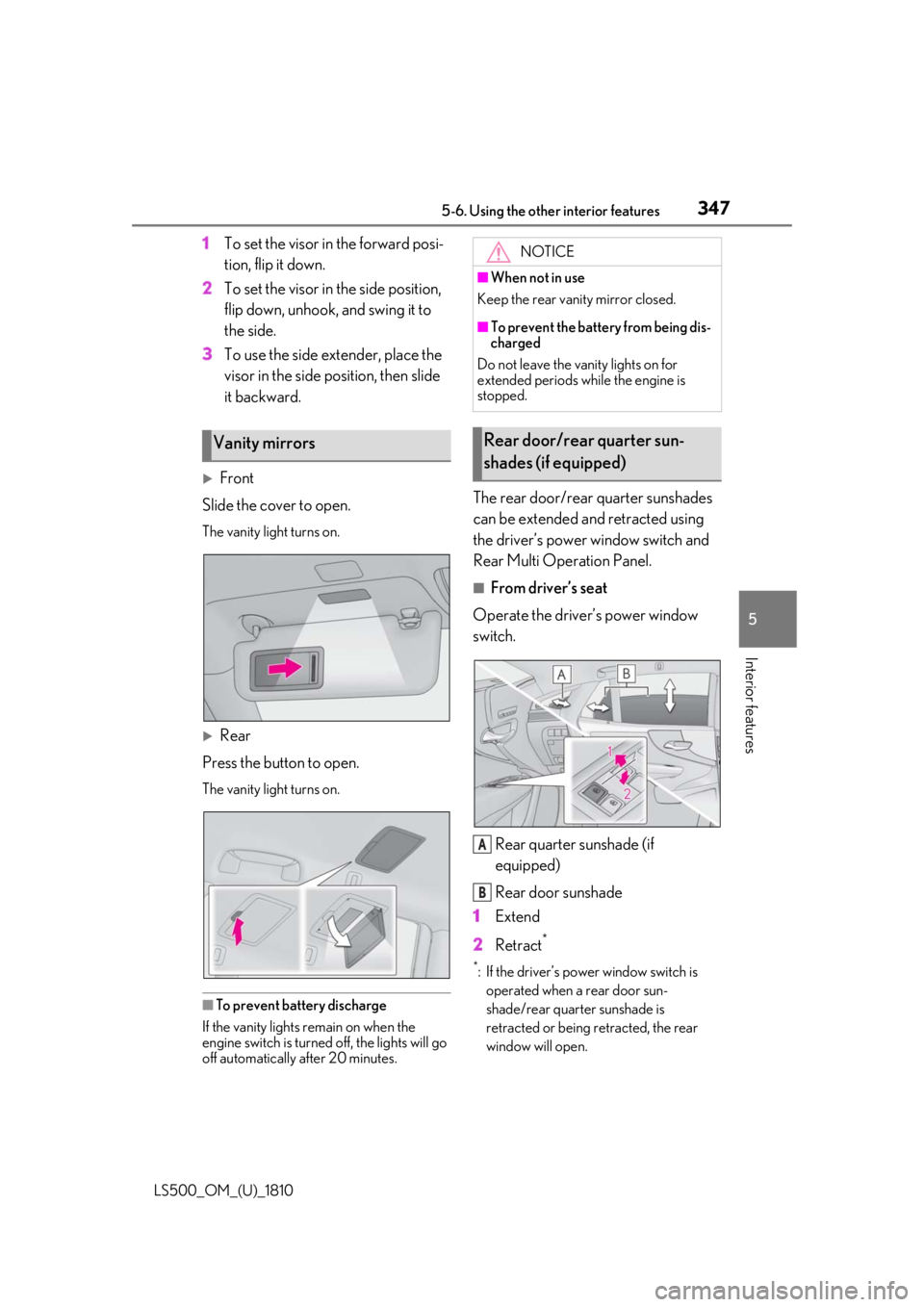
Front
Slide the cover to open. The vanity light turns on.
Rear
Press the button to open. The vanity light turns on.
■
To prevent battery discharge
If the vanity lights remain on when the
engine switch is turned off, the lights will go
off automatically after 20 minutes. The rear door/rear quarter sunshades
can be extended and retracted using
the driver’s power window switch and
Rear Multi Operation Panel. ■
From driver’s seat
Operate the driver’s power window
switch.
Rear quarter sunshade (if
equipped)
Rear door sunshade
1 Extend
2 Retract **
: If the driver’s power window switch is
operated when a rear door sun-
shade/rear quarter sunshade is
retracted or being retracted, the rear
window will open.Vanity mirrors NOTICE■
When not in use
Keep the rear vanity mirror closed. ■
To prevent the battery from being dis-
charged
Do not leave the vanity lights on for
extended periods while the engine is
stopped.
Rear door/rear quarter sun-
shades (if equipped)
A
B
Page 348 of 512

348 5-6. Using the other interior features
LS500_OM_(U)_1810 ■
From rear seat
The rear seat power window switches
cannot be used to extend the rear door
sunshades/rear quarter sunshades.
1 Display the home screen and then
touch “Rear Shade/Lamp”.
( P.308)
2 To fully extend/retract a rear
door/rear quarter sunshade, touch
the respective button.
■
Operating conditions●
The engine switch is in IGNITION ON
mode.●
The rear side windows are fully closed.■
Operation of rear door sunshades/rear
quarter sunshades when extended
If a rear door power window switch is oper-
ated when the rear door sunshade/rear
quarter sunshade is extended, the rear door
sunshade/rear quarter sunshade will retract
while the rear window is opening.
■
Operating the rear door/rear quarter
sunshades after turning the engine
switch off
The rear door/rear quarter sunshades can
be operated for a while even after the
engine switch is turned to ACCESSORY
mode or off.
However, they cannot be operated using
the driver’s power window switch after
either front door is opened.
■
Jam protection function
If an object becomes caught between a rear door sunshade and the window frame, the
rear door sunshade will stop and then
extend/retract slightly. ■
When reconnecting the battery
The rear door/rear quarter sunshades will
always be retracted the first time the button
is pressed.
The rear sunshade can be raised and
lowered by operating any of the
switches shown below. WARNING■
When the rear door/rear quarter sun-
shades are being extended or
retracted
Do not place fingers or other objects in
the shade mechanism or in the opening
as injury may result. ■
Jam protection function
Never use any part of your body to inten-
tionally activate the jam protection func-
tion.
NOTICE■
To ensure normal operation of the
sunshades
Observe the following precautions: ●
Do not place excessive load on the
motor or other components.
●
Do not place objects where they may
hinder opening and closing opera-
tions.
●
Do not attach items to the rear
door/rear quarter sunshades.
●
Keep the opening clean and clear of
obstructions.
●
Do not operate the rear door/rear
quarter sunshades continuously for
long periods of time.
Rear sunshade (if equipped)
Page 350 of 512
350 5-6. Using the other interior features
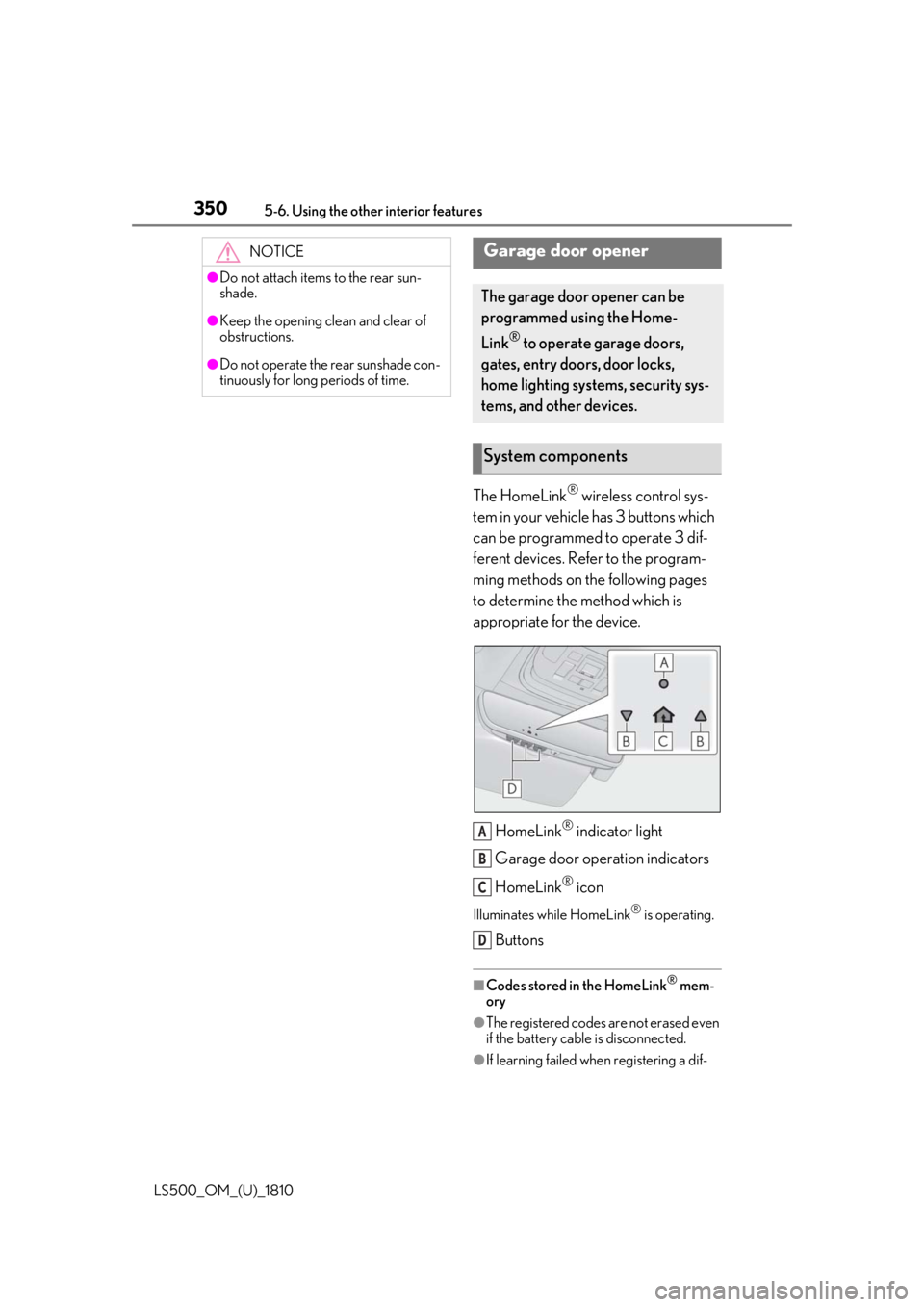
LS500_OM_(U)_1810 The HomeLink ®
wireless control sys-
tem in your vehicle has 3 buttons which
can be programmed to operate 3 dif-
ferent devices. Refer to the program-
ming methods on the following pages
to determine the method which is
appropriate for the device.
HomeLink ®
indicator light
Garage door operation indicators
HomeLink ®
iconIlluminates while HomeLink ®
is operating.
Buttons ■
Codes stored in the HomeLink ®
mem-
ory
●
The registered codes are not erased even
if the battery cable is disconnected.
●
If learning failed when registering a dif-NOTICE●
Do not attach items to the rear sun-
shade.●
Keep the opening clean and clear of
obstructions.●
Do not operate the rear sunshade con-
tinuously for long periods of time.
Garage door opener The garage door opener can be
programmed using the Home-
Link ®
to operate garage doors,
gates, entry doors, door locks,
home lighting systems, security sys-
tems, and other devices.
System components
A
B
C
D
Page 352 of 512
352 5-6. Using the other interior features
LS500_OM_(U)_1810 ■
Before programming HomeLink ®
During programming, it is possible
that garage doors, gates, or other
devices may operate. For this rea-
son, make sure that people and
objects are clear of the garage door
or other devices to prevent injury or
other potential harm.
It is recommended that a new bat-
tery be placed in the remote control
transmitter for more accurate pro-
gramming.
Garage door opener motors manu-
factured after 1995 may be
equipped with rolling code protec-
tion. If this is the case, you may need
a stepladder or other sturdy, safe
device to reach the “Learn” or
“Smart” button on the garage door
opener motor. ■
Programming HomeLink ®
Steps 1 through 3 must be performed
within 60 seconds, otherwise the indi-
cator light will stop flashing and pro-
gramming will not be able to be
completed.
1 Press and release the HomeLink ®
button you want to program and check that the HomeLink ®
indica-
tor light flashes (orange).
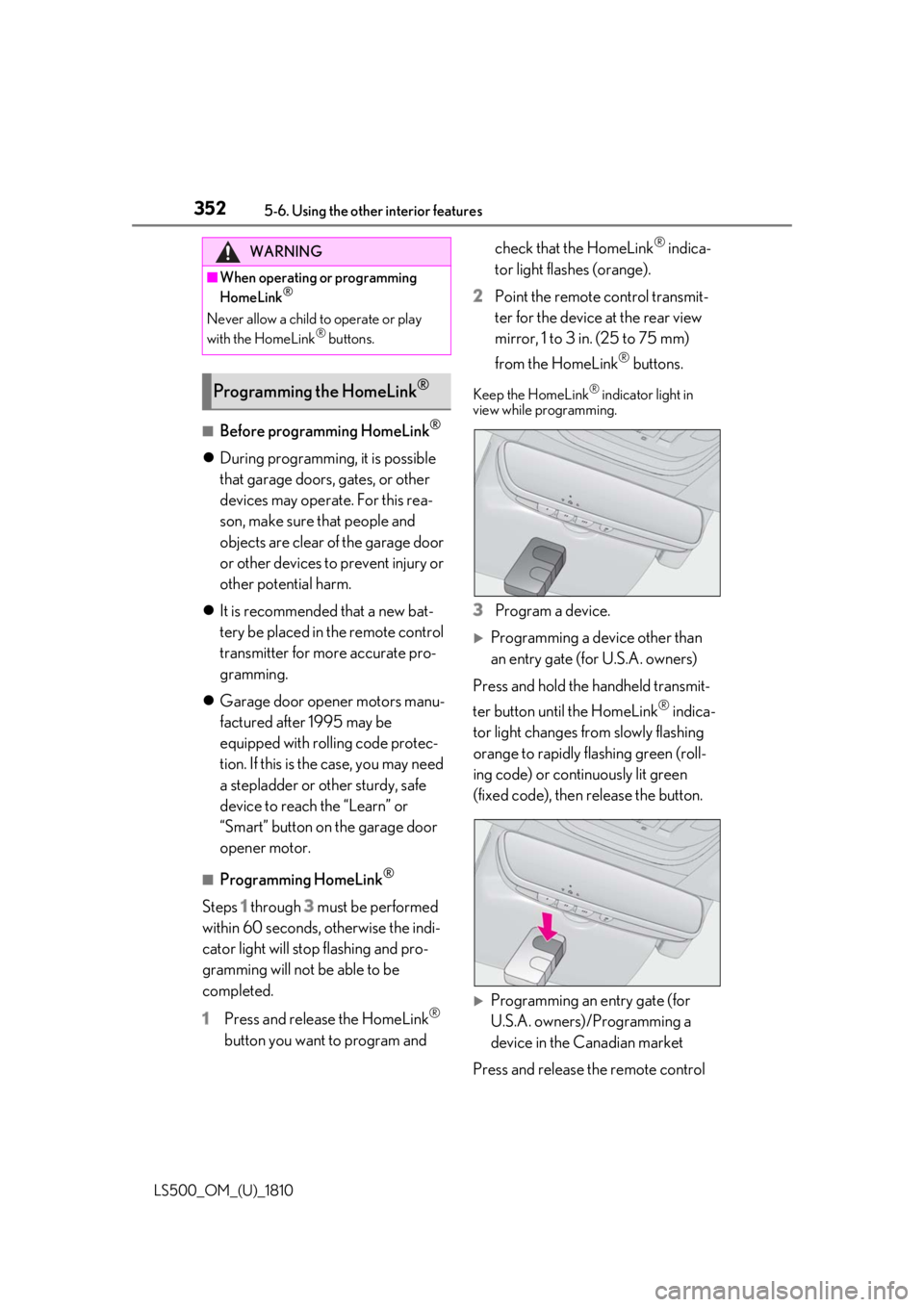
2 Point the remote control transmit-
ter for the device at the rear view
mirror, 1 to 3 in. (25 to 75 mm)
from the HomeLink ®
buttons.Keep the HomeLink ®
indicator light in
view while programming.
3 Program a device.
Programming a device other than
an entry gate (for U.S.A. owners)
Press and hold the handheld transmit-
ter button until the HomeLink ®
indica-
tor light changes from slowly flashing
orange to rapidly flashing green (roll-
ing code) or continuously lit green
(fixed code), then release the button.
Programming an entry gate (for
U.S.A. owners)/Programming a
device in the Canadian market
Press and release the remote control WARNING■
When operating or programming
HomeLink ®
Never allow a child to operate or play
with the HomeLink ®
buttons.
Programming the HomeLink ®
Page 353 of 512
3535-6. Using the other interior features
LS500_OM_(U)_1810 5
Interior features transmitter button at 2 second inter-
vals, repeatedly, until the HomeLink ®
indicator light changes from slowly
flashing (orange) to rapidly flashing
(green) (rolling code ) or continuously
lit (green) (fixed code).
4 Test the HomeLink ®
operation by
pressing the newly programmed
button and observing the indicator
light:
Indicator light illuminates: Program-
ming of a fixed code device has
completed. The garage door or
other device should operate when a
HomeLink ®
button is pressed and
released.
Indicator light flashes rapidly: The
garage door opener motor or other
device is equipped with a rolling
code. To complete programming,
firmly press and hold the Home-
Link ®
button for 2 seconds then
release it.
If the garage door or other device
does not operate, proceed to “Pro-
gramming a rolling code system”.
5 Repeat the steps above to program
another device for any of the
remaining HomeLink ®
buttons.■
Programming a rolling code sys-
tem
2 or more people may be necessary to
complete rolling code programming.
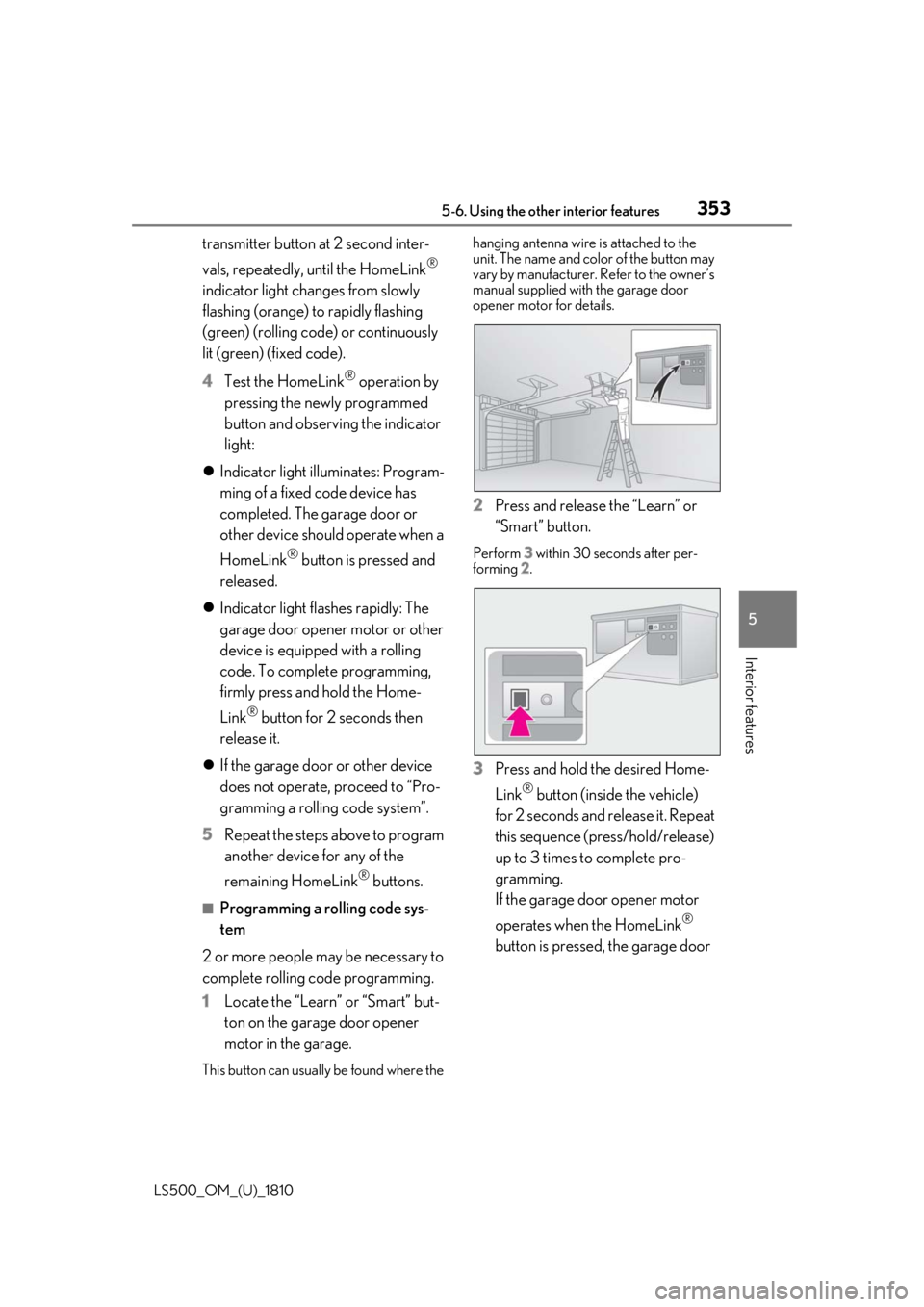
1 Locate the “Learn” or “Smart” but-
ton on the garage door opener
motor in the garage.
This button can usuall y be found where the hanging antenna wire is attached to the
unit. The name and color of the button may
vary by manufacturer. Refer to the owner’s
manual supplied with the garage door
opener motor for details.
2 Press and release the “Learn” or
“Smart” button. Perform 3 within 30 seconds after per-
forming 2 .
3 Press and hold the desired Home-
Link ®
button (inside the vehicle)
for 2 seconds and release it. Repeat
this sequence (press/hold/release)
up to 3 times to complete pro-
gramming.
If the garage door opener motor
operates when the HomeLink ®
button is pressed, the garage door
Page 354 of 512

354 5-6. Using the other interior features
LS500_OM_(U)_1810 opener motor recognizes the
HomeLink ®
signal.
■
Enabling 2-way communication
with a garage door (only available
for compatible devices)
When enabled, 2-way communication
allows you to check the status of the
opening and closing of a garage door
through indicators in your vehicle.
2-way communication is only available
if the garage door opener motor used
is a compatible device. (To check
device compatibility, refer to
www.homelink.com.)
1 Within 5 seconds after program-
ming the garage door opener has
been completed, if the garage door
opener motor is trained to Home-
Link ®
, both garage door operation
indicators will flash rapidly (green)
and the light on the garage door
opener motor will b link twice, indi-
cating that 2-way communication is
enabled.If the indicators do not flash, perform 2 and
3 within the first 10 presses of the Home-
Link ®
button after programming has been
completed.
2 Press a programmed HomeLink ®
button to operate a garage door. 3 Within 1 minute of pressing the
HomeLink ®
button, after the
garage door operation has
stopped, press the “Learn” or
“Smart” button on the garage door
opener motor. Within 5 seconds of
the establishment of 2-way com-
munication with the garage door
opener, both garage door opera-
tion indicators in the vehicle will
flash rapidly (green) and the light
on the garage door opener motor
will blink twice, indicating that
2-way communication is enabled. ■
Reprogramming a single Home-
Link ®
button
When the following procedure is per-
formed, buttons which already have
devices registered to them can be
overwritten:
1 With one hand, press and hold the
desired HomeLink ®
button.
2 When the HomeLink ®
indicator
starts flashing (orange), continue to
hold the HomeLink ®
button and
perform “Programming Home-
Link ®
” 1 (it takes 20 seconds for
the HomeLink ®
indicator to start
flashing). ■
Before programming
●
Install a new battery in the transmitter.
●
The battery side of the transmitter must
be pointed away from the HomeLink ®
.
Page 355 of 512

3555-6. Using the other interior features
LS500_OM_(U)_1810 5
Interior features Press the appropriate HomeLink ®
button. The HomeLink ®
indicator light
should turn on.
The status of the opening and closing
of a garage door is shown by the indi-
cators.
Opening
ClosingThis function is only available if the garage
door opener motor used is a compatible
device. (To check device compatibility,
refer to www.homelink.com.)
The indicators can operate within
approximately 820 ft. (250 m) of the
garage door. However, if there are
obstructions between the garage door
and the vehicle, such as houses and
trees, feedback signals from the
garage door may not be received. To recall the previous door operation
status, press and release either Home-
Link ®
buttons and or
and simultaneously. The
last recorded status will be displayed
for 3 seconds.
Press and hold the 2 outside buttons
for 10 seconds until the HomeLink ®
indicator light changes from continu-
ously lit (orange) to rapidly flashing
(green). If you sell your vehicle, be sure to erase the
programs stored in the HomeLink ®
mem-
ory.Operating HomeLink ®
Color Status
Orange (flashing) Currently open-
ing/closing
Green Opening/closing has
completed
Red (flashing) Feedback signals
cannot be receivedA
B Erasing the entire HomeLink ®
memory (all three codes)
Page 357 of 512

357
LS500_OM_(U)_1810 6 6
Maintenance and care Maintenance and care .
6-1. Maintenance and care
Cleaning and protecting the vehi-
cle exterior ................................ 358
Cleaning and protecting the vehi-
cle interior .................................. 361
6-2. Maintenance
Maintenance requirements
........................................................ 364
General maintenance ............. 365
Emission inspection and mainte-
nance (I/M) programs ......... 368
6-3. Do-it-yourself maintenance
Do-it-yourself service precautions
........................................................ 369
Hood................................................ 371
Positioning a floor jack............. 371
Engine compartment............... 373
Battery ........................................... 380
Tires ................................................ 382
Replacing the tire ....................... 391
Tire inflation pressure .............. 395
Wheels........................................... 396
Air conditioning filter............... 398
Electronic key battery ............. 399
Checking and replacing fuses
......................................................... 401
Light bulbs .................................... 404