Page 469 of 512
4698-2. Customization
LS500_OM_(U)_1810 8
Vehicle specifications *
:If equipped ■
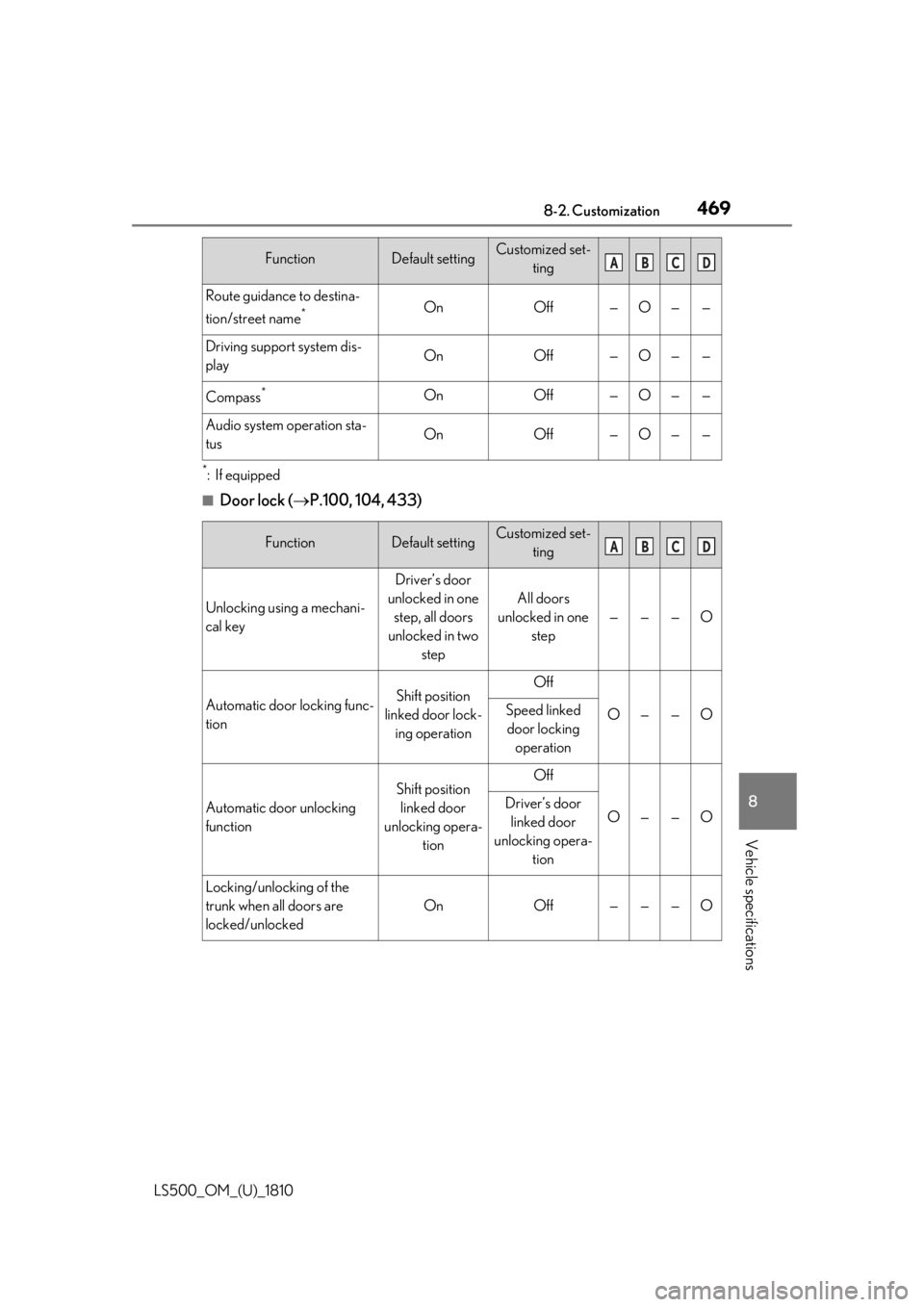
Door lock ( P.100, 104, 433)Route guidance to destina-
tion/street name *
On Off — O — —
Driving support system dis-
play On Off — O — —
Compass *
On Off — O — —
Audio system operation sta-
tus On Off — O — —
Function Default setting Customized set-
ting
Unlocking using a mechani-
cal key Driver’s door
unlocked in one
step, all doors
unlocked in two
step All doors
unlocked in one
step — — — O
Automatic door locking func-
tion Shift position
linked door lock-
ing operation Off
O — — OSpeed linked
door locking
operation
Automatic door unlocking
function Shift position
linked door
unlocking opera-
tion Off
O — — ODriver’s door
linked door
unlocking opera-
tion
Locking/unlocking of the
trunk when all doors are
locked/unlocked On Off — — — OFunction Default setting Customized set-
ting A B C D
A B C D
Page 470 of 512

470 8-2. Customization
LS500_OM_(U)_1810 ■
Smart access system with push-butto n start and wireless remote control
( P.100, 111)
■
Smart access system with push-button start ( P.100, 111)
■
Wireless remote control ( P.98, 100, 104)Function Default setting Customized set-
ting
Operating signal (Buzzers) 5 Off
O — — O
1 to 7
Operation signal (Emer-
gency flashers) On Off O — — O
Time elapsed before auto-
matic door lock function is
activated if door is not
opened after being unlocked 60 seconds Off
O — — O30 seconds
120 seconds
Open door warning buzzer On Off — — — O
Function Default setting Customized set-
ting
Smart access system with
push-button start On Off — — — O
Smart door unlocking Driver’s door All the doors O — — O
Time elapsed before unlock-
ing all the door when gripping
and holding the driver’s door
handle 2 seconds Off
— — — O1.5 seconds
2.5 seconds
Number of consecutive door
lock operations 2 times As many as
desired — — — O
Function Default setting Customized set-
ting
Wireless remote control On Off — — — O
Unlocking operation Driver’s door
unlocked in one
step, all doors
unlocked in two
step All doors
unlocked in one
step O — — O A B C D
A B C D
A B C D
Page 471 of 512
4718-2. Customization
LS500_OM_(U)_1810 8
Vehicle specifications ■
Trunk ( P.104)*
:If equipped ■
Front seats ( P.119)*
:If equipped
■
Power rear seats *
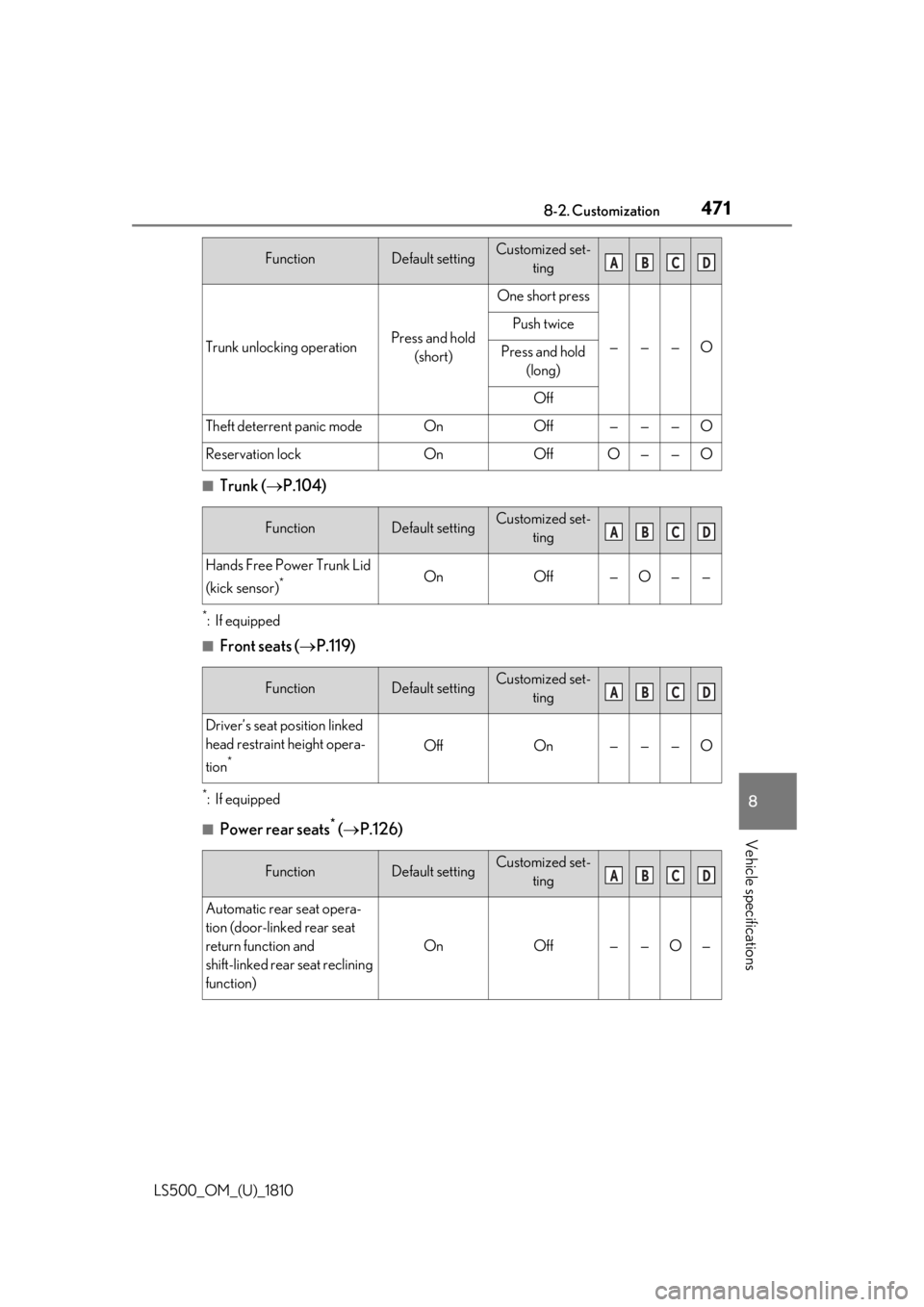
( P.126)Trunk unlocking operation Press and hold
(short) One short press
— — — OPush twice
Press and hold
(long)
Off
Theft deterrent panic mode On Off — — — O
Reservation lock On Off O — — O
Function Default setting Customized set-
ting
Hands Free Power Trunk Lid
(kick sensor) *
On Off — O — —
Function Default setting Customized set-
ting
Driver’s seat position linked
head restraint height opera-
tion *
Off On — — — O
Function Default setting Customized set-
ting
Automatic rear seat opera-
tion (door-linked rear seat
return function and
shift-linked rear seat reclining
function) On Off — — O —Function Default setting Customized set-
ting A B C D
A B C D
A B C D
A B C D
Page 472 of 512
472 8-2. Customization
LS500_OM_(U)_1810 *
:If equipped ■
Driving position memory ( P.130)
■
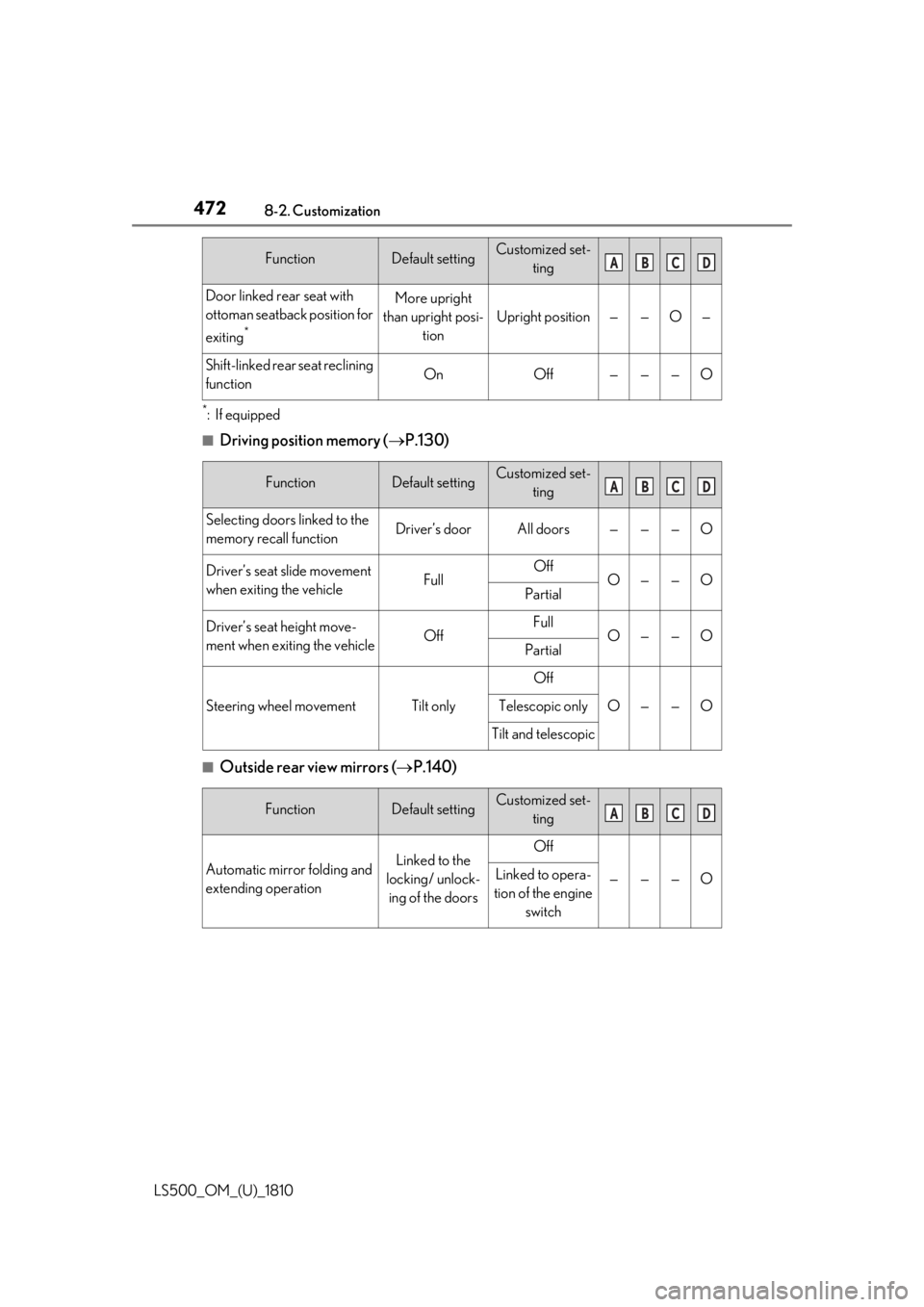
Outside rear view mirrors ( P.140)Door linked rear seat with
ottoman seatback position for
exiting *
More upright
than upright posi-
tion Upright position — — O —
Shift-linked rear seat reclining
function On Off — — — O
Function Default setting Customized set-
ting
Selecting doors linked to the
memory recall function Driver’s door All doors — — — O
Driver’s seat slide movement
when exiting the vehicle Full Off
O — — O
Partial
Driver’s seat height move-
ment when exiting the vehicle Off Full
O — — O
Partial
Steering wheel movement Tilt only Off
O — — OTelescopic only
Tilt and telescopic
Function Default setting Customized set-
ting
Automatic mirror folding and
extending operation Linked to the
locking/ unlock-
ing of the doors Off
— — — OLinked to opera-
tion of the engine
switchFunction Default setting Customized set-
ting A B C D
A B C D
A B C D
Page 479 of 512
4798-2. Customization
LS500_OM_(U)_1810 8
Vehicle specifications ■
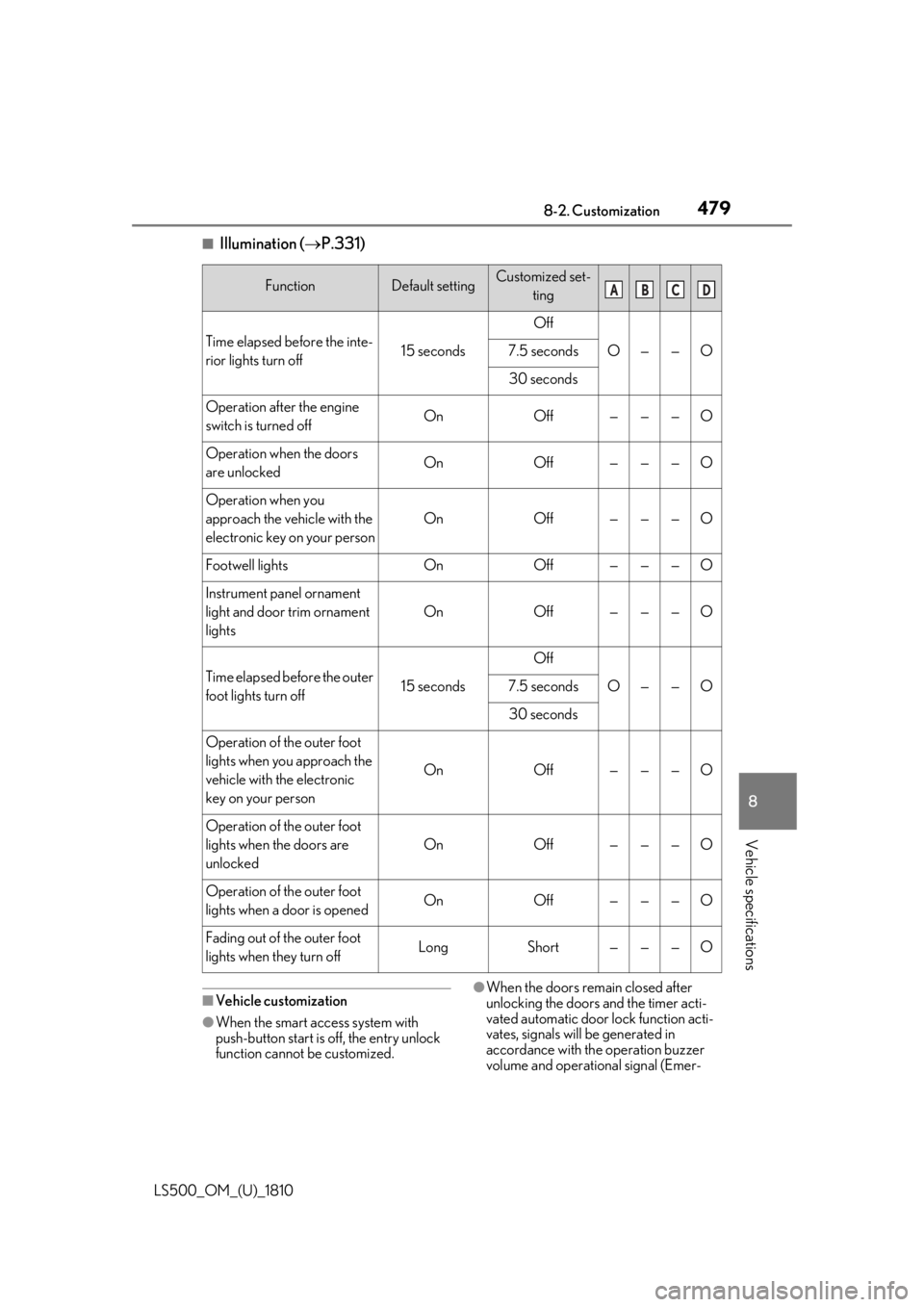
Illumination ( P.331)
■
Vehicle customization
●
When the smart access system with
push-button start is off, the entry unlock
function cannot be customized. ●
When the doors remain closed after
unlocking the doors and the timer acti-
vated automatic door lock function acti-
vates, signals will be generated in
accordance with the operation buzzer
volume and operational signal (Emer-Function Default setting Customized set-
ting
Time elapsed before the inte-
rior lights turn off 15 seconds Off
O — — O7.5 seconds
30 seconds
Operation after the engine
switch is turned off On Off — — — O
Operation when the doors
are unlocked On Off — — — O
Operation when you
approach the vehicle with the
electronic key on your person On Off — — — O
Footwell lights On Off — — — O
Instrument panel ornament
light and door trim ornament
lights On Off — — — O
Time elapsed before the outer
foot lights turn off 15 seconds Off
O — — O7.5 seconds
30 seconds
Operation of the outer foot
lights when you approach the
vehicle with the electronic
key on your person On Off — — — O
Operation of the outer foot
lights when the doors are
unlocked On Off — — — O
Operation of the outer foot
lights when a door is opened On Off — — — O
Fading out of the outer foot
lights when they turn off Long Short — — — O A B C D
Page 480 of 512
480 8-2. Customization
LS500_OM_(U)_1810 gency flashers) function settings.●
Some settings can be changed using a
switch or the audio system screen. If a
setting is changed using a switch, the
changed setting will not be reflected on
the audio system screen until the engine
switch is turned of f and then to IGNI-
TION ON mode.■
Clock settings screen
If the clock adjustment screen is displayed
continuously when attempting to change
the clock settings, the system may be mal-
functioning. Have the vehicle inspected by
your Lexus dealer.
Page 494 of 512

494 What to do if... (Troubleshooting)
LS500_OM_(U)_1810 1-1.What to do if... (Troubleshooting)
What to do if... (Troubleshooting) If you lose your mechanical keys,
new genuine mechanical keys can
be made by your Lexus dealer.
( P.432)
If you lose your electronic keys, the
risk of vehicle theft increases signifi-
cantly. Contact your Lexus dealer
immediately. ( P.432)
Is the electronic key battery weak or
depleted? ( P.399)
Is the engine switch in IGNITION
ON mode? When locking the doors, turn the engine
switch off. (
P.166 )
Is the electronic key left inside the
vehicle? When locking the doors, make sure that
you have the electronic key on your per-
son. The function may not operate prop-
erly due to the condition of the radio
wave. ( P.113)
Is the child-protector lock set? The rear door cannot be opened from
inside the vehicle when the lock is set.
Open the rear door from outside and then
unlock the child-protector lock. (
P.103 )
The function to prevent the elec-
tronic key from being left inside the
trunk will operate and you can open
the trunk as usual. Take the key out
from the trunk. ( P.109)
Did you press the engine switch
while firmly depressing the brake
pedal? ( P.164)
Is the electronic key anywhere
detectable inside the vehicle?
( P.112)
Is the steering wheel unlocked?
( P.164)
Is the electronic key battery weak or
depleted?If you have a problem, check the
following before contacting your
Lexus dealer.
The doors cannot be locked,
unlocked, opened or closed You lose your keys
The electronic key does not
operate properly
The doors cannot be locked or
unlocked The rear door cannot be opened
The trunk lid is closed with the
electronic key left inside
If you think something is wrong The engine does not start
Page 495 of 512

4951-1. What to do if... (Troubleshooting)
LS500_OM_(U)_1810 495What to do if... (Troubleshooting)
In this case, the engine can be started in a
temporary way. (
P.434 )
Is the battery discharged?
( P.435)
It is locked automatically to prevent
theft of the vehicle. ( P.164)
Is the window lock switch pressed? The power window except for the one at
the driver’s seat cannot be operated if the
window lock switch is pressed. (
P.144 )
The auto power off function will be
operated if the vehicle is left in
ACCESSORY mode for a period of
time. ( P.166)
The seat belt reminder light is flash-
ing Are the driver and the front passenger
wearing the seat belts? (
P.418 )
The parking brake indicator is on Is the parking brake released? (
P.174 )
Depending on the situation, other
types of warning buzzer may also sound. ( P.415, 425)
Did anyone inside the vehicle open
a door during setting the alarm? The sensor detects it and the alarm sounds.
(
P.65 )
Do one of the following to deactivate
or stop the alarms:
Unlock the doors.
Turn the engine switch to ACCES-
SORY or IGNITION ON mode, or
start the engine. (The alarm will be
deactivated or stopped after a few
seconds.)
Is the message displayed on the
multi-information display? Check the message on the multi-informa-
tion display. (
P.425 )
When a warning light turns on or a
warning message is displayed, refer
to P.415, 425.The steering wheel cannot be
turned after the engine is
stopped
The windows do not open or
close by operating the power
window switches
The engine switch is turned off
automatically
A warning buzzer sounds during
driving An alarm is activated and the
horn sounds
A warning buzzer sounds when
leaving the vehicle
A warning light turns on or a
warning message is displayed
When a problem has occurred
If you have a flat tire