Page 199 of 604

GS350_300_OM_OM30G96U_(U)
1994-1. Before driving
4
Driving
WARNING
■Things that must not be carried in the trunk
The following things may cause a fire if loaded in the trunk:
●Receptacles containing gasoline
●Aerosol cans
■Storage precautions
Observe the following precautions.
Failure to do so may prevent the pedals from being depressed properly, may block the
driver’s vision, or may result in items hitting the driver or passengers, possibly causing
an accident.
●Stow cargo and lugg age in the trunk whenever possible.
●Do not place cargo or luggage in or on the following locations.
• At the feet of the driver
• On the front passenger or re ar seats (when stacking items)
• On the package tray
• On the instrument panel
•On the dashboard
• In front of the Remote Touch screen
●Secure all items in the occupant compartment.
■Capacity and distribution
●Do not exceed the maximum axle weight rating or the total vehicle weight rating.
●Even if the total load of occupant’s weight and the cargo load is less than the total load
capacity, do not apply the load unevenly. Improper loading may cause deterioration
of steering or braking control whic h may cause death or serious injury.
Page 222 of 604

222
GS350_300_OM_OM30G96U_(U)4-3. Operating the lights and wipers
Headlight switch
Operating the switch turn
s on the lights as follows:
With the headlights on, push the
lever away from you to turn on the
high beams.
Pull the lever toward you to the center
position to turn the high beams off.
Pull the lever toward you and release
it to flash the high beams once.
You can flash the high beams with the
headlights on or off.
The headlights can be operated manually or automatically.
Operating instructions
U.S.A. Canada
The side marker, parking, tail,
license plate, instrument panel
lights, and daytime running
lights (P. 223) turn on.
The headlights and all lights
listed above (except daytime
running lights) turn on.
The headlights, daytime run-
ning lights ( P. 223) and all
the lights listed above turn on
and off automatically.
(When the engine switch is in
IGNITION ON mode.)
Off
The daytime running lights
turn on. ( P. 223)1
2
3
4
(U.S.A.)
(Canada)
Turning on the high beam headlights
1
2
Page 326 of 604

326
GS350_300_OM_OM30G96U_(U)5-2. Using the air conditio
ning system and defogger
■Air conditioning filter
P. 410
■Customization
Settings (e.g. exhaust gas sensor sensitivity) can be changed.
(Customizable features: P. 549)
WARNING
■To prevent the windshield from fogging up
●Do not use during cool air operation in extremely humid weather. The differ-
ence between the temperature of the outside air and that of the windshield can cause
the outer surface of the windshield to fog up, blocking your vision.
■To prevent burns
●Do not touch the rear view mirror surfaces when the outside rear view mirror defog-
gers are on.
●Vehicles with windshield wiper de-icer: Do not touch the glass at lower part of the
windshield or to the side of the front pill ars when the windshield wiper de-icer is on.
NOTICE
■To prevent battery discharge
Do not leave the air conditioning system on longer than necessary when the engine is
stopped.
●Do not place anything on the instrument
panel which may cover th e air outlets. Other-
wise, air flow may be obstructed, preventing
the windshield defoggers from defogging.
Page 335 of 604
335
GS350_300_OM_OM30G96U_(U)5-3. Using the interior lights
5
Interior features
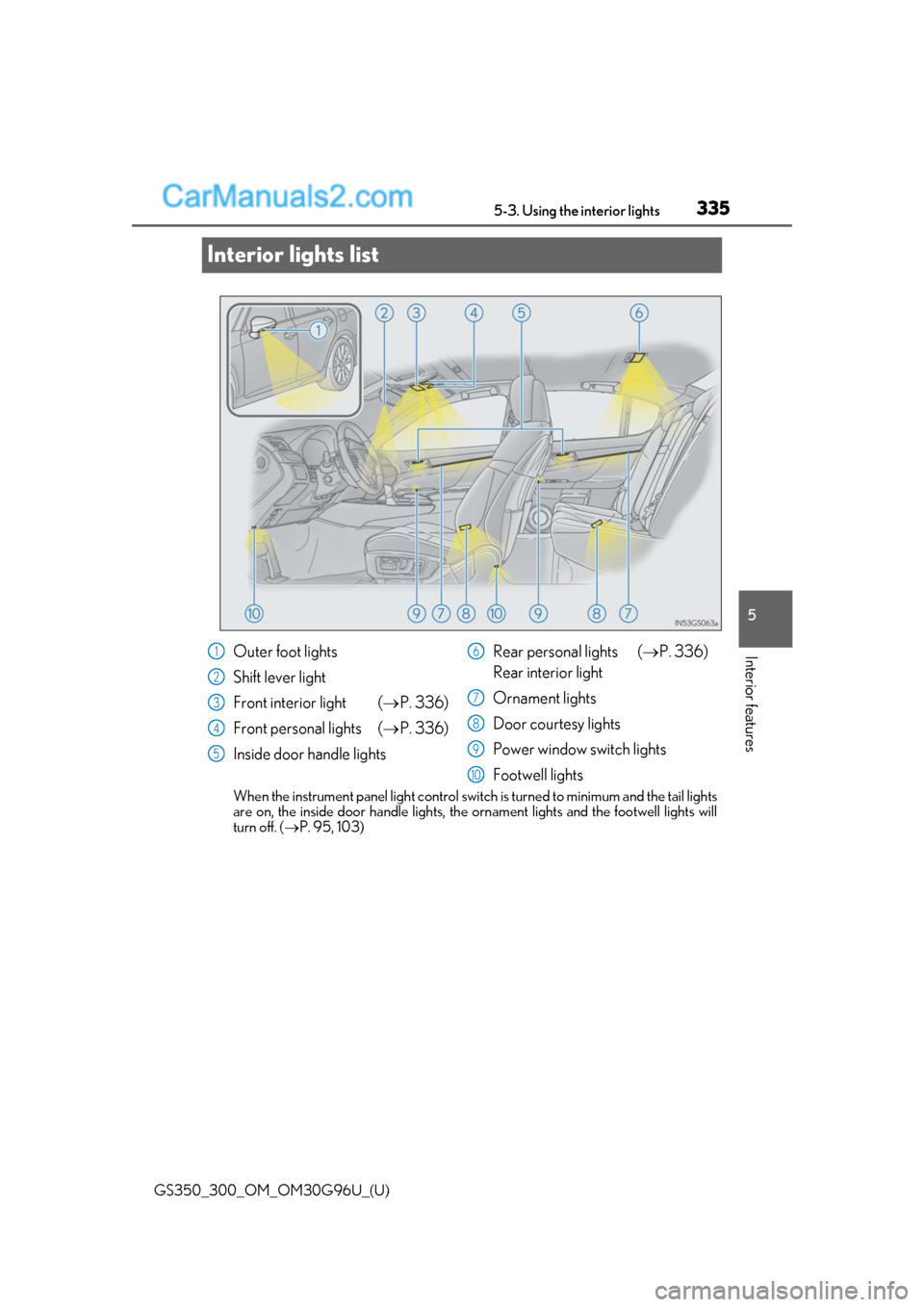
Interior lights list
When the instrument panel light control switch
is turned to minimum and the tail lights
are on, the inside door handle lights, th e ornament lights and the footwell lights will
turn off. ( P. 95, 103)
Outer foot lights
Shift lever light
Front interior light ( P. 336)
Front personal lights ( P. 336)
Inside door handle lights Rear personal lights (
P. 336)
Rear interior light
Ornament lights
Door courtesy lights
Power window switch lights
Footwell lights1
2
3
4
5
6
7
8
9
10
Page 365 of 604

GS350_300_OM_OM30G96U_(U)
3656-1. Maintenance and care
6
Maintenance and care
●Brush the surfaces using a soft brush.
Do not brush hard as doing so may cause damage.
●Wipe the surfaces clean with a soft cloth that has been dampened in cold or
lukewarm water and squeezed out.
●Allow the artificial leather (Alcantara®*) to dry in a shaded and ventilated
area.
*: “Alcantara®” is a registered trademark of Alcantara S.p.A.
■Caring for leather areas
Lexus recommends cleaning the interior of the vehicle at least twice a year to maintain
the quality of the vehicle’s interior.
■Shampooing the carpets
There are several commercial foaming-type cl eaners available. Use a sponge or brush to
apply the foam. Rub in overlapp ing circles. Do not use water. Wipe dirty surfaces and let
them dry. Excellent results are obtained by keeping the carpet as dry as possible.
■Seat belts
Clean with mild soap and lukewarm water using a cloth or sponge. Also check the belts
periodically for excessive wear, fraying or cuts.
■When cleaning the carpeted portions of the glove box, console box, etc.
If a strong adhesive tape is used, there is a possibility that the surface of the carpet could
be damaged.
Cleaning the artificial leather (Alcantara®*) areas
WARNING
■Water in the vehicle
●Do not splash or spill liquid in the vehicle.
Doing so may cause electrical components, etc. to malfunction or catch fire.
●Do not get any of the SRS components or wiring in the vehicle interior wet. (P. 43)
An electrical malfunction ma y cause the airbags to deploy or not function properly,
resulting in death or serious injury.
■Cleaning the interior (especially instrument panel)
Do not use polish wax or polish cleaner. Th e instrument panel may reflect off the wind-
shield, obstructing the driver’s view and leading to an accident, resulting in death or
serious injury.
Page 414 of 604
414
GS350_300_OM_OM30G96U_(U)6-3. Do-it-yourself maintenance
Checking and replacing fuses
Turn the engine switch off.
Open the fuse box cover.
If any of the electrical components do not operate, a fuse may have blown. If
this happens, check and repl
ace the fuses as necessary.
1
2
Engine compartment (type A fuse
box)Engine compartment (type B fuse
box)
Push the tab in and lift the lid off. Push the tab in and lift the lid off.
Driver’s side instrument panelPassenger’s side instrument panel
Remove the lid. Remove the lid.
Page 523 of 604
GS350_300_OM_OM30G96U_(U)
5238-1. Specifications
8
Vehicle specifications
■Vehicle identification number
The vehicle identification number (VIN) is the legal identifier for your vehicle.
This is the primary identification number fo r your Lexus. It is used in register-
ing the ownership of your vehicle.
This number is stamped on the top
left of the instrument panel and in the
engine compartment.
Vehicle identification
GS350GS300
GS F
Page 585 of 604

585Alphabetical index
GS350_300_OM_OM30G96U_(U)
Approach warning............................... 273
Armrest .................................................... 346
Armrest door ......................................... 349
ASC (Active Sound Control) ........... 221
Ashtrays.................................................... 345
Assist grips ..............................................350
Audio input
*
Audio system*
Automatic headlight leveling system .................................................... 224
Automatic light control system....... 222
Automatic transmission .....................208 If the shift lever cannot be shifted from P .....................................214
M mode ..................................................... 211
Paddle shift switches ......................... 210
AUX port
*
Auxiliary boxes ........................................341
AVS (Adaptive Variable Suspension system).......................... 297
Back-up lights Replacing light bulbs ........................ 422
Battery....................................................... 392
Battery checking................................... 392 If the vehicle battery is discharged ........................................ 507
Preparing and checking before winter ................................................... 304
Warning light ....................................... 437 Blind Spot Monitor (BSM) ............... 286
Blind Spot Monitor function.........289
Rear Cross Traffic Alert function.................................................. 291
Bluetooth
®*
Brake Fluid ............................................................391
Parking brake ........................................ 217
Warning light ........................... 437, 439
Warning message............................. 444
Brake assist ..............................................296
Brake Hold................................................ 219
Break-in tips .............................................189
Brightness control Instrument panel light control.......................................... 95, 103
BSM (Blind Spot Monitor) ............... 286 Blind Spot Monitor function.........289
Rear Cross Traffic Alert function.................................................. 291
Card key ....................................................138
Care................................................360, 364 Aluminum wheels ................................361
Exterior ...................................................360
Interior ..................................................... 364
Seat belts................................................365
Cargo capacity ..................................... 200
Cargo hooks ...........................................342
CD player
*
Chains ....................................................... 306
BC
*: Refer to the “NAVIGATION AND MULTIMEDIA SYSTEM OWNER’S MANUAL”.