2019 Lexus ES300h eco display
[x] Cancel search: eco displayPage 4 of 456

4TABLE OF CONTENTS
Emission inspection and mainte-nance (I/M) programs ............. 313
6-3. Do-it-yourself maintenance Do-it-yourself service precautions .314
Hood................................................... 316
Positioning a floor jack................ 316
Engine compartment................... 318
12-volt battery................................ 323
Tires ................................................... 326
Tire inflation pressure ................. 334
Wheels.............................................. 336
Air conditioning filter..................338
Electronic key battery ................ 339
Checking and replacing fuses . 341
Headlight aim................................. 343
Light bulbs ....................................... 344
7-1. Essential information Emergency flashers..................... 350
If your vehicle has to be stopped in an emergency ............................. 350
If the vehicle is trapped in rising water................................................ 351
7-2. Steps to take in an emergency If your vehicle needs to be towed....353
If you think something is wrong ........ 356
If a warning light turns on or a warn- ing buzzer sounds ..................... 358
If a warning message is displayed ... 368
If you have a flat tire..................... 372If the hybrid system
will not start......
379
If you lose your keys.................... 380
If the fuel filler door cannot be opened ........................................... 381
If the electronic key does not oper- ate properly .................................. 381
If the 12-volt battery is discharged .. 384
If your vehicle overheats ........... 388
If the vehicle becomes stuck .... 391
8-1. Specifications Maintenance data (fuel, oil level, etc.) ................................................. 394
Fuel information............................. 401
Tire information ............................ 403
8-2. Customization Customizable features ................ 412
8-3. Items to initialize Items to initialize ........................... 423
9-1. For owners Reporting safety defects for U.S. owners ........................................... 426
Seat belt instructions for Canadian owners (in French) ................... 426
SRS airbag instructions for Cana- dian owners (in French) ......... 428
Headlight aim instructions for Canadian owners (in French) 434
7When trouble arises
8Vehicle specifications
9For owners
Page 49 of 456

491-2. Child safety
1
For safety and security
■Child restraint LATCH anchors
LATCH anchors are provided for the
outboard rear seat. (Marks displaying
the location of the anchors are
attached to the seats.)
WARNING
■When installing a child restraint sys-
tem
Observe the following precautions.
Failure to do so may result in death or
serious injury.
●Do not allow children to play with the
seat belt. If the seat belt becomes
twisted around a child’s neck, it may
lead to choking or other serious inju-
ries that could result in death.
If this occurs and the buckle cannot be
unfastened, scissors should be used to
cut the belt.
●Ensure that the belt and plate are
securely locked and the seat belt is not
twisted.
●Shake the child restraint system left
and right, and forward and backward
to ensure that it has been securely
installed.
●After securing a child restraint system,
never adjust the seat.
●When a booster seat is installed,
always ensure that th e shoulder belt is
positioned across the center of the
child’s shoulder. The belt should be
kept away from the child’s neck, but
not so that it could fall off the child’s
shoulder.
●Follow all installation instructions pro-
vided by the child restraint system
manufacturer.
●When securing some types of child
restraint systems in rear seats, it may
not be possible to properly use the
seat belts in position s next to the child
restraint without interfering with it or
affecting seat belt effectiveness. Be
sure your seat belt fits snugly across
your shoulder and low on your hips. If it
does not, or if it interferes with the
child restraint, move to a different posi-
tion. Failure to do so may result in
death or serious injury.
■When installing a booster seat
To prevent the belt from going into ALR
lock mode, do not fully extend the shoul-
der belt. ALR mode causes the belt to
tighten only. This could cause injury or
discomfort to the child. ( P.26)
■Do not use a seat belt extender
If a seat belt extender is used when
installing a child restra int system, the seat
belt will not securely hold the child
restraint system, which could cause
death or serious injury to the child or
other passengers in the event of sudden
braking, sudden swerving or an accident.
Child restraint system fixed with
a child restraint LATCH anchor
Page 59 of 456

591-3. Hybrid system
1
For safety and security
When a certain level of impact is
detected by the impact sensor, the
emergency shut off system blocks the
high voltage current and stops the fuel
pump to minimize the risk of electrocu-
tion and fuel leakage. If the emergency
shut off system activates, your vehicle
will not restart. To restart the hybrid system, contact your Lexus dealer.
A message is automatically displayed
when a malfunction occurs in the
hybrid system or an improper opera-
tion is attempted.
If a warning message is shown on the
multi-information display, read the
message and follow the instructions.
■If a warning light comes on, a warning
message is displayed, or the 12-volt bat-
tery is disconnected
The hybrid system may not start. In this
case, try to start the system again. If the
“READY” indicator does not come on, con-
tact your Lexus dealer.
NOTICE
■Hybrid battery (traction battery) air
intake vent
●Make sure not to block the air intake
vent with anything, such as a seat
cover, plastic cover, or luggage. If the
vents become blocked, the hybrid bat-
tery (traction battery) input and output
may be restricted, leading to a reduc-
tion in hybrid battery (traction battery)
output and a malfunction.
●When dust etc. has accumulated in the
air intake vent, periodically clean it
with a vacuum cleaner to prevent the
vent from clogging.
●A filter is installed to the air intake vent.
When the filter remains noticeably
dirty even after cleaning the air intake
vent, filter cleaning or replacement is
recommended. When cleaning or
replacing the filter, contact your Lexus
dealer.
Refer to P.304 for details on how to
clean the filter.
●Do not get water or foreign materials
in the air intake vent as this may cause
a short circuit and damage the hybrid
battery (traction battery).
●Do not carry large amounts of water
such as water cooler bottles in the
vehicle. If water spills onto the hybrid
battery (traction battery), the battery
may be damaged. Have the vehicle
inspected by your Lexus dealer.
Emergency shut off system
Hybrid warning message
Page 67 of 456

672-1. Instrument cluster
2
Vehicle status information and indicators
*1: These lights come on when the power switch is turned to ON mode to indi-
cate that a system check is being per-
formed. They will go off after the hybrid
system is on, or after a few seconds.
There may be a malfunction in a system
if the lights do not come on, or go off.
Have the vehicle inspected by your
Lexus dealer.
*2: This light illuminates on the multi-infor-mation display.
The indicators inform the driver of the
operating state of the vehicle’s various
(Canada) ABS warning light
*1 (
P.360)
Brake Override System warn-
ing light/Drive-Start Control
warning light
*2 ( P.360)
(red)
Electric power st eering system
warning light
*1 ( P.360)
(yellow)
Electric power st eering system
warning light
*1 ( P.360)
Low fuel level warning light
( P.361)
Driver’s and front passenger’s
seat belt reminder light
( P.361)
Rear passengers’ seat belt
reminder lights ( P.361)
Tire pressure warning light
*1
( P.362)
(orange)
LTA indicator ( P.362)
(flashes)
Intuitive parking assist OFF indi-
cator
*1 (if equipped) ( P.362)
(flashes)
RCTA OFF indicator*1 (if
equipped) ( P.363)
(flashes) RCD OFF indicator (if
equipped) (
P.363)
(flashes)
PKSB OFF indicator*1 (if
equipped) ( P.363)
(flashes or
illuminates)PCS warning light*1 ( P.364)
Slip indicator
*1 ( P.364)
(flashes)
(U.S.A.)
Parking brake indicator
( P.364)
(flashes)
(Canada)
Parking brake indicator
( P.364)
(flashes)
Brake hold operated indicator*1
( P.365)
Hybrid system overheat warn-
ing light
*2( P.365)
Master warning light
*1
( P.365)
WARNING
■If a safety system warning light does
not come on
Should a safety system light such as the
ABS and SRS warning light not come on
when you start the hybrid system, this
could mean that these systems are not
available to help protect you in an acci-
dent, which could result in death or seri-
ous injury. Have the vehicle inspected by
your Lexus dealer immediately if this
occurs.
Indicators
Page 69 of 456

692-1. Instrument cluster
2
Vehicle status information and indicators
Drive mode indicators
*1: These lights come on when the power
switch is turned to ON mode to indi-
cate that a system check is being per-
formed. They will go off after the hybrid
system is on, or after a few seconds.
There may be a malfunction in a system
if the lights do not come on, or go off.
Have the vehicle inspected by your
Lexus dealer.
*2: This light comes on when the system is turned off.
*3: This light illuminates on the outside rear view mirrors.
*4: This light illuminates on the multi-infor- mation display.
*5: When the outside temperature is approximately 37°F (3°C) or lower, this
indicator will flash for approximately 10
seconds, then stay on.
*6: This light illuminates on the center panel.
(Canada)
“AIR BAG ON/OFF” indica-
tor
*1, 6 (
P.37)
Traction battery status indica-
tor
*4 ( P.81)
Eco drive mode indicator
( P.202)
Sport mode indicator
( P.202)
Page 71 of 456

712-1. Instrument cluster
2
Vehicle status information and indicators
Shift position and shift range (P.141)
Odometer and trip meter display ( P.72)
■Hybrid System Indicator
Charge area
Shows regeneration* status.
Regenerated energy will be used to charge
the hybrid battery (traction battery).
Hybrid Eco area
Shows that gasoline engine power is not
being used very often.
The gasoline engine will automatically stop
and restart under various conditions.
Eco area
Shows that the vehicle is being driven in an
Eco-friendly manner.
By keeping the bar display within Eco area,
more Eco-friendly driv ing can be achieved.
Power area
Shows that an Eco-friendly driving range is
being exceeded (durin g full power driving
etc.)
*: When used in this manual, regeneration refers to the conversion of energy cre-
ated by the movement of the vehicle into
electrical energy.
■Engine speed
On hybrid vehicles, engine speed is pre-
cisely controlled in order to help improve
fuel efficiency and reduce exhaust emis- sions etc.
There are times when the engine speed that
is displayed may differ even when vehicle
operation and driving
conditions are the
same.
■Hybrid System Indicator is displayed
when
The Hybrid System Indicator is displayed in
the following situations:
●The shift lever is in D or S.
●The hybrid system is started.
■Outside temperature display
●In the following situations, the correct
outside temperature may not be dis-
played, or the display may take longer
than normal to change:
• When stopped, or driving at low speeds
(less than 12 mph [20 km/h])
• When the outside temperature has changed suddenly (at the entrance/exit of
a garage, tunnel, etc.)
●When “--” or “E” is displayed, the system
may be malfunctioning. Take your vehicle
to your Lexus dealer.
■Liquid crystal display
P.74
■Customization
The gauges and meters can be customized
on of the multi-information display.
( P.75)
H
I
A
B
C
D
WARNING
■The information display at low tem-
peratures
Allow the interior of the vehicle to warm
up before using the liquid crystal infor-
mation display. At extremely low tem-
peratures, the information display
monitor may respond slowly, and display
changes may be delayed.
Page 72 of 456

722-1. Instrument cluster
■Display items
Odometer
Displays the total distance the vehicle has
been driven.
Trip meter A/trip meter B
Displays the distance the vehicle has been
driven since the meter was last reset. Trip
meters A and B can be used to record and
display different distances independently.
Distance until next engine oil
change
Displays the distance the vehicle can be
driven until an oil change is necessary.
■Changing the display
Each time the “ODO TRIP” switch is
pressed, the displayed item will be changed. When the trip meter is dis-
played, pressing and holding the switch
will reset the trip meter.
■Pop-up display
Distance until the next engine oil
change will displayed when a warning
message indicating that oil mainte-
nance should be performed soon or is
required is displayed.
The brightness of the instrument panel
lights can be adjusted.
1 Darker
2 Brighter
■Brightness of the meter lights (day mode
and night mode)
The brightness of the meter lights can be
adjusted individually.
In the following situations, the meters
WARNING
For example, there is a lag between the
driver’s shifting and the new gear number
appearing on the display. This lag could
cause the driver to downshift again,
causing rapid and excessive engine brak-
ing and possibly an accident resulting in
death or injury.
NOTICE
■To prevent damage to the engine and
its components
●Do not let the indicator needle of the
tachometer enter the red zone, which
indicates the maximum engine speed.
●The engine may be overheating if the
engine coolant temperature gauge is
in the red zone (H). In this case, imme-
diately stop the vehicle in a safe place,
and check the engine after it has
cooled completely. ( P.388)
Odometer and trip meter dis-
play
Changing the instrument panel
light brightness
Page 74 of 456
742-1. Instrument cluster
■Liquid crystal display
Small spots or light spots may appear on the
display. This phenomenon is characteristic
of liquid crystal displays, and there is no
problem continuing to use the display.
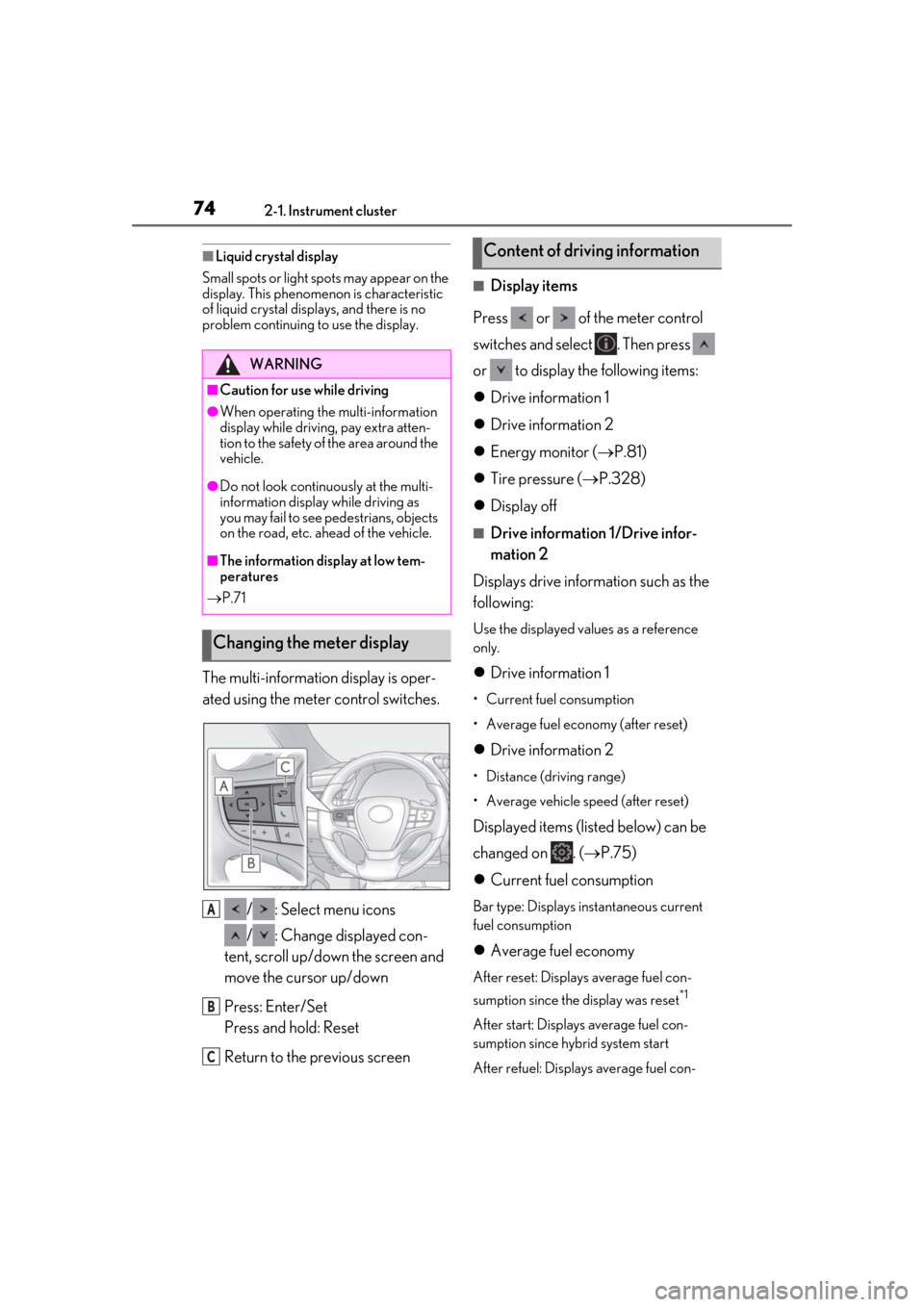
The multi-information display is oper-
ated using the meter control switches.
/ : Select menu icons
/ : Change displayed con-
tent, scroll up/down the screen and
move the cursor up/down
Press: Enter/Set
Press and hold: Reset
Return to the previous screen
■Display items
Press or of the meter control
switches and select . Then press
or to display the following items:
Drive information 1
Drive information 2
Energy monitor ( P.81)
Tire pressure ( P.328)
Display off
■Drive information 1/Drive infor-
mation 2
Displays drive information such as the
following:
Use the displayed values as a reference
only.
Drive information 1
• Current fuel consumption
• Average fuel economy (after reset)
Drive information 2
• Distance (driving range)
• Average vehicle speed (after reset)
Displayed items (listed below) can be
changed on . ( P.75)
Current fuel consumption
Bar type: Displays instantaneous current
fuel consumption
Average fuel economy
After reset: Displays average fuel con-
sumption since the display was reset
*1
After start: Displays average fuel con-
sumption since hybrid system start
After refuel: Displays average fuel con-
WARNING
■Caution for use while driving
●When operating the multi-information
display while driving, pay extra atten-
tion to the safety of the area around the
vehicle.
●Do not look continuously at the multi-
information display while driving as
you may fail to see pedestrians, objects
on the road, etc. ahead of the vehicle.
■The information display at low tem-
peratures
P.71
Changing the meter display
A
B
C
Content of driving information