2019 Lexus ES300h load
[x] Cancel search: loadPage 226 of 456

2264-5. Using the driving support systems
■The Parking Support Brake function
(static object) will operate when
The function will operate when the PKSB
OFF indicator is not illuminated or flashing
( P.66, 67) and all of the following condi-
tions are met:
●Hybrid system output restriction control
• The Parking Support Brake is enabled.
• The vehicle speed is 9 mph (15 km/h) or less.
• There is a static object in the traveling direction of the vehicle and 6 to 13 ft. (2
to 4 m) away.
• The Parking Support Brake determines
that a stronger-than-normal brake opera-
tion is necessary to avoid a collision.
●Brake control
• Hybrid system output restriction control is operating.
• The Parking Support Brake determines that an immediate brake operation is nec-
essary to avoid a collision.
■The Parking Support Brake function
(static objects) will stop operating when
The function will stop operating if any of the
following conditions are met:
●Hybrid system output restriction control
• The Parking Support Brake is disabled.
• The system determines that the collision
WARNING
●If the area around a radar sensor is
subjected to an impact, the system
may not operate properly due to a
sensor malfunction. Have the vehicle
inspected by your Lexus dealer.
■Handling the suspension
Do not modify the suspension, as
changes to the height or inclination of the
vehicle may prevent the sensors from
detecting objects correctly or cause the
system to not operate or operate unnec-
essarily.
■If the Parking Support Brake function
(static objects) operates unnecessar-
ily, such as at a railroad crossing
In the event that the Parking Support
Brake function (static objects) operates
unnecessarily, such as at a railroad cross-
ing, brake control w ill be canceled after
approximately 2 seconds, allowing you
to proceed forward and leave the area,
brake control can also be canceled by
depressing the brake pedal. Depressing
the accelerator pedal after brake control
is canceled will allow you to proceed for-
ward and leave the area.
■Notes when washing the vehicle
Do not apply intensive bursts of water or
steam to the sensor area.
Doing so may result in the sensor mal-
functioning.
●When using a high pressure washer to
wash the vehicle, do not spray the sen-
sors directly, as doing so may cause a
sensor to malfunction.
●When using steam to clean the vehicle,
do not direct steam too close to the
sensors as doing so may cause a sen-
sor to malfunction.
■When to disable the Parking Support
Brake
In the following situations, disable the
Parking Support Brake as the system
may operate even though there is no
possibility of a collision.
●When inspecting the vehicle using a
chassis roller, chassis dynamo or free
roller
●When loading the vehicle onto a boat,
truck or other transport vessel
●If the suspension has been modified or
tires of a size othe r than specified are
installed
●If the front of the vehicle is raised or
lowered due to the carried load
●When equipment that may obstruct a
sensor is installed, such as a towing
eyelet, bumper protector (an addi-
tional trim strip, etc.), bicycle carrier, or
snow plow
●When using an automatic car wash
Page 228 of 456

2284-5. Using the driving support systems
etc. (when cleared, the system will return
to normal)
• If heavy rain or water strikes a sensor
• When driving in incl ement weather such
as fog, snow or a sandstorm
●Other ultrasonic wave sources
• When vehicle horns, vehicle detectors, motorcycle engines, air brakes of large
vehicles, the clearance sonar of other
vehicles or other devices which produce
ultrasonic waves are near the vehicle
• If a sticker or an el ectronic component,
such as a backlit license plate (especially
fluorescent type), fog lights, fender pole
or wireless antenna is installed near a
sensor
●Changes in the vehicle posture
• If the vehicle is significantly tilted
• If the front of the vehicle is raised or low- ered due to the carried load
• If the orientation of a sensor has been changed due to a collision or other
impact
■Situations in which the Parking Support
Brake function (stati c objects) may not
operate properly
In some situations, such as the following, this
function may not operate properly.
●Weather
• When a sensor or the area around a sen-
sor is extremely hot or cold
• When strong winds are blowing
• If a sensor is covered with ice, snow, dirt, etc. (when cleared, the system will return
to normal)
• If heavy rain or water strikes a sensor
• When driving in incl ement weather such
as fog, snow or a sandstorm
●Vehicle surroundings
• When an object that cannot be detected is between the vehicle and a detected
object
• If an object such as a vehicle, motorcycle, bicycle or pedestrian cuts in front of the
vehicle or runs out from the side of the
vehicle
●Other ultrasonic waves sources
• When vehicle horns, vehicle detectors, motorcycle engines, air brakes of large
vehicles, the clearance sonar of other
vehicles or other de vices which produce
ultrasonic waves are near the vehicle
• If a sticker or an electronic component, such as a backlit license plate (especially
fluorescent type), fog lights, fender pole
or wireless antenna is installed near a
sensor
●Changes in the vehicle posture
• If the vehicle is significantly tilted
• If the front of the vehicle is raised or low- ered due to the carried load
• If the orientation of a sensor has been
changed due to a collision or other
impact
Page 232 of 456

2324-5. Using the driving support systems
snow, dirt, etc.
●When it is raining heavily or water strikes
the vehicle
●When the detection area of a radar sen-
sor is obstructed by an adjacent vehicle
●If the vehicle is significantly tilted
●When equipment that may obstruct a
sensor is installed, such as a towing eye-
let, bumper protector (an additional trim
strip, etc.), bicycle carrier, or snow plow
●If the suspension has been modified or
tires of a size other than specified are
installed
●If the front of the vehicle is raised or low-
ered due to the carried load
●If a sticker or an electronic component,
such as a backlit license plate (especially
fluorescent type), fog light, fender pole or
wireless antenna is installed near a radar
sensor
●If the orientation of a radar sensor has
been changed
●When multiple vehicles are approaching
with only a small gap between each vehi-
cle
●If a vehicle is approaching the rear of
your vehicle rapidly
●Situations in which the radar sensor may
not detect a vehicle
• When a vehicle approaches from the right or left at the rear of the vehicle while
you are turning while backing up
• When turning while backing up
• When backing out of a shallow angle parking spot • When backing up on
a slope with a sharp
change in grade
• When a vehicle turns into the detection area
Page 235 of 456

2354-5. Using the driving support systems
4
Driving
garage or underground parking lot
• When backing up in a dim environment such as during dusk or in an underground
parking lot
●Even though there are no pedestrians in
the detection area, some objects, such as
the following, may be detected, possibly
causing the Parking Support Brake func-
tion (rear pedestri ans) to operate.
• Three dimensional objects, such as a pole, traffic cone, fence, or parked vehi-
cle
• Moving objects, such as a car or motor- cycle
• Objects moving toward your vehicle when backing up, such as flags or pud-
dles (or airborne matter, such as smoke,
steam, rain, or snow)
• Cobblestone or gravel roads, tram rails, road repairs, white lines, pedestrian
crossings or fallen leaves on the road
• Metal covers (gratings), such as those used for drainage ditches
• Objects reflected in a puddle or on a wet road surface
• The roadside or bumps on the road
•Shadows on the road
●In some situations, such as the following,
the Parking Support Brake function (rear
pedestrians) may operate even though
there are no pedestrians in the detection
area.
• When backing up toward the roadside or a bump on the road
• If the vehicle is significantly tilted, such as when carrying a heavy load
• When backing up toward an
incline/decline
• If the suspension has been modified or tires of a size other than specified are
installed
• If the rear of the vehicle is raised or low- ered due to the carried load
• If an electronic component, such as a backlit license plate or rear fog light, is
installed near the rear camera
• If a bumper protector, such as an addi-
tional trim strip, is installed to the rear
bumper
• If the orientation of the rear camera has
been changed due to a collision or other
impact, or remova l and installation
• If a towing eyelet is installed to the rear of the vehicle
• When water is flowing over the rear cam- era lens
• When the rear camera is obscured (dirt,
snow, ice, etc. are at tached) or scratched
• If there is a flashing light in the detection
area, such as the emergency flashers of
another vehicle
Page 239 of 456

2394-5. Using the driving support systems
4
Driving
WARNING
●When driving on dirt, gravel or snow-
covered roads
●When driving with tire chains
●When driving over bumps in the road
●When driving over roads with potholes
or uneven surfaces
■TRAC/VSC may not operate effec-
tively when
Directional control and power may not
be achievable while driving on slippery
road surfaces, even if the TRAC/VSC
system is operating.
Drive the vehicle carefully in conditions
where stability and power may be lost.
■Active Cornering Assist does not
operate effectively when
●Do not rely solely upon Active Cor-
nering Assist. Active Cornering Assist
may not operate effectively when
accelerating down slopes or driving on
slippery road surfaces.
●When Active Cornering Assist fre-
quently operates, Active Cornering
Assist may temporarily stop operating
to ensure proper operation of the
brakes, TRAC, VSC.
■Hill- start assist control does not
operate effectively when
●Do not overly rely on hill-start assist
control. Hill-start assist control may
not operate effectively on steep
inclines and roads covered with ice.
●Unlike the parking brake, hill-start
assist control is not intended to hold
the vehicle stationary for an extended
period of time. Do not attempt to use
hill-start assist control to hold the vehi-
cle on an incline, as doing so may lead
to an accident.
■When the TRAC/ABS/VSC is acti-
vated
The slip indicator light flashes. Always
drive carefully. Reckless driving may
cause an accident. Exercise particular
care when the indicator light flashes.
■When the TRAC/VSC systems are
turned off
Be especially careful and drive at a speed
appropriate to the road conditions. As
these are the systems to help ensure
vehicle stability and driving force, do not
turn the TRAC/VSC systems off unless
necessary.
■Secondary Collision Brake
Do not overly rely on the Secondary Col-
lision Brake. This system is designed to
help reduce the possibility of further
damage due to a secondary collision,
however, that effect changes according
to various conditions. Overly relying on
the system may result in death or serious
injury.
■Replacing tires
Make sure that all ti res are of the speci-
fied size, brand, tread pattern and total
load capacity. In addition, make sure that
the tires are inflated to the recom-
mended tire inflation pressure level.
The ABS, TRAC and VSC systems will
not function correctly if different tires are
installed on the vehicle.
Contact your Lexus dealer for further
information when replacing tires or
wheels.
■Handling of tires and the suspension
Using tires with any kind of problem or
modifying the suspensi on will affect the
driving assist systems, and may cause a
system to malfunction.
Page 281 of 456

2815-6. Using the other interior features
5
Interior features
Fold down the armrest for use.
An assist grip installed on the ceiling
can be used to support your body
while sitting on the seat.
■Rear sunshade
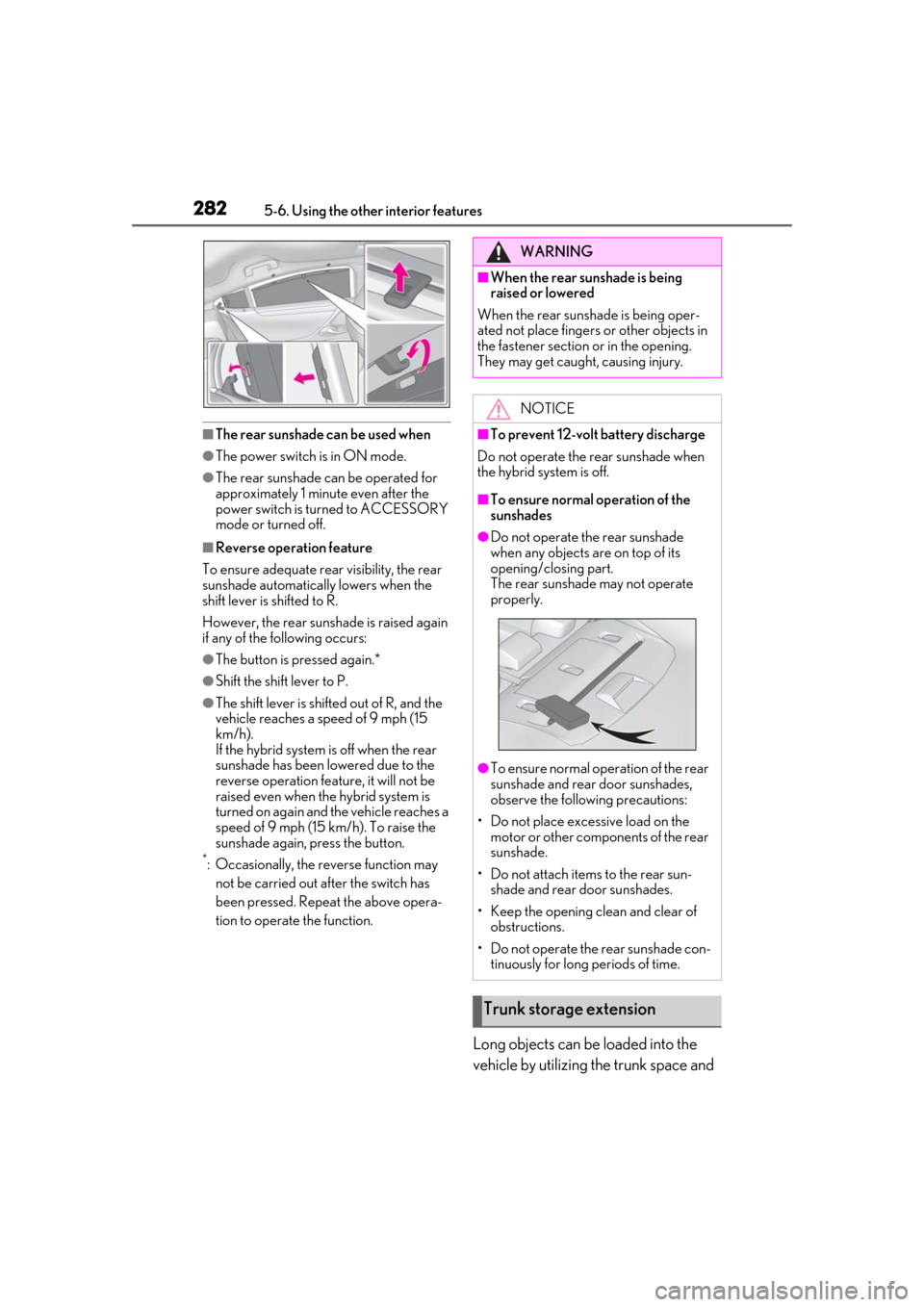
The rear sunshade can be raised and
lowered by operating the button shown
below.
Press the switch. (Raise/lower)
■Rear door sunshades
Pull the tab of the rear door sunshade
and hook the sunshade on the anchors.
To retract the rear door sunshade, unhook
the sunshade and retract it slowly.
NOTICE
■To prevent battery discharge
When the engine is stopped, do not use
the wireless charger for a long time.
Armrest
NOTICE
■To prevent damage to the armrest
Do not apply too much load on the arm-
rest.
Assist grips
WARNING
■Assist grips
Do not use the assist grip when getting in
or out of the vehicle or rising from your
seat.
NOTICE
■To prevent damage to the assist grip
Do not hang any heavy object or put a
heavy load on the assist grip.
Rear sunshade (if
equipped)/rear door sunshades
(if equipped)
Page 282 of 456
2825-6. Using the other interior features
■The rear sunshade can be used when
●The power switch is in ON mode.
●The rear sunshade can be operated for
approximately 1 minute even after the
power switch is turned to ACCESSORY
mode or turned off.
■Reverse operation feature
To ensure adequate rear visibility, the rear
sunshade automatically lowers when the
shift lever is shifted to R.
However, the rear suns hade is raised again
if any of the following occurs:
●The button is pressed again.*
●Shift the shift lever to P.
●The shift lever is shifted out of R, and the
vehicle reaches a speed of 9 mph (15
km/h).
If the hybrid system is off when the rear
sunshade has been lowered due to the
reverse operation feature, it will not be
raised even when the hybrid system is
turned on again and the vehicle reaches a
speed of 9 mph (15 km/h). To raise the
sunshade again, press the button.
*: Occasionally, the reverse function may
not be carried out after the switch has
been pressed. Repeat the above opera-
tion to operate the function.
Long objects can be loaded into the
vehicle by utilizing the trunk space and
WARNING
■When the rear sunshade is being
raised or lowered
When the rear sunshade is being oper-
ated not place fingers or other objects in
the fastener section or in the opening.
They may get caught, causing injury.
NOTICE
■To prevent 12-volt battery discharge
Do not operate the rear sunshade when
the hybrid system is off.
■To ensure normal operation of the
sunshades
●Do not operate the rear sunshade
when any objects ar e on top of its
opening/closing part.
The rear sunshade may not operate
properly.
●To ensure normal operation of the rear
sunshade and rear door sunshades,
observe the following precautions:
• Do not place excessive load on the motor or other components of the rear
sunshade.
• Do not attach items to the rear sun- shade and rear door sunshades.
• Keep the opening clean and clear of obstructions.
• Do not operate the rear sunshade con- tinuously for long periods of time.
Trunk storage extension
Page 296 of 456
2965-6. Using the other interior features
before using Safety Connect;
The Safety Connect system installed in
your vehicle is a low-power radio trans-
mitter and receiver. It receives and also
sends out radio frequency (RF) signals.
In August 1996, the Federal Commu-
nications Commission (FCC) adopted
RF exposure guidelines with safety lev-
els for mobile wireless phones. Those
guidelines are consistent with the
safety standards previously set by the
following U.S. and international stan-
dards bodies.
ANSI (American National Stan-
dards Institute) C95.1 [1992]
NCRP (National Council on Radia-
tion Protection and Measurement)
Report 86 [1986]
ICNIRP (International Commission
on Non-Ionizing Radiation Protec-
tion) [1996]
Those standards were based on com-
prehensive and periodic evaluations of
the relevant scientific literature. Over
120 scientists, engi neers, and physi-
cians from universi ties, and govern-
ment health agencies and industries
reviewed the available body of
research to develop the ANSI Stan-
dard (C95.1).
The design of Safety Connect com-
plies with the FCC guidelines in addi-
tion to those standards.
*: If equipped
After you sign the Telematics Subscrip-
tion Service Agreement, download the
Lexus Enform Remote app from your
cellular phone’s app st ore, and register
within the app (or en roll and complete
registration at the dealer), you can
begin using these services. ( P.292)
A variety of subscription terms are
available. Contact your Lexus dealer,
or call 1-800-25-LEXUS (1-800-
255-3987) for further subscription
details.
■Availability of service
Lexus Enform Remote is available in the
contiguous United States, Washington D.C.
and Alaska.
Lexus Enform Remote is not available in
some countries or areas.
■Lexus Enform Remote Information
●Lexus Enform Remote should only be
used by authorized users.
●Laws in some communities may require
that the vehicle be within view of the user
Lexus Enform Remote*
Lexus Enform Remote is a cellular
phone application that lets you view
and remotely control certain
aspects of your vehicle.
For details about the functions and
services of this application, refer to
http://www.lexus.com/enform/
.
Function of the Lexus Enform
Remote is achieved by using DCM
(Data Communication Module).
Subscription