2019 KIA STINGER battery
[x] Cancel search: batteryPage 219 of 555
Features of your vehicle
132
4
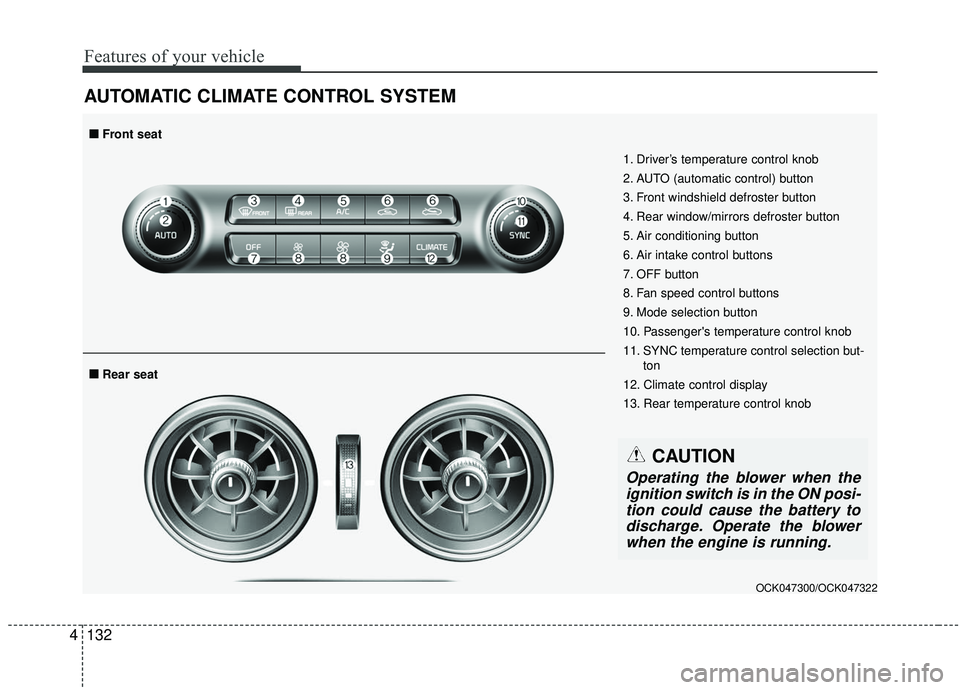
AUTOMATIC CLIMATE CONTROL SYSTEM
OCK047300/OCK047322
1. Driver’s temperature control knob
2. AUTO (automatic control) button
3. Front windshield defroster button
4. Rear window/mirrors defroster button
5. Air conditioning button
6. Air intake control buttons
7. OFF button
8. Fan speed control buttons
9. Mode selection button
10. Passenger's temperature control knob
11. SYNC temperature control selection but-
ton
12. Climate control display
13. Rear temperature control knob
■ ■ Rear seat
■ ■Front seat
CAUTION
Operating the blower when the
ignition switch is in the ON posi-tion could cause the battery todischarge. Operate the blowerwhen the engine is running.
Page 225 of 555
Features of your vehicle
138
4
The temperature will decrease to the
minimum (Lo) by turning the knob to
the extreme left.
When turning the knob, the tempera-
ture will increase or decrease by
0.5°C/1°F. When set to the lowest
temperature setting, the air condi-
tioning will operate continuously.
Turn the rear seat temperature con-
trol knob to adjust temperature.
The front and rear seat side temper-
ature is adjusted individually. Adjusting the driver and passenger
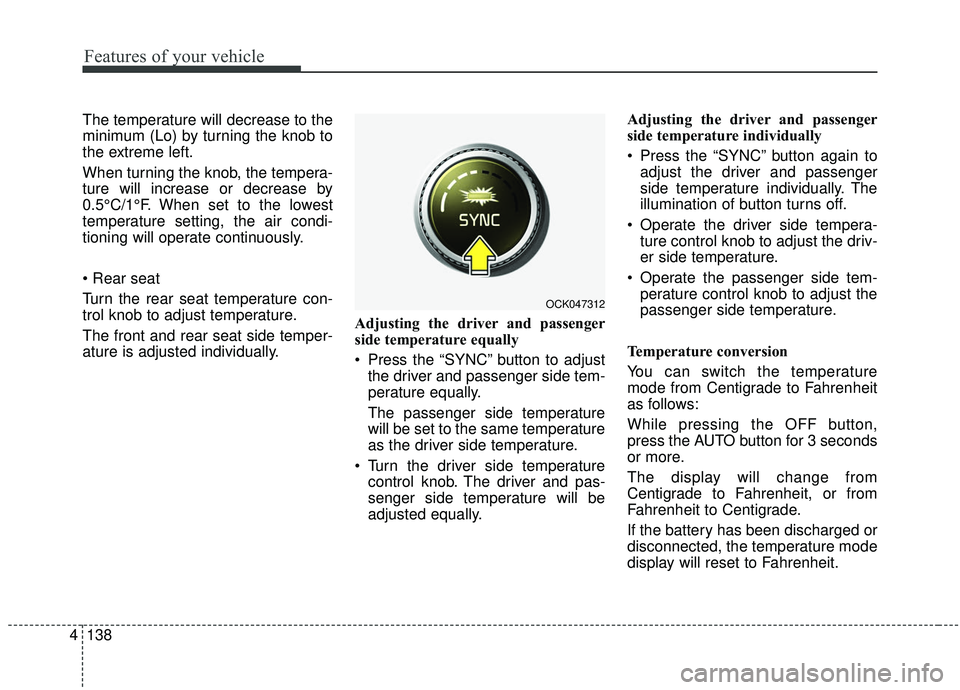
side temperature equally
Press the “SYNC” button to adjust
the driver and passenger side tem-
perature equally.
The passenger side temperature
will be set to the same temperature
as the driver side temperature.
Turn the driver side temperature control knob. The driver and pas-
senger side temperature will be
adjusted equally. Adjusting the driver and passenger
side temperature individually
Press the “SYNC” button again to
adjust the driver and passenger
side temperature individually. The
illumination of button turns off.
Operate the driver side tempera- ture control knob to adjust the driv-
er side temperature.
Operate the passenger side tem- perature control knob to adjust the
passenger side temperature.
Temperature conversion
You can switch the temperature
mode from Centigrade to Fahrenheit
as follows:
While pressing the OFF button,
press the AUTO button for 3 seconds
or more.
The display will change from
Centigrade to Fahrenheit, or from
Fahrenheit to Centigrade.
If the battery has been discharged or
disconnected, the temperature mode
display will reset to Fahrenheit.
OCK047312
Page 235 of 555
Features of your vehicle
148
4
Automatic climate control system
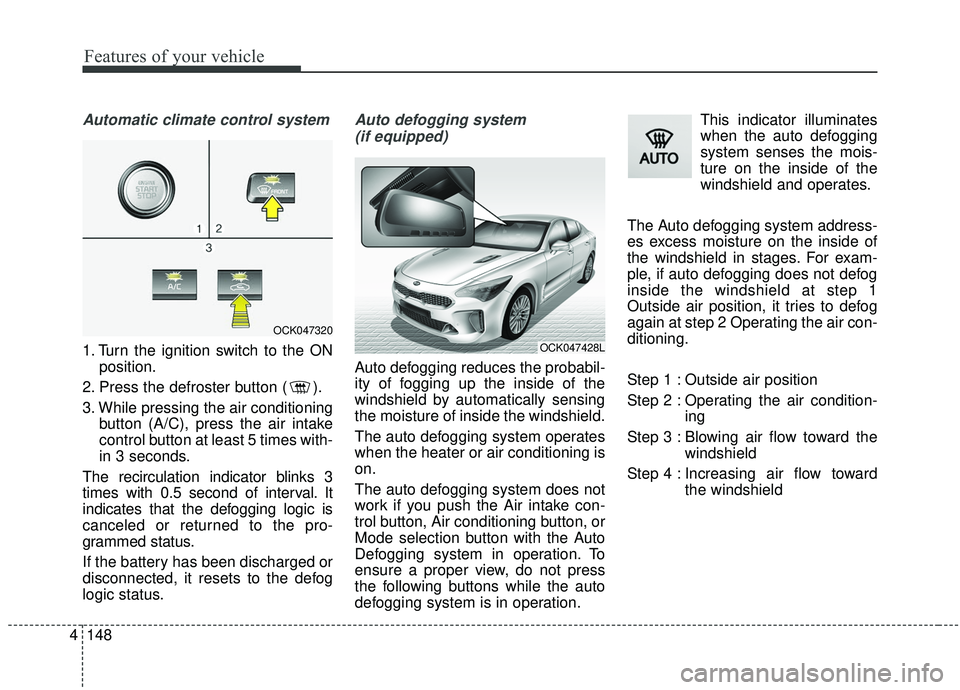
1. Turn the ignition switch to the ON
position.
2. Press the defroster button ( ).
3. While pressing the air conditioning button (A/C), press the air intake
control button at least 5 times with-
in 3 seconds.
The recirculation indicator blinks 3
times with 0.5 second of interval. It
indicates that the defogging logic is
canceled or returned to the pro-
grammed status.
If the battery has been discharged or
disconnected, it resets to the defog
logic status.
Auto defogging system (if equipped)
Auto defogging reduces the probabil-
ity of fogging up the inside of the
windshield by automatically sensing
the moisture of inside the windshield.
The auto defogging system operates
when the heater or air conditioning is
on.
The auto defogging system does not
work if you push the Air intake con-
trol button, Air conditioning button, or
Mode selection button with the Auto
Defogging system in operation. To
ensure a proper view, do not press
the following buttons while the auto
defogging system is in operation. This indicator illuminates
when the auto defogging
system senses the mois-
ture on the inside of the
windshield and operates.
The Auto defogging system address-
es excess moisture on the inside of
the windshield in stages. For exam-
ple, if auto defogging does not defog
inside the windshield at step 1
Outside air position, it tries to defog
again at step 2 Operating the air con-
ditioning.
Step 1 : Outside air position
Step 2 : Operating the air condition- ing
Step 3 : Blowing air flow toward the windshield
Step 4 : Increasing air flow toward the windshield
OCK047320
OCK047428L
Page 236 of 555
4149
Features of your vehicle
To cancel or reset the Auto Defogging
System
Press the front windshield defroster
button for 3 seconds when the igni-
tion switch is in the ON position.
When the ADS system is canceled,
Indicator on the button will blink 3
times per 0.5 sec and the position
“ADS OFF” will be displayed on the
climate control information screen.
When the ADS system is reset,
Indicator on the button will blink 6
times per 0.25sec and the position
“ADS OFF” will be disappeared on
the climate control information
screen. You can set or release the
Auto Defogging System on the AVN
Climate Information selection screen.
If the battery is discharged or
detached, the auto defogging system
will be reset. Adjust the feature
accordingly.Automatic ventilation
(if equipped)
The system automatically selects the
outside (fresh) air position when the
climate control system operates over
a certain period of time (approxi-
mately 30 minutes) in low tempera-
ture with the recirculated air position
selected.
To cancel or reset the Automatic
Ventilation
When the air conditioning system is
on, select Face Level mode and
while pressing the A/C button, press
the recirculated air position button
five times within three seconds.
When the automatic ventilation is
canceled, the indicator blinks 3
times. When the automatic ventila-
tion is activated, the indicator blinks
6 times.
If the battery is discharged or
detached, the automatic ventilation
will be reset. Adjust the feature
accordingly.
Smart ventilation (if equipped)
The smart ventilation system main-
tains pleasant/fresh air condition
inside the passenger compartment
by automatically detecting/controlling
the temperature and humidity when
you drive the vehicle with the climate
control system in the OFF position.
When the smart ventilation system
starts to operate, the message,
“SMART VENTILATION ON”
appears for 5 seconds.
The smart ventilation system stops operating, when the OFF button of
the climate control system is
selected.
The smart ventilation system stops operating, when any button of the
climate control system is selected
for operation.
The smart ventilation system may not operate, when the vehicle is
driven at low speed.
CAUTION
Do not remove the sensor coverlocated on the upper end of thepassenger side windshield glass.Damage to the system partscould occur and may not be cov-ered by your vehicle warranty.
Page 242 of 555
4155
Features of your vehicle
The seat warmer (with air ventila-tion) defaults to the OFF position
whenever the ignition switch is
turned on.Sunvisor
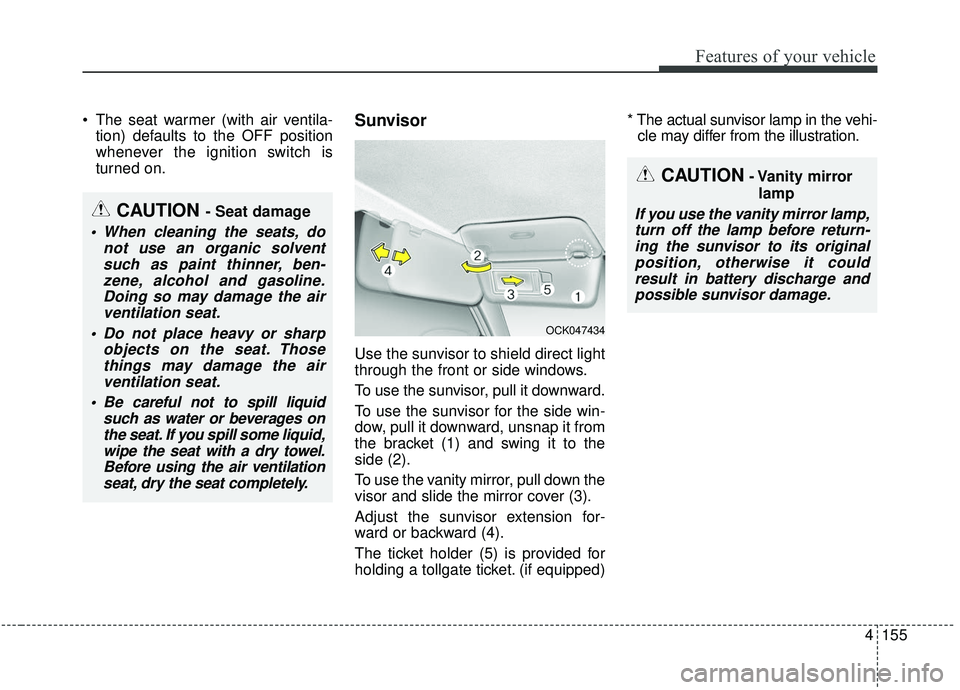
Use the sunvisor to shield direct light
through the front or side windows.
To use the sunvisor, pull it downward.
To use the sunvisor for the side win-
dow, pull it downward, unsnap it from
the bracket (1) and swing it to the
side (2).
To use the vanity mirror, pull down the
visor and slide the mirror cover (3).
Adjust the sunvisor extension for-
ward or backward (4).
The ticket holder (5) is provided for
holding a tollgate ticket. (if equipped) * The actual sunvisor lamp in the vehi-
cle may differ from the illustration.
CAUTION- Vanity mirror
lamp
If you use the vanity mirror lamp,turn off the lamp before return-ing the sunvisor to its originalposition, otherwise it couldresult in battery discharge andpossible sunvisor damage.CAUTION - Seat damage
When cleaning the seats, do not use an organic solventsuch as paint thinner, ben-zene, alcohol and gasoline.Doing so may damage the airventilation seat.
Do not place heavy or sharp objects on the seat. Thosethings may damage the airventilation seat.
Be careful not to spill liquid such as water or beverages onthe seat. If you spill some liquid,wipe the seat with a dry towel.Before using the air ventilationseat, dry the seat completely.
OCK047434
Page 243 of 555
Features of your vehicle
156
4
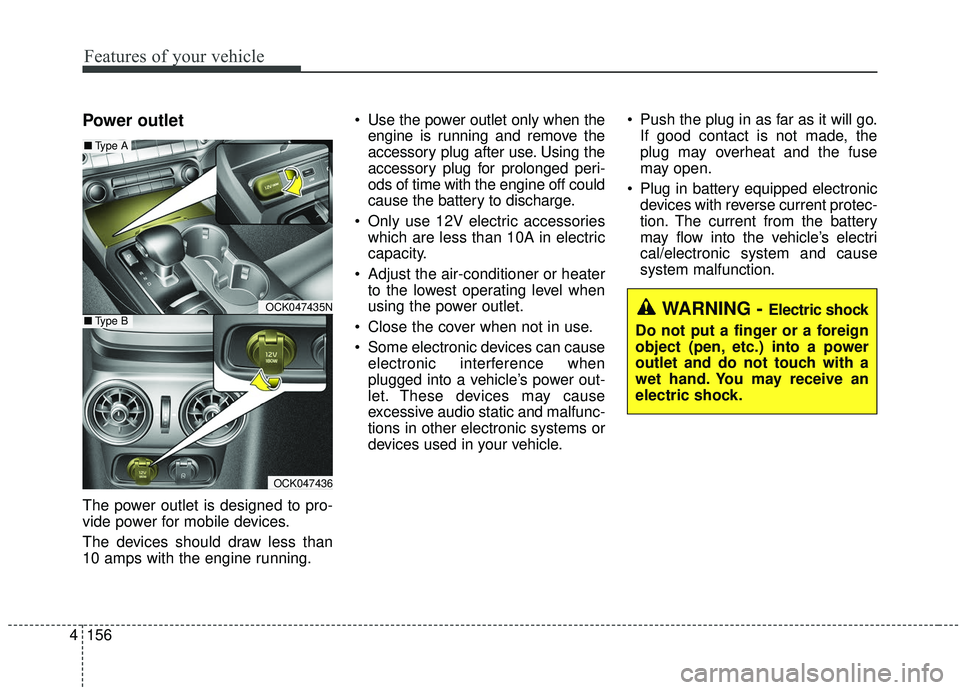
Power outlet
The power outlet is designed to pro-
vide power for mobile devices.
The devices should draw less than
10 amps with the engine running. Use the power outlet only when the
engine is running and remove the
accessory plug after use. Using the
accessory plug for prolonged peri-
ods of time with the engine off could
cause the battery to discharge.
Only use 12V electric accessories which are less than 10A in electric
capacity.
Adjust the air-conditioner or heater to the lowest operating level when
using the power outlet.
Close the cover when not in use.
Some electronic devices can cause electronic interference when
plugged into a vehicle’s power out-
let. These devices may cause
excessive audio static and malfunc-
tions in other electronic systems or
devices used in your vehicle. Push the plug in as far as it will go.
If good contact is not made, the
plug may overheat and the fuse
may open.
Plug in battery equipped electronic devices with reverse current protec-
tion. The current from the battery
may flow into the vehicle’s electri
cal/electronic system and cause
system malfunction.
WARNING - Electric shock
Do not put a finger or a foreign
object (pen, etc.) into a power
outlet and do not touch with a
wet hand. You may receive an
electric shock.OCK047435N
OCK047436
■ Type A
■Type B
Page 244 of 555

4157
Features of your vehicle
USB charger (if equipped)
The USB charger is designed to
recharge devices using a USB cable.
The electrical devices can be
recharged when the Engine Start/Stop
button is in ACC/ON/START position.
The battery charging state may be
monitored on the electrical device.
Disconnect the USB cable from the
USB port after use. Use the USB charger when the
engine is running to prevent bat-
tery discharge.
Only devices that fits the USB port can be used.
The USB charger can be used only for battery charging purposes.
Wireless smart phone charg-
ing system (if equipped)
A wireless smart phone charging
system is located in front of the cen-
ter console.
Firmly close all doors, and turn the
ignition to ACC or IGN ON. To start
wireless charging, place the smart
phone equipped with wireless charg-
ing function on the wireless charging
pad.
For best wireless charging results,
place the smart phone on the center
of the charging pad.
OCK047461
OCK047440N
Page 260 of 555

57
Driving your vehicle
Illuminated engine start/stop
button
Whenever the front door is opened,
the engine start/stop button will illu-
minate for your convenience. The
light will go off after about 30 sec-
onds when the door is closed.
When all doors are closed and you
lock the vehicle by using the trans-
mitter or the smart key, the light will
go off immediately.
Engine start/stop button posi-
tion
OFF
To turn off the engine (START/RUN
position) or vehicle power (ON posi-
tion), press the engine start/stop but-
ton with the shift lever in the P (Park)
position. When you press the engine
start/stop button without the shift
lever in the P (Park) position, the
engine start/stop button will not
change to the OFF position but to the
ACC position.
In an emergency situation while the
vehicle is in motion, you are able to
turn the engine off and to the ACC
position by pressing the engine
start/stop button for more than 2 sec-
onds or 3 times successively within 3
seconds. If the vehicle is still moving,
you can restart the engine without
depressing the brake pedal by press-
ing the engine start/stop button with
the shift lever in the N (Neutral) posi-
tion.
ACC(Accessory)
Press the engine start/stop button
while it is in the OFF position without
depressing the brake pedal.
If the engine start/stop button is in the
ACC position for more than 1 hour,
the button is turned off automatically
to prevent battery discharge.
Accessory is displayed on the LCD
of the cluster.
ENGINE START/STOP BUTTON
OCK057001
OCK057163