Page 253 of 607
Features of your vehicle
166
4
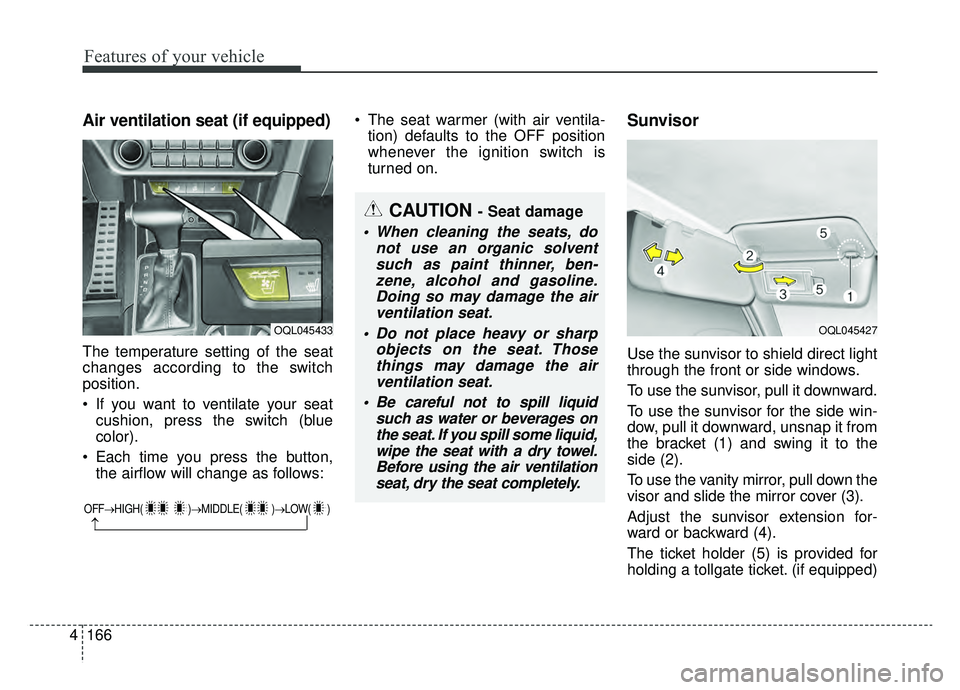
Air ventilation seat (if equipped)
The temperature setting of the seat
changes according to the switch
position.
If you want to ventilate your seat
cushion, press the switch (blue
color).
Each time you press the button, the airflow will change as follows: The seat warmer (with air ventila-
tion) defaults to the OFF position
whenever the ignition switch is
turned on.
Sunvisor
Use the sunvisor to shield direct light
through the front or side windows.
To use the sunvisor, pull it downward.
To use the sunvisor for the side win-
dow, pull it downward, unsnap it from
the bracket (1) and swing it to the
side (2).
To use the vanity mirror, pull down the
visor and slide the mirror cover (3).
Adjust the sunvisor extension for-
ward or backward (4).
The ticket holder (5) is provided for
holding a tollgate ticket. (if equipped)
OFF→ HIGH( )→ MIDDLE( )→LOW( )
→
CAUTION - Seat damage
When cleaning the seats, do
not use an organic solventsuch as paint thinner, ben-zene, alcohol and gasoline.Doing so may damage the airventilation seat.
Do not place heavy or sharp objects on the seat. Thosethings may damage the airventilation seat.
Be careful not to spill liquid such as water or beverages onthe seat. If you spill some liquid,wipe the seat with a dry towel.Before using the air ventilationseat, dry the seat completely.
OQL045433OQL045427
Page 254 of 607
4167
Features of your vehicle
* The actual sunvisor lamp in the vehi-cle may differ from the illustration.Power outlet
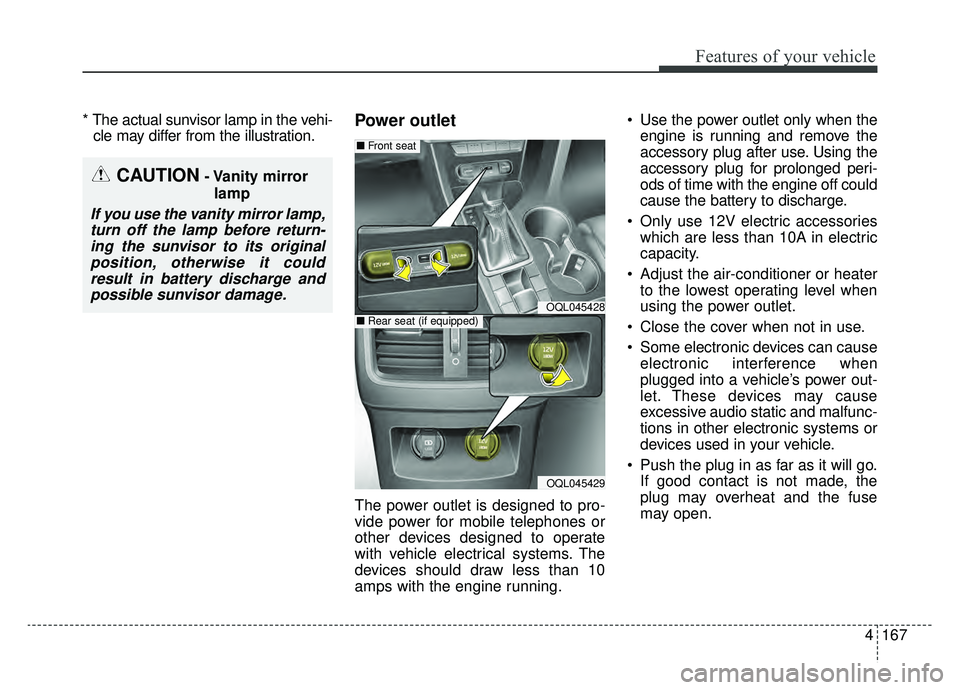
The power outlet is designed to pro-
vide power for mobile telephones or
other devices designed to operate
with vehicle electrical systems. The
devices should draw less than 10
amps with the engine running. Use the power outlet only when the
engine is running and remove the
accessory plug after use. Using the
accessory plug for prolonged peri-
ods of time with the engine off could
cause the battery to discharge.
Only use 12V electric accessories which are less than 10A in electric
capacity.
Adjust the air-conditioner or heater to the lowest operating level when
using the power outlet.
Close the cover when not in use.
Some electronic devices can cause electronic interference when
plugged into a vehicle’s power out-
let. These devices may cause
excessive audio static and malfunc-
tions in other electronic systems or
devices used in your vehicle.
Push the plug in as far as it will go. If good contact is not made, the
plug may overheat and the fuse
may open.
CAUTION- Vanity mirror
lamp
If you use the vanity mirror lamp,turn off the lamp before return-ing the sunvisor to its originalposition, otherwise it couldresult in battery discharge andpossible sunvisor damage.
OQL045428
OQL045429
■ Front seat
■Rear seat (if equipped)
Page 332 of 607
Driving your vehicle
46
Before entering vehicle
• Be sure that all windows, outsidemirror(s), and outside lights are
clean.
Check the condition of the tires.
Check under the vehicle for any sign of leaks.
Be sure there are no obstacles behind you if you intend to back up.
Necessary inspections
Fluid levels, such as engine oil,
engine coolant, brake fluid, and
washer fluid should be checked on a
regular basis, at the exact interval
depending on the fluid. Further
details are provided in chapter 8,
“Maintenance”.
Before starting
Close and lock all doors.
Position the seat so that all con-trols are easily reached.
Buckle your seat belt.
Adjust the inside and outside rearview mirrors.
Be sure that all lights work.
Check all gauges.
Check the operation of warning lights when the ignition switch is
turned to the ON position.
Release the parking brake and make sure the brake warning light
goes out.
For safe operation, be sure you are
familiar with your vehicle and its
equipment.
BEFORE DRIVING
WARNING - Distracted driving
Focus on the road while driving.
The driver's primary responsi-
bility is in the safe and legal
operation of the vehicle. Use of
any handled devices, other
equipment or vehicle systems
that distract the drive should
not be used during vehicle
operation.
Page 401 of 607
673
Driving your vehicle
BSD (Blind Spot Detection) /
LCA (Lane Change Assist)
Operating conditions
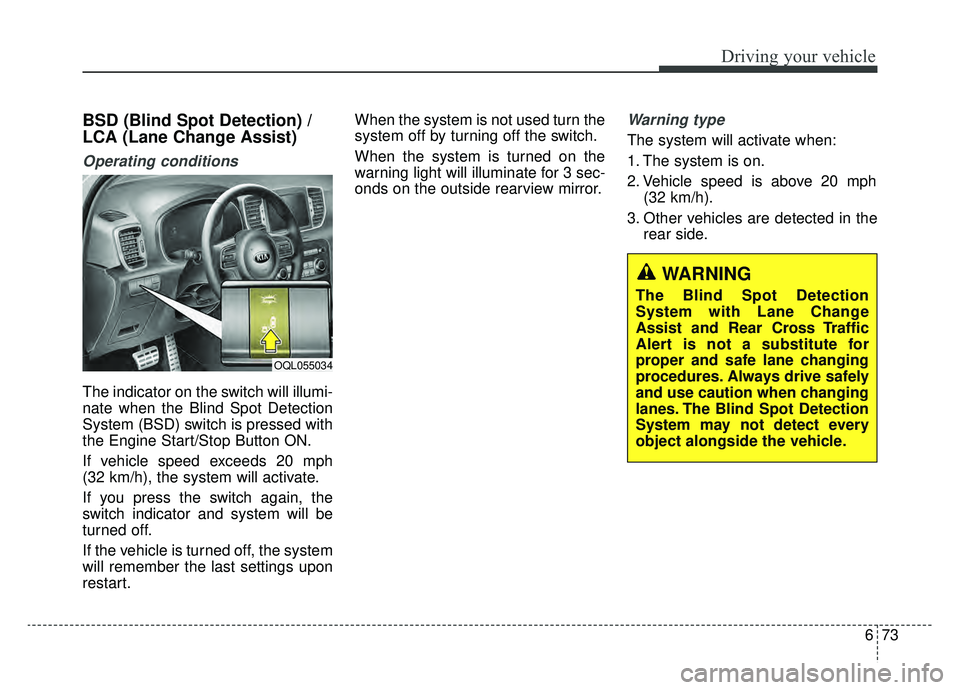
The indicator on the switch will illumi-
nate when the Blind Spot Detection
System (BSD) switch is pressed with
the Engine Start/Stop Button ON.
If vehicle speed exceeds 20 mph
(32 km/h), the system will activate.
If you press the switch again, the
switch indicator and system will be
turned off.
If the vehicle is turned off, the system
will remember the last settings upon
restart.When the system is not used turn the
system off by turning off the switch.
When the system is turned on the
warning light will illuminate for 3 sec-
onds on the outside rearview mirror.
Warning type
The system will activate when:
1. The system is on.
2. Vehicle speed is above 20 mph
(32 km/h).
3. Other vehicles are detected in the rear side.
WARNING
The Blind Spot Detection
System with Lane Change
Assist and Rear Cross Traffic
Alert is not a substitute for
proper and safe lane changing
procedures. Always drive safely
and use caution when changing
lanes. The Blind Spot Detection
System may not detect every
object alongside the vehicle.
OQL055034
Page 402 of 607
Driving your vehicle
74
6
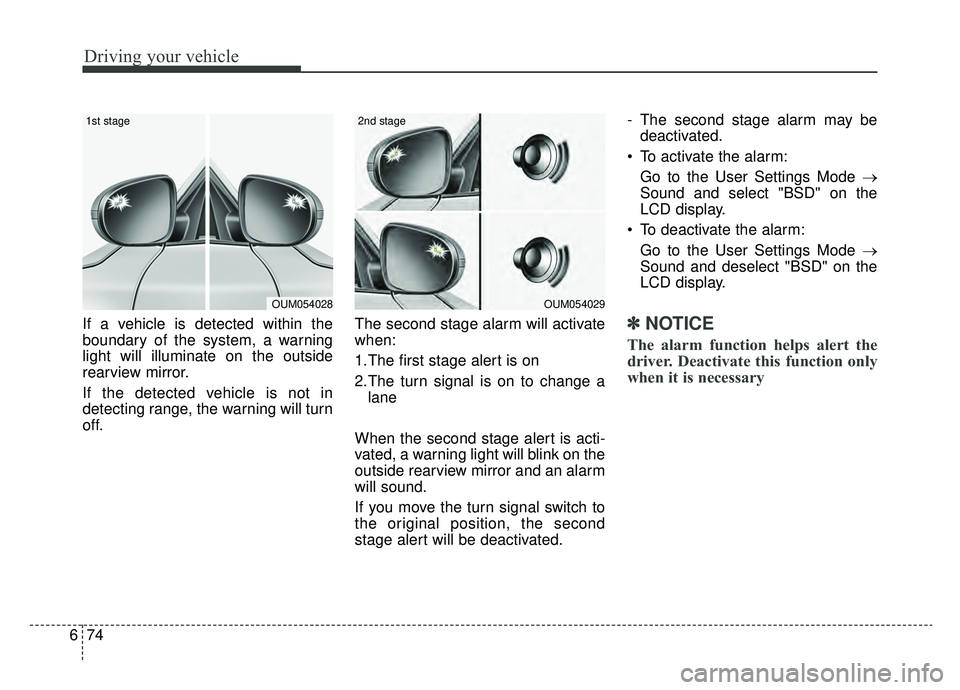
If a vehicle is detected within the
boundary of the system, a warning
light will illuminate on the outside
rearview mirror.
If the detected vehicle is not in
detecting range, the warning will turn
off. The second stage alarm will activate
when:
1.The first stage alert is on
2.The turn signal is on to change a
lane
When the second stage alert is acti-
vated, a warning light will blink on the
outside rearview mirror and an alarm
will sound.
If you move the turn signal switch to
the original position, the second
stage alert will be deactivated. - The second stage alarm may be
deactivated.
To activate the alarm: Go to the User Settings Mode →
Sound and select "BSD" on the
LCD display.
To deactivate the alarm: Go to the User Settings Mode →
Sound and deselect "BSD" on the
LCD display.✽ ✽
NOTICE
The alarm function helps alert the
driver. Deactivate this function only
when it is necessary
OUM054029
2nd stage
OUM054028
1st stage
Page 405 of 607
677
Driving your vehicle
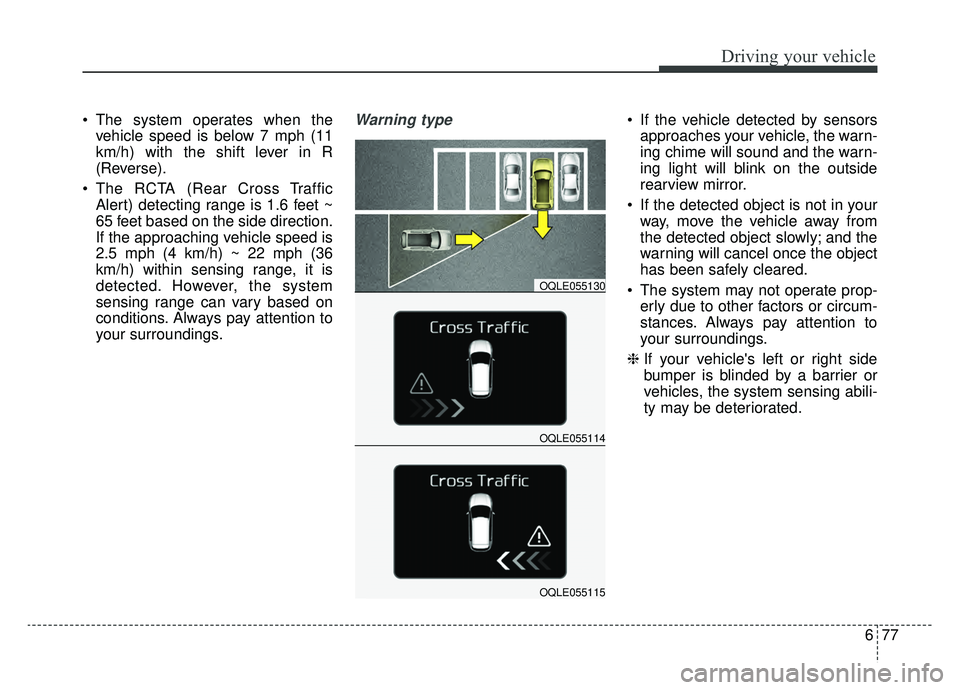
The system operates when thevehicle speed is below 7 mph (11
km/h) with the shift lever in R
(Reverse).
The RCTA (Rear Cross Traffic Alert) detecting range is 1.6 feet ~
65 feet based on the side direction.
If the approaching vehicle speed is
2.5 mph (4 km/h) ~ 22 mph (36
km/h) within sensing range, it is
detected. However, the system
sensing range can vary based on
conditions. Always pay attention to
your surroundings.Warning type If the vehicle detected by sensorsapproaches your vehicle, the warn-
ing chime will sound and the warn-
ing light will blink on the outside
rearview mirror.
If the detected object is not in your way, move the vehicle away from
the detected object slowly; and the
warning will cancel once the object
has been safely cleared.
The system may not operate prop- erly due to other factors or circum-
stances. Always pay attention to
your surroundings.
❈ If your vehicle's left or right side
bumper is blinded by a barrier or
vehicles, the system sensing abili-
ty may be deteriorated.
OQLE055114
OQLE055130
OQLE055115
Page 407 of 607
679
Driving your vehicle
- When the temperature of the rearbumper is very high or low.
- When bike racks, etc. cover the sensor.
- When reversing from a parking space with pillars or metal struc-
tures.
- When you are reversing and if the detected vehicle is simultaneously
reversing.
- If there are small objects like shop- ping carts and baby carriages.
- If there is a vehicle with decreased ride height (lowered).
- When the vehicle is close to anoth- er vehicle.
- When driving through a narrow road with many plants.
- When driving on wet surface.Outside rearview mirror may not alert the driver when:
- The outside rearview mirror hous- ing is very dirty.
- The window is very dirty.
- The windows are tinted very dark. This device complies with Part 15
of the FCC rules.
Operation is subject to the following
two conditions:
1. This device may not cause harm-
ful interference, and
2. This device must accept any inter- ference received, including inter-
ference that may cause undesired
operation.
Page 411 of 607
683
Driving your vehicle
Conditions that cause missed
warnings and false warnings:
The lane is not visible due to snow,rain, debris, puddles or other envi-
ronmental conditions.
The brightness outside changes suddenly such as when
entering/exiting a tunnel.
The headlights are off at night or the vehicle is in a tunnel.
The color of the lane marking from the road is difficult to distinguish.
Driving on a steep grade or a curve.
Light such as street lights, sunlight or oncoming vehicle lights reflect
off of water on the road.
The lens or windshield is obscured by debris.
The sensor cannot detect the lane because of fog, heavy rain or
heavy snow.
The rear view mirror housing has overheated from exposure to direct
sunlight.
The lane is very wide or narrow. The lane line is damaged or indis-
tinct.
The windshield is fogged up by humidity.
Objects in the median or along the side of the road cast shadows over
the lane markings
The sensor cannot distinguish the lane from the road due to the
dust/dirt.
There are other markings similar to lane lines.
There are lane boundaries instead of markings.
The vehicle ahead is very close, obscuring the view of the lane
markings, or the vehicle ahead is
driving over the lane markings.
The vehicle vibrates heavily due to poor road conditions.
The lanes are merging, expanding, or otherwise overlapping
Something reflective is placed on the dashboard. Driving with the sun in front of you.
Driving in areas under construc-
tion.
Lanes are marked by more than two sets of lines.
The windshield is fogged by humid air in the vehicle.
This device complies with Part 15
of the FCC rules.
Operation is subject to the following
two conditions:
1. This device may not cause harm- ful interference, and
2. This device must accept any inter- ference received, including inter-
ference that may cause undesired
operation.